
TEG-S2620IS - Network switch TRENDNET - Free user manual and instructions
Find the device manual for free TEG-S2620IS TRENDNET in PDF.


User questions about TEG-S2620IS TRENDNET
0 question about this device. Answer the ones you know or ask your own.
Ask a new question about this device
Download the instructions for your Network switch in PDF format for free! Find your manual TEG-S2620IS - TRENDNET and take your electronic device back in hand. On this page are published all the documents necessary for the use of your device. TEG-S2620IS by TRENDNET.
USER MANUAL TEG-S2620IS TRENDNET

Quick Installation Guide
Table of Contents
Francais 1
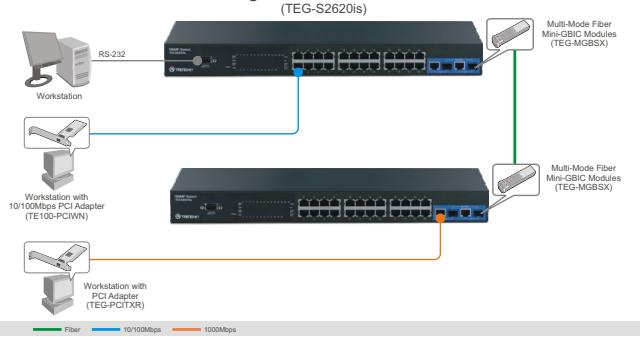
24-Port 10/100Mbps Layer 2 Stackable Switch with 2 shared Gigabit Ports and Mini-GBIC Slots
Q1: How do I configure TCP/IP settings on my computer? Windows Vista
- Go into the Control Panel, click Network and Internet, click Network and Sharing Center, click Manage Network Connections and then right-click the Local Area Connection icon and then click Properties.
Local Area Connection
Identifyin
Disable
Status
Diagnose
Bridge Connections
Create Shortcut
Delete
Rename
Properties
Obtain an IP address automatically
Use the following IP address:
IP address:
Sybnet mask:
Default gateway:
Windows XP/2000
-
Click Internet Protocol Version 4(TCP/IPv4) and then click Properties. Then click on Use the following IP address, and make sure you assign your network adapter an IP address in the subnet of 192.168.0.x.
-
Go into the Control Panel, double-click the Network Connections icon, and then right-click the Local Area Connection icon and then click Properties.
Local
Conne
Disable
Status
Repair
Bridge Connections
Create Shortcut
Delete
Rename
Properties
Obtain an IP address automatically
Use the following IP address:
IP address:
Subnet mask:
Default gateway:
192.168.0.50
255.255.255.0

m = 311
- Click Internet Protocol (TCP/IP) and then click Properties. Then click on Use the following IP address, and make sure you assign your network adapter an IP address in the subnet of 192.168.0.x.
Q2: I typed http://192.168.0.1 in my Internet Browser's Address Bar, but an error message says "The page cannot be displayed." How can I get into the TEG-S2620is's web configuration page?
A2: First, check your hardware settings again by following the instructions in section 2. Second, make sure the Power and LNK/ACT lights are lit. Third, make sure the TCP/IP settings are configured properly (see Q1). Fourth, since the Switch's default IP address is 192.168.0.1, make sure that no other network devices are assigned an IP address of 192.168.0.1.
Q3: If my network's IP is different than the Switch's range, what should I do?
A3: You should still configure the Switch first. After all the settings are applied, go to the Switch's configuration page, click on Administrator, click IP Configuration, change the IP address of the Switch to match your network's IP and then click Apply.
Q4: What are the default port settings for configuring the Switch through the console port using HyperTerminal?
A3: Bits per Second: 9600; Data bits: 8; Parity: None; Stop bits: 1; Flow control: None.
Q5: I changed the IP address of the switch, but I forgot it. How do I reset my TEG-S2620is?
A5: Follow the instructions below:
1) Connect the RS-232 cable from a serial port on your Windows PC to the console port on your computer.
2) Go to Start -> Programs -> Accessories -> Communications -> HyperTerminal.
3) Enter a name, select an icon and then click OK.
4) Select the correct COM port (e.g. COM1, COM2) and then click OK.
5) Configure the following settings, click Apply and then click OK: Bits per second: 9600
Data bits: 8
Parity: None
Stop bits: 1
Flow control: None
6) Press Enter.
7) Enter the user name. By default, the user name is admin.
8) Press Enter.
9) Enter the password. By default, password is admin.
10) Press Enter.
11) Press Tab to navigate to System Reset Configuration and then press Enter.
12) Press Tab to navigate to Factory Default and then press Enter.
13) Press Y to continue.
The default IP address of the switch is 192.168.0.1.
If you still encounter problems or have any questions regarding the TEG-S2620is, please contact TRENDnet's Technical Support Department.
Limited Warranty
TRENDnet warrants its products against defects in material and workmanship, under normal use and service, for the following lengths of time from the date of purchase.
TEG-S2620is - 5-Year Limited Warranty
If a product does not operate as warranted above during the applicable warranty period, TRENDnet shall, at its option and expense, repair the defective product or deliver to customer an equivalent product to replace the defective item. All products that are replaced will become the property of TRENDnet. Replacement products may be new or reconditioned.
TRENDnet shall not be responsible for any software, firmware, information, or memory data of customer contained in, stored on, or integrated with any products returned to TRENDnet pursuant to any warranty.
There are no user serviceable parts inside the product. Do not remove or attempt to service the product through any unauthorized service center. This warranty is voided if (i) the product has been modified or repaired by any unauthorized service center, (ii) the product was subject to accident, abuse, or improper use (iii) the product was subject to conditions more severe than those specified in the manual.
Warranty service may be obtained by contacting TRENDnet office within the applicable warranty period for a Return Material Authorization (RMA) number, accompanied by a copy of the dated proof of the purchase. Products returned to TRENDnet must be preauthorized by TRENDnet with RMA number marked on the outside of the package, and sent prepaid, insured and packaged appropriately for safe shipment.
WARRANTIES EXCLUSIVE: IF THE TRENDNET PRODUCT DOES NOT OPERATE AS WARRANCED ABOVE, THE CUSTOMER'S SOLE REMEDY SHALL BE, AT TRENDNET'S OPTION, REPAIR OR REPLACEMENT. THE FOREGOING WARRANTYES AND REMEDIES ARE EXCLUSIVE AND ARE IN LIEU OF ALL OTHER WARRANTYES, EXPRESSED OR IMPLIED, EITHER IN FACT OR BY OPERATION OF LAW, STATUTORY OR OTHERWISE, INCLUDING WARRANTYES OF MERCHANTABILITY AND FITNESS FOR A PARTICULAR PURPOSE. TRENDNET NEITHER ASSUMES NOR AUTHORIZES ANY OTHER PERSON TO ASSUME FOR IT ANY OTHER LIABILITY IN CONNECTION WITH THE SALE, INSTALLATION, MAINTENANCE OR USE OF TRENDNET'S PRODUCTS.
TRENDNET SHALL NOT BE LIABLE UNDER THIS WARRANTY IF ITS TESTING AND EXAMINATION DISCLOSE THAT THE ALLEGED DEFECT IN THE PRODUCT DOES NOT EXIST OR WAS CAUSED BY CUSTOMER'S OR ANY THIRD PERSON'S MISUSE, NEGLECT, IMPROPER INSTALLATION OR TESTING, UNAUTHORIZED ATTEMPTS TO REPAIR OR MODIFY, OR ANY OTHER CAUSE BEYOND THE RANGE OF THE INTENDED USE, OR BY ACCIDENT, FIRE, LIGHTNING, OR OTHER HAZARD.
LIMITATION OF LIABILITY: TO THE FULL EXTENT ALLOWED BY LAW TRENDNET ALSO EXCLUDING FOR ITSELF AND ITS SUPPLIERS ANY LIABILITY, WHETHER BASED IN CONTRACT OR TORT (INCLUDING NEGLIGENCE), FOR INCIDENTAL, CONSEQUENTIAL, INDIRECT, SPECIAL, OR PUNITIVE DAMAGES OF ANY KIND, OR FOR LOSS OF REVENUE OR PROFITS, LOSS OF BUSINESS, LOSS OF INFORMATION OR DATE, OR OTHER FINANCIAL LOSS ARISING OUT OF OR IN CONNECTION WITH THE SALE, INSTALLATION, MAINTENANCE, USE, PERFORMANCE, FAILURE, OR INTERRUPTION OF THE POSSIBILITY OF SUCH DAMAGES, AND LIMITS ITS LIABILITY TO REPAIR, REPLACEMENT, OR REFUND OF THE PURCHASE PRICE PAID, AT TRENDNET'S OPTION. THIS DISCLAIMER OF LIABILITY FOR DAMAGES WILL NOT BE AFFECTED IF ANY REMEDY PROVIDED HEREIN SHALL FAIL OF ITS ESSENTIAL PURPOSE.
Governing Law: This Limited Warranty shall be governed by the laws of the state of California.
Note: AC/DC Power Adapter, Cooling Fan, Cables and Power Supply carry a 1-Year Warranty
Certifications
This equipment has been tested and found to comply with FCC and CE Rules.
Operation is subject to the following two conditions:
(1) This device may not cause harmful interference.
(2) This device must accept any interference received. Including interference that may cause undesired operation.


Waste electrical and electronic products must not be disposed of with household waste. Please recycle where facilities exist. Check with you Local Authority or Retailer for recycling advice.

NOTE: THE MANUFACTURER IS NOT RESPONSIBLE FOR ANY RADIO OR TV INTERFERENCE CAUSED BY UNAUTHORIZED MODIFICATIONS TO THIS EQUIPMENT. SUCH MODIFICATIONS COULD VOID THE USER'S AUTHORITY TO OPERATE THE EQUIPMENT.
ADVERTENCIA
Product Warranty Registration
Please take a moment to register your product online. Go to TRENDnet's website at http://www.trendnet.com/register