
ELAN II - Radio PURE - Free user manual and instructions
Find the device manual for free ELAN II PURE in PDF.


| Product type | DAB/FM stereo digital radio with RDS |
| Brand | PURE |
| Model | ELAN II |
| Dimensions (W x H x D) | 280 x 161 x 88 mm |
| Power supply | Mains adapter 230 V AC - 12 V DC (included); optional: rechargeable battery ChargePAK C6L or 6 LR14 batteries |
| Power consumption | 0.9 W standby; 2.9 W operating |
| Speakers | 2 x 3" full-range speakers, 2.5 W RMS each |
| Connectors | Mini-jack headphone socket, mini-jack stereo auxiliary input, mini-USB port for software updates |
| Presets | Up to 50 stations (25 DAB + 25 FM) |
| Main functions | ReVu (pause and rewind live radio), Intellitext, textSCAN, alarms, kitchen timer, sleep timer, auto/manual tuning |
| Display | Screen with information: scrolling text, date, signal strength, signal quality |
| Care and cleaning | Wipe with a soft, dry cloth. Do not use abrasive cleaners or solvents. |
| Safety | Do not expose to heat sources, ensure at least 10 cm ventilation around the unit, avoid contact with liquids, do not open the casing. |
| Spare parts and repairability | ChargePAK C6L battery sold separately; replaceable LR14 batteries; software updates via USB; repairs by PURE after-sales service. |
| Warranty | 2 years (material and workmanship defects) |
Frequently Asked Questions - ELAN II PURE
User questions about ELAN II PURE
0 question about this device. Answer the ones you know or ask your own.
Ask a new question about this device
Download the instructions for your Radio in PDF format for free! Find your manual ELAN II - PURE and take your electronic device back in hand. On this page are published all the documents necessary for the use of your device. ELAN II by PURE.
USER MANUAL ELAN II PURE
Keep the radio away from heat sources, such as naked flames or candles.
Ensure that the unit has adequate ventilation (at least 10cm space all round).
Do not use the radio near water.
Avoid liquids dripping or splashing onto the radio.
Do not place any objects containing liquids on the unit, such as vases.
When plugged in, Elanll remains connected to mains power, even in standby with the display backlight off.
To disconnect completely, unplug from the mains socket.
Ensure that the mains plug is readily accessible in case isolation from the mains is required.
Do not remove screws from or open the radio casing.
Damage to hearing can occur with consistent exposure to high volume when using headphones.

Setting up 2
Controls at a glance 3
Rear connectors 3
Connecting an auxiliary device 3
Listening to radio 4
Switching between DAB,FM and AUX. 4
Changing stations 4
Using Presets 5
Changing the information displayed on screen 5
Using textSCAN™ to pause and control scrolling text 5
Intellitext 6
ReVu^TM - pause and rewind live radio 6
Setting the alarm & timers 7
Setting the alarm. 7
Setting the kitchen timer 8
Setting the sleep timer. 8
Options and settings 9
DAB options 9
Autotune. 9
Intellitext options 9
FM options. 9
General options. 9
Backlight 9
Audio 9
Clock. 9
Energy saving. 10
Software upgrade 10
Using a ChargePAKTM 10
Help and specifications 11
Secondary and inactive stations 11
Hints and tips. 11
Technical Specifications 12
Setting up
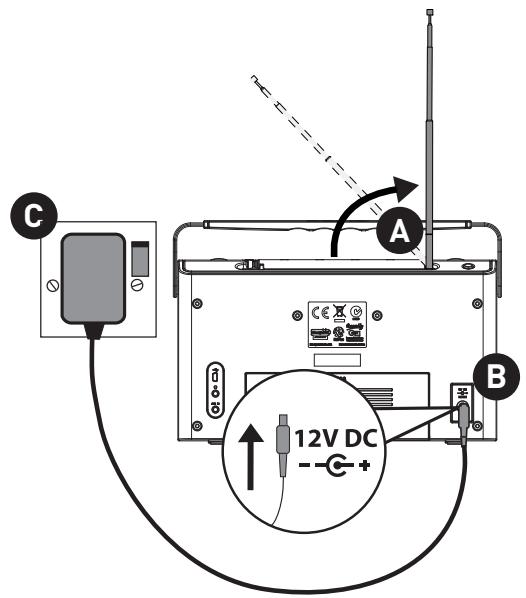
Note: If you have a ChargePAK C6L rechargeable battery (sold separately) fit the battery BEFORE plugging the radio in. Follow the fitting instructions supplied with the ChargePAK C6L.

Lift the aerial from the clip on the top of the radio and fully extend it.
Insert the connector of the supplied mains adapter into the socket on the rear of the radio.
Plug the mains adapter into the mains supply and wait for the radio to switch on.

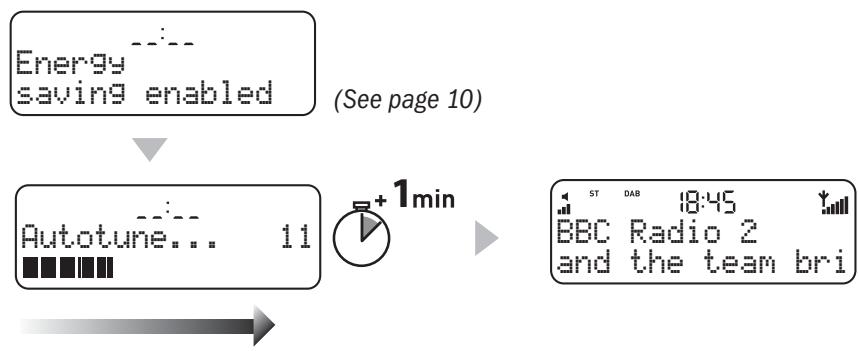
Wait for Élan II to complete an Autotune, which finds all available DAB stations (this takes about a minute). When the Autotune is complete, a station will be selected.
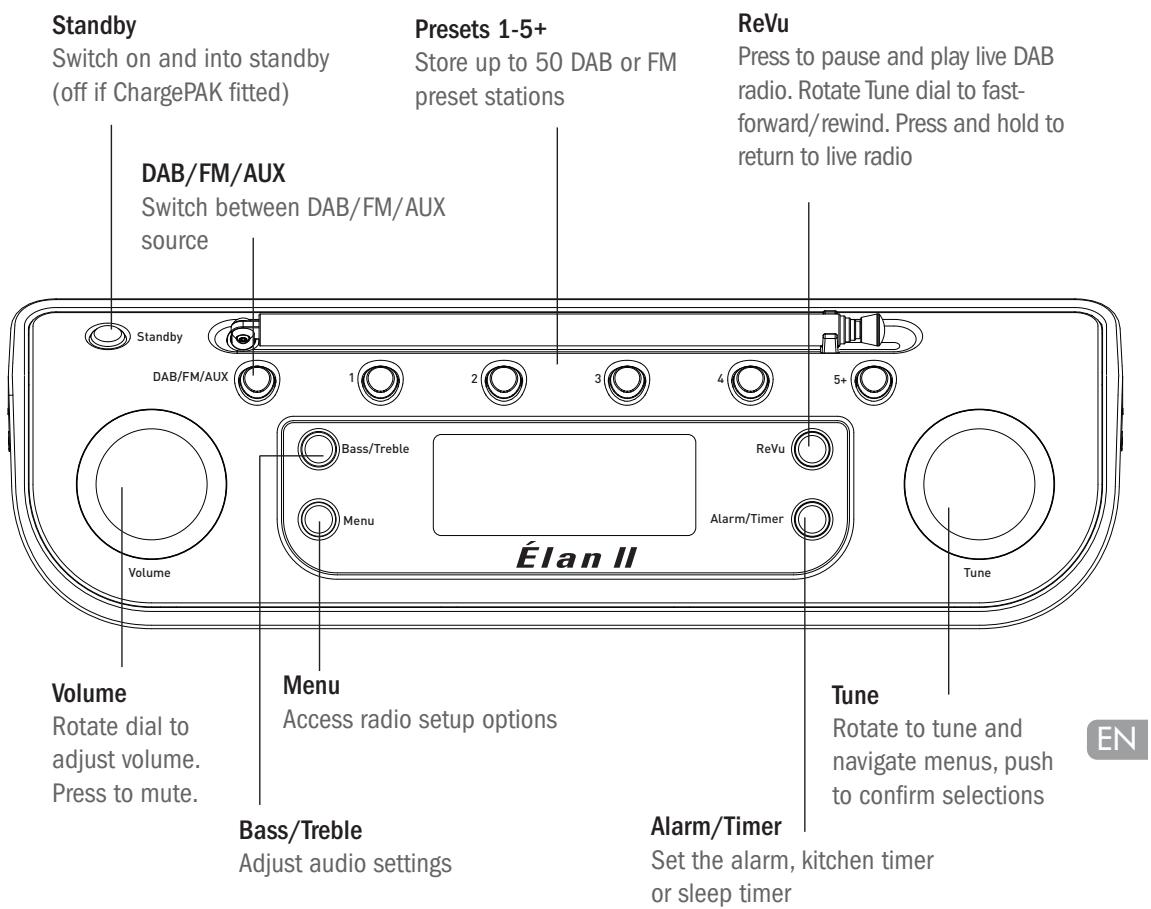
Controls at a glance
Rear connectors

USB connector for software upgrades (mini-B type).
3.5mm headphone socket.
Analogue stereo input for iPod, CD player, etc.
Connecting an auxiliary device
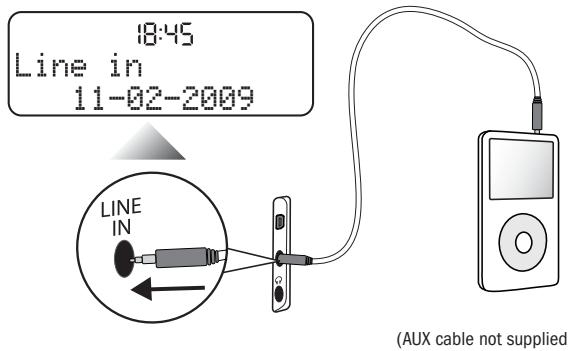
Switching between DAB,FM and AUX
Press the DAB/FM/AUX/ button.

Changing stations
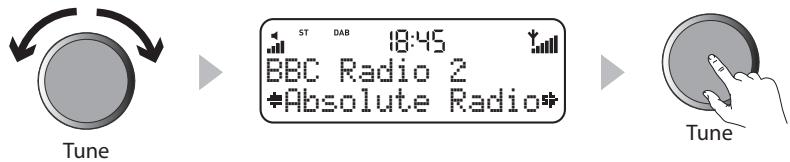
When listening to DAB
- Rotate the Tune dial right or left to scroll through the list of available DAB stations. The name of the current station remains at the top of the screen.
- Push the Tune dial to change the station.
When listening to FM
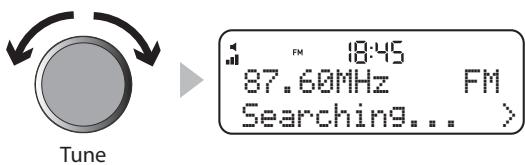
Seek Tuning
Rotate the Tune dial right or left to seek to the next or previous FM station.
Manual Tuning
- Change the FM tuning mode to 'Manual' (see page 9).
- Rotate the Tune dial right or left to step up or down 0.05MHz
Using Presets
You can store up to 25 DAB and 25 FM presets.
Storing a Preset
- Tune to the DAB or FM station you want to store as a preset.
- Press and hold the Preset button (1-5) you wish to use until the 'Preset saved' message appears on screen.
- Alternatively, press 5+ and rotate the Tune dial to scroll to a preset slot between 1 and 25. Push the Tune dial to confirm the preset.

Selecting a Preset
To select a preset, press the Preset button (1-5) your station is saved to. For presets above 5, press the 5+ button then rotate the Tune dial and push to select the preset you wish to listen to.
Changing the information displayed on screen
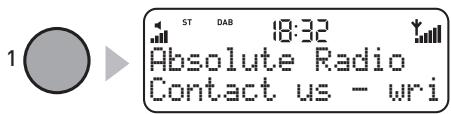
To change the information displayed on screen, press the Menu button, then rotate the Tune dial to select 'info display'. Push to select, then rotate to scroll through the following options:
Scrolling text Information broadcast by most DAB stations and some FM (RDS) stations.
Date Today's date automatically updated by the DAB signal.
Signal strength A bar showing the signal strength.
Signal quality Displays DAB signal quality: 85 to 100 good; 70 to 84 OK; 0 to 69 poor.
Using textSCAN™ to pause and control scrolling text
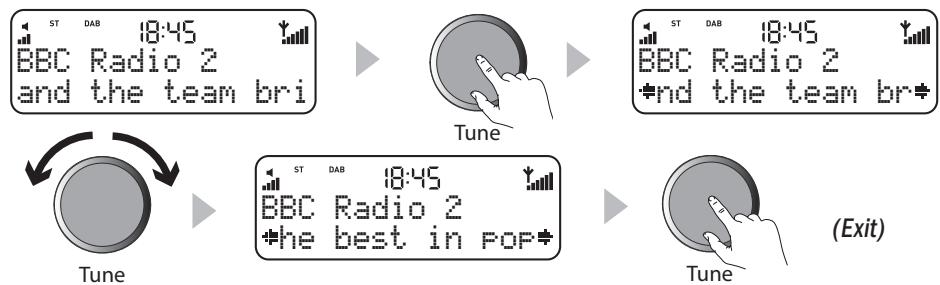
- When scrolling text information is displayed in either DAB or FM (RDS), push the Tune dial to pause the scrolling text.
- Turn the dial left or right to scroll through the current scrolling text message. To exit textSCAN push the Tune dial again.
Intellitext®
Intellitext provides on-demand text information such as sports headlines, weather forecasts and news from DAB stations that support the service. The text is updated by the broadcasters and stored in your radio while you listen to stations. Intellitext is listed by station and split into categories, e.g., Football, Cricket, Headlines, etc.
To view Intellitext messages
- Press Menu to enter the menu and use the Tune dial to select 'Intellitext'. Push the Tune dial to select 'View' and access a list of stations for which you have Intellitext information (if you see 'No data' you need to tune to a station broadcasting Intellitext for a few minutes before information is received).
2 Push the Tune dial to select a station, then rotate and push to browse Intellitext categories for that station, e.g., Radio 5 > SPORT > FOOTBALL. The selected information will scroll across the screen. Press Menu to go back to the previous category.

Note: You can use textSCAN (page 5) to pause and control Intellitext messages.
ReVuTM - pause and rewind live radio
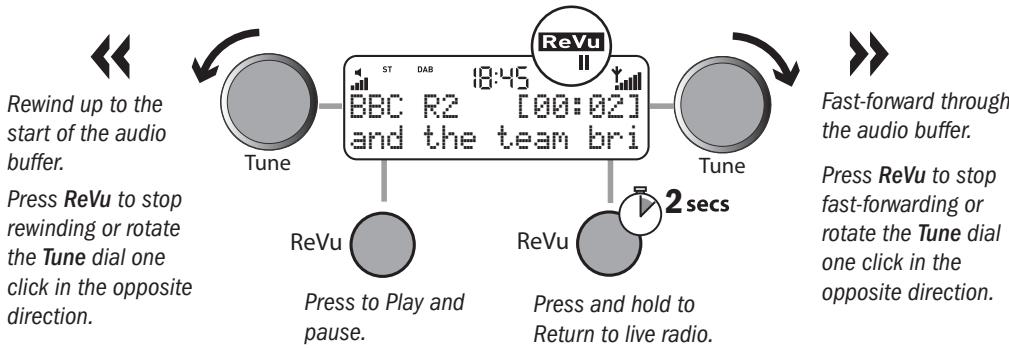
ReVu enables you to pause and rewind radio by saving an audio 'buffer' of the current station. You can rewind for approximately 10-15 minutes depending on the broadcast quality of the current station and/or how long you've been tuned to the current station.
To pause and rewind live radio
- Press ReVu to pause the current station and enter ReVu mode.

- When the audio is paused you can do the following:
Setting the alarm & timers
Setting the alarm
- Press the Alarm/Timer button and select 'Alarm' with the Tune dial to display the alarm status screen.
- Push the Tune dial to enter the alarm menu. You can scroll through six alarm options on the bottom line of the display, while the top line displays their current setting. To change a setting, push the dial, rotate it to make your selection and then push again to confirm the change.

Set alarm
Push the Tune dial to choose between 'Alarm on' (alarm sounds) or 'Alarm off' (alarm does not sound). The symbol on the screen indicates that the alarm is on.
Set time
Push the Tune dial to set the alarm time. Rotate to set the hour then push to confirm. Repeat to set the minutes.
Set days
Push the Tune dial to set the days that the alarm sounds. Choose between: Once only (alarm does not repeat), Daily (every day), Weekday (Monday to Friday), Weekend, Saturday or Sunday.
Set alarm mode
Push the Tune dial to choose between: DAB, FM or Tone.
Select station
If you've set alarm mode as DAB or FM you can choose 'Select station' and choose a DAB station or an FM preset and push the Tune dial to confirm. Last tuned tunes to the most recent FM station.
Alarm volume
If the alarm mode is set to DAB or FM, push the Tune dial to change the alarm volume. Rotate the Tune dial left to decrease the alarm volume and right to increase it then push to confirm.
Cancelling a sounding alarm
To cancel a tone alarm push the Tune dial or Standby button. To cancel a radio alarm press any button.
Note: A sounding alarm will switch off after one hour unless you cancel it.
Setting the kitchen timer L
Elan II has a countdown timer which will sound a beeping tone after a set time period – handy for use in the kitchen.
To set a kitchen timer
- Press Alarm/Timer, then rotate the Tune dial to display 'Kitchen timer' and push to select.
- Rotate the Tune dial to change the hours and push to confirm. Rotate again to change the minutes then push to confirm and start the countdown timer. is displayed on screen.

To cancel a kitchen timer
To stop and reset the kitchen timer before it sounds a beeping tone, press and hold down the Alarm/Timer button for two seconds until you see the message 'Timer cleared'.

Setting the sleep timer
Elan II has a sleep timer that switches your radio into standby (or off if powered by a ChargePAK or batteries) after a number of minutes has elapsed. Use this if you want to fall asleep to the radio.
To set a sleep timer
- Press the Alarm/Timer button, rotate the Tune dial to display Sleep timer then push the Tune dial to select.
- Rotate the Tune dial to increase the duration of the sleep from 15 to 90 minutes in fifteen minute intervals. Push to start the sleep timer.

To cancel a sleep timer
Select the Sleep timer screen (see above) and set the duration of the Sleep timer to Sleep Off. Alternatively, press and hold the Alarm/Timer button for three seconds until you see the message 'Timer cleared'.
Options and settings
Press the Menu button to access the options menu, rotate the Tune dial to scroll through and change the options and push to select.
DAB options
Autotune
Scans all DAB Band III frequencies for stations, automatically adds any new stations found to the station list and removes inactive stations. To stop an Autotune press Menu.
Intellitext options
Select 'Intellitext' and use the Tune dial to access the following options for managing Intellitext messages:
Set timeout Choose to delete old Intellitext messages after 1 week (default) or 1 day. Clear all Delete all stored Intellitext messages immediately.
FM options
FM tuning mode
Seek When you rotate the Tune dial, the radio tunes to the next station with a good signal.
Manual When you rotate the Tune dial, the radio tunes up or down in steps of 0.05 MHz.
FM stereo mode
Choose from Stereo (default) or Mono. Mono may improve clarity where stereo signals are weak.
General options
Backlight
Timed The backlight turns on for 7 seconds when any button is pressed (default). Off The backlight does not switch on. On The backlight is always on when the radio is on.
Audio
Push the Tune dial to select, then rotate to adjust the treble or bass and push to confirm.
Treib Adjust the treble between -5 (minimal treble), and 5 (high treble).
Bass Adjust the bass between -5 (minimal bass), and 5 (maximum bass).
Clock
The clock will automatically set itself and also update for GMT/BST clock changes. However, if you cannot receive a DAB signal, the time and date can be manually set by selecting Set Clock from the options menu.
Energy saving
Elan II is part of the PURE EcoPlus product family, designed and manufactured to minimize power consumption when the unit is switched on and to use less than 1 Watt in standby. One way this low power consumption is enabled is by not collecting and storing Intellitext messages when the unit is in standby. Two options are available:
On (default) Elan II updates the Intellitext data when you tune to a station that broadcasts Intellitext. Intellitext data is not collected in standby.
Off Elan II collects Intellitext data in standby from the last station you used to view Intellitext. This increases standby power consumption.
Note: If you fit the optional ChargePAK C6L or 6 x 'C' cell batteries (see below), your radio will switch off when you press the Standby button and not enter standby, as long as it is not connected to mains power.
Software upgrade
Software updates for your Elan II may be made available in the future. If you register your product and include a valid e-mail address you will receive notification of software updates (register at www.pure.com/register). Available software updates* are also listed at http://support.pure.com
To upgrade your radio
- Press and hold the Menu button for three seconds to access the maintenance menu.
- Select 'Upgrade' and follow the instructions provided with the upgrade software.
Reset your radio
Resetting your radio removes all presets, clears the station list and resets all options to defaults.
- Press and hold the Menu button for three seconds to access the software menu.
- Rotate the Tune dial to choose 'Factory Reset' and push the dial to confirm the reset.
Using a ChargePAK™
PURE ChargePAK C6L is a rechargeable battery pack which plugs into the socket in the radio's battery compartment. Whenever your radio is connected to a mains supply the ChargePAK will charge up and the battery icon on screen will animate. When the ChargePAK is fully charged the battery icon will disappear.
You can also use 6 'C' cell batteries to power Elan II. Fit them according to the diagram inside the battery compartment.
Note Élan II can only be powered with a ChargePAK C6L. Do not use any other ChargePAK model. Carefully follow the separate fitting instructions that are supplied with the ChargePAK C6L.
To purchase a PURE ChargePAK C6L, contact your nearest PURE dealer, visit the shop on our website at www.pure.com or call the PURE order line on +44 (0)845 148 9001.
*Requires a PC with internet access running Windows XP or Vista and a suitable USB cable (not included).
Using the alarm when using ChargePAK C6L or batteries
When a ChargePAK rechargeable battery or 'C' cell batteries are fitted and the unit is not connected to mains power the radio switches off completely when the Standby button is pressed. In this case, the message 'Disabling alarm' will be briefly displayed after the Standby button is pressed and the alarm will not sound.
Help and specifications
Secondary and inactive stations
(<</>>) Secondary DAB services
Secondary services accompany some stations, providing extra information or alternative content and may only be broadcast at certain times. If a station has secondary services available, the station shows ‘>>’ next to its name in the station list and the secondary service appears next to the station in the list. A secondary service has a ‘<<’ before its name in the station list.
(?) Inactive or unavailable DAB stations
Inactive or unavailable stations appear on the station list preceded by '?' and cannot be tuned to. A station may be inactive or unavailable because the station is not broadcasting at the current time (check with the station) or has stopped broadcasting altogether. Alternatively, you may not have a strong enough signal to receive the Multiplex on which the station is broadcast.
Hints and tips
Display says 'No stations available'
Use Autotune (page 9) to search for stations. Try adjusting your aerial or radio position.
Receiving new DAB stations that have started broadcasting
Use Autotune to scan for new stations, remove unavailable stations and add any new DAB stations to the station list.
Need help?
We want you to get the most out of your Elan II and enjoy all that digital radio has to offer. If you have any questions about the product after reading this manual, please visit our support website or contact a member of our support team by phone or e-mail.
Returns & Repairs
If this product develops a fault within the warranty period we'll organise a repair or replace it if necessary. Please read the Warranty information.

+44 (0)845 148 9001
(9am-5:30pm, Mon-Fri)

support@pure.com
support.pure.com

Technical Specifications
General: Stereo digital radio with full Band III and FM reception. ETSI EN 300 401 compliant and capable of decoding all DAB transmission modes 1-4 up to and including 192 kbps. Supports FM RDS and RadioText.
Frequency ranges: DAB Band III 174-240 MHz, FM 87.5-108 MHz.
Speakers: 2 × full-range 3" drive units.
Audio power output: 2.5W RMS per channel; 5W RMS total.
Input connectors: 12V DC power adapter socket (230V adapter supplied), Mini USB connector for software upgrades, 3.5mm Line in for auxiliary devices.
Output connectors: 3.5mm headphone socket.
Mains power supply: 230V AC to 12V (0.8A) DC external power adapter.
Power consumption: In standby 0.9W; in operation 2.9W on average.
Batteries: ChargePAK C6L (not supplied) or 6 x 'C' Cell.
Approvals: CE marked. Compliant with the EMC and Low Voltage Directives (2004/108/EC and 2006/95/EC).
Dimensions: 280 mm wide x 161 mm high x 88 mm deep.
Aerial: Integral telescopic aerial.
Copyright
Copyright 2009 by Imagination Technologies Limited. All rights reserved. No part of this publication may be copied or distributed, transmitted, transcribed, stored in a retrieval system, or translated into any human or computer language, in any form or by any means, electronic, mechanical, magnetic, manual or otherwise, or disclosed to third parties without the express written permission of Imagination Technologies Limited.
Trademarks
E1 2009.
Erste Schritte 2
Energy saving (Energispar)
Set mode (Fijar alarm)
Pulse el control Tune para elegir entre: DAB, FM o Tono
Select station (Seleccionar emisora)
(9 am-5:30 pm, Lun-Vier)

support@pure.com
support@pure.com
Especificaciones技术水平
Warranty information
Imagination Technologies Ltd. warrants to the end user that this product will be free from defects in materials and workmanship in the course of normal use for a period of two years from the date of purchase. This guarantee covers breakdowns due to manufacturing or design faults; it does not apply in cases such as accidental damage, however caused, wear and tear, negligence, adjustment, modification or repair not authorised by us. Please visit www.pure.com/register to register your product with us. Should you have a problem with your unit please contact your supplier or contact PURE Support at the address shown on the rear of this manual.
Imagination Technologies Limited makes no representation or warranties with respect to the content of this document and specifically disclaims any implied warranties of merchantability or fitness for any particular purpose. Further, Imagination Technologies Limited reserves the right to revise this publication and to make changes in it from time to time without obligation of Imagination Technologies Limited to notify any person or organization of such revisions or changes.
Ausschlusshinweis
Imagination Technologies Ltd.
+44 (0)845 148 9002
trade sales and support
Home Park Estate
+44 (0)845 148 9003
fax
Kings Langley
Herts,WD4 8LZ
support.pure.com
United Kingdom
sales@pure.com
PURE
+49 (0)6158 878872
sales
Karl-Marx Strasse 6
+49 (0)6158 878874fax
64589 Stockstadt/Rhein
Germany
sales_gmbh@pure.com
Elan II is a member of the PURE EcoPlus™ product family. All EcoPlus products are designed and manufactured to minimize their environmental impact, with:
- Reduced power consumption in operation and standby
- Components selected to minimize environmental impact
- Use of materials from recycled and sustainable sources
The smallest possible packaging
For more information please visit www.pure.com/ecoplus
101SN
- Listening to radio 4
- Setting the alarm & timers 7
- Options and settings 9
- Help and specifications 11
- Setting up
- Controls at a glance
- Rear connectors
- Connecting an auxiliary device
- Switching between DAB,FM and AUX
- Changing stations
- When listening to DAB
- When listening to FM
- Using Presets
- Storing a Preset
- Selecting a Preset
- Changing the information displayed on screen
- Using textSCAN™ to pause and control scrolling text
- Intellitext®
- To view Intellitext messages
- ReVuTM - pause and rewind live radio
- To pause and rewind live radio
- Setting the alarm & timers
- Setting the alarm
- Set alarm
- Set time
- Set days
- Set alarm mode
- Select station
- Alarm volume
- Cancelling a sounding alarm
- Setting the kitchen timer L
- To set a kitchen timer
- To cancel a kitchen timer
- Setting the sleep timer
- To set a sleep timer
- To cancel a sleep timer
- Options and settings
- DAB options
- Autotune
- Intellitext options
- FM options
- FM tuning mode
- FM stereo mode
- General options
- Backlight
- Audio
- Clock
- Energy saving
- Software upgrade
- To upgrade your radio
- Reset your radio
- Using a ChargePAK™
- Help and specifications
- Secondary and inactive stations
- Hints and tips
- Need help?
- Returns & Repairs
- Technical Specifications
- Copyright
- Trademarks
- Erste Schritte 2
- Energy saving (Energispar)
- Set mode (Fijar alarm)
- Select station (Seleccionar emisora)
- Especificaciones技术水平
- Warranty information
- Ausschlusshinweis
- Elan II is a member of the PURE EcoPlus™ product family. All EcoPlus products are designed and manufactured to minimize their environmental impact, with:
Brand : PURE
Model : ELAN II
Category : Radio