
ES-1016B - Network switch ZYXEL - Free user manual and instructions
Find the device manual for free ES-1016B ZYXEL in PDF.


| Product type | Unmanaged network switch |
| Brand | ZYXEL |
| Model | ES-1016B |
| Number of ports | 16 ports RJ-45 10/100 Mbps |
| Network standard | IEEE 802.3, 802.3u, 802.3x |
| Switching technology | Store-and-forward |
| Switching capacity | 3.2 Gbit/s (non-blocking) |
| MAC address table | 8,000 entries |
| Buffer memory | 1.25 Mb |
| Flow control | Back-pressure (half-duplex), Pause Frame (full-duplex) |
| Auto MDI/MDI-X detection | Yes, on all ports |
| LED indicators | PWR (power), LINK/ACT (per port) |
| Power supply | 100-240 V AC, 50/60 Hz, 0.24 A max |
| Power consumption | Approximately 5 W |
| Dimensions (W × D × H) | 440 × 120 × 44 mm |
| Weight | 1.37 kg |
| Operating temperature | 0 °C to 50 °C |
| Operating humidity | 10% to 90% (non-condensing) |
| Rack mounting | Yes, 19 inch (brackets included) |
| Certifications | FCC Class B, CE, C-Tick |
| Package contents | Switch, power cord, user guide, adhesive feet, rack-mount brackets |
| Cleaning and maintenance | Unplug before cleaning, use a soft dry cloth. Do not use abrasive products. |
| Safety instructions | Do not open the casing. Use only the provided power supply. Avoid moisture and power surges. |
| Warranty | 2 years (subject to ZyXEL terms) |
Frequently Asked Questions - ES-1016B ZYXEL
User questions about ES-1016B ZYXEL
0 question about this device. Answer the ones you know or ask your own.
Ask a new question about this device
Download the instructions for your Network switch in PDF format for free! Find your manual ES-1016B - ZYXEL and take your electronic device back in hand. On this page are published all the documents necessary for the use of your device. ES-1016B by ZYXEL.
USER MANUAL ES-1016B ZYXEL
Copyright © 2005 by ZyXEL Communications Corporation.
The contents of this publication may not be reproduced in any part or as a whole, transcribed, stored in a retrieval system, translated into any language, or transmitted in any form or by any means, electronic, mechanical, magnetic, optical, chemical, photocopying, manual, or otherwise, without the prior written permission of ZyXEL Communications Corporation.
Published by ZyXEL Communications Corporation. All rights reserved.
Disclaimer
ZyXEL does not assume any liability arising out of the application or use of any products, or software described herein. Neither does it convey any license under its patent rights nor the patent rights of others. ZyXEL further reserves the right to make changes in any products described herein without notice. This publication is subject to change without notice.
Interference Statements andWarnings
FCC Statement
This switch complies with Part 15 of the FCC rules. Operation is subject to the following two conditions:
1 This switch may not cause harmful interference.
2 This switch must accept any interference received, including interference that may cause undesired operations.
FCC Warning
This equipment has been tested and found to comply with the limits for a Class B digital switch, pursuant to Part 15 of the FCC Rules. These limits are designed to provide reasonable protection against harmful interference in a commercial environment. This equipment generates, uses, and can radiate radio frequency energy and, if not installed and used in accordance with the instruction manual, may cause harmful interference to radio communications. Operation of this equipment in a residential area is likely to cause harmful interference in which case the user will be required to correct the interference at his own expense.
CE Mark Warning:
This is a class B product. In a domestic environment this product may cause radio interference in which case the user may be required to take adequate measures.
Notice 1
Changes or modifications not expressly approved by the party responsible for compliance could void the user's authority to operate the equipment.
Certifications
1 Go to www.zyxel.com
2 Select your product from the drop-down list box on the ZyXEL home page to go to that product's page.
3 Select the certification you wish to view from this page.
Registration
Register your product online for free future product updates and information at www.zyxel.com for global products, or at www.us.zyxel.com for North American products.
SafetyWarnings
For your safety, be sure to read and follow all warning notices and instructions.
- Do NOT open the device or unit. Opening or removing covers can expose you to dangerous high voltage points or other risks. ONLY qualified service personnel can service the device. Please contact your vendor for further information.
- Use ONLY the dedicated power supply for your device. Connect the power cord or power adaptor to the right supply voltage (110V AC in North America or 230V AC in Europe).
- Do NOT use the device if the power supply is damaged as it might cause electrocution.
- If the power supply is damaged, remove it from the power outlet.
- Do NOT attempt to repair the power supply. Contact your local vendor to order a new power supply.
- Place connecting cables carefully so that no one will step on them or stumble over them. Do NOT allow anything to rest on the power cord and do NOT locate the product where anyone can walk on the power cord.
- If you wall mount your device, make sure that no electrical, gas or water pipes will be damaged.
- Do NOT install nor use your device during a thunderstorm. There may be a remote risk of electric shock from lightning.
- Do NOT expose your device to dampness, dust or corrosive liquids.
- Do NOT use this product near water, for example, in a wet basement or near a swimming pool.
- Make sure to connect the cables to the correct ports.
- Do NOT obstruct the device ventilation slots, as insufficient airflow may harm your device.
- Do NOT store things on the device.
- Connect ONLY suitable accessories to the device.
ZyXEL Limited Warranty
ZyXEL warrants to the original end user (purchaser) that this product is free from any defects in materials or workmanship for a period of up to two years from the date of purchase. During the warranty period, and upon proof of purchase, should the product have indications of failure due to faulty workmanship and/or materials, ZyXEL will, at its discretion, repair or replace the defective products or components without charge for either parts or labor, and to whatever extent it shall deem necessary to restore the product or components to proper operating condition. Any replacement will consist of a new or re-manufactured functionally equivalent product of equal value, and will be solely at the discretion of ZyXEL. This warranty shall not apply if the product is modified, misused, tampered with, damaged by an act of God, or subjected to abnormal working conditions.
Note
Repair or replacement, as provided under this warranty, is the exclusive remedy of the purchaser. This warranty is in lieu of all other warranties, express or implied, including any implied warranty of merchantability or fitness for a particular use or purpose. ZyXEL shall in no event be held liable for indirect or consequential damages of any kind of character to the purchaser.
To obtain the services of this warranty, contact ZyXEL's Service Center for your Return Material Authorization number (RMA). Products must be returned Postage Prepaid. It is recommended that the unit be insured when shipped. Any returned products without proof of purchase or those with an out-dated warranty will be repaired or replaced (at the discretion of ZyXEL) and the customer will be billed for parts and labor. All repaired or replaced products will be shipped by ZyXEL to the corresponding return address, Postage Paid. This warranty gives you specific legal rights, and you may also have other rights that vary from country to country.
Customer Support
Please have the following information ready when you contact customer support.
Product model and serial number.
Warranty Information.
- Date that you received your device.
- Brief description of the problem and the steps you took to solve it.
| METHOD LOCATION | SUPPORT E-MAIL | TELEPHONE* | WEB SITE | REGULAR MAIL |
| SALES E-MAIL | FAX | FTP SITE | ||
| CORPORATE HEADQUARTERS (WORLDWIDE) | support@zyxel.com.tw | +886-3-578-3942 | www.zyxel.com www.europe.zyxel.com | ZyXEL Communications Corp. 6 Innovation Road II Science Park Hsinchu 300 Taiwan |
| sales@zyxel.com.tw | +886-3-578-2439 | ftp.zyxel.com ftp.europe.zyxel.com | ||
| CZECH REPUBLIC | info@cz.zyxel.com | +420 241 091 350 | www.zyxel.cz | ZyXEL Communications Czech s.r.o. Modranská 621 143 01 Praha 4 - Modranly Ceská Republika |
| info@cz.zyxel.com | +420 241 091 359 | |||
| DENMARK | support@zyxel.dk | +45 39 55 07 00 | www.zyxel.dk | ZyXEL CommunicationsA/S Columbusvej 5 2860 Soeborg Denmark |
| sales@zyxel.dk | +45 39 55 07 07 | |||
| FINLAND | support@zyxel.fi | +358-9-4780-8411 | www.zyxel.fi | ZyXEL Communications Oy Malminkaari 10 00700 Helsinki Finland |
| sales@zyxel.fi | +358-9-4780 8448 | |||
| FRANCE | info@zyxel.fr | +33 (0)4 72 52 97 97 | www.zyxel.fr | ZyXEL France 1 rue des Vergers Bat. 1/CD 69760 Limonest France |
| +33 (0)4 72 52 19 20 | ||||
| GERMANY | support@zyxel.de | +49-2405-6909-0 | www.zyxel.de | ZyXEL Deutschland GmbH. Adenauerstr. 20/A2 D-52146 Wuerselen Germany |
| sales@zyxel.de | +49-2405-6909-99 | |||
| NORTH AMERICA | support@zyxel.com | +1-800-255-4101 | www.us.zyxel.com | ZyXEL Communications Inc. 1130 N. Miller St. Anaheim CA 92806-2001 U.S.A. |
| +1-714-632-0882 | ||||
| sales@zyxel.com | +1-714-632-0858 | ftp.us.zyxel.com | ||
| NORWAY | support@zyxel.no | +47 22 80 61 80 | www.zyxel.no | ZyXEL CommunicationsA/S Nils Hanssen vei 13 0667 Oslo Norway |
| sales@zyxel.no | +47 22 80 61 81 | |||
| SPAIN | support@zyxel.es | +34 902 195 420 | www.zyxel.es | ZyXEL Communications Alejandro Villegas 33 1°,28043Madrid Spain |
| sales@zyxel.es | +34 913 005 345 | |||
| SWEDEN | support@zyxel.se | +46 31 744 7700 | www.zyxel.se | ZyXEL Communications A/S Sjöporten 4, 41764 Göteborg Sweden |
| sales@zyxel.se | +46 31 744 7701 | |||
| UNITED KINGDOM | support@zyxel.co.uk | +44 (0) 1344 303044 08707 555779 (UK only) | www.zyxel.co.uk | ZyxEL Communications UK Ltd.,11 The Courtyard, Eastern Road, Bracknell, Berkshire, RG12 2XB, United Kingdom (UK) |
| sales@zyxel.co.uk | +44 (0) 1344 303034 | ftp.zyxel.co.uk |
- “+” is the (prefix) number you enter to make an international telephone call.
Table of Contents
Copyright 1
Interference Statements andWarnings 2
ZyXEL Limited Warranty 4
Customer Support 5
Table of Contents 1
List of Figures 3
List of Tables 5
Preface 7
Chapter 1 Getting to Know Your Switch 9
1.1 Introduction 9
1.2 Features 9
1.3 Package Contents 10
1.4 Applications 10
1.4.1 Standalone Workgroup 10
1.4.2 Bridging 10
Chapter 2 Hardware Description and Connection 13
2.1 Rear Panel 13
2.1.1 Rear Panel Power Connection 13
2.2 Front Panel 13
2.2.1 RJ-45 Auto-negotiating Ports 13
2.2.2 Front Panel Connections 14
2.2.3 Front Panel LEDs 14
2.3 Hardware Installation 14
Chapter 3 Troubleshooting 15
3.1 Introduction 15
3.1.1 PWR LED 15
3.1.2 LINK/ACT LED 15
3.2 Improper Network Cabling and Topology 16
Appendix A
Product Specifications 17
Index 19
List of Figures
Figure 1 ES-1016B 9
Figure 2 ES-1024B 9
Figure 3 Standalone Workgroup Example 10
Figure 4 Bridging Example 11
Figure 5 Rear Panel 13
Figure 6 Front Panel LEDs (ES-1024A) 14
Figure 7 Troubleshooting LINK/ACT LED 15
Figure 8 Troubleshooting Improper Network Cabling and Topology 16
List of Tables
Table 1 Network Cable Types 14
Table 2 The Front Panel LED Descriptions 14
Table 3 Troubleshooting Power LED 15
Table 4 Product Specifications 17
Preface
Congratulations on your purchase of the Dimension Ethernet Switch.
About the Dimension Ethernet Switches
The Dimension switch is a cost effective Fast Ethernet switch ideal for setting up a small workgroup or for bridging two separate networks.
There are two switch models. The ES-1016B comes with 16 10/100M ports and the ES-1024B with 24 10/100M ports.
Related Documentation
Support Disk
Refer to the included CD for support documents.
- Quick Start Guide
The Quick Start Guide is designed to help you get up and running right away. It contains a detailed easy-to-follow connection diagram and instructions on how to install and connect the hardware in your network.
ZyXEL Web Site
The ZyXEL download library at www.zyxel.com contains additional support documentation and an online glossary of networking terms.
Syntax Conventions
-
For brevity's sake, we will use "e.g.," as a shorthand for "for instance", and "i.e.," for "that is" or "in other words" throughout this manual.
-
The ES-1016B/1024B Ethernet Switch may be referred to as the switch in this user's guide. This refers to both models (ES-1016B and ES-1024B) unless specifically identified.
-
Unless specified, images of the ES-1024B are used throughout this document. The ES-1016B has 16 available Ethernet ports however the images used in this User's Guide show the 24 available ports that are featured on the ES-1024B. Images that directly relate to the ES-1016B are used when referring to the key differences between the two models
Graphics Icons Key
| Switch | Computer | Server |
| Printer | Router | Switch |
User Guide Feedback
Help us help you. E-mail all User Guide-related comments, questions or suggestions for improvement to techwriters@zyxel.com.tw or send regular mail to The Technical Writing Team, ZyXEL Communications Corp., 6 Innovation Road II, Science-Based Industrial Park, Hsinchu, 300, Taiwan. Thank you!
CHAPTER 1 Getting to Know Your Switch
This chapter describes the key features, benefits and applications of your switch.
1.1 Introduction
The switch is a multi-port switch that can be used to build high-performance switched workgroup networks. The switch is a store-and-forward device that offers low latency for high-speed networking. The switch is designed for workgroups, departments or backbone computing environments for SME (small, medium enterprise) businesses.

Figure 1 ES-1016B

Figure 2 ES-1024B
1.2 Features
The following are the essential features of the switch.
- Conforms to IEEE 802.3, 802.3u, and 802.3x standards.
- Auto-negotiating 10/100Mbps Ethernet RJ-45 ports.
- Auto-sensing crossover for all 10/100Mbps Ethernet RJ-45 ports.
Supports Back-Pressure-Base flow control on Half-duplex ports.
Supports Pause-Frame-Base flow control on Full-duplex ports.
Supports store-and-forward switching.
Supports automatic address learning. - Full wire speed forwarding rate.
- Embedded 8K MAC address table providing 8000 MAC addresses entries.
- Power, LK/ACT and FD/COL LEDs.
- Standard 19-inch rack-mount design.
1.3 Package Contents
Compare the contents of your ES package with the checklist below. If any item is missing or damaged, please contact your local dealer.
An Ethernet switch
Power cord
- This User's Guide
- Four self-adhesive rubber feet
- Rack mount brackets
1.4 Applications
This section provides two network topology examples in which the switch is used.
1.4.1 Standalone Workgroup
In this application, the switch is an ideal solution for small networks where rapid growth can be expected in the near future.
The switch can be used standalone for a group of heavy traffic users. You can connect computers directly to the switch's port or connect other switches to the switch.
In this example, all computers can share high-speed applications on the server. To expand the network, simply add more networking devices such as switches, routers, computers, print servers etc.
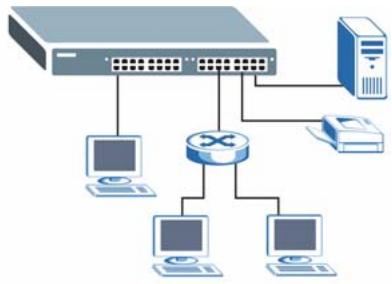
Figure 3 Standalone Workgroup Example
1.4.2 Bridging
With its large address table and high performance, the switch is an ideal solution for department networks to connect to the corporate backbone or for connecting network segments.
The following figure depicts a typical segment bridge application of the switch in an enterprise environment. The two networks (RD and Sales), the standalone server and the computers can all communicate with each other and share all network resources.
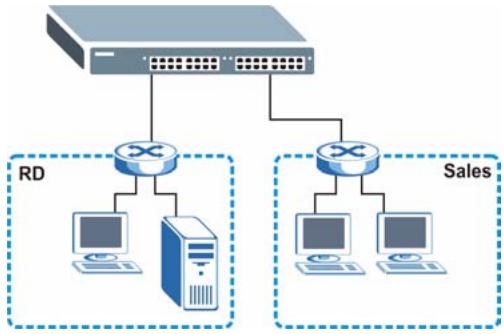
Figure 4 Bridging Example
CHAPTER 2
Hardware Description and Connection
2.1 Rear Panel
The three-pronged power receptacle is located on the rear panel of the switch. Refer to the Appendix A on page 17 for power specification.
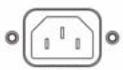
Figure 5 Rear Panel
AC INPUT 100-240VAC 50/60Hz 0.25A MAX
2.1.1 Rear Panel Power Connection
Connect one end of the supplied power cord to the power receptacle on the back of the switch and the other end to the appropriate power source.
2.2 Front Panel
The front panel of the switch includes the auto-negotiating 10Base-T/100Base-TX RJ-45 ports and the LEDs.
2.2.1 RJ-45 Auto-negotiating Ports
The 10Base-T/100Base-TX RJ-45 ports are auto-negotiating and auto-crossover.
An auto-negotiating port can detect and adjust to the optimum Ethernet speed (10/100Mpbs) and duplex mode (full duplex or half duplex) of the connected device.
An auto-crossover (auto-MDI/MDI-X) port automatically works with a straight-through or crossover Ethernet cable.
2.2.2 Front Panel Connections
You can use unshielded twisted pair (UTP) or shielded twisted-pair (STP) Ethernet cables for RJ-45 ports. The following table describes the types of network cable used for the different connection speeds.
Note: Make sure the cable length between connections does not exceed 100 meters (328 feet).
Table 1 Network Cable Types
| SPEED | NETWORK CABLE TYPE |
| 10 Base-T | 100Ω 2-pair UTP/STP Category 3, 4 or 5 |
| 100 Base-TX | 100Ω 2-pair UTP/STP Category 5 |
2.2.3 Front Panel LEDs
The LED Indicators give real-time information about the status of the switch. The following table provides descriptions of the LEDs.
Figure 6 Front Panel LEDs (ES-1024A)
| LINK/ACT | 1 | 2 | 3 | 4 | 5 | 6 |
| 7 | 8 | 9 | 10 | 11 | 12 | |
| LINK/ACT | □ | □ | □ | □ | □ | □ |
| LINK/ACT | 13 | 14 | 15 | 16 | 17 | 18 |
| PWR | 19 | 20 | 21 | 22 | 23 | 24 |
The following table describes the LEDs.
Table 2 The Front Panel LED Descriptions
| LED | COLOR | STATUS | DESCRIPTION |
| PWR | Green | On | The switch is on and receiving power. |
| Off | The switch is not receiving power. | ||
| LINK/ACT | Green | On | The port is connected to an Ethernet network. |
| Blinking | The port is receiving or transmitting data. | ||
| Off | The port is not connected to an Ethernet network. |
2.3 Hardware Installation
Refer to the Quick Start Guide for hardware installation instructions.
CHAPTER 3
Troubleshooting
This section describes common problems you may encounter with the switch and possible solutions.
3.1 Introduction
Troubleshoot the switch using the LEDs to detect problems.
3.1.1 PWR LED
The PWR LED on the front panel does not light up.
Table 3 Troubleshooting Power LED
| STEP | CORRECTIVE ACTION |
| 1 | Check the connections from your switch to the power source. Make sure you are using the supplied power cord and that you are using an appropriate power source. Refer to the product specifications. |
| 2 | Make sure the power source is turned on and that the switch is receiving sufficient power. |
| 3 | If these steps fail to correct the problem, contact your local distributor for assistance. |
3.1.2 LINK/ACT LED
The LINK/ACT LED does not light up when a device is connected.
Figure 7 Troubleshooting LINK/ACT LED
| STEP | CORRECTIVE ACTION |
| 1 | Verify that the attached device(s) is turned on and properly connected to your switch. |
| 2 | Make sure the network adapters are working on the attached devices. |
| 3 | Verify that proper network cable type is used and its length does not exceed 100 meters. For more information on network cable types, see Section 2.2.2 on page 14. |
3.2 Improper Network Cabling and Topology
Improper network cabling or topology setup is a common cause of poor network performance or even network failure.
Figure 8 Troubleshooting Improper Network Cabling and Topology
| PROBLEM | CORRECTIVE ACTION |
| Faulty cables | Using faulty network cables may affect data rates and have an impact on your network performance. Replace with new standard network cables. |
| Non-standard network cables | Non-standard cables may increase the number of network collisions and cause other network problems that affect your network performance. Refer to Section 2.2.2 on page 14 for more information on network cable types. |
| Cabling Length | If you use longer cables than are needed, transmission quality may be affected. The network cables should not be longer than the limit of 100 meters. |
| Too many hubs between the computers in the network | Too many hubs (or repeaters) between the connected computers in the network may increase the number of network collision or other network problems. Remove unnecessary hubs from the network. |
| A loop in the data path | A data path loop forms when there is more than one path or route between two networked computers. This results in broadcast storms that will severely affect your network performance. Make sure there are no loops in your network topology. |
APPENDIX A
Product Specifications
These are the product specifications.
Table 4 Product Specifications
| Standard | IEEE802.3 10BASE-T Ethernet IEEE802.3u 100BASE-TX Fast Ethernet IEEE802.3x Flow Control |
| Protocol | CSMA/CD |
| Technology | Store-and-Forward switching architecture Supports broadcast storm control |
| Non-blocking Wire Speed | ES-1016B: 3.2 Gb ES-1024B: 4.8 Gb |
| Transfer Rate | Ethernet: 10 Mbps (half duplex), 20 Mbps (full duplex) Fast Ethernet: 100 Mbps (half duplex), 200 Mbps (full duplex) |
| Data Forwarding Rate | 14880 pps for 10 Base-T (Ethernet) 148800 pps for 100 Base-T (Fast Ethernet) |
| Connector | RJ-45; Auto-MDIX on all ports |
| MAC Address | 8K MAC address table |
| Memory Buffer | 1.25 Mbps |
| Network Cable | 10 Base-T: 100Ω 2-pair UTP/STP Cat. 3, 4, 5 100 Base-TX: 100Ω 2-pair UTP/STP Cat. 5 |
| LED | Per port: LINK/ACT Per unit: PWR |
| Power Supply | 100-240 VAC, 50~60Hz 0.24A max. |
| Temperature | Operating: 0° C~ 50°C (32°F ~ 122°F) |
| Humidity | Operating: 10% ~ 90% (Non-condensing) |
| Dimension L x W x H (mm) | 440 x 120 x 44 |
| Weight | ES-1016B: 1370 g ES-1024B: 1448 g |
| EMI & Safety | FCC Class B, CE, C-Tick |
Index
Numerics
10 Mbps Ethernet 14
110V AC 3
230V AC 3
A
AC 3
Accessories 3
Airflow 3
Applications 10
Segment Bridge 10
Authority 2
B
Basement 3
C
Cables, Connecting 3
Cabling Length 16
Changes or Modifications 2
Connecting Cables 3
Copyright 1
Corrosive Liquids 3
Covers 3
Customer Support 5
D
Damage 3
Dampness 3
Danger 3
Data path loop 16
Denmark, Contact Information 5
Dust 3
E
Electric Shock 3
Electrical Pipes 3
Electrocution 3
Europe 3
Exposure 3
F
Faulty cables 16
FCC
Compliance 2
Finland, Contact Information 5
France, Contact Information 5
Front Panel 13
Front Panel Connections 14
G
Gas Pipes 3
Germany, Contact Information 5
H
High Voltage Points 3
L
LED Descriptions
LK/ACT 14
PWR 14
Lightning 3
Liquids, Corrosive 3
M
Modifications 2
Regular Mail 5
Removing 3
Repair 3
Risk 3
Risks 3
N
Network Cable Length Limit 14
Network Cable Types 14
100Mbps 14
10Mbps 14
Non-standard network cables 16
North America 3
North America Contact Information 5
Norway, Contact Information 5
0
Opening 3
s
SafetyWarnings 3
Service 3, 4
Service Personnel 3
Shock, Electric 3
Spain, Contact Information 5
Standalone Workgroup 10
Supply Voltage 3
Support Disk 7
Support E-mail 5
Sweden, Contact Information 5
Swimming Pool 3
Syntax Conventions 7
P
Package Contents 10
Pipes 3
Pool 3
Power Adaptor 3
Power Cord 3
Power Outlet 3
Power Supply 3
Power Supply, repair 3
Product specification 17
Q
Qualified Service Personnel 3
Quick start guide 7
T
Telephone 5
Thunderstorm 3
Troubleshooting
Improper Network Cabling and Topology 16
LK/ACT LED 15
Power LED 15
V
Vendor 3
Ventilation Slots 3
Voltage Supply 3
Voltage, High 3
R
Rear Panel 13
Rear Panel Power Connection 13
W
Wall Mount 3
Warnings 3
Water 3
Water Pipes 3
Web Site 5
Wet Basement 3
Worldwide Contact Information 5
Z
ZyXEL Limited Warranty
Note 4
- Disclaimer
- Interference Statements andWarnings
- FCC Statement
- FCC Warning
- CE Mark Warning:
- Notice 1
- Certifications
- Registration
- SafetyWarnings
- ZyXEL Limited Warranty
- Note
- Customer Support
- Table of Contents
- List of Figures
- List of Tables
- Preface
- About the Dimension Ethernet Switches
- Related Documentation
- Syntax Conventions
- Graphics Icons Key
- User Guide Feedback
- CHAPTER 1 Getting to Know Your Switch
- Introduction
- Features
- Package Contents
- Applications
- Standalone Workgroup
- Bridging
- CHAPTER 2
- Hardware Description and Connection
- Rear Panel
- Rear Panel Power Connection
- Front Panel
- RJ-45 Auto-negotiating Ports
- Front Panel Connections
- Front Panel LEDs
- Hardware Installation
- CHAPTER 3
- Troubleshooting
- Introduction
- PWR LED
- LINK/ACT LED
- Improper Network Cabling and Topology
- APPENDIX A
- Product Specifications
- Index
- Numerics
- A
- B
- C
- D
- E
- F
- G
- H
- L
- M
- N
- 0
- s
- P
- Q
- T
- V
- R
- W
- Z
Brand : ZYXEL
Model : ES-1016B
Category : Network switch