
SmartMi Air Purifier - Air purifier Xiaomi - Free user manual and instructions
Find the device manual for free SmartMi Air Purifier Xiaomi in PDF.


Pick your language and provide your email: we'll send you a specifically translated version.
| Type of Product | Air Purifier |
| Brand | Xiaomi (SmartMi) |
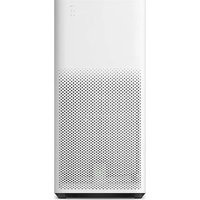
| Model | SmartMi Air Purifier |
| Color | White |
| Dimensions (L × W × H) | 235 × 235 × 370 mm |
| Net Weight | 2.2 kg |
| Power Supply | AC 220-240V, 50Hz |
| Power Consumption | 28W |
| Noise Level | ≤ 34 dB(A) |
| Coverage Area | Up to 30 m² |
| CADR (Clean Air Delivery Rate) | 200 m³/h |
| Filtration Stages | Pre-filter, HEPA H13, Activated Carbon |
| Control Type | Touch Panel, Mi Home App |
| Connectivity | Wi-Fi 802.11 b/g/n, Bluetooth |
| Display | LED with PM2.5 reading |
| Timer | 1-8 hours |
| Modes | Auto, Sleep, Manual |
| Air Quality Sensor | Laser Particle Sensor (PM2.5) |
| Maintenance | Clean outer grille monthly; replace filter every 3-6 months |
| Safety Features | Child Lock, Overheat Protection |
| Spare Parts & Repairability | Replacement filters and motor assembly available |
| General Information | Designed for home use, quiet operation, works with Xiaomi Smart Home ecosystem |
Frequently Asked Questions - SmartMi Air Purifier Xiaomi
How do I reset the filter replacement indicator?
After replacing the filter, press and hold the mode button for three seconds until the indicator turns off. This resets the internal timer.
How often should I replace the filter?
Depending on usage and air quality, the filter should be replaced every 3 to 6 months. The purifier will display a reminder when it's time.
Can I control the purifier with my smartphone?
Yes, the SmartMi Air Purifier can be connected to the Mi Home app. From there you can monitor air quality, set schedules, and adjust modes remotely.
What is the recommended room size for this purifier?
The purifier is best suited for rooms up to 30 m². For larger spaces, you may need a higher CADR device.
How do I clean the purifier?
First unplug it. Use a soft dry cloth to wipe the exterior. For the air inlet/outlet grilles, use a soft brush or vacuum to remove dust. Never use wet cloth.
Why does the purifier make noise?
Noise can be caused by a clogged filter or by running at manual speed. Try cleaning or replacing the filter, or switch to Sleep mode for quieter operation.
Is the filter washable?
The pre-filter can be washed periodically, but the HEPA and activated carbon layers are not washable and must be replaced when exhausted.
What does the PM2.5 display mean?
The display shows the concentration of particulate matter (PM2.5) in micrograms per cubic meter. Lower values indicate cleaner air.
Can I schedule the purifier to turn on automatically?
Yes, using the Mi Home app, you can set a timer or create scenes to switch the purifier on/off at specific times.
What is the CADR rating and why does it matter?
CADR stands for Clean Air Delivery Rate, measured in m³/h. It indicates how quickly the purifier can clean the air. This model has a CADR of 200 m³/h, suitable for small to medium rooms.
User questions about SmartMi Air Purifier Xiaomi
0 question about this device. Answer the ones you know or ask your own.
Ask a new question about this device
No questions yet. Be the first to ask one.
Download the instructions for your Air purifier in PDF format for free! Find your manual SmartMi Air Purifier - Xiaomi and take your electronic device back in hand. On this page are published all the documents necessary for the use of your device. SmartMi Air Purifier by Xiaomi.
USER MANUAL SmartMi Air Purifier Xiaomi

Manual assistant
Powered by Anthropic
Waiting for your message
Product information
Brand : Xiaomi
Model : SmartMi Air Purifier
Category : Air purifier