USER MANUAL ALTIVAR 18 SCHNEIDER
variable speed controllers
for asynchronous motors,
Frequenzumrichter
Speed controller for asynchronous motors
Page 34
When the speed controller has power on, a number of components are connected to the supply. It is extremely dangerous to touch them.
After switching off the supply to the Altivar wait for 1 minute before touching the equipment. This is the time taken for the capacitors to discharge.
During operation the motor can be stopped or started by inhibiting the start command with the speed controller still connected to the supply. For personnel safety during maintenance electronic locking should not be used, the supply should be switched-off.
The speed controller incorporates safety devices which can shutdown the speed controller and stop the motor in the event of a fault. These faults may be caused by a mechanical blockage of the motor or alternatively problems with the electrical supply.
The removal of the problem may cause the motor to re-start, creating danger for certain machines and installations, especially those which must conform to safety regulations.
In such cases, therefore, the user must take precautions to avoid re-starting of the motor. A device such as a speed detector should be incorporated to remove the supply in the event of an unscheduled stopping of the motor.
The equipment has been designed to conform to IEC standards.
In general, power to the speed controller must be switched off before any electrical or mechanical intervention on the installation or machine.
The products and materials presented in this document may be changed or modified at any time, either from a technical point of view or in the way they are operated. Their description can in no way be considered contractual.

Warning
The Altivar 18 must be considered a component. It is neither a machine nor a piece of equipment ready for use in accordance with European directives (machinery directive and electromagnetic compatibility directive). It is the responsibility of the user to ensure that his machine meets these standards.
This speed controller must be installed and set up in accordance with international and national standards. This compliance is the responsibility of the systems integrator who must respect the European community EMC directive amongst others.
The specifications contained in this document must be applied in order to comply with the essential requirements of the EMC directive.
The "Altivar 18" 34
Preliminary checks 38
Choice of speed controller 38
Available torque 39
Technical characteristics 40
Dimensions - Mounting recommendations 41
Mounting in a wall-fixing or floor standing enclosure 42
Electromagnetic compatibility 43
44 and 45
Control terminals 46
Connection diagram 47
Functions which do not require adjustment 48
Logic and analog input functions which can be configured 49 to 51
Function compatibility table 52
Installation 53 to 62
Maintenance - Replacement and repairs 63
Maintenance assistance 64
Remove the Altivar 18 from its packaging, and check that it has not been damaged in transit. Check that the reference of the speed controller on the label is the same as that on the delivery note and corresponds to the order form.
Choice of speed controller
| A.C. supply | Motor | Altivar 18 |
| Power supply voltage | Line current (1) | Power indicated on plate | Permanent output current | Maximum transient current (2) | Power dissipated at nominal load | Reference | Weight |
| at U1 | at U2 |
| U1...U2 | | | | | | | | | |
| V | A | A | kW | HP | A | A | W | | kg |
| 200...24050/60 Hzsingle phase | 4.4 | 3.9 | 0.37 | 0.5 | 2.1 | 3.1 | 23 | ATV-18U09M2 | 1.5 |
| 7.6 | 6.8 | 0.75 | 1 | 3.6 | 5.4 | 39 | ATV-18U18M2 | 1.5 |
| 13.9 | 12.4 | 1.5 | 2 | 6.8 | 10.2 | 60 | ATV-18U29M2 | 2.1 |
| 19.4 | 17.4 | 2.2 | 3 | 9.6 | 14.4 | 78 | ATV-18U41M2 | 2.8 |
| 200...23050/60 Hz3-phase | 16.2 | 14.9 | 3 | - | 12.3 | 18.5 | 104 | ATV-18U54M2 | 3.3 |
| 20.4 | 18.8 | 4 | 5 | 16.4 | 24.6 | 141 | ATV-18U72M2 | 3.3 |
| 28.7 | 26.5 | 5.5 | 7.5 | 22 | 33 | 200 | ATV-18U90M2 | 7.8 |
| 38.4 | 35.3 | 7.5 | 10 | 28 | 42 | 264 | ATV-18D12M2 | 7.8 |
| 380...46050/60 Hz3-phase | 2.9 | 2.7 | 0.75 | 1 | 2.1 | 3.2 | 24 | ATV-18U18N4 | 2 |
| 5.1 | 4.8 | 1.5 | 2 | 3.7 | 5.6 | 34 | ATV-18U29N4 | 2.1 |
| 6.8 | 6.3 | 2.2 | 3 | 5.3 | 8 | 49 | ATV-18U41N4 | 3.1 |
| 9.8 | 8.4 | 3 | - | 7.1 | 10.7 | 69 | ATV-18U54N4 | 3.3 |
| 12.5 | 10.9 | 4 | 5 | 9.2 | 13.8 | 94 | ATV-18U72N4 | 3.3 |
| 16.9 | 15.3 | 5.5 | 7.5 | 11.8 | 17.7 | 135 | ATV-18U90N4 | 8 |
| 21.5 | 19.4 | 7.5 | 10 | 16 | 24 | 175 | ATV-18D12N4 | 8 |
| 31.8 | 28.7 | 11 | 15 | 22 | 33 | 261 | ATV-18D16N4 | 12 |
| 42.9 | 38.6 | 15 | 20 | 29.3 | 44 | 342 | ATV-18D23N4 | 12 |
(1) Typical value without additional inductance.
(2) For 60 seconds.
The Altivar 18 is designed to supply the required power for the appropriate motor.
Continuous operation
For self-ventilated motors, motor cooling is linked to speed. Derating occurs at speeds of less than half the nominal speed.
Operation in overspeed
Since the voltage can no longer change with the frequency, there is a decrease in motor induction resulting in a loss of torque. Consult the manufacturer to find out whether the machine can operate in overspeed.
Torque characteristics :
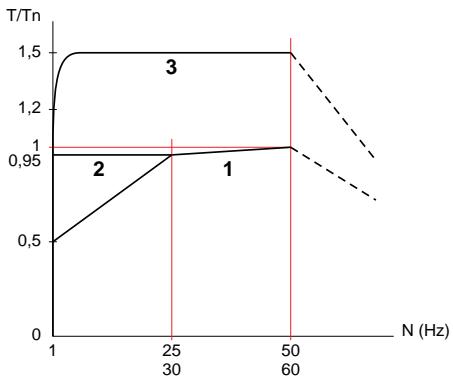
1 Continuous usable torque : self-ventilated motor
2 Continuous usable torque: force-ventilated motor
3 Transient overtorque : typical curve at ± 10 % Value : 1.5 Tn for 60 s
Note : With a special motor, the nominal frequency and the maximum frequency can be adjusted from 40 to 320 Hz .
Environment
| Degree of protection | IP31
IP20 without the blanking cover on the top |
| Vibration and shock resistance in accordance with EN50178 | 0.6 gn from 10 to 50 Hz
2 gn from 50 to 150 Hz |
| Degree of pollution | Degree 2 according to IEC664. Protect the speed controller from dust, corrosive gases, splashing liquid, etc. |
| Relative maximum humidity | 93 % without condensation or dripping water. If there is a risk of condensation, provide a heating system |
| Ambient air temperature in accordance with EN50178 | For storage: - 25 °C to + 65 °C
For operation:
- 10 °C to + 40 °C without derating, with the blanking cover
- 10 °C to + 50 °C without derating, without the blanking cover |
| Maximum operating altitude | 1000 m without derating. Above this, derate the current by 3 % for each additional 1000 m |
Electrical characteristics
| Power supply | Voltage | - single phase : 200 V - 15 % to 240 V + 10 %
- 3-phase : 200 V - 15 % to 230 V + 10 %
380 V - 15 % to 460 V + 10 % |
| Frequency | 50/60 Hz ± 5 % |
| Output voltage | Maximum voltage equal to mains voltage |
| Output frequency range | 0.5 to 320 Hz |
| Maximum transient current | 150 % of speed controller nominal current for 60 seconds |
| Braking torque | 30 % of the nominal motor torque without brake resistor (typical value). Up to 150 % with brake resistor as an option |
| Frequency resolution | - Display : 0.1 Hz
- Analog inputs : 0.1 Hz for 100 Hz maximum |
| Switching frequency | Can be adjusted from 2.2 to 12 kHz |
| Speed controller protection and safety | - Electrical isolation between power and control circuits (inputs, outputs, supplies)
- Protection against short-circuits :
. internal supplies available
. between output phases U - V - W
. between the output phases and earth for ratings 5.5 to 15 kW
- Thermal protection from excessive overheating and overcurrents
- Under and overvoltage supply
- Overvoltage safe on braking |
| Motor protection | Protection integrated in the speed controller by calculating I²t |
Dimensions
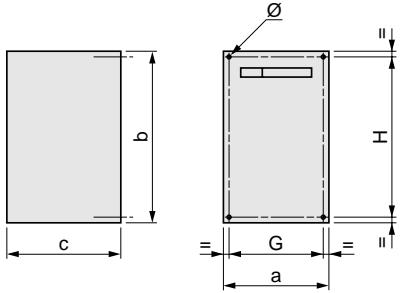
ATV18
| ATV18 | a | b | c | G | H | ∅ |
| U09M2, U18M2 | 112 | 182 | 121 | 100 | 170 | 5 |
| U29M2, U18N4, U29N4 | 149 | 184 | 157 | 137 | 172 | 5 |
| U41M2, U54M2, U72M2, U41N4, U54N4, U72N4 | 185 | 215 | 158 | 171 | 202 | 6 |
| U90M2, D12M2, U90N4, D12N4 | 210 | 300 | 170 | 190 | 280 | 7 |
| D16N4, D23N4 | 245 | 390 | 190 | 225 | 370 | 10 |
Mounting recommendations
Mount the unit vertically.
Avoid placing close to any heating equipment.
Leave enough free space to ensure that sufficient air can circulate for cooling. The unit is ventilated from the bottom upwards.
IP20 : remove the blanking cover from the top (self-adhesive film).
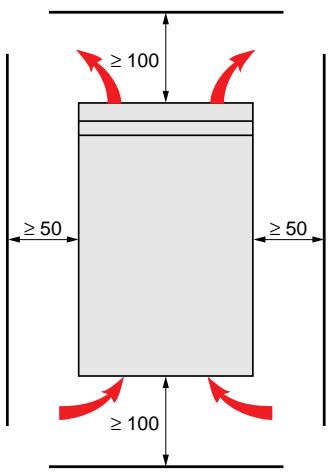
Ventilation flow rate
ATV-18U09M2, U18M2, U18N4 : not ventilated.
ATV-18U29M2, U29N4:0.25 m³/minute.
ATV-18U41M2, U54M2, U72M2, U41N4, U54N4, U72N4: 0.75 m³/minute.
ATV-18U90M2, D12M2, U90N4, D12N4, D16N4, D23N4 : 1.3 m³/minute.
Observe the mounting recommendations given on page 41.
To ensure air circulation in the speed controller :
- provide ventilation louvres,
- ensure that ventilation is sufficient. If not install forced ventilation with a filter,
- use special filters in IP 54,
- remove the blanking cover from the top of the speed controller.
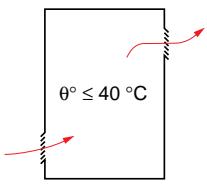
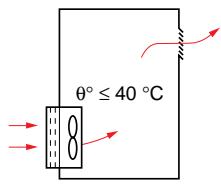
The speed controller needs to be mounted in a dust and damp proof enclosure under certain environmental conditions : dust, corrosive gas, high humidity with a risk of condensation or dripping water, splashing liquid, etc.
To avoid hot spots in the speed controller, if it is a non-ventilated model, add a fan to circulate the air inside the enclosure.
This means that the speed controller can be used in an enclosure where the maximum internal temperature can reach 50^ .
Calculating the size of the enclosure
Maximum thermal resistance Rth (^ / W) ..
$$
R t h = \begin{array}{c c} \theta^ {\circ} - \theta^ {\circ} e & \theta^ {\circ} \ P & \theta^ {\circ} e \end{array} = \begin{array}{c c} \text {m a x i m u m t e m p e r a t u r e i n t h e e n c l o s u r e i n} ^ {\circ} C, \ \text {m a x i m u m e x t e r n a l t e m p e r a t u r e i n} ^ {\circ} C, \ P & \text {t o t a l p o w e r d i s s i p a t e d i n t h e e n c l o s u r e i n} W. \end{array}
$$
Power dissipated by the speed controller : see page 38.
Add the power dissipated by the other equipment.
Useful heat dissipation surface of the enclosure S (^2) ..
(sides + top + front, when the controller is wall-mounted)
$$
S = \frac {K}{R t h} \quad K = \text {t h e r m a l r e s i s t a n c e p e r} m ^ {2} \text {o f t h e e n c l o s u r e}.
$$
For a metal enclosure: K = 0.12 with an internal fan,
K = 0.15 with no fan.
Warning : Do not use insulated enclosures, as they have a poor level of conductivity.
Installation : to comply with standards EN55011 class A, EN61800-3, IEC1800-3.
General rules
- Grounds between speed controller, motor and cable shielding must have "high frequency" equipotentiality.
- Use shielded cables with shielding connected to the ground at 360^ at both ends of the motor cable and the control cables. This shielding can be conduit or metal ducting as long as there is no break in continuity.
Installation diagram
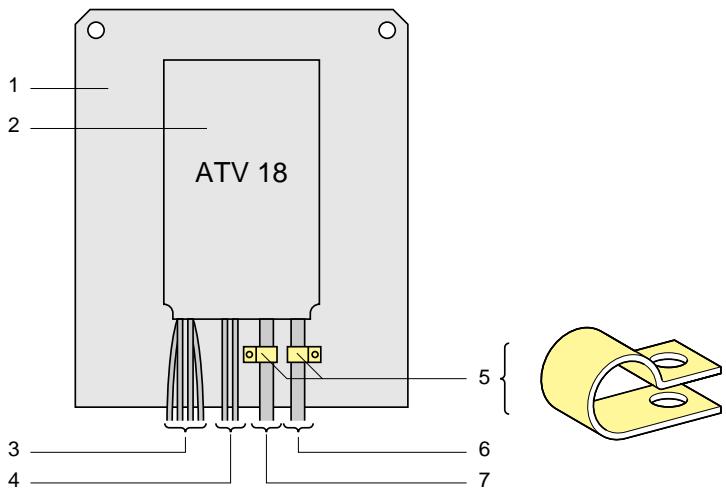
1- Mounting plate, unpainted flat sheet steel, with anti-corrosion treated conductors (machine ground wiring).
Painted steel can be used on condition that good electrical contact is ensured between the mounting surfaces with 2 and 5.
2- Altivar 18 fixed directly to the mounting plate (equipotential grounds).
3- Non-shielded supply wires or cable for connecting the line choke, if used.
4- Non-shielded wires for fault relay contact output wires.
5- The shielding for cables 6 and 7 should be fixed and grounded as close to the controller as possible :
strip the shielding,
- use the correct size clamps on the stripped parts of the shielding to fix to the backplate,
-type of clamps : stainless steel.
The shielding must be clamped tightly enough to the backplate for the contacts to be good.
6- Shielded cable for connecting the motor, with shielding connected to ground at both ends.
This shielding must be uninterrupted, and any intermediate terminal blocks must be in an EMC shielded metal case.
7- Shielded cable for connecting the control/command system.
For uses which may require several conductors, small cross sections should be used (0.5mm^2) .
The shielding must be connected to ground at both ends. This shielding must be uninterrupted, and any intermediate terminal blocks must be in an EMC shielded metal case.
Note : The HF equipotential ground connection between speed controller, motor and cable shielding does not remove the need to connect the protective conductors PE (green-yellow), to the appropriate terminals on each of the units.
Accessing terminal blocks
To access terminal blocks, remove cover fixed by 2 screws.
Terminal blocks : on the lower part of the Altivar.
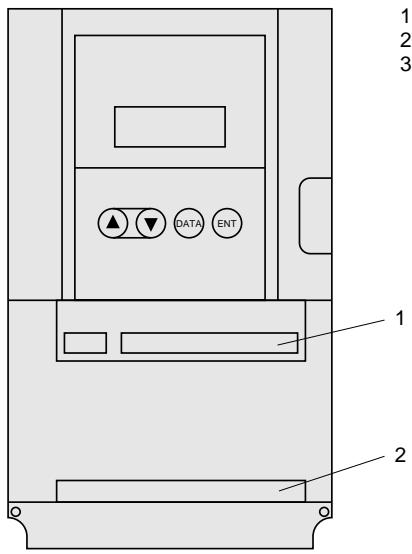
1 - Control
2 - Power
3 - Terminal for connecting a protection conductor with a 10mm^2 cross section in accordance with EN50178 (earth leakage current)
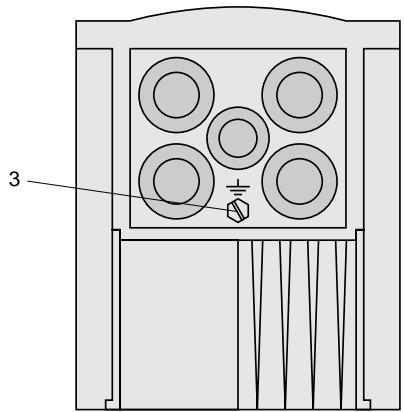
Speed controllers are fitted with metal gland plates equipped with rubber blanking plugs which can be perforated to enable cables to be passed through them and also to protect the cables. The gland plates can take EMC metal cable glands.
Power terminals
Terminal characteristics
| Altivar ATV-18 | Maximum connection capacity | Tightening torque in Nm |
| AWG | mm2 |
| U09M2, U18M2 | AWG14 | 2.5 | 1 |
| U29M2, U41M2 | AWG10 | 6 | 1.2 |
| U54M2, U72M2 |
| U18N4, U29N4 |
| U41N4, U54N4 |
| U72N4 |
| U90M2, D12M2, | AWG8 | 10 | 2.4 |
| U90N4, D12N4 |
| D16N4, D23N4 | AWG6 | 16 | 4 |
Function of terminals
| Terminals | Function | For Altivar ATV-18 |
| L1 | Power supply | All ratings |
| L2 |
| L3 | 3-phase only |
| ⊥ | Altivar ground terminal | All ratings |
| Do not use | All ratings |
| PA | Output to brake resistor | All ratings |
| PB |
| U | Output to the motor | All ratings |
| V |
| W |
| ⊥ | Altivar ground terminal | All ratings |
Terminal connections
ATV-18 single phase
ATV-18 3-phase except D16N4 and D23N4
ATV-18D16N4 and D23N4
Maximum connection capacity: 1.5mm^2 , AWG16.
Tightening torque : 0.5 mN
Factory preset speed controller configuration.
Control terminal block electrically isolated from power terminal block.
| Terminal | Function | Characteristics |
| SA | C/O contact of the fault relay. | Contact switching capacity : |
| SC | Activated when speed controller powered-up, no fault | - minimum 10 mA for 5 V--- |
| SB | - maximum on inductive load (cos φ 0.4, L/R 7 ms) |
| | 1.5 A for 250 V~ and 1.5 A for 30 V--- |
| +10 | Power supply for setpoint potentiometer 1 to 10 kΩ | 10 V+15% +0 10 mA maximum, protected |
| AI1 | Voltage speed reference | Analog input 0 + 10 V impedance 30 kΩ |
| AI2 | Voltage setpoint or | Analog input 0 + 10 V impedance 30.55 kΩ |
| AIC | Current setpoint, summing of AI1 | or analog input 0 - 20 mA (factory preset) or 4 - 20 mA, impedance 400 Ω |
| | AI2 or AIC can be assigned. Do not use them both at the same time. |
| COM | Common for logic and analog inputs and the logic output | |
| LI1 | Run forward command | Logic inputs impedance 3.5 kΩ |
| LI2 | Run reverse command | Power supply + 24 V (maximum 30 V) |
| LI3 | Preset speeds | State 0 if < 5 V, state 1 if > 11 V |
| LI4 | | LI2, LI3, LI4 can be assigned |
| + 24 | Logic input and output supply | + 24 V protected, maximum rate 100 mA |
| LO+ | Logic output supply | To be connected to the internal + 24 V or to the + 24 V (maximum 30 V) of an external supply |
| LO | Speed reference reached | PLC compatible logic output (open collector) + 24 V maximum 20 mA with internal supply or 200 mA with external supply. LO can be assigned. |
Connection diagram with factory preset values
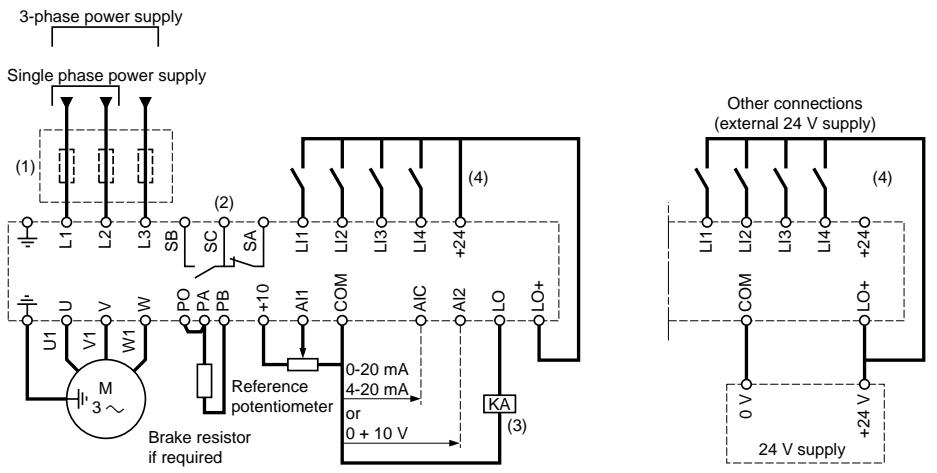
(1) Line choke if required (1 phase or 3 phases).
(2) Fault relay contacts, for remote signalling of the speed controller state.
(3) PLC relay or input = = 24V
(4) + 24 V internal. When using a + 24 V external supply, connect the 0 V to the COM terminal, and do not use the + 24 terminal of the speed controller.
Note : Suppressors should be fitted to all inductive circuits close to the speed controller or connected on the same circuit (relays, contactors, solenoid valves, etc).
Choice of associated components
See Altivar 18 catalog.
Wiring recommendations
Power
Follow the cable cross-section recommendations specified in the standards.
The speed controller must be earthed, in order to comply with regulations concerning high leakage currents (over 3.5mA ). Upstream protection by differential circuit-breaker is not advised as DC elements may be generated by leakage currents from the speed controller. If the installation has several speed controllers on the same supply, connect each speed controller to earth separately. If necessary, provide a line choke (consult the catalogue).
Keep the power cables apart from low-level signal circuits (detectors, PLCs, measuring equipment, video, telephone).
Control
Keep the control circuits and the power cables apart. For control circuits and speed reference circuits, it is advisable to use a shielded, twisted pair cable at intervals of between 25 and 50mm by connecting the shielding at each end.
Fault relay, resetting
The fault relay is energized when the speed controller is powered up and not faulty. It comprises a C/O contact.
The speed controller is reset after a fault :
- by switching it off until the display and the red indicator lamp disappear and then restarting the speed controller,
- automatically in the cases described under the "automatic restart" function.
Thermal protection of the speed controller
Function :
Protection via a thermistor fixed to the heatsink.
Indirect protection of the speed controller by calculating the l^2 t .
This function ensures thermal protection of the speed controller in normal ambient temperature conditions.
Typical tripping points :
- motor current = 185% of the nominal speed controller current : 2 seconds,
- motor current = 150% of the nominal speed controller current : 60 seconds,
- motor current ≤ 110% of the nominal speed controller current : does not trip.
Possible deratings for switching frequencies of >4kHz are automatically taken into account and reduce the admissible I^2t .

Warning : If the speed controller is switched off, the I²t calculation is reset to 0 .
Speed controller ventilation
For models which have a fan, the fan is supplied automatically when the speed controller is reset (operating direction + reference). It is switched off several seconds after the speed controller is locked (motor speed < 0.5Hz and injection braking completed).
- LI1: forward operation. Cannot be assigned to another function.
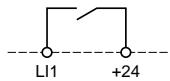
When the contact is closed, the frequency setpoint is applied in the forward direction.
-
LI2, LI3, LI4 : can be assigned to the following functions :
-
reverse direction: r 5 assignment
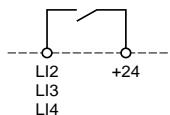
When the contact is closed, the frequency setpoint is applied in reverse direction. If LI1 is also closed, the first one to have been closed has priority.
-2 speeds: P5 assignment
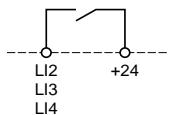
Open contact: reference = L 5 P + analog reference.
Closed contact : reference = H 5 P .
- 4 speeds : assignment of one input to P ≤ 2 and another to P ≤ 4 (it is not possible to assign P ≤ 4 only)
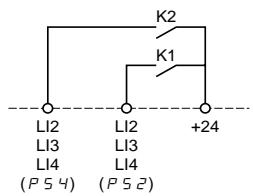
K1 and K2 open: setpoint = L P + analog setpoint.
K1 closed and K2 open: setpoint = 5P (level 1 adjustment).
K1 open and K2 closed: setpoint = 5P4 (level 1 adjustment).
K1 and K2 closed: setpoint = H5P
- JG: jog operation. JG assignment
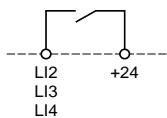
If the contact is closed and then operating direction contact is also closed, the ramp time is 0.1 s irrespective of the R C and d C settings. If the speed controller is already operating and the contact assigned to J G is closed, the ramp times are those of R C and d C . The minimum time between two J G operations is 0.5 s.
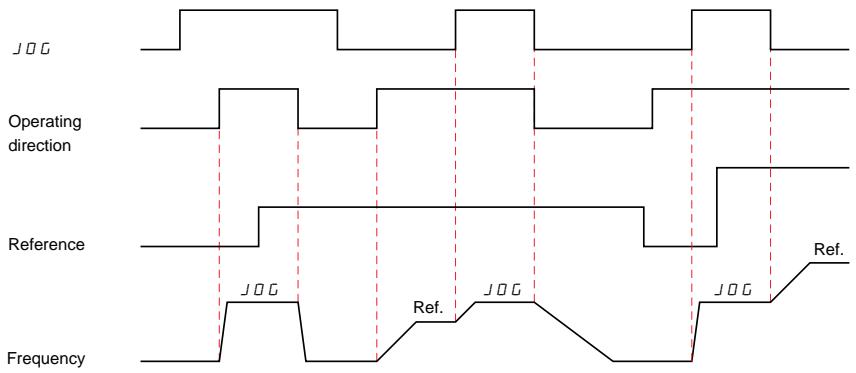
Note: 1- During "jog" operation, automatic DC injection braking when the motor is stopped is inhibited. 2- Injection braking on the logic input has priority over operation.
- Fast stop: F S E assignment

Note : Fast stop command is activated when the contact between the input and the + 24 V is open.
Braked stop, with the dE ramp time divided by 4, but limited to the acceptable minimum without locking on an "excessive braking" fault (self-adaptation if the braking capability is exceeded).
Note : During fast stop, braking either by automatic DC injection or on the logic input is inhibited.
- DC injection braking: dL assignment
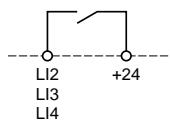
Note : Injection braking command is activated when the contact between the input and the +24V is closed.
The braking current is equal to the speed controller nominal current during 5 seconds. After 5 seconds, braking current is peak limited to a maximum value of 0.5 I E H motor.
Note : 1- Automatic injection braking when stopped remains active if the d C I function is assigned. 2- Fast stop has priority over injection braking.
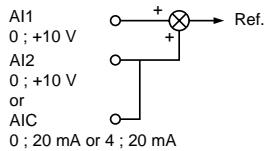
An extra analog input can be used as :
- voltage on Al2,
- current on AIC.
and can be assigned as :
- a summing input of AI1,
- PI regulator feedback.
Summing with AI1:5R/ assignment
PI regulator feedback : P IF assignment
This assignment automatically configures AI1 as a reference for the PI regulator.

Adjustment parameters r , P , r , I , and F , B are in level 1.
- AIC parameter setting: 0 - 20mA or 4 - 20mA .
Note : The PI function is not compatible with certain logic input functions :
- preset speeds (2 or 4),
-jog operation ( )
The choice of application selections is restricted due to incompatibility between certain functions. Those functions which are not listed can be used without restriction.
| Automatic D.C. braking | Summing input | PI regulator | Forward direction | Reverse direction | D.C. braking by logic input | Fast stop | Jog | Preset Speeds |
| Automatic D.C. braking | | | | | | | ↑ | ↑ | |
| Summing input | | | ● | | | | | | |
| PI regulator | | ● | | | | | | ● | ● |
| Forward direction | | | | | ←↑ | | ↑ | | |
| Reverse direction | | | | ←↑ | | | ↑ | | |
| D.C. braking by logic input | | | | | | | ↑ | ← | ← |
| Fast stop | ← | | | ← | ← | ← | | ← | ← |
| Jog | ← | | ● | | | ↑ | ↑ | | |
| Preset Speeds | | | ● | | | ↑ | ↑ | | |
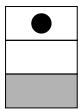
Non-compatible functions Compatible functions not significant
Function priority (Functions unable to be used at the same time) :
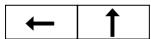
The function indicated by the arrow has priority over the other one.

The first operated has priority.
The choice of functions is limited by the number of configurable logic inputs (3). Functions using configurable logic inputs :
- One input for each function: reverse direction, D.C. braking, fast stop, jog, 2 preset speeds.
- Two inputs for the function : 4 preset speeds.
The Altivar is factory preset for standard applications :
- applications with constant torque.
Preset values
- Display : speed controller ready (when stopped), motor frequency (in operation).
- Supply: 50 Hz.
- Motor voltage: 230V or 400V , depending on the product.
- Ramps : 3 seconds.
- Low speed: 0 Hz - High speed: 50 Hz.
- Frequency loop gain : standard.
- Thermal motor current = nominal speed controller current.
- Injection braking current when stopped = 0.7 nominal speed controller current, for 0.5 seconds.
- Operation at constant torque, with sensorless flux vector control.
- Logic inputs :
.2 operating directions (LI1, LI2),
.4 preset speeds (LI3, LI4): 0 Hz, 5 Hz, 25 Hz, 50 Hz.
. Al1 : speed reference 0 + 10 V ,
. Al2 (0 + 10V) or AIC (0,20mA) summing of Al1.
- Logic output :
. LO : speed reference reached.
- Automatic adaptation of the deceleration ramp if there is overvoltage on braking.
- Switching frequency of 4kHz
If the above values are compatible with the application, the speed controller can be used without modifying the settings.
In power control with line contactor :

- avoid frequent operation of contactor KM1 (premature ageing of capacitors), use inputs LI1 to LI4 to control the speed controller,
- in the case of cycles < 60 s, these measures are essential, otherwise the load resistor may be destroyed.
User adjustment and function extensions
If necessary, the display can be used to make adjustments and to expand the functions using those listed on the following pages. There are two levels of access:
- level 1: adjustments (standard configuration),
- level 2: extension of functions.
It is easy to return to the factory setting.
There are three types of parameter :
- display : values displayed by the speed controller,
- adjustment : can be modified during operation or when stopped,
- configuration : can only be modified when stopped and with no braking. Can be displayed during operation.

- ensure that the setting changes made during operation present no danger. It is advisable to perform modifications when the machine has stopped.
Integrated display terminal
Functions of keys and display
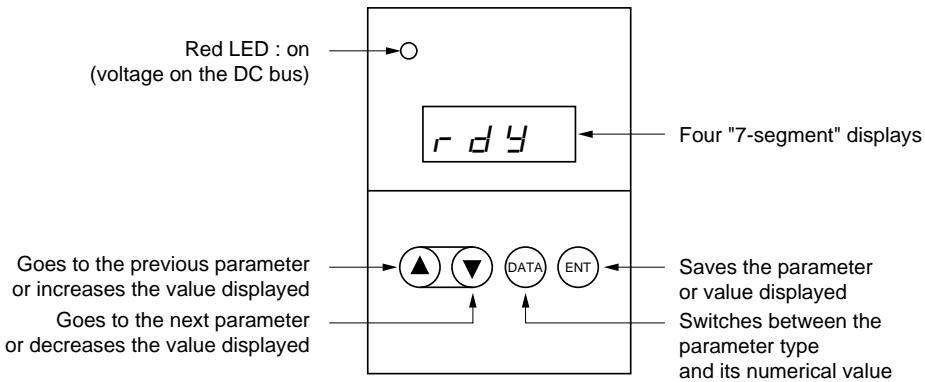
Normal display (no faults and after installation).
- In t : Initialization sequence.
-rdY :Speed controller ready.
- 43.0 : Display of the frequency setpoint.
- d b : DC injection braking in progress.
- r∈r: Automatic restart in progress.
Using the integrated display terminal
Scrolling through the parameters: Next parameter, Previous parameter
Display of the parameter value, its state or its assignment: (DATA)
Modifying the value, state or assignment:

Pressing or does not memorize the selection.
Memorizing, saving the selection displayed:
The display flashes during memorization.
Return to parameters : (DATA)
Using the integrated display terminal
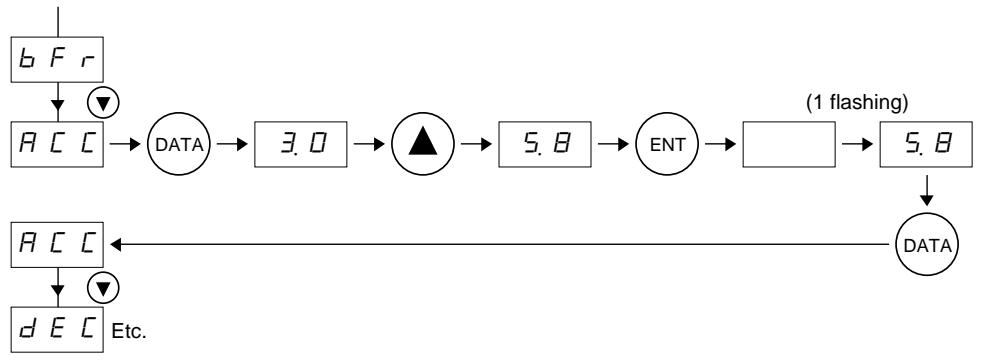
Example 1: ramp adjustment
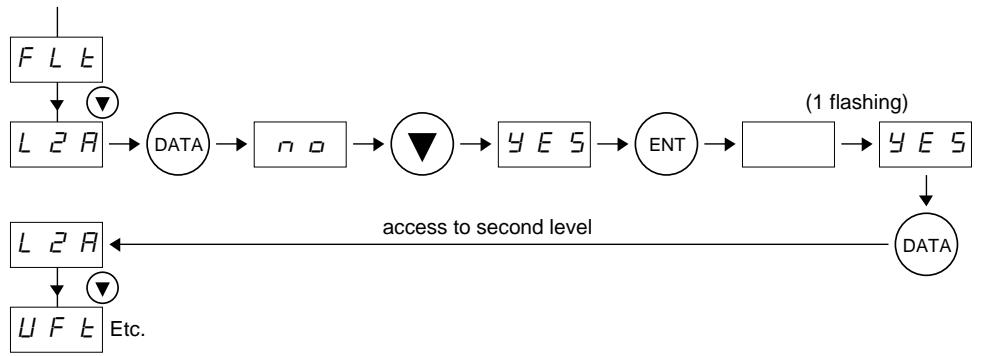
Example 2: access to second level parameters
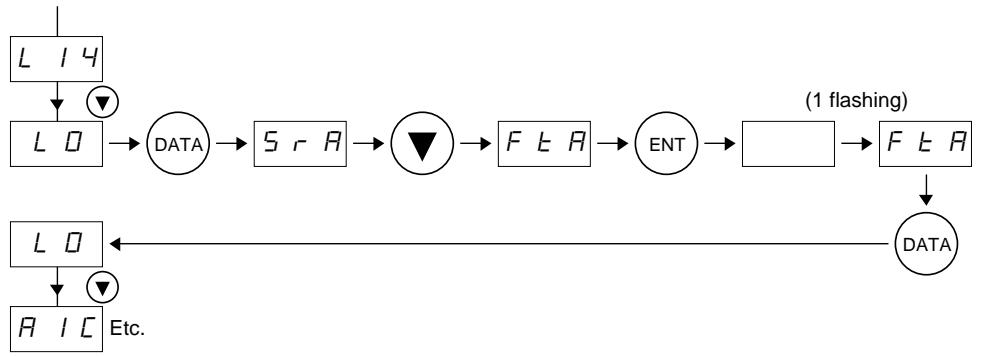
Example 3: configuration of the logic output
Hierarchical access to parameters
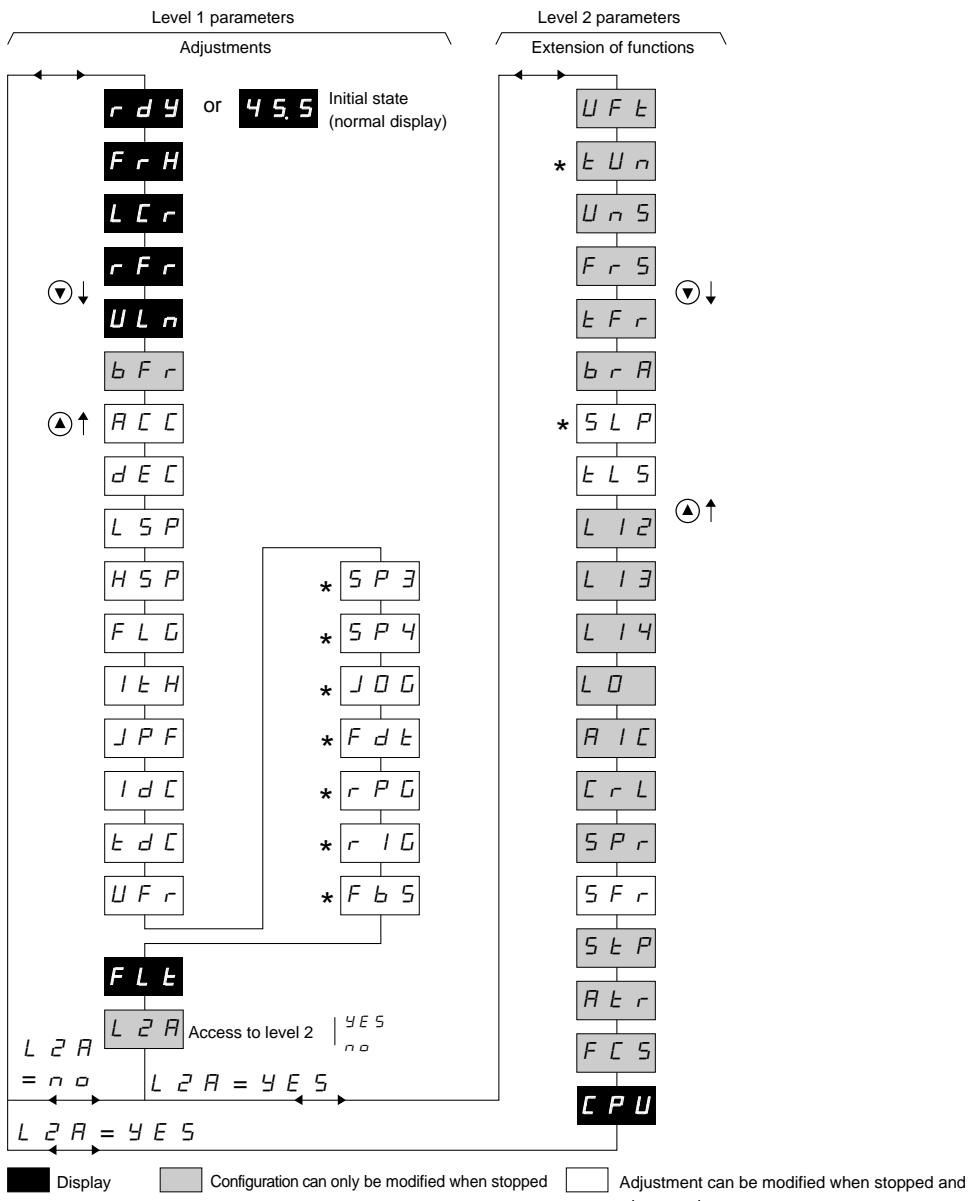
Parameter shown only if the corresponding function is configured
Adjustment of the speed controller (level 1 parameters)
| Code | Function | Factory preset | Maximum value | Minimum value | Unit | Resolution (minimum increment) | Type |
| r d y | Speed controller ready | | | | | | Display |
| F r H | Frequency setpoint | Choice of parameter displayed during operation (1) | F r H | | | Hz | 0.1 |
| L C r | Motor current | | | A | 0.1 |
| r F r | Frequency of rotation | | | Hz | 0.1 |
| U L n | Mains voltage | | | V | 1 |
| b F r | Base frequency. Select the same frequency as the supply frequency. | 5 Ω | 6 Ω | 5 Ω | Hz | | Configu-ration |
| The value of b F r presets the nominal motor frequency and voltage to the following values :
ATV18...M2: - b F r = 50:230 V/50 Hz
- b F r =60:230 V/60 Hz
ATV18...N4: - b F r =50:400 V/50 Hz
- b F r =60:460 V/60 Hz |
| These presets can be modified in level 2 parameters. |
| R C C | Linear acceleration ramp | 3.0 | 3.6 Ω | 0.1 | s | 0.1 or 1 | Adjust. |
| d E C | Linear deceleration ramp | 3.0 | 3.6 Ω | 0.1 | s | 0.1 or 1 | Adjust. |
| The ramps are defined for the base frequency.
Example: ramp 10 s: - if b F r = 50 Hz, 5 s needed for variation of 25 Hz,
- if b F r = 60 Hz, 5 s needed for variation of 30 Hz. |
| L 5 P | Low speed | Ω | = H 5 P | Ω | Hz | 0.1 | Adjust. |
| H 5 P | High speed: ensure that this setting is suitable for the motor and the application. | 5 Ω | = E F r (2) | = L 5 P | Hz | 0.1 | Adjust. |
| F L G | Frequency loop gain | 3 Ω | 1 Ω Ω | Ω | | 1 | Adjust. |
| Linked to the inertia and resistive torque of the driven mechanism :
- machines with high resistive torque or high inertia : gradually reduce to between 33 and 0,
- machines with fast cycles, low resistive torque and low inertia : gradually increase the gain to between 33 and 100. Too high a gain may lead to unstable operation |
| I E H | Motor thermal protection (4).
Adjust I E H to nominal current | IN(3) | 1.15 IN(3) | 0.5 IN(3) | A | 0.1 | Adjust. |
| shown on the motor rating plate. To inhibit thermal protection, increase the value up to its maximum value. |
(1) L r, r r and U n cannot be memorized using _ENT , but can be displayed for a few moments, until the machine stops or goes to the next parameter.
(2) F_r is a level 2 parameter which can be adjusted from 40 to 320Hz , preset at 60Hz . For H5P > 60Hz , modify the setting of F_r beforehand (level 2).
(3) I_N = speed controller permanent output current.
(4) Warning : - in the case of motors connected in parallel on a single speed controller, used thermal relay for each motor to offset the risk of the load not being distributed.
- if the speed controller is switched off the l^2 t calculation changes to zero.
Adjustment of speed controller (level 1 parameters)
| Code | Function | Factory preset | Maximum value | Minimum value | Unit | Resolution (minimum increment) | Type |
| JPF | Cancellation of a critical speed which leads to mechanical resonance : it is possible to prevent prolonged operation in a 2 Hz frequency range, which can be adjusted anywhere between LSP and HSP. Factory preset of 0 deactivates the function. |
| Idc | Automatic DC injection braking current when stopped | 0.7IN(1) | IN(1) | 0.25 I E H | A | 0.1 | Adjust. |
| Edc | Automatic injection braking time when stopped. Setting of ∅ cancels the injection when stopped, setting to 25.5 makes this permanent (2). |
| UFR | Parameter enabling the torque to be optimized at a very low speed | 20 | 100 | 0 | | 1 | Adjust. |
| SP3 | 3rd preset speed | 5 | H5P | L5P | Hz | 0.1 | Adjust. |
| SP4 | 4th preset speed | 25 | H5P | L5P | Hz | 0.1 | Adjust. |
| JOG | Setpoint in "jog" operation | 10 | 10 | 0 | Hz | 0.1 | Adjust. |
| FdE | Frequency threshold associated with the "frequency threshold reached" function of output L0. This threshold comprises an anti-repeat hysteresis of 0.2 Hz. |
| rPG | Proportional gain of the PI regulator function | I | 100.0 | 0.0 I | | 0.0 I | Adjust. |
| rIG | Integral gain of the PI regulator function | I | 100.0 | 0.0 I | 1/s | 0.0 I | Adjust. |
| FB5 | Multiplication coefficient of feedback of PI regulator function, associated with analog input AIC or AI2. | I | 100.0 | 0.0 I | | 0.0 I | Adjust. |
| FLE | Display of the last fault which occurred, by pressing the DATA key. When no fault has occurred the display reads : nEr r. |
| L2H | Access to level 2 parameters. no : →the next display will be rdy(initial display) if ↓yes : YES →the next display will be the first parameter of level 2 if ↓ | Configu-ration |
(1) I_N = speed controller permanent output current.
(2) Warning, the configuration parameters cannot be modified during braking. Set 25.5 s as the last operation if permanent braking is required.
* These parameters only appear if the associated functions are selected.
Example: S^P and S^P only appear as a factory preset.
Extension of functions (level 2 parameters)
| Code | Function | Factory preset | Maximum value | Minimum value | Unit | Resolution (minimum increment) | Type |
| U F E | Selection of the type of voltage/frequency ratio- L : constant torque for motors connected in parallel or special motors- P : variable torque- n : sensorless flux vector control for applications with a constant torque- n L d : energy saving, for applications with variable torque | Configu-ration |
| U U n | Auto-tuneOnly active for V/F ratios :n and n L d- n o : no (factory parameters of standard IEC motors)- d o n E (auto-tune has already been performed) : auto-tune parameters already in use- y E S : triggers auto-tune.When auto-tune is completed, r d y is displayed. Returning to t U n, d o n E appears next.If the t n F fault appears, it is because the motor is not adapted : use L or P mode. | Configu-ration |
| U n S | Nominal motor voltage.Use the value shown on the motor rating plate.Maximum, minimum and factory preset values depend on the model and the b F r parameter (level 1)ATV18...M2.ATV18...N4. b F r = 50ATV18...N4. b F r = 60 | Configu-ration |
| F r S | Nominal motor frequencyUse the value shown on the motor rating plate if it is different from the supply frequency set by b F r | Configu-ration |
| E F r | Maximum output frequency | 60 | 320 | 40 | Hz | 0.1 | Configu-ration |
| b r R | Automatic adaptation of the deceleration ramp time, if the latter leads to overvoltage on braking.This function prevents tripping when there is a D b F fault.Y E S : Active function, n o : Inactive functionThis function may be incompatible with ramp positioning and with the use of a brake resistor. | Configu-ration |
| S L P | Slip compensationThis parameter only appears if the U F E mode is configured for n mode.The value in Hz corresponds to the slip in nominal torque | Adjust. |
(1) The factory preset depends on the speed controller rating.
Extension of functions (level 2 parameters)
| Code | Function | Factory preset | Maximum value | Minimum value | Unit | Resolution (minimum increment) | Type |
| L 5 | Limiting of operation time at low speed (zero setpoint and start command present). | 0 | 25.5 | 0 | s | 0.1 | Adjust. |
| L 2 | L 5 = 0: function inactive.Automatic restart occurs on the ramp when the reference reappears or after a break when the start command is reestablished.Reassignment of logic input LI2Ensure that the logic inputs are switched off beforehand.- If a function has already been assigned to another input, it will still appear, but (ENT) will not cause it to be memorized.- If functions P52 and P54 are both assigned, any change to the assignment of the input linked to the function P52 will only be recognized when the assignment of the input linked to the P54 function has been changed. |
| When AIC is assigned as a summing input for AI1 and one of the logic inputs is assigned to P52 (1):- DFF: not assigned- r r5: "reverse" rotation direction (2 operating directions)- dC1: fixed DC injection braking (In speed controller for 5 s, then 0.5 lth)- F5E: fast stop. This function is active when the input is switched off- JOG: jog operation (2)- P52: 2 preset speeds- P54: 4 preset speeds (2) | r r5 | P54 | DFF | | | Configu-ration |
| When AIC is assigned as PI regulator feedback :- DFF- r r5- dC1- F5E | r r5 | F5E | DFF | | | Configu-ration |
| When no logic input is assigned to P52 :- DFF- r r5- dC1- F5E- JOG- P52 | r r5 | P52 | DFF | | | Configu-ration |
(1) This is the case for a factory preset.
(2) These functions display the corresponding adjustments in level 1 parameters. Set these parameters (J0G, S P 2, S P 4) .
Extension of functions (level 2 parameters)
| Code | Function | Factory preset | Maximum value | Minimum value | Unit | Resolution (minimum increment) | Type |
| L I3 | Reassignment of logic input LI3: same as LI2 | P 5.2 | " | " | | | Configu-ration |
| L I4 | Reassignment of logic input LI4: same as LI2 | P 5.4 | " | " | | | Configu-ration |
| L D | Assignment of the logic input 1) S r R: speed reference reached by the motor, with a threshold of ±2,5 Hz Reference+2,5 Hz+2,5 HzSpeedL DNote: If the reference is less than 0.5 Hz, the output L D is reset to 0. | S r R | S r R | F E R | | | Configu-ration |
| 2) F E R: frequency threshold crossed (F d E) Hysteresis 0.2 Hz Threshold F d E Frequency L DAssigning F E R causes the F d E setting to appear in level 1 parameters. Set this parameter |
| R I C | Assignment of the analog input AIC/AI2. | | | | | | |
| If the logic inputs are not assigned to the preset speeds (P 5.2 - P 5.4) or to jog operation (J 0 G): - S R I: Summing with AI1 - P I F: PI regulator feedback. This configuration automatically assigns input AI1 as the regulator reference and displays the adjustments in the level 1 parameters: r P G, r I G, F b 5. Note: This configuration is only possible if the user has previously been using the following configurations, in the order: 1) L I 4 = D F or F 5 E 2) L I 3 = D F or d C I 3) L I 2 = D F or r r 5 | Configu-ration |
| If a logic input is assigned to the preset speeds (P 5.2 - P 5.4) or to jog operation (J 0 G): - S R I: Summing with AI1 | S R I | S R I | | | Configu-ration |
| C r L | Configuration of input AIC/AI2: - D D: AIC: 0 - 20 mA / AI2: 0 + 10 V - 4 D: AIC: 4 - 20 mA / AI2: 2 + 10 V | D D | D D | mA | | Configu-ration |
Extension of functions (level 2 parameters)
| Code | Function | Factory preset | Maximum value | Minimum value | Unit | Resolution (minimum increment) | Type |
| 5 P r | Automatic catching a spinning load with speed search. After a short power break, the motor restarts on a ramp using its effective speed. The speed search time canreach 3.2 s. The speed reference and operating direction should be maintained on a restart. - no : Function not active - ye 5 : Function active |
| 5 F r | Switching frequencyThe switching frequency can be adjusted to reduce the noise generated by the motor. Over 4 kHz, derating must be applied to the output current of the speed controller, depending on the model : - ATV-18U09M2, U18M2, U29M2, U41M2, U54M2 : no derating, - other references : . up to 8 kHz : 5 % derating, . over 8 kHz : 10 % derating. | 4.0 | 12.0 | 2.2 | kHz | 0.1 | Adjust. |
| 5 E P | Controlled stop on power break : Control of motor stopping during a power break, following a ramp which is self adapting as a function of the restored kinetic energy. - no : Function inactive - ye 5 : Function active | no | ye 5 | no | | | Configu-ration |
| R E r | Automatic restart, after locking on fault, if the fault is no longer present and the other operating conditions allow. To restart, a series of automatic attempts are performed at increasing intervals : 1 s, 5 s, 10 s, then 1 min for subsequent attempts. If the start has not been achieved after 6 min, the procedure is abandoned and the speed controller remains locked until it is switched off and then switched on again. The faults which enable this function are : DH , DL , USF , ObF , OSF. The fault relay of the speed controller then remains activated if the function is active. The speed setpoint and the operating direction must be retained. Ensure that an unexpected restart does not present any risk to people or equipment. - no : Function inactive - ye 5 : Function active | no | ye 5 | no | | | Configu-ration |
| F C 5 | Return to the factory preset no : no ye 5 : yes, the next display will be rd y | no | ye 5 | no | | | Configu-ration |
| C PU | Software version (information) Display of the software version | | | | | | Display |
Before performing any operation on the speed controller, switch off the power supply and wait for the capacitors to discharge (takes approximately 1 minute). The red indicator lamp should be off.

DC voltage to terminals PA and PB and hidden terminals PO, PC can reach 800 to 900 V depending on the mains voltage.
In case of a fault during installation or operation, firstly ensure that the guidelines relating to the environment, mounting and connections have been followed.
Maintenance
The Altivar 18 does not require any preventive maintenance. However, the user is advised to do the following at regular intervals :
- check the state and tightness of connections,
- ensure that the temperature in the area around the equipment remains at an acceptable level, and that ventilation is effective (average lifetime of fans: 3 to 5 years depending on the conditions of use),
- ensure the speed controller is free from dust.
Maintenance assistance
The first fault detected is memorized and displayed on the display if the voltage is maintained : the speed controller locks itself and the fault relay trips.
Clearing the fault
Remove the power supply to the speed controller.
Find the cause of the fault in order to eliminate it.
Reconnect the power supply : this will clear the fault if it has been corrected.
In some cases the equipment may automatically restart after the fault has disappeared, if this function has been programmed.
Replacements and repairs
For repairs and replacements on Altivar 18 speed controllers, consult your local Schneider office.
Faults which can be reset with the automatic restart function, after the cause of the fault has been corrected
| Fault | Probable cause | Remedies |
| ☐ HF
speed controller
overload | - I²t too high
or
- speed controller temperature
too high | - Check the motor load, the speed controller ventilation and the environment.
Wait for it to cool before restarting. |
| ☐ L F
motor overload | - I²t motor too high | - Check the setting of the motor thermal protection, and check the motor load.
Wait for it to cool before restarting. |
| ☐ 5 F
overvoltage
in steady state
or during acceleration | - mains voltage too high
- mains interference | - Check the mains voltage. |
| U 5 F
under voltage | - Mains supply voltage too low
- Momentary drop in voltage
- Weakened load resistance | - Check the voltage and the voltage parameter.
- Reset.
- Change the load resistance. |
| ☐ b F
overvoltage
on deceleration | - Braking too abrupt
or driving load | - Increase the deceleration time.
- Add brake resistor if necessary.
- Activate the function b r H if it is compatible with the application. |
Faults which cannot be automatically reset. The cause of the fault must be corrected before resetting by switching the controller off and then on again
| Fault | Probable cause | Remedies |
| DCFovercurrent | - Short-circuit or earthing at speed controller output | - Having disconnected the speed controller, check the connection cables, motor isolation and state of the windings. |
| - Overcurrent in the brake resistor | - Check the resistor selected.Having disconnected the speed controller, check the connection cables, insulation of the resistor and its ohmic value. |
| dBFbraking circuit overload | - Exceeding the capacity of the braking circuit | - Check the brake resistor selected.Check the ohmic resistance value.Ensure that the speed controller rating is suitable for the application. |
| INFinternal fault | - Internal fault | - Check the environment (electromagnetic compatibility).- Return the speed controller for servicing/repair. |
| ENFauto-tune error | - Special motor- Power motor not adapted to the speed controller | - Use L or P mode. |
| E E F | - Internal fault | - Return the speed controller for servicing/repair. |