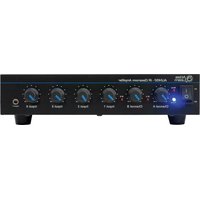
AL2430 - Receiver ATLAS - Free user manual and instructions
Find the device manual for free AL2430 ATLAS in PDF.


Pick your language and provide your email: we'll send you a specifically translated version.
| Brand | Atlas |
| Model | AL2430 |
| Product Type | Receiver |
| Dimensions (W x D x H) | 430 x 320 x 150 mm |
| Weight | 8.5 kg |
| Power Supply | AC 220-240 V, 50/60 Hz |
| Power Output | 100 W per channel (8 ohms) |
| Frequency Response | 20 Hz – 20 kHz |
| Signal-to-Noise Ratio | 88 dB |
| Audio Inputs | 4 x HDMI, 2 x optical, 1 x coaxial, 1 x AUX |
| Audio Outputs | 2 x HDMI (ARC), 2 x subwoofer pre-out, 5-way binding posts |
| Audio Decoding | Dolby Atmos, DTS:X |
| Bluetooth | Yes, version 5.0 |
| Radio Tuner | FM / AM |
| Remote Control | Included |
| Main Functions | Surround sound processing, room calibration, multi-room audio |
| Ventilation | Do not cover, leave 20 cm clearance |
| Cleaning and Maintenance | Use dry, soft cloth; avoid liquids |
| Safety Instructions | Do not open casing; disconnect from mains during storms |
| Spare Parts and Repairability | Authorized service center only |
Frequently Asked Questions - AL2430 ATLAS
How do I connect the AL2430 to my TV?
Use an HDMI cable from the receiver's HDMI OUT (ARC) port to your TV's HDMI ARC port. Then select the correct input on both devices. For audio return, enable ARC in the TV settings.
How do I set up the speaker system?
Connect your front, center, and surround speakers to the corresponding terminals, ensuring positive/negative alignment. Use the on-screen menu to assign channels and set distance/level.
How do I stream music via Bluetooth?
Press the Bluetooth button on the remote, enter pairing mode, and select 'ATLAS AL2430' from your device's Bluetooth settings. The receiver will automatically play paired audio.
Which audio formats are supported?
The AL2430 supports Dolby Atmos, DTS:X, and common formats like PCM and AAC. For multichannel PCM, use HDMI inputs.
How do I calibrate the room sound?
Use the auto-calibration function with the supplied microphone. Place the mic at your listening position and start the setup; the receiver will measure and adjust speaker levels.
How do I clean and maintain the receiver?
Wipe the exterior with a dry, soft cloth. Do not use chemicals or water. Remove dust from ventilation slots with a vacuum cleaner or soft brush.
Can I control the AL2430 without the remote?
Yes, the front panel includes buttons for power, input, volume, and menu navigation. The remote offers full access to setup features.
What is the standby power consumption?
In standby mode, power consumption is less than 0.3 W, complying with eco-design regulations. Turn off at the main switch for zero consumption.
How do I reset to factory settings?
Turn off the receiver, then press and hold the Sound Mode button for 5 seconds while powering on. The display shows 'INITIALIZED'.
Why is there no sound from the surround speakers?
Check that the speaker output is set to a surround mode (e.g., Dolby Surround) and verify speaker connections. Run the speaker setup again to confirm the surround channels are enabled.
User questions about AL2430 ATLAS
0 question about this device. Answer the ones you know or ask your own.
Ask a new question about this device
No questions yet. Be the first to ask one.
Download the instructions for your Receiver in PDF format for free! Find your manual AL2430 - ATLAS and take your electronic device back in hand. On this page are published all the documents necessary for the use of your device. AL2430 by ATLAS.
USER MANUAL AL2430 ATLAS

Manual assistant
Powered by Anthropic
Waiting for your message
Product information
Brand : ATLAS
Model : AL2430
Category : Receiver