AA200PHD-CE - Receiver ATLAS - Free user manual and instructions
Find the device manual for free AA200PHD-CE ATLAS in PDF.


Pick your language and provide your email: we'll send you a specifically translated version.
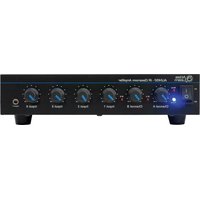
| Product type | Receiver |
| Brand | Atlas |
| Model | AA200PHD-CE |
| Color | Black |
| Dimensions (W x H x D) | 430 x 60 x 300 mm |
| Weight | 7.5 kg |
| Power supply | AC 230V, 50Hz |
| Power output | 2 x 100W RMS (4 Ohms) |
| Tuner | FM/AM with 30 presets |
| Audio inputs | 2x RCA, 1x AUX, 1x USB |
| Audio outputs | Speaker terminals, RCA line out, headphone jack |
| Bluetooth version | 5.0 |
| Remote control | Included |
| Display | LED with adjustable brightness |
| Tone control | Bass, treble |
| Protection circuit | Overload and short-circuit protection |
| Cleaning instructions | Use a soft dry cloth. Do not use chemicals. |
| Safety | Do not expose to water or humidity. |
| Reparability | Spare parts available from authorized service centers. |
| Included accessories | Remote control, batteries, instruction manual |
Frequently Asked Questions - AA200PHD-CE ATLAS
How do I connect my device to a power source?
Plug the AC power cord into a 230V outlet. Make sure the receiver is switched off before connecting.
Can I use this receiver with my TV?
Yes, connect the audio output of your TV to the AUX or RCA input on the receiver using a suitable cable.
How do I pair my smartphone via Bluetooth?
Put the receiver in Bluetooth mode, search for 'ATLAS AA200PHD' on your phone and pair it.
My receiver has no sound. What should I check?
Verify that the speakers are correctly connected and the volume is not muted. Also check the input selection.
How do I preset FM radio stations?
Tune to the desired frequency, then press and hold a preset number button to save it.
What is the maximum supported USB drive size?
The USB port supports devices up to 32 GB with FAT32 format.
Can I connect a subwoofer?
Yes, use the RCA line-out to connect an active subwoofer.
How to clean the receiver?
Unplug the device and wipe the exterior with a soft, dry cloth. Do not use solvents.
The remote control is not working. What to do?
Check the batteries and ensure there are no obstacles between the remote and the receiver.
How can I reset the receiver to factory settings?
Turn off the device, then press and hold the Power button for 10 seconds until the display flashes.
User questions about AA200PHD-CE ATLAS
0 question about this device. Answer the ones you know or ask your own.
Ask a new question about this device
No questions yet. Be the first to ask one.
Download the instructions for your Receiver in PDF format for free! Find your manual AA200PHD-CE - ATLAS and take your electronic device back in hand. On this page are published all the documents necessary for the use of your device. AA200PHD-CE by ATLAS.
USER MANUAL AA200PHD-CE ATLAS

Manual assistant
Powered by Anthropic
Waiting for your message
Product information
Brand : ATLAS
Model : AA200PHD-CE
Category : Receiver