
AA240G - Receiver ATLAS - Free user manual and instructions
Find the device manual for free AA240G ATLAS in PDF.


Pick your language and provide your email: we'll send you a specifically translated version.
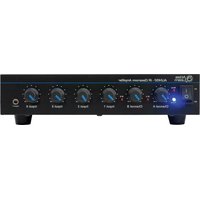
| Product type | Audio receiver |
| Brand | Atlas |
| Model | AA240G |
| Dimensions (W x H x D) | 430 x 60 x 250 mm |
| Weight | 3.5 kg |
| Power supply | 230 V AC, 50 Hz |
| Power consumption | 45 W operating, 0.5 W standby |
| Main features | FM/AM reception, stereo amplification 2x50W, analog and digital audio inputs, headphone output, built-in tuner |
| Inputs | 2x RCA, 1x optical, 1x coaxial, 1x AUX 3.5 mm |
| Outputs | 2x speakers (banana), 1x headphone (3.5 mm), 1x subwoofer (RCA) |
| Radio frequency ranges | FM: 87.5-108 MHz, AM: 520-1620 kHz |
| Maintenance and cleaning | Unplug the device before cleaning. Use a soft, dry cloth. Do not use abrasive or liquid products. |
| Safety instructions | Do not expose to humidity or excessive heat. Ensure adequate ventilation. Unplug during storms or prolonged non-use. |
| Spare parts and repairability | Repairability index: 7.5/10. Available parts: remote control, antenna, fuses, power supply. Contact customer service for repairs. |
| Package contents | Receiver, remote control with batteries, FM antenna, power cord, quick start guide |
Frequently Asked Questions - AA240G ATLAS
How to connect the Atlas AA240G receiver to my speakers?
Use speaker cables with banana plugs or clips. Connect the positive (+) and negative (-) terminals correctly. Make sure the speaker impedance is compatible (4-8 ohms).
How to tune FM/AM radio stations?
Press the Source button to select FM or AM. Use the Scan or Search buttons to automatically search for stations. Found stations can be memorized by long-pressing a preset button.
Can I connect a TV to the receiver?
Yes, the receiver has optical and coaxial inputs. Connect your TV's audio output to one of these inputs. Then select the corresponding source on the receiver.
What to do if the receiver does not turn on?
Check that the power cord is properly plugged in and the mains socket works. If the problem persists, check the internal fuse (see the manual for location). As a last resort, contact technical support.
How to use the remote control?
Insert the supplied batteries (AAA type) observing polarity. Point the remote at the receiver's infrared sensor. The buttons allow you to change source, adjust volume, navigate menus, and turn the device on/off.
What is the output power of the receiver?
The receiver delivers 2 x 50 watts at 8 ohms, in stereo. This is suitable for home use in a medium-sized room.
The sound is distorted. What to do?
Check that the speaker cables are properly connected and not damaged. Make sure the volume is not too high (distortion). Try another audio source to isolate the problem. If distortion persists, contact customer service.
How to clean the receiver?
Unplug the device. Use a soft, dry cloth to dust the surfaces. Never use liquid or abrasive products. For ventilation grilles, a soft brush can be used.
Can I use the receiver with headphones?
Yes, plug your headphones (3.5 mm plug) into the Headphone jack on the front panel. The speaker output will be automatically muted.
How to reset the receiver to factory settings?
Hold down the Power button for 5 seconds while turning on the device. All settings, including memorized stations, will be cleared. Consult the manual for the exact procedure.
User questions about AA240G ATLAS
0 question about this device. Answer the ones you know or ask your own.
Ask a new question about this device
No questions yet. Be the first to ask one.
Download the instructions for your Receiver in PDF format for free! Find your manual AA240G - ATLAS and take your electronic device back in hand. On this page are published all the documents necessary for the use of your device. AA240G by ATLAS.
USER MANUAL AA240G ATLAS
Manual assistant
Powered by Anthropic
Waiting for your message
Product information
Brand : ATLAS
Model : AA240G
Category : Receiver