AA60G - Receiver ATLAS - Free user manual and instructions
Find the device manual for free AA60G ATLAS in PDF.


Pick your language and provide your email: we'll send you a specifically translated version.
| Brand | ATLAS |
| Model | AA60G |
| Product Type | AV Receiver |
| Channels | 5.1 |
| Power Output per Channel | 100 W (8 ohms, 20 Hz - 20 kHz, 0.08% THD) |
| Supported Audio Formats | Dolby Digital, DTS, PCM |
| HDMI Inputs | 4 |
| HDMI Outputs | 1 (ARC supported) |
| Optical Digital Input | 1 |
| Coaxial Digital Input | 1 |
| Analog Audio Inputs | 2 pairs (RCA) |
| FM/AM Tuner | Yes |
| Bluetooth | Yes (Version 4.2) |
| Wi-Fi | No |
| Dimensions (W x H x D) | 435 x 150 x 330 mm |
| Weight | 8.5 kg |
| Power Supply | AC 220-240 V, 50/60 Hz |
| Power Consumption | 350 W (standby: 0.5 W) |
| Remote Control | Included (Infrared) |
| Speaker Impedance | 4 - 16 ohms |
| Frequency Response | 20 Hz - 20 kHz (±1 dB) |
| Signal-to-Noise Ratio | 100 dB |
| Total Harmonic Distortion | 0.08% |
| Cleaning Instructions | Wipe with a dry, soft cloth. Do not use solvents. |
| Safety Features | Overload protection, auto shut-off after 30 min of inactivity |
Frequently Asked Questions - AA60G ATLAS
How do I connect my TV to the ATLAS AA60G receiver?
Connect the HDMI output of your TV to one of the HDMI inputs on the receiver. Ensure the receiver is set to the correct input source. For audio return channel (ARC), use the HDMI ARC-labeled port on both devices and enable ARC in the TV settings.
What is the maximum power output per channel?
The AA60G delivers up to 100 watts per channel into 8 ohms, with 0.08% THD, from 20 Hz to 20 kHz.
Does the AA60G support Bluetooth connectivity?
Yes, the ATLAS AA60G has built-in Bluetooth 4.2, allowing you to stream music wirelessly from your smartphone, tablet, or computer.
How many HDMI inputs does the receiver have?
The receiver features 4 HDMI inputs and one HDMI output with ARC support for connecting your TV and other devices.
Can I use the AA60G with a 4K TV?
Yes, the AA60G supports 4K Ultra HD passthrough at 60 Hz, so you can enjoy high-resolution video from your source devices.
What speaker impedance is compatible with this receiver?
The AA60G is designed to work with speakers rated from 4 to 16 ohms. Ensure your speakers are within this range to avoid damage.
How do I reset the receiver to factory settings?
Press and hold the Power button on the front panel while turning the unit on. Continue holding until the display shows 'Clear' or 'Reset'. Release the button. The receiver will restart with factory defaults.
What is the standby power consumption?
In standby mode, the AA60G consumes less than 0.5 watts, making it energy-efficient.
Does the receiver include a remote control?
Yes, an infrared remote control is included with the ATLAS AA60G for convenient operation.
How do I clean the receiver?
Use a dry, soft cloth to wipe the exterior. Do not use any chemical solvents or abrasive cleaners. Ensure the unit is unplugged before cleaning.
User questions about AA60G ATLAS
0 question about this device. Answer the ones you know or ask your own.
Ask a new question about this device
No questions yet. Be the first to ask one.
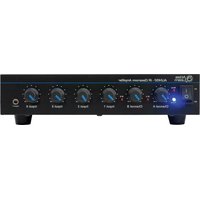
Download the instructions for your Receiver in PDF format for free! Find your manual AA60G - ATLAS and take your electronic device back in hand. On this page are published all the documents necessary for the use of your device. AA60G by ATLAS.
USER MANUAL AA60G ATLAS


Manual assistant
Powered by Anthropic
Waiting for your message
Product information
Brand : ATLAS
Model : AA60G
Category : Receiver