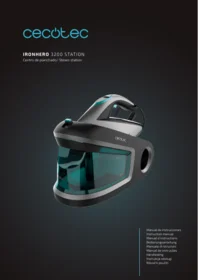
Ironhero 3200 Station - Iron CECOTEC - Free user manual and instructions
Find the device manual for free Ironhero 3200 Station CECOTEC in PDF.


| Product type | Steam station iron |
| Brand | Cecotec |
| Model | Ironhero 3200 Station |
| Power supply | 220-240 V ~ 50/60 Hz |
| Power | 3200 W |
| Weight | 2.5 kg |
| Water tank capacity | 1.5 L |
| Steam pressure | 5 bar |
| Steam output | 120 g/min |
| Soleplate | Non-slip ceramic soleplate |
| Vertical steam function | Yes |
| Anti-drip system | Yes |
| Auto shut-off | Yes |
| Cable length | 2 m |
| Cleaning and maintenance | Clean the soleplate with a damp cloth after cooling |
| Safety | Overheat protection, hot surface |
| Intended use | Domestic ironing |
| Spare parts and repairability | Service with available spare parts |
| General information | CE compliant |
Frequently Asked Questions - Ironhero 3200 Station CECOTEC
User questions about Ironhero 3200 Station CECOTEC
0 question about this device. Answer the ones you know or ask your own.
Ask a new question about this device
Download the instructions for your Iron in PDF format for free! Find your manual Ironhero 3200 Station - CECOTEC and take your electronic device back in hand. On this page are published all the documents necessary for the use of your device. Ironhero 3200 Station by CECOTEC.
USER MANUAL Ironhero 3200 Station CECOTEC
Safety instructions 6
- Parts and components 27
- Before use 27
- Operation 28
- Cleaning and maintenance 28
- Troubleshooting 29
- Technical specifications 29
- Disposal of old electrical and electronic appliances 30
- Technical support and warranty 30
- Copyright 30
SOMMAIRE
Read these instructions thoroughly before using the appliance. Keep this instruction manual for future reference or new users.
- Ensure that the mains voltage matches the voltage specified on the appliance rating label and that the plug is earthed.
- This appliance is designed for domestic use only and is not intended for bars, restaurants, farmhouses, hotels, motels, and offices. Do not use the appliance for industrial or commercial purposes.
- Do not use the iron if it has been dropped, shows visible damage, or is leaking.
- Do not immerse the cable, plug, or any other non-removable part of the appliance in water or any other liquid or expose electrical connections to water. Make sure your hands are dry before handling the plug or switching on the appliance.
- Check the power cable regularly for visible damage. If the power cable is damaged, it must be replaced by the Technical Support Service of Cecotec or similar qualified personnel to avoid risks.
- Do not leave the iron unattended while connected to the power supply.
- Keep the power cable away from the hot soleplate of the iron.
-
The appliance will reach very high temperatures during and after use, especially the soleplate. Do not touch the soleplate to avoid burns.
-
Unplug the appliance from the power supply as soon as you have finished using it, before cleaning it, or before leaving it unattended.
- Unplug the appliance before filling up the water tank.
- Keep all filling openings closed during use.
- Do not move the appliance during use.
- Do not use the appliance to iron wet fabrics.
- The iron must be used and placed on a stable, flat surface.
- Make sure the support base of the iron is stable before placing it on top.
- Do not cover the appliance with any cloth or plastic immediately after use.
- Do not pull on the power cable to disconnect the appliance from the socket. Pull on the plug instead.
- This symbol means: CAUTION, hot surface. The temperature of accessible surfaces may be high while the appliance is in use and could cause burns. Do not touch hot surfaces during operation or immediately after.
- This appliance can be used by children aged 8 years and above and persons with reduced physical, sensory, or mental capabilities or lack of experience and knowledge if they have been given supervision or instruction concerning use of the appliance in a safe way and understand the hazards involved. Children must not play with the appliance. Cleaning and user maintenance should not be carried out by unsupervised children.
- Supervise children to prevent them from playing with the appliance. Close supervision is necessary when the appliance is being used by or near children.
- Keep the iron and its power cable out of reach of children under 8 years old when plugged in or cooling down.
INSTRUCTIONS DE SÉCURITÉ
- Base
- Water tank
- Water-tank handle
- Safety lock
- Safety-lock button
- Control panel
- Cleaning button
- Mode button
- Power button
- Handle
- Cable
- Cable storage compartment
- Heel
- Safety lock
- Steam button
Control panel indicator lights. Fig. 2
- Automatic Power-failure Warning indicator light
- ECO Steam Mode indicator light
- Steam Mode indicator light
- Empty Water Tank indicator light
- Cleaning indicator light
Note:
The graphics in this manual are schematic representations and may not exactly match the appliance.
2. BEFORE USE
- This appliance is packaged in a way as to protect it during transport. Take the appliance out of its box and remove all packaging materials. You can keep the original box and other packaging elements in a safe place. This will help you prevent damage to the appliance when transporting it in the future. In case the original packaging is disposed of, make sure all packaging materials are recycled accordingly.
- Make sure all parts and components are included and in good conditions. If there is any piece missing or in bad conditions, contact the official Cecotec Technical Support Service immediately.
ENGLISH
3. OPERATION
Using the appliance
- Press the Power button to turn the appliance on.
- Hold down the Power button for 2 seconds to turn the appliance off.
- The steam station features an electronic temperature control, eliminating the need of manually adjusting the temperature.
Filling up the water tank
- Make sure the iron is unplugged from the mains.
- Remove the water tank and open the cap.
- Fill the water tank up to the MAX mark and close the cap.
Steam ironing
- Fill the water tank as described in the section 'Filling up the water tank'.
- Plug the iron to the mains.
- Wait for the iron to heat up before steam ironing to prevent the soleplate from leaking.
- Wait until the indicator light is no longer flashing to ensure that the soleplate is hot enough.
3.1 To activate continuous steam, press the Mode button. You can select between Steam mode and ECO Steam Mode. You can switch modes during ironing at any time by pressing the same button.
3.2 If you do not wish to use continuous steam, press the Steam button directly.
-
Once finished ironing, place the iron upright or on the base.
-
Unplug the iron from the mains. Discard the excess water and let the iron to cool down.
Ironing tips
- Always check if the garment to be steamed has a label with instructions for ironing, and if it has, follow the instructions.
- Synthetic fibre and silk fabrics should be ironed on their inner side to avoid them from being damaged.
- Velvet and other textures that rapidly become shiny should be ironed in one direction with light pressure applied. Always keep the iron moving.
- Pure wool fabrics (100% wool) may be ironed with the steam iron. Use a dry cloth as a mat and then select the corresponding fabric setting for ironing.
- Never iron over zip, rivet in the cloth, this will damage the soleplate.
4. CLEANING AND MAINTENANCE
Cleaning
If the pump has been running for 25 hours, the Cleaning indicator light will come on.
- Make sure there is enough water in the tank before cleaning. If necessary, fill up the water
tank as described in the section 'Filling up the water tank'.
- Plug the iron to the mains.
- Please place the iron in a safe position before cleaning to avoid scalding caused by hot water.
- Once the iron heats up enough, hold down the Cleaning button for 3 seconds: the iron will enter Cleaning mode, the display will flash, and three beeps will sound.
- Two minutes later, the iron will beep three times, indicating that cleaning is complete.
Auto switch-off
- The iron switched off after 10 minutes of inactivity.
- The corresponding indicator light flashes on the display, accompanied by six beeps.
- Press the Steam button to resume operation.
- The iron will not switch off during steam emission.
Anti-drip
This iron is equipped with an anti-drip function: the iron automatically stops steaming when the temperature is too low to prevent water dripping from the soleplate.
5. TROUBLESHOOTING
Do not attempt to replace a defective power cable. Contact the official Cecotec Technical Support Service.
The iron gives off odour or smoke
The iron gives off a strange smell upon first switch-on. Manufacturing oils must be burnt off by keeping the iron on for ten minutes.
The iron does not heat up
Make sure that the mains voltage matches the voltage stated on the rating label of the appliance.
6. TECHNICAL SPECIFICATIONS
Product reference: 01865
Product: IronHero 3200 Station
Power: 2800-3200 W
Voltage and frequency: 220-240 V, 50/60 Hz
Technical specifications may change without prior notice to improve product quality.
Made in China | Designed in Spain
7. DISPOSAL OF OLD ELECTRICAL AND ELECTRONIC APPLIANCES

This symbol indicates that, according to the applicable regulations, the product and/or batteries must be disposed of separately from household waste. When this product reaches the end of its shelf life, you should dispose of the cells/batteries/accumulators and take them to a collection point designated by the local authorities. Consumers must contact their local authorities or retailer for information concerning the correct disposal of old appliances and/or their batteries.
Compliance with the above guidelines will help protecting the environment.
8. TECHNICAL SUPPORT AND WARRANTY
Cecotec shall be liable to the end user or consumer for any lack of conformity that exists at the time of delivery of the product under the terms, conditions, and deadlines established by the applicable regulations.
It is recommended that repairs are carried out by qualified personnel.
If at any moment you detect any problem with your product or have any doubt, do not hesitate to contact the official Cecotec Technical Support Service at +34 963 210 728.
9. COPYRIGHT
The intellectual property rights over the texts in this manual belong to CECOTEC INNOVACIONES, S.L. All rights reserved. The contents of this publication may not, in whole or in part, be reproduced, stored in a retrieval system, transmitted, or distributed by any means (electronic, mechanical, photocopying, recording or similar) without the prior authorization of CECOTEC INNOVACIONES, S.L.
1. PIÈCES ET COMPOSANTS
Img. 1
5. PROBLEEMOPLOSSING
Product: IronHero 3200 Station
Vermogen: 2800-3200 W
Voltage en frequentie: 220-240 V, 50/60 Hz
Fig./Img./Abb./Afb./Rys./Obr.1

Fig./Img./Abb./Afb./Rys./Obr. 2
www.cecotec.es
- SOMMAIRE
- INSTRUCTIONS DE SÉCURITÉ
- CONTROL PANEL INDICATOR LIGHTS. FIG. 2
- NOTE
- BEFORE USE
- ENGLISH
- OPERATION
- USING THE APPLIANCE
- FILLING UP THE WATER TANK
- STEAM IRONING
- IRONING TIPS
- CLEANING AND MAINTENANCE
- CLEANING
- AUTO SWITCH-OFF
- ANTI-DRIP
- TROUBLESHOOTING
- THE IRON GIVES OFF ODOUR OR SMOKE
- THE IRON DOES NOT HEAT UP
- TECHNICAL SPECIFICATIONS
- DISPOSAL OF OLD ELECTRICAL AND ELECTRONIC APPLIANCES
- TECHNICAL SUPPORT AND WARRANTY
- COPYRIGHT
- PIÈCES ET COMPOSANTS
- IMG. 1
- PROBLEEMOPLOSSING
Brand : CECOTEC
Model : Ironhero 3200 Station
Category : Iron