Energysilence 1090 Skyline Retro Smart - Ceiling fan CECOTEC - Free user manual and instructions
Find the device manual for free Energysilence 1090 Skyline Retro Smart CECOTEC in PDF.


| Brand | Cecotec |
| Model | Energysilence 1090 Skyline Retro Smart |
| Product type | Tower fan |
| Available colors | Green, White, Blue |
| References | 08226, 08227, 08228 |
| Power supply | 220-240 V~, 50-60 Hz |
| Power | 40 W |
| Power consumption | 38.5 W |
| Standby consumption | 0.25 W |
| Maximum air flow | 16.68 m³/min |
| Maximum air speed | 1.39 m/s |
| Acoustic power level | 56.74 dB(A) |
| Service value | 0.43 (m³/min)/W |
| Measurement standard | IEC 60789:2019 |
| Number of speeds | 3 (Low, Medium, High) |
| Operating modes | Night, Natural, Normal |
| Timer | 0.5 to 12 hours |
| Oscillation | Yes |
| Remote control | Included, with CR2025 battery |
| Control panel | Touch |
| Care and cleaning | Soft, damp cloth, without abrasive products |
| Box contents | Fan, remote control, CR2025 battery, instruction manual |
Frequently Asked Questions - Energysilence 1090 Skyline Retro Smart CECOTEC
User questions about Energysilence 1090 Skyline Retro Smart CECOTEC
0 question about this device. Answer the ones you know or ask your own.
Ask a new question about this device
Download the instructions for your Ceiling fan in PDF format for free! Find your manual Energysilence 1090 Skyline Retro Smart - CECOTEC and take your electronic device back in hand. On this page are published all the documents necessary for the use of your device. Energysilence 1090 Skyline Retro Smart by CECOTEC.
USER MANUAL Energysilence 1090 Skyline Retro Smart CECOTEC
- Parts and components 37
- Before use 37
- Product assembly 37
- Operation 38
- Cleaning and maintenance 39
- Technical specifications 40
- Disposal of old electrical and electronic appliances 41
- Technical support and warranty 41
- Copyright 41
SOMMAIRE
- Read these instructions thoroughly before using the device. Keep this instruction manual for future reference or new users.
- All safety instructions must be closely followed when using the appliance.
- This appliance can be used by children aged 8 years and above and people with reduced physical, sensory, or mental capabilities or lack of experience and knowledge if they have been given supervision or instruction concerning use of the appliance in a safe way and understand the hazards involved. Children must not play with the appliance. Cleaning and user maintenance should not be carried out by unsupervised children.
- This device is designed for domestic use only and is not intended for bars, restaurants, farmhouses, hotels, motels, and offices.
- Make sure that the mains voltage matches the voltage stated on the appliance marking and that the wall outlet is earthed.
- Check the power cable regularly for visible damage. If the cable is damaged, it must be repaired by the official Cecotec Technical Support Service in order to avoid any type of danger.
- Do not immerse the cable, plug, or any other non-removable part of the device in water or any other liquid or expose electrical connections to water. Make sure your hands are dry before handling the plug or switching on the device.
- If the appliance falls accidentally into water, unplug it immediately. Do not touch the water!
-
Do not operate the device if any fault or unusual sign is detected.
-
Do not operate the product next to combustible or explosive gas.
- The appliance must not be placed immediately below a socket.
- Keep hair, loose clothing, fingers, and other parts of the body away from the openings and moving parts of the device.
- Make sure the appliance is placed on a flat and stable surface and do not move it during operation.
- Do not use the appliance near a window or places where it could get wet (at least 2 metres away), as water could cause an electric shock.
- Do not operate the product under or next to curtains.
- Do not cover the air inlet and outlet and do not place the product's cable under carpets or other objects during operation. Keep the front, back, and sides of appliance at a minimum safety distance from walls and other objects.
- Do not leave the appliance unattended while in use.
- It is not recommended to use the product with an extension lead.
- Always turn off and unplug the device when not in use and before assembling, disassembling, or moving it. Pull from the plug, not the cable, to disconnect it from the outlet.
- Cleaning and maintenance tasks should be carried out according to this manual to ensure the correct operation of the device.
- Supervise children to prevent them from playing with the appliance. Close supervision is necessary when the appliance is being used by or near children.
Instructions on batteries
- Do not burn or expose the batteries to high temperatures, as they may explode.
- Leaks from the batteries can occur under extreme conditions.
- Do not touch any liquid that leaks from the batteries. If the liquid gets into contact with skin, wash immediately with soap and water. If the liquid gets into the eyes, wash them immediately with clean water for a minimum of 10 minutes and seek medical attention. Wear gloves to handle the battery and dispose of it immediately in accordance with local regulations.
- Avoid contact between the batteries and small metal objects such as paper clips, coins, keys, nails, or screws.
- Do not tamper with the batteries in any way.
- The batteries must be removed for safe disposal of the machine.
- Keep the batteries out of the reach of children when there is a risk of ingestion.
- Battery ingestion can cause burns, soft-tissue perforation, and death. It can cause severe burns within two hours of the ingestion.
- In case of battery ingestion, please seek medical help immediately.
- The batteries' power supply terminals must not be short-circuited.
- If the machine is to be stored for a long period of time, it is advisable to remove the batteries.
- The batteries must be inserted in the correct position.
- When replacing batteries, check the polarity.
INSTRUCTIONS DE SÉCURITÉ
The graphics in this manual are schematic representations and may not exactly match the device.
2. BEFORE USE
- This appliance is packaged in a way as to protect it during transport. Take the device out of its box and remove all packaging materials. You can keep the original box and other packaging elements in a safe place. This will help you prevent damage to the device when transporting it in the future. In case the original packaging is disposed of, make sure all packaging materials are recycled accordingly.
- Make sure all parts and components are included and in good conditions. If there is any piece missing or in bad conditions, contact the official Cecotec Technical Support Service immediately.
Box content
- Tower fan
- Remote control
- Instruction manual
- 1 CR2025 battery
3. PRODUCT ASSEMBLY
- Take all the parts out of the box and remove all packaging materials.
- Turn the fan upside down and loosen the nut at the bottom.
- The base is composed of two halves. Before joining them together, make sure that the
ENGLISH
power cable goes through the hole on the base. Then, place the already assembled base on its bracket. Tighten it securely with the nut.
- Pass the power cable from the bottom of the base through the outlet hole.
Parts are shown below in Fig. 2:
- Nut
- Base half 1
- Base half 2
- Base bracket
4. OPERATION
Fan functions Control panel
Fig. 3
- Power icon
- Speed icon
- Mode icon: Sleep-Natural-Normal
- Timer icon
-
Oscillation icon
-
Press the power icon/button ⏻ to switch on/off the fan. Once switched on, if you press the speed icon/button ||, the fan will cycle through the three speeds (Low-Medium-High), and the corresponding indicator light will light up.
- Press the oscillation icon/button ⏻ to activate the oscillation function.
- When you switch on the fan for the first time, the mode indicator light will light up, indicating that the fan is operating in Normal mode. Press the timer icon/button ⏰ to select when you want the fan to switch off. This time can range from 0.5 to 12 hours.
- Press the mode icon/button (Sleep-Natural-Normal) ⏻ to select the desired mode.
Natural mode
- If, when this mode is selected, the fan is running at High speed, it will alternate between High, Medium, and Low speeds.
- If, when this mode is selected, the fan is running at Medium speed, it will alternate between Medium and Low speeds.
- If, when this mode is selected, the fan is running at Low speed, the fan will run at Low speed and turn off alternately.
Sleep mode
- If, when this mode is selected, the fan is running at High speed, it will switch to Natural mode at High speed for 30 minutes; then, to Natural mode at Medium speed for another 30 minutes, and finally to Natural mode at Low speed for the remaining time.
- If, when this mode is selected, the fan is running at Medium speed, it will switch to Natural mode at Medium speed for 30 minutes; then, to Natural mode at Low speed for the remaining time.
- If, when this mode is selected, the fan is running at Low speed, it will switch to Natural mode at Low speed.
Remote control
NOTE:
The operations on the remote control are identical to those on the control panel.
Fig. 4
- Power button
- Speed button
- Mode button (Sleep-Natural-Normal)
- Timer button
-
Oscillation button
-
The remote control of this tower fan requires one CR2025 battery.
- Figure 5 details the procedure to change it.
5. CLEANING AND MAINTENANCE
- Always disconnect electrical and electronic appliances before cleaning them.
- Use a soft, damp cloth to clean the surface of the device.
- Do not use abrasive or corrosive products.
- Do not immerse any part of the fan in water or other liquids.
- After cleaning, carefully dry the appliance and make sure that all the electrical parts are completely dry.
- Make sure the air inlet and outlet are kept clean and protected from dust and dirt.
- If the product is not going to be used for a long period, unplug it, and store it in a dry and safe place.
6. TECHNICAL SPECIFICATIONS
Product reference: 08226 - 08227 - 08228
Product:
EnergySilence 1090 Skyline Retro Smart Green tower fan
EnergySilence 1090 Skyline Retro Smart White tower fan
EnergySilence 1090 Skyline Retro Smart Blue tower fan
Power: 40 W
Voltage: 220 - 240 V\~
Frequency: 50-60 Hz
| Description | Symbol | Value | Unit |
| Fan maximum flow | F | 16.68 | m3/min |
| Fan power consumption | P | 38.5 | W |
| Service value | SV | 0.43 | (m3/min)/W |
| Power consumption on standby mode | PSB | 0.25 | W |
| Fan sound power level | LWA | 56.74 | dB (A) |
| Maximum air speed | C | 1.39 | m/seg |
| Service value measurement standard | IEC 60789:2019 | ||
| Contact details to obtain more information | Cecotec Innovaciones S.L.Av. Reyes Católicos n°60, 46910,Alfafar (Valencia, Spain) | ||
The power consumption in standby mode is 0.25 W using the guidelines of EN 50564:2011 and the European regulations 1275/2008/EC and 801/2013/EC. For this purpose, the device is connected to the mains without performing any function, waiting for the standby mode to be activated.
Technical specifications may change without prior notification to improve product quality.
Made in China | Designed in Spain
7. DISPOSAL OF OLD ELECTRICAL AND ELECTRONIC APPLIANCES
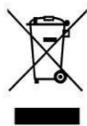
This symbol indicates that, according to the applicable regulations, the product and/or batteries must be disposed of separately from household waste. When this product reaches the end of its shelf life, you should dispose of the cells/batteries/accumulators and take them to a collection point designated by the local authorities.
Consumers must contact their local authorities or retailer for information concerning the correct disposal of old appliances and/or their batteries.
Compliance with the above guidelines will help protecting the environment.
8. TECHNICAL SUPPORT AND WARRANTY
Cecotec shall be liable to the end user or consumer for any lack of conformity that exists at the time of delivery of the product under the terms, conditions, and deadlines established by the applicable regulations.
It is recommended that repairs be carried out by qualified personnel.
If at any moment you detect any problem with your product or have any doubt, do not hesitate to contact the official Cecotec Technical Support Service at +34 963 210 728.
9. COPYRIGHT
The intellectual property rights over the texts in this manual belong to CECOTEC INNOVACIONES, S.L. All rights reserved. The contents of this publication may not, in whole or in part, be reproduced, stored in a retrieval system, transmitted, or distributed by any means (electronic, mechanical, photocopying, recording or similar) without the prior authorization of CECOTEC INNOVACIONES, S.L.
FRANÇAIS
1. PIÈCES ET COMPOSANTS
Img. 1
- Base
- Grille avant
Écran
Fig./Img./Abb./Afb./Rys. 2
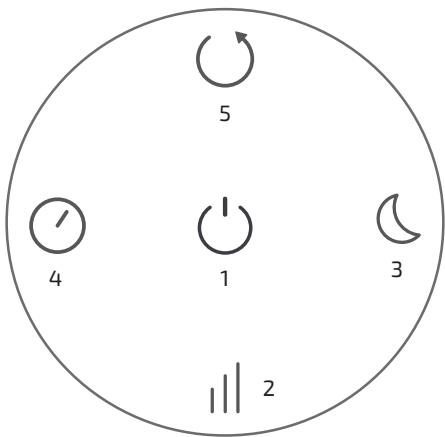
Fig./Img./Abb./Afb./Rys. 3
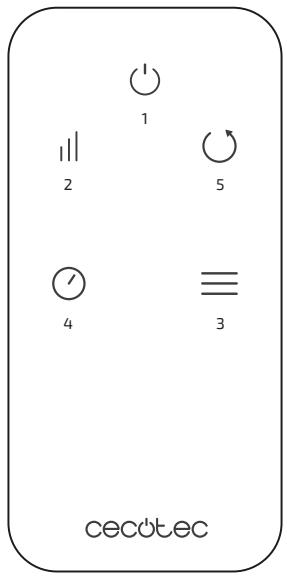
Fig./Img./Abb./Afb./Rys. 4

Fig./Img./Abb./Afb./Rys. 5
www.cecotec.es
- SOMMAIRE
- INSTRUCTIONS ON BATTERIES
- INSTRUCTIONS DE SÉCURITÉ
- BEFORE USE
- BOX CONTENT
- PRODUCT ASSEMBLY
- ENGLISH
- OPERATION
- FAN FUNCTIONS CONTROL PANEL
- NATURAL MODE
- SLEEP MODE
- REMOTE CONTROL
- NOTE
- FIG. 4
- CLEANING AND MAINTENANCE
- TECHNICAL SPECIFICATIONS
- DISPOSAL OF OLD ELECTRICAL AND ELECTRONIC APPLIANCES
- TECHNICAL SUPPORT AND WARRANTY
- COPYRIGHT
- FRANÇAIS
- PIÈCES ET COMPOSANTS
- IMG. 1
- ÉCRAN
Brand : CECOTEC
Model : Energysilence 1090 Skyline Retro Smart
Category : Ceiling fan