
TUNECAST AUTO 3 #F8Z182EABLK - FM Transmitter BELKIN - Free user manual and instructions
Find the device manual for free TUNECAST AUTO 3 #F8Z182EABLK BELKIN in PDF.


User questions about TUNECAST AUTO 3 #F8Z182EABLK BELKIN
0 question about this device. Answer the ones you know or ask your own.
Ask a new question about this device
Download the instructions for your FM Transmitter in PDF format for free! Find your manual TUNECAST AUTO 3 #F8Z182EABLK - BELKIN and take your electronic device back in hand. On this page are published all the documents necessary for the use of your device. TUNECAST AUTO 3 #F8Z182EABLK by BELKIN.
USER MANUAL TUNECAST AUTO 3 #F8Z182EABLK BELKIN
Your TuneCast Auto is designed to power, charge, and transmit audio from your iPod to your car stereo. Please review this User Manual carefully so that you can get the most from your TuneCast Auto, virtually anywhere you go.
Connecting Your TuneCast Auto
- Turn down your stereo's volume.
- Connect your TuneCast Auto to the cigarette lighter or power outlet in your vehicle
- Connect your iPod to your TuneCast Auto. Your TuneCast Auto will turn on automatically when it detects your iPod.

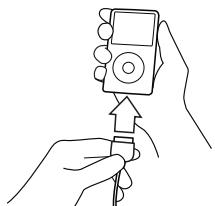
Note: Your TuneCast Auto will automatically turn off if there is no audio for about 30 seconds for European versions, but it will automatically turn on again when it detects audio from your iPod. You can also press the "m1" or "m2" button to turn on your TuneCast Auto.
Introduction EN-1
Selecting an FM Frequency
Selecting an FM Frequency
You can use ClearScan to find a frequency and match it to your stereo, or you can find a frequency on your stereo and match your TuneCast Auto to the same frequency
Using ClearScan to Select the Best FM Frequency (recommended)
Your TuneCast Auto uses ClearScan technology to constantly scan for the clearest FM frequency in your area.
- Press the CLEARSCAN button. Your TuneCast Auto will display the best frequency.
- Tune your stereo to the frequency on your TuneCast Auto display.
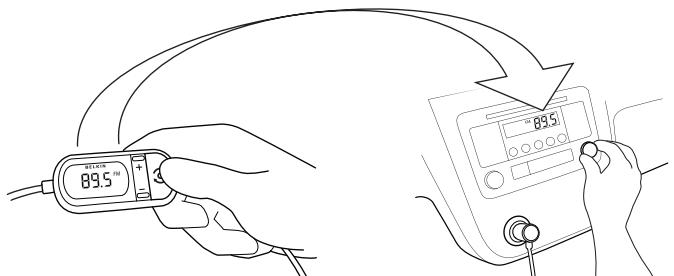
Note: If you immediately press the "ClearScan" button when you turn on your TuneCast Auto, it may take up to 30 seconds for ClearScan to locate the best frequency. If your audio signal declines, just press "ClearScan" and the best FM frequency will instantly display.
Selecting an FM Frequency EN-2
Selecting an FM Frequency
Manually Selecting an FM Frequency
If you want to use a specific frequency, you can manually select it on your TuneCast Auto.
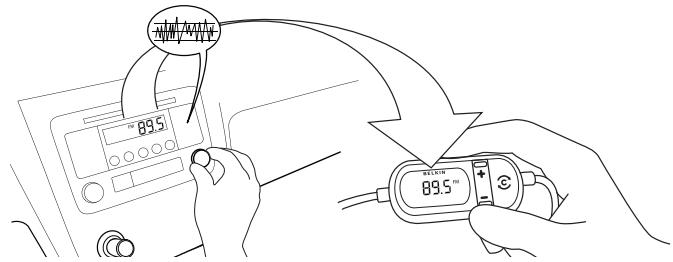
- Tune your stereo to a frequency between stations. The ideal frequency is one not broadcasting a radio station's signal
- Press the + or - button on your TuneCast Auto to select the same frequency.
Storing and Selecting a Frequency
You can store two frequencies using the "m1" and "m2" buttons.
- To store a frequency, select the desired frequency on your TuneCast Auto using the + or - buttons.
- Press and hold the "m1" or "m2" preset button for two seconds. The "m1" or "m2" icon will flash on the screen and you will hear a beep when the frequency is set.
- To recall a preset frequency, press the "m1" or "m2" preset button. Your TuneCast Auto will change to the preset frequency.
Selecting an FM Frequency
EN-3
Using the TuneCast Auto
Using the PRO Setting to Improve Performance
When you connect your iPod, your TuneCast Auto will automatically detect the iPod model and adjust the volume. Although the default volume setting will be ideal for most conditions, you may be able to improve the audio performance of your TuneCast Auto by using the PRO setting. The PRO setting can make your music sound louder and fuller by decreasing the amount of attenuation in the audio signal. Professional FM stations use dynamic compression to make music louder and fuller while limiting distortion. You can use the three PRO settings on your TuneCast Auto to add dynamic compression to your audio:
Normal - No change to the audio. This setting works well with all types of audio.
PRO 1 - Increases the average volume of the audio. This setting works well with most types of music.
PRO 2 - Increases the average volume even further. This setting works well with quieter music, but it may cause distortion with louder music.
PRO - Increases the average volume and transmits in mono (instead of stereo). This setting works well for podcasts and audio books. It can also be used to improve reception if you are not receiving a clear signal from your TuneCast Auto.
When you press the "PRO" button, your TuneCast Auto will display the current PRO setting. Pressing the "PRO" button again will change the setting to PRO1, PRO2, and PRO as follows:

Using the TuneCast Auto EN-4
Using the TuneCast Auto
Listening to Mono Recordings
Your TuneCast Auto transmits in stereo, but you can also transmit in mono if needed. We suggest that you switch to mono transmission only if your car stereo is not receiving a clear signal from the TuneCast Auto or if you are listening to a mono recording such as an audio book.
To switch to mono transmission, press the "PRO" button until PRO is shown on the display. The "PRO" button settings are as follows:

Charging Your iPod
Your TuneCast Auto will charge your iPod while it is connected to a power outlet and receiving power. If your iPod is not charging, make sure your TuneCast Auto is correctly connected to the power outlet and that your iPod is securely connected to your TuneCast Auto. The indicator light on the cigarette lighter adapter should be lit.
Note: Some vehicles do not provide power to the power outlet unless the vehicle is in ignition mode or the engine is running.
Using the TuneCast Auto EN-5
Information
SafetyWarnings
Do not attempt to connect your TuneCast Auto while driving. Make sure your TuneCast Auto fits securely and firmly into the power outlet before driving.
Do not attempt to adjust or retrieve an unsecured TuneCast Auto or iPod while driving.
Position the TuneCast Auto so that both the TuneCast Auto and the iPod do not interfere with any of the operating controls of the car.
Do not insert any objects other than the cigarette lighter adapter into the power outlet without disconnecting the battery of the car first. Failure to observe this safety warning can result in injury or property damage.
Belkin does not assume any responsibility for personal injury or property damage incurred due to hazardous driving as a result of interaction with the TuneCast Auto, the iPod, or the vehicle's power outlet.
f this equipment does cause harmful interference to radio or television reception, which can be determined by turning the equipment off and on, the user is encouraged to try to correct the interference by one of the following measures:
- Reorient or relocate the receiving antenna.
- Increase the separation between the equipment and receiver.
- Connect the equipment into an outlet on a circuit different from that which the receiver is connected.
- Consult the dealer or an experienced radio/TV technician for help.
Under certain circumstances ESD may cause this device to shut down. In these circumstances simply power the unit off by removing the CLA and then plug back in, restore power and switch back on
Electrical/Environmental Specifications
Power Requirement: 12V DC, 500mA at CLA input
Fuse: Current rating 4A, Voltage rating 250V
This product complies to the WEEE directive.
For recycling information please follow the following link: www.belkin.com/environmental
At 3 October 2007 this device may be used in: Germany, Switzerland, Iceland, Lichtenstein, Poland, Estonia, Czech Republic, Norway, Finland, Luxembourg, Denmark, Spain, Portugal, Sweden, United Kingdom, Estonia, Bosnia and Herzegovina, Ireland and Belgium. Please see national legislation or Recommendation 70-03 implementation table for current position http://www.ero.dk/
Information EN-6
Belkin International, Inc., Limited 3-Year Product Warranty
What this warranty covers. Belkin International, Inc. ("Belkin") warrants to the original purchaser of this Belkin product that the product shall be free of defects in design, assembly, material, or workmanship.
What the period of coverage is. Belkin warrants the Belkin product for three years.
What will we do to correct problems? Product Warranty. Belkin will repair or replace, at its option, any defective product free of charge (except for shipping charges for the product).
What is not covered by this warranty? All above warranties are null and void if the Belkin product is not provided to Belkin for inspection upon Belkin's request at the sole expense of the purchaser, or if Belkin determines that the Belkin product has been improperly installed, altered in any way, or tampered with. The Belkin Product Warranty does not protect against acts of God such as flood, lightning, earthquake, war, vandalism, theft, normal-use wear and tear, erosion, depletion, obsolescence, abuse, damage due to low voltage disturbances (i.e. brownouts or sags), non-authorized program, or system equipment modification or alteration.
How to get service. To get service for your Belkin product you must take the following steps:
- Contact Belkin Ltd. Express Business Park, Shipton Way, Rushden, NN10 6GL, United Kingdom, Attn: Customer Service, or call (800)-223-5546, within 15 days of the Occurrence. Be prepared to provide the following information:
a. The part number of the Belkin product.
b. Where you purchased the product.
c. When you purchased the product.
d. Copy of original receipt.
- Your Belkin Customer Service Representative will then instruct you on how to forward your receipt and Belkin product and how to proceed with your claim.
Belkin reserves the right to review the damaged Belkin product. All costs of shipping the Belkin product to Belkin for inspection shall be borne solely by the purchaser. If Belkin determines, in its sole discretion, that it is impractical to ship the damaged equipment to Belkin, Belkin may designate, in its sole discretion, an equipment repair facility to inspect and estimate the cost to repair such equipment. The cost, if any, of shipping the equipment to and from such repair facility and of such estimate shall be borne solely by the purchaser. Damaged equipment must remain available for inspection until the claim is finalized. Whenever claims are settled, Belkin reserves the right to be subrogated under any existing insurance policies the purchaser may have.
How state law relates to the warranty. THIS WARRANTY CONTAINS THE SOLE WARRANTY OF BELKIN. THERE ARE NO OTHER WARRANTYES, EXpressed OR, EXCEPT AS REQUIRED BY LAW, IMPLIED, INCLUDING THE IMPLIED WARRANTY OR CONDITION OF QUALITY, MERCHANTABILITY OR FITNESS FOR A PARTICULAR PURPOSE, AND SUCH IMPLIED WARRANTYES, IF ANY, ARE LIMITED IN DURATION TO THE TERM OF THIS WARRANTY.
Some states do not allow limitations on how long an implied warranty lasts, so the above limitations may not apply to you.
IN NO EVENT SHALL BELKIN BE LIABLE FOR INCIDENTAL, SPECIAL, DIRECT, INDIRECT, CONSEQUENTIAL OR MULTIPLE DAMAGES SUCH AS, BUT NOT LIMITED TO, LOST BUSINESS OR PROFITS ARISING OUT OF THE SALE OR USE OF ANY BELKIN PRODUCT, EVEN IF ADJISSED OF THE POSSIBILITY OF SUCH DAMAGES.
This warranty gives you specific legal rights, and you may also have other rights, which may vary from state to state. Some states do not allow the exclusion or limitation of incidental, consequential, or other damages, so the above limitations may not apply to you.
Warranty
EN-7
Information
EC Declaration of Conformity to R&TTE Directive 1999/5/E/C
Manufacturer
BELKIN Ltd.
EXPRESS BUSINESS PARK
SHIFTONWAY
RUSHDEN
NN10 6GL ENGLAND
Representative (residing in the EC holding the TCF)
Belkin Ltd
Product / Apparatus
Band II LPD
Type Number
F8Z182ea
Declaration
I declare that above product conforms to all the applicable requirements of EU Directive1999/5/EC and is CE-marked accordingly:
Article 3.1a: (Standard(s)) used to show compliance with LVO, 2006/95EC: EN80950-1:2001 EMF:EN50371 (March 2002) Compliant test report number: 3C07/5876
Article 3.1: (Standard(s)) used to show compliance with EMCU-2004/10EC EN 30731:2005) and Standard(s) V1.3.1 (2008) Compliant test report number: 3C077/67311
Article 3.2: Conformity was assessed via Annex IV, using a Technical Construction File examined by Notified Body: Technology International (Europe) Limited 0673 Standard(s) of following compliance: EN301 357-1 v1.4-1 (2007-07) EN301 357-2 v1.4-1 (2007-07)
Compliant test report number: 3C07/5731/2
Signature
A
Name
B. Copey
Title
: Consultant
Date
:12Dec 2007
Free Tech Support*
You can find additional support information on our website www.belkin.com through the tech-support area. If you want to contact technical support by phone, please call the number you need from the list below*.
*Local rates apply
| Country | Number | Internet adress |
| AUSTRIA | 08 - 20 20 07 66 | http://www.belkin.com/uk |
| BELGIUM | 07 07 00 073 | http://www.belkin.com/nl |
| CZECH REPUBLIC | 23 900 04 06 | http://www.belkin.com/uk |
| DENMARK | 701 22 403 | http://www.belkin.com/uk |
| FINLAND | 00800 - 22 35 54 60 | http://www.belkin.com/uk |
| FRANCE | 08 - 25 54 00 26 | http://www.belkin.com/fr |
| GERMANY | 0180 - 500 57 09 | http://www.belkin.com/de |
| GREECE | 00800 - 44 14 23 90 | http://www.belkin.com/uk |
| HUNGARY | (06-1)-7774906 | http://www.belkin.com/uk |
| ICELAND | 800 8534 | http://www.belkin.com/uk |
| IRELAND | 0818 55 50 06 | http://www.belkin.com/uk |
| ITALY | 02 - 69 43 02 51 | http://www.belkin.com/it/support/tech |
| LUXEMBOURG | 34 20 80 8560 | http://www.belkin.com/uk |
| NETHERLANDS | 0900 - 040 07 90 €0.10 per minute | http://www.belkin.com/nl |
| NORWAY | 815 00 287 | http://www.belkin.com/uk |
| POLAND | 00800 - 441 17 37 | http://www.belkin.com/uk |
| PORTUGAL | 707 200 676 | http://www.belkin.com/uk |
| RUSSIA | 495 580 9541 | http://www.belkin.com/uk |
| SOUTH AFRICA | 0800 - 99 15 21 | http://www.belkin.com/uk |
| SPAIN | 902 - 02 43 66 | http://www.belkin.com/es/support/tech |
| SWEDEN | 07 - 71 40 04 53 | http://www.belkin.com/se/support/tech |
| SWITZERLAND | 08 - 48 00 02 19 | http://www.belkin.com/uk |
| UNITED KINGDOM | 0845 - 607 77 87 | http://www.belkin.com/uk |
| OTHER COUNTRIES | +44 - 1933 35 20 00 | |


BELKIN
www.belkin.com
Belkin Tech Support
UK:08456077787
Europe: www.belkin.com/support
Belkin Ltd.
Express Business Park
Shipton Way, Rushden
NN10 6GL, United Kingdom
+44 (0) 1933 35 2000
+44 (0) 1933 31 2000 fax
Belkin SAS
130 rue de Silly
92100 Boulogne-Billancourt, France
+33 (0) 1 41 03 14 40
+33 (0) 141 31 01 72 fax
Belkin GmbH
Hanebergstrasse 2
80637 Munich, Germany
+49 (0) 89 14 34 05 0
© 2007 Belkin International, Inc. All rights reserved.
All trade names are registered trademarks of respective manufacturers listed.
iPod is a trademark of Apple Inc., registered in the U.S. and other countries.
F8Z182eaBLK

P75616ea



FR
BELKIN
EC Declaration of Conformity to R&TTE Directive 1999/5/E/C
Manufacturer
BELKIN Ltd.
EXPRESS BUSINESS PARK
SHIFTONWAY
RUSHDEN
NN10 6GL ENGLAND
Representative (residing in the EC holding the TCF)
Belkin Ltd
Product / Apparatus
Band II LPD
Type Number
F8Z182ea
Declaration
I declare that above product conforms to all the applicable requirements of EU Directive1999/5/EC and is CE-marked accordingly:
Article 3.1a: (Standard(s)) used to show compliance with LVO, 2006/95EC: EN80950-1:2001 EMF:EN50371 (March 2002) Compliant test report number: 3C07/5876
Article 3.1b: (Standard(s)) used to show compliance with EMCU 2004/10/EC EN 30731.1 (EPC) and EPC V1.3.1 (EPC) compliant test report number: 3C077/3713
Article 3.2: Conformity was assessed via Annex IV, using a Technical Construction File examined by Notified Body: Technology International (Europe) Limited 0673 Standard(s) of following compliance: EN301 357-1:vol V1.4 (2007-07) EN301 357-2:vol V1.4 (2007-07)
Compliant test report number: 3C07/5731/2
Signature
A
Name
B. Copley
Title
: Consultant
Date
:12Dec 2007
Assistance technique gratuite*
Assistance technique Belkin
Express Business Park
Shipton Way, Rushden
EC Declaration of Conformity to R&TTE Directive 1999/5/E/C
Manufacturer
BELKIN Ltd.
EXPRESS BUSINESS PARK
SHIFTONWAY
RUSHDEN
NN10 6GL ENGLAND
Representative (residing in the EC holding the TCF)
Belkin Ltd
Product / Apparatus
Band II LPD
Type Number
F8Z182ea
Declaration
I declare that above product conforms to all the applicable requirements of EU Directive1999/5/EC and is CE-marked accordingly:
Article 3.1a: (Standard(s)) used to show compliance with LVO, 2006/95EC: EN80950-1:2001 EMF:EN50371 (March 2002) Compliant test report number: 3C07/5876
Article 3.1b: (Standard(s)) used to show compliance with EMCU 2004/10/EC EN 30731.1 (EPC) and EPC V1.3.1 (EPC) compliant test report number: 3C077/3713
Article 3.2: Conformity was assessed via Annex IV, using a Technical Construction File examined by Notified Body: Technology International (Europe) Limited 0673 Standard(s) of following compliance: EN301 357-1:vol.1V.4.1 (2007-07) EN301 357-2:vol.1V.4.1 (2007-07)
Compliant test report number: 3C07/5731/2
Signature
A
Name
B. Copley
Title
: Consultant
Date
:12Dec 2007
Express Business Park
Shipton Way, Rushden
EC Declaration of Conformity to R&TTE Directive 1999/5/E/C
Manufacturer
BELKIN Ltd.
EXPRESS BUSINESS PARK
SHIFTONWAY
RUSHDEN
NN10 6GL ENGLAND
Representative (residing in the EC holding the TCF)
Belkin Ltd
Product / Apparatus
Band II LPD
Type Number
F8Z182ea
Declaration
I declare that above product conforms to all the applicable requirements of EU Directive1999/5/EC and is CE-marked accordingly:
Article 3.1a: (Standard(s)) used to show compliance with LVO, 2006/95EC: EN80950-1:2001 EMF:EN50371 (March 2002) Compliant test report number: 3C07/5876
Article 3.1b: (Standard(s)) used to show compliance with EMCU 2004/10/EC EN 30731:2005, Standard test report: EMCU V1.3.1 (2008) Compliant test report number: 3C077/67311
Article 3.2: Conformity was assessed via Annex IV, using a Technical Construction File examined by Notified Body: Technology International (Europe) Limited 0673 Standard(s) of following compliance: EN301 357-1:vol.1V.4.1 (2007-07) EN301 357-2:vol.1V.4.1 (2007-07)
Compliant test report number: 3C07/5731/2
Signature
A
Name
B. Copley
Title
: Consultant
Date
:12Dec2007
Express Business Park
Shipton Way, Rushden
EC Declaration of Conformity to R&TTE Directive 1999/5/E/C
Manufacturer
BELKIN Ltd.
EXPRESS BUSINESS PARK
SHIFTONWAY
RUSHDEN
NN10 6GL ENGLAND
Representative (residing in the EC holding the TCF)
Belkin Ltd
Product / Apparatus
Band II LPD
Type Number
F8Z182ea
Declaration
I declare that above product conforms to all the applicable requirements of EU Directive1999/5/EC and is CE-marked accordingly:
Article 3.1a: (Standard(s)) used to show compliance with LVO, 2006/95EC: EN80950-1:2001 EMF:EN50371 (March 2002) Compliant test report number: 3C07/5876
Article 3.1b: (Standard(s)) used to show compliance with EMCU 2004/10/EC EN 30731:2005, Standard test method: EMCU V1.3.1 (2008) Compliant test report number: 3C077/67311
Article 3.2: Conformity was assessed via Annex IV, using a Technical Construction File examined by Notified Body: Technology International (Europe) Limited 0673 Standard(s) of following compliance: EN301 357-1:vol V1.4 (2007-07) EN301 357-2:vol V1.4 (2007-07)
Compliant test report number: 3C07/5731/2
Signature
A
Name
B.Copsey
Title
: Consultant
Date
:12Dec2007
Asistencia的技术ica gratuita*
Express Business Park
Shipton Way, Rushden
EC Declaration of Conformity to R&TTE Directive 1999/5/E/C
Manufacturer
BELKIN Ltd.
EXPRESS BUSINESS PARK
SHIFTONWAY
RUSHDEN
NN10 6GL ENGLAND
Representative (residing in the EC holding the TCF)
Belkin Ltd
Product / Apparatus
Band II LPD
Type Number
F8Z182ea
Declaration
I declare that above product conforms to all the applicable requirements of EU Directive1999/5/EC and is CE-marked accordingly:
Article 3.1a: (Standard(s)) used to show compliance with LVO, 2006/95EC: EN80950-1:2001 EMF:EN50371 (March 2002) Compliant test report number: 3C07/5876
Article 3.1b: (Standard(s)) used to show compliance with EMCU 2004/10/EC EN 30731.1 (EPC) and EPC V1.3.1 (EPC) compliant test report number: 3C077/3713
Article 3.2: Conformity was assessed via Annex IV, using a Technical Construction File examined by Notified Body: Technology International (Europe) Limited 0673 Standard(s) of compliance: EN301-357:1:vol.1V.4.1 (2007-07) EN301-357:2:vol.1V.4.1 (2007-07)
Compliant test report number: 3C07/5731/2
Signature
A
Name
B. Copley
Title
: Consultant
Date
:12Dec 2007
Express Business Park
Shipton Way, Rushden