
260333 - Night vision binoculars BUSHNELL - Free user manual and instructions
Find the device manual for free 260333 BUSHNELL in PDF.


| Product type | Color digital night vision binoculars |
| Brand | Bushnell |
| Model | 260333 |
| Magnification | 3x |
| Objective lens diameter | 32 mm |
| Power supply | 4 AA batteries (alkaline, lithium or rechargeable NiMH) not included; 6V DC, 1A power adapter (positive tip) optional |
| Video output | PAL (model 260333) |
| Output port | RCA jack (TV Out) and 6V auxiliary jack |
| IR illuminator | Integrated, manual or automatic activation, brightness adjustment |
| Auto-off | After 2 minutes of inactivity (can be disabled) |
| Tripod mount | Yes (standard socket, removable rubber cover) |
| Dimensions | 150 × 95 × 51 mm |
| Temperature range | -10 °C to 40 °C |
| Humidity | Up to 90% |
| Maintenance and cleaning | Clean the lenses with a professional product; exterior with a soft cloth; do not open the housing |
| Precautions | Avoid shocks, heat, humidity, direct sunlight; remove batteries if not used for long periods |
| Warranty | Limited 2-year warranty |
Frequently Asked Questions - 260333 BUSHNELL
User questions about 260333 BUSHNELL
0 question about this device. Answer the ones you know or ask your own.
Ask a new question about this device
Download the instructions for your Night vision binoculars in PDF format for free! Find your manual 260333 - BUSHNELL and take your electronic device back in hand. On this page are published all the documents necessary for the use of your device. 260333 by BUSHNELL.
USER MANUAL 260333 BUSHNELL
Congratulations on the purchase of your Bushnell® Digital Color Night Vision. Comprised of high quality electronics and optics, the Bushnell Digital Color unit is a hand-held digital night vision viewing system that utilizes a low-light complementary metal oxide semiconductor (CMOS) sensor providing images comparable to generation 2 & 3 resolution. Day and Night time images are magnified and displayed on a Color LCD micro display screen, which provides a color image when ambient light conditions are high enough, and a desaturated color or neutral, monochrome image (not the typical "green screen" night vision) under lower ambient light conditions. The Digital Color Night Vision also contains an RCA video output port which allows live transmission to video camcorders, computer lap tops / monitors, and television screens.
Bushnell Digital Night Vision products collect existing light through the objective lens. The light is then processed through a highly sensitive CMOS sensor and transferred to the micro liquid crystal display (color LCD). Images viewed on the LCD are magnified 3 times. An infrared illuminator provides a light source to enable viewing in total darkness.
The Bushnell Digital Color Night Vision unit is ideal for camping, caving, scouting, maritime navigation, and observing wildlife under the veil of darkness, patrolling warehouses and similar surveillance operations where light is scarce.
OPERATING INSSTRUCTIONS
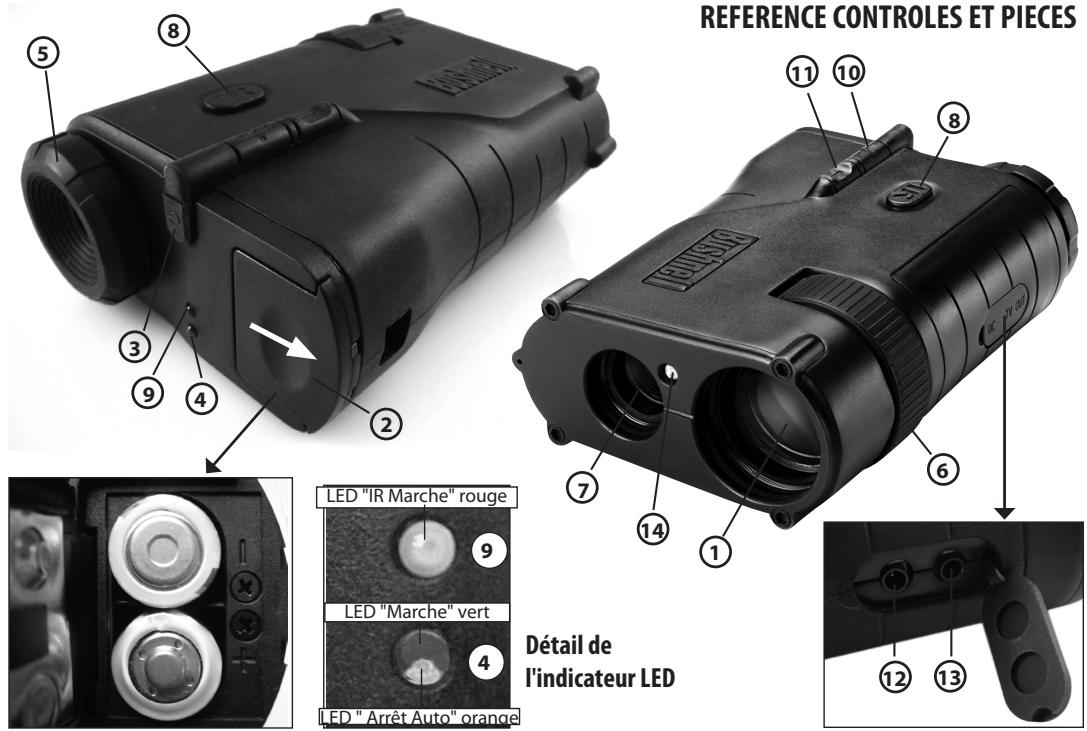
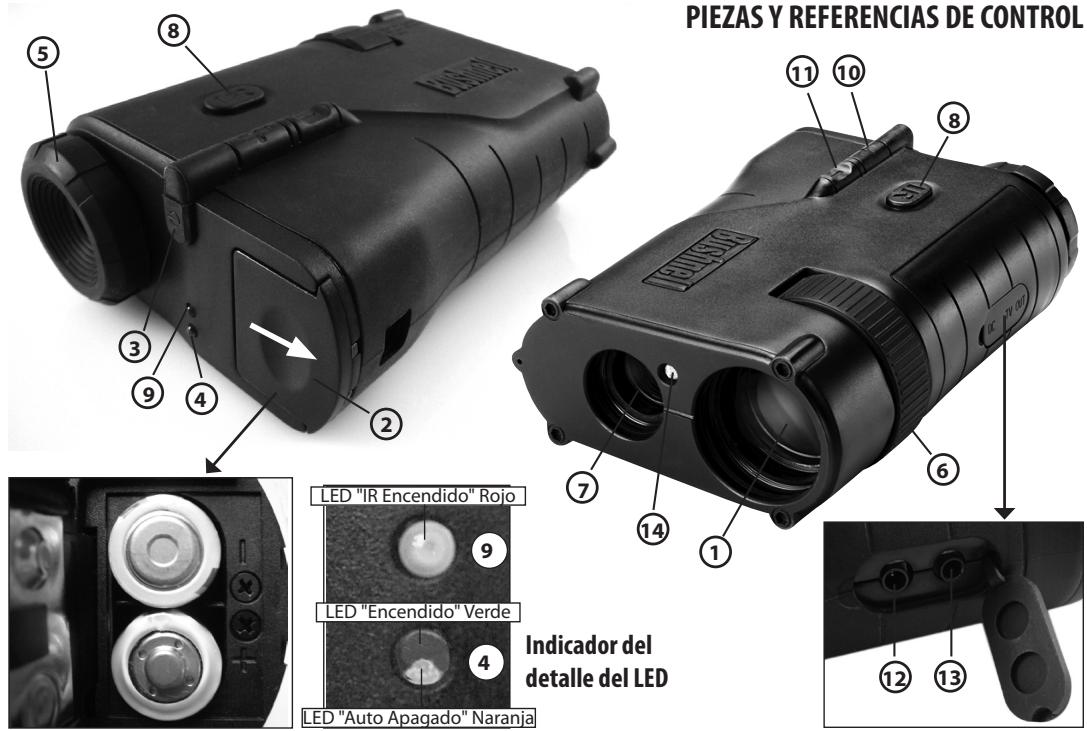
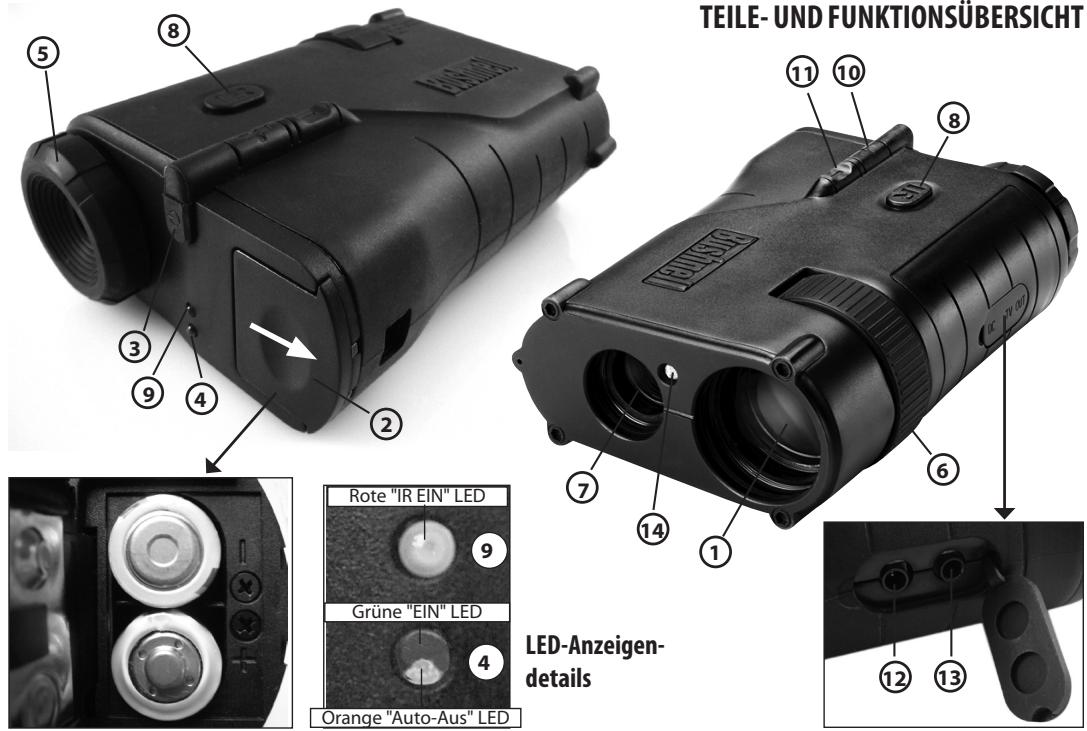
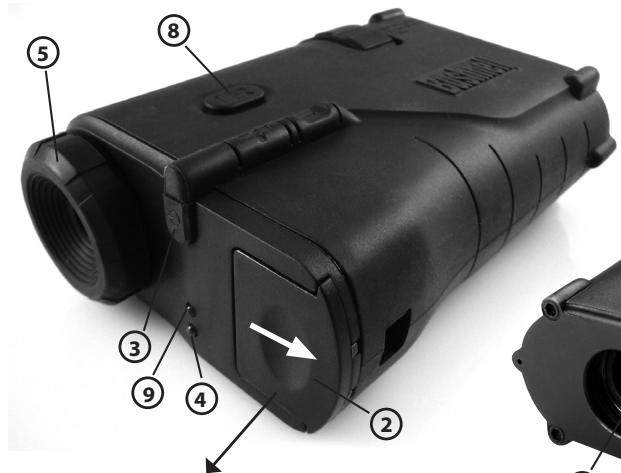
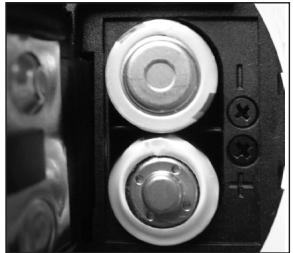
- Slide the battery compartment door (2) open in the direction of the white arrow. Insert four AA alkaline or four AA lithium batteries into the battery compartment (batteries not included). Be sure to observe the polarity indicators as shown to the right of the battery compartment. The "+" ends of the lower pair of batteries should be facing out (towards the battery door), and the "-" ends of the upper pair of batteries should be facing out.
- Remove the front lens cover. When finished using the unit, replace the cover to protect the objective lens (1) and IR light (7).
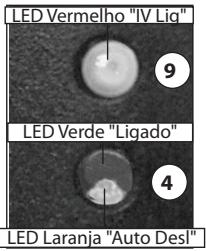
- Press the ON/OFF switch (3) to power the device on. A green LED light (4) indicates that the power is on. To extend battery life, the unit will turn off automatically after 2 minutes (if no buttons are pressed). To cancel this auto-off function, briefly press and release the IR switch (8) on the top of the unit. The power will then remain on until you turn it off manually with the ON/OFF switch. The orange light on the lower half of the power indicator light (4) will glow if the unit is in auto-off mode (default), and will turn off if you cancel the auto-off function. If the batteries become weak, the green power indicator LED will blink. To turn the unit off manually, push and hold the power button for at least two seconds. When you release the button, the power indicator LED will go out.
-
View through the eyepiece (5) and select an object to focus on.
-
To focus the image, first rotate the eyepiece rubber ring (5) until the edges of the LCD display appear sharp to your vision. Next, rotate the objective lens focus wheel (6) until the object is in focus and the view is clearest. At this point, the display focus (eyepiece ring) is set for your individual eyesight and will not require further adjustment when viewing objects at different distances. When changing the viewing distance, simply rotate the main focus wheel (6) until the image is in focus.
- The Digital Night Vision has a light level sensor on the front of the unit (14) which detects low light conditions and automatically turns on an infrared illuminator (7) to improve image quality. When the IR light is on, this is indicated by the red LED (9) above the power indicator. You can also turn the IR illuminator on manually anytime, even if ambient light levels are high, by pressing and holding the IR switch (8) for at least two seconds (when you release the switch, you will see the red IR illuminator LED indicator, confirming the IR illuminator is on now).
- To increase the brightness of the IR illuminator, press the "+" key (10). This can be used to extend your viewing distance. To decrease the brightness of the IR illuminator, press the "-" key. This can be helpful in improving the LCD display viewing quality (by avoiding "wash out") in very low light conditions or complete darkness.
- While moving from viewing one object to another object, it might be necessary to rotate the objective lens focus wheel and adjust the IR illuminator brightness in order to achieve the best image quality.
- The Digital Night Vision includes a video output ("TV Out") jack (13). This port allows one to transmit images to an external video monitor or video recorder. Plug the output video cable into the video output jack ("TV Out"). When the Digital Color Night Vision is connected to compatible video equipment, the image produced by the unit can be monitored and/or recorded. Note: Model 260332 is compatible with the NTSC video system used in the US and Canada. Model 260333 is compatible with the PAL video system used in many other countries.
- The Digital Color Night Vision also includes a 6 volt auxiliary power input jack (12). To connect the Digital Night Vision to a household outlet, use the included 6 volt AC power adapter. Note that this feature is not intended to recharge AA batteries of any type, and should not be used for that purpose. It simply provides an option for an external power source.
NOTE: When the batteries are inserted and the external power source is turned on, the device operates on the external power source. If you unplug the external power source, and you want to use the battery source, you have to press the ON button (3) to make the device operate.
NOTE: A standard tripod mounting socket is provided on the bottom of the unit. Remove the round rubber plug near the center of the bottom face of the unit and set it aside.
TROUBLESHOOTING
Unit will not turn on
- Check that the batteries are installed correctly (2). If the batteries are installed correctly and the batteries are good, then the greenLED indicator light should be on steadily.
- Check that the power button (3) has been pressed.
Power does not stay on
- Replace the batteries when they become weak.
- The unit normally turns off automatically after 2 minutes to conserve battery power. To defeat this, briefly press the IR switch.
Image is not focused.
- Adjust the objective focus wheel (6) and eyepiece display focus (5).
- Make sure you are not too close to the object you are viewing.
For any other problems or questions, please contact Bushnell Customer Service at:
(800) 423-3537 · www.bushnell.com
CARE AND MAINTENANCE
Your Bushnell Digital Night Vision device was designed to provide many years of reliable service. To ensure that you get the most enjoyment out of your Digital Night Vision device, always obey the following warnings and precautions.
- Do not open the body of the device or otherwise attempt to service this device.
Always store the device in a dry, well ventilated room. - Keep the device away from any heating and air conditioning vents or other heating devices, direct sunlight, and moisture.
- Avoid dropping or otherwise shocking the unit. Although designed for rugged outdoor use, this device incorporates a sophisticated digital circuitry which could be damaged in extreme cases of misuse.
- Clean the optical lens with a professional lens cleaning supplies.
- Clean the exterior of the device with a soft clean cloth.
- Avoid removing the eyepiece as the LCD display could become damaged.
- Do not leave the device in direct sunlight or rain.
- Remove the batteries if the device will not be used for longer than a few weeks.
SPECIFICATIONS
Magnification:
Objective Size:
Battery Type:
Viewing Range:
Field of View:
Operating Temperature Range:
Dimensions:
Weight:
Tripod Mountable:
Video Out:
External AC Power Adapter:
3x
32 mm
4 AA batteries (not included), alkaline, lithium or NiMh rechargeable
1-328 ft. / .3-100m
70 ft @ 100 yds / 23m @ 100m
14-104 / -10 ~ 40 C (Humidity >90%)
5.9× 3.8× 2.0 in./ 150× 95× 51mm
13.4 oz./380g
Yes
(Model# 260332) NTSC video standard.
Note: low ambient light operation may create low signal levels.
(Model# 260333) PAL video standard.
6V DC, 1A, plug polarity=positive tip
Note: Included with model 260332 only.
TWO-Year LIMITED WARRANTY
Your Bushnell® product is warranted to be free of defects in materials and workmanship for two years after the date of purchase. In the event of a defect under this warranty, we will, at our option, repair or replace the product, provided that you return the product postage prepaid. This warranty does not cover damages caused by misuse, improper handling, installation, or maintenance provided by someone other than a Bushnell Authorized Service Department.
Any return made under this warranty must be accompanied by the items listed below:
1) A check/money order in the amount of $10.00 to cover the cost of postage and handling
2) Name and address for product return
3) An explanation of the defect
4) Proof of Date Purchased
5) Product should be well packed in a sturdy outside shipping carton, to prevent damage in transit, with return postage prepaid to the address listed below:
IN U.S.A. Send To:
Bushnell Outdoor Products
Attn.: Repairs
8500 Marshall Drive
Lenexa, Kansas 66214
IN CANADA Send To:
Bushnell Outdoor Products
Attn.: Repairs
25A East Pearce Street, Unit 1
Richmond Hill, Ontario L4B 2M9
For products purchased outside the United States or Canada please contact your local dealer for applicable warranty
information. In Europe you may also contact Bushnell at:
Bushnell Germany GmbH
European Service Centre
Mathias-Bruggen-Str. 80
D-50827 Köln
GERMANY
This warranty gives you specific legal rights.
You may have other rights which vary from country to country.
©2010 Bushnell Outdoor Products
Plage d'Observation: 1-328 ft./.3-100m
Profondeur de champ: 70 ft @ 100 yds / 23m @ 100m
Poids: 13.4 oz./380g
Bushnell Outdoor Products
Attn.: Repairs
8500 Marshall Drive
Lenexa, Kansas 66214
Bushnell Outdoor Products
Attn.: Repairs
25A East Pearce Street, Unit 1
Richmond Hill, Ontario L4B 2M9
European Service Centre
Mathias-Bruggen-Str. 80
D-50827 Köln
GERMANY
©2010 Bushnell Outdoor Products
Bushnell Outdoor Products
Attn.: Repairs
8500 Marshall Drive
Lenexa, Kansas 66214
En CANADÁ enviar a:
Bushnell Outdoor Products
Attn.: Repairs
25A East Pearce Street, Unit 1
Richmond Hill, Ontario L4B 2M9
European Service Centre
Mathias-Bruggen-Str. 80
D-50827 Köln
GERMANY
©2010 Bushnell Outdoor Products
Bushnell Outdoor Products
Attn.: Repairs
8500 Marshall Drive
Lenexa, Kansas 66214
Bushnell Outdoor Products
Attn.: Repairs
25A East Pearce Street, Unit 1
Richmond Hill, Ontario L4B 2M9
European Service Centre
Mathias-Bruggen-Str. 80
D-50827 Köln
GERMANY
©2010 Bushnell Outdoor Products
Bushnell Outdoor Products
Attn.: Repairs
8500 Marshall Drive
Lenexa, Kansas 66214
IN CANADA Send To:
Bushnell Outdoor Products
Attn.: Repairs
25A East Pearce Street, Unit 1
Richmond Hill, Ontario L4B 2M9
European Service Centre
Mathias-Bruggen-Str. 80
D-50827 Köln
GERMANY
©2010 Bushnell Outdoor Products
Detalles do indicator LED
Bushnell Outdoor Products
Attn.: Repairs
8500 Marshall Drive
Lenexa, Kansas 66214
NO CANADÁ REMETER PARA:
Bushnell Outdoor Products
Attn.: Repairs
25A East Pearce Street, Unit 1
Richmond Hill, Ontario L4B 2M9
European Service Centre
Mathias-Bruggen-Str. 80
D-50827 Köln
GERMANY
©2010 Bushnell Outdoor Products
FR
Environment protection first!
1 Your appliance contains valuable materials which can be recovered or recycled.
Leave it at a local civic waste collection point.
DE AT
This equipment has been tested and found to comply with the limits for a Class B digital device, pursuant to Part 15 of the FCC Rules. These limits are designed to provide reasonable protection against harmful interference in a residential installation. This equipment generates, uses and can radiate radio frequency energy and, if not installed and used in accordance with the instructions, may cause harmful interference to radio communications. However, there is no guarantee that interference will not occur in a particular installation. If this equipment does cause harmful interference to radio or television reception, which can be determined by turning the equipment off and on, the user is encouraged to try to correct the interference by one or more of the following measures:
- Reorient or relocate the receiving antenna.
- Increase the separation between the equipment and receiver.
- Connect the equipment into an outlet on a circuit different from that to which the receiver is connected.
- Consult the dealer or an experienced radio/TV technician for help.
Shielded interface cable must be used with the equipment in order to comply with the limits for a digital device pursuant to Subpart B of Part 15 of FCC Rules.
NOTE: THE MANUFACTURER IS NOT RESPONSIBLE FOR ANY RADIO OR TV INTERFERENCE CAUSED BY UNAUTHORIZED MODIFICATIONS TO THIS EQUIPMENT. SUCH MODIFICATIONS COULD VOID THE USER AUTHORITY TO OPERATE THE EQUIPMENT.
Specifications and designs are subject to change without any notice or obligation on the part of the manufacturer.
Bushnell
©2010 Bushnell Outdoor Products
(800) 423-3537 · www.bushnell.com