
TRAIL SCOUT 119905 - Outdoor security camera BUSHNELL - Free user manual and instructions
Find the device manual for free TRAIL SCOUT 119905 BUSHNELL in PDF.


| Product Type | Outdoor surveillance camera / Trail camera |
| Brand | BUSHNELL |
| Model | TRAIL SCOUT 119905 |
| Image sensor | CMOS 1/2", 3.0 megapixels (5 MP resolution via software processing) |
| Lens | F/3.5, effective focal length 42 mm, field of view 45° |
| Flash | High-power electronic xenon flash or 24 infrared LED array, range 10 m |
| PIR detector | Passive infrared sensor, detection range 15 m |
| Display | Backlit LCD screen, 2 rows of 8 characters, auto-off 3 min |
| File format | JPG photos (3.0 or 5.0 MP), AVI videos 320x240 pixels, DCF 1.0 management |
| Power supply | 4 D-size alkaline batteries |
| Battery life | Approximately 30 days (depending on temperature, activity and flash use) |
| Main features | Photo and video mode (15 sec with sound), day/night/24h modes, adjustable delay between shots (30s/1min/2min), laser pointer, stealth LED flash, date/time/moon phase stamping |
| Security | Padlock tab, aluminum anti-theft cable, tree mount, software password (4 digits) |
| Maintenance and cleaning | Clean with a soft dry cloth. Avoid water and chemicals. Store in a dry place. |
| Spare parts and repairability | 2-year warranty. For repair, contact Bushnell Performance Optics. Included parts: anti-theft cable, padlock, tree mount. |
| General information | Designed to record game activity. Weather-resistant. Textured 'bark' surface for concealment. |
Frequently Asked Questions - TRAIL SCOUT 119905 BUSHNELL
User questions about TRAIL SCOUT 119905 BUSHNELL
0 question about this device. Answer the ones you know or ask your own.
Ask a new question about this device
Download the instructions for your Outdoor security camera in PDF format for free! Find your manual TRAIL SCOUT 119905 - BUSHNELL and take your electronic device back in hand. On this page are published all the documents necessary for the use of your device. TRAIL SCOUT 119905 by BUSHNELL.
USER MANUAL TRAIL SCOUT 119905 BUSHNELL
Congratulations on your purchase of the Bushnell® Digital Trail Scout™ Camera! This trail camera is designed to record the activity of wildlife game in the outdoors with it's still image and movie modes and weatherproof, rugged construction. This instruction manual is designed to maximize your understanding of how the camera operates.
Bushnell Digital Trail Scout Features (All Models)
One of the most revolutionary advances in scouting technology to date, the Bushnell Digital Trail Scout delivers. Boasting one of the most user friendly interfaces in the industry, this trail camera has a positive toggle switch system that instantly tells you what your camera settings are—without fumbling with a confusing software interface! The built-in security system has four levels of security. Every Trail Scout comes complete with padlock, cable lock, tree bracket for screw attachment, and software password that locks out would-be thieves. The high resolution digital camera delivers crisp views of game in your area and stamps each image with the date, time, your name, and even the moon phase. Along with regular image mode, there is a movie mode for 15 second video clips (with sound in models 119935/119905). The camera will function during day, night, or all 24 hours and sense game out to 45 feet. The oversized xenon (standard) flash will reach out to 30 feet. Image delay settings include 30 seconds, 1 minute and 2 minutes. The innovative backlit LCD makes set up a breeze in the field. The Trail Scout is weatherproof and rugged.
119833-Digital Trail Scout 3.0MP
Great images and scouting technology at a great value. This camera will sense deer and other game as far out as 45 feet with its passive infrared sensor. Low-battery indicator lights when battery life drops below 25% . Motion LED lights when activity is detected by the sensor in regular imaging mode and during setup mode for aiming. Weatherproof. Date/Time/Moon Phase stamp feature. Comes complete with aircraft aluminum security cable, padlock, and tree bracket. Textured "bark-like" surface for maximum concealment.
119935/119905 (RealTree AP® Camo)—Digital Trail Scout 5.0MP with Night Vision
With all the features of the 3.0MP Trail Scout plus Night Vision and more, this is the top of the line digital trail camera. Still photos are captured with 5 megapixel resolution (via software processing), and the video clips include audio collected by a built-in microphone. Choose your setting for regular camera flash or stealth-like LED flash. LED flash enables you to discretely image game in the night without a visible flash. There is no need to worry about your flash giving away your position in popular, busy hunting areas. And no need to manually set an infrared filter switch for day or night mode to get great results-it's done for you automatically. This camera even includes a laser aiming feature for easy set up in the woods.
DIGITAL TRAIL SCOUT SPECIFICATIONS
| Image Sensor | 1/2" CMOS, 3.0 million pixels (models 119935/119905 capture images with 5MP resolution via software processing) |
| Lens | F/3.5, effective focal length 42mm. Sight range: 45 degrees |
| Flash | High power electronic Xenon Flash or Infrared 24-lamp LED array. Range: 30 ft. |
| PIR Sensor | Low noise, high sensitivity passive infrared sensor. Range: 45 ft |
| Motion LED Indicator | Yes |
| Display | Backlit LCD, 2 rows x 8 characters. Auto-off: 3 min. 2-digit event and image display. |
| File Format | Still image JPG (3.0 or 5.0 megapixels). Movie images AVI 320x 240 pixels per frame. DCF version. 1.0 file management. |
| Exposure | Auto |
| White Balance | Auto |
| Power Supply | 4 x “D” cell batteries. Low battery indicator at 25% remaining power. |
| Battery Life | Approximately 30 days (dependant on temperature, camera activity and flash usage) |
| User Password | Yes, available range: 0000 to 9999 |
| Other (119935/119905 only) | Laser pointer, IR LED array for night vision infrared imaging |
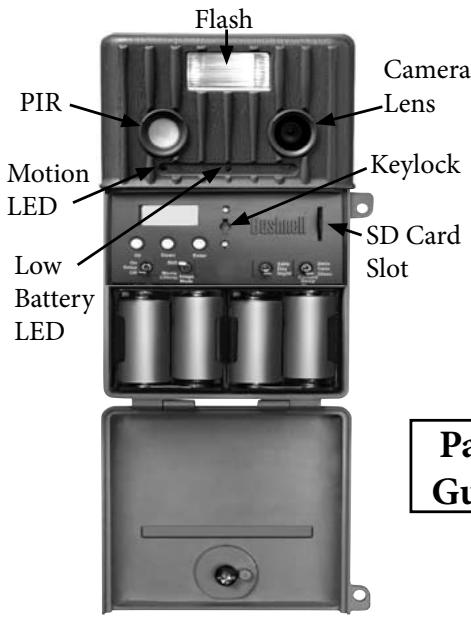
119833
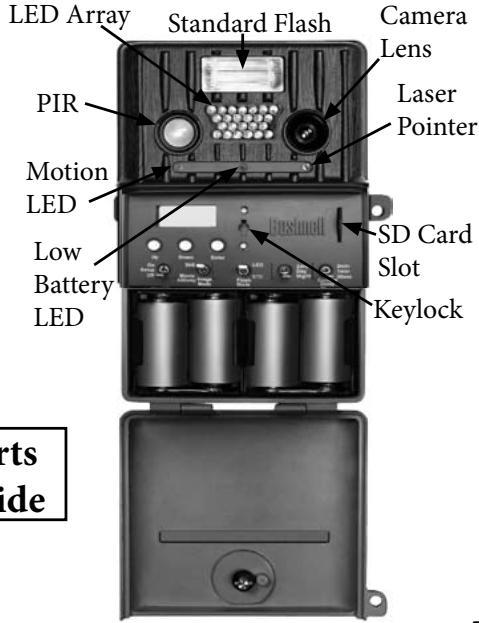
Infrared 119935/119905
Switch and Setup Description
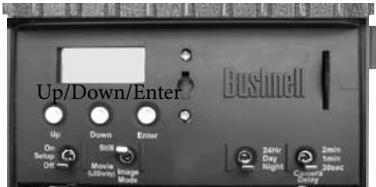
119833 Control Panel
K1 K2
K3 K4
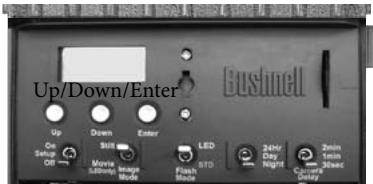
119935/119905 Control Panel
K1 I
K3
K4
K5
| Switch Position/Setting | |||
| Switch#/Function | UP | CENTER | DOWN |
| K1 (Operating Mode) | On | Setup | Off |
| K2 (Image Mode) | Still | - | Movie |
| K3 (Day/Night Mode) | 24 Hour | Day (Default = 6AM-6PM*) | Night (Default = 6PM-6AM*) |
| K4 (Camera Delay) | 2 minutes | 1 minute | 30 seconds |
| Switch Position/Setting | |||
| Switch#/Function | UP | CENTER | DOWN |
| K1 (Operating Mode) | On | Setup | Off |
| K2 (Image Mode) | Still | - | Movie |
| K3 (Flash Mode) | LED | - | Standard** |
| K4 (Day/Night Mode) | 24 Hour | Day (Default = 6AM-6PM*) | Night (Default = 6PM-6AM*) |
| K5 (Camera Delay) | 2 minutes | 1 minute | 30 seconds |
NOTE (Models 119935/119905 Only): THE LASER POINTER IS ACTIVATED IN THE SET-UP MODE. DO NOT PERMIT THE LASER POINTER TO BE DIRECTED TOWARD ANYONE'S EYES TO AVOID POTENTIAL EYE INJURY.
Before beginning the setup, insert 4 "D" size alkaline batteries as indicated inside the battery compartment.
1. K1 - Mode Switch (OFF / SETUP/ ON):
a) Power ON (UP position): Set K1 to ON position, The LCD display will show "BUSHNELL" for about 2 seconds.
EVENT nn IMAGE nn
The LCD will rotate through the DATE\TIME\EVENT&IMAGE displays when pressing the Up and Down keys.
b) SETUP Mode [move switch K1 from UP (ON) position to center position]: Press Up or Down buttons to scroll through choices of DATE, TIME, NAME and PASSWORD to modify or set these functions. Refer to the next two pages for more details.
c) Power OFF: Set K1 to "Off", the Trail Scout will be OFF.
For mounting directions, please refer to the manual section titled "Using The Trail Scout".
Setup Guide (cont.)
(1) SET DATE: When the LCD shows the date, press the ENTER key to modify the date.
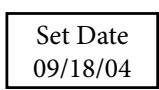
Press Up or Down button to select 1-12 then press the ENTER button to confirm the two digit month. The cursor will then move to the day.
Press Up or Down button to select 1-31 then press ENTER to confirm the two digit day. Then the cursor will move to the year.
Press Up or Down button to select 0-99, then press ENTER to confirm the two digit year. From Set Date, press the Down button to set the time.
Note: See "Other Setup Notes" for details on the moon phase stamp feature, which is linked to the date you set here.
(2) SET TIME: When the LCD shows the time, press the ENTER key to modify the time.
Set Time 06:30PM
Press Up or Down button to select 1-12, then press ENTER to confirm the two digit hour. Then the cursor will move to the minute.
Press Up or Down button to select 0-59, then press ENTER to confirm the two digit minute. From SET TIME, press the Down button to set the name.
(3) SET NAME: When the LCD shows current name, press ENTER key to modify the
MY NAME 555_1234
name display. Press Up or Down button to select one character from "A" to "Z", "0" to "9", then Press ENTER to confirm, the cursor will move to next character. There are 2 lines of 8 characters each for your use. From Set Name, press the Down button to change the password.
(4) SET PASSWORD:
Password Set
When the LCD shows [Password Set], press the ENTER key to set the password.
(4) SET PASSWORD (cont.):
Password Yes
The LCD will show [Password Yes]. To change the password, press Enter.
If you do not want to set a password, you can press the Up or Down key to select NO.
New Pswd 0000
If you selected YES, the LCD shows [New Pswd]. Press the Up or Down key to select the first password digit of 0-9. Press ENTER to confirm, the cursor will move to the next digit to the right. Repeat the process using UP, Down and Enter keys to enter your four digit password. Press ENTER to confirm.
Password None
If you do not want to set a password when the LCD shows (PW YES), you can press the U/D button to select No, After pressing the ENTER, the LCD display shows (PW NO), and no password will be set.
When you are finished with SETUP, change K1 to the ON (UP) position and the unit will be operating after a 2 minute delay.
(5) SET DAY TIME: (Note: This setting determines the time period when photos are taken in both DAY and NIGHT only modes, and auto switches an infrared filter-see #4 under "Other Setup Notes"
When the LCD shows (Day Time), press ENTER key to set the DAY TIME range. The LCD will show and underscore under the first 2 digits in the DAY TIME mode. Press the up or down keys to set time of 24 hour clock for the specific DAY TIME start hour desired. Press ENTER to set the DAY TIME start time.
Day Time 07 -- 18
Then, underscore will move to the second 2 digits in the DAY TIME mode. Press the up or down keys to set time of 24 hour clock for the specific DAY TIME end hour desired. Press ENTER to set the DAY TIME end time.
Now your DAY TIME is defined (NIGHT is defined as the period between DAY end and start times). If you do not make your own settings for DAY, a default of 6AM~6PM is used.
Example: 07-18 would define DAY as from 7AM to 6PM (6PM=18:00 hours on 24 hr clock).
Setup Guide (cont.)
2. K2 - Image Mode Switch (STILL / MOVIE):
Set K2 to either of these settings:
(UP) STILL Photo Mode: Image resolution is 3.0MP (119833), or 5.0MP (119935/119905) and photos are stored in JPG format.
(DOWN) MOVIE Mode: The camera can record a 15 second movie, the file format is AVI (with audio on models 119935/119905).
NOTE: On model# 119833, the combination of NIGHT mode and MOVIE mode will result in dark videos, as the xenon flash does not function in MOVIE mode. With models 119935/119905, you may use NIGHT and MOVIE modes together by setting switch K3 (Lighting mode) to the LED position (the standard xenon flash does not function in MOVIE mode).
(Models 119935/119905 only)
Note: see #4 in "Other Setup Notes" for additional information.
3. K3 - Flash Mode Switch (LED / Standard):
The Game camera has two modes that select which flash type will fire under dark conditions:
(a) LED Mode (Infrared LED lamp array):
The IR-LED (infrared) light is invisible to the naked eye, but will provide illumination for the camera, use it when you do not want to alert the subject at night. This mode can also be used for nighttime movie capture. During the time defined as "Night", an infrared blocking filter is automatically deactivated, so that the IR light generated by the LEDs can create an image. During the "Day", the infrared blocking filter is re-activated; therefore, you should use the "Standard" or xenon flash position for best results when the camera is set to "Day only" time mode.
(b) STD (Standard) Mode: (Xenon flash tube) Note: this switch position may be labeled "Incand" rather than "STD" on some early production units.
You can use Standard mode for twilight/cloudy conditions, or to take color still pictures at night. If you want to use the MOVIE mode, you can not use Standard flash mode--you must set K3 to LED.
4. K3 (Model 119833) - (24Hr / DAY/NIGHT) MODE:
K4 (Model 119935/119905)-(24Hr / DAY / NIGHT) MODE:
The Trail Scout has three operating period modes:
(a) 24Hr: The Trail camera is operational both day and night. When the PIR (Passive Infra Red sensor) senses a subject, the camera will take a photo and record an EVENT.
(b) DAY: The Trail camera only takes photos during the Daytime (user defined Day start~end period or default 6am~6pm). When the PIR senses a subject, the unit will take an image and record an EVENT. If the PIR is triggered between the Day end and Day start times, only an EVENT is recorded-an image is not taken.
(c) NIGHT: The Trail camera only takes photos during the Night (from user set Day end to Day start, or default 6pm~6am). When the PIR senses a subject the unit will take image and record an EVENT. If the PIR is triggered during "Day" time, only an EVENT is recorded, an image is not taken.
5. K4 (Model 119833)- (30s/1Min/2Min) CAMERA DELAY MODE
K5 (Model 119935/119905) - (30s/1Min/2Min) CAMERA DELAY MODE:
There are three modes for taking delayed pictures: 30 Sec, 1 Min and 2 Min.
The unit will record EVENTS while CAMERA is in DELAY MODE each time the PIR senses motion.
(a) 30s: After the first picture, a second picture will be taken 30 seconds later.
(b) 1Min: After the first picture, a second picture will be taken 1 minute later.
(c) 2Min: After the first picture, a second picture will be taken 2 minutes later.
GLOSSARY
PIR—Passive Infrared Sensor. Senses motion like typical security motion detector. Requires infrared energy (heat) in addition to motion to trip sensor to assure detection of live animals.
Event—Any time that the PIR senses motion it counts it as an event. Events are recorded to the SD card in a text file. Events are recorded continuously during operation.
Image—A digital picture recorded on the SD Card when motion is sensed. Images are taken at the desired delay between images.
Image Delay—Time elapsed between photos while events are sensed and recorded. This is user-set based on wildlife activity in area.
IR Flash—IR LED Array—Infrared LED Night Vision feature. Emits a burst of infrared light which is invisible to the human eye. Especially useful for night photos when a visible flash is undesirable. (Featured on Models 119935/119905 only)
Std (Standard) Flash—Xenon flash tube used for low light or night photography. Automatically fires if necessary due to dark, overcast skies or waning light late in the day.
SD Card—Memory card used to store images and events. Compatible with up to 1GB capacity SD card (all new Trail Scouts include a 128MB card).
Battery Life—Time that camera will function in the field. Dependent on temperature, number of images and number of flashes during that time.
Setup—Using the display menu and buttons to set the date/time, still photo or movies, and password.
Security—One of the most important requirements of any trail camera. The Trail Scouts have 4 security features—padlock tab, tree bracket, cable lock, and software password.
Trigger Speed—Time delay between a subject passing in front of PIR sensor and the image capture of that subject.
All Bushnell Trail Cameras have a trigger speed of less than one second.
1. SD CARD SLOT
The unit has a standard SD Card slot. You must push the SD Card in with the SD Card label facing the Bushnell logo into the SD card slot. Pushing it again will release the SD card, and then you can remove the SD card from the SD card slot. Insertion or removal of SD card is only recommended when the unit is in the "OFF" position.
2. PIR SENSOR
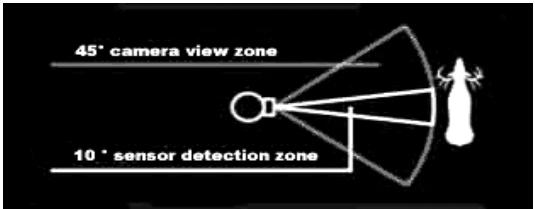
The sensor that triggers the trail camera is Passive InfraRed, or PIR. Infrared energy is essentially heat energy. The PIR detector operates by sensing a change in the infrared level in its detection zone. This zone is a cone in the center 10 degrees of the camera's field of view. The camera establishes an average long-term infrared level. When this level increased suddenly the PIR detector signals the camera to record a picture and/or an event. Because of this effect, the PIR detector will be more sensitive at night, when the average temperature is lower.
In the Setup mode, you can use PIR sensor to determine the detection zone. When the PIR is sensed, the PIR Sense Indicator will light. The camera's field of view is a 45 degree cone, centered on the PIR detection
zone.
Other Setup Notes (cont.)
3. LASER POINTER (Models 119935/119905 Only)
The 119935/119905 Trail Scout camera has a Laser pointer. When you mount the unit on a tree or any other fixed surface and cannot sight from behind the Game Camera, you can use the Laser Pointer to align the unit.
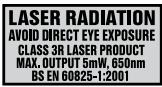
NOTE: LASER LIGHT IS POTENTIALLY DANGEROUS TO THE EYES. THE LASER POINTER IS ACTIVATED IN THE SET-UP MODE. DO NOT PERMIT THE LASER POINTER TO BE DIRECTED TOWARD ANYONE'S EYES TO AVOID POTENTIAL EYE INJURY.
4. AUTO DAY/NIGHT IR FILTER SWITCH (Models 119935/119905 Only)
The Model 119935/119905 Trail Scout camera has an automatic function which activates a filter in the camera's lens system during the time period you define as "Day" (see "Set Day Time" in the Setup Guide). The purpose of this filter is to block infrared light, so that photos taken by daylight or with the standard (xenon) flash tube (in heavy shade or late in the day) will have a normal appearance. This infrared filter is found in virtually all digital cameras, as their image sensors are sensitive to infrared light as well as visible light wavelengths. However, during the time period defined as "Night" (from Day end time to Day start time), the infrared blocking filter is automatically deactivated, or removed from the lens path. This allows the LED lamp array, which emits invisible infrared light, to be able to create an image on the camera's CMOS sensor when the IR light illuminates a subject in front of the lens. Because the infrared filter is activated during the Day time period, the combination of "DAY Only" operating mode and "LED" flash mode is not recommended, as the filter will prevent the infrared light from the LED from reaching the sensor, resulting in dark photos. The standard flash may be selected along with "NIGHT Only" mode, however, photos may be slightly pink or reddish in color due to the deactivated infrared filter. Refer to the following chart:
| Operating Mode | Flash Mode | Day Time Photo Results | Night Time Photo Results | Recommended Combination |
| Day Only | STD | Normal color & exposure | Photos not taken | YES |
| Night Only | LED | Photos not taken | Black & White, good exposure | YES |
| 24 Hour | LED | Normal, may be dark during cloudy conditions or late hours | Black & White, good exposure | Good (Better night results, flash is undetected) |
| Day Only | LED | May be dark during cloudy conditions or late hours | Photos not taken | NO |
| Night Only | STD | Photos not taken | Slight pink or reddish color | OK to use |
| 24 Hour | STD | Normal color & exposure | Slight pink or reddish color | Good (Better day results) |

5. MOON PHASE STAMP
All new Trail Scout models have a "moon phase" stamp feature. This links the current date (as set by the user in the setup procedure) to the phase of the moon on that date (this data is stored on an internal memory chip), and imprints a icon on your photo which represents the moon phase when the photo was taken. The moon phase icon will appear on your photos in the lower left, next to your name and the Bushnell logo. Some hunters will find this to be a useful reference, as it can help determine if particular animals are inactive at night when a full or nearly full moon is present, causing them to be more visible to predators. Or, if some of your night photos seem to have a darker or lighter background (beyond the range of the LED lamps or flash), you can see if that was related to how bright the moon was at the time. The icons for the various phases of the moon are shown above.
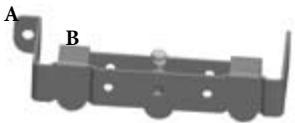
1. MOUNTING:
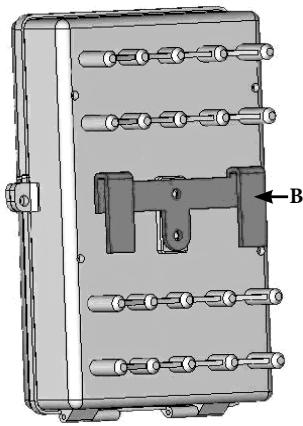
Mount the trail camera on the tree as shown below.
- Screw bracket A to the tree.
- Bolt bracket B on the back of the trail camera.
- Match bracket B up to bracket A.
- Then, hang bracket B over bracket A.
- Finally, insert the padlock and lock when setup is completed.
For extra security, you can use the included cable to wrap around the tree also.
- Insert the end with the large lug into bracket A.
- Then, feed the other end of the cable around the tree and back through the bracket.
- Tighten the adjustable locking bolt to hold the cable tightly in place (B).
Using the Trail Scout (cont.)
2. Power ON and Setup switch summary:
Turn the knob 90^ counterclockwise and open the front cover.
Set the K1 to ON position,
Input correct Password. Default password is "0000".
(If the password is entered incorrectly 3 times, the unit will be powered off automatically. If you want to power ON again you must set K1 back to OFF and then set K1 to ON)
The LCD will display current IMAGE&EVENT counter.
You can press the Up or Down key to see the DATE, TIME, NAME.
If you want to modify DATE, TIME, NAME or password, set K1 to SETUP.
(See SETUP GUIDE for details)
After finishing SETUP, set K1 back to ON position
The unit will delay 2 minutes before functioning to allow you to clear out of your area.
The functions of K2, K3, and K4 can be set in the SETUP or ON Mode.
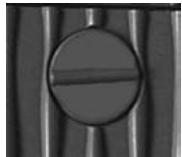
After finishing SETUP, close the front cover and turn the knob to 90^ clockwise.
Finally, secure the Trail Scout with a padlock.
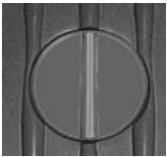

Turn the knob 90^
counterclockwise to open
Turn the knob 90^
clockwise to close

TWO-YEAR LIMITED WARRANTY
Your Bushnell' product is warranted to be free of defects in materials and workmanship for two years after the date of purchase. In the event of a defect under this warranty, we will, at our option, repair or replace the product, provided that you return the product postage prepaid. This warranty does not cover damages caused by misuse, improper handling, installation, or maintenance provided by someone other than a Bushnell Authorized Service Department.
Any return made under this warranty must be accompanied by the items listed below:
1) A check/money order in the amount of $10.00 to cover the cost of postage and handling
2) Name and address for product return
3) An explanation of the defect
4) Proof of Date Purchased
5) Product should be well packed in a sturdy outside shipping carton, to prevent damage in transit, with return postage prepaid to the address listed below:
IN U.S.A. Send To:
Bushnell Performance Optics
Attn.: Repairs
8500 Marshall Drive
Lenexa, Kansas 66214
IN CANADA Send To:
Bushnell Performance Optics
Attn.: Repairs
25A East Pearce Street, Unit 1
Richmond Hill, Ontario L4B 2M9
For products purchased outside the United States or Canada please contact your local dealer for applicable warranty information. In Europe you may also contact Bushnell at
BUSHNELL Performance Optics Gmbh
European Service Centre
MORSESTRASSE 4
D-50769 KOLN
GERMANY
Tel: +49 (0) 221 709 939 3
Fax: +49 (0) 221 709 939 8
This warranty gives you specific legal rights.
You may have other rights which vary from country to country.
©2007 Bushnell Outdoor Products
FCC Note:
This equipment has been tested and found to comply with the limits for a Class B digital device, pursuant to Part 15 of the FCC Rules. These limits are designed to provide reasonable protection against harmful interference in a residential installation. This equipment generates, uses and can radiate radio frequency energy and, if not installed and used in accordance with the instructions, may cause harmful interference to radio communications. However, there is no guarantee that interference will not occur in a particular installation. If this equipment does cause harmful interference to radio or television reception, which can be determined by turning the equipment off and on, the user is encouraged to try to correct the interference by one or more of the following measures:
- Reorient or relocate the receiving antenna.
- Increase the separation between the equipment and receiver.
- Connect the equipment into an outlet on a circuit different from that to which the receiver is connected.
- Consult the dealer or an experienced radio/TV technician for help.
Shielded interface cable must be used with the equipment in order to comply with the limits for a digital device pursuant to Subpart B of Part 15 of FCC Rules.
Specifications and designs are subject to change without any notice or obligation on the part of the
manufacturer.
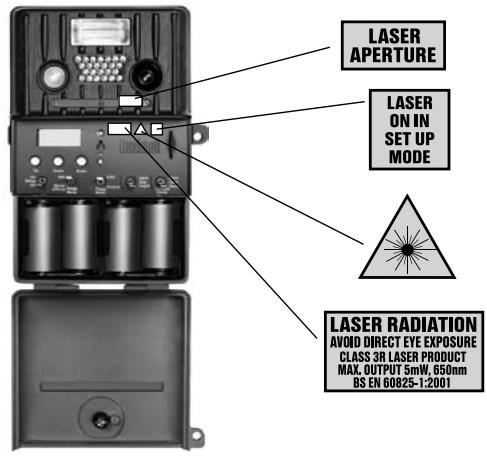
LASER POINTER ACTIVE IN SET UP MODE FOR AIMING OF TRAIL CAMERA.
WARNING! AVOID HAZARDOUS LASER RADIATION!



Environment protection first!
Your appliace contains valuable materials which can be recovered or recyed.
Leave it at a local civic waste collection point.

- The LCD showing "ENTER SUSPEND" means the system is going to suspend activity (sleep mode to conserve battery power).
- After setting K1 to ON, the system will begin working after a two minute delay. If there is no activity sensed in three minutes, the system will go to SUSPEND. When the PIR senses activity, the camera will be activated immediately.
The LCD showing "RESUME" means the system is active. - Changing batteries within 20 seconds will avoid the need to reset the date and time.
Français
119833-Digital Trail Scout 3,0 MP
119935/119905 (Camouflage RealTree AP®)—Digital Trail Scout 5,0 MP à vision nocturne
Bushnell Outdoor Products
Attn.: Repairs
8500 Marshall Drive
Lenexa, Kansas 66214
25A East Pearce Street, Unit 1
Richmond Hill, Ontario L4B 2M9
European Service Centre
MORSESTRASSE 4
D-50769 Cologne
Allemagne
Tel: +49 (0) 221 709 939 3
Fax: +49 (0) 221 709 939 8
©2007 Bushnell Outdoor Products
Environment protection first!
Your appliance contains valuable materials which can be recovered or recycled.
Leave it at a local civic waste collection point.

Bushnell Outdoor Products
Attn.: Repairs
8500 Marshall Drive
Lenexa, Kansas 66214
En CANADA enviar a:
Bushnell Outdoor Products
Attn.: Repairs
25A East Pearce Street, Unit 1
Richmond Hill, Ontario L4B 2M9
European Service Centre
MORSESTRASSE 4
D-50769 K÷LN
ALEMANIA
Tel: +49 (0) 221 709 939 3
Fax: +49 (0) 221 709 939 8
©2007 Bushnell Outdoor Products
Notadela FCC:
Environment protection first!
Your appliance contains valuable materials which can be recovered or recycled.
Leave it at a local civic waste collection point.

119833-Digital Trail Scout 3,0 MP
5. MONDPHASEN-STEMPEL
Bushnell Outdoor Products
Bushnell Outdoor Products
25A East Pearce Street, Unit 1
Lenexa, Kansas 66214
Richmond Hill, Ontario L4B 2M9
European Service Centre
MORSESTRASSE 4
D-50769 KOLN
DEUTSCHLAND
Tel: +49 (0) 221 709 939 3
Fax: +49 (0) 221 709 939 8
©2007 Bushnell Outdoor Products
Environment protection first!
Your appliance contains valuable materials which can be recovered or recycled.
Leave it at a local civic waste collection point.

CLASS 3R LASER PRODUCT
MAX.OUTPUT 5mW,650nm
BS EN 60825-1:2001
4. INTERRUTTORE AUTOMATICO DEL FILTRO IR GIORNO/NOTTE (solo per i modelli 119935 /119905)
Bushnell Outdoor Products
Attn.: Repairs
8500 Marshall Drive
Lenexa, Kansas 66214
Recapito in Canada:
Bushnell Performance Optics
Attn.: Repairs
25A East Pearce Street, Unit 1
Richmond Hill, Ontario L4B 2M9
European Service Centre
MORSESTRASSE 4
D-50769-Cologne
Germania
Tel: +49 (0) 221 709 939 3
Fax: +49 (0) 221 709 939 8
©2007 Bushnell Outdoor Products
Environment protection first!
Your appliance contains valuable materials which can be recovered or recycled.
Leave it at a local civic waste collection point.

Example: 07-18 would define DAY as from 7AM to 6PM (6PM=18:00 hours on 24 hr clock).
Bushnell Outdoor Products
Attn.: Repairs
8500 Marshall Drive
Lenexa, Kansas 66214
NO CANADÁ REMETER PARA:
Bushnell Performance Optics
Attn.: Repairs
25A East Pearce Street, Unit 1
Richmond Hill, Ontario L4B 2M9
European Service Centre
MORSESTRASSE 4
D-50769KOLN
Alemanha
Tel: +49 (0) 221 709 939 3
Fax: +49 (0) 221 709 939 8
©2007 Bushnell Outdoor Products
Notadafcc:
Environment protection first!
Your appliance contains valuable materials which can be recovered or recycled.
Leave it at a local civic waste collection point.

INNOVATION THAT THRIVES OUTSIDE
For further questions or additional information please contact:
Bushnell Outdoor Products
9200 Cody, Overland Park, Kansas 66214
(800) 423-3537 • www.bushnell.com