
SCD600 - Baby monitor PHILIPS AVENT - Free user manual and instructions
Find the device manual for free SCD600 PHILIPS AVENT in PDF.



User questions about SCD600 PHILIPS AVENT
0 question about this device. Answer the ones you know or ask your own.
Ask a new question about this device
Download the instructions for your Baby monitor in PDF format for free! Find your manual SCD600 - PHILIPS AVENT and take your electronic device back in hand. On this page are published all the documents necessary for the use of your device. SCD600 by PHILIPS AVENT.
USER MANUAL SCD600 PHILIPS AVENT
Congratulations on your purchase and welcome to Philips AVENT! To fully benefit from the support that Philips AVENT offers, register your product at www.philips.com/welcome.
The Philips AVENT video monitor provides you with round-the-clock support and it allows you to see your baby day and night from anywhere in the house. The latest digital technology guarantees crystal-clear sound and the clearest image of your baby. This gives you an additional sense of security without entering your baby's room and disturbing its sleep.
General description (Fig. 1)
A Parent unit
1 Antenna
2 Signal strength symbol
3 Video display
4 Lullaby symbol
5 Battery/power-on light
6 LINK light
Sound level lights
8 Loudspeaker
9 Socket for appliance plug
10 Adapter
11 Rechargeable battery
12 Automatic screen activation light
13 Lullaby light
14 Volume wheel with power-off position
15 Brightness adjustment buttons
16 Battery symbol
17 Small plug
18 Belt clip/stand
19 Battery compartment lid
20 Automatic screen activation button
21 'Next lullaby' button
22 Lullaby play/stop button
B Baby unit
1 Antenna
2 Power-on light
3 Lens
4 Stand
5 Adapter
6 Battery compartment lid
7 Microphone
8 Nightlight button
9 Nightlights
10 Loudspeaker
11 On/off switch
12 Socket for appliance plug
13 Non-rechargeable batteries (not included)
14 Small plug
Important
Read this user manual carefully before you use the appliance and save it for future reference.
Danger
- Never immerse any part of the baby monitor in water or any other liquid.
Warning
- Check if the voltage indicated on the adapters of the baby unit and the parent unit corresponds to the local mains voltage before you connect the appliance.
- Only use the adapters supplied to connect the baby unit and the parent unit to the mains.
- The adapters contain a transformer. Do not cut off the adapters to replace them with other plugs, as this causes a hazardous situation.
- If the adapters are damaged, always have them replaced with one of the original type in order to avoid a hazard. For the correct type, see chapter 'Replacement'.
- Never use the baby monitor in moist places or close to water.
Except for the battery compartments, do not open the housing of the baby unit and parent unit in order to prevent electric shock. - This appliance is not intended for use by persons (including children) with reduced physical, sensory or mental capabilities, or lack of experience and knowledge, unless they have been given supervision or instruction concerning use of the appliance by a person responsible for their safety.
- Children should be supervised to ensure that they do not play with the appliance.
Caution
- Use and store the appliance at a temperature between 10^ and 35^ .
- Do not expose the baby unit and parent unit to extreme cold or heat or to direct sunlight. Do not put the baby unit and the parent unit close to a heating source.
- Make sure the baby unit and the cord are always out of reach of the baby (at least 1 metre/3 feet away).
- Never place the baby unit inside or mount it on the baby's bed or playpen.
- Never cover the parent unit and the baby unit with anything (e.g. a towel or blanket).
General
- This baby monitor is intended as an aid. It is not a substitute for responsible and proper adult supervision and should not be used as such.
- The operating range of the baby monitor is 150 metres/490 feet in open air. Depending on the surroundings and other disturbing factors, this range may be smaller.
- If you have any combination of cordless phones, wireless video, Wi-Fi networks, microwave or Bluetooth on 2.4Ghz, connection problems may occur. The connection between the parent unit and the baby unit could be lost for some seconds or may cause interference with other devices.
- We advise you to use the parent unit connected to the mains to save energy. The baby video monitor consumes more energy than a standard baby monitor (without video).
Additional battery information
- Always place a rechargeable battery of the correct type in the parent unit. Do not use non-rechargeable batteries to avoid the risk of explosion.
- Always place non-rechargeable batteries of the correct type in the baby unit. The baby unit does not have a charging function.
- Make sure that your hands are dry when you insert or replace the batteries.
- To avoiding damage due to battery leakage:
1 Do not expose the appliance to temperatures higher than 35^ .
2 Remove the rechargeable battery and the non-rechargeable batteries if you are not going to use the appliance for one month or more.
3 Do not leave empty batteries in the baby unit.
Electromagnetic fields (EMF)
This Philips AVENT appliance complies with all standards regarding electromagnetic fields (EMF). If handled properly and according to the instructions in this user manual, the appliance is safe to use based on scientific evidence available today.
Preparing for use
Baby unit
You can use the baby unit from the mains or on non-rechargeable batteries. Even if you are going to use the unit from the mains, we advise you to insert non-rechargeable batteries. This guarantees automatic back-up in case of mains failure.
Mains operation
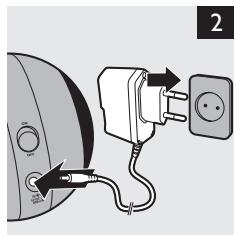
1 Put the appliance plug in the baby unit and put the adapter in a wall socket (Fig. 2).
Operation on non-rechargeable batteries
The baby unit runs on four 1.5V R6 AAA batteries (not included). We strongly advise you to use Philips R06 PowerLife batteries.
Do not use rechargeable batteries, as the baby unit does not have a charging function.
Unplug the baby unit and make sure your hands and the unit are dry when you insert non-rechargeable batteries.
1 Remove the screw in the battery compartment lid with a flathead screwdriver (Fig. 3).
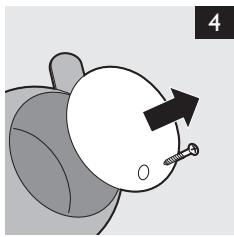
2 Remove the battery compartment lid. (Fig. 4)
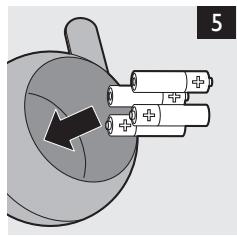
3 Insert four non-rechargeable batteries (Fig. 5).
Note: Make sure the + and - poles point in the right direction.
4 Reattach the lid.
5 Fasten the screw with a flathead screwdriver.
Parent unit
Operation on rechargeable battery
Unplug the parent unit and make sure your hands and the unit are dry when you insert the rechargeable battery.
The parent unit comes with a rechargeable Li-ion 1050mAh battery.
Charge the parent unit before you use it for the first time or when the parent unit indicates that the battery is low (when the empty battery symbol flashes on the video display and the battery light on the parent unit flashes green).
Note: If the battery is completely empty, the parent unit automatically switches off and loses contact with the baby unit.
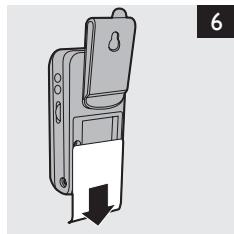
1 Slide down the battery compartment lid to remove it (Fig. 6).
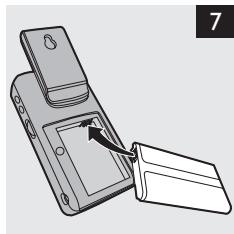
2 Insert the rechargeable battery (Fig. 7).
Note: Make sure the + and - poles point in the right direction.
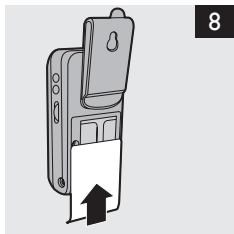
3 Reattach the lid (Fig. 8).
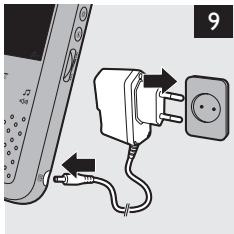
4 Insert the appliance plug into parent unit and put the adapter in a wall socket (Fig. 9).
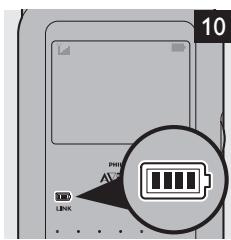
The battery light on the parent unit lights up blue and the video display shows a battery symbol (Fig. 10).
- When the battery is fully charged, the battery light turns green.
- When you charge the parent unit for the first time or after a long period of disuse, switch it off and let it charge continuously for at least 4 hours.
- Charging normally takes 3.5 hours, but it takes longer when the parent unit is switched on during charging. To keep the charging time as short as possible, switch off the parent unit during charging.
- When the batteries are fully charged, the parent unit can be used cordlessly for at least 8 hours if it is in automatic screen activation mode. If the video is on continuously, the parent unit can be used cordlessly for approx. 6 hours.
Note: When the parent unit has been charged for the first time, the operating time is less than 6 hours. The rechargeable battery only reaches its full capacity after you have charged and discharged it four times.
Note:The battery gradually discharges, even when the parent unit is switched off.
Using the appliance
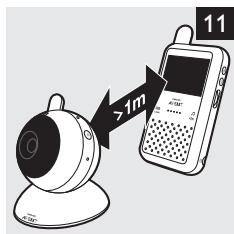
1 Place the parent unit and the baby unit in the same room to test the connection (Fig. 11). Make sure the baby unit is at least 1 metre/3 feet away from the parent unit.
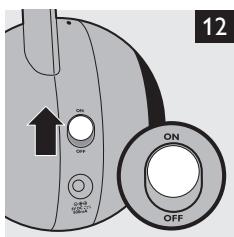
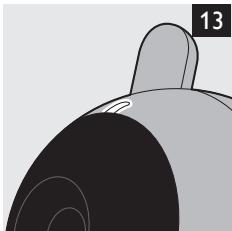
2 Set the ON/OFF switch on the baby unit to the ON position. (Fig. 12) The green power-on light goes on. (Fig. 13)
Note:The power-on light always lights up green, even when there is no connection with the parent unit.
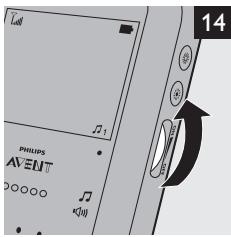
3 To switch on the parent unit, turn the volume wheel in the 'ON' direction to the desired volume level. (Fig. 14)
The power-on/battery light goes on. If the parent unit is charging, the power-on/battery light is blue. When the parent unit is fully charged, the power-on/battery light turns green.
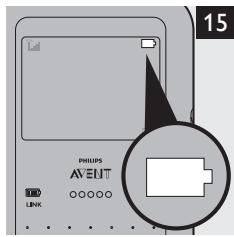
Note:The power-on/battery light always goes on, even when there is no connection with the baby unit. The video display goes on and the battery symbol appears on it (Fig. 15).
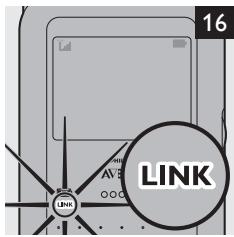
The LINK light flashes red to indicate that the parent unit is searching for a connection with a baby unit. (Fig. 16)
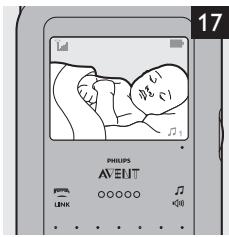
The LINK light on the parent unit turns green and lights up continuously when a connection has been established between the baby unit and parent unit. The baby is shown on the video display. (Fig. 17)
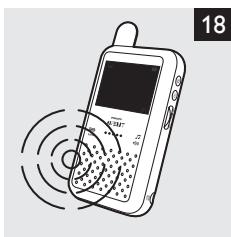
Note: If no connection can be established, the LINK light on the parent unit flashes red, the parent unit beeps and 'OUT OF RANGE' appears on the display. (Fig. 18)
Positioning the baby monitor
Keep the baby unit out of the reach of the baby. Never place the baby unit inside or mount it on the baby's bed or playpen.
Note: If you use a Wi-Fi network, microwave oven or a DECT-system and you experience interference on either the parent unit or baby unit, move the parent unit further away until there is no more interference.
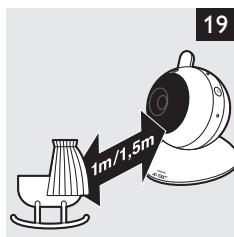
1 Place the baby unit at least 1 metre/3 feet away from your baby, but no further than 1.5 metres/5 feet away (Fig. 19).
2 Place the stand of the baby unit on a stable, level and horizontal surface.
Tip: Position the baby unit at a higher level to get a good overview of the baby's bed or playpen.
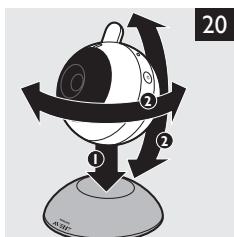
3 Place the baby unit on the stand and adjust its position in a way that ensures the best visibility of your baby (Fig. 20).
Do not position the baby unit with the microphone facing downwards. When the microphone is blocked by the base, the baby unit does not pick up sounds properly.
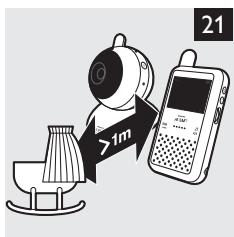
4 Place the parent unit within the operating range of the baby unit. Make sure it is at least 1 metre/3 feet away from the baby unit to avoid acoustic feedback (Fig. 21).
For more information on the operating range, see section 'Operating range' below.
Operating range
The operating range of the baby monitor is 150 metres/490 feet in open air. Depending on the surroundings and other disturbing factors, this range may be smaller.
| Dry materials | Material thickness | Loss of range |
| Wood, plaster, cardboard, glass (without metal, wires or lead) | < 30cm/12in | 0-10% |
| Brick, plywood | < 30cm/12in | 5-35% |
| Reinforced concrete | < 30cm/12in | 30-100% |
| Metal grilles or bars | < 1cm /0.4in | 90-100% |
| Metal or aluminium sheets | < 1cm/0.4in | 100% |
For wet and moist materials, the range loss may be up to 100% .
Features
Adjusting loudspeaker volume
You can adjust the loudspeaker volume of the parent unit to the level you prefer.
1 Turn the volume wheel to adjust the volume. (Fig. 14)
Note: If the volume is set to a high level, the parent unit consumes more power.
Adjusting display brightness
You can adjust the display brightness of the parent unit to the level you prefer.
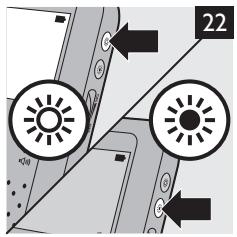
Press the brightness adjustment buttons on the parent unit to adjust the brightness of the video display. (Fig. 22)
Note: If the brightness is set to a high level, the parent unit consumes more power.
Sound level lights
The parent unit continuously monitors the sound level in your baby's room and the sound level lights let you know if there is any activity. If your baby cries, the green sound level lights light up on the parent unit.
- As long as the baby unit does not detect a sound, all sound level lights on the parent unit are out.
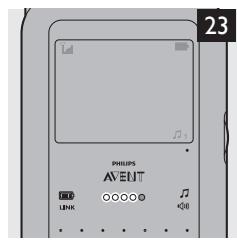
- When the baby unit picks up a sound, one or more sound level lights on the parent unit go on. The number of lights that go on is related to the loudness of the sound picked up by the baby unit. The sound level lights also go on when the parent unit is set to a low volume or when the automatic screen activation mode is activated (see section 'Automatic screen activation' below) (Fig. 23).
Automatic screen activation
The parent unit continuously monitors the sound level in your baby's room. When the automatic screen activation mode is activated, the video display only switches on when the baby unit picks up a sound. As long as no sound is detected, the video display is off to save power.
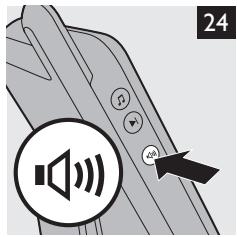
To activate the automatic screen activation mode, press the automatic screen activation button on the parent unit. (Fig. 24)
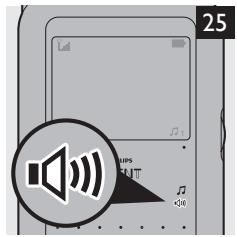
The automatic screen activation light on the parent unit goes on (Fig. 25).
- When the baby unit detects a sound, the video display on the parent unit automatically goes on to show the baby. When no sound is detected for 30 seconds, the video display goes out again.
2 To switch off the automatic screen activation mode, press the automatic screen activation button on the parent unit again.
Nightlights
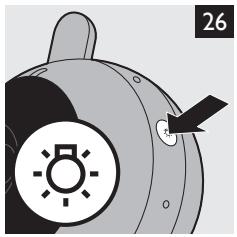
1 Press the nightlight button on the baby unit to switch on the nightlights. (Fig. 26)
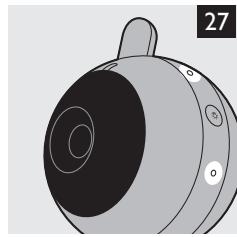
The nightlights on the baby unit go on. (Fig. 27)
Press the nightlight button again to switch off the nightlights.
Tip: Switch off the nightlights when you operate the baby unit on non-rechargeable batteries. This saves power.
Lullaby function
Note: When the baby unit plays a lullaby, it consumes more power.
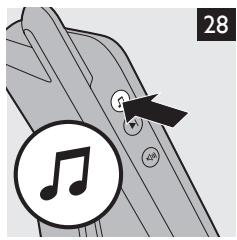
1 Press the play/stop button to start the lullaby (Fig. 28).
The lullaby starts to play on the baby unit and repeats continuously.
2 To stop the lullaby, press the play/stop button on the parent unit again.
3 To select another lullaby when a lullaby is playing:
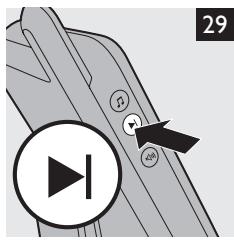
- Press the 'next lullaby' button on the parent unit. (Fig. 29)
If you want a different lullaby, press the 'next lullaby' button on the parent unit again.
Out-of-range alert
When the parent unit is out of range of the baby unit, the parent unit beeps once and the message 'Out of range' appears on the video display. The LINK light on the parent unit flashes red.
Note:The message 'Out of range' also appears on the video display of the parent unit when the baby unit is switched off.
Night vision
The camara has infrared lights that allow you to see your baby clearly, even in a dark room. When the lens detects low light levels, the infrared lights are activated automatically. Place the baby unit 1 to 1.5 metres/3 to 5 feet away from the baby to ensure a clear view.
Belt clip/stand
If the rechargeable battery of the parent unit is sufficiently charged, you can take the unit with you inside and outside the house by attaching the unit to your belt or waistband with the belt clip. This allows you to monitor your baby while you are moving around.
Cleaning and maintenance
Do not immerse the parent unit and the baby unit in water and do not clean them under the tap.
Do not use cleaning spray or liquid cleaners.
Switch off the baby unit and the parent unit and unplug them if they are connected to the mains.
2 Clean the parent unit and the baby unit with a damp cloth.
Note: Fingerprints or dirt on the lens of the baby unit may affect the camera's performance. Avoid touching the lens with your fingers.
Make sure the baby unit and parent unit are dry before you connect them to the mains again.
3 Clean the adapters with a dry cloth.
Storage
When you are not going to use the baby monitor for some time, remove the non-rechargeable batteries from the baby unit and the rechargeable battery from the parent unit. Store the parent unit, the baby unit and the adapters in a cool and dry place.
Replacement
The following items are replaceable:
- Magnetic stand for baby unit
- Adapters. (type number OH-1048A0600800U-VDE (Europe,VDE) or OH-1048A0600800U-UK (UK).
- Li-ion rechargeable battery
Battery compartment lid
Note: Only replace the stand, adapters, rechargeable battery and battery compartment lid with ones of the original type.
Accessories
You can order a new adapter from your Philips dealer or a Philips service centre under type number OH-1048A0600800U-VDE (Europe,VDE) or OH-1048A0600800U-UK (UK).
Environment
- Do not throw away the appliance with the normal household waste at the end of its life, but hand it in at an official collection point for recycling. By doing this, you help to preserve the environment (Fig. 30).
- Rechargeable and non-rechargeable batteries contain substances that may pollute the environment. Do not throw away rechargeable and non-rechargeable batteries with the normal household waste, but hand them in at an official collection point. Always remove rechargeable and non-rechargeable batteries before you discard and hand in the appliance at an official collection point. (Fig. 31)
Guarantee and service
If you need service or information or if you have a problem, please visit the Philips AVENT website at www.philips.com/AVENT or contact the Philips Consumer Care Centre in your country (you find its phone number in the worldwide guarantee leaflet). If there is no Consumer Care Centre in your country, go to your local Philips dealer.
Frequently asked questions
This chapter lists the questions most frequently asked about the appliance. If you cannot find the answer to your question, contact the Consumer Care Centre in your country.
| Question | Answer |
| Why don't the power-on light of the baby unit and the parent unit go on when I switch on the units? | Perhaps the rechargeable battery of the parent unit is empty and the parent unit is not connected to the mains. Insert the appliance plug into the parent unit and put the adapter in a wall socket. Then move the volume wheel in the 'ON' direction to switch on the parent unit and to establish connection with the baby unit. |
| Perhaps the baby unit is not connected to the mains and the non-rechargeable batteries in the baby unit are empty or there are no non-rechargeable batteries in the baby unit at all. Put full non-rechargeable batteries in the baby unit or connect the baby unit to the mains. Then set the on/off switch to 'ON' to switch on the baby unit and to establish connection with the parent unit. | |
| Why does the LINK light on the parent unit flash red? | The baby unit and the parent unit are out of range of each other. Move the parent unit closer to the baby unit. |
| The baby unit may be switched off. Switch on the baby unit. | |
| Why does the battery/ power-on light on the parent unit flash green? | The rechargeable battery of the parent unit is running low. Recharge the battery (see chapter 'Preparing for use'). |
| Why does the parent unit beep? | If the parent unit beeps while the LINK light lights up red continuously, the connection with the baby unit is lost. Move the parent unit closer to the baby unit. |
| The baby unit may be switched off. Switch on the baby unit. | |
| Why does the video monitor produce a high-pitched noise? | The units may be too close to each other. Make sure the parent unit and the baby unit are at least 1 metre/3 feet away from each other. |
| The volume of the parent unit may be set too high. Decrease the volume of the parent unit. | |
| Why don't I hear a sound/Why can't I hear my baby cry? | The volume of the parent unit may be set too low or may be switched off. Turn the volume wheel to a higher volume level. |
| Perhaps you have switched on the automatic screen activation. If the automatic screen activation is activated, the video display only switches on when the baby unit picks up a sound. As long as no sound is detected, the video display is off to save power. | |
| Why does the parent unit react too quickly to other sounds? | The baby unit also picks up other sounds than those of your baby. Move the baby unit closer to the baby (but observe the minimum distance of 1 metre/3 feet). |
| Why do the non-rechargeable batteries of the baby unit run low quickly? | Perhaps you have switched on the nightlights. If you want to use the nightlights, we advise you to use the baby unit on mains power. |
| Perhaps you are playing lullabies. The baby unit consumes a lot of energy when you play lullabies. If you play lullabies, we advise you to use the baby unit on mains power. | |
| Why does the charging time of the parent unit exceed 3.5 hours? | The parent unit may be switched on during charging. Switch off the parent unit during charging. |
| The specified operating range of the baby monitor is 150 metres/490 feet. Why does my baby monitor manage a much smaller distance than that? | The specified range is only valid outdoors in open air. Inside your house, the operating range is limited by the number and type of walls and/or ceilings in between. |
| Why can't I establish a connection? Why is the connection lost every now and then? Why are there sound interruptions? | The baby unit and the parent unit are probably close to the outer limits of the operating range or there is interference from other 2.4GHz wireless devices. Try a different location, decrease the distance between the units or switch off other 2.4GHz wireless devices. Please note that it takes about 5 seconds each time before a connection between the units is established. |
| What happens during a power failure? | If the parent unit is sufficiently charged, it continues to operate during a power failure. If there are batteries in the baby unit, it also continues to operate during a power failure. |
| The operating time of the parent unit is supposed to be at least 6 hours. Why is the operating time of my parent unit shorter? | When the parent unit has been charged for the first time, the operating time is shorter because the battery has not reached its full capacity yet. The rechargeable battery only reaches its full capacity after you have charged and discharged it at least four times. After this, the operating time is 6 hours if the automatic screen activation is not activated and 8 hours if the automatic screen activation mode is activated. |
| The parent unit consumes a lot of energy when the video display is switched on continuously. Activate the automatic screen activation mode to increase the operating time (see chapter ‘Features’, section ‘Automatic screen activation'). | |
| The volume of the parent unit may be set too high, which causes the parent unit to consume a lot of energy. Decrease the volume of the parent unit | |
| Why do I get interference on the parent unit? | Interference may occur when the parent unit is out of range of the baby unit. Interference may also occur if there are too many walls or ceilings between the parent unit and the baby unit or when other 2.4GHz wireless devices are switched on (e.g. microwave, internet). Put the parent unit in a different place, closer to the baby unit, or switch off other wireless devices. |
| Why does the parent unit make a buzzing sound? | Interference may occur when the parent unit is out of range of the baby unit. Interference may also occur if there are too many walls or ceilings between the parent unit and the baby unit or when other 2.4GHz wireless devices are switched on (e.g. microwave, internet). Put the parent unit in a different place, closer to the baby unit, or switch off other wireless devices. |
| The rechargeable battery of the parent unit may need to be charged. | |
| Why does the video display flicker? | Interference may occur when the parent unit is out of range of the baby unit. Interference may also occur if there are too many walls or ceilings between the parent unit and the baby unit or when other 2.4GHz wireless devices are switched on (e.g. microwave, internet). Put the parent unit in a different place, closer to the baby unit, or switch off other wireless devices. |
| The rechargeable battery of the parent unit may need to be changed. | |
| Why isn't there any image on the video display when the power-on light is on? | The parent unit may be in the automatic screen activation mode. Press the automatic screen activation button again to switch on the video display. |
| Why isn't the image on the video display clear? | The display brightness may be set too low. Increase the display brightness (see chapter 'Features'). |
| Why doesn't the parent unit work in the automatic screen activation mode? | The distance between the baby and the baby unit may be too large. Make sure that the baby unit is placed 1 to 1.5 metres/3 to 5 feet away from the baby. |
| Why isn't the image on the video display clear in night vision? | The distance between the baby and the baby unit may be too large. Make sure that the baby unit is placed 1 to 1.5 metres/3 to 5 feet away from the baby. |
| Why doesn't the battery symbol appear on the video display of the parent unit when I start to charge the parent unit? | It may take a few minutes before the battery symbol appears on the video display of the parent unit when you charge the parent for the first time or after a long period of disuse. |
| Why doesn't the parent unit charge when I have plugged it in? | The rechargeable battery may have reached the end of its life. Replace the rechargeable battery. |
Introduktion
Philips AVENT Ks L b L b L b L b L b L b L b L b L b L b L b L b L b L b L b L b L b L b L b L b L b L b L b L b L b L b L b L b L b L b L b L b L b L b L b L b L b L b L b L b L b L b L b L b L b L b L b L b L b L b Lb
Jgaa
a 1 1 1 1 1 1 1 1 1 1 1 1 1 1 1 1 1 1 1 1 1 1 1 1 1 1 1 1
aaiy aaiy aaiy aaiy aaiy aaiy aaiy aaiy aaiy aaiy aaiy aaiy aaiy aaiy aaiy aaiy aaiy aaiy aaiy aaiy aaiy aaiy aaiy aaiy aaiy aaiy aaiy aaiy aaiy aaiy aaiy aaiy aaiy aaiy aal y
1 1
S
J 15 J 15 J 15 J 15 J 15 J 15 J 15 J 15 J 15 J 15 J 15 J 15 J 15 J 15 J 15 J 15 J 15 J 15 J 15 J 15 J 15 J 15 J 15 J 15 J 15
15 5 5
S_ ACD = 12 · CD × AC = 12 × 3
gaaa aaaaa aaaaa aaaaaa aaaaa aaaaa
(4)J (20
yj yj jyj yj yj yj jyj ojj ojj
aJ 1
J 1
(19)
1 1
(14)
(14).g 2
a a a a a a a a a a a a a a a a a a a a a a a a
(14)
g 1 1 1 1 1 1 1 1 1 1 1 1 1 1 1 1 1 1 1 1 1 1 1
g 1000000000000000000000000000000000000000000
a 1000000000000000000000000000000000000000000
(10)
Lg 000000000000000000000000000000000000000000000000000000000000000
(1)
120 ÷ 21 ÷ 20 = 3021
8
S ACD = S COD + S_ CDF
10
jla Jla sJla 11
12
23
14
S_ LBC = 12 · CD · BC = 12 × CD × 5
S_ ACD = 12 · CD × AC = 12 × 3
17
S OBC = S COD + S BOC - S BOC
19
120
1.3,5 2.4( 1,5)
22
B
1
S OBC = S COD + S BOC - S BOC
3
42
5
6j( a^2 + 2b^2 - 2ac)
S OBC = S COD + S_ BOC
12 = 2
15 ÷ 15 ÷ 15
10
jgol/ jgs 1
S木弟形 COBD = S COD + S BDO = S BOC +
()
14
- p_1 =
Aa aaa aaa aaa aaa aaa aaa aaa
a aaae aee aae e ae aee aee aee
y 1 y
aai aaiiaaiiuiLiayll
#
a a a a a a a a a a a a a a a a a a a a a a a a a a a a a a a a a
J 1
J
JUUUUULUULUUL
Jibl l 1
.(J)OH-1048A0600800U-UK(j(VDE,)OH-1048A0600800U-VDEj(j)).
Li-ion Li
= b1 + b2 + ·s + b_n
a 21
#
OH-1048A0600800U-VDE jIglllPhilips Philips jJjPhilips jJj
(1048A0600800U-UK,1(VDE
#
aay aee aee aee aee aee aee aee aee aee aee aee aee aee
(·J)zlllglslal
aallll lallln 1 aalii y. aaii iiaai jai jai aallln 1 aaiy aaiy aaiy aaiy aaiy aaiy aaiy aaiy aaiy aaiy aaiy
(1)
aaii
Philips AVENT y jy jy k y d y lal y a Lgall y d y Ld y y d y (ylll Jyddy y d y y d y y d y y d y y d y y d y y d y y d y y d y y d y y d y y d y y d y y d y y d y y d y y d y
jaii jaii jaii jaii jaii jaii jaii jaii jaii jaii jaii jaii jaii jaii jaii jaii jaii jaii jaii jaii jaii jaii jaii jaii jaii jaii jaii jaii jaii jaii jaii jaii jaii jaii jali
(10)
(11)JdJI 1
j 1
(1VJ)
a a a a a a a a a a a a a a a a a a a a a a a a a
Juslln 1yall jzil 102g aag
19 0/0j0 1,0 jue y Jai jy Jai jy jay jay jay jay jay jay jay jay jay jay jay jay jay jay jay jay jay jay jay jay jay jay jay jay jay jay jay jay jay jay jay jay jay jay jay
sai g ssiwag ciL chw gie Jalll oJalj
Jalall Ja aad g Jaliell yewd yjia ge Jyaoa glg Jalall 3ag jay
(y)diabla jgyjdyjgjjgjjgjjgjjgjjgjjgjjgjjgjjgjjgjjgjjgjjgjjgjjgjjgjjgjjgjjgjjgjjgjjgjjgjjgjjgjjgjjgjjgjjgjjgjjgjjgjjgjjgjjgjjgjjgjjgjjgjjgjjgjjgjjgjjgjjgjjgjjgjjgjjgjjg
alg 1 blll jall l gag gag gall gag gag gall ll l Jaa 1 gag gag gall gag gag g
JLL
e 6
(1)
.1i j" jilil jllill lglbl, jilil jlll jc oolall j
gulil
1a 100
julil
a a a a a a a a a a a a a a a a a a a a a a a a a a a a a a a a a a
(1) (2)
(J).
(0J)j
a 100000000000000000000000000000000000000
sUuluSj
Jia jia de jia jiu Jai jiu Jauuall
p11 0
J 1
a aallll lallll lalll llae 0g g g g g g g g g g g g g g g
J 1050mAh a baa a a d j t J a a a a a a a a a a a a a a a a a a a a a a a a
y
Jalll 200 g Jlll 100g lill 100g Jll 100g Jll 100g Jll 100g
(1 J) aed Jaaa Jaua aee 2e
.(VJ)joo
aalol 1 -ylllgl + ygal lalil g g a
(A J) 1
(9 J) blll aea g aegall aagg aag aag aal
a a a a a a a a a a a a a a a a a a a
j4aai
(11)
1 1 1 1 1 1 1 1 1 1 1 1 1 1 1
(14)
(14)
a 12345678901000000000000000000000000000000000000
(11)J. J. J. J. J. J. J. J. J. J. J. J. J. J. J. J. J. J. J. J. J. J. J. J. J. J. J. J. J. J. J. J. J. J. J. J. J. J. J. J. J. J. J. J. J. J. J. J. J. J. J.
J 1000000000000000000000000000000000000000000000000000000000000000000000000000000000000000000000
j
jall 2g
JyI JyI JyI JyI JyI JyI JyI JyI JyI JyI JyI JyI JyI JyI JyI JyI JyI JyI JyI JyI JyI JyI JyI JyI
JLJIJIJIJIJIJIJIJIJIJIJIJIJIJIJIJIJIJIJIJIJIJIJIJIJIJIJIJIJIJIJIJIJIJIJIJIJIJIJIJIJIJIJIJIJIJIJIJIJIJIJIJIJIJIJIJIJIJIJIJIJIJIJIJIJIJIJIJIJIJIJIJIJIJIJIJIJIJIJIJIJIJIJIJIJIJIJIJIJIJIJIJIJIJIJIJIJIJIJIJIJ
#
Philips AVENT 1uJ Philips AVENT 1uJ
. www.philips.com/welcome
Jn Jn Jn Jn Jn Jn Jn Jn Jn Jn Jn Jn Jn Jn Jn Jn Jn Jn Jn Jn Jn Jn Jn Jn Jn Jn Jn Jn Jn Jn Jn Jn Jn Jn Jn Jn Jn Jn Jn Jn Jn Jn Jn Jn Jn Jn Jn Jn Jn Jn Jn
aLgclglcgldlgs
(1)
A
1
f1( x0,y_0) = 2
3
4
5
6b + d = 10
7
8
9
10
11
12
13
14
EgwhbI bJzj1 15
ai a ai 的最小值为 k .
17
18
(Year in which the CE mark is affixed)
EC DECLARATION OF CONFORMITY
We,PHILIPS CONSUMER LIFESTYLE B.V.
TUSSENDIEPEN 4, 9206 AD DRACHTEN, THE NETHERLANDS
Declare under our responsibility that the electrical product(s):
Philips
(brand name)
SCD600
(Type version of model)
Baby Monitor
product description)
To which this declaration relates is in conformity with the following harmonized standards:
(title, number and date of issue of the standard)
EN60950-1:2006
EN62311:2008
EN 301 489-1 V1.8.1
EN 301 489-17 V1.3.2
EN 300 328 V1.7.1
EN62018:2003
Following the provisions of :
1999/5/EC (R&TTE Directive) (Directive R&TTE 1999/5/CE)
2009/125/EC (EuP Directive)
-
278/2009/EC
-
1275/2008/EC
And are produced under a quality scheme at least in conformity with ISO 9001or CENELEC
Permanent Documents
The Notified Body CETECOM ICT, NB0682
and
KEMA Quality HK LTD, NB0344
(Name and number)
performed Safety, EMC and EuP tests
(description of intervention)
Remarks:
Drachten, 30 November 2009
(place, date)
A. Speelman, Compliance Manager
(sigature, name and function)

R&TTE Directive 1999/5 EC
| AT √ | DK √ | DE √ | IT √ | MT √ | SK √ | GB √ | CH √ |
| BE √ | EE √ | GR √ | LV √ | NL √ | SI √ | IS √ | BG √ |
| CY √ | FI √ | HU √ | LT √ | PL √ | ES √ | LI √ | RO √ |
| CZ √ | FR √ | IE √ | LU √ | PT √ | SE √ | NO √ | TR √ |