
T-X3 BATTERY GRIP - Photo accessory THRUSTMASTER - Free user manual and instructions
Find the device manual for free T-X3 BATTERY GRIP THRUSTMASTER in PDF.



| Product Type | Battery Grip for handheld console |
| Brand | THRUSTMASTER |
| Model | T-X3 BATTERY GRIP |
| Category | Photo accessory (for PSP™ console) |
| Compatibility | Sony PSP™ series 1000 (old generation) and series 2000 (Slim & Lite) |
| Power supply | Built-in rechargeable battery via 5V AC adapter (provided with PSP™) |
| Charging time | Approximately 3 hours (full charge) |
| Battery capacity | Approximately 2000 mAh (estimated) |
| Connections | 1 x DC IN 5V, 2 x DC OUT (retractable cable + cable under flap) |
| LED indicator | Red = charging, Green = full charge |
| Fixation system | Hinged with 2 fixing screws inserting into the holes of the PSP™ |
| Supported positions | Open (gaming), Standby (video), Closed (transport) |
| Main functions | Recharge the PSP™ while playing or carrying; protect the screen in closed position |
| Materials | ABS plastic, electronic components |
| Warranty | 2 years against material and manufacturing defects |
| Care and cleaning | Clean with a dry cloth, avoid moisture and dust |
| Safety | Do not expose to heat, do not short-circuit, use only the supplied 5V adapter |
| Spare parts and repairability | Contact Thrustmaster technical support for any repairs |
| General information | Made in China. Compliant with WEEE directive (end-of-life recycling) |
| Dimensions (estimated) | Approximately 130 x 70 x 30 mm |
| Weight (estimated) | Approximately 150 g |
Frequently Asked Questions - T-X3 BATTERY GRIP THRUSTMASTER
User questions about T-X3 BATTERY GRIP THRUSTMASTER
0 question about this device. Answer the ones you know or ask your own.
Ask a new question about this device
Download the instructions for your Photo accessory in PDF format for free! Find your manual T-X3 BATTERY GRIP - THRUSTMASTER and take your electronic device back in hand. On this page are published all the documents necessary for the use of your device. T-X3 BATTERY GRIP by THRUSTMASTER.
USER MANUAL T-X3 BATTERY GRIP THRUSTMASTER
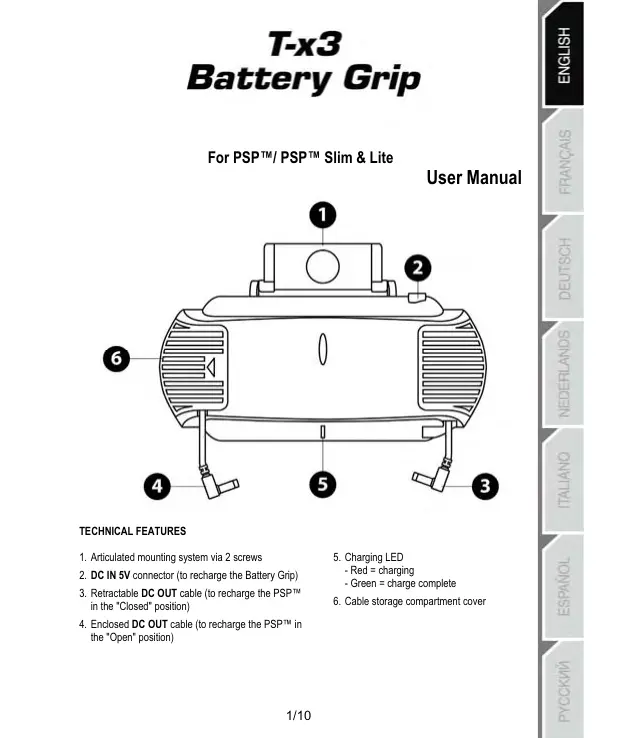
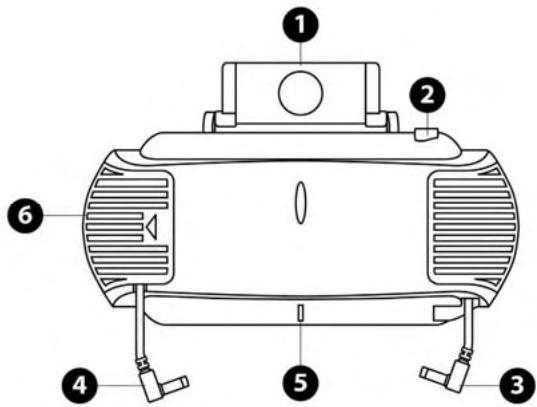
- Articulated mounting system via 2 screws
- DC IN 5V connector (to recharge the Battery Grip)
- Retractable DC OUT cable (to recharge the PSP™ in the "Closed" position)
-
Enclosed DC OUT cable (to recharge the PSP™ in the "Open" position)
-
Charging LED
- Red = charging
- Green = charge complete
- Cable storage compartment cover
WARNING
Before using this product, please read this document carefully and hold on to it for later consultation.
- Keep your Battery Grip in a dry place and do not expose it to dust or sunlight.
Make sure to respect polarities and charging times.
- Do not twist or pull too strongly on the connectors and cables.
- Do not spill liquid on the Battery Grip and its connectors.
- Do not short-circuit the Battery Grip.
- Never recharge the Battery Grip with any accessory other than the 5V power adapter included with your PSP™.
- Never remove your PSP™ console's internal battery when recharging via the Battery Grip.
- Never dismantle, attempt to burn or expose the Battery Grip to high temperatures.
BEFORE USING YOUR T-X3 BATTERY GRIP FOR THE FIRST TIME:
WE STRONGLY RECOMMEND THAT YOU GIVE YOUR T-X3 BATTERY GRIP
A FULL CHARGE BEFORE USING IT FOR THE FIRST TIME.
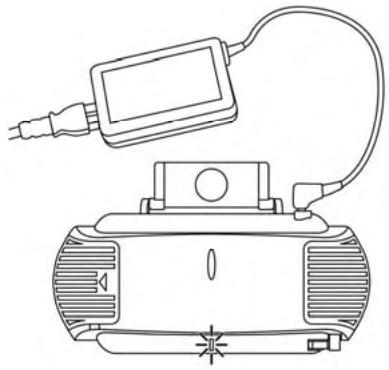
RECHARGING THE T-X3 BATTERY GRIP
- Connect your PSP™ console's AC ADAPTOR 5V power adapter to the DC IN (2) connector on the Battery Grip.
The charging LED (5) on the Battery Grip lights up.
Average length of time for a full charge: 3 hours.
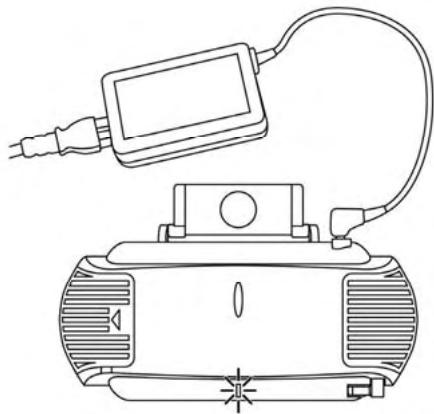
T-X3 BATTERY GRIP CHARGING LED
Red LED = the battery is recharging.
- Green LED = the battery is fully charged.
IMPORTANT NOTE: To achieve maximum battery life, you should also recharge your Sony® PSP™ console fully AND separately using the console's power adapter.
INSTALLING THE T-X3 BATTERY GRIP ON YOUR PSP™
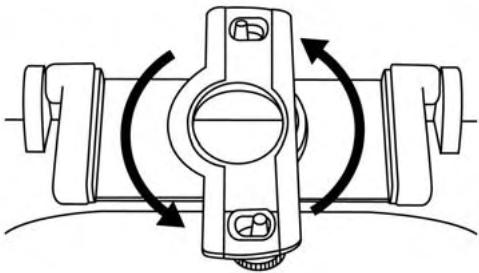
1) Turn the articulated mounting system (1) on the Battery Grip 90^ in order to access the 2 mounting screws.
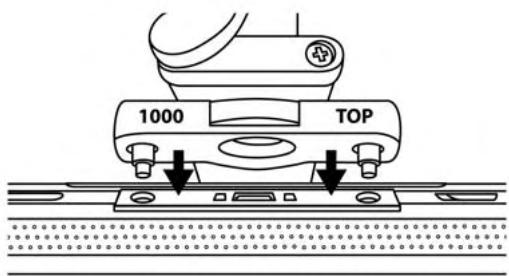
2) If you have a PSP™ 1000 Series model (older generation), position the screen of your PSP™ console on the side marked 1000 - TOP:
3) If you have a PSP™ 2000 Series model (Slim & Lite), position the screen of your PSP™ console on the side marked 2000 - TOP:
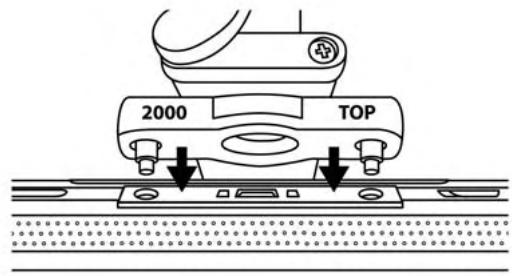
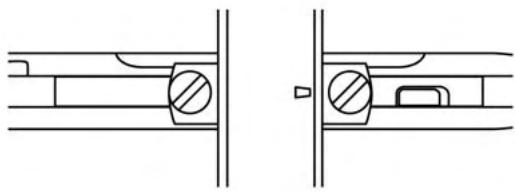
4) Insert the tips of the 2 mounting screws into the 2 corresponding openings on your PSP^TM
5) Tighten the 2 screws so that the entire unit is perfectly stable, using a flat head screwdriver if necessary.
USING THE DC OUT CABLES
The T-X3 Battery Grip features 2 DC OUT cables, allowing you to recharge your PSP^TM in 3 different positions (Open, Stand or Closed).
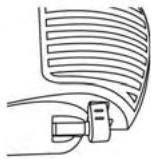
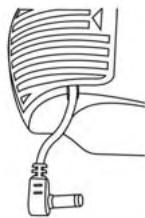
- Retractable DC OUT cable (3)
(located on the right-hand side of the Battery Grip)
- Remove the connector from its dedicated spot and pull it out gently to bring out the cable.
- Do the reverse after use to store the cable again.
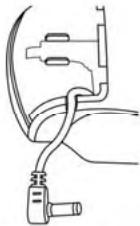
Enclosed DC OUT cable (4)
(located on the left-hand side of the Battery Grip)
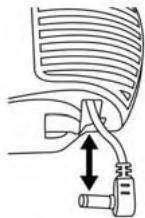
- Open the cable storage compartment cover (the one with OPEN written on it).
- Remove the connector and thread the cable through the corresponding notch.
- Close the cable storage compartment cover.
- Do the reverse after use to store the cable again.
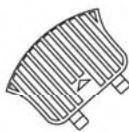
3 POSITION MECHANICAL SYSTEM TO RECHARGE YOUR PSP™
To switch from one position to another, simply turn your Battery Grip 180^ .
-
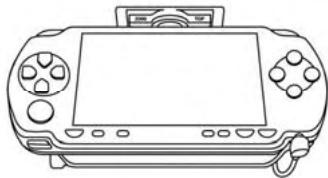
Recharging in the Open (for gaming) or Stand (for watching videos) positions:
-
Connect the enclosed DC OUT cable (4) to the DC IN connector on your PSP™.
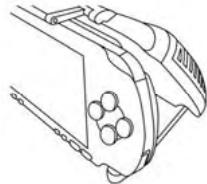
-
Recharging in the Closed position (to protect the screen and for transportation):
-
Connect the retractable DC OUT cable (3) to the DC IN connector on your PSP™.
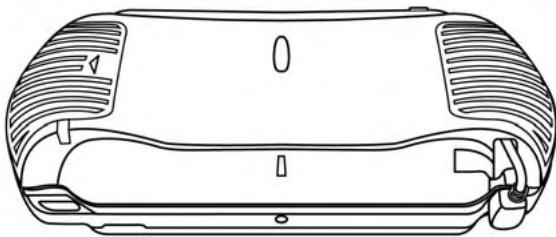
NOTE:
THE CHARGING LED (5) ON THE BATTERY GRIP ONLY LIGHTS UP WHEN THE BATTERY GRIP IS BEING CHARGED.
TECHNICAL SUPPORT
If you encounter a problem with your product, please go to http://fs.thrustmaster.com and click Technical Support. From there you will be able to access various utilities (Frequently Asked Questions (FAQ), the latest versions of drivers and software) that may help to resolve your problem. If the problem persists, you can contact the Thrustmaster products technical support service ("Technical Support"):
By email:
In order to take advantage of technical support by email, you must first register online. The information you provide will help the agents to resolve your problem more quickly. Click Registration on the left-hand side of the Technical Support page and follow the on-screen instructions. If you have already registered, fill in theUsername and Password fields and then click Login.
By telephone:
| United Kingdom | 08450800942Charges at local rate | Monday to Friday from Noon to 4pm and 5pm to 10pm Saturday from 9am to Noon and 1pm to 7pm Sunday from 9am to Noon and 1pm to 4pm |
| United States | 1-866-889-5036Free | Monday to Friday from 7am to 11am and from Noon to 5pm Saturday and Sunday from 7am to Noon (Eastern Standard Time) |
| Canada | 1-866-889-2181 Gratisuit / Free | Monday to Friday from 7am to 11am and from Noon to 5pm Saturday and Sunday from 7am to Noon (Eastern Standard Time) |
| Denmark | 80887690Free | Monday to Friday from 1pm to 5pm and 6pm to 11pm (English) Saturday from 9am to 1pm and 2pm to 8pm Sunday from 10am to 1pm and 2pm to 5pm |
| Sweden | 0200884567Free | Monday to Friday from 1pm to 5pm and 6pm to 11pm (English) Saturday from 9am to 1pm and 2pm to 8pm Sunday from 10am to 1pm and 2pm to 5pm |
| Finland | 0800 913060Free | Monday to Friday from 2pm to 6pm and 7pm to Midnight (English) Saturday from 10am to 2pm and 3pm to 9pm Sunday from 11am to 2pm and 3pm to 6pm |
WARRANTY INFORMATION
Worldwide, Guilemot Corporation S.A. ("Guilemot") warrants to the consumer that this Thrustmaster product will be free from material defects and manufacturing flaws for a period of two (2) years from the original date of purchase. Should the product appear to be defective during the warranty period, immediately contact Technical Support, who will indicate the procedure to follow. If the defect is confirmed, the product must be returned to its place of purchase (or any other location indicated by Technical Support).
Within the context of this warranty, the consumer's defective product will, at Technical Support's option, be either repaired or replaced. Where authorized by applicable law, the full liability of Guillemot and its subsidiaries (including for indirect damages) is limited to the repair or replacement of the Thrustmaster product. The consumer's legal rights with respect to legislation applicable to the sale of consumer goods are not affected by this warranty.
This warranty shall not apply: (1) if the product has been modified, opened, altered, or has suffered damage as a result of inappropriate or abusive use, negligence, an accident, normal wear, or any other cause not related to a material defect or manufacturing flaw; (2) in the event of failure to comply with the instructions provided by Technical Support; (3) to software not published by Guillemot, said software being subject to a specific warranty provided by its publisher.
Additional warranty provisions
In the United States of America and in Canada, this warranty is limited to the product's internal mechanism and external housing. Any applicable implied warranties, including warranties of merchantability and fitness for a particular purpose, are hereby limited to two (2) years from the date of purchase and are subject to the conditions set forth in this limited warranty. In no event shall Guillemot Corporation S.A. or its affiliates be liable for consequential or incidental damage resulting from the breach of any express or implied warranties. Some States/Provinces do not allow limitation on how long an implied warranty lasts or exclusion or limitation of incidental/consequential damages, so the above limitation may not apply to you. This warranty gives you specific legal rights, and you may also have other legal rights which vary from State to State or Province to Province.
COPYRIGHT
© 2008 Guillemot Corporation S.A. All rights reserved. Thrustmaster® is a registered trademark of Guillemot Corporation S.A. PSP™ is a trademark of Sony Computer Entertainment Inc. This product is not distributed under official license from or endorsed by Sony computer Entertainment Inc. All other trademarks and brand names are hereby acknowledged and are property of their respective owners. Illustrations not binding. Contents, designs and specifications are subject to change without notice and may vary from one country to another. Made in China.
ENVIRONMENTAL PROTECTION RECOMMENDATION
At the end of its working life, this product should not be disposed of with standard household waste, but rather dropped off at a collection point for the disposal of Waste Electrical and Electronic Equipment (WEEE) for recycling.
This is confirmed by the symbol found on the product, user manual or packaging.
Depending on their characteristics, the materials may be recycled. Through recycling and other forms of processing Waste Electrical and Electronic Equipment, you can make a significant contribution towards helping to protect the environment.
Please contact your local authorities for information on the collection point nearest you.
FAQs, tips and drivers available at www.thrustmaster.com
T-x3
Battery Grip
Pour PSP™/PSP™ Slim & Lite
INFORMATIONS RELATIVES À LA GARANTIE
INFORMATIE MET BETREKKING TOT DE GARANTIE
Cable DC OUT retracted (3)
PykoBoCTBOIJIb3ObaTeJIa
TEXHNUECKNEXAPAKTEPNCTUKN
1.卍日nHnA CNTEMMAKPENNEHNA PPNI NMOO2 2 HINTOB
2. PazemДдгпдддддддддддддддддддддддддддддддддддддддддддддддддддддддддддддддддддддддддддддддддддддддддддддддддддд
5B(dнэpeaparikn Battery Grip)
3. NéupúñOHHH KábeBbXbOJa YCTpOCTBa
nóctoRrHrOTo TKA (dIpe nepezapárKIM PSP™
B NOJOKHEIN (3kApbTfO)®
4. Czukhnoi kabirékh bixho kdo noctoHHOToTOKI (dJa Npe9e3aRnD PSEPTM nBONKHeHcNkO (KtObTe)
C. SeBTOdNO HnDnKauuH coCTOHNHIA 3aepJDK
-Kpaacbny npocecc3apdKn
-3eJenbI =3apJa 3aBepWeHa
6. Kpbiuka kaabeNbHoro oTceka
PENEYNPEXKDEHNE
Pc06Ba BHMMATEHbO 03AHOMtCBsC DAHbIM DOKYMHTOM NpeD IWCNOB3OBaHEM INEDJIIM, A TAKOE CBEPTBcC H Bm B DAHEINHE.
CnEduyET xpanHbI Battery Grip B cyXOM MecTe IN He Donyckatb BO3dEYCTBn HA Hero PbInn I cOnneHrO Cbenta.
CnElyETBHMMATEHbO CNEIHTb3aCoBIOJENHEMNOJARHOCTN6ATAPeIN NpOdoONKITeJIHOCTN 3AQPdIKn.
He npOycaTeTcA kcyuBnAme Hn npReBbUeHMe yCnIyBaTbRnBnA B OTHoEHN pa3bEmOB KabEn.
He donyckaetc nonapdHne kdkoctn Ha Battery Grip n erpaembl.
He donyckaetraMbikaHne Battery Grip hakopoTko.
He nyocyaetca nepea34kaBatty Grip pn noMOUpaPnncOo6neHN, OTNIHbIX or 6Noka pntanHHAPKHEMN 5 B, nctapnnEAMBO KOMPKTEC s C PSPM.
3anepaetor ydaenene Hbnytpenien 6atapen KcHocmPSP™ npn nepezapdke npn nomou Battery Grip.
3anpeaetora pa3bapatBatty Grip n noaepatrB OoaeiCTBIO OTHN INI Blycoox TMepnATyp.
IPEPEDEPBbIMIPUMEHEHEMT-X3 BATTERY GRIP
HACTORTELHO KEPOMEHELYETC BYIONIOHITNIJYK 3APRJKY T-X3 BATTERY GRIP NEPED ETO PEPBbIM ICNPOJI 3OBAHIEM.
IPE3APJKA T-X3 BATTERY GRIP
- Пдогончiteь BLOK TИТАНУР LAHJPKEHEMМ 5 B KONCOJI N PSP™ к разьему Источька рintаная постеногуто VA DC IN (2) hy Battery Grip.
Ha Battery Grip 3a2opaemc cemodou ndukauu ccmoHna 3apk (5).
CpeHn npoDOnKInTeIbHOCTb noIHorO uKnla 3apAkn:3aca.
CBETODIOIHINIKALCIMCOCTOHN3APRKNT-X3BATTERYGRIP
KpaChbIy cBET CBEToNDHOa = BaTapeB B COCTOHNnepe3apdKn.
3eHbI uBcT cBToDnOa = nonHbI 3apd 6atapei.
BAXHOE 3AMEUHHE YTOBbI PNOJNTb CPOK CNYKbI BATAPEI, HEOEXOJIMO 3APJNTb KOHCOB SONYPSP TM PNOHOCbIO N OTDEJIbHO, INCINBJ3yCETBOB ADAJTEP KOHCOIN.
YCTAHOBKA T-X3 BATTERY GRIP HA PSP™
HepeunHbI Ka6eIbBbIXoDa yCtpoCTBa nOToHHoro ToKa DC OUT (3)
(pacnonazaemca na npaeou cmopone Battery Grip)
BbHbte CoedHHntTeBn 13 erO JneKn H octopoxHO ToNtHHe 3a Hero, YTObbl BbTbHytB bKa6BeB.
Omebl Ha yacmo 3adaeabe bie eonpocbi, coebu u dpaeepbl, meomcra Ha www.thrustmaster.com

Thrustmaster is a division of the Guillemot Corporation group
- WARNING
- BEFORE USING YOUR T-X3 BATTERY GRIP FOR THE FIRST TIME:
- RECHARGING THE T-X3 BATTERY GRIP
- T-X3 BATTERY GRIP CHARGING LED
- INSTALLING THE T-X3 BATTERY GRIP ON YOUR PSP™
- USING THE DC OUT CABLES
- - Retractable DC OUT cable (3)
- Enclosed DC OUT cable (4)
- POSITION MECHANICAL SYSTEM TO RECHARGE YOUR PSP™
- NOTE:
- TECHNICAL SUPPORT
- By email:
- WARRANTY INFORMATION
- Additional warranty provisions
- COPYRIGHT
- ENVIRONMENTAL PROTECTION RECOMMENDATION
- T-x3
- Battery Grip
- INFORMATIONS RELATIVES À LA GARANTIE
- INFORMATIE MET BETREKKING TOT DE GARANTIE
- Cable DC OUT retracted (3)
- TEXHNUECKNEXAPAKTEPNCTUKN
- PENEYNPEXKDEHNE
- IPEPEDEPBbIMIPUMEHEHEMT-X3 BATTERY GRIP
- IPE3APJKA T-X3 BATTERY GRIP
- CBETODIOIHINIKALCIMCOCTOHN3APRKNT-X3BATTERYGRIP
- YCTAHOBKA T-X3 BATTERY GRIP HA PSP™
- HepeunHbI Ka6eIbBbIXoDa yCtpoCTBa nOToHHoro ToKa DC OUT (3)
Brand : THRUSTMASTER
Model : T-X3 BATTERY GRIP
Category : Photo accessory