
R-9500 - Electric razor REMINGTON - Free user manual and instructions
Find the device manual for free R-9500 REMINGTON in PDF.



| Brand | REMINGTON |
| Model | R-9500 |
| Product type | Rechargeable electric shaver (cord/cordless) |
| Power supply | Universal voltage 100-240 V, 50/60 Hz |
| Battery life | Up to 3 weeks of shaving after full charge of 1 hour |
| Quick charge | 5 minutes for one shave |
| Display | Digital LCD with charge indicator and remaining minutes |
| Blade technology | Titanium coated blades |
| Trimmer | Easy-View pop-up trimmer |
| Cleaning system | Automatic with Remington CC-100 cleaning solution |
| Maintenance | Washable, daily cleaning recommended |
| Safety | Do not use in bathtub/shower, unplug before cleaning |
| Replacement parts | SP-21 cutting heads, CC-100 cleaning solution and filter |
| Warranty | 2 years (full warranty) |
| Usage | Dry shaving, face only |
| Included accessories | Storage case, cleaning brush |
Frequently Asked Questions - R-9500 REMINGTON
User questions about R-9500 REMINGTON
0 question about this device. Answer the ones you know or ask your own.
Ask a new question about this device
Download the instructions for your Electric razor in PDF format for free! Find your manual R-9500 - REMINGTON and take your electronic device back in hand. On this page are published all the documents necessary for the use of your device. R-9500 by REMINGTON.
USER MANUAL R-9500 REMINGTON
IMPORTANT SAFETY INSTRUCTIONS
When using an electrical appliance, basic precautions should always be observed, including the following. Read all instructions before using this appliance.
DANGER
To reduce the risk of electric shock:
- Do not reach for an appliance that has fallen into water. Unplug it immediately.
Do not use while bathing or in the shower. - Do not place or drop into water or other liquid.
- Do not place or store this appliance where it can fall or be pulled into a tub or sink.
Except when charging, always unplug this appliance from the electrical outlet immediately after using.
Unplug this appliance before cleaning it.
WARNING
To reduce the risk of burns, fire, electric shock or injury to persons:
This appliance is for household use only.
An appliance should never be left unattended when it's plugged in, except when charging a rechargeable appliance.
Close supervision is necessary when this appliance is used by, on, or near children or invalids.
Use this appliance only for its intended use as described in this manual. Do not use attachments not recommended by Remington.
- Keep the cord away from heated surfaces.
- Never operate this appliance if it has a damaged cord or plug, if it is not working properly, if it has been dropped or damaged, or if it has been dropped into water. If any of these things happen, return the appliance to a Remington authorized service center for examination and repair.
Never drop or insert any object into any of the appliance's openings.
- Do not use outdoors or operate where aerosol (spray) products are being used, or where oxygen is being administered.
Always store this appliance and cord in a moisture-free area. Do not store it in temperatures exceeding 140^ (60^)
Do not plug or unplug this appliance when your hands are wet.
- Do not use an extension cord or a voltage converter with this appliance.
- Do not wrap the cord around the appliance.
Always attach the plug to the appliance, then to the outlet. To disconnect, turn all controls to OFF, then remove plug from outlet. Detach removable power cords from appliances for storage.
- Do not use this appliance with a damaged or broken screen or cutters, as injury may occur.
Shavers are for use on facial hair only. Should not be used for shaving the hair on your head.
Use only on a level surface.
Unplug the cleaning base before filling. Fill reservoir with Remington® cleaning solution only. Do not overfill.
SAVE THESE INSTRUCTIONS
Contents
English 4
Spanish 17
French 33
Product Features
Shaver Parts
(A) Head & cutter assembly
(B) ON/OFF button
(C) Head guard
(D) Rear tab of head guard
(E) Easy-View® Trimmer
(F) Trimmer button
(G) Cleaning brush
(H) Storage pouch
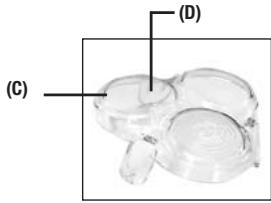
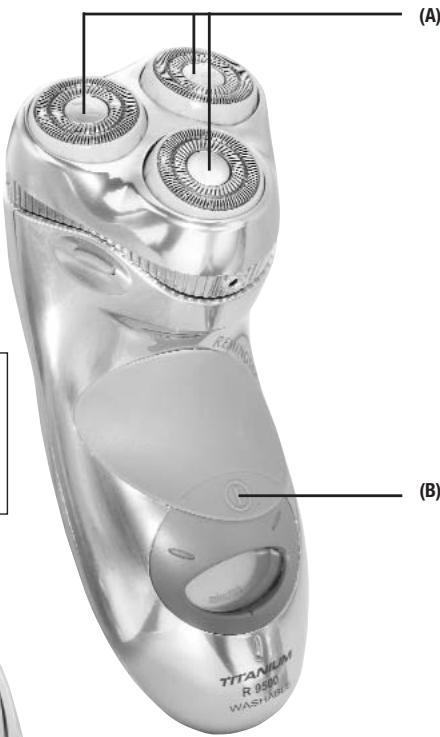
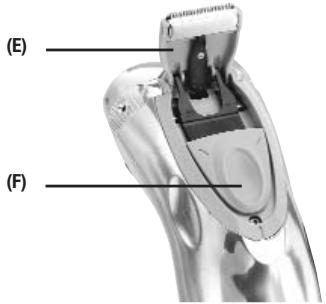
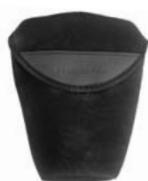
一(G)
(H)
Titanium Smart Shaver
Congratulations on your purchase of a premium Remington® shaver.
The Titanium Smart Shaver is the world's first shaver with Titanium-coated blades. Titanium-coated blades are harder than stainless steel, so they stay sharper longer, resulting in a close, comfortable shave, time after time.
| Power system | Washable | Quick charge | LCD display | Worldwide voltage | |
| R-9500 | Cord/cordless | X | X | X | X |
LCD Indicator
Remington's most premium shavers have Smart Shaver Technology instead of indicator lights. Smart Shaver
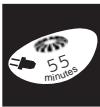
Technology is an LCD numeric indicator that shows shaver charge status in minutes remaining. When the plug icon comes on, it means you have approximately 5 to 6 minutes of shaving time left. The LCD also alerts you when it's time to replace the heads and cutters.
Worldwide Voltage
The Smart Shaver features worldwide automatic dual voltage conversion, providing

AC current between 100-240 volts AC, 50-60 Hz. Just plug it in to the local outlet (you may need an adapter plug) and use as usual. Your shaver will convert automatically to the local current requirements.
Product Features (continued)
Smart Cleaner
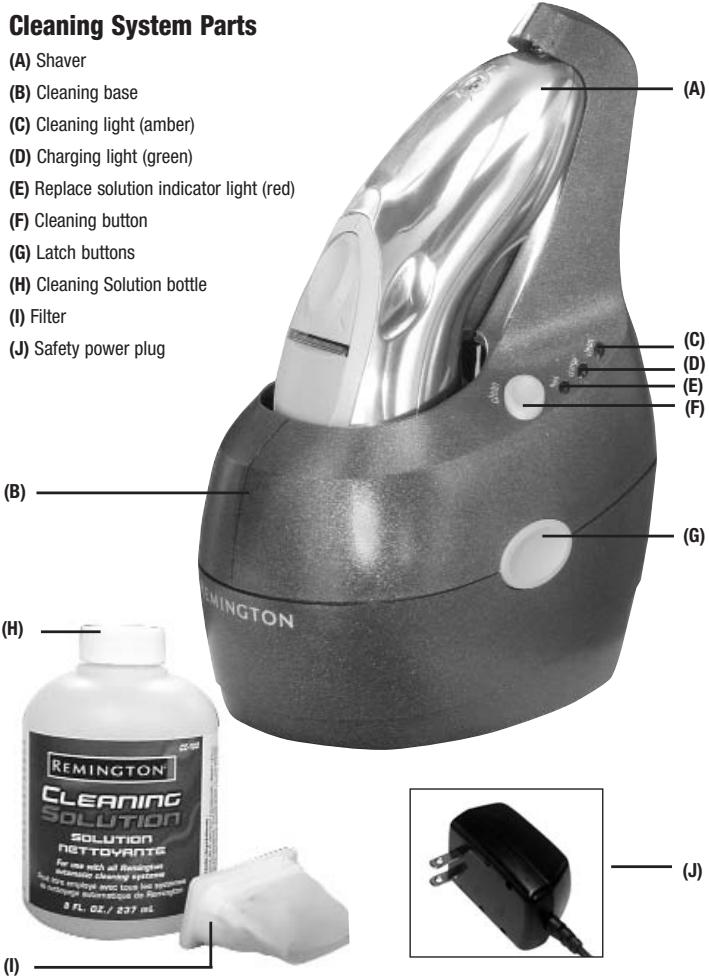
The Remington® Cleaning System has been developed to automatically clean and charge your shaver.
The cleaning base also serves as a storage unit. For peak performance of your shaver, clean it daily by pushing the CLEAN button.
During the automated cleaning process, the shaver is switched on and off at intervals to obtain best cleaning results. Since the specially formulated cleaning fluid also contains a small amount of oil, the cleaning procedure also fulfills the lubrication needs of your shaver.
NOTE: Remington® recommends cleaning your shaver daily for optimum shaving performance.
NOTE: With daily cleaning, the solution will last about 4 weeks. The cleaning solution, if not used daily, will last longer. Normal evaporation will occur even when the unit is not being used. In hot, humid weather, solution may evaporate more rapidly.
Use only the power supply cord supplied with this product.
In order to avoid any leakage of the cleaning fluid, place the cleaning base on a flat table surface. Be careful not to tip, move suddenly, or transport in any way if the base is filled with the cleaning fluid.
- Do not place the cleaning base in a cabinet or any other enclosed area unless the solution is empty. Do not store it over radiators, nor place it on polished, lacquered, or any other surface that is susceptible to damage by isopropyl alcohol. Always operate and store it in a well ventilated area.
To avoid evaporation, do not expose cleaning solution to direct sunlight.
The cleaning base contains highly flammable liquid. Keep it away from sources of ignition. No smoking. Keep out of reach of children. Discard cleaning solution bottle after contents have been poured into the cleaning base.
When cleaning the shaver, its clear plastic head guard must be removed.
Do not block fan area.
How to Use
Charging
Before using your shaver for the first time, put it on charge for 24 hours.
Preparing the System
Cleaning solution:
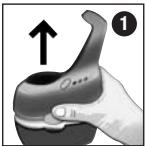
- Press the latch buttons on the sides of the cleaning base and lift the upper portion off the unit. You will need to keep the buttons pressed in as you move the upper portion
tion away from the base. The cleaning solution tank is in the unit's bottom portion.
-
Remove the filter from the tank and set aside.
-
Pour the bottle of cleaning solution into the base of the unit through the opening where the filter was removed. Fill tank to
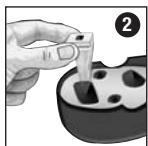
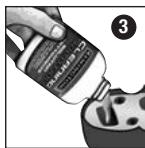


- Place the filter back into its original position.
NOTE: It is important to make sure the filter is in place. The filter collects hair clippings and debris, and should be replaced along with the solution. Failure to do so will permanently clog the system rendering it inoperable.
- Replace the top portion of the cleaning base by lining up the three tail posts with the three holes in the tank. Push the top
portion down until the two latches click into place.
- You can dispose of the bottle and cap with your normal trash, or recycle where local ordinances apply.
Operating the Charging/Cleaning System
Plug the power cord into the cleaning base and then into an electrical outlet.
Place the shaver into the unit, head side down, and slide its "tail" toward the "neck" of the base until it clicks into place.
Charging
Your shaver automatically begins to recharge as soon as it clicks into place in the cleaning base. While it is charging, the green indicator light will flash; when it is fully charged the green light will stop blinking and glow steadily.
Cleaning
To activate cleaning mode, simply press the CLEAN button on the cleaning base. The amber indicator light flashes through the entire cleaning cycle, which lasts approximately 25 minutes. When the cleaning cycle has been completed, the amber light will stop blinking and glow steadily. The unit then returns to charging mode.
! Wait until the cleaning cycle has finished before removing the shaver from the base. If the shaver is removed during the cleaning cycle it will be covered with cleaning solution and be unusable.
Solution levels
The cleaning solution will slowly evaporate with use. When the solution levels get low, the red replacement indicator light will begin to flash. This means you have
enough cleaning solution left for approximately 5 more cleanings. If the red light stops blinking and glows steadily, the unit will not operate until the solution and filter have been replaced.
Replacing the Filter and Solution
Only Remington's special cleaning solution and filter can be used with the Smart System. The cleaning solution contains a high percentage of alcohol and a special oil that lubricates your shaver each time it is cleaned. The filter is specially designed to collect hair debris yet allow for the system to clean your shaver.
To refill the cleaning solution and replace the filter, follow the steps for "Preparing the System" above. But before replacing the upper portion of the unit, rinse out the tank with fresh water and allow it to air dry to remove any sediment.
Wipe off the unit periodically with a damp cloth and remove any hair debris that has collected where the shaver sits.
To avoid damage to the cleaning system, use only Remington special cleaning solution.
Remington's replacement solution and filter is model #CC-100. U.S. residents: To order, contact us at (800) 736-4648, www.remington-products.com, or visit your local retailer.
Canadian residents: For shaver accessories, call (800) 268-6531 or write: Remington Products (Canada) Inc., P.O. Box 601, Postal Station "T," Dept. A-100, 3019 Dufferin St., Toronto, Ontario, Canada M6B3T7.
To Charge Your Shaver
Your Smart Shaver can also be recharged by plugging it into the cord directly.
Use only the charging adapter supplied with the shaver.
Make sure your shaver is turned off.
Connect the cord to the shaver, then plug the charging adapter into the electrical outlet. A charging indicator light will come on.
- Your shaver cannot be overcharged, so you can leave it plugged in and charging between shaves.
To preserve the life of the batteries, let them fully run out every six months, then recharge them for a full 24 hours.
Cord/cordless rechargeable shavers can run directly off the cord if necessary. They will not recharge while you are shaving, so after shaving with the cord, turn the unit off and set it aside to charge. Cord/cordless shavers should not be used strictly as cord-operated shavers, as continued cord-only use will result in reduction of battery life.
Quick Charge provides up to three weeks of shaving after a one-hour charge, or a single shave after a five-minutes charge.
NOTE: If your shaver battery is completely discharged or the shaver has not been used for a long time, the shaver may not start when operated using the cord. If this happens, charge the shaver for approximately five minutes before shaving.
Usage Tips
Getting a close, comfortable shave
Remington® shavers need no adjustments to their heads or cutters before you shave. The heads will automatically adjust to the contours of your face. It is not necessary to apply pressure while shaving, just let the shaver glide lightly on your skin. This gentle touch makes shaving easier and helps avoid possible skin irritation.
As with every shaver, your shave will improve over time. So allow about three weeks to develop an effective shaving style and for your beard to adjust to the new shaver. The adaptation period may take a little longer if your skin is sensitive, or if you alternate between shaving methods.
It's simple to get a great shave from your new shaver. Here are a few tips:
Always use a clean, dry shaver. Make sure that the cutter head assembly is in the locked position.
Wait at least 15 minutes after getting up before shaving, to ensure your face is free of puffiness that may be present from sleeping.
Make sure your face is clean and dry before starting.
To Shave
Push the ON/OFF button to activate the shaver for shaving.
Hold the shaver so all the heads touch your face together.
This allows the shaver to work the way it was designed for the closest shave and minimum wear. Avoid holding the shaver at an angle so only one head touches the skin. This could cause skin irritation.
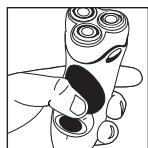
Use short, circular strokes. Use your free hand to stretch your skin. This encourages your whiskers to stand out, making it easier for them t chamber.
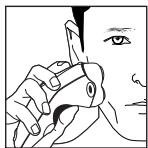
Never press hard. Pressing only flattens your whiskers which makes it harder for them to enter the cutting chamber. It will
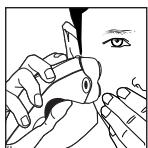
also wear out the cutting surface more quickly.
To Trim
To use the Easy-View® pop-up trimmer, simply push the trimmer button up. The trimmer will pop up for ready use. Hold the shaver
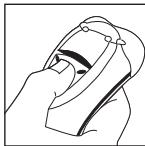
as shown in the illustration. To conserve battery energy (on rechargeable shavers only), it is recommended to use the trimmer only when needed for trimming. When through using, push the trimmer button downward to lock into the OFF position.
Trim Sideburns
Simply touch the edge of the trimmer to the desired line for neat, clean sideburns.

Trim Mustache
Hold shaver at desired trim line for a quick, easy, professional trim. The trimmer can also be used to trim the upper edge of your mustache.
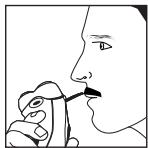
! Always keep the protective head guard on the shaver head and keep the trimmer in the OFF position when the shaver is not in use.
For an Even Better Shave...
Remington® Pre-Shave Powder Stick (SP-5) or the Pre-Shave Lotion with Aloe (SP-6) can help maximize your shaver's performance. Just rub either product over your beard. Both absorb moisture and facial oils, helping set up the hairs so they enter the cutting chamber more easily. They make shaving quicker and more comfortable.
Maintenance
When is it time to replace your head assembly?
Because they are subject to daily use, the heads and cutters of your Remington® shaver will wear and eventually require replacement. It is very important to replace your heads and cutters when necessary to insure a close, comfortable shave. Depending on your shaving technique and habits:
Head and cutter assemblies will usually last 12 months. Worn or damaged parts should be replaced with Remington® replacement parts only. The replacement head assembly for the R-9500 is SP-21.
When it's time to replace the cutters, model R-9500 displays a cutter icon.
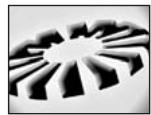
Irritation
As the heads get excessively worn there may be some skin irritation. This would be especially noticed when applying after-shave lotion.
Pulling
When the cutters wear you may feel a sense of pulling and a loss of closeness when you shave. This is an indication that it is time to replace your heads and cutters.
! Do not remove or replace the head assembly while shaver is running or plugged into an electrical outlet as it may cause damage to the unit's cutters.
! To prevent inadvertent damage to the cutter assembly, do not attempt to remove it unless you are replacing it. When it's time to remove the cutter assembly, follow the instructions that come with the replacement package.
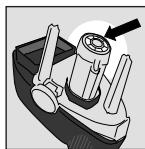
Interior Cleaning
For optimal results, gently wipe this area clean with a damp cloth every 6 months.
Battery Removal
When your rechargeable shaver reaches the end of its useful life, the batteries must be removed from the shaver and be recycled or disposed of properly in accordance with your state and local requirements. If this is not required by law, you may elect to dispose of the shaver without removing the batteries.
THE FOLLOWING PROCEDURE SHOULD BE FOLLOWED FOR BATTERY REMOVAL:
- To avoid a possible electric shock hazard, unplug cord from electrical outlet and shaver.
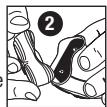
- Open the head assembly by pressing the head release buttons and lifting the head assembly. Pull the entire head assembly off of the shaver assembly.
- Push the trimmer button up to open the trimmer.
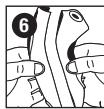
- Remove the trimmer assembly by squeezing the sides as shown in the picture.
- Using a small Phillips head screwdriver, remove the 3 screws from the back of the shaver.
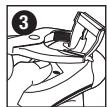
- Pull or gently pry the shaver halves apart, exposing the battery.
- Pry the lower battery clip off.
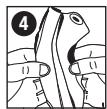
- Lift or pry the batteries out of the shaver.
- Cut the wires on both ends of each battery and remove them from the shaver.
CAUTION:DO NOT PUT IN FIRE OR MUTILATE YOUR BATTERIES WHEN DISPOSING AS THEY MAY BURST OR RELEASE TOXIC MATERIALS. DO NOT SHORT CIRCUIT AS IT MAY CAUSE BURNS. DISPOSE PROPERLY IN ACCORDANCE WITH YOUR LOCAL AND STATE REQUIREMENTS.
Warranty
Warranty Service
In the U.S. and Canada, service is provided by our Company-owned Service Centers and more than 300 Authorized Service Dealers. For the address of your nearest authorized Service Dealer, contact us at (800) 736-4648 (in U.S.), (888) 277-6333 (in Canada), visit our website at www.remington-products.com or consult your local Yellow Pages under "Shaver-Electric-Repair."
U.S. customers may mail the product, post-paid, with a copy of the sales receipt and a letter explaining the problem, to this address:
Remington Products Company, L.L.C. 60 Main St.
Bridgeport, CT 06604
Attention: Service Department
KEEP ORIGINAL SALES RECEIPT AS PROOF OF PURCHASE FOR WARRANTY PURPOSES.
For questions or comments, contact us:
Remington Products Company, L.L.C.
20 Constitution Boulevard South P.O.Box 884
Shelton, CT 06484-0884
Attn: Consumer Affairs
800-736-4648
www.remington-products.com
Remington Products (Canada) Inc.
61 Amber Street.
Markham, Ontario L3R 3J7
Attn: Customer Service
888-277-6333
www.remington-products.com
Remington and Easy-View are trademarks of RemingtonProducts Company, L.L.C. in the U.S.
2003 R.P.C, L.L.C.
Job #S03-071 11/03 Part No. 14456
U.S. Patents: 5,390,416; 5,408,749 and patents pending.
Canadian Patents: D94,221; 2,114,923
2,111,626 and patents pending.

Remington Products Company, L.L.C.
60 Main Street
Bridgeport, CT 06604
MADE IN CHINA
Remington Products (Canada) Inc.
61 Amber Street
Markham, Ontario L3R 3J7
Performance Guarantee
Performance Guarantee
Remington Money-Back Offer
If within 30 days after you have purchased your Remington® product, you are not satisfied with it and would like a refund, just return it, together with the sales receipt, to the retailer from whom it was purchased. Remington will reimburse all retailers who accept such appliances within 30 days from date of purchase. If you have any questions regarding this money-back guarantee, please call 800-736-4648 in the U.S. or 888-277-6333 in Canada.
Full Two-Year Warranty
Remington warrants that this product is free from defect in material and workmanship for two years after its original purchase date—except for damage as specified below and these parts meant to be replaced during regular maintenance:
ROTARY SHAVERS: head assembly
SMART SYSTEM: filter
If the product should become defective within the warranty period, Remington will repair it or elect to replace it free of charge. We will return your product, shipping charges prepaid, if you do the following within two years of the purchase date:
- Return the complete product in person or by mail, postage paid, to a Remington Company-owned Service Center or Authorized Service Dealer.
- Include a copy of the original purchase receipt with the product.
- Include a description of the problem or defect.
- Do not return the product to the store that sold it to you.
This warranty does not cover products damaged by the following:
Accident, misuse, abuse or alteration of it
Servicing by unauthorized persons
Use with unauthorized accessories
- Connecting it to incorrect current and voltage
Any other conditions beyond our control No responsibility, obligations, or liability is assumed for the installation or maintenance of this product.
REMINGTON SHALL NOT BE RESPONSIBLE FOR ANY INCIDENTAL, SPECIAL OR CONSEQUENTIAL DAMAGES RESULTING FROM THE USE OF THIS PRODUCT. USE OF NON-REMINGTON® CLEANING SOLUTION
VOUNDS THE WARRANTY. ALL IMPLIED WARRANTY INCLUDING BUT NOT LIMITED TO IMPLIED WARRANTY OF FITNESS AND MERCHANTABILITY, ARE LIMITED IN DURATION TO TWO YEARS FROM DATE OF ORIGINAL PURCHASE.
This warranty gives you specific legal rights, and you may also have other rights that vary from state to state. Some states do not allow the exclusion or limitation of incidental or consequential damages, or limitations on how long an implied warranty lasts, so the above limitations and exclusions may not apply to you.
U.S. residents:
To order, contact us at 800-736-4648, visit us at www.remington-products.com, or visit your local retailer.
Canadian residents:
For any shaver accessory requirements, please call 800-268-6531 or write:
Remington Products (Canada) Inc.,
P.O. Box 601, Postal Station "T," Dept. A-100,
3019 Dufferin St., Toronto, Ontario, Canada M6B3T7.
REmInGToN
Remington Products Company, L.L.C. 60 Main St.
Bridgeport, CT 06604
Attention: Service Department
CONSERVE EL RECIBO DE VENTA ORIGINAL COMO COMPROBANTE DE COMPRA A FIN DE PODER UTILizar LA GARANTIA.
Remington Products Company L.L.C.
20 Constitution Boulevard South
P.O.Box 884
Shelton, CT 06484-0884
Attn: Consumer Affairs
800-736-4648
www.remington-products.com
Remington Products (Canada) Inc.
61 Amber Street.
Markham, Ontario L3R 3J7
Attn: Customer Service
888-277-6333
www.remington-products.com
Remington Products Company, L.L.C.
60 Main Street
Bridgeport, CT 06604
Remington Products (Canada) Inc.
61 Amber Street
Markham, Ontario L3R 3J7
HECHO EN CHINA
Remington Products Company, L.L.C.
60 Main St.
Bridgeport, CT 06604
Attention: Service Department
CONSERVEZ VOITRE REÇU DE CAISSE COMME PREUVÉ D'ACHAT POUR LES DE LA GARANTIE.
Remington Products Company L.L.C.
20 Constitution Boulevard South P.O.Box 884
Shelton, CT 06484-0884
Attn:Consumer Affairs
800736-4648
www.remington-products.com
Remington Products (Canada) Inc. 61, rue Amber
www.remington-products.com
Remington Products Company, L.L.C.
60 Main Street
Bridgeport, CT 06604
Remington Products (Canada) Inc.
61, rue Amber
Remington Products Company, L.L.C., 60 Main Street, Bridgeport, CT 06604
Remington Products (Canada) Inc., 61, rue Amber, Markham (Ontario) L3R 3J7
- IMPORTANT SAFETY INSTRUCTIONS
- DANGER
- WARNING
- SAVE THESE INSTRUCTIONS
- Contents
- Product Features
- Shaver Parts
- Titanium Smart Shaver
- Congratulations on your purchase of a premium Remington® shaver.
- LCD Indicator
- Worldwide Voltage
- Product Features (continued)
- Smart Cleaner
- The Remington® Cleaning System has been developed to automatically clean and charge your shaver.
- How to Use
- Charging
- Preparing the System
- Cleaning solution:
- Operating the Charging/Cleaning System
- Cleaning
- Solution levels
- Replacing the Filter and Solution
- To Charge Your Shaver
- Usage Tips
- Getting a close, comfortable shave
- To Shave
- To Trim
- Trim Sideburns
- Trim Mustache
- For an Even Better Shave...
- Maintenance
- When is it time to replace your head assembly?
- Irritation
- Pulling
- Interior Cleaning
- Battery Removal
- Warranty
- Warranty Service
- MADE IN CHINA
- Performance Guarantee
- Remington Money-Back Offer
- Full Two-Year Warranty
- REmInGToN
- HECHO EN CHINA
Brand : REMINGTON
Model : R-9500
Category : Electric razor