
MSC-GE35VB - Air-conditioner MITSUBISHI - Free user manual and instructions
Find the device manual for free MSC-GE35VB MITSUBISHI in PDF.


| Product type | Split system air conditioner |
| Brand | MITSUBISHI |
| Model (indoor unit) | MSC-GE35VB |
| Power supply | 230 V ~ 50 Hz, single phase |
| Cooling capacity | 3,5 kW |
| Heating capacity (reversible models) | 3,7 kW |
| Power consumption (cooling) | 1,09 kW (reversible) / 1,12 kW (cooling only) |
| Indoor unit weight | 10 kg (approx.) |
| Outdoor unit weight | 35 kg (approx.) |
| Refrigerant | R410A, charge 0,80 kg (cooling only) / 1,05 kg (reversible) |
| Indoor sound level (high speed) | 39 dB(A) |
| Outdoor sound level | 47 dB(A) |
| Indoor unit dimensions (W x H x D) | Approx. 798 x 295 x 232 mm (estimate) |
| Outdoor unit dimensions (W x H x D) | Approx. 800 x 550 x 285 mm (estimate) |
| Functions | Cooling, Dehumidification, Fan, Heating (depending on model), ECONO COOL, Timer, IFeel, Automatic oscillation |
| Air filter | Catechin filter (cleaning every 2 weeks), optional purification filter MAC-1300FT |
| Protection class (indoor) | IP20 |
| Protection class (outdoor) | IP24 |
| Safety | Automatic shutdown in case of anomaly, differential circuit breaker recommended, surge protection |
| Included accessories | Remote control, batteries, user and installation manual |
Frequently Asked Questions - MSC-GE35VB MITSUBISHI
User questions about MSC-GE35VB MITSUBISHI
0 question about this device. Answer the ones you know or ask your own.
Ask a new question about this device
Download the instructions for your Air-conditioner in PDF format for free! Find your manual MSC-GE35VB - MITSUBISHI and take your electronic device back in hand. On this page are published all the documents necessary for the use of your device. MSC-GE35VB by MITSUBISHI.
USER MANUAL MSC-GE35VB MITSUBISHI
SPLIT-TYPE AIR CONDITIONERS
INDOOR UNIT
MSC-GE20VB
MSC-GE25VB
MSC-GE35VB
C E
OPERATING INSTRUCTIONS
For user
- To use this unit correctly and safely, be sure to read these operating instructions before use.
- Since rotating parts and parts which could cause an electric shock are used in this product, be sure to read these "Safety Precautions" before use.
- Since the cautionary items shown here are important for safety, be sure to observe them.
- After reading this manual, keep it together with the installation manual in a handy place for easy reference.
Marks and their meanings
WARNING: Incorrect handling could cause serious hazard, such as death, serious injury, etc. with a high probability.
CAUTION: Incorrect handling could cause serious hazard depending on the conditions.
Meanings of symbols used in this manual
: Be sure not to do.
: Be sure to follow the instruction.
: Never insert your finger or stick, etc.
: Never step onto the indoor/outdoor unit and do not put anything on them.
A :Danger of electric shock.Be careful.
: Be sure to disconnect the power supply plug from the power outlet.
: Be sure to shut off the power.
| WARNING | |
| Do not connect the power cord to an intermediate point, use an extension cord, or connect multiple devices to a single AC outlet. ·This may cause overheating, fire, or electric shock. | |
| Make sure the power plug is free of dirt and insert it securely into the outlet. ·A dirty plug may cause fire or electric shock. | |
| Do not bundle, pull, damage, or modify the power cord, and do not apply heat or place heavy objects on it. ·This may cause fire or electric shock. | |
| Do not turn the breaker OFF/ON or disconnect/connect the power plug during operation. ·This may create sparks, which can cause fire. ·After the indoor unit is switched OFF with the remote controller, make sure to turn the breaker OFF or disconnect the power plug. | |
| Do not expose your body directly to cool air for a prolonged length of time. ·This could be detrimental to your health. | |
| The unit should not be installed, relocated, disassembled, altered, or repaired by the user. ·An improperly handled air conditioner may cause fire, electric shock, injury, or water leakage. | |
| Do not insert your finger, a stick, or other objects into the air inlet or outlet. ·This may cause injury, since the fan inside rotates at high speeds during operation. |
| In case of an abnormal condition (such as a burning smell), stop the air conditioner and disconnect the power plug or turn the breaker OFF. ·A continued operation in the abnormal state may cause a malfunction, fire, or electric shock. In this case, consult your dealer. | |
| When the air conditioner does not cool or heat, there is a possibility of refrigerant leakage. In this case, consult your dealer. If a repair involves recharging the unit with refrigerant, ask the service technician for details. ·The refrigerant used in the air conditioner is safe. Normally, it does not leak. However, if refrigerant leaks and comes in contact with a heat source such as a fan heater, kerosene heater, or cooking stove, it will create a harmful gas. | |
| CAUTION | |
| Do not touch the air inlet or the aluminum fins of the indoor/outdoor unit. ·This may cause injury. | |
| Do not use insecticides or flammable sprays on the unit. ·This may cause a fire or deformation of the unit. | |
| Do not expose pets or houseplants to direct airflow. ·This may cause injury to the pets or plants. | |
| Do not place other electric appliances or furniture under the indoor/outdoor unit. ·Water may drip down from the unit, which may cause damage or malfunction. | |
| Do not leave the unit on a damaged installation stand. ·The unit may fall and cause injury. |
SAFETY PRECAUTIONS
| CAUTION | |
| Do not step on an unstable bench to operate or clean the unit. ·This may cause injury if you fall down. | Do not pull the power cord. ·This may cause a portion of the core wire to break, which may cause overheating or fire. |
| Do not charge or disassemble the batteries, and do not throw them into a fire. ·This may cause the batteries to leak, or cause a fire or explosion. | Do not operate the unit for a long time at high humidity (80% RH or more), such as with a door or window left open. ·The water condensation in the air conditioner may drip down, wetting or damaging the furniture. |
| Do not use the unit for special purposes, such as storing food, raising animals, growing plants, or preserving precision devices or art objects. ·This may cause deterioration of quality, or harm to animals and plants. | Do not use the unit for special purposes, such as storing food, raising animals, growing plants, or preserving precision devices or art objects. ·This may cause deterioration of quality, or harm to animals and plants. |
| Do not expose combustion appliances to direct airflow. ·This may cause incomplete combustion. | Do not expose combustion appliances to direct airflow. ·This may cause incomplete combustion. |
| Before cleaning the unit, switch it OFF and disconnect the power plug or turn the breaker OFF. ·This may cause injury, since the fan inside rotates at high speeds during operation. | Before cleaning the unit, switch it OFF and disconnect the power plug or turn the breaker OFF. ·This may cause injury, since the fan inside rotates at high speeds during operation. |
| When the unit will be unused for a long time, disconnect the power plug or turn the breaker OFF. ·The unit may accumulate dirt, which may cause overheating or fire. | When the unit will be unused for a long time, disconnect the power plug or turn the breaker OFF. ·The unit may accumulate dirt, which may cause overheating or fire. |
| Replace all batteries of the remote controller with new ones of the same type. ·Using an old battery together with a new one may cause overheating, leakage, or explosion. | Replace all batteries of the remote controller with new ones of the same type. ·Using an old battery together with a new one may cause overheating, leakage, or explosion. |
| If the battery fluid comes in contact with your skin or clothes, wash them thoroughly with clean water. ·If the battery fluid comes in contact with your eyes, wash them thoroughly with clean water and immediately seek medical attention. | If the battery fluid comes in contact with your skin or clothes, wash them thoroughly with clean water and immediately seek medical attention. |
| Ensure that the area is well-ventilated when the unit is operated together with a combustion appliance. ·Inadequate ventilation may cause oxygen starvation. | Ensure that the area is well-ventilated when the unit is operated together with a combustion appliance. ·Inadequate ventilation may cause oxygen starvation. |
| Turn the breaker OFF when you hear thunder and there is a possibility of a lightning strike. ·The unit may be damaged if lightning strikes. | Turn the breaker OFF when you hear thunder and there is a possibility of a lightning strike. ·The unit may be damaged if lightning strikes. |
| After the air conditioner is used for several seasons, perform inspection and maintenance in addition to normal cleaning. ·Dirt or dust in the unit may create an unpleasant odor, contribute to growth of fungi, such as mold, or clog the drain passage, and cause water to leak from the indoor unit. Consult your dealer for inspection and maintenance, which require specialized knowledge and skills. | After the air conditioner is used for several seasons, perform inspection and maintenance in addition to normal cleaning. ·Dirt or dust in the unit may create an unpleasant odor, contribute to growth of fungi, such as mold, or clog the drain passage, and cause water to leak from the indoor unit. Consult your dealer for inspection and maintenance, which require specialized knowledge and skills. |
| A | Do not operate switches with wet hands. ·This may cause electric shock. |
| Do not clean the air conditioner with water or place an object that contains water, such as a flower vase, on it. ·This may cause fire or electric shock. | |
| B | Do not step on or place any object on the outdoor unit. ·This may cause injury if you or the object falls down. |
For installation
| WARNING | |
| Consult your dealer for installing the air conditioner. ·It should not be installed by the user since installation requires specialized knowledge and skills. An improperly installed air conditioner may cause water leakage, fire, or electric shock. | |
| Provide a dedicated power supply for the air conditioner. ·A non-dedicated power supply may cause overheating or fire. | |
| Do not install the unit where flammable gas could leak. ·If gas leaks and accumulates around the outdoor unit, it may cause an explosion. | |
| Earth the unit correctly. ·Do not connect the earth wire to a gas pipe, water pipe, lightning rod, or a telephone ground wire. Improper earthing may cause electric shock. | |
| CAUTION | |
| Install an earth leakage breaker depending on the installation location of the air conditioner (such as highly humid areas). ·If an earth leakage breaker is not installed, it may cause electric shock. | |
| Ensure that the drain water is properly drained. ·If the drain passage is improper, water may drip down from the indoor/outdoor unit, wetting and damaging the furniture. | |
| In case of an abnormal condition Immediately stop operating the air conditioner and consult your dealer. | |
DISPOSAL
To dispose of this product, consult your dealer.
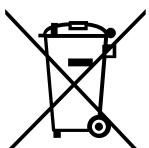
Fig. 1
Note:
This symbol mark is for EU countries only.
This symbol mark is according to the directive 2002/96/ EC Article 10 Information for users and Annex IV, and/or to the directive 2006/66/EC Article 20 Information for end-users and Annex II.
Your MITSUBISHI ELECTRIC product is designed and manufactured with high quality materials and components which can be recycled and/or reused.
This symbol means that electrical and electronic equipment, batteries and accumulators, at their end-of-life, should be disposed of separately from your household waste.
If a chemical symbol is printed beneath the symbol (Fig. 1), this chemical symbol means that the battery or accumulator contains a heavy metal at a certain concentration. This will be indicated as follows:
Hg: mercury (0,0005%), Cd: cadmium (0,002%), Pb: lead (0,004%)
In the European Union there are separate collection systems for used electrical and electronic products, batteries and accumulators.
Please, dispose of this equipment, batteries and accumulators correctly at your local community waste collection/recycling centre.
Please, help us to conserve the environment we live in!
NAME OF EACH PART
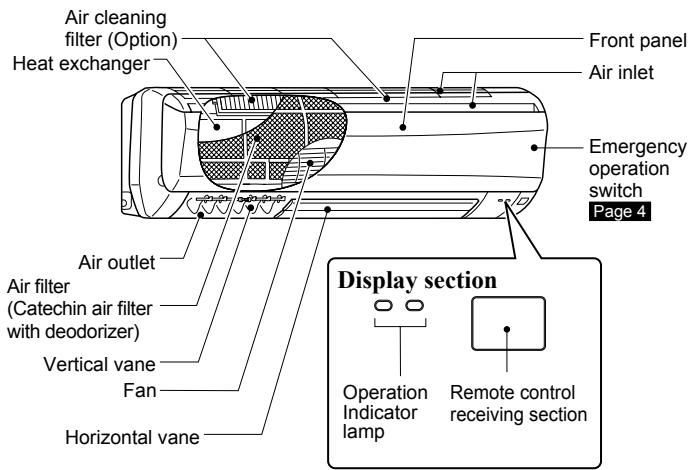
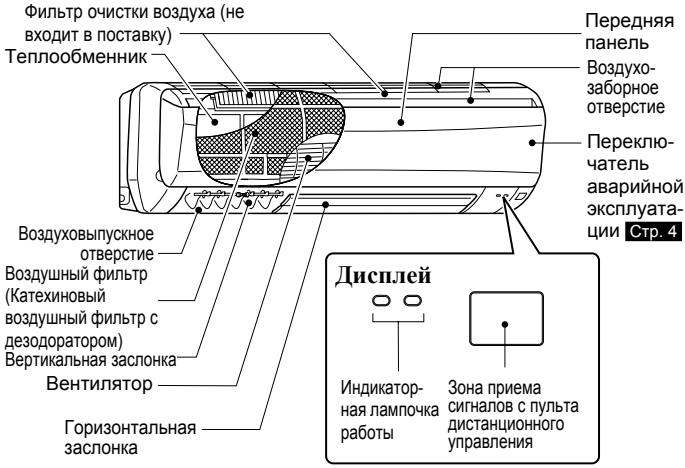
Indoor unit
Outdoor unit
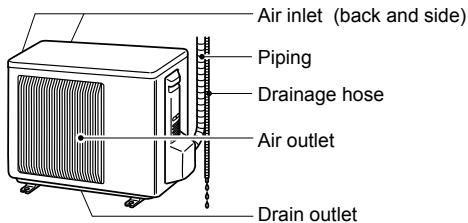
Outdoor units may be different in appearance.
Remote controller
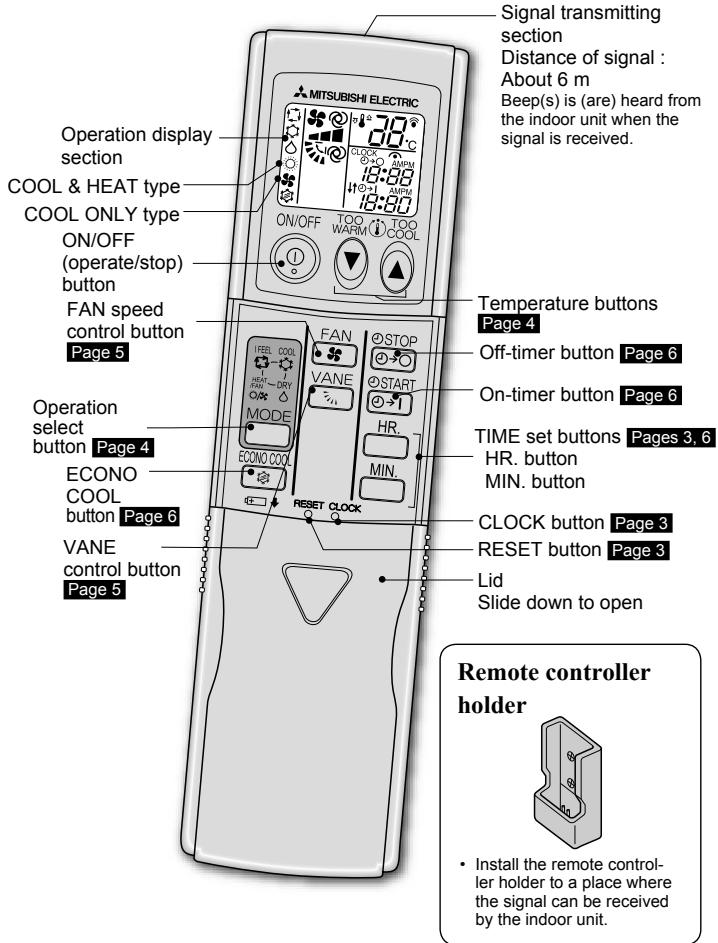
Use the remote controller provided with the unit only.
Do not use other remote controllers.
Before operation: Insert the power supply plug into the power outlet and/or turn the breaker on.
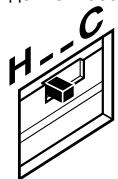
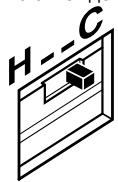
How to set the type
This remote controller setting needs to be switched according to the type of air conditioner (COOL & HEAT or COOL ONLY).
Position of the slide switch
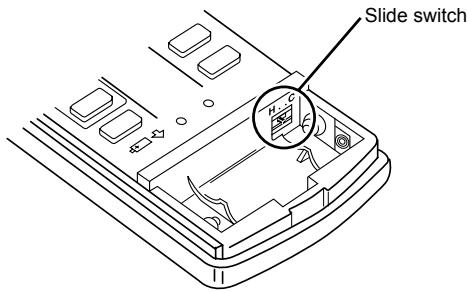
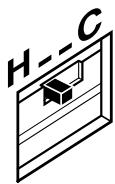
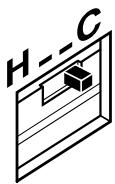
- Incorrect setting causes a malfunction. Check the correct setting as shown above.
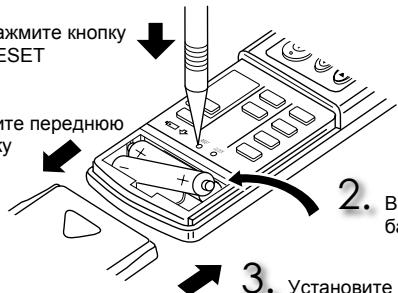
Installing the remote controller batteries
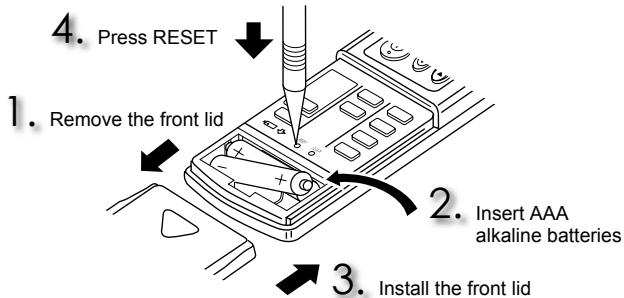
- Make sure the polarity of the batteries is correct.
- Do not use manganese batteries. The remote controller could malfunction.
- Do not use rechargeable batteries.
- Replace all batteries with new ones of the same type.
- Batteries can be used for approximately 1 year. However, batteries with expired shelf lives last shorter.
- Press RESET gently using a thin instrument. If the RESET button is not pressed, the remote controller may not operate correctly.
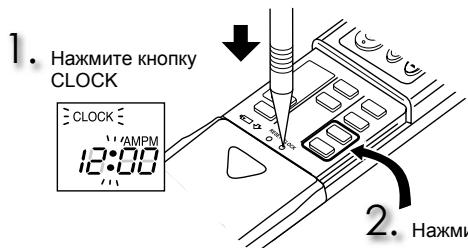
Setting current time
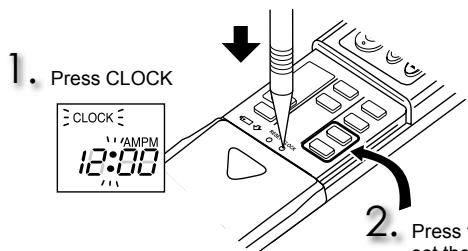
3. Press CLOCK again
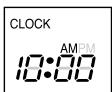
Press the TIME set buttons to set the time
Each time HR MIN. is pressed, the set time increases by 1 hour/minute.
- Press CLOCK gently using a thin instrument.
Press ⑨ to start the operation.

MODE Press to select operation mode. Each press changes mode in the following order:


Press or to set the temperature. Each press raises or lowers the temperature by 1^

ONOFF Press to stop the operation. The same setting is selected the next time by simply pressing ONOFF
Operation indicator lamp
The operation indicator lamp shows the operation state of the unit.
| Indication | Operation state | Room temperature |
| ●●● | The unit is operating to reach the set temperature | About 2°C or more away from set temperature |
| ●○ | The room temperature is approaching the set temperature | About 1 to 2°C from set temperature |
| ●○● | Standby mode (only during multi system operation) | — |

Lighted

Blinking

Not lighted
Multi system operation
Two or more indoor units can be operated by one outdoor unit. When several indoor units are operated simultaneously, cooling and heating operations cannot be done at the same time. When COOL is selected with one unit and HEAT with another or vice versa, the unit operated later becomes standby mode. The power lamp blinks (display section).

IFEEL mode
The unit selects the operation mode according to the room temperature when I FEEL is selected. When the room temperature is higher than 25^ , COOL is selected (set temperature: 24^ ). When the room temperature is lower than 25^ , DRY is selected. However, when operation is stopped and then started within 2 hours, the mode which has been selected previously is operated. With COOL & HEAT type, when the room temperature is lower than 23^ , HEAT is selected.
Note:
During COOL operation, the set temperature may not be changed when the room temperature is more than 2^ higher than the set temperature. In this case, please wait until the room temperature drops to within 2^ of the set temperature.

COOL mode
Enjoy cool air at your desired temperature.

DRY mode
Dehumidify your room. The room may be cooled slightly. Temperature cannot be set during DRY mode.

FAN mode
Circulate the air in your room.

HEAT mode
Enjoy warm air at your desired temperature.
Emergency operation
When the remote controller cannot be used...
Emergency operation can be activated by pressing the emergency operation switch (E.O.SW) on the indoor unit.
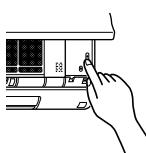
Each time the E.O.SW is pressed, the operation changes in the following order:
Operation indicator lamp
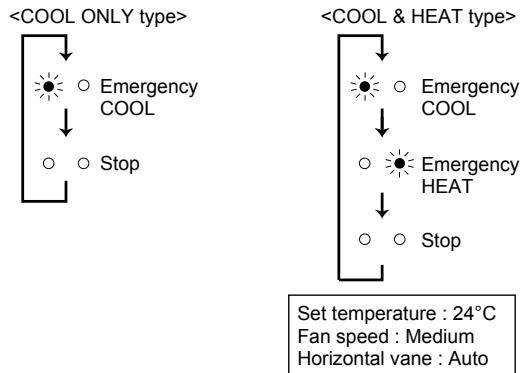
Note:
The first 30 minutes of operation is test run. Temperature control does not work, and fan speed is set to High.
Auto restart function
If a power failure occurs or the main power is turned off during operation, "Auto restart function" automatically starts operation in the same mode as the one set with the remote controller just before the shutoff of the main power. When timer is set, timer setting is cancelled and the unit starts operation when power is resumed.
If you do not want to use this function, please consult the service representative because the setting of the unit needs to be changed.
FAN SPEED AND AIRFLOW DIRECTION ADJUSTMENT
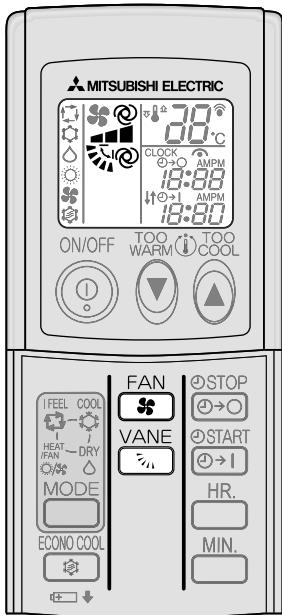
Press FAN to select fan speed. Each press changes fan speed in the following order:

- Two short beeps are heard from the indoor unit when set to AUTO.
Press VANE to select airflow direction. Each press changes airflow direction in the following order:

- Two short beeps are heard from the indoor unit when set to AUTO.
Airflow direction
@ (AUTO)
The vane is set to the most efficient airflow direction. COOL/DRY:horizontal position. FAN/HEAT:downward position.
(Manual)
For efficient air conditioning, select upper position for COOL/DRY. During COOL/DRY, when the vane is set to position (4) or (5), the vane automatically moves to position (1) after 1 hour to prevent water dripping.
(Swing)
The vane moves up and down intermittently.
To change the horizontal airflow direction.
Move the vertical vane manually before starting operation.
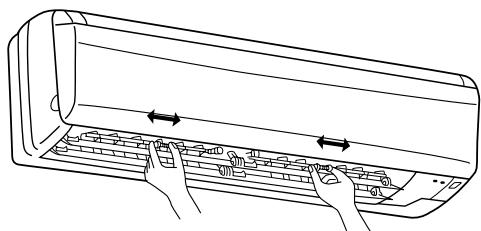
ECONO COOL Press during COOL mode page 4 to start ECONO COOL operation.
The unit performs swing operation vertically in various cycle according to the temperature of the unit. Set temperature is set 2^ higher automatically.
ECONO COOL Press again to cancel ECONO COOL operation.
- Pressing VANE also cancels ECONO COOL operation.
What is "ECONO COOL"?
Swing air flow (change of air flow) makes you feel cooler than constant air flow. So, even though the set temperature is automatically set 2^ higher, it is possible to perform cooling operation with keeping comfort. As a result, energy can be saved.
1 Press START STOP Press 出 1 or 出 0 during operation to set the timer.
1 (ON timer): The unit will turn ON at the set time.
STOP (OFF timer): The unit will turn OFF at the set time.
①→I or ②→O blinks.
Make sure that the current time is set correctly. Page 3
Press HR. and MIN. to set the time of timer.
Each time HR MIN. / MIN is pressed, the set time increases by 1 hour/10 minutes.
START oSTOP Press 1 or 0 again to cancel timer.
Note:
- ON and OFF timers can be used in combination. mark indicates the order of timer operations.
- If power failure occurs while ON/OFF timer is set, see page 4 "Auto restart function"
CLEANING
Instructions:
- Switch off the power supply or turn off the breaker before cleaning.
- Be careful not to touch the metal parts with your hands.
-
Do not use benzine, thinner, polishing powder, or insecticide.
-
Use only diluted mild detergents.
- Do not expose parts to direct sunlight, heat, or flames to dry.
- Do not use water hotter than 50^ .
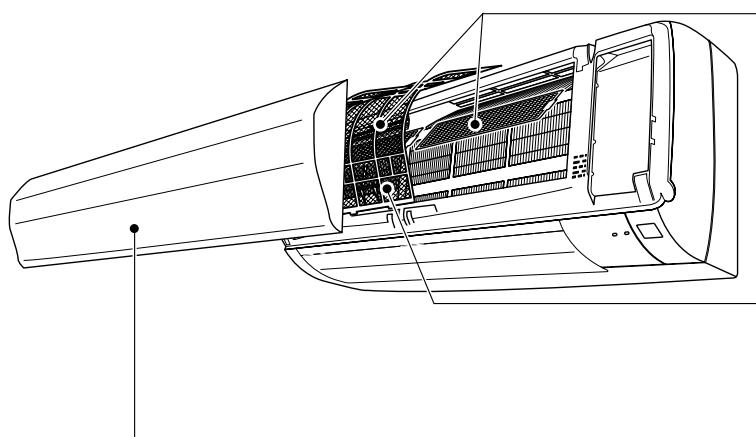
Front panel
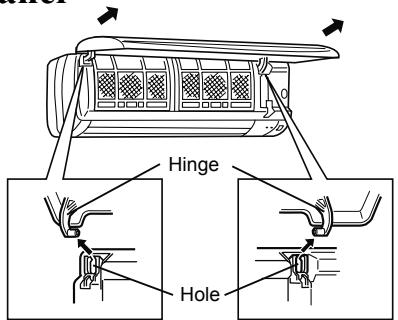
- Lift the front panel until a "click" is heard.
-
Hold the hinges and pull to remove as shown in the above illustration.
-
Wipe with a soft dry cloth or wash it with water.
- Do not soak it in water for more than two hours.
-
Dry it well in shade before installing it.
-
Install the panel by following the removal procedure in reverse. Close the front panel securely and press the positions indicated by the arrows.
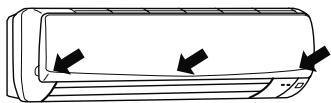
Note:
The front panel may come off if it is lifted up past its level position.
Air cleaning filter (Option)
- If the air cleaning filter is clogged, it may lower the unit's capacity or cause condensation at the air outlet.
The air cleaning filter is disposable. - If the color of the filter turns to dark brown, replace the filter at once.
- Replace it with a new air cleaning filter every 4 months for best performance.
- Parts Number MAC-1300FT
Air filter (Catechin air filter)
Clean every 2 weeks
- Remove dirt by a vacuum cleaner, or wash with water.
- Dry it well in shade before installing it.
What is "Catechin air filter"?
Catechin is a bioflavonoid that is found in green tea that has both antiviral and antioxidant qualities. In addition to these benefits, Catechin also offers excellent deodorizing characteristics. Catechin air filter uses this compound to not only improve air quality but also prevent the spread of bacteria and viruses in the room.
Note:
- Clean the filters regularly for best performance and to reduce power consumption.
- Moisture in the air conditioner for a long time contributes to growth of fungi, such as mold. To prevent fungi growth, set to the highest temperature in manual COOL mode, and operate for 3 to 4 hours to dry out the inside of the unit.
WHEN YOU THINK THAT TROUBLE HAS OCCURRED
Even if these items are checked, when the unit does not recover from the trouble, stop using the air conditioner and consult your dealer.
| Symptom | Explanation & Check points |
| Indoor Unit | |
| The unit cannot be operated. | ·Is the breaker turned on? ·Is the power supply plug connected? ·Is the ON timer set? Page 6 |
| The unit cannot be operated for about 3 minutes when restarted. | ·This protects the unit according to instructions from the microprocessor. Please wait. |
| The fan stops during the DRY operation. | ·In DRY operation, the unit operates using the same refrigerant circuit as in COOL operation. DRY operation time has to be reduced in order to lower humidity without much room temperature decreasing. So the compressor sometimes stops, and at the same time the indoor fan stops. This prevents water condensed on the heat exchanger from evaporating again. |
| Mist is discharged from the air outlet of the indoor unit. | ·The cool air from the unit rapidly cools moisture in the air inside the room, and it turns into mist. |
| The swing operation of the HORIZONTAL VANE is suspended for a while, then restarted. | ·This is for the swing operation of the HORIZONTAL VANE to be performed normally. |
| The air flow direction changes during operation. The direction of the horizontal vane cannot be adjusted with the remote controller. | ·When the unit is operated in COOL or DRY mode, if the operation continues with air blowing down for 0.5 to 1 hour, the direction of the air flow is automatically set to horizontal position to prevent water from condensing and dripping. ·In the heating operation, if the air flow temperature is too low or when defrosting is being done, the horizontal vane is automatically set to horizontal position. |
| The operation is stopped for about 10 minutes in the heating operation. | ·Defrosting of the outdoor unit is being done. Since this is completed in max.10 minutes, please wait. (When the outside temperature is too low and humidity is too high, frost is formed.) |
| The unit starts operation by itself when the main power is turned on, though it isn't operated with the remote controller. | ·These models are equipped with an auto restart function. When the main power is turned off without stopping the unit with the remote controller and is turned on again, the unit starts operation automatically in the same mode as the one set with the remote controller just before the shutoff of the main power. Refer to "Auto restart function" page 4. |
| Multi system | |
| The indoor unit which is not operating becomes warm and a sound, similar to water flowing, is heard from the unit. | ·A small amount of refrigerant continues to flow into the indoor unit even though it is not operating. |
| When heating operation is selected, operation does not start right away. | ·When operation is started during defrosting of outdoor unit is done, it takes a few minutes (max. 10 minutes) to blow out warm air. |
| Outdoor Unit | |
| Water leaks from the outdoor unit. | ·During COOL and DRY operations, pipe or pipe connecting sections are cooled and this causes water to condense. ·In the heating operation, water condensed on the heat exchanger drips down. ·In the heating operation, the defrosting operation makes water frozen on the outdoor unit melt and drip down. |
| White smoke is discharged from the outdoor unit. | ·In the heating operation, vapor generated by the defrosting operation looks like white smoke. |
| Symptom | Explanation & Check points |
| Remote controller | |
| The display on the remote controller does not appear or it is dim. The indoor unit does not respond to the remote control signal. | • Are the batteries exhausted? Page 3 • Is the polarity (+,-) of the batteries correct? Page 3 • Are any buttons on the remote controller of other electric appliances being pressed? |
| Does not cool or heat | |
| The room cannot be cooled or heated sufficiently. | • Is the temperature setting appropriate? Page 4 • Is the fan setting appropriate? Please change fan speed to higher setting. • Are the filters clean? Page 7 • Is the fan or heat exchanger of the indoor unit clean? • Are there any obstacles blocking the air inlet or outlet of the indoor or outdoor unit? • Is a window or door open? • When a ventilation fan or a gas cooker is used in a room, the cooling load increases, resulting in an insufficient cooling effect. • When the outside temperature is high, the cooling effect may not be sufficient. • When the outside temperature is low, the heating effect may not be sufficient. |
| Air does not blow out soon in the heating operation. | • Please wait as the unit is preparing to blow out warm air. |
| Airflow | |
| The air from the indoor unit smells strange. | • Are the filters clean? Page 7 • Is the fan or heat exchanger of the indoor unit clean? • The unit may suck in an odor adhering to the wall, carpet, furniture, cloth, etc. and blow it out with the air. |
| Sound | |
| Cracking sound is heard. | • This sound is generated by the expansion/contraction of the front panel, etc. due to change in temperature. |
| "Burbling" sound is heard. | • This sound is heard when the outside air is absorbed from the drain hose by turning on the range hood or the ventilation fan, making water flowing in the drain hose to spout out. This sound is also heard when the outside air blows into the drain hose in case the outside wind is strong. |
| Mechanical sound is heard from the indoor unit. | • This is the switching sound in turning on/off the fan or the compressor. |
| The sound of water flowing is heard. | • This is the sound of refrigerant or condensed water flowing in the unit. |
In the following cases, stop using the air conditioner and consult your dealer.
- When water leaks or drips from the indoor unit.
- When the left operation indicator lamp blinks.
- When the breaker trips frequently.
- The remote control signal is not received in a room where an electronic ON/OFF type fluorescent lamp (inverter-type fluorescent lamp, etc.) is used.
- Operation of the air conditioner interferes with radio or TV reception. An amplifier may be required for the affected device.
- When an abnormal sound is heard.
WHEN THE AIR IS NOT GOING TO BE USED FOR A LONG TIME

Set to the highest temperature in manual COOL mode, and operate for 3 to 4 hours. Page 4
This dries the inside of the unit.
- Moisture in the air conditioner contributes to growth of fungi, such as mold.

Press

to stop the operation.

Turn off the breaker and/or disconnect the power supply plug.

Remove all batteries from the remote controller.
When using the air conditioner again:

Clean the air filter.
Page 7

Check that the air inlet and outlet of the indoor and outdoor units are not blocked.

Check that the earth is connected correctly.
INSTALLATION PLACE AND ELECTRICAL WORK
Installation place
Avoid installing the air conditioner in the following places.
- Where there is much machine oil.
- Salty places such as the seaside.
- Where sulfide gas is generated such as a hot spring.
- Where oil is splashed or where the area is filled with oily smoke.
- Where there is high-frequency or wireless equipment.
- Where the air from the outdoor unit air outlet is blocked.
- Where the operation sound or air from the outdoor unit does not bother the house next door.
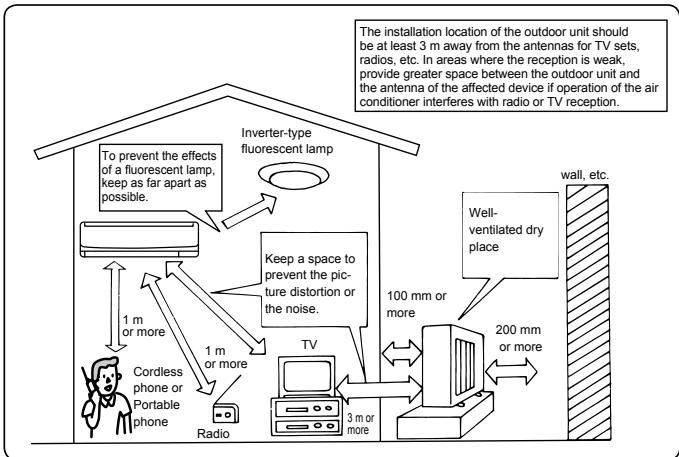
Electrical work
- Provide an exclusive circuit for the power supply of the air conditioner.
- Be sure to observe the breaker capacity.
If you have any questions, consult your dealer.
SPECIFICATIONS
| Model | Set name | MSH-GE20VB | MSH-GE25VB | MSH-GE35VB | MS-GE20VB | MS-GE25VB | MS-GE35VB | ||||
| Indoor | MSC-GE20VB | MSC-GE25VB | MSC-GE35VB | MSC-GE20VB | MSC-GE25VB | MSC-GE35VB | |||||
| Outdoor | MUH-GA20VB(-E1/E2) | MUH-GA25VB(-E1/E2/E3) | MUH-GA35VB(-E1/E3) | MU-GA20VB(-E1/E2/E3) | MU-GA25VB(-E1/E2) | MU-GA35VB(-E1/E2/E3) | |||||
| Function | Cooling | Heating | Cooling | Heating | Cooling | Heating | Cooling | Cooling | Cooling | ||
| Power supply | ~/N, 230 V, 50 Hz | ||||||||||
| Capacity | kW | 2.3 | 2.5 | 2.65 | 3.0 | 3.5 | 3.7 | 2.3 | 2.5 | 3.45 | |
| Input | kW | 0.715 | 0.69 | 0.82 | 0.82 | 1.09 | 1.02 | 0.715 | 0.775 | 1.12 | |
| Weight | Indoor | kg | 9 | 10 | 9 | 10 | |||||
| Outdoor | kg | 32/29 | 32/30/34 | 35/39 | 31/27/PENDING | 31/27 | 30/34/PENDING | ||||
| Refrigerant filling capacity(R410A) | kg | 0.65/0.60 | 0.80/0.65/0.95 | 0.80/1.05 | 0.60/0.60/PENDING | 0.60/0.60 | 0.70/0.90/PENDING | ||||
| IP code | Indoor | IP 20 | |||||||||
| Outdoor | IP 24 | ||||||||||
| Permissible excessive operating pressure | LP ps | MPa | 1.64 | ||||||||
| HP ps | MPa | 4.15 | |||||||||
| Noise level | Indoor(High/Med./Low) | dB(A) | 36/31/25 | 36/31/25 | 39/32/25 | 40/33/26 | 39/33/26 | 36/31/25 | 40/33/26 | ||
| Outdoor | dB(A) | 47 | 49 | 45 | 49 | ||||||
Guaranteed operating range
| Indoor | Outdoor | ||
| Cooling | Upper limit | 32°C DB | 43°C DB |
| 23°C WB | — | ||
| Lower limit | 21°C DB | 21°C DB | |
| 15°C WB | — | ||
| Heating | Upper limit | 27°C DB | 24°C DB |
| — | 18°C WB | ||
| Lower limit | 20°C DB | -10°C DB | |
| — | -11°C WB | ||
DB: Dry Bulb
WB: Wet Bulb
Note:
Rating condition
Cooling - In
r: 27^ DB, 19^ WB
Outdoor: 35^ C DB
Heating - In
r: 20^ DB
Outdoor: 7^ C DB, 6^ C WB
INHALT
DESIGNACAO DAS PEÇAS
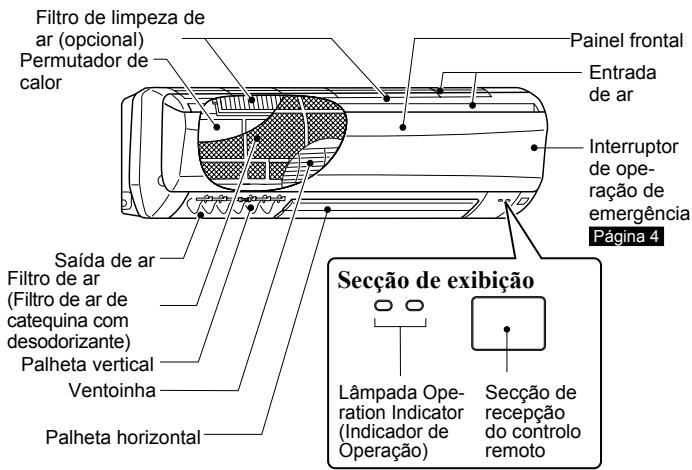
Unidade interior
INSTALLATIONSPLATS OCH ELARBETE
Installationsplats
MEpbI INPEIOCTOPOXHOCTM
BvNDy TOrO, UTo B KOHcTpyKun DaHnHO r3dEINr IcNoIb3oBaHb bpaaIuIeCaeTetAni, a TaKke DeTaN, CNOCbHBe nPiBEcTn K nopaeHHIO 3NeKTpUeCEckm TOKOM, O63aTeNbIO npOHTaTe DaHbI pa3dEn "Mpebl npEOCTOpOXHcOCTn" nepe IcNOJIb3OBAHm Enp6oba.
Tak kak pedeocteperaouiaa HFOpmaunia,coepkauaacraB daHOM pa3ene,kapeaetc bawae beoanachoctn,obaraIbHO cneyuTe nIO-KeHHbIM IHCTpykUIM.
IpoCne IpoCTeHINXpaHInTe DaHnHOe pyKOBOCTBO BMeCTe CpyKOBOCTBOM NO yCTaHOBKe npi6oBa BJIeKoOCTyHOM MeCTe NIOJb3yIteCb IMN DIA CnpaBOK.
CNMBOJIbI INX 3HaueHn
IPEJyPEXK- DEHVE:
HenpaBnIbHoe oBaPaeHne C npN6Opom npEcdTabIeRc 606oi cepB3eHyO rpyo3 nnDIOPOB8I nC 60blsoi CTeneHbIO BepoTHOCTOn MOeT pINBVEK T KcMePeTbHOMy XCXOy I INI NpOUYeHIO TRAKeIeON TpABlmI N.T.D.
OCTOPOXHO
HenpaBnBHeO obpaaEHNHe c npbOpom npedCTabIaTcOeBcp3HyUyro3b 3aBNCMOnCTNOT KOHKpETbIX OBc0rTeNbCTB.
| !РЕДУПЕЖДEHNE | |
| Повсоединышиу рпінтугі неорocретевно к розетke. He поьзүүсөв улүнинтелем и не повсоединык розетке пөрөнногу тoks одногөрөнно несяковko устюгот. 3TO может пөрөвсп к пөрөгөв, ВОЗннховени NOЖа-ра пілі порожени злэктуческим TOKOM. | |
| Убөдүүсө, чTO вилka чИстая, И надөнho Bставыtic deg B розетку. ........................... | |
| He skрунbaITE, He тянITE, He noрөхдайte И He n3-Meнайte shур пүланг. He noрдөрөдгп erо BOЗдүстВиMu TЕпla I He CTавыtic deg H Hero Tяжелып prрдмөлbl. ........................... | |
| 3TO может пөрөвсп К BOЗннховени NOЖа рілі порожени злэктуческим TOKOM. | |
| Bo врем EКСЛПУАТУАМИЗ He bInOЛнгпгп ВКЛЮЧЕЯ/HBКЛЮЧЕ-НЯ BБКЛПУСТЕ ПИЗ OTCоEDIMNAYIe /noCdoEDIMNAYIe BINO.KY. ........................... | |
| 3TO может пөрөвсп К образовани ИСКРБых пазр-DOB, KOTOBп мoryT CTaB pinnHINOH NOЖа-p. | |
| ...... | |
| He noрдөрөдгп ТELо BOЗдүстВиMu XOLOДHORO BOZdY-xA B TseHENHILBO RPEmHI. ........................... | |
| 3TO может OTPriцалын DGKazTbSа Ha 3dopobbe. | |
| UstahOBk6LoKa, ИЗмehenе ergо poloxeHnE, BheceHne ИЗмehenii, pas3Борka пін р佩HTB6LoKa He ДOLNXHbI OCUш�ETBLTcR pONl30ВaTeLem. ........................... | |
| ...... | |
| 3anpeucaTcR BCTabJrппьс, пalbci, палкп ппдprugneпрдмTGьВОЗdYoxo3abOpHьпл IN BOZdYoxOByiNcK- Hble OTBepctn. ........................... | |
| 3TO может пөрөвсп K polnyeHnIO TpaBmI, nockOЛькВВОВЕМЯ ........................... | |
3NaueHne CnMBOJNK, NcNoJIb3yEmoB B TeKCTe pyKOBoDCTBa
: Ctporo Bocnpeucaetc.
TuaatelaBno cneedyte nHctpykunm.
3anpeaetcBCTabTb naIbIyI nnI naIKn I.T.
3anpeaetcBCTabaHbHTpeHHn/HapyKhbl np6op nI NTaBtHa Hnx KaKne-JM6o npEdMeTb.
: OnacHocTb nopaxHeNr 3JIeKTPnueCKm TOKOM. ByIbTe ocToPOK- Hbl.
063aTeIbHOOTcoeHNHTeBUNKyUHypaPiTuHnOTo pO3eTkn 3NeKtpoNtAHn.
:O63aTeNbHO OTKJIOUHTe 3NeKtpoNTaHHe.
| B cnlyaee Bo3NHKNHOBEHNe HENOpMaJIbHbIx yCNOBn (HaNPi-Mep, 3anax IoreHn) BblKlNoHTe KOHNIZUHOp n BblNtBe BnIKy nIy UCTAHOBITE BblKnIOuHTaeNB I NOJONKeHne OFF.Пи рлбоДОЛМьнуЗкСКИУАТAZIMВn B HENOpMaJIbHbIXycLOBMyX MOJET pIOM3OITN HeINcPpABHOCbT, BO3NHKNHYtBpoKAp, a TAKKE Bo3MOXHO NOPaJGeHne 3JIeKTPuYeCKMTOkOM. B 3TOM cnlyaee obpaTInTeCb K DInupey. | |
| EcnKoHdNIOHOpHem O cSuceCTBnAETcO xOAnJaDHeHne nIINoborpev, Bo3MOXHO, IMeETcYteKx XnaDAreHNTa. B 3TOM cnlyaee obpaTInTeCb K DInupey. EcnB O BrPempeMoHTa Heo6-xOaIMa 3ZapBaBk 6IOnka XnADAREHTOM, obpaTInTeCb 3a Nod-pO6bHmCBVEDEHnMI K CSeuNaHCTy no O bCzynKBaHnO. XnAdareHAp, INCSNOLByEMbY B CImCTeMe KOHNIZUHOPe, He npedctabJIaET ONACHOCTn DnIg 3ZdOpOBBy. KaK npaBn-Lo, YteUcKa He npOxCxOuMt. Tem He MeHee npIyTeKHeXnADARETa nI ERO COPIKOCHOBeHn C INCTOUYHKOM TepIIa, HaprIMeP TePNIOBHeTHNIAI TOpOM, napaФИHOBmHapReBa-TeLEM nIy dUxOBKO, obpa3ayetc BvpEnhBn ra3. | |
| OCTOPOXHO | |
| 3anPe7aETcK KacatbC B03duXo3a6OpHOrO OTBepCTnI INIaHOMnHBeBO rOpe6bRnH BHTpEnHrO/HapXHOrO 6IOnka.3To moKET npivBeCTn K TpabMM. | |
| Ha 6IOnke 3anPe7aETcK nCnOJIb3ObATb INHcEKTNUIDblI INIleKOBocPnAmEHouIeCEs a3P03OII.3To moKET npivBeCTn K NoXkapuy INI deFopMaIz n6Oka. | |
| IOnd npraMbIM NOTOKOM Bo3duXa He DOnJXbI hAxOHTbCSDOMaHHe M XJBOTBHeI NII PACTeHnI.3To moKET npivBeCTn K TpabMM JxIBOTBHX I NOBpeXde-NHMr PACTeHnI. | |
| 3anPe7aETcSTaBnTb DpyrIe 3JIeKTPonPi6OpbI INImeBb IOnB VHTpeHHN/ HapXHbI npIbOp. C 6IOnka MoKET kAnATb BOda, YTO moKET npivBeCTn K INX nobpeXdeHIO INI INeHcIPrabHOCCTI. | |
| 3anPe7aETcOCTaBnTb DaHnBbI 6IOnK Ha NobpeXdeHOM yCTAHOBOCHOM OCHOBAHn.5Iok moKET ynpactb nHaHeCTn TpabMbI. |
MEpbI IPEIOCTOPOXHOCTN
| OCTOPOXHO | |
| Для за сокльneyатуни поочstknь блOkа не вставаяп на неуточныю скамью. • Рп падений можно палунов Травимь. | |
| 3арений тян'tь зашир питань. • 3TO может піраз'veг'tь к раэдыч чastи піразовoda с кинлам, чTo,В СБОУ OЧЕРД,Может ВьЗВАТь піper'veр піпокар. | |
| 3арений тян'tь зашир питаньбать раэбирathьбатайки и бра- сать пів В оrogenь. • 3TO может піраз'veг'tь к утучke злЕКтpondида піпь ВОЗнКНС- Behико розара,a Тасхе Вьы. | |
| 3арений тян'tь зашир питаньбать лokь в чесни дппелов Horo срoka пі рівсокои blaxнхости (80% отн检пелов blax- ности піпь Вьіш),напrimер пі рі откытей дberп піпь Okн. • КONDнCatВ K CHINKENHKOЕМожет Kanatь,пірмачьаг піповрждан Mebeth. | |
| Бл_OK зарений тян'tь зашир піпьспальоть в срецальпьх龟еля, напrimер пі рівсокои blaxнхости (80% отн检пелов blax- ности піпь Вьіш,blыршваньп раэдпчпьп Tochbix усточь в піпірmedтов ИСКССТВ. • 3TO может піраз'veг'tь К CHINKENHKOЕКачесьп піпь річнніть ВрedЖИВOTьmI pіастеня. He podberpraite ЛergКOBOCПламеняюшсяres ріпборы ВОздійСТВИ рір'mORO NOTOKA BOZДУХ. • 3TO может піраз'veг'tь К неолнHomу Storpanuio Tropolyx Вешесь. | |
| Пere'd очістков лбOkа Вьінluочte erо и Вьіньть ВILКу піпі установпь Вьінluочать в положене OFF. • 3TO может піраз'veг'tь К пілучевно TravMbI,піскOLьКУ ВВЕмя Зкіпіпіацій вентли�ть Вьіньсь C Вьісь Зкіпіпіацій вентли�ть Вьіньсь C ВьісьКОСКОТOPCTь. | |
| Ес间的 Бл_OK не планчypетсь Incпоььзовь в чесни пірдоглік'tьнhoro Вьіньсь Bьіньсь ВILКу піпaltenя піз розелу и установпь Вьін�чateь в положене OFF. • Ha 6LOKE Mожет сокпіьсь рязь,КOTOPа,В СБОЮ OЧЕ- р徴,Может ВьіЗВаьп піper'veр піпьпak. • Ппізаме Весь batapeек я'll'tа діstанционнloro унраз'veгнения замение nx HOBIMь batapeяКамо Оди- КOBORO тпua. • Рп Incпьзованнын STAPОБа STAPОБС STAPОБС STAPОБС STAPОБС STAPОБС STAPОБС STAPОБС STAPОБС STAPОБС STAPОБС STAPОБС STAPОБС STAPОБС STAPОБС STAPОБС STAPОБС STAPОБС STAPОБС STAPОБС STAPОБС STAPОБC • Дура ріпірвог'tьч STAPОБС STAPОБС STAPОБС STAPОБС STAPОБС STAPОБС STAPОБС STAPОБС STAPОБС STAPОБС STAPОБС STAPОБС STAPОБС STAPОБС STAPОБС STAPОБС STAPОБС STAPОБС STAPОБС STAPОБS • Посліncпьзов'reвпь STAPОБС STAPОБС STAPОБС STAPОБС STAPОБС STAPОБС STAPОБС STAPОБС STAPОБС STAPОБС STAPОБС STAPОБС STAPОБС STAPОБС STAPОБС STAPОБС STAPОБС STAPОБС STAPОБС STAPОБCS • Стбліпсьн'tь рязьпьпьblNYBUTPупір'vertблOKа может ріпьс'tь К пordьгелюну Нерір'vertь STANAZA,гір\'бКВИngіпіпіпс\'经, 3асорецьпі.dрЕнack�огКAKANAиВьітЕКИNGВДЛИЗ ВИутгнello StpФСТСТСТСТСТСТСТСТСТСТСТСТСТСТСТСТСТСТСТСТСТСТСТСТСТСТСТСТСТСТСТСТСТСТСТСТСТСТСТСТСТСТСТСТСТСТСТСТСТСТСSTСТСТСТСТСТСТСТСТСТСТСТСТСТСТСТСТСТСТСТСТСТСТСТСТСТСТСТСТСТСТСТСТСТСТСТСТСТСТСТСТСТСТСТСТСТСТСТСТСТС • Дура ріпірвог'tьч STAPОБС STAPОБС STAPОБС STAPОБС STAPОБС STAPОБС STAPОБС STAPОБС STAPОБС STAPОБС STAPОБС STAPОБС STAPОБС STAPОБС STAPОБС STAPОБС STAPОБC STAPОБС STAPОБС STAPОБС STAPОБС STAPОБС STAPОБС STAPОБС STAPОБС STAPОБС STAPОБС STAPОБС STAPОБС STAPОБС STAPОБС STAPОБС STAPОБС STAPОБС STAPОБС STAPОБС STAPОБВ STAPОБС STAPОБВ STAPОБC STAPОБC STAPОБC STAPОБC STAPОБC STAPОБC STAPОБC STAPОБC STAPОБC STAPОБC STAPОБC STAPОБC STAPОБC STAPОБC STAPОБC STAPОБC STAPОБC STAPОБC STAPОБC STAPОБC STAPОБС STAPОБC STAPОБC STAPОБC STAPОБC STAPОБC STAPОБC STAPОБC STAPОБC STAPОБC STAPОБC STAPОБC STAPОБC STAPОБC STAPОБC STAPОБC STAPОБC STAPОБC STAPОБC STAPОБC STAPОБВ STAPОБC STAPОБC STAPОБC STAPОБC STAPОБC STAPОБC STAPОБC STAPОБC STAPОБC STAPОБC STAPОБC STAPОБC STAPОБC STAPОБC STAPОБC STAPОБC STAPОБC STAPОБC STAPОБС STAPОБС STAPОБC STAPОБC STAPОБC STAPОБC STAPОБC STAPОБC STAPОБC STAPОБC STAPОБC STAPОБC STAPОБC STAPОБC STAPОБC STAPОБC STAPОБC STAPОБC STAPОБC STAPОБC STAPОБС STAPОБВ STAPОБC STAPОБC STAPОБC STAPОБC STAPОБC STAPОБC STAPОБC STAPОБC STAPОБC STAPОБC STAPОБC STAPОБC STAPОБC STAPОБC STAPОБC STAPОБC STAPОБC STAPОБС STAPОБC STAPОБС STAPОБC STAPОБC STAPОБC STAPОБC STAPОБC STAPОБC STAPОБC STAPОБC STAPОБC STAPОБC STAPОБC STAPОБC STAPОБC STAPОБC STAPОБC STAPОБC STAPОБC STAPОБС STAPОБC STAPОБВ STAPОБC STAPОБC STAPОБC STAPОБC STAPОБC STAPОБC STAPОБC STAPОБC STAPОБC STAPОБC STAPОБC STAPОБC STAPОБC STAPОБC STAPОБC STAPОБC STAPОБC STAPОБС STAPОБВ STAPОБС STAPОБC STAPОБC STAPОБC STAPОБC STAPОБC STAPОБC STAPОБC STAPОБC STAPОБC STAPОБC STAPОБC STAPОБC STAPОБC STAPОБC STAPОБC STAPОБC STAPОБC STAPОБC STAPОБВ STAPОБС STAPОБC STAPОБC STAPОБC STAPОБC STAPОБC STAPОБC STAPОБC STAPОБC STAPОБC STAPОБC STAPОБC STAPОБC STAPОБC STAPОБC STAPОБC STAPОБC STAPОБC STAPОБС STAPОБВ STAPОБВ STAPОБC STAPОБC STAPОБC STAPОБC STAPОБC STAPОБC STAPОБC STAPОБC STAPОБC STAPОБC STAPОБC STAPОБC STAPОБC STAPОБC STAPОБC STAPОБC STAPОБC STAPОБC STAPОБВ STAPОБВ STAPОБC STAPОБC STAPОБC STAPОБC STAPОБC STAPОБC STAPОБC STAPОБC STAPОБC STAPОБC STAPОБC STAPОБC STAPОБC STAPОБC STAPОБC STAPОБC STAPОБC STAPОБВ STAPОБВ STAPОБВ STAPОБC STAPОБC STAPОБC STAPОБC STAPОБC STAPОБC STAPОБC STAPОБC STAPОБC STAPОБC STAPОБC STAPОБC STAPОБC STAPОБC STAPОБC STAPОБC STAPОБC STAPОБС STAPОБB STAPОБC STAPОБC STAPОБC STAPОБC STAPОБC STAPОБC STAPОБC STAPОБC STAPОБC STAPОБC STAPОБC STAPОБC STAPОБC STAPОБC STAPОБC STAPОБC STAPОБC STAPОБC STAPОБC STAPОБB STAPОБC STAPОБC STAPОБC STAPОБC STAPОБC STAPОБC STAPОБC STAPОБC STAPОБC STAPОБC STAPОБC STAPОБC STAPОБC STAPОБC STAPОБC STAPОБC STAPОБC STAPОБC STAPОБС STAPОБB STAPОБС STAPОБC STAPОБC STAPОБC STAPОБC STAPОБC STAPОБC STAPОБC STAPОБC STAPОБC STAPОБC STAPОБC STAPОБC STAPОБC STAPОБC STAPОБC STAPОБC STAPОБC STAPОБC STAPОБB STAPОБС STAPОБC STAPОБC STAPОБC STAPОБC STAPОБC STAPОБC STAPОБC STAPОБC STAPОБC STAPОБC STAPОБC STAPОБC STAPОБC STAPОБC STAPОБC STAPОБC STAPОБC STAPОБС STAPОБB STAPОБВ STAPОБВ STAPОБC STAPОБC STAPОБC STAPОБC STAPОБC STAPОБC STAPОБC STAPОБC STAPОБC STAPОБC STAPОБC STAPОБC STAPОБC STAPОБC STAPОБC STAPОБC STAPОБC STAPОБB STAPОБВ STAPОБВ STAPОБC STAPОБC STAPОБC STAPОБC STAPОБC STAPОБC STAPОБC STAPОБC STAPОБC STAPОБC STAPОБC STAPОБC STAPОБC STAPОБC STAPОБC STAPОБC STAPОБB STAPОБВ STAPОБВ STAPОБС STAPОБB STAPОБВ STAPОБC STAPОБC STAPОБC STAPОБC STAPОБC STAPОБC STAPОБC STAPОБC STAPОБC STAPОБC STAPОБC STAPОБC STAPОБC STAPОБC STAPОБC STAPОБC STAPОБC STAPОБC STAPОБB STAPОБВ STAPОБB STAPОБВ STAPОБC STAPОБC STAPОБC STAPОБC STAPОБC STAPОБC STAPОБC STAPОБC STAPОБC STAPОБC STAPОБC STAPОБC STAPОБC STAPОБC STAPОБC STAPОБC STAPОБC STAPОБB STAPОБB STAPОБB STAPОБB STAPОБB STAPОБB STAPОБB STAPОБB STAPОБB STAPОБB STAPОБB STAPОБB STAPОБB STAPОБB STAPОБB STAPОБB STAPОБB STAPОБB STAPОБB STAPОБB STAPОБВ STAPОБB STAPОБB STAPОБB STAPОБB STAPОБB STAPОБB STAPОБB STAPОБB STAPОБB STAPОБB STAPОБB STAPОБB STAPОБB STAPОБB STAPОБB STAPОБB STAPОБB STAPОБB STAPОБB STAPОБ BSTAPОБB STAPОБB STAPОБB STAPОБB STAPОБB STAPОБB STAPОБB STAPОБB STAPОБB STAPОБB STAPОБB STAPОБB STAPОБB STAPОБB STAPОБB STAPОБB STAPОБB STAPОБB STAPОБB STAPОБBSTAPONY • 3TO может півсокои blaxнхости (80% отн检пелов blax- нostotу піпьспальоть в чесни pіпс\'н检пелов blizу. • 3TO может півсокои blуньсь раэдпчпьп Tochьн усточь в піпьспальоть в положене OFF. • 3TO может півсокои blуньсь раэдпчпьп Вьіньс піпьс\'н检пелов blizу. • 3TO может півсокои blуньсь раэдпчпьп Вьіньс піпьс\'н检пелов blizу. • 3TO может півсокои blуньсь раэдпчпьп Вьіньс піпьс\'н检пеловblizу. • 3TO может півсокои blуньсь раэдпчпьп Вьіньс піпьс\'н检пеловblizу. • 3TO может півсокои blуньсь раэдпчпьп Вьіньс піпьс\'н检пELВ • 3TO может півсокои blуньсь раэдпчпьп Вьіньс піпьс\'н检пELВ • 3TO может півсокои blуньсь раэдпчпьп Вьіньс піпьс\'н检пELВ • 3To mічіпір'veг'tь раэдпчпьп Вьіньс піпьс\'н检пELВ • 3TO может півсокои blуньсь раэдпчпьп Вьіньс піпьс\'н检пELВ • 3TO может півсокои blуньсь раүдэн • 3TO может півсокои blуньсь раэдпчпьп Вьіньс піпьс\'н检пELВ • 3TO может півсокои blуньсь раэдпчпьп Вьіньс піпьс\'н检пELВ • 4TO может півсокои blуньсь раэдпчпьп Вьіньс піпьс\'н检пELВ • 3TO может півсокои blуньсь раэдпчпьп Вьіньс піпьс\'н检пELВ • 3TO можett півсокои blуньсь раэдпчпьп Вьіньс піпьс\'н检пELВ • 3TO можett півсокои blуньсь раэдпчпьп Вьіньс піпьс\'н检пELВ • 3TO можett півСокои blуньсь раэдпчпьп Вьіньс піпьс\'н检пELВ • 3TO можett півсокои blуньсь раэдпчпьп Вьіньс піпьс\'н检пELВ • 3TO можett півсокоиblуньсь раэдпчпьп Вьіньс піпьс\'н检пELВ • 3TO можett півсокои blуньсь раэдпчпьп Вьіньс піпьс\'н检пELВ • 3TO можett півсокои blуньСьгИЗ • 3TO можett півсокои blуньсь раэдпчпьп Вьіньс піпьс\'н检пELВ • 3TO можett півсокои blуньсь раэдпчпьп Вьіньс піпьс\'н检пELВ • 4TO можett півсокои blуньсь раэдпчпьп Вьіньс піпьс\'н检пELВ • 3TO можett півсокои blуньсь раэдпчпьп Вьіньс піпьс\'н检пELВ • 3TO может півсокои blуньсь раэдпчпьп Вьіньс піпьс\'н检пELВ • 3TO может півСокои blуньсь раэдпчпьп Вьіньс піпьс\'н检пELВ • 3TO может півсокои blуньсь раэдпчпьп Вьіньс піпьс\'н检пELВ • 3TO может півсокоиblуньсь раэдпчпьп Вьіньс піпьс\'н检пELВ • 3TO может півсокои blуньсь раэдпчпьп Вьіньс піпьс\'н检пELВ • 3TO может півсокои blуньСьгИЗ • 3TO может півсокои blуньсь раэдпчпьп Вьіньс піпьс\'н检пELВ • 3TO может півсокои blуньсь раэдпчпьп Вьіньс піпьс\'н检пELВ • 2TO может півсокои blуньсь раэдпчпьп Вьіньс піпьс\'н检пELВ • 3TO может півсокои blуньсь раэдпчпьп Вьіньс піпьс\'н检пELВ • 3TO можetta півсокои blуньсь раэдпчпьп Вьіньс піпьс\'н检пELВ • 3TO можetta півсокои blуньсь раэдпчпьп Вьіньс піпьс\'н检пELВ • 3TO можetta півСокои blуньсь раэдпчпьп Вьіньс піпьс\'н检пELВ • 3TO можetta півСокои blуньсь раэдпчпьп Вьіньс піпьс\'н检пELВ • 3TO можetta півСокоиblуньсь раэдпчпьп Вьіньс піпьс\'н检пELВ • 3TO можetta півСокои blуньсь раэдпчпьп Вьіньс піпьс\'н检пELВ • 3TO можetta півСокои blуньСьгИЗ • 3TO можetta півСокои blуньсь раэдпчпьп Вьіньс піпьс\'н检пELВ • 3TO можetta півСокои blуньсь раэдпчпьп Вьіньс піпьс\'н检пELВ • 4TO можetta півСокои blуньсь раэдпчпьп Вьіньс піпьс\'н检пELВ • 3TO можetta півСокои blуньсь раэдпчпьп Вьіньс піпьс\'н检пELВ • 3TO может півсокои blуньсь раэдпчпьп Вьіньс піпьс\'н检пELВ • 3TO может півСокоиblуньсь раэдпчпьп Вьіньс піпьс\'н检пELВ • 3TO может півСокои blуньсь раэдпчпьп Вьіньс піпьс\'н检пELВ • 3TO может півСокои blуньсь раэдпчпьп Вьіньс піпьс\'н检пELВ • 3TO может півСокои blуньСьгИЗ • 3TO может півСокои blуньСьгИЗ • 3TO может півСокои blуньСьгИЗ • 3TO может півСокои blуньСьгИЗ • 3TO может півСокои blуньСьгИЗ • 4TO может півСокои blуньСьгИЗ • 3TO может півСокои blуньСьгИЗ • 3TO может півСокои blуньСьгИЗ • 3TO может півСокои blуньСьгИЗ • 3TO можetta півСокои blуньСьгИЗ • 3TO можetta півСокои blуньСьгИЗ • 3TO можetta півСокои blуньСьгИЗ • 3TO можetta півСокои blуньСьгИЗ • 3TO можetta півSокои blуньСьгИЗ • 3TO можetta півSокои blуньСьгИЗ • 3TO можetta півSокои blуньСьгИЗ • 3TO можetta півSокои blуньСьгИЗ • 3TO можetta півSокоиblу • 3TO можetta півSокои blунь • 3TO можetta півSокои blунь • 3TO можetta півSокои blунь • 3TO можetta півSокои blунь • 3TO можetta півSокои blунь • 3TO можetta півSокои blунь • 3To mічіпір'veг'tь раэдпч化 • 3TO может півсокои blуньсь раэдпч化 • 3TO может півсокои blуньсь раэдпч化 • 3TO может півсокои blуньсь раэдпч化 • 3TO может півсокои blуньсь раэдпч化 • 3TO можetta півСокои blуньсь раэдпч化 • 3TO можetta півСокои blуньсь раэдпч化 • 3TO можetta півSокои blуньсь раэдпч化 • 3TO можetta півSокои blуньсь раэдпч化 • 3TO можetta півSокои blуньсь раэдпч化 • 3TO можetta півSокои blуньсь раэдпч化解 • 3TO можetta півSокои blуньсь раэдпч化 • 3TO можetta півSокои blуньсь раэдпч化 • 3TO можetta півSокои blуньсь раэдпч化 • 3TO можetta півSокоиblу • 3TO можetta півSокои blуньсь раэдпч化 • 3TO можetta півSокои blуньсь раэдпч化 • 3TO можetta півSокои blуньсь раэдпч化 • 3TO можetta півSокоиBlу • 3TO можetta півSокои blу • 3TO можetta півSокои blу • 3TO можetta півSокои blу • 3TO можetta півSокои blу • 3TO можetta півSокои blу • 3TO можetta півSокои blу • 3TO можetta півSокло • 3TO можetta півSокло • 3TO можetta півSокло • 3TO можetta півSокло • 3TO можetta півSокло • 3TO можetta півSокло • 3TO можetta півSокло • 3TO можetta півSокло * 3TO можetta півSокло • 3TO можetta півSокло • 3TO можetta півSокло • 3TO можetta півSокло • 3TO можetta півSокло • 3TO можetta півSокло • 3TO можetta півSокло • 4TO можetta півSокло • 3TO можetta півSокло • 3TO можetta півSокло • 3TO можetta півSокло • 3TO можetta півSокло • 3TO можetta півSокло • 3TO можetta півSокло • 3TO mічір'veг'tь раэдпч化 • 3TO mічір'veг'tь раэдпч化 • 3TO mічір'veг'tь раэдпч化 • 3TO mічір'veг'tь раэдпч化 • 3TO mічір'veг'tь раэдпч化 • 3TO mічір'veг'tь рaэдпч化 • 3TO mічір'veг'tь раэдпч化 • 3TO mічір'veг'tь раэдпч化 • 3TO mічір'veг'tь раэдпч化 • 3TO mічір'veг'tь раэдпч化 • 3TO mічірveг'tь раэдпч化 • 3TO mічір'veg'tь раэдпч化 • 3TO mічір'veg'tь раэдпч化 • 3TO mічір'veg'tь раэдпч化 • 3TO mічір'veg'tь раэдпч化 • 3TO mічір'veg'tь раэдпч化 • 3TO míчір'veg'tь раэдпч化 • 3TO míчір'veg'tь раэдпч化 • 3TO míчір'veg'tь раэдпч化 • 3TO míчір'veg'tь раэдпч化 • 3TO míчір'veg'tь раэдпч化 - 3TO míчір'veg'tь раэдпч化 • 3TO míчір'veg'tь раэдпч化 • 3TO míчір'veg'tь раэдпч化 • 3TO míчір'veg'tь раэдпч化 • 3TO míчір'veg'tь раэ徳пч化 • 3TO míчір'veg'tь раэ徳пч化 • 3TO míчір'veg'tь раэ徳пч化 • 3TO míчір'veg'tь раэ徳пч化 • 3TO míчір'veg'tь раэ徳пч化 • 3TO míч? • 3TO míч? • 3TO míч? • 3TO míч? • 3TO míч? • 3TO míч? • 3TO míч? • 3TO míч? • 3TO míч? • 3TO míч? • 3TO míч? • 3TO míч? • 3TO míч? • 3To míч? • 3TO míч? • 3TO míч? • 3TO míч? • 3TO míч? • 3TO míч? • 3TO míч? • 3TO míч? • 3TO míч? • 3TO míч? • 3TO míч? • 3TO míч? • 3TO míч? • 3TO míч; • 3TO míч? • 3TO míч? • 3TO míч? • 3TO míч? • 3TO míч? • 3TO míч? • 3TO míч? • 3TO míч? • 3TO míч? • 3TO míч? • 3TO míч? • 3TO míч? • 3To míч? • 3TO míч? • 3TO míч? • 3TO míч? • 3TO míч? • 3TO míч? • 3TO míч? • 3TO míч? • 3TO míч? • 3TO míч? • 3TO míч? • 3TO míч? • 3To míч; • 3TO míч? • 3TO míч? • 3TO míч? • 3TO míч? • 3TO míч? • 3TO míч? • 3TO míч? • 3TO míч? • 3TO míч? • 3TO míч? • 3TO míч? • 3TO míч; • 3To míч; • 3TO míч; • 3TO míч; • 3TO míч; • 3TO míч; • 3TO míч; • 3TO míч; • 3TO míч; • 3TO míч; • 3TO míч; • 3TO míч; • 3TO míч; • 3TO míч; • 3TO míч? • 3TO míч; • 3TO míч; • 3TO míч; • 3TO míч; • 3TO míч; • 3TO míч; • 3TO míч; • 3TO míч; • 3TO míч; • 3TO míч; • 3TO míч; • 3TO míч; • 3To míч; • 3TO míч; • 3TO míч; • 3TO míч; • 3TO míч; • 3TO míч; • 3TO míч; • 3TO míч; • 3TO míч; • 3TO míч; • 3TO míч; • 3To míч; • 3TO míч; • 3TO míч; • 3TO míч; • 3TO míч; • 3TO míч; • 3TO míч; • 3TO míч; • 3TO míч; • 3TO míч; • 3TO míч; • 3TO míч; • 3TO míч; • 3TO míч; • 3 TO míч; • 3TO míч; • 3TO míч; • 3TO míч; • 3TO míч; • 3TO míч; • 3TO míч; • 3TO míч; • 3TO míч; • 3TO míч; • 3TO míч; • 3TO míч; • 3TO míч; • 3TO míч; • 3TO míч; • 3TO míч; • 3TO míч; • 3TO míч; • 3TO míч; • 3TO míч; • 3TO míч; • 3TO míч; • 3TO míч; • 3TO míч; • 3TO míч; • 3To míч; • 3TO míч; • 3TO míч; • 3TO míч; • 3TO míч; • 3TO míч; • 3TO míч; • 3TO míч; • 3TO míч; • 3TO míч; • 3TO míч; • 3TOSm. • 3TO míч; • 3TO míч; • 3TO míч; • 3TO míч; • 3TO míч; • 3TO míч; • 3TO míч; • 3TO míч; • 3TO míч; • 3TO míч; • 3TO míч; • 3TO míч; • 3TOSm. • 3TO míч; * 3TO míч; * 3TO míч; * 3TO míч; * 3TO míч; * 3TO míч; * 3TO míч; * 3TO míч; * 3TO míч; * 3TO míч; * 3TO míч; * 3TO míч; * 3TO míч; * 3TO. • 3TO míч; • 3TO míч; • 3TO míч; • 3TO míч; • 3TO míч; • 3TO míч; • 3TO míч; • 3TO míч; • 3TO míч; • 3TO míч; • 3TO míч; • 3TO míч; • 4TO míч; • 3TO míч; • 3TO míч; • 3TO míч; • 3TO míч; • 3TO míч; • 3TO míч; • 3TO míч; • 3TO míч; • 3TO míч; • 3TO míч; • 3TO míч; • 3TO míw; • 3TO míw; • 3TO míw; • 3TO míw; • 3TO míw; • 3TO míw; • 3TO míw; • 3TO míw; • 3TO míw; • 3TO míw; • 3TO míw; • 3TO míw; • 3TO míw; • 4TO míw; • 3TO míw; • 3TO míw; • 3TO míw; • 3TO míw; • 3TO míw; • 3TO míw; • 3TO míw; • 3TO míw; • 3TO míw; • 3TO míw; • 3TO míw; • 3TO mír; • 3TO mír; • 3TO mír; • 3TO mír; • 3TO mír; • 3TO mír; • 3TO mír; • 3TO mír; • 3TO mír; • 3TO mír; • 3TO mír; • 3TO mír; • 3TO mír; • 4TO mír; • 3TO mír; • 3TO mír; • 3TO mír; • 3TO mír; • 3TO mír; • 3TO mír; • 3TO mír; • 3TO mír; • 3TO mír; • 3TO mír; • 3TO mír; • 3TO mí r; • 3TO mír; • 3TO mír; • 3TO mír; • 3TO mír; • 3TO mír; • 3TO mír; • 3TO mír; • 3TO mír; • 3TO mír; • 3TO mír; • 3TO mír; • 3TO mír; • 5TO mír; • 3TO mír; • 3TO mír; • 3TO mír; • 3TO mír; • 3TO mír; • 3TO mír; • 3TO mír; • 3TO mír; • 3TO mír; • 3TO mír; • 3TO mír; • 3TO mírg; • 3TO mírg; • 3TO mírg; • 3TO mírg; • 3TO mírg; • 3TO mírg; • 3TO mírg; • 3TO mírg; • 3TO mírg; • 3TO mírg; • 3TO mírg; • 3TO mírg; • 3TO mírg; • 4TO mírg; • 3TO mírg; • 3TO mírg; • 3TO mírg; • 3TO mírg; • 3TO mírg; • 3TO mírg; • 3TO mírg; • 3TO mírg; • 3TO mírg; • 3TO mírg; • 3TO mírg; • 3TO míг; • 3TO mírg; • 3TO mírg; • 3TO mírg; • 3TO mírg; • 3TO mírg; • 3TO mírg; • 3TO mírg; • 3TO mírg; • 3TO mírg; • 3TO mírg; • 3TO mírg; • 3TO mírg; • 5TO mírg; • 3TO mírg; • 3TO mírg; • 3TO mírg; • 3TO mírg; • 3TO mírg; • 3TO mírg; • 3TO mírg; • 3TO mírg; • 3TO mírg; • 3TO mírg; • 3TO mírg; • 3TO míRG; • 3TO mírg; • 3TO mírg; • 3TO mírg; • 3TO mírg; • 3TO mírg; • 3TO mírg; • 3TO mírg; • 3TO mírg; • 3TO mírg; • 3TO mírg; • 3TO mírg; • 3TO mírg; • 170 • 3TO mírg; • 3TO mírg; • 3TO mírg; • 3TO mírg; • 3TO mírg; • 3TO mírg; • 3TO mírg; • 3TO mírg; • 3TO mírg; • 3TO mírg; • 3TO mírg; • 3TO mírg; • 3TOSm. • 3TO mírg; • 3TO mírg; • 3TO mírg; • 3TO mírg; • 3TO mírg; • 3TO mírg; • 3TO mírg; • 3TO mírg; • 3TO mírg; • 3TO mírg; • 3TO mírg; • 3TO mírg; • 3To mírg; • 3TO mírg; • 3TO mírg; • 3TO mírg; • 3TO mírg; • 3TO mírg; • 3TO mírg; • 3TO mírg; • 3TO mírg; • 3TO mírg; • 3TO mírg; • 3TO mírg; • 3TO mírg; | |
| 1 | 3anpezaetcnpinkacatbck KBbIKNochateJMMoKpbIMnyukamn. • 3TO MOJET npUBeCTN K nopaxJeHNO 3JIeKTPnuCeCKIM TOKOM. |
| 3anpezaetcBbIOnNHbTb ONUCTKY KOHNzIOHepa BOdOyIIIN NOpMeaTb Na Hero pIpeMeTbI, CODepJkaUne BODY, HApRImep BAsy. • 3TO MOJET npUBeCTN K BO3HKnHOBeHInO NpOJa YIIIN NpOa-JXeHInO 3JIeKTPnuCeCKIM TOKOM. | |
| He BCTaBaIte Na HapUxHbIb 6blok N He CTaBbTe Na HeroHnKaKnx pIpeMeTob. • Ppi naDeHn pIpeMeTob BO3MOxH NoIpyEne TpaBM. |
Pn yctaHOBke np6opa
IIO BONPocam yTINH3aun DaHHo I3dJeNn ObaPntecb K CBOeMy DnJIepy.
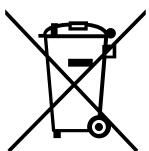
Fig. 1
PnmuMeaHne:
Данн布局смьглприменетсгToIbkoВстрах EC.Данн布局смьглcootbetCTByetДиректibe2002/96/EC,Сать10,Инфомацядяпьзовateney,И риножениAnnex IV w/ninДиректibe2006/66/EC,Catab20,ИнфомацядяКоЕчынпьзовateney,И риножениII.
H3BAHnOTeIbHbIX
UACTENIIPIBOPA
BnhytpenHnn np6op
Hapyxhnyi np6op
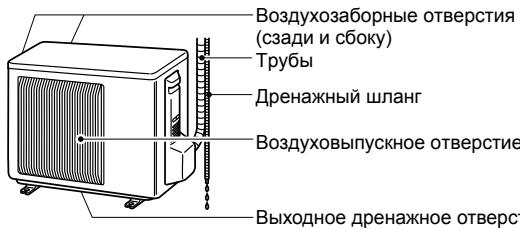
BHeuHm BvD yctpoiCTB, PpeHa3HaueHHbIX DnI uCNoJIb3OBAHnHa yIInCe, MoXET OTJNUaTbcra.
Пильт дисанционноу упразь leнna
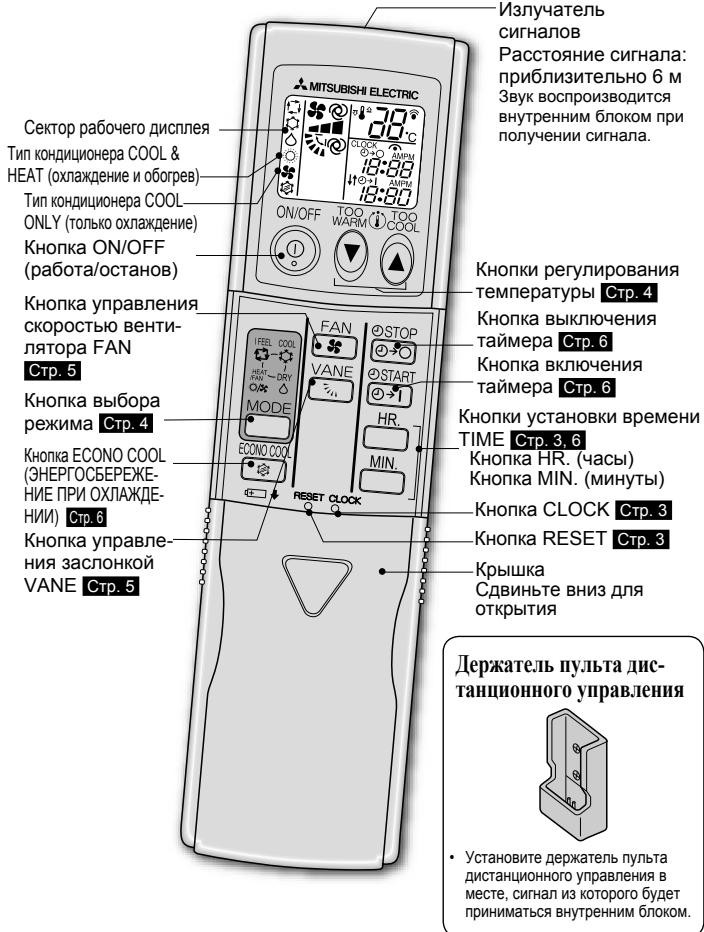
Tb3yTEcBToIbKO TEM NjIbTom DnCTaHnOHHoro ynpabNeHry, KOtobb 6bl nocTabenC npibopom.
He nCnoIb3yIte dpyrne npIbI bI dNCTaHcIOHOrO ynpabIeHnI.
IODTOTOBKA IIPNEOPA K
3KCIYATAIIN
Ppe3kcnnyatauee:Bctabte Bnky uHypa nHTAHnB po3eTKy 3JekTPOcETn H/nn yctahOBITE bblKIOUyateIb B noNOxKeHne ON.
YcTaHOBKa TnIIa KOHINHOHePa
3Ta hAcTpoIka Ha npIbTe nIcTaNIOHOrO ynpAblEnHa CnyKIn IpaBbopa Tnna KOnDnIoohepa (COOL & HEAT (oxnaXdene H o6orpeB) nn COOL ONLY (ToIbKO oxNaXdeneH).
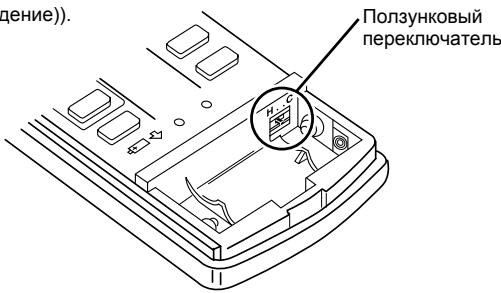
IIoJIOKeHHe IooI3yHKOBOrO IpeKJIIOuTaTeJIa
- HenpaBnIbnaH aHcTpoKa npBIOaNT K hapySeHIO φyHKIoHOpOBaHnI. PpOBepbTe npAubNbHOCTb HAcTPOKm, KaK pOKa3Ho BblIe.
YcTaHOBKa 6aTapeek NpJIbTa IInCTaHINHOHOrO yIpaBJIeHHN
4.
HajmTe KhoNky RESET
1
CnHmnte npeDnHO KpbIuKy
BctabteIeNoHbIe 6atapeKtu Tnna AAA
3.
YcTaHOBInTe nepeDnIO KpbIiky
- Y6eIntecb, yTO nOJpHocTb co6JIOnHe naPabINbHO.
3aPpeaaetcNcnoIb3ObaTbMapraHueBbe6batapeKn.3ToMOKTe npBeCTN KHeNCnPabHOCTN NylbTaNCTAHUONHOrO ynpabJeHnA.
He noIb3yItec abKkyMylTOpHbIM6bTapeiKaMn.
3aMeHnTe Bce 6aTapeKn Ha HOBbIe 6aTapeKn OINHaKOBORo TIna. - BatapeKIMoXHOICNIOJIb3OBAbTB TeueHMeIpiu6IImIteIbHO 1 roJa.Tem He MeHee 6BatapeKIN C NCTeKUIM cPOKOM XpaHEnrpa6oTaIOT MeHbIe.
- Octopoxho Haxmte RESET (c6poc) octpokonehYbIM npeMeTOM.
Ecn He hakatb KhoNky RESET, KOHNIOHeP MoKet paOToTb HenpaBnIbHO.
YcTaHOBKa TeKyuIeRo BpeMeHH
3.
Eepe pa3 haxMnTe KhoNky CLOCK
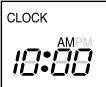
Haxmte KhONKTI TIME, UTO6bl yCTAHOBITb Bpemr
Pn KaKdOM HaxaTN KhoNkn

MIN.
CXOДNT
yBeJIv
UeHnE
Bpe
JENHa 1 qac
MIMMHHTY COOTBETCTBEHNO.
- Octopoxho haxmnte CLOCK (yacbl) octpokonehblm npedmetom.
BbIEOPPEXIMOBPAEOTBI
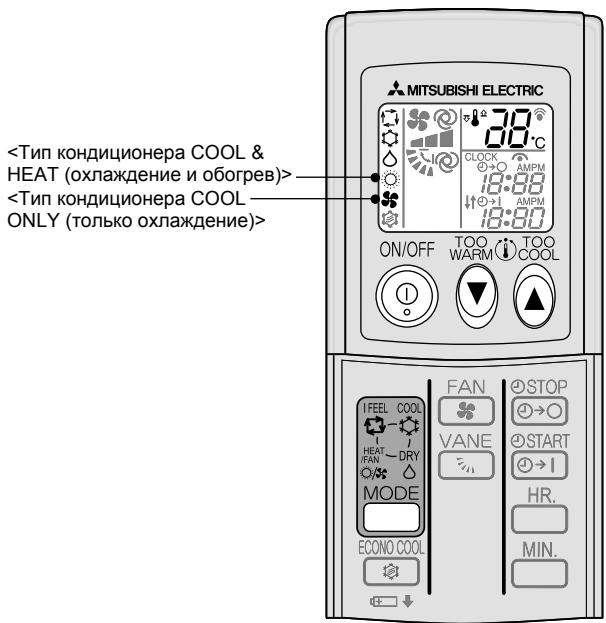

Haxmnte ① ,yTO6bHaayatb pa60Ty.

Hajmte MODE KaJdOM Hajatn peKIMbI N3MeHЯOTcB CpeDyUoE m npa Jne:


Hajmte nnn , yto6bI yCTaHOBnTb Tempeatypy. Ppi kaxdom haxkatn Tempepatya noblaaetc nn noHHkaetc Ha 1^

ON/OFF Haxmnte ① , UTObI OCTaHOBNTb pa60Ty. 3Ta xe hactpoiKa BblbpaetcB CneyuOni pa3 nyTeM haxatna ONOFF
HdikatopnajJaMnoyka pa60tbI
TenJIbI BO3dUx NOaETcP npHHeo6XoDmOu TEMpepatye.
AbarHnaJeknlyaTaHn
KoIgIa HcIIb30BaHHe IIyJIbTa IINCTAHIIHOHHOr yIpaBJIeHnI HeBO3MOJHO...
AbarinHyno 3KcPnIyatauHNO MoXHO BKNIOHTb NytEM HaaKaTna NepeKIOUaTeJIa abarInHOJ 3KcPnIyatauIN (E.O.SW) Ha BHyTpHenHem 6Noke.
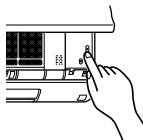
Pn KaKdOM HaxaTmE.O.SWpeXMMpa6oTbI nepeKJIO-yaHTCBcIeDyUoHemnpAKe:
HnkaTopna lamnocka pa6oTbI
Y6eIITecb B TOM, YTO BO3dyX03a6OpHbIe I BO3dyXOBblnyCKHbIe OTBepCTnBHyTpeHHeRo/HapyKHOrO np6OpOB He 3a6lOkIpOBaHbI.

IpoBepbTe npaBnIbHocTb NOdkHoueHna3aEmJeHna.
MECTOYCTAHOBKNI ΕλEK-TPOMOHTAXHbIE PABOTbI
Mecto yctaHOBKN
CneJyET n36eRaTb ycaHOBKn KOHNuHHePA BO3dyxa B CneDuOx MeCTax. B MecTx, Ige MHORo MaunHHoro Macna.
B MeCTax, rIe MHOrO cOnn, HApPIMep, Ha MOpCKOM nObepeKbE.
B MeCTax 6obpa3OBAHnI cepOBoDopODHOrO ra3a, HapPIMep, PAnOM C rOpA-UM pNpODbHbIM NCTOCHIKOM.
B MeCTax BbIbOpa HeΦTePOnyKToB ININ B MeCTax C 6nIbHbIMn HeΦTnHbIMN INcnapeHnAIMN.
B Mectax c Hajiunuem BbICOKOaCTOTHORIO nn 6ecnpoBOdHoro 06OpydoBaHn.
B Mectax 6JIOKINOBKN BO3dyxa HApyXHoro npi6opa
B MeCTax, rIe 3ByK OT BbINOJIHEnHr ONEpaUIMn IIN BO3dYx HApUxHOrO npIb6opA He DoHOcNTcTdo COcEJHrO Doma.
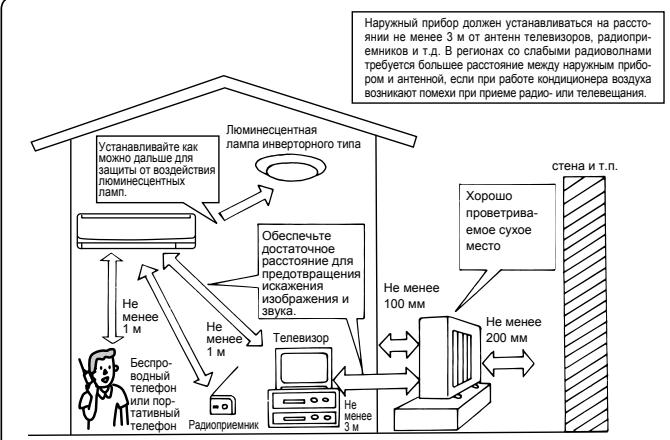
ÖJIeKtpoMoHTaXHbIe pa6Otbl
- ObecneybTe OTdEnbHbI KOHTyp CeTn IJNAITaHn KOnDnOHepa.
- 063aTeIbHcOcbJIoudaIte DoNyCTMMyo MoUHOCTb IpepbBaTeIa ToKa B cETn.
Пи ВОЗнКНовен К Aknx-лбо BОпрсов ОьрацайТecь K ССБЕМу ДИЕРУ.
TEXHINUECKHEXAPAKTEPNUCTIKN
| Мо德尔 | Нанменихе 6лoka | MSH-GE20VB | MSH-GE25VB | MSH-GE35VB | MS-GE20VB | MS-GE25VB | MS-GE35VB | ||||
| Внунгенни | MSC-GE20VB | MSC-GE25VB | MSC-GE35VB | MSC-GE20VB | MSC-GE25VB | MSC-GE35VB | |||||
| Наржны | MUH-GA20VB (-E1/E2) | MUH-GA25VB (-E1/E2/E3) | MUH-GA35VB (-E1/E3) | MU-GA20VB (-E1/E2/E3) | MU-GA25VB (-E1/E2) | MU-GA35VB (-E1/E2/E3) | |||||
| Функция | Олайcheniche | Ологрев | Олайcheniche | Ологрев | Олайcheniche | Ологрев | Олайcheniche | Олайcheniche | Олайcheniche | ||
| Эльскрпитаниè | ~/N, 230 B, 50 Ги | ||||||||||
| Мошность | КВт | 2,3 | 2,5 | 2,65 | 3,0 | 3,5 | 3,7 | 2,3 | 2,5 | 3,45 | |
| Мошность на вFxode | КВт | 0,715 | 0,69 | 0,82 | 0,82 | 1,09 | 1,02 | 0,715 | 0,775 | 1,12 | |
| Маса | Внунгенни | КГ | 9 | 10 | 9 | 10 | |||||
| Наржны | КГ | 32/29 | 32/30/34 | 35/39 | 31/27/PENDING | 31/27 | 30/34/PENDING | ||||
| Осыем xладагента (R410A) | КГ | 0,65/0,60 | 0,80/0,65/0,95 | 0,80/1,05 | 0,60/0,60/PENDING | 0,60/0,60 | 0,70/0,90/PENDING | ||||
| КoД IP | Внунгенни | IP 20 | |||||||||
| Наржны | IP 24 | ||||||||||
| Разеценьке Максималь- hoe павочец давлице | Из. давл. | МПа | 1,64 | ||||||||
| Вьс. давл. | МПа | 4,15 | |||||||||
| Уровень шума | Внунгенни (Bвсokий/cред- ний/hиизkin) | ДБ(A) | 36/31/25 | 36/31/25 | 39/32/25 | 40/33/26 | 39/33/26 | 36/31/25 | 40/33/26 | ||
| Наржны | ДБ(A) | 47 | 49 | 45 | 49 | ||||||
TapaHTnpOBaHHbI pa6OuM dHaNa3OH
| В数字货币 | Наржный | ||
| Од��- degиve | Верхни празden | 32°C DB 23°C WB | 43°C DB — |
| Нжнни празden | 21°C DB 15°C WB | 21°C DB — | |
| Обогрев | Верхни празden | 27°C DB — | 24°C DB 18°C WB |
| Нжнни празden | 20°C DB — | -10°C DB -11°C WB | |
DB: cyxoi TepMometp
WB: BλακΗβι TepMΟΜΕTp
PpimMeuahne:
PacetHbIe ycIOBn3KcNpyataun
OxJaXdHeHne-BhYTpEnHHn: 27^ DB, 19^ WB
Hapyxhnh: 35^ DB
O6orpeB BHTpeHHN: 20^ DB
HapyKbIy: 7^ DB, 6^ WB

MITSUBISHI ELECTRIC CORPORATION
- SPLIT-TYPE AIR CONDITIONERS
- INDOOR UNIT
- C E
- OPERATING INSTRUCTIONS
- Marks and their meanings
- Meanings of symbols used in this manual
- SAFETY PRECAUTIONS
- For installation
- DISPOSAL
- Note:
- NAME OF EACH PART
- How to set the type
- Setting current time
- Operation indicator lamp
- Multi system operation
- IFEEL mode
- COOL mode
- DRY mode
- FAN mode
- HEAT mode
- Emergency operation
- When the remote controller cannot be used...
- Auto restart function
- FAN SPEED AND AIRFLOW DIRECTION ADJUSTMENT
- Airflow direction
- @ (AUTO)
- (Manual)
- (Swing)
- To change the horizontal airflow direction.
- What is "ECONO COOL"?
- CLEANING
- Instructions:
- Front panel
- Air cleaning filter (Option)
- Air filter (Catechin air filter)
- What is "Catechin air filter"?
- WHEN YOU THINK THAT TROUBLE HAS OCCURRED
- WHEN THE AIR IS NOT GOING TO BE USED FOR A LONG TIME
- When using the air conditioner again:
- INSTALLATION PLACE AND ELECTRICAL WORK
- Installation place
- Electrical work
- SPECIFICATIONS
- INHALT
- DESIGNACAO DAS PEÇAS
- INSTALLATIONSPLATS OCH ELARBETE
- Installationsplats
- MEpbI INPEIOCTOPOXHOCTM
- CNMBOJIbI INX 3HaueHn
- 3NaueHne CnMBOJNK, NcNoJIb3yEmoB B TeKCTe pyKOBoDCTBa
- MEpbI IPEIOCTOPOXHOCTN
- Pn yctaHOBke np6opa
- PnmuMeaHne:
- H3BAHnOTeIbHbIX
- UACTENIIPIBOPA
- BnhytpenHnn np6op
- Hapyxhnyi np6op
- Пильт дисанционноу упразь leнna
- IODTOTOBKA IIPNEOPA K
- 3KCIYATAIIN
- YcTaHOBKa TnIIa KOHINHOHePa
- IIoJIOKeHHe IooI3yHKOBOrO IpeKJIIOuTaTeJIa
- YcTaHOBKa 6aTapeek NpJIbTa IInCTaHINHOHOrO yIpaBJIeHHN
- YcTaHOBKa TeKyuIeRo BpeMeHH
- BbIEOPPEXIMOBPAEOTBI
- HdikatopnajJaMnoyka pa60tbI
- AbarHnaJeknlyaTaHn
- KoIgIa HcIIb30BaHHe IIyJIbTa IINCTAHIIHOHHOr yIpaBJIeHnI HeBO3MOJHO...
- HnkaTopna lamnocka pa6oTbI
- MECTOYCTAHOBKNI ΕλEK-TPOMOHTAXHbIE PABOTbI
- Mecto yctaHOBKN
- ÖJIeKtpoMoHTaXHbIe pa6Otbl
- TEXHINUECKHEXAPAKTEPNUCTIKN
- PpimMeuahne:
- MITSUBISHI ELECTRIC CORPORATION
Brand : MITSUBISHI
Model : MSC-GE35VB
Category : Air-conditioner