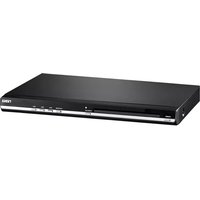
ND-865 - DVD player Naxa - Free user manual and instructions
Find the device manual for free ND-865 Naxa in PDF.


Pick your language and provide your email: we'll send you a specifically translated version.
| Product type | DVD player |
| Brand | Naxa |
| Model number | ND-865 |
| Disc compatibility | DVD, DVD±R/RW, CD, CD-R/RW |
| Video output | Composite, S-Video, Component (YUV) |
| Audio output | Stereo RCA, Digital coaxial |
| Playback formats | DVD Video, VCD, SVCD, MP3, JPEG, DivX |
| Playback functions | Play, pause, stop, fast forward, rewind, slow motion, zoom, repeat A-B, subtitle and audio switching |
| Parental control | Multi-level password-protected parental lock |
| Remote control | Full-function infrared remote control included |
| Dimensions (approx) | 16.9 x 10.6 x 2.4 inches (43 x 27 x 6 cm) |
| Weight (approx) | 2.4 kg |
| Power supply | AC 100-240 V, 50/60 Hz |
| Power consumption | Less than 10 W (standby less than 1 W) |
| Connections | Composite video, component video, stereo audio, digital coaxial audio |
| Cleaning and maintenance | Wipe the exterior with a soft, dry cloth; clean discs with a microfiber cloth from center to edge |
| Safety information | Class 1 laser product; do not open the cabinet; avoid moisture and high temperature |
| Spare parts and repairability | Remote control and power cord are available as genuine Naxa spare parts |
| General information | User manual and quick start guide available for free download in PDF format |
Frequently Asked Questions - ND-865 Naxa
What disc formats can the Naxa ND-865 play?
The Naxa ND-865 supports DVD, DVD±R/RW, CD, and CD-R/RW discs. It can also play MP3, JPEG, and DivX files when burned onto a compatible disc.
How do I connect the DVD player to my television?
Use the composite video (yellow) connection for standard TVs or the component video (Y, Pb, Pr) for better picture quality. Connect the stereo audio cables (red and white) to the corresponding inputs on your TV or home theater system.
How should I clean the Naxa ND-865 DVD player?
Always unplug the device before cleaning. Wipe the exterior with a soft, dry cloth. To clean discs, use a microfiber cloth and wipe gently from the center outward. Never use chemical solvents.
The remote control doesn't work. What should I do?
First, check that the batteries are installed correctly and have charge. Make sure the infrared sensor on the player is not obstructed and the remote is pointed directly at it. If the problem persists, attempt a device reset by unplugging the player for a minute, then plugging it back in.
Can I set parental controls to restrict certain discs?
Yes, the Naxa ND-865 includes a parental lock feature. Access the setup menu, select the parental control option, and enter a 4-digit password to set a rating level. Discs rated above the selected level will require the password to play.
How do I switch audio language or subtitle tracks?
During playback, press the Audio button to cycle through available audio languages and Subtitle button for subtitle tracks. The availability depends on the disc's contents.
The player turns on but there is no picture. What can I try?
Ensure the TV input is set to the correct source (e.g., AV or Component). Verify that the video cables are firmly connected. If using component, make sure the DVD player is set to that output mode, and check that the TV supports the selected resolution.
Can I play JPEG photos from a CD?
Yes, the player can read JPEG files from CD or DVD discs. Burn the photos onto a disc, insert it, and select the file using the on-screen menu. Use the remote to navigate and view your slideshow.
What is standby power consumption?
In standby mode, the Naxa ND-865 consumes less than 1 watt. This is energy-efficient and allows you to leave it connected without significant power usage.
Where can I find the user manual?
The user manual is available as a free PDF download from the notice-facile.com website. You can also request a translated version by selecting your language and providing your email address.
User questions about ND-865 Naxa
0 question about this device. Answer the ones you know or ask your own.
Ask a new question about this device
No questions yet. Be the first to ask one.
Download the instructions for your DVD player in PDF format for free! Find your manual ND-865 - Naxa and take your electronic device back in hand. On this page are published all the documents necessary for the use of your device. ND-865 by Naxa.
USER MANUAL ND-865 Naxa

Manual assistant
Powered by Anthropic
Waiting for your message
Product information
Brand : Naxa
Model : ND-865
Category : DVD player