ND-862 - DVD player Naxa - Free user manual and instructions
Find the device manual for free ND-862 Naxa in PDF.


Pick your language and provide your email: we'll send you a specifically translated version.
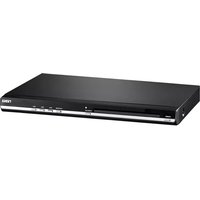
| Product Type | DVD Player |
| Brand | Naxa |
| Model | ND-862 |
| Dimensions (W x D x H) | 430 x 260 x 40 mm |
| Weight | 1.5 kg |
| Power Supply | AC 100-240V, 50/60Hz |
| Disc Formats Supported | DVD, DVD±R/RW, CD, CD-R/RW, MP3, JPEG |
| Video Output | Composite (RCA) |
| Audio Output | Stereo RCA (L/R), Digital Coaxial |
| Remote Control | Included (batteries not included) |
| Playback Features | PAL/NTSC auto detection, zoom, repeat A-B, slow motion |
| Region Code | Region 1 or Region Free (varies by unit) |
| Cleaning Instructions | Clean with a soft, dry cloth. Do not use liquid or abrasive cleaners. |
| Safety Precautions | Do not expose to moisture or extreme temperatures. Keep ventilation slots clear. |
| Repairability | Spare parts (remote, power adapter) available. Contact authorized service center for repairs. |
Frequently Asked Questions - ND-862 Naxa
The DVD player does not turn on. What should I check?
Ensure the power cord is securely connected to both the player and a working AC outlet. Verify that the power outlet is providing power by testing with another device. If the unit still does not power on, the internal fuse may be blown; contact Naxa customer support for assistance.
How do I connect the DVD player to my TV?
Use the included composite AV cable (yellow for video, white/red for audio). Connect the yellow plug to the video input on your TV, and the white/red plugs to the corresponding audio inputs. Select the correct input source on your TV (e.g., AV, Video, or Input).
The disc won't play. What could be wrong?
Check that the disc is inserted with the label side facing up. Ensure the disc is clean and free of scratches. The player supports DVD, CD, MP3, and JPEG formats; unreadable discs may be incompatible or damaged. Try a different disc to isolate the issue.
How do I clean the DVD player lens?
Use a commercially available DVD lens cleaning disc. Do not attempt to open the player or clean the lens with liquids or cotton swabs, as this may cause permanent damage.
The remote control is not working. What should I do?
First, replace the AAA batteries (if applicable). Check that the remote sensor on the front panel is not blocked. Ensure there are no obstructions between the remote and the player. If the issue persists, the remote may need replacement; contact Naxa for a spare.
Can I play DVDs from other regions on this player?
The region code is typically set to Region 1 for North America. To play discs from other regions, you may need a region-free or modified player. Check your unit's specifications, or contact Naxa for region compatibility details.
Why does the player freeze or skip during playback?
Freezing or skipping can be caused by a dirty disc, scratches, or a dirty lens. Clean the disc with a soft cloth from the center outward. If the problem continues, use a lens cleaning disc. Also, ensure the player is on a stable, vibration-free surface.
How do I reset the DVD player to factory settings?
With the unit on, press the Setup button on the remote and navigate to the 'Factory Reset' or 'Default' option. Confirm the reset. If no such option exists, unplug the player for 30 seconds and plug it back in.
What audio and video formats are supported?
The player supports DVD video, CD audio, MP3 (up to 320 kbps), and JPEG image files. For video files, only standard DVD formats are supported; it does not play DivX or Xvid.
How do I enable subtitles on a DVD?
During playback, press the Subtitle button on the remote control repeatedly to cycle through available subtitle languages. Subtitles must be present on the disc; this function does not work with burned discs containing MP3 or JPEG files.
User questions about ND-862 Naxa
0 question about this device. Answer the ones you know or ask your own.
Ask a new question about this device
No questions yet. Be the first to ask one.
Download the instructions for your DVD player in PDF format for free! Find your manual ND-862 - Naxa and take your electronic device back in hand. On this page are published all the documents necessary for the use of your device. ND-862 by Naxa.
USER MANUAL ND-862 Naxa

Manual assistant
Powered by Anthropic
Waiting for your message
Product information
Brand : Naxa
Model : ND-862
Category : DVD player