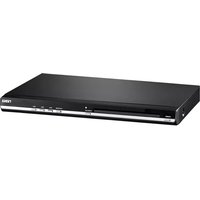
ND-856P - DVD player Naxa - Free user manual and instructions
Find the device manual for free ND-856P Naxa in PDF.


Pick your language and provide your email: we'll send you a specifically translated version.
| Product Type | DVD Player |
| Model | ND-856P |
| Brand | Naxa |
| Dimensions (W x D x H) | Approx. 17.2 x 10.6 x 2.5 inches (43.7 x 26.9 x 6.4 cm) |
| Weight | Approx. 2.5 lbs (1.1 kg) |
| Power Supply | AC 110-240V, 50/60 Hz |
| Power Consumption | Approx. 15 W |
| Disc Compatibility | DVD, DVD±R/RW, CD, CD-R/RW |
| Video Outputs | Composite (RCA), Component (Y/Pb/Pr) |
| Audio Outputs | Stereo RCA (L/R), Digital Coaxial |
| Additional Features | USB playback, parental control, zoom, subtitle options |
| Remote Control | Included |
| Display | LED indicator |
| Region Code | Region 1 or multi-region (verify) |
| Maintenance | Clean with soft dry cloth; avoid liquids |
| Safety | Use only in dry environment; do not block vents |
| Spare Parts / Repairability | Contact Naxa support for service; limited user-serviceable parts |
Frequently Asked Questions - ND-856P Naxa
What types of discs can this DVD player play?
The Naxa ND-856P plays standard DVDs, DVD±R/RW, audio CDs, and CD-R/RW discs. It also supports playback of certain formats via USB.
How do I connect the DVD player to my TV?
Use the composite (yellow, red, white) or component (red, green, blue) video cables, and connect the corresponding audio cables. Ensure the TV is set to the correct input source.
Why is there no picture or sound?
Check that all cables are securely connected. Make sure the input source on your TV matches the output used. Also, verify the disc is not damaged and is inserted correctly with the label side up.
Can I play media from a USB drive?
Yes, the player has a USB port that supports playback of MP3, JPEG, and DivX/AVI video files. Format the drive as FAT32 for best compatibility.
How do I set parental controls?
Press Setup on the remote, navigate to Parental, and enter the default password (often 0000 or 1234). You can then set a rating level to block unsuitable content.
The remote control is not working. What should I do?
Replace the batteries with fresh ones. Ensure there are no obstacles between the remote and the player, and point it directly at the IR sensor. Also check if the remote is in the correct mode.
How to clean the DVD player?
Unplug the player. Use a soft, dry cloth to wipe the exterior. Do not use any liquids or sprays. For the disc tray, gently clean with a dry cotton swab.
What is the region code for this player?
The Naxa ND-856P is typically set to Region 1 for North America. Some units may be multi-region; check the label on the back or consult the manual for details.
Does this player support HDMI?
No, the ND-856P does not have an HDMI output. It uses composite and component video connections. For HDMI, you would need an external converter.
How do I reset the DVD player to factory settings?
With the player on, press Setup, navigate to Factory Default or Reset, and confirm. This will restore all settings to their original state.
User questions about ND-856P Naxa
0 question about this device. Answer the ones you know or ask your own.
Ask a new question about this device
No questions yet. Be the first to ask one.
Download the instructions for your DVD player in PDF format for free! Find your manual ND-856P - Naxa and take your electronic device back in hand. On this page are published all the documents necessary for the use of your device. ND-856P by Naxa.
USER MANUAL ND-856P Naxa

Manual assistant
Powered by Anthropic
Waiting for your message
Product information
Brand : Naxa
Model : ND-856P
Category : DVD player