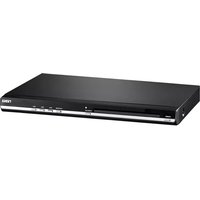
ND-864 - DVD player Naxa - Free user manual and instructions
Find the device manual for free ND-864 Naxa in PDF.


Pick your language and provide your email: we'll send you a specifically translated version.
| Product Type | DVD Player |
| Model | ND-864 |
| Brand | Naxa |
| Dimensions (W x D x H) | 430 x 280 x 40 mm |
| Weight | 2.5 kg |
| Power Supply | AC 110-240V, 50/60Hz, 15W |
| Disc Compatibility | DVD, DVD±R, DVD±RW, CD, CD-R, CD-RW, VCD, SVCD |
| Media Playback | MP3, JPEG, DivX (via USB/Disc) |
| USB Port | USB 2.0 for media playback |
| Video Outputs | HDMI, Composite, Component (YPbPr) |
| Audio Outputs | Stereo RCA, Coaxial Digital Audio |
| Video Resolution | Up to 1080p via HDMI |
| Region Code | Region 1 (North America) - check manual for multi-region |
| Parental Control | Yes, adjustable rating levels |
| Progressive Scan | Yes, 480p/576p |
| Playback Functions | Play, Pause, Stop, FF, FR, Next, Prev, Repeat, Shuffle, A-B Repeat, Zoom |
| Remote Control | Included with batteries |
| Maintenance | Clean with soft, dry cloth; do not use liquids or abrasives |
| Safety Precautions | Keep away from moisture, heat, and direct sunlight; do not disassemble |
| Repair & Spare Parts | Contact Naxa support; no user-serviceable parts inside |
| Warranty | 90 days parts and labor (check with retailer) |
Frequently Asked Questions - ND-864 Naxa
How do I connect the Naxa ND-864 to my TV?
Use an HDMI cable for best quality. Alternatively, use composite (RCA) or component (YPbPr) cables. Ensure the TV is set to the correct input source.
Can I play movies from a USB flash drive?
Yes, insert a USB drive into the USB port. The player supports MP3, JPEG, and DivX files. Use the remote to navigate and select files.
Why is my disc not playing?
Check if the disc is inserted correctly with the label facing up. Ensure the disc is clean and not scratched. Verify that the disc format (DVD, CD, etc.) is supported. Try a different disc.
How do I change the region code?
The region code is set by the manufacturer. Some players allow changing it via a specific sequence on the remote, but it may void warranty. Refer to the manual or region-free modification guides.
What if the remote control does not work?
Replace the batteries. Ensure there are no obstacles between the remote and the player. Point the remote directly at the sensor. Try resetting the player by unplugging it for 30 seconds.
How can I clean the DVD player?
Unplug the player. Use a soft, dry cloth to wipe the exterior. Do not use any liquids, alcohol, or abrasive cleaners. For the lens, use a disc lens cleaner.
Does the ND-864 support parental control?
Yes, it has parental control settings. You can set a password and restrict playback based on rating levels. Access the setup menu and navigate to 'Parental Control'.
How do I reset the player to factory settings?
Open the setup menu, go to 'System Setup' or 'Factory Reset', and confirm. Alternatively, unplug the player for 30 seconds and plug it back in.
Is the player multi-voltage?
Yes, it accepts AC 110-240V, 50/60Hz, so it can be used worldwide with the appropriate plug adapter.
What is the warranty period for Naxa ND-864?
Naxa typically offers a 90-day warranty for parts and labor from the date of purchase. Check your purchase receipt or contact Naxa support for details.
User questions about ND-864 Naxa
0 question about this device. Answer the ones you know or ask your own.
Ask a new question about this device
No questions yet. Be the first to ask one.
Download the instructions for your DVD player in PDF format for free! Find your manual ND-864 - Naxa and take your electronic device back in hand. On this page are published all the documents necessary for the use of your device. ND-864 by Naxa.
USER MANUAL ND-864 Naxa

Manual assistant
Powered by Anthropic
Waiting for your message
Product information
Brand : Naxa
Model : ND-864
Category : DVD player