
ND-860 - DVD player Naxa - Free user manual and instructions
Find the device manual for free ND-860 Naxa in PDF.


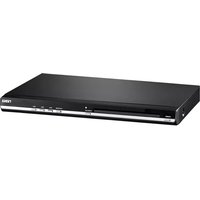
| Product Type | DVD Player |
| Brand | Naxa |
| Model | ND-860 |
| Power Supply | 110-240V~ 50/60Hz |
| Supported Discs | DVD/VCD/CD/MP3/Photo CD/SVCD/JPEG/MPEG-4 |
| Signal System | PAL/AUTO/NTSC |
| Frequency Response | 20Hz - 20kHz (at 1kHz 0dB) |
| Signal-to-Noise Ratio (Audio) | ≥90 dB (at 1kHz 0dB) |
| Audio Distortion + Noise | ≤ -60dB (at 1kHz 0dB) |
| Audio Output (Analog) | 2.0Vrms (+0/-1.0Vrms) |
| Video Output (Composite) | 1.0 ± 0.2Vp-p, 75Ω, unbalanced, negative polarity |
| Video Output Type | Composite (RCA) |
| Audio Output Type | RCA Stereo, Coaxial Digital |
| USB Port | Yes (front panel) |
| Remote Control | Included |
| Playback Functions | Play, Pause, Stop, Open/Close, Skip, Search |
| JPEG Photo Slideshow | Yes |
| Disc Drawer | Motorized, Open/Close button |
| Standby Button | Yes (front panel) |
| Cleaning | Unplug before cleaning; use damp cloth, no liquids or aerosols |
| Safety Certification | Class 1 Laser Product, FCC compliant |
| Disposal | Do not dispose with household waste; follow local recycling regulations |
| Dimensions (approx.) | Standard DVD player size (exact dimensions not specified) |
| Weight (approx.) | Standard DVD player weight (exact weight not specified) |
Frequently Asked Questions - ND-860 Naxa
User questions about ND-860 Naxa
0 question about this device. Answer the ones you know or ask your own.
Ask a new question about this device
Download the instructions for your DVD player in PDF format for free! Find your manual ND-860 - Naxa and take your electronic device back in hand. On this page are published all the documents necessary for the use of your device. ND-860 by Naxa.
USER MANUAL ND-860 Naxa
natural_image
Black NEXI remote control unit with ports and indicator lights (no visible text or symbols)USER MANUAL
Please read and keep these instructions

CAUTION
RISK OF ELECTRIC SHOCK DO NOT OPEN

AVIS
RISQUE CHOC ELECTRIQUE NE PAS OUVRIR

THE LIGHTNING FLASH WITH APPROWHEAD SYMBOL WITHIN AN EQUILATERAL TRIANGLE IS IN TENDED TO ALERT THE USER TO THE PRESENCE OF UNINSULATED « DANGEROUS VOLTAGE » WITHIN THE UNIT'S CABINET THAT MAY BE OF SUFFICIENT MAGNITUDE TO CONSTITUTE A RISK OF ELECTRIC SHOCK TO PERSONS.

THE EXCLAMATION POINT WITHIN AN EQUILATERAL TRIANGLE IS INTENDED TO ALERT THE USER TO THE PRESENCE OF IMPORTANT OPERATING AND
MAINTENANCE (SERVICING) INSTRUCTIONS IN THE MANUAL ACCOMPANYING THE UNIT.

THE MAINS PLUG USED AS THE DISCONNECT DEVICE, THE DISCONNECT DEVICE SHALL REMAIN READILY OPERABLE.

THE APPARATUS SHALL NOT BE EXPOED TO DRIPPING OR SPLASHING AND THAT ON OBJECTS FILLED WITH LIQUIDS, SUCH AS VASES, SHALL BE PLACED THE APPARATUS.

THE APPLIANCE COUPLER IS USED AS THE DISCONNECT DEVICE, THE DISCONNECT DEVICE SHALL REMAIN READILY OPERABLE.

NEVER PLACE THE DVD PLAYER IN A "BUILT-IN" ENCLOSURE, UNLESS PROPER VENTILATION IS PROVIDED

ALWAYS REMEMBER TO REMOVE THE PLUG FROM THE MAINS SOCKET BEFORE DISCONNECTING THE POWER LEAD FROM THE BACK OF THE UNIT.
WARNING
TO PREVENT FIRE OR ELECTRIC SHOCK, DO NOT EXPOSE THE UNIT TO RAIN OR MOISTURE. NEVER ATTEMPT TO OPEN THE CABINET, DANGEROUS HIGH VOLTAGES ARE PRESENTED IN THE UNIT. REFER SERVCSING TO QUALIFIED SERVICE PERSONNEL.
CAUTION
TO PREVENT ELECTRIC SHOCK, MATCH WIDE-BLADE PLUG WITH WIDE SLOT AND FULLY INSERT.
THE APPARATUS SHALL NOT BE EXPOSED TO WATER AND NO OBJECTS FILLED WITH LIQUID SUCH AS VASES SHALL BE PLACED ON THE APPARATUS.
CAUTION
THE UNIT EMPLOYS A LASER SYSTEM. TO ENSURE THE PROPER USE OF THE UNIT, READ THEIS MANUAL CAREFULLY AND KEEP IT FOR FUTURE REFERENCE.
IF THE UNIT REQUIRES SERVICING, CONTACT THE SELLER OR SEE "TROUBLESHOOTING".
TO PREVENT DIRECT EXPOSURE TO THE LASER RADIATION, DO NOT OPEN THE CABINET. VISIBLE LASER MAY RADIATE WHEN THE CABINET IS OPENED OR THE INTERLOCKS ARE DEFEATED. DO NOT STARE INTO THE LASER BEAMS.
CAUTION
THIS PLAYER IS A CLASS 1 LASER PRODUCT. USE OF CONTROLS OR ADJUSTMENTS OR PERFORMANCE OF PROCEDURES OTHER THAN THOSE SPECIFIED HEREIN MAY REULT IN HAZARDOUS RADIATION EXPOSURE. AS THE LASER BEAM USED IN THIS DVD VIDEO PLAYER IS HARMFUL TO THE EYES, DO NOT ATTEMPT TO DISASSEMBLE THE CABINET. REFER SERVICING TO QUALIFIED PERSONNEL ONLY.
WARNING
FCC REGULATIONS STATE THAT ANY CHANGE OR MODIFICATION TO THE EQUIPMENT, NOT EXPRESSLY APPROVED BY MAKER OR ITS AUTHORIZED PARTIES, COULD VOID USER'S AUTHORITY TO OPERATE THIS EQUIPMENT.
1. Read Instructions
All the safety and operating instructions should be read before the product is operated.
2. Retain Instructions
The safety and operating instructions should be retained for future reference.
3. Head Warnings
All warnings on the product and in the operating instructions should be adhered to.
4. Follow Instructions
All operating instructions should be followed.
5. Cleaning
Unplug this product from the wall outlet before cleaning. Do not use liquid cleaners or aerosol cleaners. Use a damp cloth for cleaning.
6. Attachments
Do not use attachments not recommended by the product manufacturer as they may cause hazards.
7. Water and Moisture
Do not use this product near water for example, near a bathtub, wash bowl, kitchen sink, or laundry tub; in a wet basement; or near a swimming pool; and the lake.
8. Accessories
Do not place this product on an unstable cart, stand, tripod, bracket, or table. The product may fall, causing serious injury to a child or adult, and serious damage of the product. Use only with a cart, stand, tripod, bracket, or table recommended by the manufacturer, or sold with the product. Any mounting of the product should follow the manufacturer's instructions, and should use a mounting accessory recommended by the manufacturer.
9. Portable Cart Warning

(Symbol provided by RETAC)
A product and cart combination should be moved with care. Quick stop, excessive force, and uneven surface may cause the product and cart combination to overturn.
10. Ventilation.
Slots and openings in the cabinet are provided for ventilation and to ensure reliable operation of the product and to protect if from overheating, and these openings must not be blocked or covered. The openings should never be blocked by placing the product on a bed, sofa, rug, or other similar surface. This product should not be placed in a built-in installation such as a bookcase or rack unless proper ventilation is provided or the manufacturer's instructions have been adhered to.
11. Power Sources
This product should be operated only from the type of power source indicated on the marking label. If you are not sure of the type of power supply to your home, consult your product dealer or local power company. For products intended to operate from battery power or other sources, refer to the operating instructions.
12. Power Cord Protection
Power supply cords should be routed so that they are not likely to be walked on or pinched by items placed upon or against them, paying particular attention to cords at plugs, convenience receptacles, and the point where they exit from the product.
13. Power Lines
An outside antenna system should not be located in the vicinity of overhead power lines or other electric light or power circuits, o where it can fall into such power lines or circuits. When installing an outside antenna system, extreme care should be taken to keep from touching such power lines or circuits as contact with them might be fatal.
14. Overloading
Do not overload wall outlets, extension cords, or integral convenience receptacles, as this can result in a risk of fire or electric shock.
15. Object and Liquid Entry
Never push objects of any kind into this product through openings as they may touch dangerous voltage points or short-out parts that could result in a fire or electric shock. Never spill liquid of any kind to the product.
16. Servicing
Do not attempt to service this product yourself as opening or removing covers may expose you to dangerous voltage or other hazards. Refer all servicing to qualified service personnel.
17. Replacement Parts
When replacement parts are required, be sure the service technician has used replacement parts specified by the manufacturer or have the same characteristics as the original part. Unauthorized substitutions may result in fire, electric shock, or other hazards.
18. Safety Check
Upon completion of any service or repairs to this product, ask the service technician to perform safety checks to determine that whether the product is in proper operating condition.
19. Heat
The product should be situated away from heat sources such as radiators, heat registers, stoves, or other products (including amplifiers) that product heat.
Note on environmental protection

After the implementation of the European Directive 2002/96/EU in the national legal system, the following applies: Electrical and electronic devices may not be disposed of with domestic waste. Consumers are obliged by law to return electrical and electronic devices at the end of their service lives to the public collecting points set up for this purpose or point of sale. Details to this are defined by the national law of the respective country. This symbol on the product, the instruction manual or the package indicates that a product is subject to these regulations. By recycling, reusing the materials or other forms of utilizing old devices, you are making an important contribution to protecting our environment.
FRONT PANEL AND REAR PANEL ILLUSTRATION
Front panel

- DVD DOOR
2.OPEN/CLOSE BUTTON
3.PLAY/PAUSE BUTTON
4.STOP BUTTON
5.STANDBY BUTTON
6.USB JACK
7.REMOTE RECEIVER WINDOW
Rear panel

Power
Plug the attached AC cord into a standard AC power outlet to power the DVD player.

natural_image
Line drawing of an electronic device rear panel with power outlet and cable (no text or symbols)Connecting Video and Audio
Note: Before making or changing any connections, make sure that all the devices are disconnected from the power outlet.
Note: Both video and audio connections must be made from the DVD player to your television.
Composite Video Output
- Use the Composite Video Output to send video from the DVD player to a television.
- Requires an RCA video cable (included).
- Use the RCA video cable to connect the Composite Video Output to a composite video input on a television.
- Adjust the connected televisions input setting to match the input used in the previous step.
RCA Stereo Audio Output
- Use the RCA Stereo Audio Output to send audio from the DVD player to a television.
- Requires an RCA audio cable (included).
- Use the RCA audio cable to connect the RCA Stereo Audio Output to an RCA stereo audio input on a television.
- Adjust the connected televisions input setting to match the input used in the previous step.
Coaxial Digital Audio Output
- Use the Coaxial Digital Audio Output to send high quality audio from the DVD player to an audio system.
- Requires an RCA audio cable (included).
- Use the RCA audio cable to connect the Coaxial Digital Audio Output to an coaxial digital audio input on an audio system.
- Adjust the connected audio system's input setting to match the input used in the previous step.
- In the Digital Out portion of the setup menu, adjust to PCM, RAW or off

Composite Video Input

Television
RCA Stereo Audio Inputs

Coaxial Digital Audio Input
DVD, CD and USB
Loading a Disc
- Press the Open/Close button to open the Disc Drawer.
- Load a disc into the DVD player, label side facing up.
- Press the Open/Close button to close the Disc Drawer.
- After a disc is loaded, it will begin playing automatically.
Playing a Loaded Disc
- Follow the instructions for Loading a Disc.
- If the disc does not begin playing automatically, press the Play/Pause button.
Playing a JPEG CD
- Load a JPEG photo disc into the player by following the instructions for Loading a Disc. A slide show of JPEG photos from the CD will begin playing automatically.
- Press the Stop button to access a file view of the loaded JPEG disc.
- Use the Arrows/Enter buttons on the remote to select and view photos.
Connecting a USB
- Load a USB into the USB PORT.
2 Press the DVD/USB button on the remote to switch to the connected USB.
3 Use the ARROW and ENTER buttons to select and play content from the connected USB.
Before Requesting Service
Check the following guide for the possible cause of a problem before contacting service.
| Symptom | Correction |
| No power | Plug the power cord into the wall outlet securely. |
| No picture | Select the appropriate video input mede on the TV so the picture from the DVD player appears on the TV screen.Connect the video cable into the jacks securely.Turn on the TV |
| NO sound | Check audio connections.If you are using a HiFi amplifier, try another sound source. |
| The playback picture is poor | Clean the disc.Correct the TV / DVD player colour system. |
| The DVD player does not start playback | Insert a disc, if no disc inside the player.Insert a playable disc. (Check the disc type, color system and Regional code.)Place the disc with the playback side down.Clean the disc.Cancel the Rating function or change the rating level. |
| Severe hum or noise is heard. | Wipe them with a cloth slightly moistened with alcohol.Clean the discConnect the speakers and components securely.Move your TV away from the audio components. |
| The remote control does not work properly. | Point the remote control at the remote sensor of the DVD receiver.Operate the remote control within about 5m.Remove the obstacle.Replace the batteries with new ones. |
| Completely distorted picture or no colour | If the picture is distorted completely or if the picture rolls vertically, make sure the NTSC/PAL setting at the DVD player matches the colour system of your television. |
| The icon appears on screen | The DVD's software restricts it.The DVD's software doesn't support the feature (eg., angles).The feature is not available at the moment. |
This product incorporates copyright protection technology that is protected by method claims of certain U.S. patents and other intellectual property rights owned by Macrovis on Corporation and other rights owners, Use of this copyright protection technology must be authorized by Macrovision Corporation, and is intended for home and other limited viewing use only unless otherwise authorized by Macrovision Corporation. Reverse engineering or disassembly is prohibited.
Technical specifications
| Signal system | PAL/AUTO/NTSC |
| Frequency Response | 20HZ-20KHZ ( at 1KHz 0 dB) |
| Signal-toNoisy Ratio(Audio) | ≥90 dB ( at 1KHz 0 dB) |
| Audio Distortion + Noise | ≤-60dB ( at 1KHz0dB) |
| Audio Output (Analog audio) | 2.0^+0_-1.0Vrms |
| Video Output | Composite: 1.0 ± 0.2Vp-p Load impedance: 75 , imbalance, negative polarity |
| Power Supply | 110-240V~ 50/60Hz |
| Supported Disc | DVD/VCD/CD/MP3/Photo CD/SVCD/JPEG/MPEG-4 |
- USER MANUAL
- CAUTION
- AVIS
- RISQUE CHOC ELECTRIQUE NE PAS OUVRIR
- WARNING
- Read Instructions
- Retain Instructions
- Head Warnings
- Follow Instructions
- Cleaning
- Attachments
- Water and Moisture
- Accessories
- Portable Cart Warning
- Ventilation.
- Power Sources
- Power Cord Protection
- Power Lines
- Overloading
- Object and Liquid Entry
- Servicing
- Replacement Parts
- Safety Check
- Heat
- Note on environmental protection
- FRONT PANEL AND REAR PANEL ILLUSTRATION
- Power
- Connecting Video and Audio
- Composite Video Output
- RCA Stereo Audio Output
- Coaxial Digital Audio Output
- DVD, CD and USB
- Loading a Disc
- Playing a Loaded Disc
- Playing a JPEG CD
- Connecting a USB
- Before Requesting Service
- Technical specifications
Brand : Naxa
Model : ND-860
Category : DVD player