
STUDIOPRO4 - Studio Monitors M-AUDIO - Free user manual and instructions
Find the device manual for free STUDIOPRO4 M-AUDIO in PDF.



| Product Type | Active two-way studio monitors |
| Brand | M-AUDIO |
| Model | StudioPro 4 |
| Woofer | 10 cm (4") with curved cone and magnetic shielding |
| Tweeter | 2.5 cm mylar dome with magnetic shielding and OptImage technology |
| Frequency Response | 70 Hz - 20 kHz |
| Crossover Frequency | 2.6 kHz |
| Maximum SPL | 101.5 dB RMS at 1 meter |
| Dynamic Range | >95 dB |
| Signal-to-Noise Ratio | >90 dB (typical, A-weighted) |
| Dynamic Power | 18 W / 4 Ω per channel (2 channels) |
| Input Impedance | 10 kΩ unbalanced |
| Input Sensitivity | 100 mV for 90 dB SPL at 1 m (volume max) |
| Input Connectors | 2 x RCA (L/R) unbalanced |
| Headphone Output | Stereo mini-jack on front panel (left speaker) |
| Mid-Boost Control | In/Out switch on rear panel |
| Power Requirement | 120 V~60 Hz, 230 V~50 Hz or 110 V~50/60 Hz depending on version |
| Power | Power via detachable power cord |
| Dimensions (H x W x D) | 21.5 cm x 14.6 cm x 15.9 cm (per speaker) |
| Weight | 5.4 kg per pair (approx.) |
| Cabinet Material | Vinyl-wrapped MDF |
| Magnetic Shielding | Yes (woofer and tweeter) to protect screens |
| Built-in Protections | RF, current limiting, overheating, on/off transients, subsonic filter |
| Maintenance and Cleaning | Dust with a soft cloth; do not touch the cones |
| Safety | Use appropriate voltage; do not block ventilation |
| Spare Parts and Repairability | Contact M-Audio technical support; limited warranty |
| Warranty | Limited warranty on defects in materials and workmanship (registration required) |
Frequently Asked Questions - STUDIOPRO4 M-AUDIO
User questions about STUDIOPRO4 M-AUDIO
0 question about this device. Answer the ones you know or ask your own.
Ask a new question about this device
Download the instructions for your Studio Monitors in PDF format for free! Find your manual STUDIOPRO4 - M-AUDIO and take your electronic device back in hand. On this page are published all the documents necessary for the use of your device. STUDIOPRO4 by M-AUDIO.
USER MANUAL STUDIOPRO4 M-AUDIO
Professional Desktop Multimedia Audio Monitors
M-AUDIO StudioPro4
ENGLISH
Introduction 5
What's in the Box? 5
StudioPro 4 Features 5
Woofer 5
Tweeter 5
Sub-Frequency Port 6
Mid-Boost Control 6
Enclosure 6
Network & Power Amplifiers 6
Front and Rear Panel Features 7
Front Panel 7
Rear Panel 8
Installation 9
Technical Support & Contact Information 12
Warranty Information 12
Terms 12
Registration 12
Appendix A - Technical Specifications 13
Appendix B - Block Diagram 14
FRANCAIS
Introduction 15
WhatContenu de I'emballage 15
Thank you for choosing the StudioPro 4 professional desktop multimedia audio monitors. Top recording engineers and producers in studios around the world use M-Audio monitors. Now, with the StudioPro 4s, you can enjoy the same professional standard of audio quality right on your desktop.
The StudioPro 4 has been designed and tested by veteran audio engineers to meet your needs in the desktop audio monitoring environment. It is focused on the functional goal of delivering pure, original sound without any additional coloration, to let you hear the music the way the artist recorded it. The StudioPro 4 monitor is self-powered, directly accepting a line level signal from a variety of sources.
The StudioPro 4 is designed to overcome all the limitations of conventional desktop monitors within the digital audio environment. The StudioPro 4s match a custom tuned cabinet, optimized woofer and tweeter and advanced crossover technology with plenty of power to insure the highest-fidelity sound available from audio monitors of their size. And M-Audio's proprietary OptImage wave guide tweeter technology assures improved and defined stereo imaging. The StudioPro 4s are the missing link for bringing your computer-based music, games and DVDs to life.
What's in the Box?
Your StudioPro 4 box contains:
- Two StudioPro 4 speakers (Left and Right)
- One speaker wire
One 1/8-inch mini jack to RCA audio cable - One detachable AC power cord
Actual test results of your StudioPro 4s pair
This manual
StudioPro 4 Features
Woofer
The woofer unit is 4 inches in diameter, with a magnetically shielded curved cone (to protect your computer monitor from interference), a high-temperature voice coil and closed-cell foam damping. It is designed to deliver balanced mid- and low-frequency response. The design is used to accurately react to input signals, and to deliver even minimal input precisely, both while minimizing distortion.
Tweeter
By employing a specially developed 1-inch Mylar dome with protective magnetic shielding, the tweeter can deliver distortion-free sound and offer an extremely natural response. It minimizes reaction time, using a specially shaped Mylar dome for excellent delivery and minimizes resonance by adapting a unique internal damping technology. Also, incorporated is the Optlmage wave guide technology which improves stereo imaging.
Sub-Frequency Port
The hole in the rear panel is called a Sub-Frequency Port and is designed to discharge extreme low frequencies.
Mid-Boost Control
The back panel Mid-Boost control on the StudioPro 4s allows compensation for room EQ. Offering a great deal of control over the StudioPro 4s sound and presence, this makes the StudioPro 4 very versatile for use in different spaces.
Enclosure
Along with the other components, the StudioPro 4s enclosure plays an important role. In order to provide more stable performance, the enclosure employs a special high-density MDF and unique interior reinforcement designed to absorb vibration and impact generated under extreme conditions.
Network & Power Amplifiers
The active equalization, crossover networks and power amplifiers for the StudioPro 4 are specially designed for its woofer and tweeter. The network properly distributes low, mid, and high frequencies to the components in order to reduce distortion and sound loss, thereby achieving a naturally balanced sound.
Front and Rear Panel Features
Front Panel
This front panel image shows the Left Speaker. The front panel of the Right Speaker houses only the Woofer and Tweeter drivers.
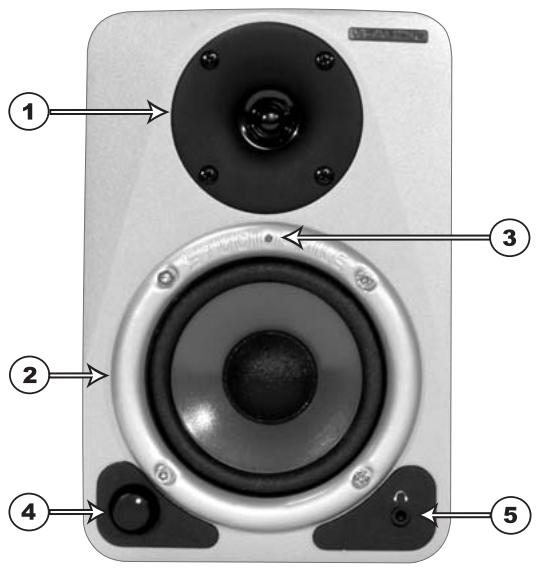
- Woofer Driver
- Tweeter Driver
- Blue Power LED: This LED indicates whether the speakers power is on or off
- Volume Control
- Headphone Output Jack (1/8")
Rear Panel
This rear panel image shows the powered Left Speaker. The Right Speaker is passive and has only one Speaker terminal for connection to the Speaker Terminal of the Left Speaker.
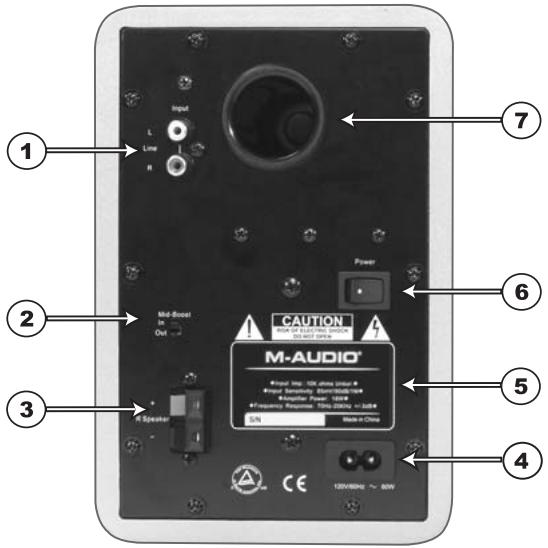
- RCA Line Inputs (L & R): These jacks accept standard RCA input connections with unbalanced wiring. The included 1/8-inch mini-jack—to—RCA audio cable allows users to connect the StudioPro 4s to other equipment accepting 1/8-inch mini jack connections, such as a laptop or MP3 player.
There are 2 RCA Line Inputs:
L — Left Channel Input (White)
R - Right Channel Input (Red) - Mid-Boost: Two selections are available for the Mid-Boost, "In" and "Out." The Out setting produces a flat frequency response curve, while the In setting gives an added boost in the mid-range frequencies.
- Speaker Outputs: There is one spring action Speaker terminal Output for connecting the Left Speaker to the Right Speaker using the included speaker wire.
- Power Receptacle: Accepts a detachable 2-circuit line cord in order to power the StudioPro 4 system.
- Product Label: This label contains the model and serial number information.
- Power Switch: This switch turns the StudioPro 4 system on and off. The on position is indicated by the white dot on the switch.
- Sub-Frequency Port: This port aids in the reproduction of very low frequencies by discharging frequencies below 70Hz.
Installation
For optimal performance of the StudioPro 4, please read the following directions carefully before installation.
Precautions
Handling: Please do not touch the speaker cones (the Woofer or the Tweeter); this could damage the unit, affecting sound quality. The StudioPro 4 speakers are packaged in the box tightly, so your attention is required when taking the speakers out of the box. To avoid possible damage to the speakers, hold both sides of the unit (not the front or the back) in order to pull it out of the box. To avoid damage, the speaker cones should never be touched, even after they're out of the box.
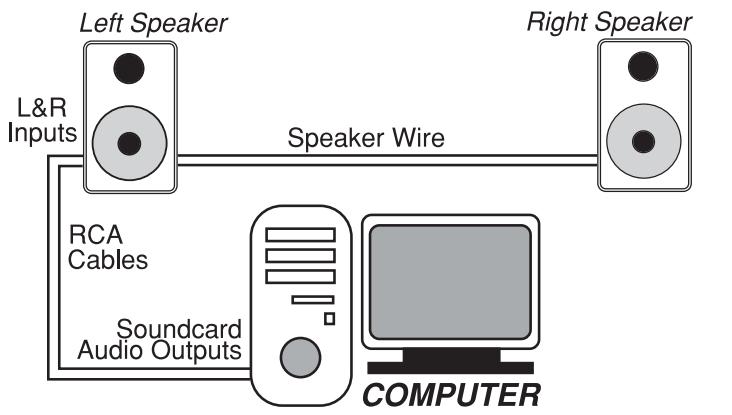
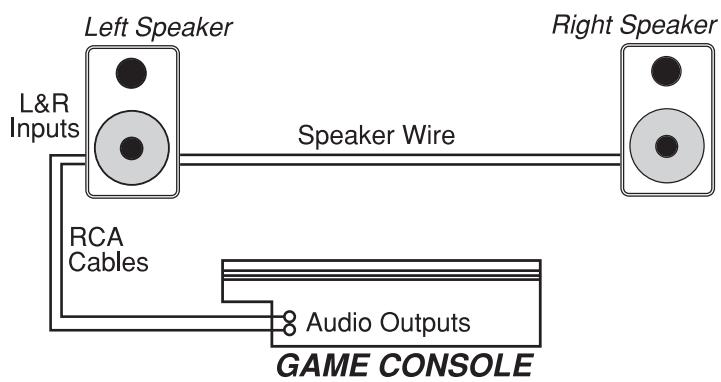
Connections: Connect the StudioPro 4s RCA inputs to the corresponding computer sound card or game console outputs. We recommend that you use high-quality cables for input connections. Be sure that the StudioPro 4 is powered off before making any connections.
If you need to connect the StudioPro 4 speakers to a device with 1/4-inch inputs, like the M-Audio MobilePre USB, you can purchase an adapter cable that will have the 1/4-inch connection on one end and the RCA connection on the other end.
Correct Power Operation: Since the StudioPro 4 contains amplifiers; it must be connected to a power outlet using the detachable AC cable that is provided. Before connecting power, please make sure that the power switch of the StudioPro 4 is in the off position.
WARNING! - Use of improper Voltage may result in hazardous conditions and/or damage to speaker components not covered by speaker warranty.
Speaker Wire Connections
Use the speaker wires included in the StudioPro 4 package to connect the Left and Right Speakers via the spring terminals.
Connecting to a Computer Sound Card or Game Console
Before connecting the StudioPro 4s, make sure the power from the output device has been turned off and the StudioPro 4 system is also turned off. Then plug the RCA cable
to the corresponding RCA output connectors of a computer sound card or game console.
Setting the Mid-Boost EQ Switch
This 2-position switch selects between the "In" and "Out" Mid-Boost modes. The Out mode produces a flat midrange response for normal monitoring and listening conditions. The In mode will move the sound stage forward toward your listening position. This is accomplished by producing a slight emphasis in the middle to upper frequencies.
Placing the StudioPro 4
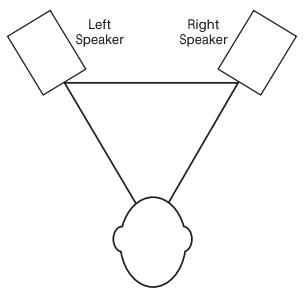
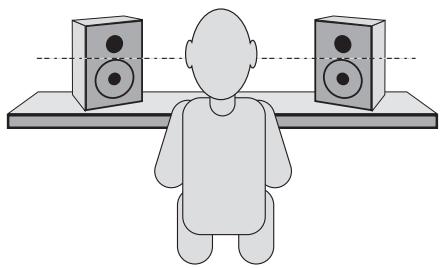
Placing the speakers is one of the most important procedures in order to monitor (listen to) sound accurately. To monitor with the StudioPro 4s performing to their maximum capability, an appropriate listening environment and correct placement are required. Please read the tips which follow, in order to assure correct StudioPro 4 placement.
- The two units and the listener should align to form a regular triangle. Refer to the following diagram.
- Position the monitors so that the tops of the woofers are level with your ears in a normal listening environment. Refer to the following diagram.
-
- Place the StudioPro 4 Left and Right units vertically with the woofer on the bottom. Placing the StudioPro 4s monitors horizontally is not recommended.
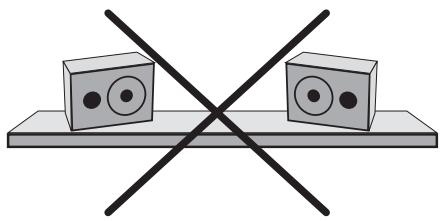
Note: DO NOT place any obstacles that may block the flow of air in front or between the StudioPro 4 monitors. Also, remove reflective materials such as glass, mirrors or metal from the monitoring environment. PLACE THOSE MATERIALS AWAY FROM THE PATH OF THE SOUND FROM THE StudioPro 4s.
Technical Support & Contact Information
For additional help, contact M-Audio Technical Support by telephone, by fax or by e-mail. If you have any questions, comments or suggestions about this or any M-Audio product, we invite you to contact us at:
M-AUDIO U.S.
5795 Martin Road, Irwinddale, CA 91706-6211, U.S.A.
Sales Information:
626-633-9050
Sales Information (email):
info@m-audio.com
Tech Support:
626-633-9055
Tech Support (email):
techsupt@m-audio.com
Fax:
626-633-9060
Internet Home Page:
http://www.m-audio.com
M-AUDIO Deutschland (Germany)
Kuhallmand 34, D-74613 Ohringen, Germany
Sales Information:
497941987000
Sales Information (email):
info@m-audio.de
Technical Support:
4979419870030
Technical Support (email):
support@m-audio.de
Fax:
07941 98 70070
Internet Home Page:
http://www.m-audio.de
M-AUDIO U.K.
Unit 5, Saracen Industrial Estate, Mark Road,
Hemel Hempstead, Herts HP2 7BJ, England
Sales Information (phone):
44 (0) 1442 416590
Sales Information (fax):
44 (0) 1442 246832
Sales Information (email):
info@maudio.co.uk
Technical Support (PC):
44 (0) 1309 671301
Technical Support (Mac):
44 (0) 1765 650072
Technical Support (email):
richard@maudio.freeserve.co.uk
Internet Home Page:
http://www.maudio.co.uk
M-AUDIO Canada
1400 St-Jean Baptiste Ave. #150
Quebec City, QC G2E 5B7, Canada
Tel:
418-872-0444
Fax:
418-872-0034
Email:
midimanca Canada@m-audio.com
Internet Home Page:
http://www.m-audio.ca
M-AUDIO France
Unit 5, Saracen Industrial Estate, Mark Road
Hemel Hempstead, Herts HP2 7BJ, England
Informations Commerciales:
0810 001 105
Informations Commerciales (email):
info@m-audio.fr
Assistance Technique:
0820 000 731 (PC) ou 0820 391 191 (Mac at genéré)
support@m-audio.fr.com ou mac@m-audio.fr (email)
Fax:
+44 (0) 144 224 6832
Site Internet:
http://www.m-audio.fr
M-AUDIO Japan
Annex Buliding 6F, 2-18-10 Marunouchi
Naka-Ku, Nagoya 460-0002, Japan
Tel:
81522183375
Fax:
81522180875
Technical Support:
0820 00 731
Email:
info@m-audio.co.jp
Internet Home Page:
http://www.m-audio.co.jp
Warranty Information
Terms
M-Audio warrants products to be free from defects in materials and workmanship, under normal use and provided that the product is owned by the original, registered user. Visit www.m-audio.com/warranty for terms and limitations applying to your specific product.
Registration
Thank you for registering your new M-Audio product. Doing so immediately both entitles you to full warranty coverage and helps M-Audio develop and manufacture the finest quality products available. Register online at www.m-audio.com/register to receive FREE product updates and for the chance to win FREE M-Audio gear.
Appendix A - Technical Specifications
Type: Two-way studio reference
LF Driver: 4-inch diameter, magnetically-shielded with curved cone, high temperature voice coil and Cellulose-impregnated fabric roll surround
HF Driver: 1-inch diameter, magnetically shielded with specially shaped Mylar dome
Frequency Response: 70Hz-20kHz
Crossover Frequency: 2.6kHz
RMS SPL: >95dB
S/N Ratio: >90dB (typical, A-weighted)
Input Connectors: Left and Right RCA Line input connectors
Polarity: Positive signal at "+" input produces outward low-frequency cone displacement
Dynamic Power: 18 watts/4 Ohms with 2 channels connected
Input Impedance: 10k ohms unbalanced
Input Sensitivity: 100 mV pink noise input produces 90dBA output SPL at 1 meter (volume control at maximum)
Protection: RF interference, output current limiting, over temperature, turn-on/off transient, subsonic filter
Indicator: Blue power LED on front panel
Power Requirements: 120V/~60Hz, 230V/~50Hz or 100V/50Hz/60Hz; powered via detachable 2-circuit line cord
Cabinet: vinyl-laminated MDF
Dimensions: 8.5 inch (H) × 5.75 inch (W) × 6.25 inch (D)
Weight: 12 lbs./pair (approx., w/o packing)
- Specifications subject to change without notice
Appendix B - Block Diagram
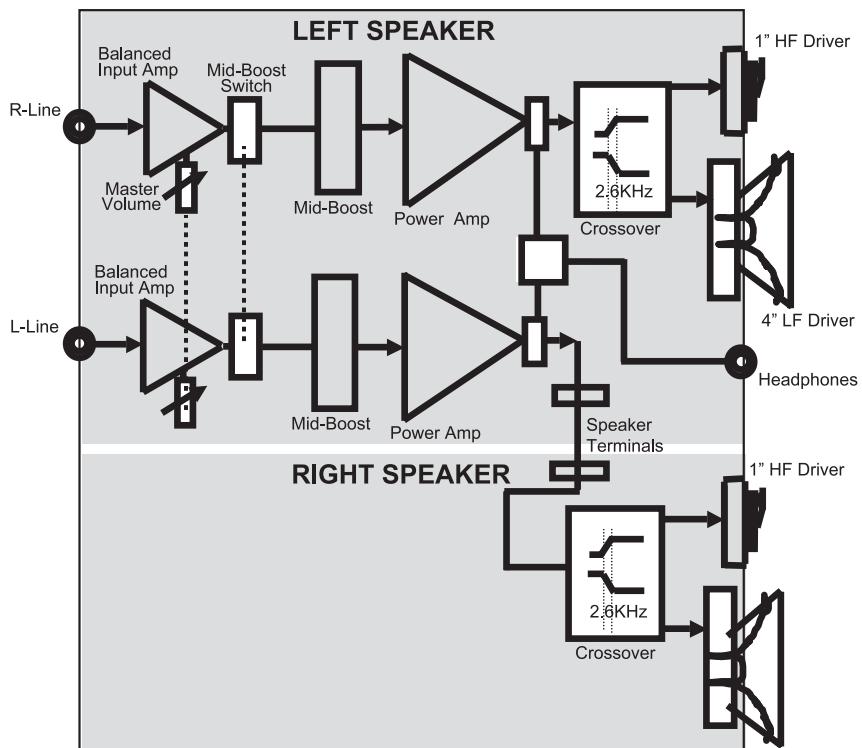
4" LF Driver
Introduction
Sales Information (email):
info@m-audio.com
Tech Support:
626-633-9055
Tech Support (email):
techsupt@m-audio.com
Fax:
626-633-9060
Internet Home Page:
http://www.m-audio.com
M-AUDIO Deutschland (Germany)
Kuhallmand 34, D-74613 Ohringen, Germany
Sales Information:
497941987000
Sales Information (email):
info@m-audio.de
Technical Support:
4979419870030
Technical Support (email):
support@m-audio.de
Fax:
07941 98 70070
Internet Home Page:
http://www.m-audio.de
M-AUDIO U.K.
Unit 5, Saracen Industrial Estate, Mark Road,
Hemel Hempstead, Herts HP2 7BJ, England
Sales Information (phone):
44 (0) 1442 416590
Sales Information (fax):
44 (0) 1442 246832
Sales Information (email):
info@maudio.co.uk
Technical Support (PC):
44 (0) 1309 671301
Technical Support (Mac):
44 (0) 1765 650072
Technical Support (email):
richard@maudio.freeserve.co.uk
Internet Home Page:
http://www.maudio.co.uk
M-AUDIO Canada
1400 St-Jean Baptiste Ave. #150
Quebec City, QC G2E 5B7, Canada
Tel:
418-872-0444
Fax:
418-872-0034
Email:
midimcanada@m-audio.com
Internet Home Page:
http://www.m-audio.ca
M-AUDIO France
Unit 5, Saracen Industrial Estate, Mark Road
Hemel Hempstead, Herts HP2 7BJ, England
Informations Commerciales:
0810 001 105
Informations Commerciales (email):
info@m-audio.fr
Assistance Technique:
support@m-audio.fr.com ou mac@m-audio.fr (email)
Fax:
+44 (0) 144 224 6832
Site Internet:
http://www.m-audio.fr
M-AUDIO Japan
Annex Bulding 6F, 2-18-10 Marunouchi
Naka-Ku, Nagoya 460-0002, Japan
Tel:
81522183375
Fax:
81522180875
Technical Support:
0820 00 731
Email:
info@m-audio.co.jp
Internet Home Page:
http://www.m-audio.co.jp
Votre garantie StudioPro 4
Conditions de garantie
Sales Information (email):
info@m-audio.com
Tech Support:
626-633-9055
Tech Support (email):
techsupt@m-audio.com
Fax:
626-633-9060
Internet Home Page:
http://www.m-audio.com
M-AUDIO Deutschland (Germany)
Kuhallmand 34, D-74613 Ohringen, Germany
Sales Information:
497941987000
Sales Information (email):
info@m-audio.de
Technical Support:
4979419870030
Technical Support (email):
support@m-audio.de
Fax:
07941 98 70070
Internet Home Page:
http://www.m-audio.de
M-AUDIO U.K.
Unit 5, Saracen Industrial Estate, Mark Road,
Hemel Hempstead, Herts HP2 7BJ, England
Sales Information (phone):
44 (0) 1442 416590
Sales Information (fax):
44 (0) 1442 246832
Sales Information (email):
info@maudio.co.uk
Technical Support (PC):
44 (0) 1309 671301
Technical Support (Mac):
44 (0) 1765 650072
Technical Support (email):
richard@maudio.freereserve.co.uk
Internet Home Page:
http://www.maudio.co.uk
M-AUDIO Canada
1400 St-Jean Baptiste Ave. #150
Quebec City, QC G2E 5B7, Canada
Tel:
418-872-0444
Fax:
418-872-0034
Email:
midimcanada@m-audio.com
Internet Home Page:
http://www.m-audio.ca
M-AUDIO France
Unit 5, Saracen Industrial Estate, Mark Road
Hemel Hempstead, Herts HP2 7BJ, England
Informations Commerciales:
0810 001 105
Informations Commerciales (email):
info@m-audio.fr
Assistance Technique:
support@m-audio.fr.com ou mac@m-audio.fr (email)
Fax:
+44 (0) 144 224 6832
Site Internet:
http://www.m-audio.fr
M-AUDIO Japan
Annex Buliding 6F, 2-18-10 Marunouchi
Naka-Ku, Nagoya 460-0002, Japan
Tel:
81522183375
Fax:
81522180875
Technical Support:
0820 00 731
Email:
info@m-audio.co.jp
Internet Home Page:
http://www.m-audio.co.jp
Garantie-Hinweise
Garantiebedingungen
Sales Information (email):
info@m-audio.com
Tech Support:
626-633-9055
Tech Support (email):
techsupt@m-audio.com
Fax:
626-633-9060
Internet Home Page:
http://www.m-audio.com
M-AUDIO Deutschland (Germany)
Kuhallmand 34, D-74613 Ohringen, Germany
Sales Information:
497941987000
Sales Information (email):
info@m-audio.de
Technical Support:
4979419870030
Technical Support (email):
support@m-audio.de
Fax:
07941 98 70070
Internet Home Page:
http://www.m-audio.de
M-AUDIO U.K.
Unit 5, Saracen Industrial Estate, Mark Road,
Hemel Hempstead, Herts HP2 7BJ, England
Sales Information (phone):
44 (0) 1442 416590
Sales Information (fax):
44 (0) 1442 246832
Sales Information (email):
info@maudio.co.uk
Technical Support (PC):
44 (0) 1309 671301
Technical Support (Mac):
44 (0) 1765 650072
Technical Support (email):
richard@maudio.freereserve.co.uk
Internet Home Page:
http://www.maudio.co.uk
M-AUDIO Canada
1400 St-Jean Baptiste Ave. #150
Quebec City, QC G2E 5B7, Canada
Tel:
418-872-0444
Fax:
418-872-0034
Email:
midimancanada@m-audio.com
Internet Home Page:
http://www.m-audio.ca
M-AUDIO France
Unit 5, Saracen Industrial Estate, Mark Road
Hemel Hempstead, Herts HP2 7BJ, England
Informations Commerciales:
0810 001 105
Informations Commerciales (email):
info@m-audio.fr
Assistance Technique:
support@m-audio.fr.com ou mac@m-audio.fr (email)
Fax:
+44 (0) 144 224 6832
Site Internet:
http://www.m-audio.fr
M-AUDIO Japan
Annex Bulding 6F, 2-18-10 Marunouchi
Naka-Ku, Nagoya 460-0002, Japan
Tel:
81522183375
Fax:
81522180875
Technical Support:
0820 00 731
Email:
info@m-audio.co.jp
Internet Home Page:
http://www.m-audio.co.jp
Sales Information (email):
info@m-audio.com
Tech Support:
626-633-9055
Tech Support (email):
techsupt@m-audio.com
Fax:
626-633-9060
Internet Home Page:
http://www.m-audio.com
M-AUDIO Deutschland (Germany)
Kuhallmand 34, D-74613 Ohringen, Germany
Sales Information:
497941987000
Sales Information (email):
info@m-audio.de
Technical Support:
4979419870030
Technical Support (email):
support@m-audio.de
Fax:
07941 98 70070
Internet Home Page:
http://www.m-audio.de
M-AUDIO U.K.
Unit 5, Saracen Industrial Estate, Mark Road,
Hemel Hempstead, Herts HP2 7BJ, England
Sales Information (phone):
0) 1442 416590
Sales Information (fax):
44 (0) 1442 246832
Sales Information (email):
info@maudio.co.uk
Technical Support (PC):
44 (0) 1309 671301
Technical Support (Mac):
44 (0) 1765 650072
Technical Support (email):
richard@maudio.freeserve.co.uk
Internet Home Page:
http://www.maudio.co.uk
M-AUDIO Canada
1400 St-Jean Baptiste Ave. #150
Quebec City, QC G2E 5B7, Canada
Tel:
418-872-0444
Fax:
418-872-0034
Email:
midimcanada@m-audio.com
Internet Home Page:
http://www.m-audio.ca
M-AUDIO France
Unit 5, Saracen Industrial Estate, Mark Road
Hemel Hempstead, Herts HP2 7BJ, England
Informations Commerciales:
0810 001 105
Informations Commerciales (email):
info@m-audio.fr
Assistance Technique:
0820 000 731 (PC) ou 0820 391 191 (Mac at genéré)
support@m-audio.fr.com ou mac@m-audio.fr (email)
Fax:
+44 (0) 144 224 6832
Site Internet:
http://www.m-audio.fr
M-AUDIO Japan
Annex Bulding 6F, 2-18-10 Marunouchi
Naka-Ku, Nagoya 460-0002, Japan
Tel:
81522183375
Fax:
81522180875
Technical Support:
0820 00 731
Email:
info@m-audio.co.jp
Internet Home Page:
http://www.m-audio.co.jp
This is the first time you can use the In/Out command. The In/Out command is used to set up a local network, and it is used to establish a connection between two devices. This command is used to establish a connection between two devices.
StudioPro 4の設置

- M-AUDIO StudioPro4
- ENGLISH
- FRANCAIS
- What's in the Box?
- StudioPro 4 Features
- Woofer
- Tweeter
- Sub-Frequency Port
- Mid-Boost Control
- Enclosure
- Network & Power Amplifiers
- Front and Rear Panel Features
- Front Panel
- Rear Panel
- Installation
- Precautions
- Speaker Wire Connections
- Connecting to a Computer Sound Card or Game Console
- Setting the Mid-Boost EQ Switch
- Placing the StudioPro 4
- Technical Support & Contact Information
- M-AUDIO U.S.
- M-AUDIO Deutschland (Germany)
- M-AUDIO U.K.
- M-AUDIO Canada
- M-AUDIO France
- M-AUDIO Japan
- Warranty Information
- Terms
- Registration
- Appendix A - Technical Specifications
- Appendix B - Block Diagram
- Introduction
- Votre garantie StudioPro 4
- Conditions de garantie
- Garantie-Hinweise
- Garantiebedingungen
- StudioPro 4の設置
Brand : M-AUDIO
Model : STUDIOPRO4
Category : Studio Monitors