URC-7969 - Universal remote ONE FOR ALL - Free user manual and instructions
Find the device manual for free URC-7969 ONE FOR ALL in PDF.


Pick your language and provide your email: we'll send you a specifically translated version.
| Product Type | Universal Remote Control |
| Device Compatibility | TV, DVD/Blu-ray, Satellite/Cable Box, Audio Systems |
| Number of Devices Supported | Up to 4 |
| Control Technology | Infrared (IR) |
| Code Setup | Direct code entry and auto-scan search |
| Code Library | Pre-programmed with thousands of codes |
| Power Source | 2 x AAA batteries (not included) |
| Battery Life | Approximately 6 months (depending on usage) |
| Dimensions | Approximately 200 x 50 x 25 mm |
| Weight | Approximately 150 g (with batteries) |
| Signal Range | Up to 7 meters |
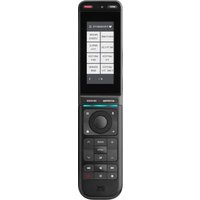
| Key Buttons | Device selection, power, volume, channel, navigation, transport controls |
| Color | Black |
| Display | None |
| Operating Temperature | 0°C to 40°C |
| Storage Temperature | -20°C to 60°C |
| Maintenance | Wipe with a soft, dry cloth |
| Safety | Keep away from liquids and direct sunlight |
| Repairability | Not user-serviceable; battery replacement only |
| General Information | Designed to replace up to 4 original remote controls |
Frequently Asked Questions - URC-7969 ONE FOR ALL
How do I program the URC-7969 for my TV?
Turn on your TV. Press and hold the TV button on the remote until the LED blinks twice. Enter your TV code from the provided code list (e.g., 0001 for many TVs). If the TV turns off, the code is saved. If not, try the next code or use the auto-search function. Refer to the user guide for the full manual search procedure.
Which devices can the URC-7969 control?
The URC-7969 can control up to 4 devices, including TVs, DVD/Blu-ray players, cable/satellite boxes, and audio receivers. It covers most major brands and models.
How do I find the correct code for my device?
You can use the code list supplied with the remote or visit the One For All website for the latest code database. Alternatively, use the auto-search feature to cycle through stored codes until your device responds.
What should I do if the remote doesn't control my device?
First, check that the batteries are fresh and properly installed. Then make sure you have selected the correct device mode (e.g., TV, DVD). If issues persist, reprogram the remote using a different code or try manual search. Ensure the device is IR-compatible and there are no obstacles blocking the signal.
How do I reset the URC-7969 to factory settings?
Press and hold the OK and EXIT buttons simultaneously for about 5 seconds until the LED flashes twice. This clears all programmed codes and restores the remote to its default state.
How do I replace the batteries?
Slide the battery cover off the back of the remote. Remove the old batteries and insert two new AAA batteries, respecting the polarity (+/-). Replace the cover and test the remote.
Does the remote have a limited range?
The URC-7969 uses infrared (IR) technology and generally has a range of up to 7 meters when pointed directly at the device. Range can be reduced in bright sunlight or if there are obstructions.
Can I use this remote with a smart TV?
Yes, as long as your smart TV is IR-compatible. Most smart TVs still support infrared, but some models only use Bluetooth or Wi-Fi. Check your TV's specifications. If it has an IR receiver, the URC-7969 can control its basic functions.
How should I clean the remote?
Use a soft, dry cloth to wipe the exterior. Do not use water, abrasive cleaners, or solvents. Avoid exposing the remote to liquids or extreme temperatures.
Is the remote compatible with all brands?
The URC-7969 supports a wide range of brands, including Samsung, LG, Sony, Philips, Panasonic, and more. It is not compatible with non-IR devices or some smart remotes that use RF or Bluetooth only.
User questions about URC-7969 ONE FOR ALL
0 question about this device. Answer the ones you know or ask your own.
Ask a new question about this device
No questions yet. Be the first to ask one.
Download the instructions for your Universal remote in PDF format for free! Find your manual URC-7969 - ONE FOR ALL and take your electronic device back in hand. On this page are published all the documents necessary for the use of your device. URC-7969 by ONE FOR ALL.
USER MANUAL URC-7969 ONE FOR ALL

Manual assistant
Powered by Anthropic
Waiting for your message
Product information
Brand : ONE FOR ALL
Model : URC-7969
Category : Universal remote