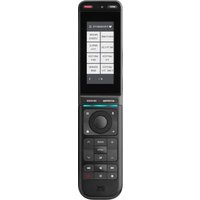
ONE FOR ALL Smart Control Pro Touch URC 7985 - Universal remote

Smart Control Pro Touch URC 7985 - Universal remote ONE FOR ALL - Free user manual and instructions

Find the device manual for free Smart Control Pro Touch URC 7985 ONE FOR ALL in PDF.

📄 68 pages English EN Download 💬 AI Question 10 questions ⚙️ Specs
Notice ONE FOR ALL Smart Control Pro Touch URC 7985 - page 3
Pick your language and provide your email: we'll send you a specifically translated version.
Product Type Universal Remote Control
Brand One for All
Model Smart Control Pro Touch URC 7985
Display Touchscreen LCD
Device Control Capacity Up to 8 devices
Power Source 2 x AAA batteries (not included)
Dimensions (approx.) 200 x 60 x 30 mm
Weight (with batteries) Approx. 200 g
Connectivity Infrared (IR)
Backlight Yes
Learning Function Yes
Macro Programming Yes
Compatible Brands Major brands (Samsung, LG, Sony, etc.)
Database Codes Pre-programmed for thousands of devices
Software Update Via USB (firmware)
Cleaning Instructions Wipe with dry, soft cloth. No liquids.
Safety Precautions Avoid water, extreme temperatures, and dropping.
Spare Parts Available Batteries only (standard AAA)
Warranty 2 years (varies by region)

Frequently Asked Questions - Smart Control Pro Touch URC 7985 ONE FOR ALL

How do I set up the remote for my TV?
Press the Setup key until the LED blinks. Enter the 4-digit code for your TV brand (found in the manual). If no code works, use the Auto Search feature: point the remote at the TV, press and hold Power and Mute until the TV turns off.
Can I control multiple devices with this remote?
Yes, the Smart Control Pro Touch can control up to 8 devices including TV, cable box, DVD, soundbar, etc. Assign each device to a different input key.
How do I replace the batteries?
Open the battery cover on the back. Insert 2 AAA batteries with correct polarity (+/-). Close the cover. The remote will retain its settings for a few minutes after battery removal.
What if the remote does not respond?
First, check the batteries. Then ensure there are no obstacles between the remote and the device. Try resetting by removing batteries for 30 seconds. If using a learning function, re-learn the command.
How do I program a macro (one-touch activity)?
Press Macro then the key you want to assign. For each step, press the device key (e.g., TV) and the command (e.g., Power). Press Macro again to save. For example, a 'Watch Movie' macro can turn on TV, receiver, and Blu-ray player.
Can I learn commands from my original remote?
Yes, point the original remote at the IR receiver of the One for All remote (on top). Press Learn on the remote, then the key you want to teach, then press the corresponding key on the original remote until the LED confirms.
How do I update the firmware?
Connect the remote to a computer via the micro-USB port (cable not included). Go to the official One for All website, download the latest firmware update tool, and follow the instructions.
The remote's touch screen is unresponsive. What should I do?
Clean the screen with a dry, soft cloth. Avoid pressure. If still unresponsive, try resetting the remote (remove batteries for 1 minute). If the issue persists, contact support for possible calibration.
Does this remote work with my soundbar?
It works with most brands. Use the Audio or Aux mode. Try the code search method: turn on the soundbar, press and hold Audio and Power until the soundbar turns off, then press OK to save.
How do I reset the remote to factory settings?
Press and hold the Setup key until the LED blinks twice, then enter code 977. The LED will blink three times to confirm. This clears all programmed codes and macros.

User questions about Smart Control Pro Touch URC 7985 ONE FOR ALL

0 question about this device. Answer the ones you know or ask your own.

Ask a new question about this device

The email remains private: it is only used to notify you if someone responds to your question.

No questions yet. Be the first to ask one.

Download the instructions for your Universal remote in PDF format for free! Find your manual Smart Control Pro Touch URC 7985 - ONE FOR ALL and take your electronic device back in hand. On this page are published all the documents necessary for the use of your device. Smart Control Pro Touch URC 7985 by ONE FOR ALL.

USER MANUAL Smart Control Pro Touch URC 7985 ONE FOR ALL

Manual assistant
Powered by Anthropic
Waiting for your message
Product information

Brand : ONE FOR ALL

Model : Smart Control Pro Touch URC 7985

Category : Universal remote