Precisioncare Expert Elite - Computer monitor CECOTEC - Free user manual and instructions
Find the device manual for free Precisioncare Expert Elite CECOTEC in PDF.


| Product Type | Computer Monitor |
| Brand | Cecotec |
| Model | Precisioncare Expert Elite |
| Screen Size | 27 inches (diagonal) |
| Resolution | 1920 x 1080 pixels (Full HD) |
| Panel Type | IPS |
| Refresh Rate | 60 Hz |
| Response Time | 5 ms |
| Viewing Angle | 178° horizontal and vertical |
| Connectivity | 1 x HDMI, 1 x VGA, 1 x 3.5mm headphone jack |
| Power Supply | 100-240 V ~ 50/60 Hz, external power adapter |
| Power Consumption | 25 W (typical), 0.5 W standby |
| Net Weight (with stand) | 4.5 kg |
| Dimensions with stand (W x H x D) | 620 x 450 x 200 mm |
| Adjustments | Tilt from -5° to +15°, VESA 100x100 mm mount |
| Functions | Blue light filter, game mode, automatic brightness adjustment |
| Care and Cleaning | Unplug the device, clean with a soft dry cloth. Do not use abrasive products or liquids. |
| Safety | Do not expose to moisture, do not block ventilation slots, use only the supplied power adapter. |
| Spare Parts and Repairability | Power adapter, HDMI cable, VGA cable (included). For any repairs, contact Cecotec after-sales service. |
| Package Contents | Monitor, stand, power adapter, HDMI cable, VGA cable, quick start guide |
Frequently Asked Questions - Precisioncare Expert Elite CECOTEC
User questions about Precisioncare Expert Elite CECOTEC
0 question about this device. Answer the ones you know or ask your own.
Ask a new question about this device
Download the instructions for your Computer monitor in PDF format for free! Find your manual Precisioncare Expert Elite - CECOTEC and take your electronic device back in hand. On this page are published all the documents necessary for the use of your device. Precisioncare Expert Elite by CECOTEC.
USER MANUAL Precisioncare Expert Elite CECOTEC
Safety instructions 10
-
Parts and components 61
-
Before use 61
-
Operation 62
-
Cleaning and maintenance 63
-
Disposal of old electrical
and electronic appliances 64
-
Copyright 64
-
Simplified EU Declaration of Conformity 64
SOMMAIRE
EN • The coding in this manual is generic and applies to all code variants of the appliance.
Read the following instructions carefully before using the appliance. Keep this instruction manual for future reference or new users.
- The appliance can be used by children from 3 years old under supervision.
- The appliance can be used by children aged 8 years and above and persons with reduced physical, sensory, or mental capabilities or lack of experience and knowledge if they have been given supervision or instruction concerning the safe use of the appliance and understand the hazards involved. Children must not play with the device. Cleaning and user maintenance must not be carried out by children without supervision.
- The appliance must be powered at a low safety voltage as stated on the marking.
- Check the power cord regularly for visible damage. If the power cable is damaged, it must be replaced with a special cable or set to be supplied by the official Cecotec Technical Support Service or the corresponding after-sales service to avoid any danger.
- WARNING: keep the appliance dry.
- This appliance has irreplaceable batteries.
- This appliance is designed for domestic use only and is not intended for use in bars, restaurants, farmhouses, hotels, motels and offices.
- Ensure that the mains voltage matches the voltage specified on the device rating label and that the plug is earthed.
- Do not immerse the cable, plug, or any other non-removable part of the device in water or any other
liquid or expose electrical connections to water. Make sure your hands are completely dry before handling the plug or switching on the appliance.
- Do not use the appliance if the cable or any other part is damaged. If this is the case, contact the official Cecotec Technical Support Service.
- Keep all packaging materials away from children. Risk of suffocation.
- This appliance must be checked frequently for signs of wear or damage. If such signs are present, or if the appliance has been used improperly, contact the official Cecotec Technical Support Service. Do not try to repair the appliance by yourself.
- Switch off the appliance immediately in the event of defects or malfunctions. To unplug the appliance, pull the plug, not the cord.
- Do not use accessories or parts that have not been provided by Cecotec
- Never leave the device unattended during use.
- Keep the appliance away from heat sources.
- Do not use an extension cord with this device.
- Do not use outdoors or operate it near flammable substances such as sprays.
- Do not place the device directly on any non-heatproof surfaces while plugged in or in operation.
- Do not try to open, disassemble, or repair the appliance by yourself. There are no serviceable parts inside the appliance.
- The appliance is exclusively designed for trimming natural hair. Do not use it to cut artificial or animal hair.
- Cecotec accepts no liability for damage caused by improper or incorrect use.
ENGLISH
- Do not use the device if your skin or head skin is injured or suffers from any type of illness.
- Turn off and unplug the appliance from the power supply before assembling or disassembling attachments.
Battery instructions
- This appliance contains an irreplaceable battery.
- This appliance includes a Li-ion battery. Do not incinerate or expose it to high temperatures, as it may explode.
- Leaks from the battery or cells can occur under extreme conditions. Do not touch any liquid that leaks from the battery. If the liquid comes into contact with skin, wash immediately with soap and water. If the liquid gets into the eyes, wash them immediately with clean water for a minimum of 10 minutes and seek medical attention. Wear gloves to handle the battery and dispose of it immediately in accordance with local regulations.
- Avoid contact between the battery and small metallic objects such as paper clips, coins, keys, nails, or screws.
- Before a new battery is used or the battery is used for the first time after long-term storage, fully charge the battery.
- When the device is stored and not used for long periods of time, ensure that the battery pack is fully charged.
- Keep batteries out of the reach of children when there is a risk of ingestion.
- Battery ingestion can cause burns, soft tissue perforation and death. Severe burns may occur within two hours of ingestion.
- In case of battery ingestion, please seek medical help immediately.
INSTRUCTIONS DE SÉCURITÉ
- Blades
- Length adjustment lever
- Power switch
- Battery indicator light
- Charging port
- Cleaning brush
- Lubricating oil bottle
- Protective cap
- Charging cable
- Guide combs
NOTE:
The graphics in this manual are schematic representations and may not exactly match the product.
2. BEFORE USE
- This appliance comes in a packaging designed to protect it during transport. Take the appliance out of its box and remove all packaging materials. You can keep the original box and other packaging materials in a safe place to prevent damage to the appliance if you need to transport it in the future. If you wish to dispose of the original packaging, make sure all items are recycled properly.
- Check that all parts and components are included and in good condition. If any of them are missing or damaged, please contact Cecotec's Official Technical Support Service immediately.
- Do not remove the serial number of the appliance in order to keep a correct traceability of it in case of assistance.
Box content
- PrecisionCare Expert
- Guide combs: 3/6/9/13 mm
- Left and right ear-trimming combs
- Charging cable
- Cleaning brush
ENGLISH
- Lubricating oil bottle
- Instruction manual
- Protective cap
Do not remove the product's serial number in order to keep proper traceability if technical assistance is required.
3. OPERATION
Charging the battery
Note: Charge the appliance fully before first use. The appliance must be switched off while charging.
- Connect the charger plug to the charging port of the appliance.
- Insert the USB cable into a compatible power adapter and plug it into the power outlet.
- While charging, an indicator light will switch on.
Using the appliance
Speed settings
To select the cutting speed, the power switch has three positions:
- Lower position keeps the appliance switched off
- Middle position activates the first speed
- Upper position activates the second and highest speed
Changing the guide comb
- First, remove the current guide comb.
- Then, insert the desired attachment comb.
- You will hear a click when the comb is fully secured.
Hair cutting
- First of all, comb your hair.
- Next, drape a towel or dressing gown over your neck and shoulders to prevent cut hair from falling on your clothes.
-
Start by cutting the hair at the neck or sides and gradually work your way to the centre of the head.
-
During cutting, hold the appliance so that the flat side of the guide comb is on the head. Be sure to cut evenly.
- Then, direct the appliance from the front of the head towards the centre.
- When you have finished cutting, comb your hair again.
4. CLEANING AND MAINTENANCE
- Clean the product after every use.
- Switch off and unplug the device from the mains before cleaning or assembling/disassembling any parts.
- Do not use compressed air, scouring pads, abrasive powders or cleaning products to clean the device.
- Do not immerse the appliance in water or any other liquid or place it under running water.
- Do not strike the product or blade against a surface to remove hair or water, as this may damage the product and blade. Replace the blade if it is damaged.
- Store the appliance in its original packaging to prevent damage.
Cleaning the blades
Clean the blades using the provided brush.
Blade alignment
- This appliance has been carefully inspected to ensure the blades were lubricated and aligned before leaving the factory.
- Blades must be realigned if they have been removed for cleaning or replacement.
- To realign them, simply match the teeth of the upper and lower blades. The tips of the upper blade teeth should be approximately 0.5-1.0 mm from the lower blade, as shown in figure 2.
- If the blades are not properly aligned, apply a few drops of lubricating oil and keep the appliance running for a while; then switch it off. Next, slightly loosen the screws and align the blades. Once aligned, retighten the screws.
5. DISPOSAL OF OLD ELECTRICAL AND ELECTRONIC APPLIANCES
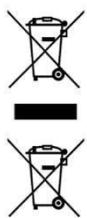
This symbol indicates that, according to the applicable regulations, the product and/or batteries must be disposed of separately from household waste. When this product reaches the end of its service life, you must remove the batteries/accumulators and take it to a collection point designated by local authorities.
For detailed information on the most appropriate way to dispose of electrical and electronic equipment and/or batteries, consumers should contact their local authorities.
Compliance with the above guidelines will help to protect the environment.
6. COPYRIGHT
The intellectual property rights over the texts in this manual belong to CECOTEC INNOVACIONES, S.L. All rights reserved. The content of this publication may not, either in part or in its entirety, be reproduced, stored in a retrieval system, transmitted or distributed by any means (electronic, mechanical, photocopying, recording or similar) without prior authorisation from CECOTEC INNOVACIONES, S.L.
7. SIMPLIFIED EU DECLARATION OF CONFORMITY
CE Cecotec Innovaciones hereby declares that this appliance complies with the essential requirements and other relevant provisions of applicable European Union regulations. This appliance has been designed, manufactured and tested in compliance with required safety and quality standards. The full text of the EU
Declaration of Conformity can be found on the following website: https://cecotec.es/es/information/declaration-of-conformity
1. PIÈCES ET COMPOSANTS
Image 1
https://cecotec.es/es/information/declaration-of-conformity
1. MEPH KAI EΞAPTHMATA
Σχήμα 1

Fig./Img./Abb./Afb./ Rys. 2
www.cecotec.es
- SOMMAIRE
- ENGLISH
- Battery instructions
- INSTRUCTIONS DE SÉCURITÉ
- NOTE:
- BEFORE USE
- Box content
- OPERATION
- Charging the battery
- Using the appliance
- Speed settings
- Changing the guide comb
- Hair cutting
- CLEANING AND MAINTENANCE
- Cleaning the blades
- Blade alignment
- DISPOSAL OF OLD ELECTRICAL AND ELECTRONIC APPLIANCES
- COPYRIGHT
- SIMPLIFIED EU DECLARATION OF CONFORMITY
- PIÈCES ET COMPOSANTS
- Image 1
- MEPH KAI EΞAPTHMATA
- Σχήμα 1
Brand : CECOTEC
Model : Precisioncare Expert Elite
Category : Computer monitor