
Precisioncare Aluminium Premium - Computer monitor CECOTEC - Free user manual and instructions
Find the device manual for free Precisioncare Aluminium Premium CECOTEC in PDF.


| Product type | Computer monitor |
| Brand | Cecotec |
| Model | Precisioncare Aluminium Premium |
| Screen size | 27 inches (diagonal) |
| Resolution | 1920 x 1080 pixels (Full HD) |
| Refresh rate | 60 Hz |
| Connectivity | HDMI, VGA, headphone jack |
| Power supply | Power adapter 12V/3A (36W) |
| Dimensions (with stand) | 620 x 450 x 180 mm (W x H x D) |
| Weight (with stand) | 5.2 kg |
| Housing material | Brushed aluminum |
| Tilt | -5° to +20° |
| Main features | Blue light reduction, flicker-free mode, static image display |
| Care and cleaning | Clean with a soft, slightly damp cloth; avoid solvents |
| Safety | Adequate ventilation required, do not expose to moisture |
| Spare parts and repairability | Replaceable external power supply, VESA 100x100 mount |
| General information | 2-year warranty, made in China |
Frequently Asked Questions - Precisioncare Aluminium Premium CECOTEC
User questions about Precisioncare Aluminium Premium CECOTEC
0 question about this device. Answer the ones you know or ask your own.
Ask a new question about this device
Download the instructions for your Computer monitor in PDF format for free! Find your manual Precisioncare Aluminium Premium - CECOTEC and take your electronic device back in hand. On this page are published all the documents necessary for the use of your device. Precisioncare Aluminium Premium by CECOTEC.
USER MANUAL Precisioncare Aluminium Premium CECOTEC
Safety instructions 6
-
Parts and components 33
-
Before use 33
-
Operation 34
-
Cleaning and maintenance 34
-
Recycling of electrical and electronic equipment 35
-
Copyright 36
-
Technical specifications 36
-
Technical support and warranty 36
-
Simplified EU Declaration of Conformity 36
SOMMAIRE
EN • The coding in this manual is generic and applies to all code variants of the appliance.
Please read these instructions carefully before using the appliance. Keep this instruction manual for future reference or new users.
- The appliance can be used by children aged 8 years and above and by people with reduced physical, sensory, or mental capabilities, as well as with lack of experience and knowledge, as long as they have been given supervision or instruction concerning the safe use of the appliance and understand the hazards involved. Children shall not play with the appliance. Cleaning and maintenance by the user
must not be carried out by unsupervised children.
- This appliance is designed for domestic use only and is not intended for bars, restaurants, farmhouses, hotels, motels and offices.
- The device may only be used with the power supply unit provided with the appliance.
- The device must only be supplied at a safety extra-low voltage in accordance with the power indicated on the device.
- If the power cord is damaged, it must be replaced by Cecotec's Official Technical Support Service or similar qualified personnel to avoid risks.
- WARNING: To recharge the battery, use only the cable supplied with the device.
- The supply terminals must not be short-circuited.
- Secure the parts to be fastened in such a way that they do not risk falling into the water.
- Do not use the device on artificial hair or pets.
Battery instructions
- This appliance contains an irreplaceable battery.
- Leaks from the battery or cells can occur under extreme conditions. Do not touch any liquid that leaks from the battery. If the liquid comes into contact with skin, wash immediately with soap and water. If the liquid gets into the eyes, wash them immediately with clean water for a minimum of 10 minutes and seek medical attention. Wear gloves to handle the battery and dispose of it immediately in accordance with local regulations.
- Before a new battery is used or the battery is used for the first time after long-term storage, fully charge the battery.
-
Keep batteries out of the reach of children when there is a risk of ingestion.
-
Battery ingestion can cause burns, soft tissue perforation and death. Severe burns may occur within two hours of ingestion.
- In case of battery ingestion, please seek medical help immediately.
INSTRUCTIONS DE SÉCURITÉ
Salida: 5,0 V =, 1,0 A
- Blades
- Shaving head with blade holder
- Power button
- Indicator lights
- USB cable connector
- Protective cap
- USB cable
- Cleaning brush
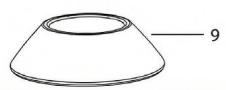
- Stand base
- Setting indicator
- Cleaning indicator
- Battery charge indicator
- Lock indicator
Note:
The graphics in this manual are schematic representations and may not exactly match the product.
2. BEFORE USE
- This appliance comes in a packaging designed to protect it during transport. Remove the appliance from its box. You can keep the original box and other packaging materials in a safe place to prevent damage to the appliance if you need to transport it in the future. If you wish to dispose of the original packaging, make sure all items are recycled properly.
- Check that all parts and components are included and in good condition. If any of them are missing or damaged, please contact Cecotec's Official Technical Support Service immediately.
Box content:
- Product
- Base
- USB cable
- Instruction manual
- Do not remove the product's serial number in order to keep proper traceability if technical assistance is required.
3. OPERATION
- Press the power button (3) to switch on the shaver.
- Hold the shaver perpendicular to the skin and slide the shaving head with blade holder (2) in short circular strokes, moving against the hair growth direction. Apply gentle pressure; do not press too hard.
- For difficult areas (e.g. chin), stretch the skin with your free hand to improve the result.
- The shaver features two speed modes. Press and hold the power button (3) for 1 second to switch modes. A beep will be heard when the change is made correctly.
- When finished, clean the shaver.
Indicator lights
Battery charge indicator
When switching on the device, the battery charge indicator (12) shows the battery level:
≥ 20 %: steady white light.
5%-20%: steady red light.
≤ 5 %: red light flashing.
Cleaning indicator
The shaver adds up the operating time. When it reaches 10 minutes, the cleaning indicator (11) lights up and the device beeps as a reminder to clean the shaving head. In this case, clean as soon as possible following the instructions in this manual.
Lock
The lock prevents accidental switch-on (e.g. during transport).
To activate: press and hold the power button (3) for 3 seconds. A beep will sound and the lock indicator (13) will light up. While activated, the power button (3) does not respond.
To deactivate: press and hold the power button (3) again for 3 seconds. The lock indicator (13) turns off and the shaver is ready for use.
4. CLEANING AND MAINTENANCE
For hygienic reasons, clean the shaver after each use. Regular cleaning ensures proper operation and extends the service life of the blades (1).
Always switch off the shaver before cleaning. Do not clean it while it is charging and connected to the power supply with the USB cable (7).
Do not use hard-bristled brushes or corrosive liquids; they could damage the surfaces.
Cleaning the shaver main body
Clean the body with a dry cloth. If it is very dirty, use a slightly damp cloth and then dry thoroughly.
Cleaning the shaving head
Using the cleaning brush (8), remove any hairs from the shaving head (2). Pull upwards to remove the head from the holder; clean any hairs from the holder and body area as well.
Cleaning with water
Place the shaver upside down and immerse only the shaving head (2) in water. Switch on using the power button (3) and keep it running for approximately 30 seconds. Switch it off and remove the head from the water.
Dry the head with a soft cloth or allow it to air dry. Do not use rough tissues or towels, as they may damage the blades (1).
Do not immerse the shaver body in water. There is a risk of electric shock.
Thorough cleaning
Remove the shaving head with blade holder (2) by pulling on the assembly, then remove the holder from the body as well.
Rinse both parts under running water, let them dry completely and reinsert them into the shaver body.
Removing the battery
For proper disposal of the device, remove the battery from the product as detailed below:
- Use a tool to pry off the power button.
- At the rear, where the USB cable connector is located, use a tool to pry off the plastic cover, then remove the two screws that are now exposed.
- Pull from the shaving head to remove the plastic housing.
- Desolder the battery pins located on the PCB.
- Recycle the battery; the product and battery must be disposed of separately from household waste. Take the battery to a collection point designated by local authorities.
5. RECYCLING OF ELECTRICAL AND ELECTRONIC EQUIPMENT

This symbol indicates that, according to the applicable regulations, the product and/or battery must be disposed of separately from household waste. When this product reaches the end of its shelf life, you should dispose of the batteries/accumulators and take them to a collection point designated by the local authorities.
For detailed information on how to properly dispose of electrical and electronic equipment and/or the corresponding batteries, consumers should contact their local authorities.
Information regarding national packaging recycling systems and their marking can be found on our website.
Compliance with the above guidelines will help protecting the environment.
6. COPYRIGHT
The intellectual property rights over the texts in this manual belong to CECOTEC INNOVACIONES, S.L. All rights reserved. The content of this publication may not, either in part or in its entirety, be reproduced, stored in a retrieval system, transmitted or distributed by any means (electronic, mechanical, photocopying, recording or similar) without prior authorisation from CECOTEC INNOVACIONES, S.L.
7. TECHNICAL SPECIFICATIONS
Product: PrecisionCare Aluminum Premium
Product reference: EU01_121503
Battery: Li-ion, 3.7 V 800 mAh, 2.96 Wh, 1.0 A, 5.0 W
Shaver inlet: 5.0 V DC, 1.0 A
To recharge the battery, it is recommended to use an adapter with the following characteristics: Input: 100-240 V\~, 50/60 Hz
Output: 5,0 V =, 1,0 A
Technical specifications may change without prior notice to improve product quality.
Made in China | Designed in Spain
8. TECHNICAL SUPPORT AND WARRANTY
Cecotec shall be liable to the end user or consumer for any lack of conformity that exists at the time of product delivery under the terms, conditions and deadlines established by applicable regulations.
Repairs should be carried out by qualified personnel.
If you detect any problem with the product or have any queries, please contact Cecotec's Official Technical Support Service at +34 96 321 07 28.
9. SIMPLIFIED EU DECLARATION OF CONFORMITY

Cecotec Innovaciones hereby declares that this appliance complies with the essential requirements and other relevant provisions of the regulations applicable in the European Union. This appliance has been designed, manufactured and tested
in compliance with required safety and quality standards. The full text of the EU Declaration of Conformity can be found on the following website: https://cecotec.es/es/information/declaration-of-conformity
1. PIÈCES ET COMPOSANTS
Image 1
Sortie : 5,0 V =, 1,0 A
Output: 5,0 V =, 1,0 A
Saída: 5,0 V =, 1,0 A
Wyjście: 5,0 V = , 1,0 A
Tıraş makinesi girişi: 5,0 V DC, 1,0 A
Çıkış: 5,0 V = , 1,0 A
'Εξοδος: 5,0 V = , 1,0 A
Sortida: 5,0 V = , 1,0 A
Kimenet: 5,0 V = , 1,0 A
https://cecotec.es/es/information/declaration-of-conformity
A


B

Fig./Img./Abb./Afb./Rys.1
www.cecotec.es

- SOMMAIRE
- Battery instructions
- INSTRUCTIONS DE SÉCURITÉ
- BEFORE USE
- Box content:
- OPERATION
- Battery charge indicator
- Cleaning indicator
- Lock
- CLEANING AND MAINTENANCE
- Cleaning the shaver main body
- Cleaning the shaving head
- Cleaning with water
- Thorough cleaning
- Removing the battery
- RECYCLING OF ELECTRICAL AND ELECTRONIC EQUIPMENT
- COPYRIGHT
- TECHNICAL SPECIFICATIONS
- TECHNICAL SUPPORT AND WARRANTY
- SIMPLIFIED EU DECLARATION OF CONFORMITY
- PIÈCES ET COMPOSANTS
- Image 1
Brand : CECOTEC
Model : Precisioncare Aluminium Premium
Category : Computer monitor