Bamba Precisioncare Titan - Computer monitor CECOTEC - Free user manual and instructions
Find the device manual for free Bamba Precisioncare Titan CECOTEC in PDF.


| Brand | Cecotec |
| Model | Bamba Precisioncare Titan |
| Product type | LED computer monitor |
| Screen size | 27 inches (68.6 cm) |
| Resolution | 1920 x 1080 pixels (Full HD) |
| Refresh rate | 60 Hz |
| Response time | 5 ms |
| Panel type | VA |
| Brightness | 250 cd/m² |
| Contrast | 3000:1 |
| Viewing angle | 178° / 178° |
| Connectivity | 1x HDMI, 1x VGA |
| Built-in speakers | No |
| Power supply | 100-240 V, 50/60 Hz |
| Power consumption | 30 W (typical), 0.5 W (standby) |
| Dimensions (with stand) | 61.5 x 45.2 x 18.0 cm |
| Weight | 4.2 kg |
| Wall mount | VESA 100x100 mm |
| Adjustments | Tilt: -5° to +15° |
| Main features | Blue light filter, reading mode |
| Care and cleaning | Use a soft, dry cloth, avoid solvents |
| Security | Kensington lock, programmable auto-off |
| Spare parts and repairability | Repairability index: 7.5/10 (estimate) |
| General information | 2-year warranty, CE certification |
Frequently Asked Questions - Bamba Precisioncare Titan CECOTEC
User questions about Bamba Precisioncare Titan CECOTEC
0 question about this device. Answer the ones you know or ask your own.
Ask a new question about this device
Download the instructions for your Computer monitor in PDF format for free! Find your manual Bamba Precisioncare Titan - CECOTEC and take your electronic device back in hand. On this page are published all the documents necessary for the use of your device. Bamba Precisioncare Titan by CECOTEC.
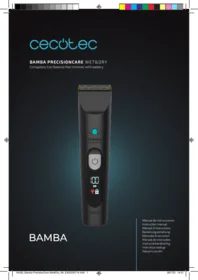
USER MANUAL Bamba Precisioncare Titan CECOTEC
BAMBA
Manual de instrucciones Instruction manual
- Parts and components 31
- Before use 31
- Operation 32
- Cleaning and maintenance 33
- Technical specifications 34
- Disposal of old electrical and electronic appliances 34
- Technical support and warranty 34
- Copyright 34
SOMMAIRE
Read these instructions thoroughly before using the product. Keep this instruction manual for future reference or new users.
- The appliance can be used by children from 3 years old under supervision.
- The appliance can be used by children aged 8 years and above and persons with reduced physical, sensory, or mental capabilities or lack of experience and knowledge if they have been given supervision or instruction concerning the safe use of the appliance and understand the hazards involved. Children must not play with the appliance. Cleaning and user maintenance should not be carried out by unsupervised children.
- The appliance must be powered at a low
safety voltage as stated on the product marking.
- Check the power cord regularly for visible damage. If the power cord is damaged, it must be replaced with a special cord or set to be supplied by the official Cecotec Technical Support Service or the corresponding after-sales service to avoid any danger.
- WARNING: keep the appliance dry.
- This appliance has irreplaceable batteries.
- This appliance is designed for domestic use only and is not intended for bars, restaurants, farmhouses, hotels, motels, and offices.
- Ensure that the mains voltage matches the voltage specified on the product rating label and that the plug is earthed.
- Do not immerse the cord, plug, or any non-removable part of the appliance in water or any other liquid, or expose electrical connections to water. Make sure your hands are dry before handling the plug or switching on the appliance.
- Do not use the device if its cord or any other part is damaged. In this case, contact the official Cecotec Technical Support Service.
- Keep all packaging materials away from
children. Risk of suffocation.
- This device must be checked frequently for signs of wear or damage. If such signs are present, or if the device has been used improperly, contact the official Cecotec Technical Support Service. Do not try to repair the device by yourself.
- Switch off the device immediately in the event of defects or malfunctions. Pull from the plug, not the cord, to disconnect it from the outlet.
- Do not use accessories or parts that have not been provided by Cecotec.
- Never leave the appliance unattended while in use.
- Keep the device away from heat sources.
- Do not use an extension cord with this appliance.
- Do not use outdoors or operate it near flammable substances such as sprays.
- Do not place the device directly on any non-heatproof surfaces while plugged in or in operation.
-
Do not try to open, disassemble, or repair the product by yourself. There are no serviceable parts inside the device.
-
The device is exclusively designed for trimming natural hair. Do not use it with artificial or animal hair.
- Cecotec accepts no liability for damage caused by improper or incorrect use.
- Do not operate the device near water, or in places where it could get wet.
- Do not use the device if your skin or head skin is injured or suffers from any type of illness.
- Turn off and unplug the device from the power supply before assembling or disassembling attachments.
Battery instructions
- This appliance contains an irreplaceable battery.
- This appliance includes a Li-ion battery. Do not incinerate or expose it to high temperatures, as it may explode.
- Leaks from the battery or battery cells can occur under extreme conditions. Do not touch any liquid that leaks from the battery. If the liquid gets into contact with skin, wash immediately with soap and water. If the liquid gets into the eyes, wash them immediately with clean water for a minimum
of 10 minutes and seek medical attention. Wear gloves to handle the battery and dispose of it immediately in accordance with local regulations.
- Avoid contact between the battery and small metallic objects such as paper clips, coins, keys, nails, or screws.
- Before a new battery is used or the battery is used for the first time after long-term storage, fully charge the battery.
- When the device is stored and not used for long periods of time, ensure that the battery pack is fully charged.
- Keep batteries out of the reach of children when there is a risk of ingestion.
- Battery ingestion can cause burns, soft tissue perforation, and death. It can cause severe burns within two hours of the ingestion.
- In case of battery ingestion, please seek medical help immediately.
The graphics in this manual are schematic representations and may not exactly match the product.
2. BEFORE USE
- This appliance is packaged in a way as to protect it during transport. Take the appliance out of its box and remove all packaging materials. You can keep the original box and other packaging elements in a safe place. This will help you prevent product damage when transporting it in the future. In case the original packaging is disposed of, make sure all packaging materials are recycled accordingly.
- Make sure all parts and components are included and in good conditions. If there is any piece missing or in bad conditions, contact the official Cecotec Technical Support Service immediately.
- Make sure that the battery is charged before using the device for the first time.
- Make sure the hair clipper is clean and oiled.
3. OPERATION
Charging the device
- Make sure the device is switched off.
- Charge the appliance to the fullest before start using the device for the first time or after a long period of disuse.
- The battery takes approximately 1 hour to fully charge, and it can operate for 120 minutes approximately.* When the device is fully charged, the LCD screen will light up and display the number "100".
*The battery lifespan may be reduced depending on usage and hair type.
Corded and cordless use
- Connect the charging cord to the product when switched off, and then to a compatible power adapter.
- You can also use it without connecting the charging cable.
Attaching/removing the guide combs Fig. 2
- The appliance comes with three guide combs:
- Guide comb for hair and beard: 1-12 mm
- Guide comb for hair: 3-15 mm
- Guide comb for hair: 18-30 mm
- The length settings are given in millimetres on the combs and correspond to the hair length remaining after it has been cut.
- The appliance must be unplugged from the mains before removing any of the guide combs.
- Choose a guide comb according to the desired length of cut and the area of use.
- To ensure better stability, push the wheel lock button located on the back of the hair clipper to the "locked" position.
- Fit the guide comb into the side slots, then press the rear tab at
the back of the hair clipper to securely fix the comb. You will hear a "click" sound when it locks into place.
- Make sure the guide comb is fixed before using the device.
- To remove a guide comb, press the top of the rear tab and pull it upwards.
Using the hair clipper
- Make sure the device is fully charged when you start clipping.
- Use the device only on clean and dry hair. Do not use it on moist or still wet hair.
- The head of the person on which the device is going to be used must be at the same level of the chest of the person who is going to cut the hair. This way, all parts of the head will be visible and easily reachable.
- When possible, move the appliance towards the direction of the hair growth. Fig. 3
- Install the accessories (see section "Attaching/removing the guide combs").
- Press the power button to turn the device on or off. The LCD display will light up.
- Make sure the flat part of the guide comb is always fully in contact with the scalp to obtain an even result. Fig. 4, 5, and 6
- To adjust the length of the cut, unlock the hair clipper head by pushing the wheel lock button on the back of the device to the "unlocked" position. Then, set the length using the adjustment knob.
Using the device without guide comb
This way, you can contour your beard and remove single hairs.
Warning
The blade is very sharp, be careful not to cut yourself. Handle it with care.
Using the device as a beard trimmer. Fig. 7
- The guide combs can also be used for trimming beards.
- Shape your moustache and sideburns, to contour and to remove single hairs. Adjust the hair-cutting length using the adjustment knob. Lock the adjustment wheel by pausing the wheel lock button on the back of the hair clipper to the "locked" position.
- Press the power button to turn the device on or off. The LCD display will light up. When possible, move the appliance towards the direction of the hair growth.
Locking the power button
- This feature is useful to take the device with you anywhere without accidentally turning it on.
- Hold down the power button for 3 seconds to lock it.
- Hold down the power button again for 3 seconds to unlock it. The travel lock light indicator will turn off.
4. CLEANING AND MAINTENANCE
- Unplug the device from the power supply and allow it to cool down before cleaning.
- Use a soft, damp cloth to clean the surface of the device.
- Do not immerse the device in water or other liquids.
- Do not use abrasive cleaners or scouring pads to clean the product.
Cleaning. Fig. 8
- Switch off the device using the power button.
- Clean the blades with the brush to remove any hair remaining on the blades. It is recommended to clean the blades thoroughly every six months.
- Lubricate the blades periodically and whenever the oil icon appears on the display.
Removing the blades. Fig. 9
- Remove the guide comb.
- Set the length adjustment knob to the lowest position (3 mm).
- Push the blades outwards as shown in the figure below.
- Put the blades back in place after cleaning them. Fix the guide comb in the side slots: it will click into place if properly attached.
5. TECHNICAL SPECIFICATIONS
Product reference: 03374/03375/03376/03377/03378
Product: Bamba PrecisionCare Titan/ Bamba PrecisionCare Titan M/ Bamba PrecisionCare Titan X/ Bamba PrecisionCare Titan S/ Bamba PrecisionCare Titan T
Hair clipper: Input: 5 V..., 800 mA
Battery (not replaceable): 3.7 V, 600 mAh Lithium-Ion
Technical specifications may change without prior notification to improve product quality.
Made in China | Designed in Spain
6. DISPOSAL OF OLD ELECTRICAL AND ELECTRONIC APPLIANCES

This symbol indicates that, according to the applicable regulations, the product and/or batteries must be disposed of separately from household waste. When this product reaches the end of its shelf life, you should dispose of the batteries/accumulators and take them to a collection point designated by the local authorities.
Consumers must contact their local authorities or retailer for information concerning the correct disposal of old appliances and/or their batteries.
Compliance with the above guidelines will help protecting the environment.
7. TECHNICAL SUPPORT AND WARRANTY
Cecotec shall be liable to the end user or consumer for any lack of conformity that exists at the time of delivery of the product under the terms, conditions, and deadlines established by the applicable regulations.
It is recommended that repairs be carried out by qualified personnel. If at any moment you detect any problem with your product or have any doubt, do not hesitate to contact the official Cecotec Technical Support Service at +34 963 210 728.
8. COPYRIGHT
The intellectual property rights over the texts in this manual belong to CECOTEC INNOVACIONES, S.L. All rights reserved. The contents of this publication may not, in whole or in part, be reproduced, stored in a retrieval system, transmitted, or distributed by any means (electronic, mechanical, photocopying, recording or similar) without the prior authorization of CECOTEC INNOVACIONES, S.L.
1. PIÈCES ET COMPOSANTS
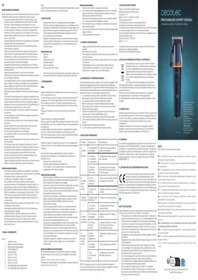
Img. 1
Fig./Img./Abb./Afb./Rys./Obr.1
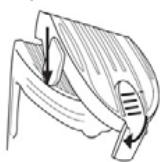
Fig./Img./Abb./Afb./Rys./Obr. 2

Fig./Img./Abb./Afb./Rys./Obr. 3

Fig./Img./Abb./Afb./Rys./Obr. 4
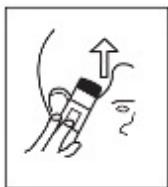
Fig./Img./Abb./Afb./Rys./Obr. 5
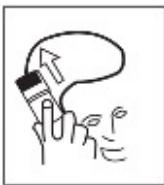
Fig./Img./Abb./Afb./Rys./Obr. 6
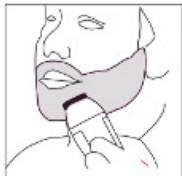
Fig./Img./Abb./Afb./Rys./Obr. 7

Fig./Img./Abb./Afb./Rys./Obr. 8

Fig./Img./Abb./Afb./Rys./Obr. 9
www.cecotec.es
Cecotec Innovaciones S.L. C/ de la Pinadeta s/n, 46930 Quart de Poblet, Valencia (Spain)
YV01230221
- SOMMAIRE
- Battery instructions
- BEFORE USE
- OPERATION
- Charging the device
- Corded and cordless use
- Attaching/removing the guide combs Fig. 2
- Using the hair clipper
- Using the device without guide comb
- Warning
- Using the device as a beard trimmer. Fig. 7
- Locking the power button
- CLEANING AND MAINTENANCE
- Cleaning. Fig. 8
- Removing the blades. Fig. 9
- TECHNICAL SPECIFICATIONS
- DISPOSAL OF OLD ELECTRICAL AND ELECTRONIC APPLIANCES
- TECHNICAL SUPPORT AND WARRANTY
- COPYRIGHT
- PIÈCES ET COMPOSANTS
- Img. 1
Brand : CECOTEC
Model : Bamba Precisioncare Titan
Category : Computer monitor