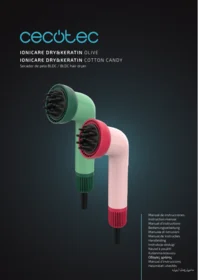
Ionicare Drykeratin Cotton Candy - Computer monitor CECOTEC - Free user manual and instructions
Find the device manual for free Ionicare Drykeratin Cotton Candy CECOTEC in PDF.


| Product Type | Steam Straightener |
| Brand | Cecotec |
| Model | Ionicare Drykeratin Cotton Candy |
| Dimensions (L x W x H) | 31 x 4 x 7 cm |
| Weight | 0.45 kg |
| Power Supply | 100-240 V, 50/60 Hz |
| Power | 60 W |
| Maximum Temperature | 230 °C |
| Ionic Technology | Negative ions to reduce frizz |
| Plate Material | Ceramic plates with keratin infusion |
| Main Functions | Straightening, curling, blow-drying |
| Temperature Adjustment | Adjustable thermostat with LCD screen |
| Heat-up Time | 30 seconds |
| Automatic Shut-off | Yes, after 60 minutes of inactivity |
| Cord | Swivel, 360°, 2 meters |
| Storage | Safety lock for storage |
| Maintenance and Cleaning | Clean the plates with a damp cloth after cooling |
| Safety | Automatic shut-off, swivel cord, cool surface |
| Spare parts and repairability | Plates and cable replaceable by a professional |
| General Information | 2-year warranty, CE manufacturing |
Frequently Asked Questions - Ionicare Drykeratin Cotton Candy CECOTEC
User questions about Ionicare Drykeratin Cotton Candy CECOTEC
0 question about this device. Answer the ones you know or ask your own.
Ask a new question about this device
Download the instructions for your Computer monitor in PDF format for free! Find your manual Ionicare Drykeratin Cotton Candy - CECOTEC and take your electronic device back in hand. On this page are published all the documents necessary for the use of your device. Ionicare Drykeratin Cotton Candy by CECOTEC.
USER MANUAL Ionicare Drykeratin Cotton Candy CECOTEC
- Parts and components 9
- Before use 9
- Operation 10
- Cleaning and maintenance 11
- Problem solving 12
- Copyright 12
- Simplified EU Declaration of Conformity 13
SOMMAIRE
EN • The coding in this manual is generic and applies to all code variants of the appliance.
- Air intake
- On/Off button and air speed control
- Temperature control button
- Air outlet
- Concentrator head
- NutriSerum head
NOTE:
The graphics in this manual are schematic representations and may not exactly match the product.
2. BEFORE USE
- This appliance has packaging designed to protect it during transport. Remove the appliance from its box and remove all packaging material. You can store the original box and other packaging in a safe place to prevent damage to the appliance if you need to transport it in the future. If you wish to dispose of the original packaging, be sure to recycle all items properly.
- Make sure that all parts and components are included and in good condition. If any of them are missing or not in good condition, please contact the official Cecotec Technical Service immediately.
Box contents:
- Dryer
- Concentrator head
- NutriSerum head
- This instruction manual
- Serum replacement
Do not remove the serial number of the product, in order to keep a correct traceability of your equipment in case of requesting assistance.
3. OPERATION
ON
When the appliance is connected to the mains the indicator lights will initiate a self-test sequence. To turn the appliance on, press and hold the on/off and air speed control button for approximately 1 second. At this time, the blue LEDs will illuminate, indicating that the air speed is selected, and the red LEDs will illuminate indicating the temperature. The default settings when first turned on are the first selection for both motor speed and temperature.
OFF
To switch off the appliance, press and hold the on/off and air speed control button for approximately 1 second. If the appliance is switched off or unplugged and then switched on again, it will automatically return to the last operating state before switching off, thanks to its memory function.
AIR SPEED SELECTION
Pressing the On/Off button and air speed control button repeatedly will alternate the air speed settings in the following order of lit blue lights: 1 / 2 / 3 / 2 / 2 / 1. The corresponding blue indicator lights will illuminate to indicate the selected engine speed.
TEMPERATURE MODE
Press the temperature control button to toggle through the temperature settings in the following order of lit red lights: Cold (no indicator light) / 1 / 2 / 3 / 2 / 1 / 1 / Cold (no indicator light).
COLD AIR MODE
While the appliance is on and in one of the warm air positions, press and hold the temperature control button to switch to cool air mode (the heating element will be switched off, but the fan speed will remain unchanged). Release the button to return to the previous operating mode.
AUTOMATIC TEMPERATURE CONTROL MODE
If a temperature above 80^ C is detected due to a partially blocked air inlet, the power will be reduced by approximately 30%. When a temperature below 75^ C is detected, the appliance will return to full power. If a temperature above 85^ C is detected, the main control IC will switch off the heating element and the motor will stop.
HIGH AND LOW VOLTAGE PROTECTION MODE
The device includes voltage protection:
- Low voltage protection: If the voltage drops below the limit, the appliance will switch off and the two red indicator lights will flash. The appliance will resume operation when the voltage rises above the limit.
ENGLISH
- High voltage protection: If the voltage exceeds the limit, the appliance will switch off and a red indicator light will flash. The appliance will resume operation when the voltage drops below the limit.
Always install the accessories with the dryer switched off. Do not remove the accessories during use to avoid burns. After use, wait for the accessory to cool down before removing it to avoid burns.
WARNING: If you notice that the product shuts down or stops blowing hot air, the overheat protection has been activated. If this occurs, unplug it from the power outlet and let it cool down for a few minutes. Before switching it on again, make sure that there is no lint, hair or other objects blocking the air intake grille.
4. CLEANING AND MAINTENANCE
Be sure to keep the NutriSerum head at a temperature below 25 °C .
The cleaning of the device can be done manually as shown in figure 2 or automatically as explained below:
AUTOMATIC CLEANING MODE
- Make sure that the appliance is switched off for self-cleaning.
- Pull out the air inlet trim.
- Connect the dryer to the mains.
- Within 10 seconds, press and hold the temperature control button for about 3 seconds to activate the automatic cleaning mode. The motor will run in reverse at maximum speed for 10 seconds, and the indicator lights will go out.
-
Dirt will come out of the air intake grille, remove it with a soft cloth.
It is not recommended to use this function frequently as it may affect the life of the motor. For repositioning, the air inlet trim has a marking that must be matched to the slot on the dryer as shown in Figure 3. -
PROBLEM SOLVING
| Problem | Possible causes | Solutions |
| The device does not work | Power cable not connected correctly. | Make sure that the power cord is securely connected to the power outlet. |
| Faulty plug or socket. | Check the plug and socket. | |
| You have not pressed the on/off and air speed control button. | Press and hold the on/off button and air speed control to turn on the device. | |
| Device shuts down suddenly | Overheating system activated. | Switch off the device and disconnect the power cable. Try again once the device has cooled down. |
| Air inlet clogged by fluff, hair etc. Overheating system activated. | Switch off the device and disconnect the cable from the power socket. Clean the air inlet and try again when the device has cooled down. | |
| Low air flow | Air inlet clogged by fluff, hair etc. | Clean the air inlet. |
WARNING:
Do not attempt to repair the appliance yourself. If the problem persists after you have carried out the checks described above, please contact authorised personnel, the shop where you purchased the product or the official Cecotec Customer Service.
6. COPYRIGHT
The intellectual property rights to the texts in this manual belong to CECOTEC INNOVACIONES, S.L. All rights reserved. The contents of this publication may not, in whole or in part, be reproduced, stored in a retrieval system, transmitted or distributed by any means (electronic, mechanical, photocopying, recording or similar) without the prior authorisation of CECOTEC INNOVACIONES, S.L.
7. SIMPLIFIED EU DECLARATION OF CONFORMITY
CE Cecotec Innovations hereby declares that this product is in compliance with the essential requirements and other relevant provisions of the regulations applicable in the European Union. This product has been designed, manufactured and tested in compliance with the required safety and quality standards. The full text of the EU Declaration of Conformity can be found at the following web address: https://cecotec.es/es/information/declaration-of-conformity
1. PIÈCES ET COMPOSANTS
Img. 1
5. PROBLEEMOPLOSSING
Fig./Img./Abb./Afb./Rys.2
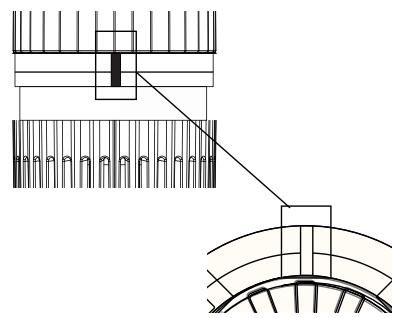
Fig./Img./Abb./Afb./ Rys. 3
www.cecotec.es
- SOMMAIRE
- BEFORE USE
- Box contents:
- OPERATION
- ON
- OFF
- AIR SPEED SELECTION
- TEMPERATURE MODE
- COLD AIR MODE
- AUTOMATIC TEMPERATURE CONTROL MODE
- HIGH AND LOW VOLTAGE PROTECTION MODE
- ENGLISH
- CLEANING AND MAINTENANCE
- AUTOMATIC CLEANING MODE
- COPYRIGHT
- SIMPLIFIED EU DECLARATION OF CONFORMITY
- PIÈCES ET COMPOSANTS
- PROBLEEMOPLOSSING
Brand : CECOTEC
Model : Ionicare Drykeratin Cotton Candy
Category : Computer monitor