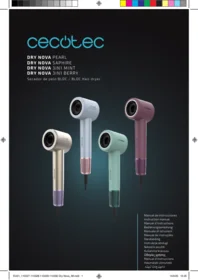
Drynova 3 En 1 Baya - Computer monitor CECOTEC - Free user manual and instructions
Find the device manual for free Drynova 3 En 1 Baya CECOTEC in PDF.


| Product type | Computer monitor |
| Brand | Cecotec |
| Model | Drynova 3 In 1 Baya |
| Screen size | 24 inches |
| Resolution | Full HD (1920 x 1080) |
| Refresh rate | 60 Hz |
| Connectivity | HDMI, VGA, USB |
| Dimensions (with stand) | 540 x 420 x 180 mm |
| Weight | 4.5 kg |
| Power supply | 100-240 V, 50/60 Hz |
| Power consumption | 30 W |
| Main features | Image display, built-in speakers, built-in camera |
| Viewing angle | 178° horizontal / 178° vertical |
| Standards | CE, RoHS |
| Operating temperature | 0°C to 40°C |
| Maintenance and cleaning | Clean with a soft, dry cloth. Do not use chemical products. |
| Safety | Do not expose to moisture. Use on a stable surface. |
| Spare parts | Power cable, HDMI cable, stand |
| Repairability | Repairability index not communicated |
| Warranty | 2 years |
Frequently Asked Questions - Drynova 3 En 1 Baya CECOTEC
User questions about Drynova 3 En 1 Baya CECOTEC
0 question about this device. Answer the ones you know or ask your own.
Ask a new question about this device
Download the instructions for your Computer monitor in PDF format for free! Find your manual Drynova 3 En 1 Baya - CECOTEC and take your electronic device back in hand. On this page are published all the documents necessary for the use of your device. Drynova 3 En 1 Baya by CECOTEC.
USER MANUAL Drynova 3 En 1 Baya CECOTEC
- Parts and components 10
- Before use 10
- Operation 11
- Cleaning and maintenance 12
- Troubleshooting 12
- Copyright 13
- Simplified EU Declaration of Conformity 13
SOMMAIRE
EU01_110327 Dry Nova Pearl EU01_110328 Dry Nova Saphire EU01_110329 Dry Nova 3in1 Mint EU01_110330 Dry Nova 3in1 Berry
EN • The coding in this manual is generic and applies to all code variants of the appliance.
Referencias EU01_110329 Dry Nova 3in1 Mint, EU01_110330 Dry Nova 3in1 Berry.
The graphics in this manual are schematic representations and may not exactly match the product.
2. BEFORE USE
- This appliance comes in a packaging designed to protect it during transport. Take the appliance out of its box and remove all packaging materials. You can keep the original box and other packaging materials in a safe place to prevent damage to the appliance if you need to transport it in the future. If you wish to dispose of the original packaging, make sure all items are recycled properly.
- Check that all parts and components are included and in good condition. If any of them are missing or damaged, please contact the Cecotec's Official Technical Support Service immediately.
Box content
References EU01_110327 Dry Nova Pearl, EU01_110328 Dry Nova Saphire.
- Hair dryer
- Diffuser
- Concentrator nozzle
- Instruction manual
References EU01_110329 Dry Nova 3in1 Mint, EU01_110330 Dry Nova 3in1 Berry.
- Hair dryer
- Diffuser
-
Concentrator nozzle
-
Volumising comb
- Instruction manual
- Do not remove the product's serial number in order to keep proper traceability if technical assistance is required.
3. OPERATION
- Before plugging in the hair dryer, make sure the switch is in the off position, "O". Then connect it to the mains socket.
- Slide the speed switch to choose the airflow intensity. Slide up once for slow airflow, "I". Slide up once more for fast airflow, "II". To turn it off, slide the switch all the way down to the off position, "O".
- Next, select the temperature by pressing the temperature button to choose the desired heat level. The available temperatures are:
a. 40 °C. Cool air mode
b. 80 °C. Warm air mode
c. 120 °C. Hot air mode
d. Alternate mode. Alternates between cool and hot air
- Dry the hair by directing the airflow from the roots to the ends for more efficient drying. If you are concerned about hair damage, select "80°C" temperature or the Alternate, Cool and Hot air mode. To activate the Alternate mode, press the temperature button again when the hair dryer is set to 120 °C. Once activated, the temperature indicator will show how the appliance automatically alternates between the three available temperatures.
Note: Keep the hair dryer at least 3 cm away from your hair and make sure the air inlet is more than 10 cm away from hair to avoid blockages.
- When finished, set the switch to the off position, "O" and unplug the hair dryer from the mains socket.
Note: Allow the appliance to cool down completely before storing it in a dry place.
Fitting the accessories
The hair dryer features a magnetic fixing system on the air outlet, facilitating quick and safe accessory changes.
ENGLISH
WARNING: If you notice that the appliance switches off or stops blowing hot air, then the overheating protection has been activated. If this happens, unplug it from the power socket and allow it to cool down for a few minutes. Before switching it back on, make sure there are no lint, hair or other objects blocking the air inlet grille.
4. CLEANING AND MAINTENANCE
- Always unplug the hair dryer from the mains socket and let it cool down completely before cleaning. This is crucial to prevent electric shock and burns.
- Clean the exterior of the appliance with a soft, dry cloth.
- Do not use abrasive cleaning agents, solvents, alcohol or chemical products to clean the hair dryer, as these could damage the finish or plastic parts.
- Do not immerse the appliance in water or any other liquid.
- Make sure no water or moisture enters the hair dryer during cleaning.
- Do not try to disassemble or repair the hair dryer yourself. If you encounter any operating issues, contact Cecotec's Official Technical Support Service.
- Clean the filter regularly to maintain good airflow and prevent overheating. To do this, remove the filter, clean it with a soft brush to prevent dust and dirt from entering the hair dryer, and finally, replace the filter correctly. Do this at least once a month, or as needed.
- After cleaning the hair dryer and making sure it is completely dry, store it in a safe, dry place.
- Avoid wrapping the cord tightly around the appliance, as this may damage it over time.
5. TROUBLESHOOTING
| Problem | Possible causes | Solutions |
| The appliance does not switch on | The power cord is not properly plugged in. | Make sure the power cord is properly connected, confirm there are no abnormalities and switch the appliance back on. |
| The power switch is in the off position. | Make sure the power switch is in one of the on positions. | |
| Internal heating elements glow red | The air inlet or outlet is blocked. | Check whether the air inlet or outlet is obstructed by lint or hair, confirm there are no abnormalities and switch the appliance back on. |
| The hair dryer does not blow hot air | The hair dryer has activated the overheating protection system. | Turn off the hair dryer and let it cool down, clean the air inlet and outlet and make sure there is nothing blocking either of them. |
WARNING:
Do not try to repair the hair dryer yourself. If the problem persists after performing the checks described above, please contact a qualified electrician, the store where you purchased the product or Cecotec's Official Technical Support Service.
6. COPYRIGHT
The intellectual property rights over the texts in this manual belong to CECOTEC
INNOVACIONES, S.L. All rights reserved. The contents of this publication may not, in whole or in part, be reproduced, stored in a retrieval system, transmitted, or distributed by any means (electronic, mechanical, photocopying, recording or similar) without the prior authorization of CECOTEC INNOVACIONES, S.L.
7. SIMPLIFIED EU DECLARATION OF CONFORMITY
CE Cecotec Innovaciones hereby declares that this appliance complies with the essential requirements and other relevant provisions of the regulations applicable in the European Union. This appliance has been designed, manufactured and tested in compliance with required safety and quality
standards. The full text of the EU Declaration of Conformity can be found on the following website: https://cecotec.es/es/information/declaration-of-conformity
FRANÇAIS
1. PIÈCES ET COMPOSANTS
Image 1
Referenzen EU01_110329 Dry Nova 3in1 Mint, EU01_110330 Dry Nova 3in1 Berry.
- Haartrockner
- Diffussor
- Styling-Düse
DEUTSCH
Referenties EU01_110327 Dry Nova Pearl, EU01_110328 Dry Nova Saphire.
Haardroger
Referenties EU01_110329 Dry Nova 3in1 Mint, EU01_110330 Dry Nova 3in1 Berry.
Haardroger
5. PROBLEEMOPLOSSING
EU01_110327 Dry Nova Pearl, EU01_110328 Dry Nova Saphire.

عجارملا
EU01_110329 Dry Nova 3in1 Mint • EU01_110330 Dry Nova 3in1 Berry.

⑧
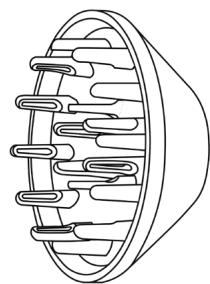
⑨

10
Fig./Img./Abb./Afb./ Rys. 1
www.cecotec.es
Brand : CECOTEC
Model : Drynova 3 En 1 Baya
Category : Computer monitor