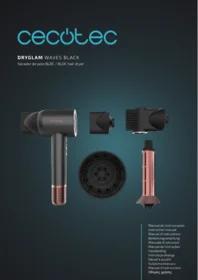
Dryglam Waves - Computer monitor CECOTEC - Free user manual and instructions
Find the device manual for free Dryglam Waves CECOTEC in PDF.


| Product type | Computer monitor |
| Brand | Cecotec |
| Model | Dryglam Waves |
| Screen size | 24 inches |
| Resolution | 1920 x 1080 pixels (Full HD) |
| Panel technology | IPS |
| Refresh rate | 60 Hz |
| Response time | 5 ms |
| Connectivity | HDMI, VGA, headphone jack |
| Viewing angle | 178° / 178° |
| Brightness | 250 cd/m² |
| Contrast ratio | 1000:1 |
| Power supply | Mains, 100-240 V, 50/60 Hz |
| Power consumption | 25 W (typical), 0.5 W in standby |
| Dimensions (with stand) | 540 x 400 x 180 mm |
| Weight | 3.5 kg |
| Main features | High-definition display, tilt adjustment, energy-saving mode |
| Maintenance and cleaning | Clean with a soft, dry cloth. Do not use harsh chemical products. |
| Safety | Follow electrical safety instructions. Do not open the casing. Unplug before cleaning. |
| Spare parts and repairability | External power supply, cables, stand available from the manufacturer. |
| General information | 2-year warranty. CE certification. |
Frequently Asked Questions - Dryglam Waves CECOTEC
User questions about Dryglam Waves CECOTEC
0 question about this device. Answer the ones you know or ask your own.
Ask a new question about this device
Download the instructions for your Computer monitor in PDF format for free! Find your manual Dryglam Waves - CECOTEC and take your electronic device back in hand. On this page are published all the documents necessary for the use of your device. Dryglam Waves by CECOTEC.
USER MANUAL Dryglam Waves CECOTEC
- Parts and components 34
- Before use 34
- Operation 35
- Cleaning and maintenance 36
- Technical specifications 36
- Disposal of old electrical and electronic appliances 37
- Technical support and warranty 37
- Copyright 37
- Simplified eu declaration of Conformity 38
SOMMAIRE
EU01_119709 - DryGlam Waves Black
EN · The coding in this manual is generic and applies to all code variants of the appliance.
Read these instructions thoroughly before using the appliance. Keep this instruction manual for future reference or new users.
- Ensure that the mains voltage matches the voltage specified on the device rating label and that the plug is earthed.
- This appliance is designed for domestic use only and is not intended for bars, restaurants, farmhouses, hotels, motels, and offices.
- If the appliance is to be used in a bathroom, it must be unplugged from the wall socket after use, as the proximity to water could be a risk even with the appliance switched off.
- As additional protection, it is recommended that a Residual Current Device (RCD) having a rated operating fault current not exceeding 30 mA be installed in the electrical circuit supplying the bathroom. We recommend you ask a qualified installer for advice.
- This appliance can be used by children aged 8 years and above and people with reduced physical, sensory, or mental capabilities or lack of experience and knowledge if they have been given supervision or instruction concerning the use of the appliance in a safe way and understand the hazards involved. Children must not play with the appliance. Cleaning and user maintenance must not be carried out by unsupervised children.
- This symbol means: do not use this appliance in a bathtub, shower or near water.
- WARNING: do not use the device near bathtubs, showers, sinks, or other water-filled containers.
- Do not immerse the cable, plug, or any other non-removable part of the device in water or any other liquid or expose
electrical connections to water. Make sure your hands are dry before handling the plug or switching on the device.
- Check the power cable regularly for visible damage. If the cable is damaged, it must be replaced by the official Cecotec Technical Support Service to avoid any danger.
- Ensure that the air inlets and outlets are not blocked.
- Turn off and unplug the appliance from the power supply immediately after use.
- Unplug the appliance immediately under the following circumstances: abnormal operation, needs cleaning, and/or after use.
- Do not insert metal objects through the air inlets to avoid electric shocks.
- Do not wind the cable around the appliance.
- Keep your face, neck, and scalp away from the appliance.
- Do not leave the appliance on any surface while in operation.
- Do not use the appliance to dry wigs, natural hair extensions, fake hair or animal hair.
- The air inlet ensures good ventilation of the appliance. Do not cover or obstruct it, as this may cause overheating.
- Do not insert objects in the air inlet.
INSTRUCTIONS DE SÉCURITÉ
The graphics in this manual are schematic representations and may not exactly match the device.
2. BEFORE USE
- This appliance is packaged in a way as to protect it during transport. Take the appliance out of its box and remove all packaging materials. You can keep the original box and other packaging elements in a safe place to prevent damage to the appliance if you need to transport it in the future. In case the original packaging is disposed of, make sure all packaging materials are recycled accordingly.
- Make sure all parts and components are included and in good conditions. If there is any piece missing or in bad conditions, contact the official Cecotec Technical Support Service immediately.
Box content
- Hair dryer
- Concentrator nozzle
- Diffuser
- Curling barrel
- Smoothing comb accessory
- Instruction manual
- Do not remove the serial number of the appliance to keep a correct traceability of it in case of assistance.
3. OPERATION
Control panel
- (1) Power button: press this button to switch the appliance on or off.
Air speed change button: press this button to change the air outlet speed of the hair dryer (each press will change the speed). The speed has three adjustable levels: low, medium, and high.
Air temperature change button: press this button to change the air outlet temperature of the hair dryer (each press will change the temperature). The temperature has three adjustable levels: cold, 55 °C (warm) and 90 °C (hot). - Low air speed indicator light: it lights up when the hair dryer is operating at low speed. You can modify the air temperature between cold, warm and hot.
- Medium air speed indicator light: it lights up when the hair dryer is operating at medium speed. You can modify the air temperature between cold, warm and hot.
- High air speed indicator light: it lights up when the hair dryer is operating at high speed. You can modify the air temperature between cold, warm and hot.
- Cold air indicator light: it lights up when the hair dryer is blowing out cold air.
- 55° 55 °C indicator light: it lights up when the hair dryer is blowing out warm air.
- 90° 90 °C indicator light: it lights up when the hair dryer is blowing out hot air.
Nozzles
- Use the concentrator nozzle for quick drying of the hair or for styling with a brush.
- Use the diffuser to define curls or add volume to roots.
- Use the curling barrel to create defined curls thanks to the Coanda effect. Make each curl in a small section with hot air and apply cold air at the end to seal the hairstyle.
- Use the smoothing comb to straighten your hair. Place the comb perpendicular to your head and slide it from roots to ends. The air will be blown vertically downwards under the spikes, stretching your hair and straightening it. You can hold the tip of the comb spikes with the other hand to facilitate movement.
Operation
1 Connect the appliance to a power outlet and press the power button to switch it on.
2 Choose the right air speed and temperature according to the condition of your hair.
Warning: the hair dryer has a built-in Memory function that allows you to remember the last speed and temperature setting used before switching it off. When you switch on the hair dryer again, the default settings will correspond to the settings you selected before switching it off the last time.
3 Both the hair dryer and the nozzles have a magnetic joint to facilitate installation. Simply align the nozzle with the air outlet and turn it until it clicks into place.
4 When using the hair dryer, hold the handle properly so as not to block the air inlet and
ENGLISH
prevent the dryer from being damaged or overheated. Keep your hair away from the air inlet by at least 10 cm to avoid tangles. Keep your hair away from the air outlet by at least 3 cm to avoid burns.
5 After use, switch off the hair dryer and unplug the power cable.
4. CLEANING AND MAINTENANCE
- Before cleaning, make sure that the dryer is switched off and disconnected from the mains.
- Do not use alcohol, nail polish remover or detergent to clean the dryer, as this may damage, break or discolour it.
Cleaning the detachable air inlet grille and filter. Fig. 2
- The grille and filter should be regularly cleaned to prevent dirt build-up and to ensure optimum air inlet.
- The air inlet grille and the nozzle are magnetically attached.
1 Hold the dryer firmly by the handle and pull the air inlet grille downwards to remove it.
2 Use a cotton swab to remove and clean any dirt in the air inlet and outlet.
3 After cleaning, align the air inlet grille with the slot in the handle and insert it. When you hear a "click" it means that the grille has been attached to the dryer by the magnet. - To avoid damaging the appliance, do not use fingernails or sharp tools to remove the detachable air inlet grille.
- Do not use water to clean the filter grid, otherwise it could damage the appliance.
Self-cleaning function
1 Connect the power cable to a power outlet.
2 Press and hold the temperature and air speed change buttons for 1.5 seconds without switching on the dryer (i.e. do not press the power button).
- This will activate the self-cleaning: the system rotates the digital motor in reverse direction to assist in deep cleaning of the filters. After 10 seconds, the motor automatically switches off. The dryer can only perform this type of cleaning by plugging and unplugging the power cable.
5. TECHNICAL SPECIFICATIONS
Product reference: EU01_119709
Product: DryGlam Black
Rated voltage: 220 - 240 V\~
Rated frequency: 50 - 60 Hz
Rated power: 1600 W
Technical specifications may change without prior notification to improve product quality. Made in China | Designed in Spain
6. DISPOSAL OF OLD ELECTRICAL AND ELECTRONIC APPLIANCES

This symbol indicates that, according to the applicable regulations, the product and/or batteries must be disposed of separately from household waste. When this product reaches the end of its shelf life, you should dispose of the cells/batteries/accumulators and take them to a collection point designated by the local authorities.
Consumers must contact their local authorities or retailer for information concerning the correct disposal of old appliances and/or their batteries.
Compliance with the above guidelines will help protecting the environment.
7. TECHNICAL SUPPORT AND WARRANTY
Cecotec shall be liable to the end user or consumer for any lack of conformity that exists at the time of delivery of the product under the terms, conditions and deadlines established by the applicable regulations.
Repairs should be carried out by qualified personnel.
If at any moment you detect any problem with your product or have any doubt, do not hesitate to contact the official Cecotec Technical Support Service at +34 96 321 07 28.
8. COPYRIGHT
The intellectual property rights over the texts in this manual belong to CECOTEC INNOVACIONES, S.L. All rights reserved. The contents of this publication may not, in whole or in part, be reproduced, stored in a retrieval system, transmitted, or distributed by any means (electronic, mechanical, photocopying, recording or similar) without the prior authorization of CECOTEC INNOVACIONES, S.L.
ENGLISH
9. SIMPLIFIED EU DECLARATION OF CONFORMITY
CE
Cecotec Innovaciones hereby declares that this appliance complies with the essential requirements and other relevant provisions of the regulations applicable in the European Union. This appliance has been designed, manufactured and tested to meet the required safety and quality standards.
The full text of the EU Declaration of Conformity can be found on the following website: https://cecotec.es/es/information/declaration-of-conformity
1. PIÈCES ET COMPOSANTS
Img. 1
Product: DryGlam Black
Nominale spanning: 220 - 240 V\~
Nominale frequentie: 50 - 60 Hz

The Ground Truth image displays a single, solid horizontal line. According to Rule 2 (UNDERSCORE & LINE RULES), if the GT contains lines used for stylistic emphasis or as background (like ruled paper), the OCR result must ignore them. The OCR content provided is "____", which consists of four underscores. This is incorrect because underscores are not equivalent to a solid line and are not permitted under the “Stylistic/Background Lines (Ignore)” rule. The OCR has hallucinated underscores where none should exist in the GT, violating the rule to ignore stylistic lines. Therefore, the OCR result is inconsistent with the Ground Truth.
The Ground Truth image displays a single, solid horizontal line. According to Rule 2 (UNDERSCORE & LINE RULES), if the GT contains lines used for stylistic emphasis or as background (like ruled paper), the OCR result must ignore them. The OCR content provided is "____", which consists of four underscores. This is incorrect because underscores are not equivalent to a solid line and are not permitted under the “Stylistic/Background Lines (Ignore)” rule. The OCR has hallucinated underscores where none should exist in the GT, violating the rule to ignore stylistic lines. Therefore, the OCR result is inconsistent with the Ground Truth.
Fig./Img./Abb./Afb./Rys./Obr. 1

Fig./Img./Abb./Afb./Rys./Obr. 2
www.cecotec.es

- SOMMAIRE
- INSTRUCTIONS DE SÉCURITÉ
- BEFORE USE
- Box content
- OPERATION
- Control panel
- Nozzles
- Operation
- ENGLISH
- CLEANING AND MAINTENANCE
- Cleaning the detachable air inlet grille and filter. Fig. 2
- Self-cleaning function
- TECHNICAL SPECIFICATIONS
- DISPOSAL OF OLD ELECTRICAL AND ELECTRONIC APPLIANCES
- TECHNICAL SUPPORT AND WARRANTY
- COPYRIGHT
- SIMPLIFIED EU DECLARATION OF CONFORMITY
- CE
- PIÈCES ET COMPOSANTS
- Img. 1
Brand : CECOTEC
Model : Dryglam Waves
Category : Computer monitor