
Bamba Ionicare 6000 Rockstar Soft Pro - Computer monitor CECOTEC - Free user manual and instructions
Find the device manual for free Bamba Ionicare 6000 Rockstar Soft Pro CECOTEC in PDF.


| Product Type | Computer Monitor |
| Brand | Cecotec |
| Model | Bamba Ionicare 6000 Rockstar Soft Pro |
| Screen Size | 24 inches |
| Resolution | Full HD (1920 x 1080) |
| Panel Technology | LCD with LED Backlight |
| Connectivity | HDMI, VGA, headphone jack |
| Dimensions (with stand) | 550 x 350 x 180 mm |
| Weight | 4.5 kg |
| Power Supply | 100-240 V AC, 50/60 Hz |
| Power Consumption | 30 W (max) |
| Viewing Angle | 178° horizontal / 178° vertical |
| Refresh Rate | 60 Hz |
| Response Time | 5 ms |
| Main Functions | OSD adjustments: brightness, contrast, color temperature, preset modes |
| Maintenance and Cleaning | Use a dry microfiber cloth. Do not use abrasive products. |
| Safety | Do not open the casing. Unplug before cleaning. Avoid moisture. |
| Spare Parts and Repairability | Contact Cecotec customer service for any replacement parts. |
| General Information | Legal warranty of conformity of 2 years. |
Frequently Asked Questions - Bamba Ionicare 6000 Rockstar Soft Pro CECOTEC
User questions about Bamba Ionicare 6000 Rockstar Soft Pro CECOTEC
0 question about this device. Answer the ones you know or ask your own.
Ask a new question about this device
Download the instructions for your Computer monitor in PDF format for free! Find your manual Bamba Ionicare 6000 Rockstar Soft Pro - CECOTEC and take your electronic device back in hand. On this page are published all the documents necessary for the use of your device. Bamba Ionicare 6000 Rockstar Soft Pro by CECOTEC.
USER MANUAL Bamba Ionicare 6000 Rockstar Soft Pro CECOTEC
cecòtec
Safety instructions 6
-
Parts and components 26
-
Before use 26
-
Operation 26
-
Cleaning and maintenance 28
-
Technical specifications 28
-
Disposal of old electrical appliances 29
-
Technical support and warranty 29
INHOUD
Read these instructions thoroughly before using the appliance. Keep this instruction manual for future reference or new users.
- Make sure that the mains voltage matches the voltage stated on the rating label of the appliance and that the wall outlet is grounded.
- This device is indented for household use only. Do not use for industrial or commercial purposes.
- Do not immerse the cord, plug, or any non-removable part of the appliance in water or any other liquid, nor expose the electrical connections to water. Make sure your hands are dry before handling the plug or switching on the appliance.
- Check the power cord regularly for visible damage. If the cord is damaged, it must be replaced by the official Technical Support Service of Cecotec in order to avoid any type of danger.
- Ensure that the air inlets and outlets are not blocked. If they are blocked, the device will activate the overheat protection system.
- Turn off and unplug the device from the power supply immediately after use. In case it is used in a bathroom, make sure to unplug it immediately after use to prevent it from getting wet.
- Unplug immediately the device from the socket in these cases:
- Abnormal operating.
- Needs to be cleaned.
- After using it.
- Do not use the appliance near water and never expose it to water or other liquids.
- Do not use the diffuser with maximum temperature for long
periods of time.
- Do not introduce metallic objects through the back grid or air inlets to avoid electric shocks.
- Do not wind the cord around the device.
- Do not allow the appliance to come into contact with your face, neck or scalp.
- Do not leave the appliance on any surface while it is operating.
- Do not use the appliance to dry wigs, fake hair nor animal hair.
- The appliance is not intended to be used by children under the age of 8. It can be used by children over the age of 8, as long as they are given continuous supervision.
- This appliance can be used by children aged 8 and above, and persons with reduced physical, sensory or mental capabilities or lack of experience and knowledge, as long as they have been given supervision or instruction concerning the use of the appliance in a safe way and understand the hazards involved.
- Do not allow children to play with the appliance. Close supervision is necessary when the appliance is being used by or near children.

INSTRUCTIONS DE SÉCURITÉ
Take the product out of the box and remove all packaging materials.
Make sure all parts and components are included and in good conditions. If any sign of visible damage is observed, contact immediately with our official Technical Support Service.
3. OPERATION
- Wash and condition your hair.
- Dry it with a towel and comb it.
- Make sure that the mains voltage matches the voltage stated on the rating label of the appliance and that the outlet is grounded. Plug the device to a socket.
- A slight odour and smoke might appear when heating the device for the first time. This is perfectly normal and indicates that the system is functioning correctly.
- Additional and removable concentrator included.
Note:
Make sure the device is turned off when you assemble the concentrator or diffuser. Do not assemble or disassemble these attachments while the device is operating to avoid scalds.
- Keep your hair 10 cm away from the air inlet while the device is operating to avoid your hair from getting stuck inside the device.
- To avoid burning the hair, keep it more than 3 cm from the air outlet.
Fig. 2
- Press the mode button to select the alternate temperature cycle, the light indicator will switch from blue to orange alternately.
- The hairdryer saves the last mode with which the device was operated; therefore, if the cool air mode was used before turning the device off, it will start operating with cool air once turned on.
-
Press the mode button to switch from cool air to hot air. The hot air mode has 3 power levels. To switch mode, simply press the mode button and the pattern followed by the device will always be the same. For example, if the hairdryer is turned on in heat level 3 and you want to change mode:
-
Press the mode button once to select cool air mode.
- Press the level selector once to select level 1.
- Press the level selector a second time to select level 2.
-
Press the level selector a third time to select level 3.
-
In case your hair is still wet, you can select maximum power.
- We recommend a lower power in case the hair is dry or damaged.
- Dry your hair evenly to avoid damaging it.
- Unplug the device when it is not longer going to be used.
- Allow it to completely cool down before cleaning or storing it.
Concentrators:
The concentrator or flat nozzle attachment allows air to be blown out with more power, concentrated and accurately. These accessories can be used for straighter and much more perfect results, as it allows using it easy and accurately.
- Round concentrator: For natural, straight hair.
- Flat concentrator: For perfectly straightened hair.
- Professional concentrator: For professional finish.
Diffuser
- The hair diffuser is designed to dry straight or curly hair.
- This attachment can be used to increase hair volume or to enhance curls.
- Keep the hairdryer in a vertical position when being used.
- If you wish to add volume to the roots, place the diffuser teeth between hair, and once in contact with the scalp, move the hair dryer in circles to distribute heat.
Warning
If the product suffers overheating, it will automatically turn off. In this case, unplug it from the power supply and allow it to cool down for a few minutes. Follow the instructions on the Cleaning and Maintenance section and turn it on again. Please contact our Technical Support Service in case the problem is not solved.
Warning
Hairspray contains inflammable substances. Do not use it while using the device.
- When finished, press the power button to turn it off. Unplug it and store once it has cooled down.
Self-clean function
- Turn the hairdryer on and off.
- Press and hold the speed button for approx. 7 seconds.
- The fan will change the direction and the air will be emitted through the rear filter so it cleans. Once finished, the self-cleaning system will turn off automatically.
4. CLEANING AND MAINTENANCE
- Disconnect the appliance from the power supply and allow it to cool down before cleaning.
- Use a soft, damp cloth to clean the device's surface.
- Do not immerse the appliance in water or other liquid.
- Do not use abrasive cleaners or scouring pads to clean the product.
- Do not twist, bend, strain, or damage the power cord in any way.
- Remove the air concentrator and use a cotton bud to remove any particle on the air outlet. Clean it with a soft cloth.
Fig. 3.
- Turn the air inlet's grill counterclockwise and use a cotton bud or a toothbrush to remove any particles on the air inlet.
- After cleaning it, assemble clockwise the air inlet's grill back.
Fig. 4.
5. TECHNICAL SPECIFICATIONS
Product: Bamba Ionicare 6000 RockStar Soft Pro
Product reference: 04297
Power: 1200 W
Voltage and frequency: 220-240 V, 50/60 Hz
Made in China | Designed in Spain
6. DISPOSAL OF OLD ELECTRICAL APPLIANCES

The European directive 2012/19/EU on Waste Electrical and Electronic Equipment (WEEE), specifies that old household electrical appliances must not be disposed of with the normal unsorted municipal waste. Old appliances must be collected separately, in order to optimise the recovery and recycling of the materials they contain and reduce the impact on human health and the environment.
The crossed out "wheeled bin" symbol on the product reminds you of your obligation to dispose of the appliance correctly.
Consumers must contact their local authorities or retailer for information concerning the correct disposal of old appliances and/or their batteries.
7. TECHNICAL SUPPORT AND WARRANTY
This product is under warranty for 2 years from the date of purchase, as long as the proof of purchase is submitted, the product is in perfect physical condition, and it has been given proper use, as explained in this instruction manual.
The warranty will not cover the following situations:
The product has been used for purposes other than those intended for it, misused, beaten, exposed to moisture, immersed in liquid or corrosive substances, as well as any other fault attributable to the customer.
The product has been disassembled, modified, or repaired by persons, not authorised by the official Technical Support Service of Cecotec.
Faults deriving from the normal wear and tear of its parts, due to use.
The warranty service covers every manufacturing defects of your appliance for 2 years, based on current legislation, except consumable parts. In the event of misuse, the warranty will not apply.
If at any moment you detect any problem with your product or have any doubt, do not hesitate to contact Cecotec Technical Support Service at +34 963 210 728.
1. PIÈCES ET COMPOSANTS
Img. 1
Made in China | Designed in Spain
6. RECYKLING SPRZĘTU AGD

Fig./Img./Abb./Rys./Obr. 2
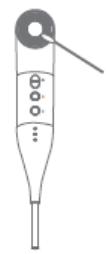
Fig./Img./Abb./Rys./Obr. 3

Fig./Img./Abb./Rys./Obr. 4
www.cecotec.es
Quart de Poblet, Valencia (Spain)
IC01210126
Brand : CECOTEC
Model : Bamba Ionicare 6000 Rockstar Soft Pro
Category : Computer monitor