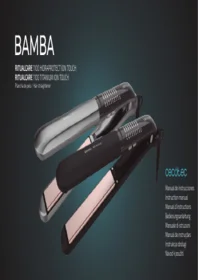
Ritualcare 1100 Hidraprotect Titanium Ion Touch - Computer monitor CECOTEC - Free user manual and instructions
Find the device manual for free Ritualcare 1100 Hidraprotect Titanium Ion Touch CECOTEC in PDF.


| Product Type | Computer Monitor |
| Brand | Cecotec |
| Model | Ritualcare 1100 Hidraprotect Titanium Ion Touch |
| Screen Size | 27 inches |
| Resolution | 1920 x 1080 pixels (Full HD) |
| Panel Technology | IPS |
| Refresh Rate | 60 Hz |
| Brightness | 250 cd/m² |
| Contrast Ratio | 1000:1 |
| Viewing Angle | 178° horizontal / 178° vertical |
| Connectivity | 1x HDMI, 1x VGA, 1x DisplayPort |
| Dimensions (with stand) | 620 x 450 x 200 mm |
| Weight | 4.5 kg |
| Power Supply | 100-240 V, 50/60 Hz |
| Power Consumption | 30 W (typical), <0.5 W standby |
| Key Features | Blue light filter, anti-glare, tilt adjustment |
| Care and Cleaning | Clean with a soft, dry cloth; avoid solvents |
| Safety | Do not expose to water or humidity, use grounded outlet |
| Spare Parts and Repairability | Power cable included, detachable base, repairable by professional |
| Warranty | 2 years |
Frequently Asked Questions - Ritualcare 1100 Hidraprotect Titanium Ion Touch CECOTEC
User questions about Ritualcare 1100 Hidraprotect Titanium Ion Touch CECOTEC
0 question about this device. Answer the ones you know or ask your own.
Ask a new question about this device
Download the instructions for your Computer monitor in PDF format for free! Find your manual Ritualcare 1100 Hidraprotect Titanium Ion Touch - CECOTEC and take your electronic device back in hand. On this page are published all the documents necessary for the use of your device. Ritualcare 1100 Hidraprotect Titanium Ion Touch by CECOTEC.
USER MANUAL Ritualcare 1100 Hidraprotect Titanium Ion Touch CECOTEC
cecòtec
- Parts and components 47
- Before use 47
- Operation 47
- Cleaning and maintenance 49
- Technical specifications 49
- Disposal of old electrical appliances 50
- Technical support and warranty 50
SOMMAIRE
Read these instructions thoroughly before using the appliance. Keep this instruction manual for future reference or new users. Make sure that the mains voltage matches the voltage stated on the rating label of the appliance and that the wall outlet is grounded.
Only insert the main cable plug to power supply when the appliance is switched off. This product is designed only for household use. Do not use it for commercial or industrial purposes.
Check the power cord regularly for visible damage. If the cord is damaged, it must be replaced by the official Technical Support Service of Cecotec in order to avoid any type of danger.
Do not sink the cable, plug or any other part of the product in water or any other kind of liquid. Do not expose its electrical connections to water. Make sure your hands are dry before handling the plug or switching on the appliance.
The appliance must not come into contact
with flammable material. It must also not be used near flammable material.
Do not cover the straightening plates with any object.
Do not use the appliance if the cable or any other part shows some kind of damage. In this case, contact the official Technical Support Service of Cecotec.
Keep children away from packaging. Risk of suffocation.
Frequently check if the appliance has signs of wear or damage. If the product shows visible signs of misuse, contact the official Technical Support Service of Cecotec. Do not try repairing this device by your own means.
In case of defect or malfunction, turn off and disconnect the appliance immediately. Do not use accessories or parts that have not been provided by Cecotec.
Never grasp the appliance by or near the straightening plates when the appliance is on. The straightening plates can cause burns. Avoid contact with the skin and eyes.
Protect the appliance away from moisture. Never put it into the dishwasher. Never immerse it in water.
Never transport the appliance when hot.
Do not leave the product unsupervised during operation.
Do not use on pets or animals.
Do not use the appliance in the bath, shower, swimming pools, near water or high levels of humidity. Make sure your hands are completely dry before use.
Keep appliance away from strong heat sources.
Do not use extension cables with this product.
The appliance may reach high temperatures during operation, avoid contact with eyes and skin.
Do not use outdoors or near aerosols.
Do not cover the cable or the appliance when operating. The main cable must not come into contact with hot appliance parts and should never run between the straightening plates!
Never wind the main cable around the appliance.
Do not use the product whilst using foam,
spray or hair gel.
Do not place the appliance directly over heat-sensitive surfaces whilst it is on or plugged into a power socket.
Do not use the main cable to pull on the plug nor remove the plug from the socket with wet hands.
If the appliance falls in water, disconnect it immediately. Do not touch water!
Unplug the device after use and before cleaning.
Do not pull on the main cable and do not
carry the appliance by means of the cable. This appliance may not be used by children or people with reduced physical, sensory or mental capabilities, or lack of experience and knowledge, unless they have been given supervision or instruction concerning use of the appliance by a person responsible for their safety. Children shall not play with the appliance.
INSTRUCTIONS DE SÉCURITÉ
- Upper handle
- Lower handle
- Decoration plate
- Upper handle cover
- Lock button
- On/off button
- Hinge cover
- Lower back cover
- Power cord
- Hot plates
- Realion
2. BEFORE USE
Note: The appliance must never be switched on when clamped together. Ensure that the appliance is open.
Take the product out of the box.
Remove all packaging material. Keep original box.
Ensure that all components are included, if components are missing or any of them shows damage, contact official
Technical Support Service of Cecotec immediately.
3. OPERATION
On
Connect the device to a power supply. The light indicator will turn on red.
Hold the On/off button for 3 seconds to turn the device on. The
default temperature setting is 190 °C , the corresponding LED light will start blinking. Once the set temperature is reached, the light indicator will stop blinking.
Temperature setting
Temperature can be set: 160 °C, 170 °C, 180 °C, 190 °C, 200 °C, 210 °C, 220 °C, 230 °C.
Touch the decoration plate and slide from lower to higher temperature setting to set the desired temperature. The set temperature will blink until it is reached, then it will stop blinking.
Recommendation: Always select the lowest temperature setting (160 °C) when using the device for the first time.
Lock
Hold down the lock button for 2-3 seconds, the power light indicator will turn on orange and all functions of the device will
be inactive.
Press the lock button again to deactivate the lock function.
Ionising function
Once the device is turned on, the ionising function is activated. The real ion on the device generates a negative ion charge that removes static electricity from hair, conditions and smoothens hair cuticles, resulting in ultra-shiny and smooth hair. Note: Real ion produce a buzzing sound. This is normal and indicating the ion function is operating correctly.
Auto shut-off
The device turns automatically off after 1 hour of no operation.
Using the hair straightener
Divide your hair into 4-cm strands.
Hold the appliance with one hand.
Begin at the roots and lay the prepared strands one at a time between the straightening plates.
Close the appliance and draw the hair straightener slowly from the roots through to the tips of your hair. Repeat until your hair is as straight as you desire.
After finishing styling, let your hair cool down and then comb it through.
When you have finished, hold down the On/off button for 2-3 seconds in order to turn off the device.
4. CLEANING AND MAINTENANCE
Always disconnect the appliance from the power supply and allow the appliance to cool down before cleaning and maintenance.
Do not submerge the device in water or any other kind of liquid.
Place the device on top of heat-resistant surface until it cools down before storing it.
Use a soft, dry cloth to clean the product.
Do not wind the cable around the device.
Store the device in a dry place, away from the reach of children.
5. TECHNICAL SPECIFICATIONS
04248 BAMBA RitualCare 1100 HidraProtect Ion Touch
04249 BAMBA RitualCare 1100 Titanium Ion Touch
60 W, 220-240V\~, 50/60 Hz
Temperature range: 160 - 230 °C
Made in China | Designed in Spain
6. DISPOSAL OF OLD ELECTRICAL APPLIANCES
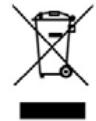
The European directive 2012/19/EU on Waste Electrical and Electronic Equipment (WEEE), specifies that old household electrical appliances must not be disposed of with the normal unsorted municipal waste. Old appliances must be collected separately, in order to optimize the recovery and recycling of the materials they contain and reduce the impact on human health and the environment.
The crossed out “wheeled bin” symbol on the product reminds you of your obligation to dispose of the appliance correctly. If the product has a built-in battery or uses batteries, they should be removed from the appliance and disposed of appropriately. Consumers must contact their local authorities or retailer for information concerning the correct disposal of old appliances and/or their batteries.
7. TECHNICAL SUPPORT AND WARRANTY
This product is under warranty for 2 years from the date of purchase, as long as the proof of purchase is submitted, the product is in perfect physical condition, and it has been given proper use, as explained in this instruction manual.
The warranty will not cover the following situations:
The product has been used for purposes other than those intended for it, misused, beaten, exposed to moisture, immersed in liquid or corrosive substances, as well as any other fault attributable to the customer.
The product has been disassembled, modified, or repaired by persons, not authorised by the official Technical Support Service of Cecotec.
Faults deriving from the normal wear and tear of its parts, due to use.
The warranty service covers every manufacturing defects of
your appliance for 2 years, based on current legislation, except consumable parts. In the event of misuse, the warranty will not apply.
If at any moment you detect any problem with your product or have any doubt, do not hesitate to contact Cecotec Technical
Support Service at +34 963 210 728.
1. PIÈCES ET COMPOSANTS
Quart de Poblet, Valencia (Spain)
IC01200814
Brand : CECOTEC
Model : Ritualcare 1100 Hidraprotect Titanium Ion Touch
Category : Computer monitor