
WK880 - Stage keyboard PEAVEY - Free user manual and instructions
Find the device manual for free WK880 PEAVEY in PDF.


| Product Type | Stage Keyboard / Multimedia Workstation |
| Maximum Polyphony | 64 voices |
| Multitimbral | 16 parts in Style/RealTime mode, 32 parts in Song mode |
| Number of ROM Sounds | 1000 sounds (8 MB of samples) |
| Sequencer | 32 tracks, 250,000 events, 16 songs |
| Accompaniment Styles | 192 styles, 4 variations, 4 intros, 4 fills, 4 endings |
| Effects Processors | 4 DSP: reverb and modulation, assignable per track |
| Keyboard | 88 keys (C0 to C8), velocity sensitive |
| Display | Backlit VGA, contrast adjustment |
| Volatile Memory | Buffered RAM (rechargeable battery), user data backup |
| Storage | 3.5" HD floppy disk drive (1.44/1.6 MB); optional internal IDE hard disk (up to 2 GB) |
| Connectivity | MIDI IN/OUT/THRU A and B, audio outputs L/R and 1/2, Mic/Line input, pedals (Damper, 1, 2, Volume), 2 headphones, computer port, RGB/SVHS video (optional), SCSI (optional) |
| Power Supply | AC 100-240 V, 50/60 Hz |
| Dimensions (approx.) | 140 x 40 x 15 cm |
| Weight (approx.) | 25 kg |
| Included Accessories | Power cable, system disk, demo disk, user manual |
| Maintenance | Clean with a soft, dry cloth; do not use solvents or abrasive cleaners |
| Safety | Do not expose to water; unplug during storms; refer all repairs to authorized technician |
| Repairability / Spare Parts | Repairs by authorized service only; spare parts available through Generalmusic |
Frequently Asked Questions - WK880 PEAVEY
User questions about WK880 PEAVEY
0 question about this device. Answer the ones you know or ask your own.
Ask a new question about this device
Download the instructions for your Stage keyboard in PDF format for free! Find your manual WK880 - PEAVEY and take your electronic device back in hand. On this page are published all the documents necessary for the use of your device. WK880 by PEAVEY.
USER MANUAL WK880 PEAVEY
Loading Successful!!
Mode Style/RealTime 2.2
Mode Song (morceau) 2.2
2 - Essayez lessons duclavier du WK6/8 (mode Style/RealTime) 2.3
Mode Full keyboard 2.3
Mode Upper/Lower keyboard (clavier supérieur/inferieur) 2.4
Quantize (Quantification) 7.8
Transpose (Transposition) 7.13
Microscope 7.14
Delete (F6) (effacer) 7.16
Master Track 7.17
Score & Edit Score 7.20
Score Controls 7.21
Video controls 7.21
Edit Score (Edition du Score) 7.22
Quantize (Quantifier) 9.8
Transpose (Transposition) 9.13
Microscope 9.14
Delete (F6) (effacer) 9.16
Common Channel/Arrangement 11.6
MIDI Dump... 11.7
Local ON, local Off 11.9
MIDI lock 11.9
Transpose (transposition) 14.1
Edit Sound Patch 15.5
Pitch Envelope 16.29
LFO (Low Frequency Oscillator) 16.32
Pan 16.34
Sample Translator 16.37
Algorithm 16.37
Load 16.43
Tuning/Scale (Accordage fin) 17.2
Pedalboard/Computer 17.4
Date & Time (Date & Heure) 17.5
Display controls 17.6
Mic/Line Inputs 17.6
Les options du menu principal de Edit General 17.9
Restore 17.9
Restore All 17. 10
Restore Styles 17. 10
Restore Performance 17. 10
Restore Songs 17. 10
Restore Style-Performance 17. 10
Fonction Restore Sounds 17. 10
APPENDIX
Tableaux Sons ROM A. 2
Tableaux Drumkit A. 10
Tableaux ROM Style A. 20
Tableaux Performance tables A. 21
Tableaux Effects A. 21
Tableaux Wave A. 22
MIDI Implementation chart A. 24/25
Messages de Control Change reconnus A. 26
Implementation System Exclusive A. 27
Index A. 47
INTRODUCTION
Requests MEMORY CLEAR !!
STOCKAGE DES DONNÉES DANS LA MÉMOIRE RAM
La batterie tampon
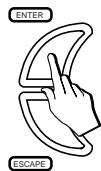
NAVIGATION, SAISIE DE DONNÉES, CONFIRMATION/ANNULATION
Edit Controllers/Pads
Edit Tracks
Edit Perf Sound/Drumkit
Edit Style/Song

Edit General

Edit Disk / Preload
Edit Sound
LES PISTES, LES PERFORMANCE ET LES ICONES DES PISTES
3
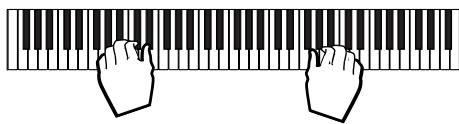
< SteelGuit 1 (Upper 1) >
< SteelGuit 2 (Upper 2) >
MODIFIER LE POINT DE SPLIT (SPLIT POINT)
Le point de Split est:
= 1 0 0
= 9 0
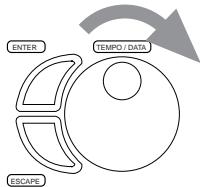
j = 9 0
= 1 0 0
= 1 1 0
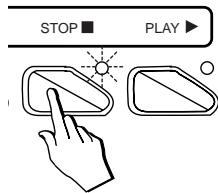
7
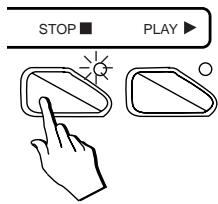
8
9
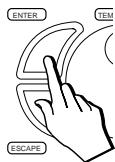
Are you sure? (Enter) to confirm (Escape) to cancel
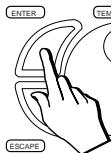
10
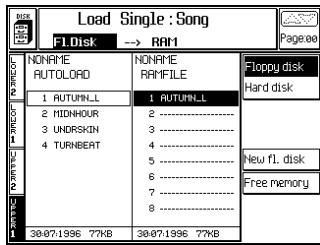
Load Group User Style
WX2, WX 400, WX Expander, SX2, SX3
This file cannot be copied/noved/saved/load to another location!
- Floopy Disk Utility et,
- Hard Disk Utility.
"Operation completed"
"Operation completed"
SEARCH RESOURCE (F4)
Play/Rec mode (mode de lecture)
II y a trois options:
- Linear
Start (point de commencement)
Song memory (non modifiable)
Play/Rec_mode: Linear
Play/Rec_mode: Forced stop
Play/Rec_mode: Loop
Are you sure? (nter) to confirm (scape) to cancel
Controls rec... (F3)
Select all tracks (F4)
MEMORY PROGRESS BAR (NON MODIFIABLE)
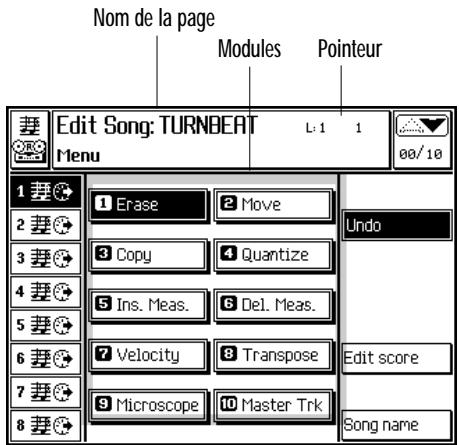
Edit Song - Main menu (menu principal de Edit Song)
PROCEDURE D'ÉDITION
Are you sure? (Enter) to confirm (Escape) to cancel
UNDO utility is OFF!
Options: All, Duplicate note, Note, Pitch Bend, Mono touch, Poly touch, Velocity Off, ProgramChange, ControlChange 00...31, ControlChange 64...127.
Note range from... to... (Extension)
Options: Merge, Replace.
Note range from... to...(Extension)
Quantize (Quantification)
Note On quantization
Note Off quantization
Note range from... to...(Extension)
Note range from... to...(Extension)
Transpose (Transposition)
Music trk (F8) (Piste Music)
INS: (X) (F3) (INTRODUIRE)
INS TYPE... (F4) (TYPE D'INTRODUCTION)
INS: (X) (F3) (INTRODUIRE)
| Statut | Valeur |
| Tempo | 120 |
| Performance | 1 |
| Volume | 64 |
| Eff. Dv. Sel | 0 |
| Statut | Valeur |
| Eff. Type | 0 |
| Eff. Vol | 0 |
| RotaryA | Slw/Fst |
| RotaryB | Slw/Fst |
| Scale | 1 |
| Key Sign | C |
INS TYPE... (F4) (TYPE D'INTRODUCTION)
COMMENT QITTER EDIT SCORE
Score Edit - mode Chord
| Var1 | Var2 | Var3 | Var4 |
| Basic Major | Basic Major | Basic Major | Basic Major |
| Basic Minor | Basic Minor | Basic Minor | Basic Minor |
| Basic 7th | Basic 7th | Basic 7th | Basic 7th |
| Fill Major | Fill Major | Fill Major | Fill Major |
| Fill Minor | Fill Minor | Fill Minor | Fill Minor |
| Fill 7th | Fill 7th | Fill 7th | Fill 7th |
| Intro Major | Intro Major | Intro Major | Intro Major |
| Intro Minor | Intro Minor | Intro Minor | Intro Minor |
| Intro 7th | Intro 7th | Intro 7th | Intro 7th |
| End Major | End Major | End Major | End Major |
| End Minor | End Minor | End Minor | End Minor |
| End 7th | End 7th | End 7th | End 7th |
| Do# | Ré# | Fa# | Sol# | La# | ||||
| Do | Ré | Mi | Fa | Sol | La | Si | ||
| 7th 1 accomp. | -2 | |||||||
| 7th 1 basse | ||||||||
| 7th 2 accomp. | -2 | -1 | ||||||
| 7th 2 basse | -1 | |||||||
| 7th 3 accomp. | -2 | +1 | ||||||
| 7th 3 basse | +1 | |||||||
| 7th 4 accomp. | -2 | |||||||
| 7th 4 basse | ||||||||
Scale Converter active: Do Maj riff -> Do mineur riff
| Do# | Ré# | Fa# | Sol# | La# | |||
| Do | Ré | Mi | Fa | Sol | La | Si | |
| min 1 accomp. | -1 | ||||||
| min 1asse | -1 | ||||||
| min 2 accomp. | -1 | -1 | |||||
| min 2asse | -1 | -1 | |||||
| min 3 accomp. | -1 | +1 | |||||
| min 3asse | -1 | +1 | |||||
| min 4 accomp. | -1 | -1 | |||||
| min 4asse | -1 | -1 | |||||
| min 5 accomp. | -1 | -1 | -1 | ||||
| min 5asse | -1 | -1 | -1 | ||||
| min 6 accomp. | -1 | -1 | +1 | ||||
| min 6asse | -1 | -1 | +1 | ||||
| min 7 accomp. | -1 | -1 | -1 | -1 | |||
| min 7asse | -1 | -1 | -1 | -1 | |||
Accords complexes
Are you sure? (Enter) to confirm (Escape) to cancel
UNDO utility is OFF!
Riff (all tracks) (F6) - Tout un riff (toutes les pistes du riff).
Options: All, Duplicate note, Note, Pitchbend, Mono Touch, Poly Touch, Velocity Off, Program Change, Control Change 00...31, Control Change 64...127.
Note range from... to... (Extension des notes de... à...)
Riff (all tracks) (F6) - Tout un riff (toutes les pistes du riff).
Options: Merge, Replace.
Quantize (Quantifier)
Measures to delete (Mesures à effacer)
Transpose (Transposition)
INS: (X) (F3) (INTRODUIRE)
INS TYPE... (F4) (TYPE D'INTRODUCTION)
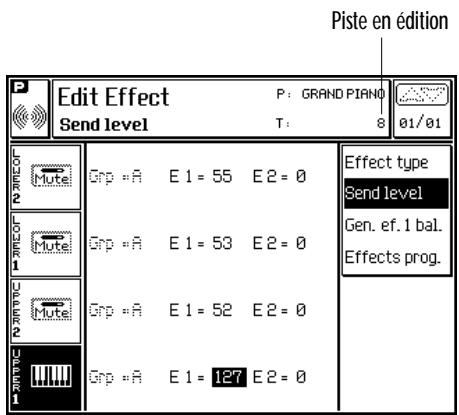
Edit Effects - Send level (mode Style/RealTime)
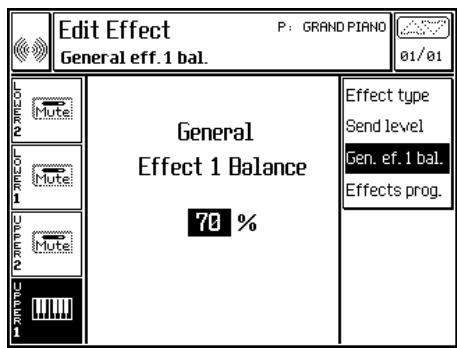
Edit Effects - General Effect Balance
EFFECTS PROGRAMMING (F4) (PROGRAMMATION DES EFFETS)
| Effect 2 - Delay/Chorus/Flanger/Modulations | |||
| 1 Mono Delay 1 | Delay [0 (0ms)...125 (500ms)] | Feedback [0% ... 99%] | L.P.Filter [0-bypass...10-16kHz] |
| 2 Mono Delay 2 | “ | “ | “ |
| 3 Stereo Delay 1 | “ | “ | “ |
| 4 Stereo Delay 2 | “ | “ | “ |
| 5 Multitap Delay 1 | “ | “ | “ |
| 6 Multitap Delay 2 | “ | “ | “ |
| 7 Ping-pong | “ | “ | “ |
| 8 Panmix | Delay [0-(0ms)...125-(500ms)] | Freq.Mod [0-bypass...30-6kHz] | Depth [0 ... 100] |
| 9 Chorus 1 | Freq.Mod [0-0kHz...30-6kHz] | Depth [0 ... 100] | L.P.Filter [0-bypass...10-16kHz] |
| 10 Chorus 2 | “ | “ | “ |
| 11 Ensemble 1 | “ | “ | “ |
| 12 Ensemble 2 | “ | “ | “ |
| 13 Phaser 1 | Freq.Mod [0-0kHz...30-6kHz] | Depth [0 ... 100] | Feedback [0% ... 99%] |
| 14 Phaser 2 | “ | “ | “ |
| 15 Flanger 1 | “ | “ | “ |
| 16 Flanger 2 | “ | “ | “ |
| 17 Chorus/Delay1 | Delay [0-(0ms)...125-(500ms)] | Freq.Mod [0-bypass...30-6kHz] | Depth [0 ... 100] |
| 18 Chorus/Delay2 | “ | “ | “ |
| 19 Flanger/Delay1 | “ | “ | “ |
| 20 Flanger/Delay2 | “ | “ | “ |
| 21 Dubbing | Delay [0-(0ms)...125-(500ms)] | Feedback [0% ... 99%] | L.P.Filter [0-bypass...10-16kHz] |
| 22 Distortion | Depth [0% ... 100%] | Feedback [0% ... 100%] | L.P.Filter [0-bypass...10-16kHz] |
| 23 Distortion/Delay | Depth [0% ... 100%] | Delay [0-(0ms)...125-(500ms)] | Feedback [0% ... 99%] |
| 24 Pitch Shifter 1 | Semitone [-12 ... +12] | Detune [-100c ... +100c] | L.P.Filter [0-bypass...10-16kHz] |
| 25 Pitch Shifter 2 | “ | “ | “ |
| 26 Shift/Delay | Delay [0-(0ms)...125-(500ms)] | Feedback [0% ... 99%] | Detune [-100c ... +100c] |
| 27 Rotary 1 | Speed [1s ... 11s] | Rotary [slow/fast] | L.P.Filter [0-bypass...10-16kHz] |
| 28 Rotary 2 | “ | “ | “ |
| 29 EQ Jazz | Low Gain | Medium Gain | High Gain |
| 30 EQ Pop | “ | “ | “ |
| 31 EQ Rock | “ | “ | “ |
| 32 EQ Classic | “ | “ | “ |
- Vocal Processor (Edit Effect)
INTRODUCTION
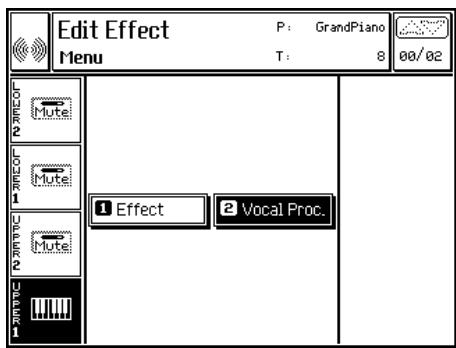
Edit Effect- Main Menu
Connexions
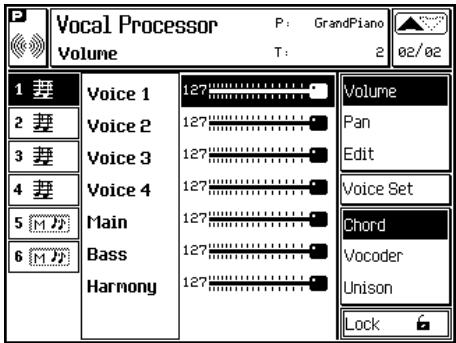
Vocal Processor-Mode Chord, option Volume
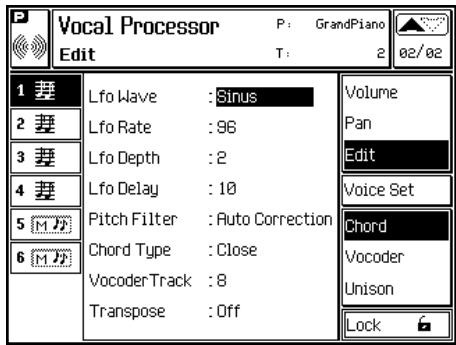
Vocal Processor - Edit

Sine

Triangle

Saw-tooth

Square

Random

Sample&Hold
LES PARAMÉTRES DE LA PAGE D'ÉDITION
LFO Wave
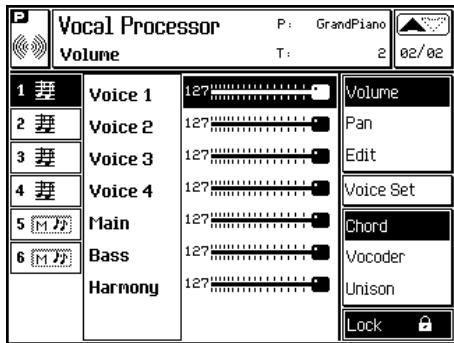
Vocal Processor - Mode Chord, option Volume, Lock
Modifications diverses
Vocal On/Off (Pedals/Pads)
Vocal Volume (uniquement Pedals Assign.)
Vocal Custom 1-16 (Pedals/Pads)
Vocal Mute (Pedals/Pads)
Vocal Chord/Vocoder/Unison (Pedals/Pads)
High gain
Middle Freq
Middle gain
Low gain
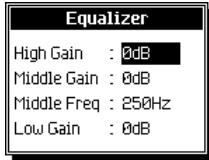
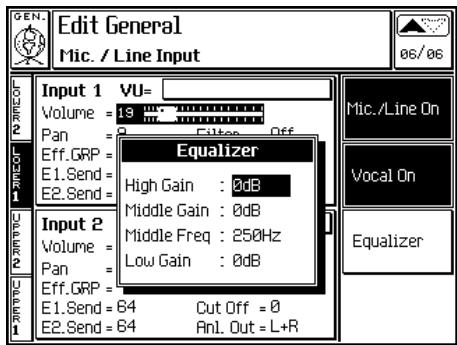
Edit General - Equalizer
SPECIAL MIDI CONTROLLER ASSOCIÉS AU VOCAL PROCESSOR
| Cntrl No. | Description | Value |
| 12 | Vocal volume | 0 ... 127 |
| 13 | Vocal On/Off | 0 Off/On (toggle) |
| 64-127 On | ||
| 14 | Mode recall | 0 = Chord mode |
| 1 - Vocoder mode | ||
| 2 = Unison | ||
| 15 | Voice Set recall | 1 = 1 |
| 2 = 2 | ||
| 3 = 3 | ||
| ... | ||
| 15 = 15 | ||
| 16 = 16 | ||
| 85 | Voice Mute mode | 0 = Voice 1 |
| 1 = Voice 2 | ||
| 2 = Voice 3 | ||
| 3 = Voice 4 | ||
| 4 = Main | ||
| 5 = Bass |
11 Edition du MIDI
Options: Off, Program Change, Pitchbend, Mono touch, Poly touch, ControlChange 00...31, ControlChange 64...127.
System Exclusive Channel
Chord to Arr.1 / Chord to Arr.2
Options: Left&Right, Left, Right.
Options: Pitch Bend: Off, 1...12.
Modulation: Off, On.
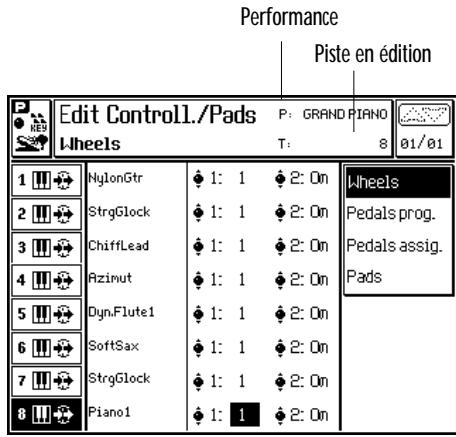
Edit Controllers/Pads - Molette
- «SWITCH»: Off, Modulation, Damper, Sostenuto, Soft, Start/Stop, Key Start, Intro, Fill<, Fill=, Fill>, Ending, Var1, Var2, Var3, Var4, Var>, Performance>, Performance<, Harmony, Bass Follow, Easy Play, Fade In/Out, Tempo-, Tempo+, Punch, Rotary Slow/Fast, Minor, 7th, Dim, Min 7th, Maj 7th, Freeze Chord.
- «CONTINUOUS»: Off., PitchBend, Pitch+, Pitch-, Filter Cutoff Frequency (CC74), Resonance (CC71), Modulation (CC01), Breath controller (CC02), Volume (CC07), Pan (CC10), Expression (CC11), Damper (CC64).
Fonctions disponibles: Off, KeybAssign, Rotary slow/fast, Hardcopy.
Off - Pad déclenché
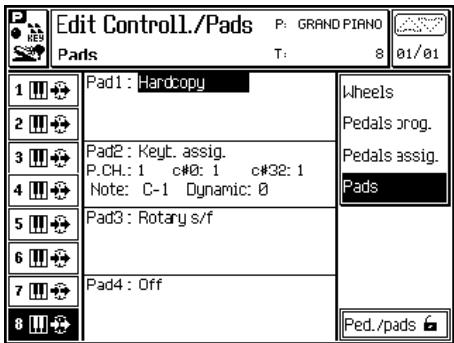
Edit Controllers/Pads - Pads (programming des pads)
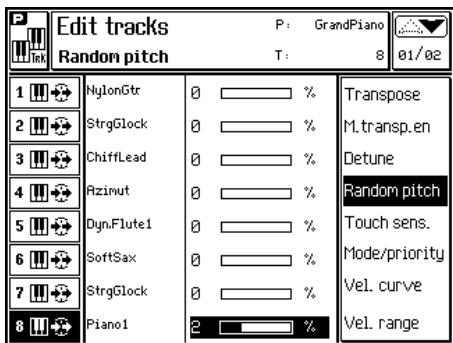
Edit Tracks - Random pitch
MODE/PRIORITY (F5) (PRIORITE)
Options: Poly, Mono L, Mono R, Mono T.
Priority (priorite)
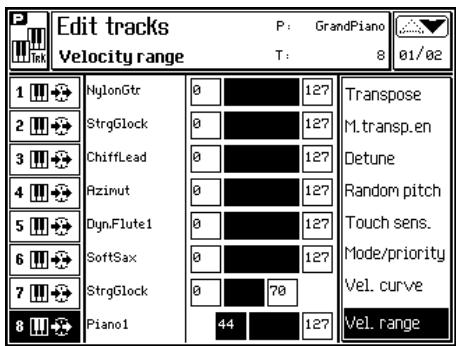
Edit Tracks - Velocity Range
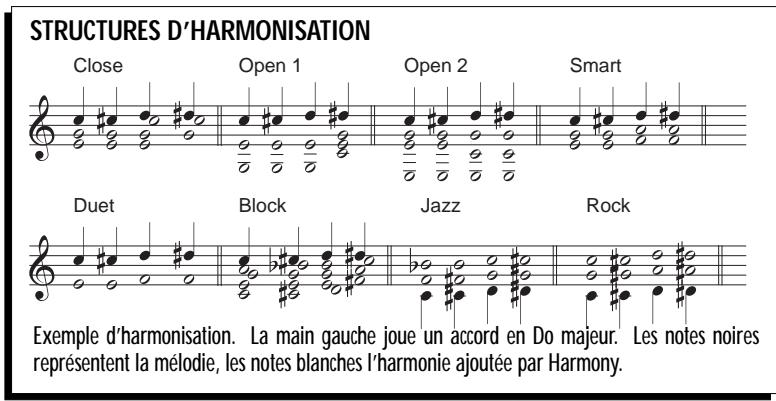
HARMONY (F1) (HARMONIE)
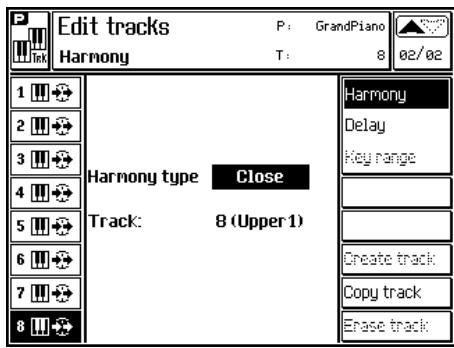
Edit Tracks - Harmony
DELAY (F2) (RETARD)
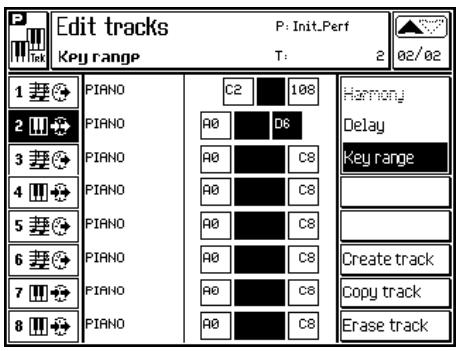
Edit Tracks - Key Range
CREATE TRACK (F5) (CREER UNE PISTE)
Release (relachement)
Resonance (resonance)
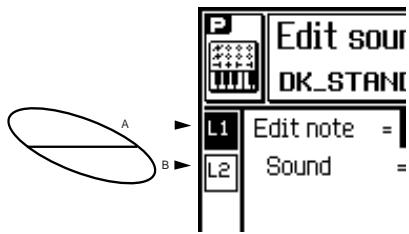
Selection Dynamic Layer
LES PARAMÉTRES DE EDIT SOUND PATCH
Edit note
Eff 2 (Delay/Chorus/Flanger/Modulation)
Copy to Layer... (F2)
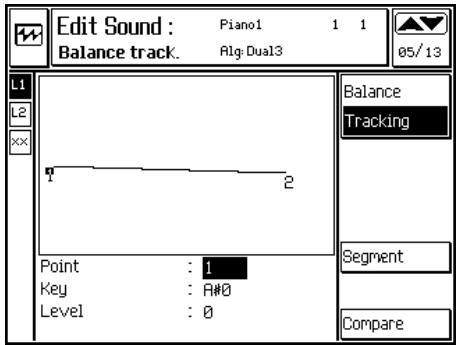
Edit Sound - Balance tracking (1 segment)
Amplitude Envelope et Balance Envelope
Edit Sound - Amp. Key Off Envelope
EXAMPLE DE PROGRAMMATION D'UNE ENVELOPPE KEY ON OU KEY OFF
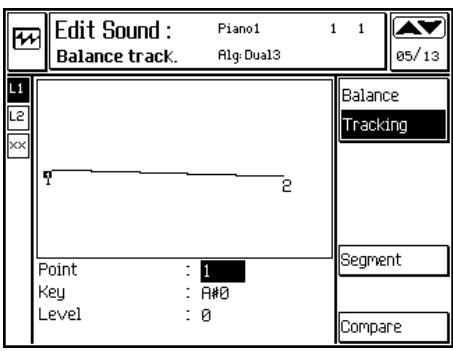
Edit Sound - Balance Tracking
Filter
FILTER ENVELOPE TRACKING
Pitch Envelope Control
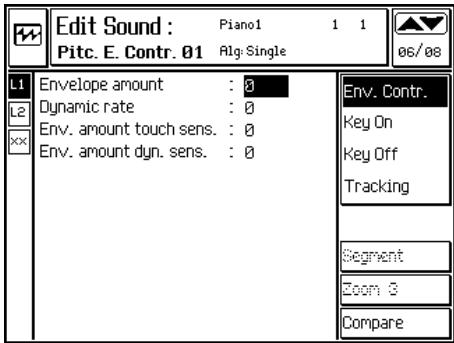
Edit Sound - page Pitch Envelope Control
PITCH ENVELOPE KEY ON & KEY OFF
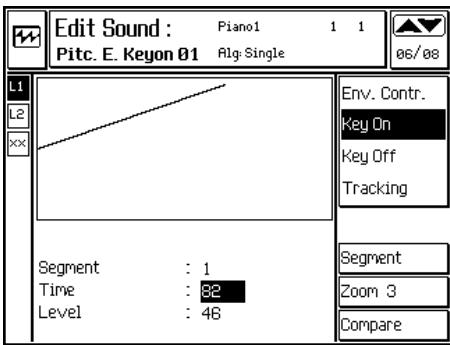
Edit Sound - Pitch Key On Envelope, Zoom 3
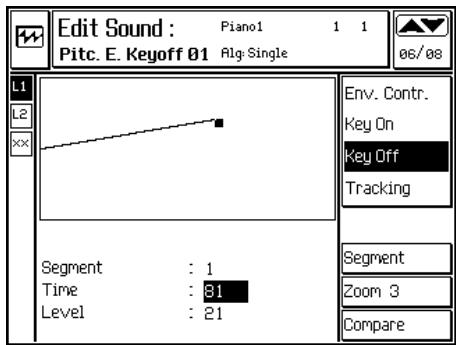
Edit Sound - Pitch Key Off Envelope, Zoom 3
Level
PITCH ENVELOPE TRACKING
LFO (Low Frequency Oscillator)
PAN ENVELOPE TRACKING
Cutoff Freq. -> 'Wha-wha'
FILTRES
Are you sure? (Enter) to confirm (Escape) to cancel
LES OPTIONS DE SAMPLE EDIT
NORMALIZE (2) (NORMALISATION)
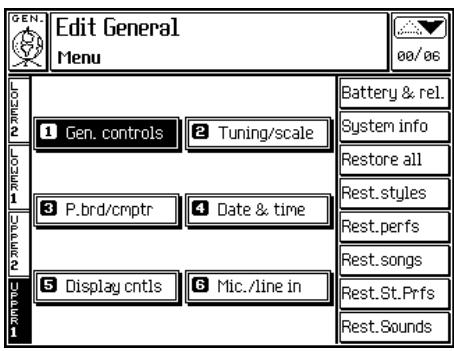
Edit General - Menu principal
DESCRIPTION DE LA PAGE PRINCIPALE (MAIN MENU)
La page menu affiche au centre 6 modules: General Controls, Tuning/Scale, Pedalboard/ Computer, Date & Time, Display Controls et Mic/ Line In.
Tuning/Scale (Accordage fin)
MASTER PITCH
Options: Equal, Inverse, Meantone, Werkmeister III, Arabian 1, Arabian 2, User1 ... User8.
SCALE USER (CLÉS PROGRAMMABLES PAR L'UTILISATEUR)
Date & Time (Date & Heure)
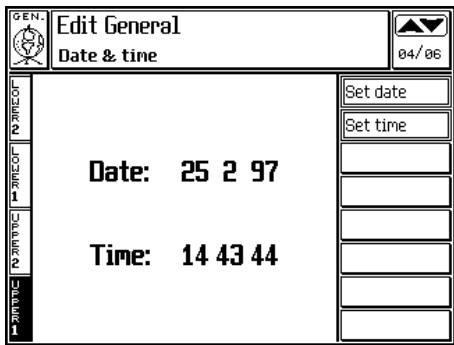
Edit General; Date & Time
Display controls
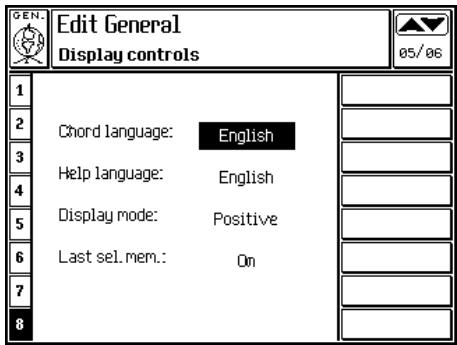
Edit General - Display controls
Mic/Line Inputs
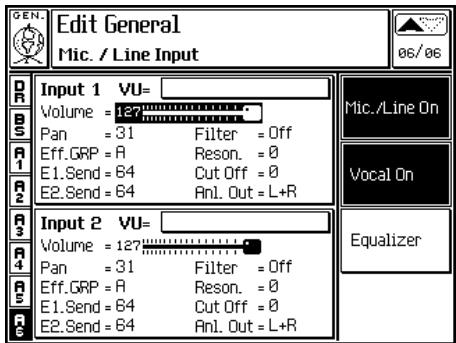
Edit General - Mic/Line In (carte AV installee)
PARAMÉTRES (AVEC CARTE AV OPTIONNELLE INSTALLÉE)
Input VU
Styles/Style Performances
| CC00 | PC | Style |
| LATIN 1 | Bank 1 | |
| 33 | 32 | Bossa Nova |
| 33 | SoftBossa | |
| 34 | ChaCha 1 | |
| 35 | ChaCha 2 | |
| 36 | Rhumba 1 | |
| 37 | Rhumba 2 | |
| 38 | Rhumba 3 | |
| 39 | Rhumba 4 | |
LATIN 1 Bank 2
33 40 Tango
41 Stand.Tango
42 Samba
43 Beguine
44 Salsa 1
45 Salsa 2
46 Cumbia 1
47 Cumbia 2
LATIN 2 Bank 1
33 48 Merengue 1
49 Merengue 2
50 Mambo 1
51 Mambo 2
52 DiscoSamba
53 disco Cha
54 Meneito 1
55 Meneito 2
LATIN 2 Bank 2
33 56 EI Tic Tac
57 Makarena
58 Caliente 1
59 Caliente 2
60 Limbo
61 Gipsy
62 Guaracha
63 Calypso
Performances (RealTime)
CC00 PC Performances†
Group 1
48 1 GrandPiano
2 EPSymphony
3 CoolPiano
4 Heavenly
5 Cathedral
6 Warm Grand
7 Grit Organ
8 St. Guitar
Group 2
48 9 CleanSweep
10 L.R.Ballad
11 TheBrass
12 Diglogue
13 PopSynth
14 Matrix 98
15 Secrets
16 EvenDeeper
Group 3
48 17 Piano
18 E.Piano1
19 E.Piano2
20 E.Piano3
21 PianoStrgs
22 E.PianoStrg
23 Clavinet
24 Vibraphone
Group 4
48 25 Marimba
26 ManualBas1
27 ManualBas2
28 SoloGuitar
29 JazzGtr1
30 OctJ.Gtr
31 LeadDist
32 FunkGuitar
CC00 PC Performances†
Group 5
48 33 ChrousGtr
34 RockOrgan
35 JazzOrgan
36 ClickOrgan
37 VintageOrg
38 Fisa
39 Musette
40 Harmonica
Group 6
48 41 SoftSax
42 Trumpet
43 Brass1
44 Brass2
45 Brass3
46 Brass4
47 BrassSec
48 SaxSection
Group 7
48 49 SynBrass
50 Strings1
51 Strings2
52 Strings3
53 Choi
54 Vocal
55 SynthPad1
56 SynthPad2
Group 8
48 57 HammBass
58 Swingin'
59 SoftOrgan
60 PercusOrgan
61 PrettySplit
62 BlueSplit
63 JazzSplit
64 HrmoncSplit
Effects
CC16 DSP A/B select
0 Eff1 (Reverbs GrpA)
1 Eff1 (Reverbs GrpB)
CC48 Rev Eff type select †
48 0 Hall 1
1 Hall 2
2 Hall 3
8 Warm Hall
9 Long Hall
10 St. Concert
16 Chamber
32 Studio Room 1
40 Studio Room 2
41 Studio Room 3
48 Club Room 1
56 Club Room2
57 Club Room3
64 Vocal
65 Metal Vocal
72 Plate 1
73 Plate 2
80 Church
88 Mountains
89 Falling
104 Early 1
105 Early 2
106 Early 3
112 Stereo
CC16 DSP A/B select †
64 Eff2 (Mod. GrpA)
65 Eff2 (Mod. GrpB)
CC48 Mod. Eff type select
48 0 Mono Delay 1
1 Mono Delay 2
8 Stereo Delay 1
9 Stereo Delay 2
16 Multimap Delay 1
17 Multitap Delay 2
24 Ping Pong
25 Pan Mix
32 Chorus 1
33 Chorus 2
40 Ensemble 1
41 Ensemble 2
48 Phaser 1
49 Phaser 2
56 Flanger 1
57 Flanger 2
36 Chorus Delay 1
37 Chorus Delay 2
60 Flanger Delay 1
61 Flanger Delay 2
28 Dubbing
64 Distortion
65 Distortion Delay
80 Pitch Shifter 1
81 Pitch Shifter 2
82 Shift Delay
96 Rotary 1
97 Rotary 2
104 EQ Jazz
105 EQ Pops
106 EQ Rock
107 EQ Classic
-
PIANO
-
MARTELLO
-
AGOGO
-
BABYVOX
-
BD_ELECT1
-
BD_HOUS1
-
BD_HOUS2
-
BD_JAZZ
-
BD ROOM1
-
BD_STD_1
-
BD_STD_2
-
BD_STD_3
-
BD_TECOD
-
BONG_SLH
-
BONGO_HI
-
BONGO_LO
-
BRUS_REV
-
BRUS_RIG
-
BRUSHSLP
-
BRUSHTAP
-
CABASA
-
CABASA_L
-
CASTAGNT
-
CHINA
-
CLAKSON
-
CLAVES
-
CON_H_SL
-
CON_L_SL
-
CONGA_HI
-
CONGA_LO
-
COWBELL
-
CRASH
-
DARBK_HI
-
DARBK_LO
-
DOLLYVOX
-
DROP
-
FINGERSP
-
GUIRO_LG
-
GUIRO_SH
-
HH CLO1L
-
HH_CLO1S
-
HH_OPEN1
-
HH_PEDAL
-
HH_TGHT1
-
HH_TGHT2
-
HOU_COWB
-
HOU TCON
-
HOUS_RIM
-
HOUS_SD1
-
HOUS_SD2
-
HOUSCLAP
-
HOUSEHH
-
HOUSRIDE
-
JNG_BELL
-
MARACAS
-
MT_SURDO
-
OP_SURDO
-
QUICA_HI
-
QUICA_LO
-
RIDE_CUP
-
RIDE_CYM
-
RIMSHOT1
-
RIMSHOT2
-
ROLL_SN
-
SD_ELECT
-
SD_JAZZ1
-
SD_JAZZ2
-
SD_JAZZ3
-
SD ORCH
-
SD ROOM1
-
SD ROOM2
-
SD_STD1
-
SD_STD2
-
SD_STD3
-
SD_STD4
-
SMASH
-
SPLASH
-
STICK
-
TAMB_SLP
-
TAMBOURI
-
TIMB_LOW
-
TIMBALES
-
TIMPANI
-
TOM_ELEC
-
TOM HIGH
-
TOM_JAZZ
-
TOM_LOW
-
TOM ROOM
-
TRIAN_LO
-
TRIAN_SH
-
VIBRASLP
-
VOICES 1
-
VOICES_2
-
VOICES_3
-
VOX_HHCL
-
VOX_TAP
-
VOX_TIP
-
WATER
-
WHISTLE
-
WIND_CHI
-
WOODBLCK
-
DIGIT1WV
-
DIGIT2WV
-
1685DRAW
-
EL_PIAN7
105.ORGAN_2W
106.ORGAN_3W
107.ORGAN_4W
- FROG_WV
109.ORGAN_5W
110.ORGAN_6W
-
VIBES_2W
-
E_PIANO4
-
E_PIANO5
-
FORMANT
115.ORGAN_1W
-
PIP_ORG3
-
SQUARE
-
PULSE_05
-
PULSE_10
-
PULSE_15
-
PULSE_20
-
PULSE_25
-
PULSE_30
-
PULSE_35
-
PULSE_40
-
PULSE_45
-
SAW
-
SINUS
-
SUPERSAW
-
TRIANGLE
-
TUB_WAVE
-
ACCORDIO
-
ACO_STR
-
ARMONICA
-
BARCHIME
-
BOTTLE
-
BRS_RIP
-
CASSOTTO
-
CHOIR
-
CLARINET
-
STEL_GTR
-
CLAVINET
-
BIRDS
-
GUN_SHOT
-
ELICOPT
-
PHONE_1
-
PHONE_2
-
SCRATCH1
-
SCRATCH2
-
SEA
-
TICKTACK
-
ZAPP
-
ELGTR_S2
-
FAGOTTO
-
FLHARD_H
-
FLHARD_L
-
FLUGE_S2
-
FNKGSTOP
-
SCRAP_GT
-
HARP
-
JAZZ_GT1
-
MUTE_TR1
-
SPECTR_1
-
NOISE
-
OBOE
-
OCT_JGT
-
PANFLUTE
-
PICKBASS
-
SOFT_SAX
-
SOPRANO
-
TENORSAX
-
PIZZICATO
-
TROMBONE
-
VOCALBOY
-
STRINGS
-
ACBASS_L
-
ACBASS_H
-
HARMACBS
-
BAGPIPE
-
ELBASS_H
-
EL BASS L
-
THUMBASS
-
HARMELBS
-
BASSLAP_H
-
BASSLAP_L
-
FRETLES
-
FLUTE
-
HARMGT_H
-
HARMGT_L
-
DIST_GTR
-
JAZZ_GT2
-
GTR_KURZ
-
ICERAIN
-
KOTO
-
OR_THEAT
-
ORROCK F
-
SAX BARI
-
VOC-DUKN
-
FLANDED
-
BANJO
-
KALIUMBA
-
SHAMISEN
-
SITAR
-
GLOCKEN
205 ELPN_KNH
-
ELPN_KNL
-
FLICORNO
-
GTR MUTE
-
ELPN_MKS
-
RHODES_H
-
RHODES_L
-
TRUMPET
-
VIBES
-
XILOPHNO
-
ACCORD2
-
BRASS
-
VOCAL_DU
-
VOCAL_BA
-
FRHORN H
-
FRHORN_L
-
ELPNKURZ
-
A_MUSETT
-
PLECTRA
-
MANDOL
-
PKBSMUTE
-
16 1DRAW
-
ORJAZZ_S
-
BD_ORCH
-
FINGBELL
-
CELLO
-
HH_CLO2
-
HH OPEN2
-
DOOR
-
KITCHEN
-
LOGDRUM
-
CRAS_ORC
-
KNELGT_L
-
APPLAUSE
-
HARPSI_S
-
VIOLA
-
VIOLIN
-
FKG_G_WS
-
GT_HARMO
-
PIK_GRT1
-
PIK_GRT2
-
WHAWHA1
-
WHAWHA2
-
WHAWHAA3
-
WHAWHAA4
-
ORCH_HIT
-
PIK GTWS
-
PIPE_S2
-
TROMBO_K
254.ORG_PIP1
-
MARIMBA
-
ORROCK S
-
MANDOL2
-
BD_POWER
-
ACO_GTR2
-
STELGTR2
-
PIANO_H
-
PIANOL2
-
BRASS_2
| 0 | 0 | HJ NO NO HJ NO NO HJ NO NO HJ NO NO HJ NO NO HJ NO NO HJ NO NO HJ NO NO HJ NO NO HJ NO NO HJ NO NO HJ NO NO HJ NO NO HJ NO NO HJ NO NO HJ NO NO HJ NO NO HJ NO NO HJ NO NO HJ NO NO HJ NO NO | ||
| O | 0 | 0 | spun | C |
| C | 0 | 0 | C | S |
| S | 0 | 0 | S | S |
| 0 | 0 | S | S | |
| 0 | 0 | S | S | |
| 0 | 0 | S | S | |
| L21-0 | L21-0 | ***** L21-0 | L21-0 | L21-0 |
| [pg] [M] [N] [O] [P] [Q] [R] [S] [T] [U] [V] [W] [X] [Y] [Z] [A] [B] [C] [D] [E] [F] [G] [H] [I] [J] [K] [L] [M] [N] [O] [P] [Q] [R] [S] [T] [U] [V] [W] [X] [Y] [Z] [A] [B] [C] [D] [E] [F] [G] [H] [I] [J] [K] [L] [M] [N] [O] [P] [Q] [R] [S] [pg] [M] [N] [P] [Q] [R] [S] [T] [U] [V] [W] [X] [Y] [Z] [A] [B] [C] [D] [E] [F] [G] [H] [I] [J] [K] [L] [M] [N] [O] [P] [Q] [R] [S] [pg] [M] [N] [pg] [M] [N] [pg] [M] [N] [pg] [M] [N] [pg] [M] [N] [pg] [M] [N] [pg] [M] [N] [pg] [M] [N] [pg] [M] [N] [pg] [M] [N] [pg] [M] [N] [pg] [M] [N] [O] [C] [D] [E] [F] [G] [H] [I] [J] [K] [L] [M] [N] [O] [P] [Q] [R] [S] [pg] [M] [N] [pg] [M] [N] [pg] [M] [N] [pg] [M] [N] [pg] [M] [N] [pg] [N] [P] [Q] [R] [S] [N] [P] [Q] [R] [S] [N] [P] [Q] [R] [S] [N] [P] [Q] [R] [S] [N] [P] [Q] [R] [S] [N] [P] [Q] [R] [S] [N] [P] [Q] [R] [S] [N] [P] [Q] [R] [S] [pg] [M] [N] [pg] [M] [N] [pg] [M] [N] [pg] [M] [N] [pg] [M] [N] [pg] [M] [N] [pg] [M] [N] [pg] [M] [N] [pg] [M] [N] [pg] [M] [pg] [M] [pg] [M] [pg] [M] [pg] [M] [pg] [M] [pg] [M] [pg] [M] [pg] [M] [pg] [M] [pg] [M] [pg] [M] [pg] [M] [pg] [M] [pg] [M] [pg] [M] [pg] [M] [pg] [N] [P] [Q] [R] [S] [N] [P] [Q] [R] [S] [N] [P] [Q] [R] [S] [N] [P] [Q] [R] [S] [N] [P] [Q] [R] [S] [N] [P] [Q] [R] [S] [N] [P] [Q] [R] [pg] [M] [N] [pg] [M] [pg] [M] [pg] [M] [pg] [M] [pg] [M] [pg] [M] [pg] [M] [pg] [M] [pg] [M] [pg] [M] [pg] [M] [pg] [M] [pg] [M] [pg] [M] [pg] [M] (LOHS) [NO] 08 [C] [D] [N] [P] [Q] [R] [S] [N] [P] [Q] [R] [S] [N] [P] [Q] [R] [S] [N] [P] [Q] [R] [S] [N] [P] [Q] [R] [S] [N] [P] [Q] [R] [S] [N] [P] [Q] [R] [S] (N) [P] [Q] [R] [S] (N) [P] [Q] [R] [S] (N) [P] [Q] [R] [S] (N) [P] [Q] [R] [S] (N) [P] [Q] [R] [S] (N) [P] [Q] [R] [S] (N) [P] [Q] [R] [S] (N) [p] [q] [r] [s] [t] [u] [v] [w] [x] [y] [z] [aa] [bb] [cc] [dd] [dd] [dd] [dd] [dd] [dd] [dd] [dd] [dd] [dd] [dd] [dd] [dd] [dd] [dd] [dd] [dd] [dd] [dd] [dd] [dd] [dd] [dd] [dd] [dd] [dd] [dd] [dd] [dd] [dd] [dd] [dd] [dd] [dd] [N] [P] [Q] [R] [S] [N] [P] [Q] [R] [S] [N] [P] [Q] [R] [S] [N] [P] [Q] [R] [S] [N] [P] [Q] [R] [S] [N] [P] [Q] [R] [S] [N] [P] [Q] [R] [S] [F] [G] [H] [I] [J] [K] [L] [M] [N] [O] [P] [Q] [R] [S] [F] [G] [H] [I] [J] [K] [L] [M] [N] [O] [P] [Q] [R] [S] [F] [G] [H] [I] [J] [K] [L] [M] [N] [O] [P] [Q] [R] [S] [F] [G] [F] [G] [F] [G] [F] [G] [F] [G] [F] [G] [F] [G] [F] [G] [F] [G] [F] [G] [F] [G] [F] [G] [F] [G] [F] [G] [F] [G] [F] [G] [F] [G] [F] [G] [F] [G] [F] [G] [F] [F] [F] [F] [F] [F] [F] [F] [F] [F] [F] [F] [F] [F] [F] [F] [F] [F] [F] [F] [F] [F] [F] [F] [F] [F] [F] [F] [F] [F] [F] [F] [F] [F] [F] [F] [F] [F] [F] [F] [F] [P] [F] [P] [F] [P] [F] [P] [F] [P] [F] [P] [F] [P] [F] [P] [F] [P] [F] [P] [F] [P] [F] [P] [F] [P] [F] [P] [F] [P] [F] [P] [F] [P] [F] [P] [F] [P] [F] [P] [F] [F] [F] [F] [F] [F] [F] [F] [F] [F] [F] [F] [F] [F] [F] [F] [F] [F] [F] [F] [F] [F] [F] [F] [F] [F] [F] [F] [F] [F] [F] [F] [F] [F] [F] [F] [F] [F] [F] [f] [F] [f] [F] [f] [F] [f] [F] [f] [F] [f] [F] [f] [F] [f] [F] [f] [F] [f] [F] [f] [F] [f] [F] [f] [F] [f] [F] [f] [F] [f] [F] [f] [F] [f] [F] [f] [F] [f] [F] [F] [F] [f] [F] [f] [F] [f] [F] [f] [F] [f] [F] [f] [F] [f] [F] [f] [F] [f] [F] [f] [F] [f] [F] [f] [F] [f] [F] [f] [F] [f] [F] [f] [F] [f] [F] [f] [F] [F] [F] [F] [F] [F] [F] [F] [F] [F] [F] [F] [F] [F] [F] [F] [F] [F] [F] [F] [F] [F] [F] [F] [F] [F] [F] [F] [F] [F] [F] [F] [F] [F] [F] [F] [F] [F] [F] [I] [F] [F] [F] [F] [F] [F] [F] [F] [F] [F] [F] [F] [F] [F] [F] [F] [F] [F] [F] [F] [F] [F] [F] [F] [F] [F] [F] [F] [F] [F] [F] [F] [F] [F] [F] [F] [F] [F] [F] [F] [F] [F] [F] [F] [F] [F] [F] [F] [F] [F] F [F] [F] [F] [F] [F] [F] [F] [F] [F] [F] [F] [F] [F] [F] [F] [F] [F] [F] [F] [F] [F] [F] [F] [F] [F] [F] [F] [F] [F] [F] [F] [F] [F] [F] [F] [F] [F] [F] [F] [F] [F] [F] [F] [F] [F] [F] [F] [F] [F] [F [F] [F [F [F [F [F [F [F [F [F [F [F [F [F [F [F [F [F [F [F [F [F [F [F [F [F [F [F [F [F [F [F [F [F [F [F [F [F [F [F [F [F [F [F [F [F [F [F [F [F [F [F |
| (1) | (2) | (3) | (4) | (5) | (6) | ||
| (sds) | (1) | (2) | (3) | (4) | (5) | (6) | |
| (encl. encl. encl. encl. encl. encl. encl. encl. encl. encl. encl. encl. encl. encl. encl. encl. encl. encl. encl. encl. encl. encl. encl. encl. encl. encl. encl. encl. encl. encl. encl. encl. encl. encl. enCL | (1) | (2) | (3) | (4) | (5) | (6) | |
| (encl. encl. encl. encl. encl. encl. encl. encl. encl. encl. encl. encl. encl. encl. encl. encl. encl. encl. encl. encl. encl. encl. encl. encl | (1) | (2) | (3) | (4) | (5) | (6) | |
| (encl. encl. encl. encl. encl. encl. encl. encl. encl. encl. encl. encl. encl. encl. encl. encl. encl. encl. encl. encl. encl. encl. encl. encl 9 | (1) | (2) | (3) | (4) | (5) | (6) | |
| (encl. encl. encl. encl. encl. encl. encl. encl. encl. encl. encl. encl. encl. encl. encl. encl. encl. encl. encl. encl. encl. encl. encl. encl . | (1) | (2) | (3) | (4) | (5) | (6) | |
| (encl. encl. encl. encl. encl. encl. encl. encl. encl. encl. encl. encl. encl. encl. encl. encl. encl. encl. encl. encl. encl. encl. encl. encl: | (1) | (2) | (3) | (4) | (5) | (6) | |
| (encl. encl. encl. encl. encl. encl. encl. encl. encl. encl. encl. encl. encl. encl. encl. encl. encl. encl. encl. encl. encl. encl. encl. encl; | (1) | (2) | (3) | (4) | (5) | (6) | |
| (encl. encl. encl. encl. encl. encl. encl. encl. encl. encl. encl. encl. encl. encl. encl. encl. encl. encl. encl. encl. encl. encl. encl. encl ; | (1) | (2) | (3) | (4) | (5) | (6) | |
| (encl. encl. encl. encl. encl. encl. encl. encl. encl. encl. encl. encl. encl. encl. encl. encl. encl. encl. encl. encl. encl. encl. encl. encl : | (1) | (2) | (3) | (4) | (5) | (6) | |
| (encl. encl. encl. encl. encl. encl. encl. encl. encl. encl. encl. encl. encl. encl. encl. encl. encl. encl. encl. encl. encl. encl. encl. encl.; | (1) | (2) | (3) | (4) | (5) | (6) | |
| (encl. encl. encl. encl. encl. encl. encl. encl. encl. encl. encl. encl. encl. encl. encl. encl. encl. encl. encl. encl. encl. encl. encl. encl, | (1) | (2) | (3) | (4) | (5) | (6) | |
| (encl. encl. encl. encl. encl. encl. encl. encl. encl. encl. encl. encl. encl. encl. encl. encl. encl. encl. encl. encl. encl. encl. encl. encl., | (1) | (2) | (3) | (4) | (5) | (6) | |
| (encl. encl. encl. encl. encl. encl. encl. encl. encl. encl. encl. encl. encl. encl. encl. encl. encl. encl. encl. encl. encl. encl. encl. encl.: | (1) | (2) | (3) | (4) | (5) | (6) | |
| (encl. encl. encl. encl. encl. encl. encl. encl. encl. encl. encl. encl. encl. encl. encl. encl. encl. encl. encl. encl. encl. encl. encl. encl.- | (1) | (2) | (3) | (4) | (5) | (6) | |
| (encl. encl. encl. encl. encl. encl. encl. encl. encl. encl. encl. encl. encl. encl. encl. encl. encl. encl. encl. encl. encl. encl. encl. encl- | (1) | (2) | (3) | (4) | (5) | (6) | |
| (encl. encl. encl. encl. encl. encl. encl. encl. encl. encl. encl. encl. encl. encl. encl. encl. encl. encl. encl. encl. encl. encl. encl. encl;- | (1) | (2) | (3) | (4) | (5) | (6) | |
| (encl. encl. encl. encl. encl. encl. encl. encl. encl. encl. encl. encl. encl. encl. encl. encl. encl. encl. encl. encl. encl. encl; | (1) | (2) | (3) | (4) | (5) | (6) | |
| (encl. encl. incl. incl. incl. incl. incl. incl. incl. incl. incl. incl. incl. incl. incl. incl. incl. incl. incl. incl; | (1) | (2) | (3) | (4) | (5) | (6) | |
| (encl. incl. incl. incl. incl. incl. incl. incl. incl. incl. incl. incl. incl. incl. incl. incl. incl. incl; | (1) | (2) | (3) | (4) | (5) | (6) | |
| (encl. incl. incl. incl. incl. incl. encl. incl. incl. incl. incl. incl. incl. incl. incl. incl. incl; | (1) | (2) | (3) | (4) | (5) | (6) | |
| (encl. incl. incl. incl. incl. incl. incl. incl. incl. incl. incl. incl. incl. encl; | (1) | (2) | (3) | (4) | (5) | (6) | |
| (encl. incl. incl. incl. incl. incl. incl. incl. incl. incl. incl. incl; | (1) | (2) | (3) | (4) | (5) | (6) | |
| (encl. incl. incl. incl. incl. incl. incl. incl. incl. incl. incl. incl; | (1) | (2) | (3) | (4) | (5) | (6) | |
| (encl. incl; incl; incl; incl; incl; incl; incl; incl; incl; incl; incl; incl; incl; incl; incl; incl; incl; incl; incl; incl; incl; incl; incl; incl; incl; incl; incl; incl; incl; incl; incl; incl; incl; incl; | (1) | (2) | (3) | (4) | (5) | (6) | |
| (encl. incl; incl; incl; incl; incl; incl; incl; incl; incl; incl; incl; incl; incl; incl; incl; incl; incl; incl; incl; incl; incl; incl: | (1) | (2) | (3) | (4) | (5) | (6) | |
| (encl. incl; incl; incl; incl; incl; incl; incl; incl; incl; incl; incl; incl; incl; incl; incl; incl; incl; incl; incl; incl; incl; incl; incl: | (1) | (2) | (3) | (4) | (5) | (6) | |
| (encl. incl: incl; incl; incl; incl; incl; incl; incl; incl; incl; incl; incl; incl; incl; incl; incl; incl; incl; incl; incl; incl; incl; incl; incl; incl; incl; incl; incl; incl; incl; incl; incl; incl; incl;incl; incl; incl; incl; incl; incl; incl; incl; incl; incl; incl; incl; incl; incl; incl; incl; incl; incl; incl; incl; incl; incl; incl; incl; incl; incl; incl; incl; incl; incl; incl; incl; incl; incr; | (1) | (2) | (3) | (4) | (5) | (6) | |
| (encl. incl; incl; incl; incl; incl; incl; incl; incl; incl; incl; incl; incl; incl; incl; incl; incl; incl; incl; incl; incl; incl; incl; incr; | (1) | (2) | (3) | (4) | (5) | (6) | |
| (encl (incl); incl; incl; incl; incl; incl; incl; incl; incl; incl; incl; incl; incl; incl; incl; incl; incl; incl; incl; incl; incl; incl; incl; incl; incl; incl; incl; incl; incl; incl; incl; incl; incl; incl; Incl; Incl; Incl; Incl; Incl; Incl; Incl; Incl; Incl; Incl; Incl; Incl; Incl; Incl; Incl; Incl; Incl; Incl; Incl; Incl; Incl; Incl; Incl; Incl; Incl; Incl; Incl; Incl; Incl; Incl; Incl; Incl; Incl; Incr; Incr; Incr; Incr; Incr; Incr; Incr; Incr; Incr; Incr; Incr; Incr; Incr; Incr; Incr; Incr; Incr; Incr; Incr; Incr; Incr; Incr; Incr; Incr; Incr; Incr; Incr; Incr; Incr; Incr; Incr; Incr; Incr; Incr: | (1) | (2) | (3) | (4) | (5) | (6) |
MESSAGESD CONTROL CHANGE RECONNUS (MIDI CONTROLLER)
| CC00,32 | Bank change. |
| CC01 | Modulation. |
| CC06,38 | Data Entry. |
| CC07 | Main Volume. |
| CC10 | Pan (panorama). |
| CC11 | Expression. |
| CC12† | Vocal Volume (Vocal Processor) |
| CC13† | Vocal On/Off (Vocal Processor) |
| CC14† | Mode Recal (Vocal Processor) |
| CC15† | Voice Set recall (Vocal Processor) |
| CC16,48† | Effects selection |
| CC17,49† | Effects volume |
| CC18,50† | General Purpose (Tuning control) |
| CC32 | BankSelect LSB. |
| CC64 | Damper pedal. |
| CC66 | Sostenuto (sustain) pedal. |
| CC67 | Soft pedal. |
| CC71 | Resonance. |
| CC72 | Release Time. |
| CC73 | Attack Time. |
| CC74 | Filter Cutoff Frequency. |
| CC80 | One Shot control |
| CC81 | On/Off control |
| CC85† | Voice Mute mode (Vocal Processor) |
| CC91 | Effect 1 send (E1, reverb depth). |
| CC93 | Effect 2 send (E2, modulation depth). |
| CC98,99 | NRPN |
| CC100-101 | RPN |
The transfer of data relating to the samples contained in the sounds of the instrument ias based on the standard protocol, called SDS (Sample Dump Standard). The formats of the various commands available are as follows:
ACK (handshake message):
| F0H | = | System Exclusive Message status |
| 7EH | = | Non-Real Time extension |
| cc | = | device ID |
| 7FH | = | ACK ID |
| pp | = | packet number |
| F7H | = | EOX |
NACK (handshake message):
| F0H | = | System Exclusive Message status |
| 7EH | = | Non-Real Time extension |
| cc | = | device ID |
| 7EH | = | NACK ID |
| pp | = | packet number |
| F7H | = | EOX |
CANCEL (handshake message):
| F0H = System Exclusive Message status |
| 7EH = Non-Real Time extension |
| cc = device ID |
| 7DH = CANCEL ID |
| pp = packet number |
| F7H = EOX |
WAIT (handshake message):
| F0H | = | System Exclusive Message status |
| 7EH | = | Non-Real Time extension |
| cc | = | device ID |
| 7CH | = | WAIT ID |
| pp | = | packet number |
| F7H | = | EOX |
DUMPHEADER:
F0 7E cc 01 ss ss ee ff ff gg gg gg hh hh ii ii jj F7
| cc | = | device ID |
| ss ss | = | Sample number (LSB first) |
| ee | = | Sample format(# of significant bits from 8-28) |
| ff ff ff | = | Sample period in nanoseconds (LSB first) |
| gg gg gg | = | Sample length in words (LSB first) |
| hh hh hh | = | Sustain loop start point word number (LSB first) |
| ii ii ii | = | Sustain loop end point word number (LSB first) |
| jj | = | Loop type (00=forward,01=backward/forward,7F=loop off) |
DUMP REQUEST:
| F0H = System Exclusive Message status |
| 7EH = Non-Real Time extension |
| cc = device ID |
| 03H = DUMP REQUEST ID |
| ss ss = Request sample (LSB first) |
| F7H = EOX |
DATA PACKET:
| F0H | = | System Exclusive Message status |
| 7EH | = | Non-Real Time extension |
| cc | = | device ID |
| 02H | = | DATA PACKET ID |
| kk | = | running packet count (0-127) |
| <120 bytes> | = | data (7 bit data format) |
| II | = | checksum (XOR of 7E cc kk <120 bytes>) |
| F7H | = | EOX |
DEVICE INQUIRY
To be able to identify a MIDI device, the following two messages are utilized; the first used for the inquiry:
INQUIRYMESSAGE:
| F0H = System Exclusive Message status |
| 7EH = Non-Real Time extension |
| cc = device ID |
| 06H = INQUIRY ID |
| 01H = Identity Request |
| F7H = EOX |
and the second for the device response:
RESPONSEMESSAGE:
F0 7E cc 06 02 mm ff ff dd dd ss ss ss ss F7
| cc | = | device ID |
| mm | = | Manufactures Sistem Exclusive id code |
| ff ff | = | Device family code (14 bits, LSB first) |
| dd dd | = | Device family member code (14 bits, LSB first) |
| ss ss ss ss | = | Software revision (format device specific) |
UNIVERSAL REAL TIME SYSTEM MESSAGES
DEVICE CONTROL
These messages are used to control the general functions of the system, without referring to a specific MIDI channel and, therefore, inserted in the context of the Universal messages.
Master Volume:
| F0H = System Exclusive Message status |
| 7FH = Real Time extension |
| cc = device ID |
| 04H = Device Control ID |
| 01H = Master Volume ID |
| vv vv = Volume (LSB first) |
| F7H = EOx |
SYSTEM REALTIME MESSAGES
ADDRESS DATA INTERFACE
The MIDI System Exclusive capabilities of the SK Series instruments allow you to manipulate all parts of the instrument's memory from a computer system.
The following is a reference to the SysEx protocol used by the SK Series instruments. This Data Address Interface is based on two principal functions: SET and GET. SET is used to set the contents of some of the instrument's resources while GET is used to withdraw them.
At the reception of a GET message, the instrument replies with an appropriate SET message containing the values of the requested data and relative checksums.
| status | data | EOX | |||
| GET | F0 | 2F 3c 00 id | aa1 aa2 aa3 ss1 ss2 ss3 cc | F7 | |
| SET | F0 | 2F 3c 01 id | cf aa1 aa2 aa3 dd1 ... ddn cc | F7 | |
| F0H | = | System Exclusive Message status | |||
| 2FH | = | ID number (manufacturer ID) = GENERAL MUSIC | |||
| 3cH | = | Command ID: 3 RealTime, c = Device ID (0-F) | |||
| 00H/01H | = | Get subfunction / Set subfunction | |||
| id | = | Model ID, 00 = WK4 | |||
| cf | = | c = checksum (0:1), f = Data Format (0:4)1 | |||
| c=1 checksum present, c=0 absent; | |||||
| aa1:3 | = | starting address code (MSB first) | |||
| ss1:3 | = | amount of required data bytes (MSB first) | |||
| dd1 | = | Data byte : first data byte to be sent | |||
| ddn | = | Data byte : last data byte to be sent | |||
| cc | = | checksum ( optional ) | |||
| F7H | = | EOX ( End Of Exclusive ) | |||
EXTREMELY IMPORTANT: when parameters have positive values that exceed 127 (=7FH), always enter f=2 in the cf field of the SET stream and transform the data into nibble format as in the example: 134 = 0 × 86 becomes 0 × 08 × 06 .
N.B.: in the following address map, the undefined value xx that parameterizes some of the addresses is the number relating to the structure (typically track or note).
EXAMPLES OF EXCLUSIVE MESSAGES AND CHECKSUM CALCULATIONS
(relating to the structure of the Address Data Interface)
According to the address map relating to the Performance Parameters -EFFECTS A the address is 00 13 00H (effectnr1) and the value relating to HALL3 is 02H; therefore the set streams is as follows:
| F0 | 2F | 36 | 01 | 00 | 00 | 00 13 00 | 02 | F7 |
| (1) | (2) | (3) | (4) | (5) | (6) | address | data | (7) |
(1)Exclusive Status
(2)manufacturer ID=GENERAL MUSIC
(3)CommandID(3=RealTime)+deviceID (6 = 7irc deviceID)
(4)Set Subfunction
(5)Model ID (0=WK4)
(6)c=0(No checksum),f=0(7 bit data value)
(7)EOX
According to the address map relating to Performance Parameters - T_SLIDER the address relating to track 11 (the first track is 0) is 0A 1C 00H (Attack) and the value to set is 4DH; therefore the set stream is as follows:
| F0 | 2F | 31 | 01 | 00 | 10 | 0A | 1C | 00 | 4D | cc=? | F7 |
| (1) | (2) | (3) | (4) | (5) | (6) | address | data | checksum | (7) | ||
(1)Exclusive Status
(2)manufacturer ID=GENERAL MUSIC
(3)CommandID(3=RealTime)+deviceID (1 = 2irc deviceID)
(4)Set Subfunction
(5)Model ID (0 = WK4)
(6)c=1(Yes checksum),f=0(7 bit data value)
(7)EOX
The checksum value is obtained with an XOR of all the bytes starting from the GeneralMusic ID (2FH) included; using as the operator XOR (OR Exclusive), then:
cc = checksum = 2 F ^ 3 1 ^ 0 1 ^ 0 0 ^ 1 0 ^ 0 A ^ 1 C ^ 0 0 ^ 4 D = 5 4
the message to send is:
F0 2F 31 01 00 10 0A 1C 00 4D 54 F7.
F0 2F 31 01 00 00 00 09 02 12 F7 (1) (2) (3) (4) (5) (6) address data (7)
(1)Exclusive Status
(2)manufacturer ID=GENERAL MUSIC
(3)CommandID(3=RealTime)+deviceID (1 = 2irc deviceID)
(4)Set Subfunction
(5)Model ID (0 = WK4)
(6)c=0(No checksum),f=0(7 bit data value)
(7)EOX
with the checksum, the stream will be:
F02F31010010009021216F7.
According to the address map relating to Global Parameters - AUDIOIN1 the address is 00 0B 05H (FItCutoff) and the value to set in nibble format is, 09 03H; infact 147 = 93H , therefore the value is sliced in two nibbles 9 and 3 obtaining 09 03H; therefore the set stream without checksum is as follows:
F0 2F 31 01 00 02 000B05 0903 F7 (1) (2) (3) (4) (5) (6) address data (7)
(1)Exclusive Status
(2)manufacturer ID=GENERAL MUSIC
(3)CommandID (3 = RealTime) ^+ deviceID (1 = 2irc deviceID)
(4)Set Subfunction
(5)Model ID (0 = WK4)
(6)c=0 (No checksum), f=2 (Nibble)
(7)EOX
with the checksum, the stream will be:
F02F31010012000B05090309F7.
According to the address map relating to the Global Parameters - EQUALIZER the address is 00 00 01H (HighGain) and the size is 00 00 01H; therefore, the get stream is as follows:
| F0 (1) | 2F (2) | 38 (3) | 00 (4) | 00 (5) | 00 00 01 address | 00 00 01 size | F7 (6) |
(1)Exclusive Status
(2)manufacturer ID=GENERAL MUSIC
(3)CommandID(3=RealTime)+deviceID (8 = 9irc deviceID)
(4)Get Subfunction
(5)Model ID (0=WK4) (6) EOX
If, for example, the value of the parameter equals 1 dB, the instrument will respond with the appropriate Set stream containing the value requested and with the checksum; therefore, the stream returned will be:
F02F38010010000010D0A F7.
REFERENCE TABLE
GLOBAL PARAMETERS
MIXER EQUALIZER
| Address(H) | Size (H) | Range(H) | Parameter | Description | Default | |
| 00 00 00 | 00 00 01 | 00 | 18 | LowGain | -12 -> +12 [dB] | 0EH= 2dB |
| 00 00 01 | 00 00 01 | 00 | 18 | HighGain | -12 -> +12 [dB] | 0DH= 1dB |
| 00 00 02 | 00 00 01 | 00 | 0C | LowFrequency | 100 -> 400 [Hz] | 2=150KHz |
| 00 00 03 | 00 00 01 | 00 | 0C | HighFrequency | 3.0 -> 15.0 [KHz] | 0 = 3KHz |
| SCORE CONTROL | ||||||
| Address(H) | Size (H) | Range(H) | Parameter | Description | Default | |
| 00 01 00 | 00 00 01 | 00 | 04 | video_display | 2 | 01 |
| 00 01 01 | 00 00 01 | 00 | 03 | lyrics.Fonts | char size | 00 |
| (if video_display=3) | ||||||
| 00 01 02 | 00 00 01 | 00 | 15 | view_mode | monitor bkgrnd col | 00 |
| GENERAL CONTROLS | ||||||
| Address(H) | Size (H) | Range(H) | Parameter | Description | Default | |
| 00 02 00 | 00 00 01 | 01 | 05 | dynamic | 3=Medium | |
| 00 02 01 | 00 00 01 | 01 | 05 | a_touch | 3=Medium | |
| ARRANGE MODE | ||||||
| Address(H) | Size (H) | Range(H) | Parameter | Description | Default | |
| 00 03 00 | 00 00 01 | 00 | 01 | FixCh_Mode | on/off | 01 |
| 00 03 01 | 00 00 01 | 00 | 02 | ChordMode1 | Up/low-multi | 01 |
| (Auto chord mode) | ||||||
| 00 03 02 | 00 00 01 | 03 | 04 | ChordMode2 | Full keyboard | 03 |
| (Auto chord mode) | ||||||
| 00 03 03 | 00 00 01 | 00 | 04 | ChordMode3 | Fix chord mode | 01 |
| 00 03 05 | 00 00 01 | 00 | 01 | DynamArrg | on/off | 00 |
| 00 03 09 | 00 00 01 | 00 | 01 | Autobacking | on/off | 01 |
| 00 03 0B | 00 00 01 | 15 | 6C | Chord_split | 3BH = 59 | |
| (GENERAL CONTROLS) FOOTSWITCH POLARITY | ||||||
| Address(H) | Size (H) | Range(H) | Parameter | Description | ||
| 00 04 00 | 00 00 01 | 00 | 01 | Footswitch[1] | 0=Normally closed, 1=open | |
| 00 04 01 | 00 00 01 | 00 | 01 | Footswitch[2] | 0=Normally closed, 1=open | |
| 00 04 02 | 00 00 01 | 00 | 01 | Footswitch[3] | 0=Normally closed, 1=open | |
| (GENERAL) DISPLAY CONTROLS | ||||||
| Address(H) | Size (H) | Range(H) | Parameter | Description | ||
| 00 05 00 | 00 00 01 | 00 | 01ChordLanguage | 0 = English, 1 = Italiano | ||
| 00 05 01 | 00 00 01 | 00 | 01Help_Language | 0 = English, 1 = Italiano | ||
| 00 05 02 | 00 00 01 | 00 | 01Display_Mode | 0 = Positive 1 = Negative | ||
| (GENERAL) NOTE TUNING/SCALE ( xx = NOTE = 0 - 7F ) | ||||||
| Address(H) | Size (H) | Range(H) | Parameter | Description | Default | |
| xx 06 00 | 00 00 01 | 00 | 7F | coarse | 0 -> 127 | |
| xx 06 01 | 00 00 01 | 01 | 7F | finetune | -63 -> +63; | |
| (GENERAL) TUNING/SCALE | ||||||
| Address(H) | Size (H) | Range(H) | Parameter | Description | Default | |
| 00 07 00 | 00 00 01 | 01 7F | Master_pitch | -63 -> +63; | 0 | |
| 00 07 01 | 00 00 01 | 00 0D | kbd_scale | 0 -> +13 | 0=Equal | |
| MIDI CLOCK | ||||||
| Address(H) | Size (H) | Range(H) | Parameter | Description | Default | |
| 00 08 00 | 00 00 01 | 00 01 | MidiClock | Int/Ext | 0=Internal | |
| GLOBAL SET | ||||||
| Address(H) | Size (H) | Range(H) | Parameter | Description | Default | |
| 00 09 02 | 00 00 01 | 00 30 | transpose | -24 +24 [semitones] | 18H = 0 | |
| MIDI GENERAL SET | ||||||
| Address(H) | Size (H) | Range(H) | Parameter | Description | Default | |
| 00 0A 00 | 00 00 01 | 00 10 | Common_ch | 0=Off; 1->10 = chan 1->16 | 0 = Off | |
| 00 0A 01 | 00 00 01 | 01 02 | Common_In | 1 = MidIn A, 2 = MidIn B | 1 = In A | |
| 00 0A 02 | 00 00 01 | 01 02 | Common_Out | 1 = MidiOut A, 2 = MidiOut B | 1 = Out A | |
| 00 0A 03 | 00 00 01 | 00 01 | Midi_lock | 1 = On | ||
| 00 0A 04 | 00 00 01 | 00 01 | Clock_Send | 1 = On | ||
| 00 0A 05 | 00 00 01 | 00 01 | Midi_Merge | 0 = Off | ||
| 00 0A 06 | 00 00 01 | 00 01 | MidinTran | 0 = Off | ||
| 00 0A 07 | 00 00 01 | 00 7F | MidiFixedDyn | 0 -> 127 | 0 = Off | |
| 00 0A 08 | 00 00 01 | 00 01 | Midi_sysex | 0=Excl System OFF, 1=ON | 1 = On | |
| 00 0A 09 | 00 00 01 | 00 01 | SMF saveFrm | 0 = GModi, 1 = smfformat | 0=GModi | |
| 00 0A 0A | 00 00 01 | 00 01 | Bank_select | 1 | ||
| (GENERAL) MIC/LINE INPUT 1 | ||||||
| Address(H) | Size (H) | Range(H) | Parameter | Description | Default | |
| 00 0B 00 | 00 00 01 | 00 7F | Volume | 0 -> 127 | 7FH = 127 | |
| 00 0B 01 | 00 00 01 | 00 01 | EffGroup | 0 | ||
| 00 0B 02 | 00 00 01 | 00 7F | Eff1Send | 0 -> 127 | 40H = 64 | |
| 00 0B 03 | 00 00 01 | 00 7F | Eff2Send | 0 -> 127 | 40H = 64 | |
| 00 0B 04 | 00 00 01 | 00 05 | FltType | 0 | ||
| 00 0B 05 | 00 00 01 | 00 BF | FltCutoff | 0 191, Use nibblized if > 127 | 0 | |
| 00 0B 06 | 00 00 01 | 00 7f | FltResonance | 0 -> 127 | 0 | |
| 00 0B 07 | 00 00 01 | 00 3E | Pan | -31 -> +31 | 3EH = 31 | |
| 00 0B 08 | 00 00 01 | 00 03 | AnalogOut | 0 | ||
| 00 0B 09 | 00 00 01 | 00 01 | Mic/Line | On/Off | 0 | |
| (GENERAL) MIC/LINE INPUT 2 | ||||||
| Address(H) | Size (H) | Range(H) | Parameter | Description | Default | |
| 00 0C 00 | 00 00 01 | 00 7F | Volume | 0 -> 127 | 7FH=127 | |
| 00 0C 01 | 00 00 01 | 00 01 | EffGroup | 0 | ||
| 00 0C 02 | 00 00 01 | 00 7F | Eff1Send | 0 -> 127 | 40H= 64 | |
| 00 0C 03 | 00 00 01 | 00 7F | Eff2Send | 0 -> 127 | 40H= 64 | |
| 00 0C 04 | 00 00 01 | 00 05 | FltType | 0 | ||
| 00 0C 05 | 00 00 01 | 00 BF | FltCutoff | 0->191, Use nibblized if >127 | 0 | |
| 00 0C 06 | 00 00 01 | 00 7f | FltResonance | 0 -> 127 | 0 | |
| 00 0C 07 | 00 00 01 | 00 3E | Pan | -31 -> +31 | 3EH= 31 | |
| 00 0C 08 | 00 00 01 | 00 03 | AnalogOut | 0 | ||
| 00 0C 09 | 00 00 01 | 00 01 | Mic/Line | On/Off | 0 | |
MIDI_CHANNELS (xx = CHANNEL3 = 0 - 1F)
| Address(H) | Size (H) | Range(H) | Parameter | Description | Default | |
| xx 0D 00 | 00 00 01 | 01 | 02 | Midi_IN_Port | 1 = Midin A, 2= Midin B | 1=In A |
| xx 0D 01 | 00 00 01 | 01 | 10 | Midi_IN_Ch | 1->10 = channels 1->16 | |
| xx 0D 02 | 00 00 01 | 01 | 02 | Midi_OUT_Port | 1 = MidiOut A, 2= MidiOut B | 1=Out A |
| xx 0D 03 | 00 00 01 | 01 | 10 | Midi_OUT_Ch | 1->10 = channels 1->16 | |
| (GENERAL) PEDALBOARD/COMPUTER MODE | ||||||
| Address(H) | Size (H) | Range(H) | Parameter | Description | Default | |
| 00 0E 00 | 00 00 01 | 00 | 03 | Computer Mode | 0=Off, 1=Mac, 2=PC1, 3=PC3 | 0 = Off |
| 00 0E 01 | 00 00 01 | 00 | 03 | Pedalb. Mode | 0=Off,1=Pdbass, 2=Pdchord, 3=MFun | 0 = Off |
| 00 0E 02 | 00 00 01 | 00 | 01 | PclfcPedB | Mode switch | |
| 0 | ||||||
MIDI FILTERS IN (xx = CHANNEL = 0 - 1F, Midi Lock ON)
| Address(H) | Size (H) | Range(H) | Parameter | Description | Default | |
| xx 0F 00 | 00 00 01 | 00 | 64 | filter_1 | 0 -> 100 (see Appendix C) | 00H |
| xx 0F 01 | 00 00 01 | 00 | 64 | filter_2 | 0 -> 100 (see Appendix C) | 00H |
| xx 0F 02 | 00 00 01 | 00 | 64 | filter_3 | 0 -> 100 (see Appendix C) | 00H |
| xx 0F 03 | 00 00 01 | 00 | 64 | filter_4 | 0 -> 100 (see Appendix C) | 00H |
| xx 0F 04 | 00 00 01 | 00 | 64 | filter_5 | 0 -> 100 (see Appendix C) | 00H |
| xx 0F 05 | 00 00 01 | 00 | 64 | filter_6 | 0 -> 100 (see Appendix C) | 00H |
| xx 0F 06 | 00 00 01 | 00 | 64 | filter_7 | 0 -> 100 (see Appendix C) | 00H |
MIDI FILTERS OUT ( xx = CHANNEL = 0 - 1F , Midi Lock ON)
| Address(H) | Size (H) | Range(H) | Parameter | Description | Default | |
| xx 10 00 | 00 00 01 | 00 | 64 | filter_1 | 0 -> 100 (see Appendix C) | 00H |
| xx 10 01 | 00 00 01 | 00 | 64 | filter_2 | 0 -> 100 (see Appendix C) | 00H |
| xx 10 02 | 00 00 01 | 00 | 64 | filter_3 | 0 -> 100 (see Appendix C) | 00H |
| xx 10 03 | 00 00 01 | 00 | 64 | filter_4 | 0 -> 100 (see Appendix C) | 00H |
| xx 10 04 | 00 00 01 | 00 | 64 | filter_5 | 0 -> 100 (see Appendix C) | 00H |
| xx 10 05 | 00 00 01 | 00 | 64 | filter_6 | 0 -> 100 (see Appendix C) | 00H |
| xx 10 06 | 00 00 01 | 00 | 64 | filter_7 | 0 -> 100 (see Appendix C) | 00H |
MIDI COMMON/ARRG NoteToArrang
| Address(H) | Size (H) | Range(H) | Parameter | Description | Default | |
| 00 11 00 | 00 00 01 | 00 | 10 | Chord Ch.1 | 0=Off, 1->10 = chans 1->16 | 0 = Off |
| 00 11 01 | 00 00 01 | 00 | 01 | IN_1 | 0 | |
| 00 11 02 | 00 00 01 | 00 | 10 | Chord Ch.2 | 0=Off, 1->10 = chans 1->16 | 0 = Off |
| 00 11 03 | 00 00 01 | 00 | 01 | IN_2 | 0 | |
MIDI CTRL PADS (xx = CHANNEL = 0 - 1F)
| Address(H) | Size (H) | Range(H) | Parameter | Description | Default | |
| xx 12 00 | 00 00 01 | 00 | 01 | ped_ftsw[1] | 1 | |
| xx 12 01 | 00 00 01 | 00 | 01 | ped_ftsw[2] | 1 | |
| xx 12 02 | 00 00 01 | 00 | 01 | ped_ftsw[3] | 1 | |
PERFORMANCE PARAMETERS
EFFECTS A
| Address(H) | Size (H) | Range(H) | Parameter | Description | Default |
| 00 13 00 | 00 00 01 | 00 17 | Eff_Type1 | 0 -> 23 | 5=St.Concert |
| 00 13 01 | 00 00 01 | 00 7F | eff_vol1 | 0 -> 127 | 5AH = 90 |
| 00 13 02 | 00 00 01 | par#1_1 | |||
| 00 13 03 | 00 00 01 | par#2_1 | |||
| 00 13 04 | 00 00 01 | par#3_1 | |||
| 00 13 05 | 00 00 01 | 00 1F | Eff_Type2 | 0 -> 31 | 9 = Chorus2 |
| 00 13 06 | 00 00 01 | 00 7F | eff_vol2 | 0 -> 127 | 79H = 121 |
| 00 13 07 | 00 00 01 | par#1_2 | |||
| 00 13 08 | 00 00 01 | par#2_2 | |||
| 00 13 09 | 00 00 01 | par#3_2 | |||
| 00 13 0A | 00 00 01 | 00 7F | Eff2ToEff1 | 0 -> 127 | 0 |
| EFFECTS B | |||||
| Address(H) | Size (H) | Range(H) | Parameter | Description | Default |
| 00 14 00 | 00 00 01 | 00 17 | Eff_Type1 | 0 -> 23 | 2= Hall3 |
| 00 14 01 | 00 00 01 | 00 7F | eff_vol1 | 0 -> 127 | 37H = 55 |
| 00 14 02 | 00 00 01 | par#1_1 | |||
| 00 14 03 | 00 00 01 | par#2_1 | |||
| 00 14 04 | 00 00 01 | par#3_1 | |||
| 00 14 05 | 00 00 01 | 00 1F | Eff_Type2 | 0 -> 31 | 0=MonoDelay1 |
| 00 14 06 | 00 00 01 | 00 7F | eff_vol2 | 0 -> 127 | 79H = 121 |
| 00 14 07 | 00 00 01 | par#1_2 | |||
| 00 14 08 | 00 00 01 | par#2_2 | |||
| 00 14 09 | 00 00 01 | par#3_2 | |||
| 00 14 0A | 00 00 01 | 00 7F | Eff2ToEff1 | 0 -> 127 | 0 |
| TRACK SOUND ( xx = CHANNEL = 0 - 1F ) | |||||
| Address(H) | Size (H) | Range(H) | Parameter | Description | Default |
| xx 15 00 | 00 00 02 | 0: 7F+0:F | Soundnr | Prog.Charge(MSB) + Bank(LSB) | |
| xx 15 01 | 00 00 01 | 0 | no sound if no zero | ||
| 0 | |||||
| MIDI CONFIGURATION ( xx = CHANNEL = 0 - 1F ) | |||||
| Address(H) | Size (H) | Range(H) | Parameter | Description | Default |
| xx 16 00 | 00 00 01 | 00 03 | source | Track source4 | |
| xx 16 01 | 00 00 01 | 00 03 | destination | Track destination5 | |
| xx 16 04 | 00 00 01 | 01 02 | Midi_In_Port | 1 = Midin A, 2= Midin B | |
| xx 16 05 | 00 00 01 | 01 10 | Midi_In-Ch | 1->10 = channels 1->16 | |
| xx 16 06 | 00 00 01 | 01 02 | Midi_Our_Port | 1 = MidiOut A, 2= MidiOut B | |
| xx 16 07 | 00 00 01 | 01 10 | Midi_out-Ch | 1->10 = channels 1->16 | |
| COMMON ( xx = CHANNEL = 0 - 1F ) | |||||
| Address(H) | Size (H) | Range(H) | Parameter | Description | Default |
| xx 17 00 | 00 00 01 | 00 7F | volume | ||
| xx 17 01 | 00 00 01 | 00 78 | transp | -60 -> +60 | 3CH = 0 |
| xx 17 02 | 00 00 02 | 00 0300 | delay | 0 -> 768 Use nibblized if > 127 | 0 |
| xx 17 03 | 00 00 01 | 00 07 | dynResp | 0 | |
| xx 17 04 | 00 00 01 | 00 01 | m_transp | 1 | |
| INTERNAL ( xx = CHANNEL = 0 - 1F ) | |||||
| Address(H) | Size (H) | Range(H) | Parameter | Description | Default |
| xx 18 00 | 00 00 01 | 00 02 | mode | 0 | |
| xx 18 01 | 00 00 01 | 00 01 | m_priority | Poly.Mono | 0 |
| xx 18 02 | 00 00 01 | 00 7F | detune | -64 -> +63 | 40H = 0 |
| xx 18 03 | 00 00 01 | 00 03 | analog_out | 0 | |
| xx 18 04 | 00 00 01 | 00 01 | effect_group | Selection effects group A or B | |
| xx 18 05 | 00 00 01 | 00 7F | vol_group_A | Volume sent of eff. group A | |
| xx 18 06 | 00 00 01 | 00 | 7F |
| xx 18 07 | 00 00 01 | 00 | 3E |
| xx 18 08 | 00 00 01 | 00 | 07 |
| xx 18 09 | 00 00 01 | 00 | 07 |
| xx 18 0A | 00 00 01 | 01 | 0B |
| xx 18 0B | 00 00 01 | 00 | 0C |
MIDI IN FILTER (xx = CHANNEL = 0 - 1F)
| Address(H) | Size (H) | Range(H) |
| xx 19 00 | 00 00 01 | 00 64 |
| xx 19 01 | 00 00 01 | 00 64 |
| xx 19 02 | 00 00 01 | 00 64 |
| xx 19 03 | 00 00 01 | 00 64 |
| xx 19 04 | 00 00 01 | 00 64 |
| xx 19 05 | 00 00 01 | 00 64 |
| xx 19 06 | 00 00 01 | 00 64 |
MIDI OUT FILTER (xx = CHANNEL = 0 - 1F)
| Address(H) | Size (H) | Range(H) |
| xx 1A 00 | 00 00 01 | 00 64 |
| xx 1A 01 | 00 00 01 | 00 64 |
| xx 1A 02 | 00 00 01 | 00 64 |
| xx 1A 03 | 00 00 01 | 00 64 |
| xx 1A 04 | 00 00 01 | 00 64 |
| xx 1A 05 | 00 00 01 | 00 64 |
| xx 1A 06 | 00 00 01 | 00 64 |
LOCAL (xx = CHANNEL = 0 - 1F)
| Address(H) | Size (H) | Range(H) |
| xx 1B 00 | 00 00 01 | 00 01 |
| xx 1B 01 | 00 00 01 | 00 01 |
| xx 1B 02 | 00 00 01 | 00 01 |
SLIDER (xx = CHANNEL = 0 - 1F)
| Address(H) | Size (H) | Range(H) |
| xx 1C 00 | 00 00 01 | 00 7F |
| xx 1C 01 | 00 00 01 | 00 7F |
| xx 1C 02 | 00 00 01 | 00 7F |
| xx 1C 03 | 00 00 01 | 00 7F |
| xx 1C 04 | 00 00 01 | 00 7F |
| xx 1C 05 | 00 00 01 | 00 7F |
| xx 1C 06 | 00 00 01 | 00 7F |
| xx 1C 07 | 00 00 01 | 00 7F |
| xx 1C 08 | 00 00 02 | 0: 7F+0:F |
| vol_group_B | Volume sent of eff. group B | |
| pan | -31 -> +31 | 3EH =31 |
| rand_pitch | 0 | |
| randshan | 0 | |
| Harmony | 1 -> 11 | 1 |
| PitchRange | 0 -> 12 | 0 |
| Parameter | Description | Default |
| filter_in1 | 0 -> 100 | 00H |
| filter_in2 | 0 -> 100 | 00H |
| filter_in3 | 0 -> 100 | 00H |
| filter_in4 | 0 -> 100 | 00H |
| filter_in5 | 0 -> 100 | 00H |
| filter_in6 | 0 -> 100 | 00H |
| filter_in7 | 0 -> 100 | 00H |
| Parameter | Description | Default |
| filter_out1 | 0 -> 100 | 00H |
| filter_out2 | 0 -> 100 | 00H |
| filter_out3 | 0 -> 100 | 00H |
| filter_out4 | 0 -> 100 | 00H |
| filter_out5 | 0 -> 100 | 00H |
| filter_out6 | 0 -> 100 | 00H |
| filter_out7 | 0 -> 100 | 00H |
| Parameter | Description | Default |
| ped_ftsw[1] | ||
| ped_ftsw[2] | ||
| ped_ftsw[3] |
| Parameter | Description | Default |
| Attack | -64 +63 | 40H = 0 |
| Release | -64 +63 | 40H = 0 |
| Flt Cutoff | -64 +63 | 40H = 0 |
| Flt Resonance | -64 +63 | 40H = 0 |
| Decay | -64 +63 | 40H = 0 |
| LFO Depth | -64 +63 | 40H = 0 |
| LFO Rate | -64 +63 | 40H = 0 |
| LFO Delay | -64 +63 | 40H = 0 |
| Soundnr | Prog.Change(MSB) + Bank(LSB) | 0 |
DRUM KIT EDITING
LAYER1 SOUND PATCH (xx = NOTE = 0 - 7F)
| Address(H) | Size (H) | Range(H) |
| xx 1D 00 | 00 00 02 | 0: 7F+0:F |
| xx 1D 01 | 00 00 01 | 00 7F |
| xx 1D 02 | 00 00 01 | 00 7F |
| xx 1D 03 | 00 00 01 | 00 7F |
| xx 1D 04 | 00 00 01 | 00 7F |
| xx 1D 05 | 00 00 01 | 00 7F |
| xx 1D 06 | 00 00 01 | 00 03 |
| xx 1D 07 | 00 00 01 | 00 7F |
| xx 1D 08 | 00 00 01 | 00 7F |
| xx 1D 09 | 00 00 01 | 00 04 |
| Parameter | Description | Default |
| Soundnr | Prog.Change(MSB) + Bank(LSB) | |
| Level | 00 127 | |
| Panorama | -64 +63 | |
| Transpose | -64 +63 | |
| Tune | -64 +63 | |
| FltCutOff | -64 +63 | |
| Exclude | 00 03 | |
| Effect 1 | 00 127 | |
| Effect 2 | 00 127 | |
| Analog Out | 00 04 |
| DYNAMIC SWITCH | |||||
| Address(H) | Size (H) | Range(H) | Parameter | Description | Default |
| 00 1E 00 | 00 00 01 | 00 7F | DynSwitch | 00 127 | |
| LAYER2 SOUND PATCH ( xx = NOTE = 0 - 7F ) | |||||
| Address(H) | Size (H) | Range(H) | Parameter | Description | Default |
| xx 1F 00 | 00 00 02 | 0: 7F+0:F | Soundnr | Prog.Charge + Bank | |
| xx 1F 01 | 00 00 01 | 00 7F | Level | 00 127 | |
| xx 1F 02 | 00 00 01 | 00 7F | Panorama | -64 +63 | |
| xx 1F 03 | 00 00 01 | 00 7F | Transpose | -64 +63 | |
| xx 1F 04 | 00 00 01 | 00 7F | Tune | -64 +63 | |
| xx 1F 05 | 00 00 01 | 00 7F | FltCutOff | -64 +63 | |
| xx 1F 06 | 00 00 01 | 00 03 | Exclude | 00 03 | |
| xx 1F 07 | 00 00 01 | 00 7F | Effect 1 | 00 127 | |
| xx 1F 08 | 00 00 01 | 00 7F | Effect 2 | 00 127 | |
| xx 1F 09 | 00 00 01 | 00 04 | Analog Out | 00=track,1=L+R,2=O1+O2,3=O1,4=O2 | |
| TRACK SELECT | |||||
| Address(H) | Size (H) | Range(H) | Parameter | Description | Default |
| 00 20 00 | 00 00 01 | 00 1F | Selected | 00 31 | |
SYSTEM OBJECT ACCESS MESSAGES
SYSTEM RESOURCE ACCESS
Messages relating to the RESOURCE ACCESS allow the transfer via MIDl of the same basic resources of the instrument that can be exported to disk, and which are:
| Σ | System SETUP |
| Σ | SOUNDS |
| Σ | REAL PERFORMANCES |
| Σ | STYLE PERFORMANCES |
| Σ | USER STYLES |
| Σ | SONGS |
Each type of resource can constitute several files, in which case, before transmitting, are compacted into a single data block.. The transmission can take place in handshake mode for higher speeds and better control of the data transmitted (the system automatically recognizes the mode utilized according to the reply given or not after the transmission of the File Header Message). The MIDI message transmitted consists of the following structure:
| F0H = System Exclusive Message status | |
| 2FH = ID number (manufacturer ID) = GENERAL MUSIC | |
| 5cH = Command ID: 5=Resource Access, c=device ID(0-F)6 | |
| ss = Subfunction ID | |
| id = Model ID, 00 = WK4 | |
| cf = c = checksum (0-1), f = Data Format (0-3) | |
| pp = packet number (optional) | |
| <data> = (optional) | |
| cc = checksum (optional) | |
| F7H = EOX |
| Subfunction ID: | File Header | 01H |
| File Data | 02H | |
| Resource Request | 03H | |
| Parametr Request | 40H | |
| Parameter Data | 41H |
| ACK | 7FH |
| NACK | 7EH |
| CANCEL | 7DH |
| WAIT | 7CH |
The transmission of one of the available resources starts by sending a message (File Header message) to identify the successive blocks of data desired (File Data message).
Typically the files concerned can be relatively long, therefore it is better to subdevide the information into several brief packets which can be individually tested and eventually retransmitted (in the case of using the handshake mode and the reception of an ACK reply confirms the correctness of the packet received, while a reply of the type NACK forces the retransmission of the error packet).
Should it be necessary to interrupt the transmission, it is always possible to send the CANCEL command at any moment during the course of the communication.
A WAIT command has also been included for future implementations.
File Header message:
| F0H = | System Exclusive Message status |
| 2FH = | ID number (manufacturer ID) = GENERAL MUSIC |
| 5cH = | Command ID: 5=Resource Access, c=device ID(0-F) |
| 01H = | Subfunction ID = FILE HEADER |
| 00 = | Model ID, 00 = WK4 |
| 03H = | not checksum, format 3 (octect) |
| <data> = | 3 octects8 |
| F7H = | EOX |
File Data message:
| F0H = | System Exclusive Message status |
| 2FH = | ID number (manufacturer ID) = GENERAL MUSIC |
| 5cH = | Command ID: 5=Resource Access, c=device ID(0-F) |
| 02H = | Subfunction ID = FILE DATA |
| 00 = | Model ID, 00 = WK4 |
| 13H = | checksum, format 3 (octect) |
| pp = | packet number (00:7fH) |
| <data> = | 15 octects |
| cc = | checksum |
| F7H = | EOX |
Resource Request message:
| F0H | = | System Exclusive Message status |
| 2FH | = | Manufacturer ID = GENERAL MUSIC |
| 5cH | = | Command ID: 5=Resource Access, c=device ID(0-F) |
| 03H | = | Subfunction ID = RESOURCE REQUEST |
| 00 | = | Model ID, 00 = WK4 |
| 00 | = | not checksum, format 0 |
| tt | = | Resource ID |
| ss | = | all files(0), selected(>0)9 |
| F7H | = | EOX |
ACK message:
F0H = System Exclusive Message status
2FH = ID number (manufacturer ID) = GENERAL MUSIC
5cH = Command ID: 5=Resource Access, c=device ID(0-F)
7FH = Subfunction ID = ACK
00 = Model ID, 00 = WK4
00 = not checksum, format 0
pp = packet number (00:7fH)
F7H = EOX
NACK message:
F0H = System Exclusive Message status
2FH = ID number (manufacturer ID) = GENERAL MUSIC
5cH = Command ID: 5=Resource Access, c=device ID(0-F)
7EH = Subfunction ID = NACK
00 = Model ID, 00 = WK4
00 = not checksum, format 0
pp = packet number (00:7fH)
F7H = EOX
CANCEL message:
F0H = System Exclusive Message status
2FH = ID number (manufacturer ID) = GENERAL MUSIC
5cH = Command ID: 5=Resource Access, c=device ID(0-F)
7DH = Subfunction ID = CANCEL
00 = Model ID, 00 = WK4
00 = not checksum, format 0
pp = packet number (00:7fH)
F7H = EOX
WAIT message:
F0H = System Exclusive Message status
2FH = ID number (manufacturer ID) = GENERAL MUSIC
5cH = Command ID: 5=Resource Access, c=device ID(0-F)
7CH = Subfunction ID = WAIT
00 = Model ID, 00 = WK4
00 = not checksum, format 0
pp = packet number (00:7fH)
F7H = EOX
EXAMPLES of Resource Request message compositions
F0 F7 F0 F7 F1 (1) 2F 50 03 00 00 00 00 (2) (3) (4) (5) (6) (7) (8) (9)
(1)Exclusive Status
(2)manufacturer ID=GENERAL MUSIC
(3)Command ID(5=RESOURCE ACCESS) + device ID (0=1° device ID)
(4)Subfunction ID (3=RESOURCE REQUEST)
(5)Model ID (0=WK4)
(6)c=0(No checksum),f=0(7 bit data value)
(7)Resource ID (0=Setup)
(8)not used for Setup Req
(7)EOX
F0 F7 F0 F7 F1 (1) 2F 50 03 00 00 01 (2) (3) (4) (5) (6) (7) (8) (9)
(1)Exclusive Status
(2)manufacturer ID=GENERAL MUSIC
(3)Command ID(5=RESOURCE ACCESS) + device ID (0=1° device ID)
(4)Subfunction ID (3=RESOURCE REQUEST)
(5)Model ID (0=WK4)
(6)c=0(No checksum),f=0(7 bit data value)
(7)Resource ID (1=Sound)
(8)Selected (00 = Al files)
(7)EOX
Messages relating to the DEVICE PARAMETERS ACCESS allows access to specific information relating to the instrument; the protocol includes the transmission of a request message which will be followed by the eventual reply.
Parameter Request message:
F0H = System Exclusive Message status
2FH = Manufacturer ID = GENERAL MUSIC
5cH = Command ID: 5=Resource Access, c=device ID(0-F)
40H = Subfunction ID = PARAMETER REQUEST
00 = Model ID, 00 = WK4
00 = not checksum, format 0
Parameter ID
bs = Bank Select
ps = PrChange Select (only for SOUND)
F7H = EOX
Parameter ID: STATUS of the system 0
SOUND Name 1
REALPERF.Name 2
STYLEPERF.Name 3
USER STYLE Name 4
SONG Name 5
Parameter Data message:
F0H = System Exclusive Message status
2FH = ID number (manufacturer ID) = GENERALMUSIC
5cH = Command ID: 5=Resource Access, c=device ID(0-F)
41H = Subfunction ID = PARAMETER DATA
00 = Model ID, 00 = WK4
cf = checksum=1, format (5 per Status, 0 altrimenti)
pp = packet number (00:7fH)
cc = checksum
F7H = EOX
The data sent refer to the structure as described below.
Status Data. The data relates to the parameters contained in the following fields (the quantities of memory are expressed in Kbyte):
| bytes | rel(addr. name | description | |
| 1 | 0 | iClass | see classification in Tab.1 |
| 1 | 1 | iSubClass | see classification in Tab.1 |
| 1 | 2 | iRelease instrument | release |
| 1 | 3 | peripherals | HD=b1, AV=b0 |
| 4 | 4 | totalSysRam | Total System Memory |
| 4 | 8 | freeSysRam | Freee System memory |
| 4 | 12 | totalBackedRam | Backed Sample Ram Memory |
| 4 | 16 | freeBackedRam | Free Backed Sample Ram Memory |
| 4 | 20 | totalVolRam | Total Volatile Sample Ram Memory |
| 4 | 24 | freeVolRam | Free Volatile Sample Ram Memory |
| iClass / iSubClass | 1 | 2 | 3 | 4 | 5 | 6 | 7 | 8 | ||
| 1 - Synth Expander | S2 | S3 | S2 Box | SK76 | SK88 | |||||
| 2 - Masterkeyboards | MK88 | |||||||||
| 3 - Keyboards | WS2 | WS1 | WX2 | WX2Box | CD | WX400 | WK4 | SX2 | SX3 | WK3 |
| 4 - Pianos | WS400 | RPro1 | RPro2 | RPprox | Ps2500 | PS1500 | ||||
| 5 - Home Organs | ||||||||||
| 6 - Classic Organs | ||||||||||
| 7 - Accessories | AS-1 |
(TAB.1)
Parameter Data. In this case the streams relating to the parameter names requested are returned and all the data is identified by the following 16 bytes:
| 0 | 1 | 2 | 3-15 |
| Parameter ID | Bank Select | Perf Select | Parameter Name (13 char Max) |
The parameters bs (bank select) and ps (prChange select) contained in the request vary according to the parameter as in Tab.2, taking into account that the request will have effectively followed only in the case in which what has been requested is actually present in the system; to be able to request all the values available for a given parameter, it is sufficient to send the values bs=00 e ps=00.
| STATUS SOUND | REAL PERF. | STYLE | SONG | ||
| Bank Select Range | 00 | 1 - 16 | 1 - 8 | 1 - 96 | 1 - 16 |
| PrCh Select Range (Tab.2) | 00 | 1 - 128 | not used (nu) | nu | nu |
APPENDIX A
DATA FORMAT
The messages used to control the system exclusives accept data in the following formats:
format =0 (7 bit data value): the natural data format with values from 0 to 127. Does not require any form of treatment.
format =1 (7 bit wide word LSB_J): the value of the data present in the stream has a range defined by the number of bytes transmitted. For example, to transmit the hexadecimal value F123 (61731 decimal) three bytes configured as follows are required:
03 62 23. This format is useful to transmit single data (byte, short, int, long, float, double) which do not fall within the range 0-127.
format =2 (nibble): single byyes contain only 4 significant bits but which can represent much greater values. for example, to transmit the hexadecimal value F123 (61731 decimal) would require four bytes configured as: 0F 01 02 03; i practice, each single byte is sliced in two and transmitted on two bytes with the four most significant bits at 0.
format =3 (octect): the bytes are groups in sets of 8 Bytes with 7 significant bits to represent 7 real bytes in 8 MIDI bytes (56 bit). This format allows, therefore, to achieve maximum compactness of the data to transmit in cases of data consisting of a large number of bytes whose priory value is not known.
The procedure is as follows: from each byte of the 7 in sequence, the least significant bit is extracted and saved in an eighth byte, therefore the same byte is shifted to the right; finally all is transmitted in the order. For example:
7 realbytes = 0 x 1 1 0 x 2 2 0 x 3 3 0 x 4 4 0 x 5 5 0 x 6 6 0 x 7 7
then shifting to the right and memorizing in a byte the "extracted" bits:
0 x 1 1 = 0 x 0 9 + 1 (b 0) 8 ^ irc byet: 0 x 0 1
0 x 2 2 = 0 x 1 1 + 0 (b 1) 0 x 0 1
0 × 3 3 = 0 × 1 A + 1 (b 2) 0 × 0 5
0 × 4 4 = 0 × 2 2 + 0 (b 3) 0 × 0 5
0 × 5 5 = 0 × 2 B + 1 (b 4) 0 × 1 5
0 × 6 6 = 0 × 3 3 + 0 (b 5) 0 × 1 5
0 x 7 7 = 0 x 3 C + 1 (b 6) 0 x 5 5
8 byte Midi = 0 x 0 9 0 x 1 1 0 x 1 A 0 x 2 2 0 x 2 B 0 x 3 3 0 x 3 C 0 x 5 5.
format =4 (nibble data dump): the single bytes containing only 4 significant bits to be able to represent any data stream. For example, the stream "ciao" corresponds to the ASCII data 0x63 0x69 0x61 0x6f and will, therefore, be represented by the following bytes: 0x06 0x03 0x06 0x09 0x06 0x01 0x06 0x0f.
format =5 (BCD data dump): the single bytes are subdivided in two nibbles and subsequently converted in BCD; this is a format particularly useful with numerical data which does not permit direct visualization. For example, the number 0x12345678 corresponds to the ASCII data 0x12 0x34 0x56 0x78 which subdevided in nibbles give:
0 x 0 1 0 x 0 2 0 x 0 3 0 x 0 4 0 x 0 5 0 x 0 6 0 x 0 7 0 x 0 8
which when converted in BCD give:
0 × 3 1 0 × 3 2 0 × 3 3 0 × 3 4 0 × 3 5 0 × 3 6 0 × 3 7 0 × 3 8
which when shown on the terminal gives the stream "12345678", representing the initial data.
Observations:
The Set function of the System Exclusive is able to automatically identify the amount of the field to update, regardless of the format with which the data is sent with the following exceptions:
the format 0 always modifies a byte relating to the address of the variable to update, therefore, if for example, we want to modify with format 0 a variable of 32 bits of the current value equalling 0x12345678 (hexadecimal value), after sending the data 0x7F we will obtain the variable updated to the value 0x7F345678. The correct method to update a variable with a value greater than 7 bit (corresponding to the decimal value 127) is to use the format 1 or 2; in the way, to update a 16 bit variable to the hexadecimal value 0x1234 you can send:
format 1: 0x24 0x34 (2 data bytes)
format 2: 0x01 0x02 0x03 0x04 (4 data bytes).
∑ the formats 4 and 5 do not consider the limits accepted by the filed in memory for which case should be taken not to send a number of data higher than the accepted limit.
APPENDIX B
Creation of RESOURCE ACCESS files.
To control the resources via system exclusive (RESOURCE ACCESS) makes use of the solution of packaging the various files which constitute the same resource into a single buffer.
Generally,therefre,we would have the following situation:
Resource File = FILE.000
FILE.001
FILE.002
···
FILE.00n
for a total of (n + 2) files (with n which can also be 0).
Each file can be identified by a set of three numbers which represent their own description:
File ID = type (Resource ID)
bank (0xFF if not exist)
perf (0xFF if not exist)
This document wants to indicate how to identify the files concerned for each resource to be accessed, how to operate to manipulate these files and, finally, the effective transmission mode.
Types of Resources
The resources can be classified as follows:
Resource ID: system SETUP 0
SOUNDS 1
REAL PERFORMANCES 2
STYLE PERFORMANCES 3
USER STYLES 4
SONGS 5
for each of which concern various files
For each of the resources available, it is possible to send a command requesting all the resources which make up the part of that groups (all the SOUNDS, all the SONGS, ...), or, it is possible to refer to a single resource of the currently selected group (send the selected SONG, the selected STYLE, ...).
Referring to the Resource Request Message command detailed above, setting the value of 0 in the field ss we will obtain all the resources, while specifying a number greater than 0 we will obtain the transmission of the single resource required. for each group of rerouces the possible selection values are the following:
| Resource ID | Max Select Number |
| SOUNDS | 16 |
| REAL PERFORMANCES | 8 |
| STYLE PERFORMANCES | 96 |
| USER STYLES | 32 |
| SONGS | 16 |
Creation of the Resource File
To create the Resource File it is necessary to write for each single file of a chunk consisting of a desription of the file and of the data that consists the file; the format of each chunk is the following:
bytes rel(addr. name description
4 0 chunk id "data"
4 4 chunk len es.: 3010 1 8 file type
1 9 file bank
1 10 file perf
1 11 not used
20 12 F_HEAD vedi除去
len-28 32 < data >byte data
therefore the Resource File can be represented as:
"data" len0 ... < data > for FILE.000
"data" len1 = len0 + 4 ... < data > for FILE.001
"data" len2 = len0 + len1 + 8 ... < data > for FILE.002
"data" len3 = len0 + len1 + len2 + 12 ... < data > for FILE.003
"data" len_n = S[len(i)] + 4^n ... < data > for FILE.00n
To calculate the totale length of the Resource File it is sufficient sum of the lengths of each file (Li) with the length of each single header chunk (32 bytes):
Resource File Length = S[Li] + n*32
The variable FHEADER present refers to the internal structure of how the file is effectively memorized within the system; to identify it we refer directly to the stuctures "C" used internally:
union TIMEInf{ struct part{ unsigned short hour : 5; unsigned short min : 6; unsigned short sec : 5; }; ushort time; } //total2bytes
union DATEINF{ struct part{ unsigned short year : 7; unsigned short month : 4; unsigned short day : 5; }; ushort date;
}; //total2bytes
struct F_HEAD { unsigned char name[8],ext[3],flags; // 12 TIMEINF time; // 2 DATEINF date; // 2 long length; // 4 };
For completion, the description of the file inside the HEADER.hdr refers instead to a more complex stecture:
struct FHEADER { F_HEAD f; char name[16]; long offset; };
Creation of the Resource Header
Before sending the Resource File, a Resource Header is sent which describes the entire Data File which is then sent. The Format of the file is the following:
bytes rel(addr. name description
1 0 resource type Resource ID
1 1 nfile number of file
4 2 len total length of the effective binary resource file
15 6 name name of the complete structure associated to the file
for a total length of files equal to 21 bytes.
APPENDIX C
MIDI FILTERS conversion table
N. Description N. Description
0 Filter off 50 77 S.C. (Undef.)
1 Prg. change 51 78 S.C. (Undef.)
2 Pitch 52 79 S.C. (Undef.)
3 Mono touch 53 80 Gen. purp. c.5
4 Poly touch 54 81 Gen. purp. c.6
5 0 Bank sel 55 82 Gen. purp. c.7
6 1 Modulation 56 83 Gen. purp. c.8
7 2 Breath cnt. 57 84 Portam. cnt.
8 3 Undef. cnt. 58 85 Undef. cnt.
9 4 Foot cnt. 59 86 Undef. cnt.
10 5 Portamento time 60 87 Undef. cnt.
11 6 Data en. MSB 61 88 Undef. cnt.
12 7 Main vol. 62 89 Undef. cnt.
13 8 Balance 63 90 Undef. cnt.
14 9 Undef. cnt. 64 91 Eff. 1 (Rev.)
15 10 Panorama 65 92 Eff. 2
16 11 Expression 66 93 Eff. 3 (Chor.)
17 12 Control 1 67 94 Eff. 4
18 13 Control 2 68 95 Eff. 5
19 14 Undef. cnt. 69 96 Data incr.
20 15 Undef. cnt. 70 97 Data decr.
21 16 Gen. purp. c.1 71 98 NRPN LSB
22 17 Gen. purp. c.2 72 99 NRPN MSB
23 18 Gen. purp. c.3 73 100 RPN LSB
24 19 Gen. purp. c.4 74 101 RPN MSB
25 20 Undef. cnt. 75 103 Undef. cnt.
26 21 Undef. cnt. 76 104 Undef. cnt.
27 22 Undef. cnt. 77 105 Undef. cnt.
28 23 Undef. cnt. 78 106 Undef. cnt.
29 24 Undef. cnt. 79 107 Undef. cnt.
30 25 Undef. cnt. 80 108 Undef. cnt.
31 26 Undefined. cnt. 81 109 Undefined. cnt.
32 27 Undef. cnt. 82 110 Undef. cnt.
33 28 Undef. cnt. 83 111 Undef. cnt.
34 29 Undef. cnt. 84 112 Undef. cnt.
35 30 Undef. cnt. 85 113 Undef. cnt.
36 31 Undef. cnt. 86 114 Undef. cnt.
37 64 Damper ped. 87 115 Undef. cnt.
38 65 Portamento 88 116 Undef. cnt.
39 66 Sostenuto 89 117 Undef. cnt.
40 67 Soft pedal 90 118 Undef. cnt.
41 68 Legato foot 91 119 Undef. cnt.
42 69 Hold 2 92 119 Undef. cnt.
43 70 S.C. (Sn.v.) 93 120 All snd. off
44 71 S.C.(Res.) 94 121 Reset all c
45 72 S.C. (Rel.) 95 122 Local cnt.
46 73 S.C. (Att.) 96 123 All note off
47 74 S.C. (Cut.) 97 124 Omni m. of
48 75 S.C. (Undef.) 98 125 Omni m. or
49 76 S.C. (Undef.) 99 126 Mono m. or
100 127 Poly m. on
1 see Appendix A on Data Format
2 0 = Echo LCD, 1=All, 2=All on 2 lines, 3=Lyric only, 4=Chord only
3 The values 00H-0FH relative to the Midi Port-A and 10H-1FH to Port-B
4 00=No Midi, No Keyboard, 1=only Keyboard, 2=only Midi, 3=Midi & Keyboard
5 00=N0 Midi, No Generation, 1=only Generation, 2=only Midi, 3=Midi & Generation
6 see Appendix A on Data Format
7 see paragraph "Device Parameter Access"
8 Infact the Resource File Header is composed of 21 byte (see Appendix B)
9 See Appendix B regarding the composition of the various resources available
10 28 + byte data number
Index
A
Battery & release 17.9
Chord to Arr.1/2 11.6
Chords 7.21,7.23,7.25
Chords on lyrics 7.22
Chords track 7.3
Chords trk 7. 13
Clock send 11.4
Close 14.4
Coarse 17.3
Coarse&Fine 17.3
Common Channel/Arrangement 11.6
Compare 16.3
Compare exit 16.3
Cutoff Frequency 16.24
D
Date & Time 17.5
Deassign 16.49
Decay 15.3
Del segm 16. 17
Delay 10.3,14.5
Delete 3. 37, 3. 39, 16. 37, 16. 47
Delete measure(s) 7.11,9.11
Démarcations de «Start» et de «End» 6.9
Edit Tracks/Split 14.1
Effect 2 to Effect 1 10. 1
Effects Programming 10.3
Effects type 10. 1
Ejection de la disquette 3.43
End 6.4
End phrase 7.26
General transposition 2.9
Get score 7.26
Go to loc 7.25
Group A & B 10. 1
H
H.F.Decay 10.3
Hard disk (disque dur) 4.3
Hard disk check/recovery (diagnostic/récapération) 3. 35
Hard Disk Protection
Low Frequency Oscillator 16.32
Low Gain 10.4
Low Pass 16.40
Low-pass 15.3
Lyric 1...Lyric 4 7. 21
Lyrics 7.24
Lyrics track 7.3,7.6
M
Macintosh 17.5
Mic/Line On/Off 17.8
Microscope 7.14,9.14
MIDI Channels 11.1
MIDI Clock 11.3
MIDI filters 11.3
MIDI Implementation Chart A. 25
MIDI IN 11.2
MIDI IN fix velocity 11.4
MIDI IN Transpose 11.4
MIDI Lock 11.1
MIDI lock 11.9
MIDI Merge 11.4
Next event 7.24, 7.25
Nom du Style 9.2
Pedals assignment 13.2
Pedals programming 13.2
Pedals/Pads Lock 13. 3
Performance tables A. 22
Peterson 14. 4
Phrasé musical 8.1
Piste Score 7.20
Pitch Envelope 16.29
Pitch envelope 16.3
Pitch Envelope Control 16.29
Pitch Envelope Key On & Key Off 16.30
Pitch Envelope Tracking 16. 31
Pitch touch 16. 11
PitchBend 13.1
Play 6.3
Pre-quantification 6.9
Preload 2.52,4.1
Preload functions 4.3
Previous event 7.24
Priority 14.2
Procedure d'edition 7.1,9.1,15.1
Programmer les Song-Performances 6.2
Properties 16.50
Protection de la disquette 3.43
Quantize 6.9, 6.13, 7.8, 8.3, 8.6, 9.8
QuickRecord 6.7
Real Performance 11.7
Rec Mode 6.8
Rec riff 8.5
Rec View 6.11
Reverbs (effect table) 10.5
Reverse 16. 10
Riff 8.1,9.3
Riff (all tracks) 9.3, 9.6
Rock 14. 4
ROM-Sound tables A. 2
Room Size 10.3
Root 7.24, 7.26
Rotary 10.4
Rotary slow/fast 13. 3
S
Saisiedu texte 7.24
Sample 16.3
Sample MIDI Dump 16.53
Sample name 16.50
Sample Pitch 16.50
Sample Rate 16.50
Sample Request 16.53
Sample size 16.50
Sample Translator version 1.0 16.41
Sample Type 16.50
Sample Vision 16.41
Sample-RAM (Edit Disk) 3.40
Song 6.5, 6.11, 11.7
Song (morceau) 4.3
Song memory 6.5
Song Name 7.2
Sound 11.7
Sound Designer 1 16.41
Sound View 6.11
System Exclusive Channel 11.4
System Exclusive Impolimentation A. 27
T
WAIT (handshake message): A. 27
Wave 16. 41
Wave Vector 16. 10
Waveform 16.3,16.10,16.39
Wavestart 16. 11
Wheels (Molettes) 13.1
Y
Y shift 7.21
Z
Zoom 16. 17, 16. 27, 16. 30
- APPENDIX
- INTRODUCTION
- STOCKAGE DES DONNÉES DANS LA MÉMOIRE RAM
- La batterie tampon
- NAVIGATION, SAISIE DE DONNÉES, CONFIRMATION/ANNULATION
- LES PISTES, LES PERFORMANCE ET LES ICONES DES PISTES
- MODIFIER LE POINT DE SPLIT (SPLIT POINT)
- Load Group User Style
- SEARCH RESOURCE (F4)
- Play/Rec mode (mode de lecture)
- - Linear
- Start (point de commencement)
- Song memory (non modifiable)
- Controls rec... (F3)
- Select all tracks (F4)
- MEMORY PROGRESS BAR (NON MODIFIABLE)
- PROCEDURE D'ÉDITION
- Note range from... to... (Extension)
- Note range from... to...(Extension)
- Quantize (Quantification)
- Note Off quantization
- Transpose (Transposition)
- Music trk (F8) (Piste Music)
- INS: (X) (F3) (INTRODUIRE)
- INS TYPE... (F4) (TYPE D'INTRODUCTION)
- COMMENT QITTER EDIT SCORE
- Accords complexes
- Note range from... to... (Extension des notes de... à...)
- Quantize (Quantifier)
- Measures to delete (Mesures à effacer)
- EFFECTS PROGRAMMING (F4) (PROGRAMMATION DES EFFETS)
- - Vocal Processor (Edit Effect)
- Connexions
- LES PARAMÉTRES DE LA PAGE D'ÉDITION
- LFO Wave
- Modifications diverses
- SPECIAL MIDI CONTROLLER ASSOCIÉS AU VOCAL PROCESSOR
- Edition du MIDI
- System Exclusive Channel
- Chord to Arr.1 / Chord to Arr.2
- MODE/PRIORITY (F5) (PRIORITE)
- Priority (priorite)
- HARMONY (F1) (HARMONIE)
- DELAY (F2) (RETARD)
- CREATE TRACK (F5) (CREER UNE PISTE)
- Release (relachement)
- Resonance (resonance)
- LES PARAMÉTRES DE EDIT SOUND PATCH
- Edit note
- Eff 2 (Delay/Chorus/Flanger/Modulation)
- Copy to Layer... (F2)
- Amplitude Envelope et Balance Envelope
- EXAMPLE DE PROGRAMMATION D'UNE ENVELOPPE KEY ON OU KEY OFF
- Filter
- FILTER ENVELOPE TRACKING
- Pitch Envelope Control
- PITCH ENVELOPE KEY ON & KEY OFF
- Level
- PITCH ENVELOPE TRACKING
- LFO (Low Frequency Oscillator)
- PAN ENVELOPE TRACKING
- FILTRES
- LES OPTIONS DE SAMPLE EDIT
- NORMALIZE (2) (NORMALISATION)
- DESCRIPTION DE LA PAGE PRINCIPALE (MAIN MENU)
- Tuning/Scale (Accordage fin)
- MASTER PITCH
- SCALE USER (CLÉS PROGRAMMABLES PAR L'UTILISATEUR)
- Date & Time (Date & Heure)
- Display controls
- Mic/Line Inputs
- PARAMÉTRES (AVEC CARTE AV OPTIONNELLE INSTALLÉE)
- Input VU
- LATIN 1 Bank 2
- LATIN 2 Bank 1
- LATIN 2 Bank 2
- Performances (RealTime)
- Effects
- MESSAGESD CONTROL CHANGE RECONNUS (MIDI CONTROLLER)
- ACK (handshake message):
- NACK (handshake message):
- CANCEL (handshake message):
- WAIT (handshake message):
- DUMPHEADER:
- F0 7E cc 01 ss ss ee ff ff gg gg gg hh hh ii ii jj F7
- DUMP REQUEST:
- DATA PACKET:
- DEVICE INQUIRY
- INQUIRYMESSAGE:
- RESPONSEMESSAGE:
- UNIVERSAL REAL TIME SYSTEM MESSAGES
- DEVICE CONTROL
- Master Volume:
- SYSTEM REALTIME MESSAGES
- ADDRESS DATA INTERFACE
- EXAMPLES OF EXCLUSIVE MESSAGES AND CHECKSUM CALCULATIONS
- F0 2F 31 01 00 10 0A 1C 00 4D 54 F7.
- F02F31010010009021216F7.
- F02F31010012000B05090309F7.
- REFERENCE TABLE
- PERFORMANCE PARAMETERS
- DRUM KIT EDITING
- SYSTEM OBJECT ACCESS MESSAGES
- SYSTEM RESOURCE ACCESS
- File Header message:
- File Data message:
- Resource Request message:
- Parameter Request message:
- Parameter Data message:
- (TAB.1)
- APPENDIX A
- DATA FORMAT
- Observations:
- APPENDIX B
- Creation of RESOURCE ACCESS files.
- Types of Resources
- Creation of the Resource File
- Creation of the Resource Header
- APPENDIX C
- Index
- A
- D
- H
- M
- S
- T
- Y
- Z
Brand : PEAVEY
Model : WK880
Category : Stage keyboard