VWS 2900 - Network switch KATHREIN - Free user manual and instructions
Find the device manual for free VWS 2900 KATHREIN in PDF.


Pick your language and provide your email: we'll send you a specifically translated version.
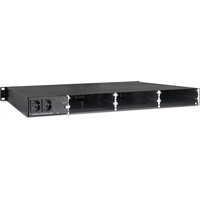
| Product Type | Network Switch |
| Model | VWS 2900 |
| Brand | Kathrein |
| Dimensions (W x D x H) | 44.0 x 20.0 x 4.5 cm |
| Weight | 2.0 kg |
| Power Supply | AC 100-240 V, 50/60 Hz |
| Power Consumption | 30 W (max) |
| Number of Ports | 8 |
| Port Type | 10/100/1000 Mbps Gigabit Ethernet |
| Data Rate | 1000 Mbps (1 Gbps) |
| Switching Capacity | 16 Gbps |
| MAC Address Table | 8K entries |
| VLAN Support | Yes, 802.1Q VLAN |
| Mounting | Rack mountable (19") / Desktop |
| Cooling | Fanless |
| Operating Temperature | 0°C to 40°C |
| Storage Temperature | -20°C to 70°C |
| Humidity | 10% to 90% non-condensing |
| LED Indicators | Power, Link/Activity per port |
| Energy Efficient Ethernet (EEE) | Yes, 802.3az |
| Safety Standards | CE, FCC, RoHS |
| Cleaning | Use a dry, soft cloth; avoid liquids |
| Parts and Repairability | No user-serviceable parts; contact Kathrein support |
| Warranty | 2 years |
Frequently Asked Questions - VWS 2900 KATHREIN
How do I reset the Kathrein VWS 2900 to factory defaults?
Locate the reset button on the device. Press and hold it for about 10 seconds using a paperclip until the LEDs flash. The switch will reboot with factory settings.
What is the default IP address of the switch?
The default IP address is 192.168.0.1, but it may vary. Check the network settings via DHCP or use the reset procedure to restore defaults.
Can I use the VWS 2900 as a PoE switch?
No, the VWS 2900 does not support Power over Ethernet (PoE). It is a standard Gigabit switch that requires external power for connected devices.
How many devices can I connect to this switch?
The switch has 8 ports, so you can connect up to 8 wired devices such as computers, printers, or IP cameras.
Does the switch support VLANs?
Yes, the Kathrein VWS 2900 supports 802.1Q VLAN tagging. You can configure VLANs for network segmentation.
How do I mount the switch in a rack?
The switch comes with rack-mount brackets. Attach the brackets to the sides and secure the switch to the rack using screws (not included). Ensure proper ventilation.
What should I do if the switch is not powering on?
Check the power cable connection and ensure the outlet is working. Try a different power cord. If still no power, contact Kathrein support.
How to update the firmware of the VWS 2900?
Firmware updates are not user-accessible for this unmanaged switch. Contact Kathrein support for any firmware-related issues.
What is the maximum cable length for Ethernet connections?
For Cat5e or Cat6 cables, the maximum distance is 100 meters (328 feet) for reliable gigabit performance.
Is the switch compatible with IPv6?
Yes, the switch is transparent to IPv6 traffic and supports IPv6 packets like any standard layer 2 switch.
User questions about VWS 2900 KATHREIN
0 question about this device. Answer the ones you know or ask your own.
Ask a new question about this device
No questions yet. Be the first to ask one.
Download the instructions for your Network switch in PDF format for free! Find your manual VWS 2900 - KATHREIN and take your electronic device back in hand. On this page are published all the documents necessary for the use of your device. VWS 2900 by KATHREIN.
USER MANUAL VWS 2900 KATHREIN
Manual assistant
Powered by Anthropic
Waiting for your message
Product information
Brand : KATHREIN
Model : VWS 2900
Category : Network switch