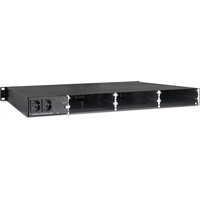
UFOpro - Network router KATHREIN - Free user manual and instructions
Find the device manual for free UFOpro KATHREIN in PDF.


Pick your language and provide your email: we'll send you a specifically translated version.
| Product Type | Satellite Receiver |
| Brand | Kathrein |
| Model | UFOpro |
| Dimensions (W x H x D) | 440 x 44 x 280 mm |
| Weight | 3.5 kg |
| Power Supply | 100-240 V AC, 50/60 Hz |
| Power Consumption | < 30 W |
| Video Output | HDMI, Composite |
| Audio Output | Digital Optical, Analog Stereo |
| Input | Satellite IF (F-type), Ethernet |
| Frequency Range | 950-2150 MHz |
| Demodulation | DVB-S2/S2X |
| Number of Tuners | 2 |
| Operating Temperature | 0°C to 50°C |
| Storage Temperature | -20°C to 70°C |
| Supported Video Resolutions | 1080p, 4K |
| Functions | Channel search, EPG, PVR via USB |
| Remote Control | Included |
| Languages | Multilingual |
| Certifications | CE, RoHS |
| Maintenance | Clean with soft dry cloth |
| Safety | Operate in ventilated area, avoid liquids |
Frequently Asked Questions - UFOpro KATHREIN
How do I set up the Kathrein UFOpro for the first time?
Connect the satellite dish to the Satellite IF input (F-type connector). Then connect the receiver to your TV via HDMI or Composite. Plug in the power cord and turn on the device. Follow the on-screen installation wizard to select your satellite, scan for channels, and configure network settings if needed.
What satellite systems are compatible with the UFOpro?
The UFOpro supports DVB-S2 and DVB-S2X standards, making it compatible with most satellite systems including Astra, Hotbird, and Eutelsat fleets. It works with both Ku-band and Ka-band LNBs.
How can I update the firmware on the UFOpro?
Download the latest firmware from the Kathrein support website onto a USB drive. Insert the USB into the receiver, navigate to Settings > Firmware Update, and select the file. Do not turn off the device during the update. Alternatively, updates may be available via network if connected to the internet.
Can I connect an external hard drive for recording?
Yes, the UFOpro supports PVR (Personal Video Recorder) via a USB port. Connect a USB hard drive or flash drive (formatted as FAT32 or NTFS) and use the Record button on the remote to schedule or start recording live TV.
How do I perform a factory reset on the UFOpro?
Go to Settings > System > Factory Reset. Confirm the action when prompted. The device will reboot and erase all user settings, including channel lists and preferences. Use this if you encounter persistent issues or want to start fresh.
What video resolutions are supported by the UFOpro?
The UFOpro supports resolutions up to 4K (2160p) at 60 Hz via HDMI. It also outputs 1080p, 1080i, 720p, and 576p. For composite output, resolution is limited to 576i or 480i.
Why is there no signal on my UFOpro and how can I fix it?
First, check the cable connection from the dish to the Satellite IF input. Ensure the dish is properly aligned and the LNB is functional. Go to Settings > Signal Test to view signal strength and quality. Try a factory reset if needed. Also verify that the correct satellite and transponder are selected.
Is the UFOpro compatible with DiSEqC switches?
Yes, the UFOpro supports DiSEqC 1.0, 1.1, and 1.2 protocols. This allows connection to multiple LNBs or dishes via a compatible switch. Configure the DiSEqC settings in the Installation Menu for each satellite position.
How do I connect the UFOpro to the internet for streaming?
Connect an Ethernet cable from your router to the LAN port on the receiver. Alternatively, use a Wi-Fi USB adapter if supported (check manual). Go to Settings > Network to configure IP automatically via DHCP or manually. Once connected, you can use IPTV or streaming apps.
What does the LED indicator on the UFOpro mean?
A steady green LED indicates normal operation. Blinking green means the device is in standby or updating. Red LED signals an error or no signal. Refer to the manual's LED status table for detailed troubleshooting.
User questions about UFOpro KATHREIN
0 question about this device. Answer the ones you know or ask your own.
Ask a new question about this device
No questions yet. Be the first to ask one.
Download the instructions for your Network router in PDF format for free! Find your manual UFOpro - KATHREIN and take your electronic device back in hand. On this page are published all the documents necessary for the use of your device. UFOpro by KATHREIN.
USER MANUAL UFOpro KATHREIN
Manual assistant
Powered by Anthropic
Waiting for your message
Product information
Brand : KATHREIN
Model : UFOpro
Category : Network router