
A3 - Guitar effects pedalboard ZOOM - Free user manual and instructions
Find the device manual for free A3 ZOOM in PDF.


| Product type | Acoustic guitar effects pedalboard (preamp and effects) |
| Brand | ZOOM |
| Model | A3 |
| Dimensions | 160.3 mm (D) x 108 mm (W) x 54.9 mm (H) |
| Weight | 630 g (without batteries) |
| Power supply | ZOOM AD-16 AC adapter (DC 9V, 500 mA, center negative) or 4 AA batteries (alkaline or NiMH) |
| Battery life | Approximately 8 hours with alkaline batteries (without 48V phantom power) |
| Number of simultaneous effects | 3 |
| Number of user memories | 20 patches |
| Number of effects | 40 types (including chorus, delay, reverb, etc.) + 28 guitar models |
| Sampling frequency | 44.1 kHz |
| A/D and D/A conversion | 24-bit with 128x oversampling |
| Signal processing | 32-bit floating point and 32-bit fixed point |
| Frequency response | 40 Hz – 20 kHz (+1 dB/-3 dB, 10 kΩ load) |
| Inputs | PICKUP IN (1/4" mono jack), MIC IN (combo XLR/jack with +24/+48 V phantom power) |
| Outputs | R (mono jack), L/MONO/PHONES (stereo jack), BALANCED OUT (XLR with Ground Lift) |
| Display | LCD with backlight |
| Main functions | High-quality preamp, acoustic modeling (16 bodies + 28 models), 40 effects, anti-feedback (3 frequencies), 12 dB boost, chromatic tuner, auto save, tap tempo, USB for firmware update |
| Maintenance and cleaning | Use a soft, dry cloth. Do not use alcohol, solvents, or abrasive products. |
| Safety | Use only the ZOOM AD-16 adapter. Do not open the casing. Observe battery polarity. |
| Spare parts and repairability | Contact ZOOM customer service for any repairs. No spare parts available to the public. |
Frequently Asked Questions - A3 ZOOM
User questions about A3 ZOOM
0 question about this device. Answer the ones you know or ask your own.
Ask a new question about this device
Download the instructions for your Guitar effects pedalboard in PDF format for free! Find your manual A3 - ZOOM and take your electronic device back in hand. On this page are published all the documents necessary for the use of your device. A3 by ZOOM.
USER MANUAL A3 ZOOM
Pre-Amp & Effects for Acoustic Guitar
A3
OPERATION MANUAL
Thank you very much for purchasing the ZOOM A3.
Please read this manual carefully to learn about all the functions of the A3 so that you will be able to use it fully for a long time.
Keep this manual in a convenient place for reference when necessary.
Contents
Usage and Safety Precautions 2
Introduction 3
Terms Used in This Manual 3
Part Names 4
Turning the Power ON 6
Adjusting the Tone and Volume 8
Adjusting Effects 10
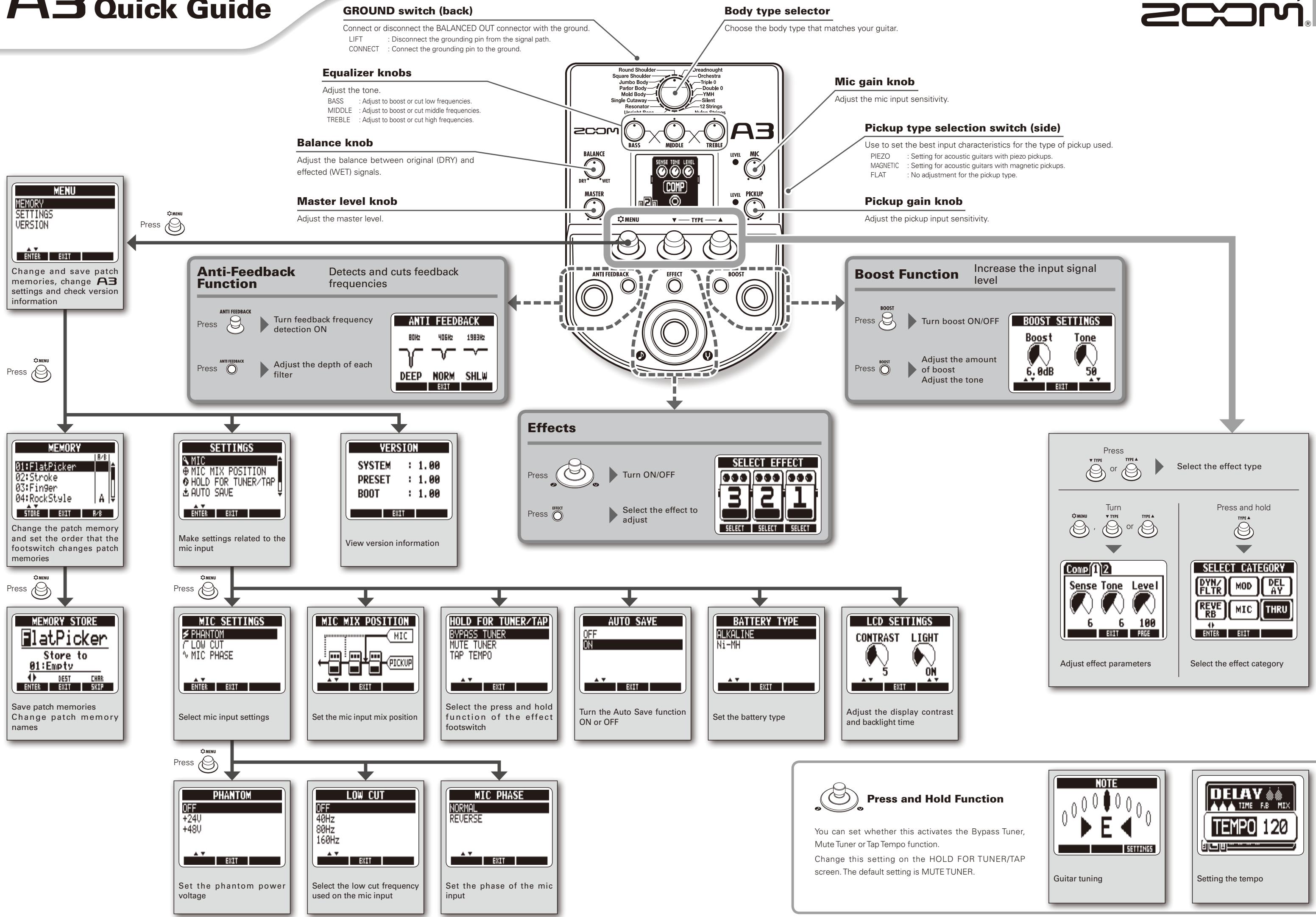
Using the Boost Function 15
Using the Anti-Feedback Function 16
Selecting and Saving Patch Memories 18
Changing Patch Memories 20
Changing Various Settings 22
Using the Tuner 28
About the Firmware 30
Restoring the A3 to its Factory
Default Settings 32
Effect Types and Parameters 33
Troubleshooting 42
Specifications 43
SAFETY PRECAUTIONS
In this manual, symbols are used to highlight warnings and cautions that you must read to prevent accidents. The meanings of these symbols are as follows:

Warning
Something that could cause serious injury or death.

Caution
Something that could cause injury or damage to the equipment.
Other symbols

Required (mandatory) actions.

Prohibited actions.

Warning
Operation using an AC adapter
Use only a ZOOM AD-16 AC adapter with this unit.
Do not use do anything that could exceed the ratings of outlets and other electrical wiring equipment. Before using the equipment in a foreign country or other region where the electrical voltage differs from that indicated on the AC adapter, always consult with a shop that carries ZOOM products beforehand and use the appropriate AC adapter.
Operation using batteries
Use 4 conventional 1.5-volt AA batteries (alkaline or nickel-metal hydride).
Read battery warning labels carefully.
Always close the battery compartment cover when using the unit.
Alterations
Never open the case or attempt to modify the product.

Precautions
Product handling
1 Do not drop, bump or apply excessive force to the unit.
1 Be careful not to allow foreign objects or liquids to enter the unit.
Operating environment
Do not use in extremely high or low temperatures.
Do not use near heaters, stoves and other heat sources.
Do not use in very high humidity or near splashing water.
Do not use in places with excessive vibrations.
Do not use in places with excessive dust or sand.
AC adapter handling
When disconnecting the AC adapter from an outlet, always pull the body of the adapter itself.
During lightning storms or when not using the unit for a long time, disconnect the power plug from the AC outlet.
Battery handling
Install the batteries with the correct + / - orientation.
Use a specified battery type. Do not mix new and old batteries or different brands or types at the same time. When not using the unit for an extended period of time, remove the batteries from the unit.
If a battery leak should occur, wipe the battery compartment and the battery terminals carefully to remove all battery residue.
Connecting cables with input and output jacks
Always turn the power OFF for all equipment before connecting any cables.
Always disconnect all connection cables and the AC adapter before moving the unit.
Volume
Do not use the product at a loud volume for a long time.
Usage Precautions
Interference with other electrical equipment
In consideration of safety, the A3 has been designed to minimize the emission of electromagnetic radiation from the device and to minimize external electromagnetic interference. However, equipment that is very susceptible to interference or that emits powerful electromagnetic waves could result in interference if placed nearby. If this occurs, place the A3 and the other device farther apart. With any type of electronic device that uses digital control, including the A3, electromagnetic interference could cause malfunction, corrupt or destroy data and result in other unexpected trouble. Always use caution.
Cleaning
Use a soft cloth to clean the panels of the unit if they become dirty. If necessary, use a damp cloth that has been wrung out well. Never use abrasive cleansers, wax or solvents, including alcohol, benzene and paint thinner.
Malfunction
If the unit becomes broken or malfunctions, immediately disconnect the AC adapter, turn the power OFF and disconnect other cables. Contact the store where you bought the unit or ZOOM service with the following information: product model, serial number and specific symptoms of failure or malfunction, along with your name, address and telephone number.
Copyrights
- Windows®, Windows Vista®, Windows® 7 and Windows® 8 are trademarks or registered trademarks of Microsoft®.
- Macintosh® and Mac OS® are trademarks or registered trademarks of Apple Inc.
- All other trademarks, product names and company names mentioned in this documentation are the property of their respective owners.
Note: All trademarks and registered trademarks mentioned in this manual are for identification purposes only and are not intended to infringe on the copyrights of their respective owners.
Acoustic modeling restores body tone
Presents for 16 body types and 28 model types simulate the sonic characteristics of a variety of acoustic guitars with different body shapes and material properties. By choosing a body and model according to the guitar that you are using, you can share the original rich and beautiful tone of your acoustic guitar with audiences when you perform live.
High-quality preamp can be used with both pickups and mics
The preamp was designed especially for acoustic guitars and can be used with piezoelectric, magnetic and passive pickups. In addition, you can connect a condenser microphone to the XLR mic input, which can provide phantom power, and mix that signal with the pickup signal to shape the sound. This acoustic guitar preamp offers a full array of features. The 3-band EQ can be used to adjust the tone according to the environment. The BALANCE knob can be used to set the ratio of the original sound (DRY) and the sound after the effects (WET). The super low noise design provides a 120dB S/N ratio and a -100dBm noise floor.
40 types of acoustic guitar effects
The 40 effects, which have a focus on chorus, delay, reverb and other spatial effects, can make acoustic tones even more beautiful. Other effects include a compressor that suppresses input peaks and evens the volume level, an air effect that simulates the sense of space from room tone and a detuning effect that creates a sound like a 12-string guitar. You can use any 2 of these effects together as you like.
Anti-feedback function with minimal effect on tone quality
The Anti-feedback function can quickly and effectively eliminate feedback during a performance. Just step on the Anti-feedback switch to automatically detect the frequency that is causing feedback and surgically apply a steep filter to cut that frequency band. The Anti-feedback function can handle up to 3 different frequencies that are causing feedback.
Clean boost of up to 12 dB
The Boost function can reduce the volume differences of fingerpicking, strumming chords and other guitar playing techniques, as well as increase amplification during solos. You can also adjust the sound when the boost is active with the TONE parameter.
Terms Used in This Manual
Patch memory
The ON/OFF status and the parameter settings of each effect are stored as "patch memories". The A3 can store 20 patch memories.
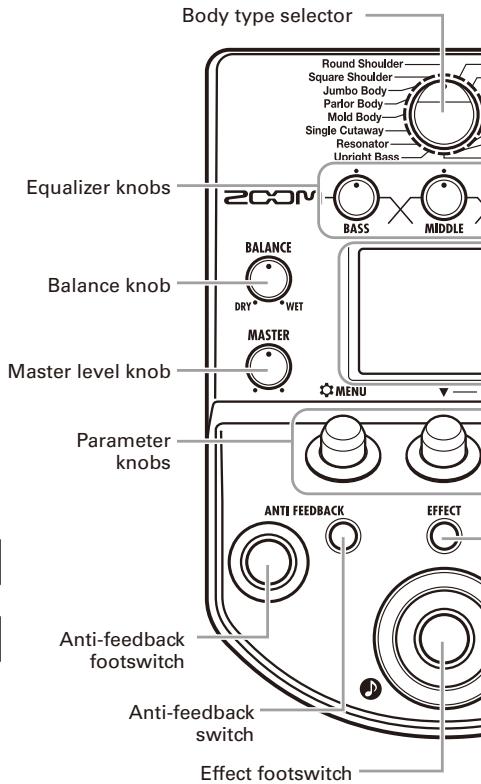
Left Panel
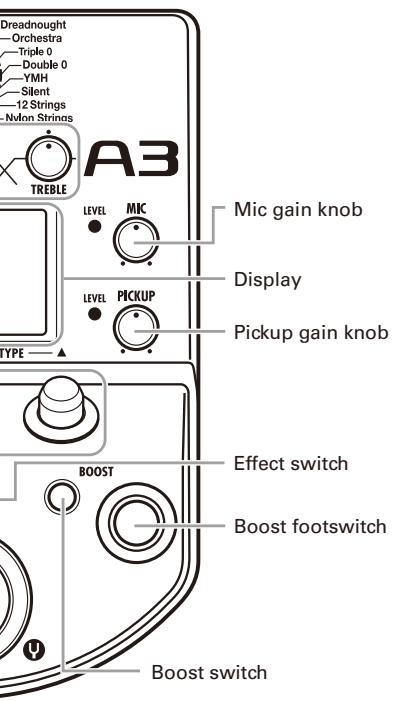
Top Panel
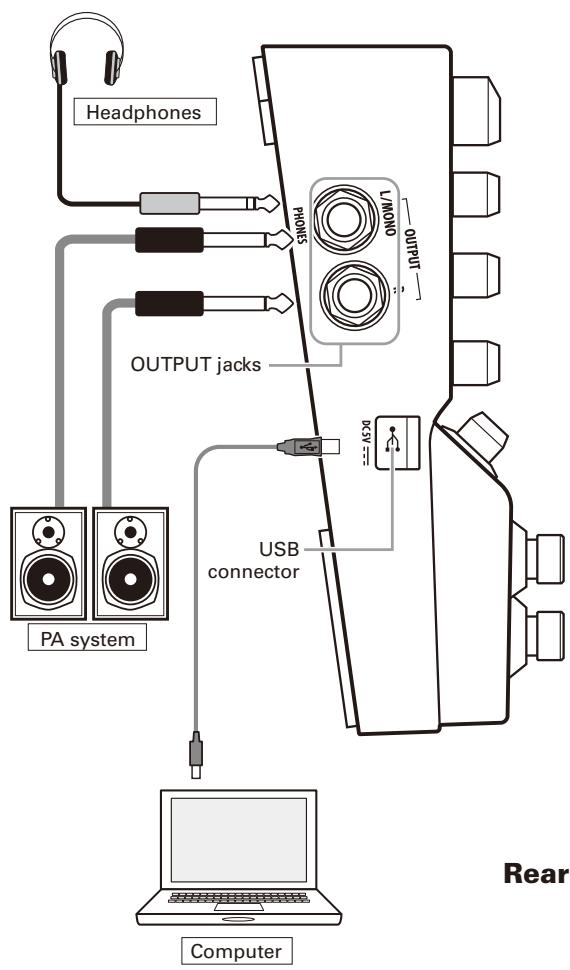
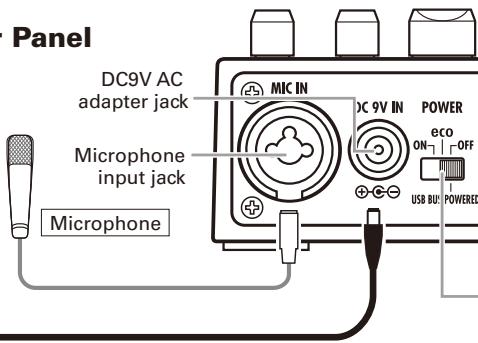
Rear Panel
Right Panel
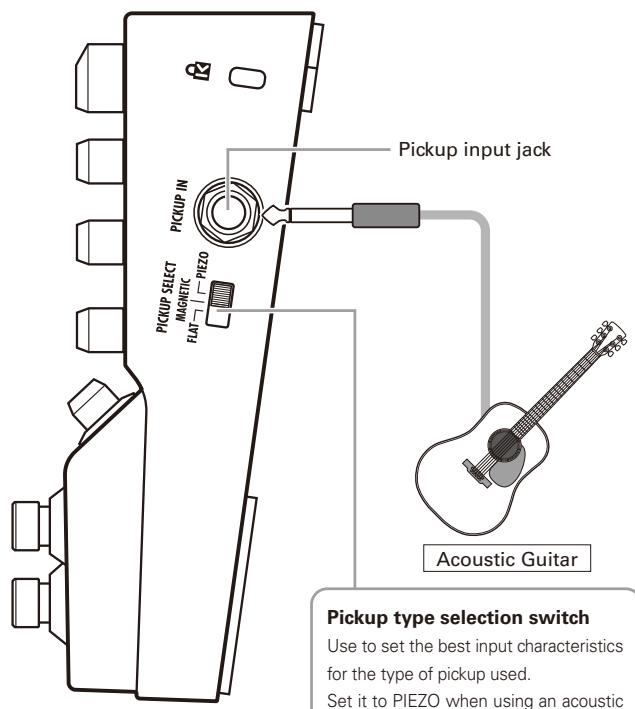
Pickup type selection switch
Use to set the best input characteristics for the type of pickup used.
Set it to PIEZO when using an acoustic guitar with a piezoelectric pickup or MAGNETIC when using a magnetic pickup. You can also set it to FLAT if you do not want any pickup adjustment.
POWER (eco) switch
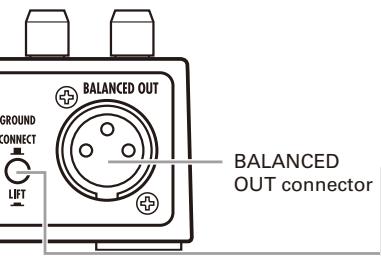
GROUND switch
Use this switch to connect or disconnect the BALANCED OUT connector with the ground.
Set it to "LIFT" (pushed in) to separate the signal path from the grounding pin. Set it to "CONNECT" (not pushed in) to connect it to the grounding pin.
1 | To turn the power ON
- Lower the volume of any connected amplifier or other audio equipment all the way.

When using batteries
Open the cover on the bottom of the unit and insert batteries in the compartment.
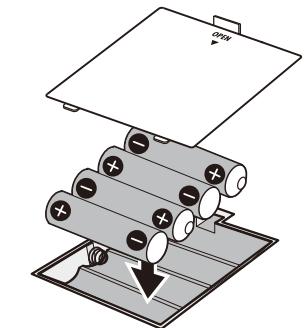
Bottom of the unit
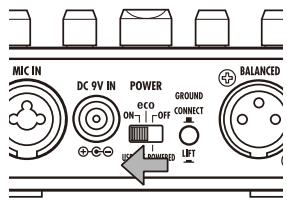

When using an adapter
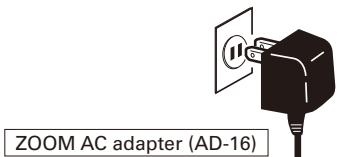
Connect an AD-16 adapter.
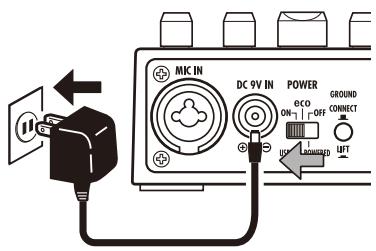
- Turn the connected amplifier or other audio equipment ON and raise its volume.
Using the POWER switch eco setting
When set to eco, if the A3 is not used for 10 hours, its power will automatically turn off.
If you want to keep it on all the time set the POWER switch to ON.
2 Display information
The Home Screen shows the current effect
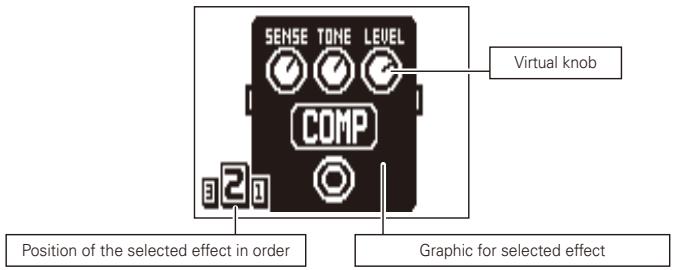
HINT
- The positions of the virtual knobs change with the parameter values.
Press to return to the Home Screen when any other screen is open.
Edit Screen shows parameters being edited
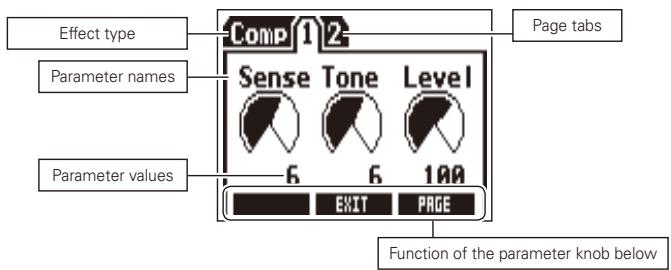
HINT
- If there are 4 or more parameters that can be adjusted, multiple page tabs will be shown.
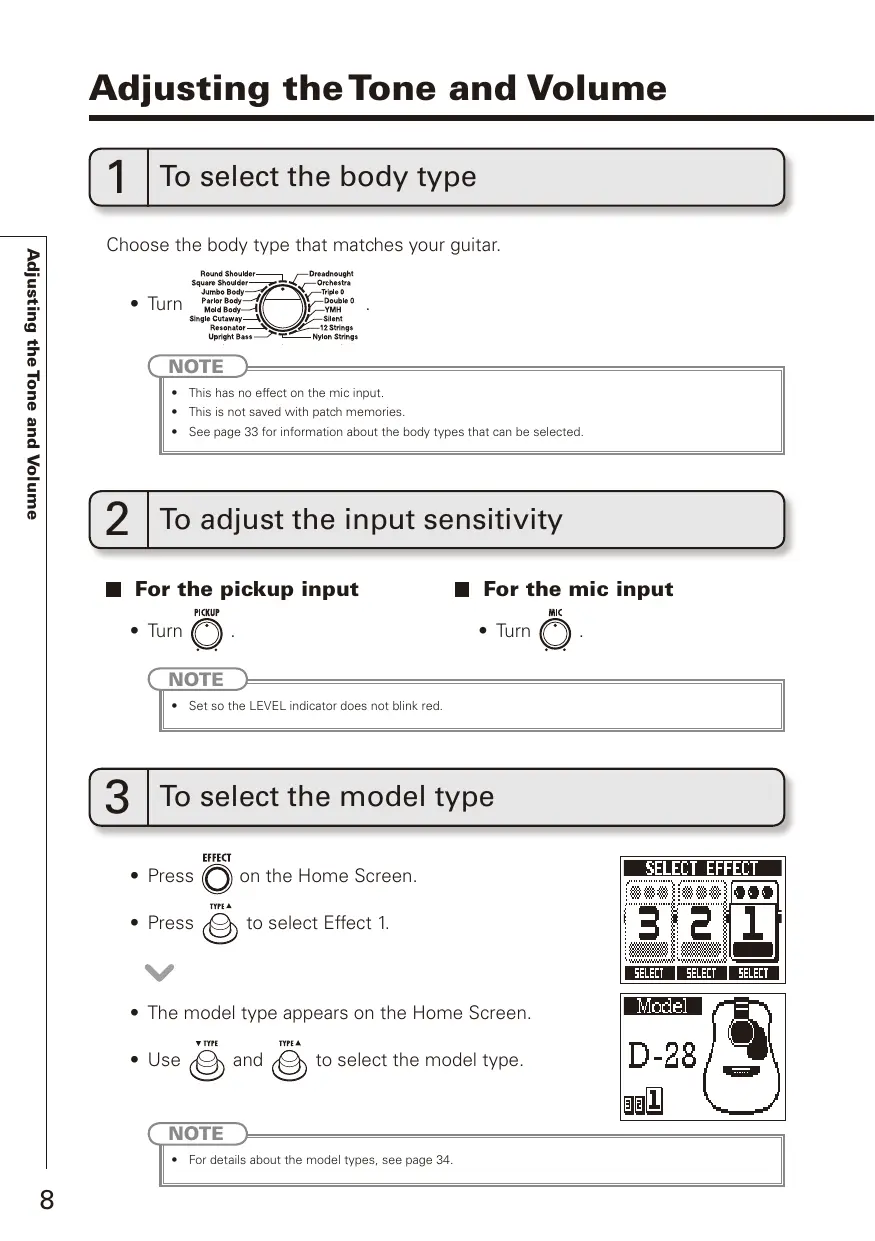
1 | To select the body type
Choose the body type that matches your guitar.
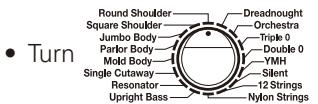
NOTE
- This has no effect on the mic input.
This is not saved with patch memories.
See page 33 for information about the body types that can be selected.
2 | To adjust the input sensitivity
For the pickup input
For the mic input
NOTE
- Set so the LEVEL indicator does not blink red.
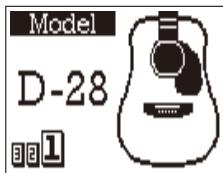
3 | To select the model type
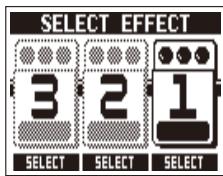
- Press EFFECT on the Home Screen.
- Press to select Effect 1.

- The model type appears on the Home Screen.
- Use and to select the model type.
NOTE
- For details about the model types, see page 34.
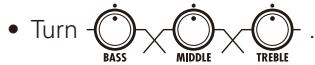
4 | To adjust the equalization
HINT
: Adjust to boost or cut low frequencies (around 60Hz) by up to ±12dB.
Adjust to cut middle frequencies (around 700Hz) by up to -12dB.
: Adjust to boost middle frequencies (around 400Hz) by up to 12dB.
Adjust to boost or cut high frequencies (around 8kHz) by up to ±12dB.
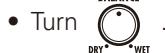
5 | To adjust the amount of the original sound
Adjust the balance between original (DRY) and effected (WET) signals.
NOTE
- The effected signal is the sound created by the pickup selection, preamp, effect, boost and equalizer settings.
6 | To adjust the master level
Confirm that the Home Screen is shown.
1 | To turn an effect ON and OFF
Press

- This switches the effect shown on the display ON and OFF.
OFF

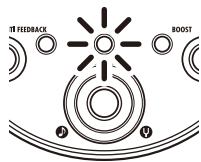
ON
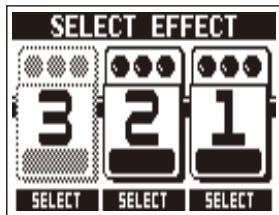
2 | To select the effect to adjust
Press

Press adjust


to select the effect to
HINT
- Effects that are OFF appear gray.

- The selected effect appears on the Home Screen.
NOTE
- Effect 1 is dedicated to model types. (See page 34.)
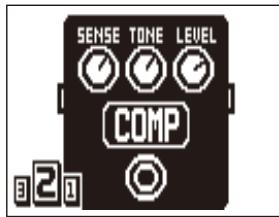
3 | To select an effect type
Press

or


- The effect type changes.
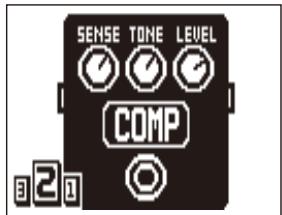

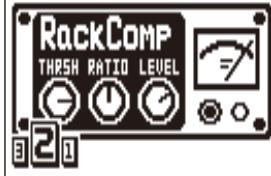
HINT
See the section starting on page 34 for information about effect types and parameters.
NOTE
- A model type can only be selected for Effect 1.
Effect processing capacity
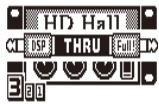
The A3 allows you to combine 3 effects as you like. However, if you combine effect types that require great amounts of processing power, the available processing capacity might not be enough. If the processing required for an effect exceeds the available capacity, the effect is bypassed and a "DSP Full!" message appears. This can be avoided by changing 1 or more of the effect types or setting them to THRU.
NOTE
- An effect requires the same amount of processing power whether it is ON or OFF.
4 | To select the effect category
- Press and hold for 1 second.

- Turn to choose the category.
Press

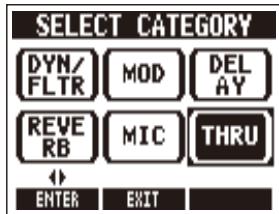
HINT
- Press to cancel.
- Effect categories can only be selected for Effects 2 and 3.
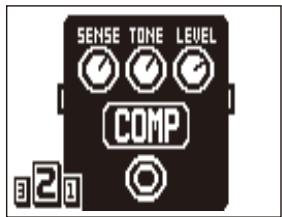
5 To adjust parameters
- Turn


and


- The editing screen opens where you can adjust parameters.

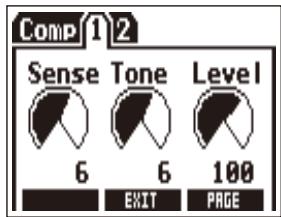
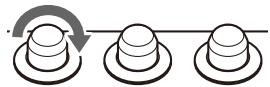
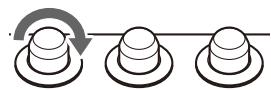
6 | To change the page
- Press TYPE A when the Edit Screen is open.
- The next page opens.
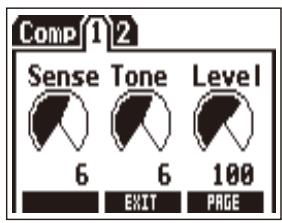

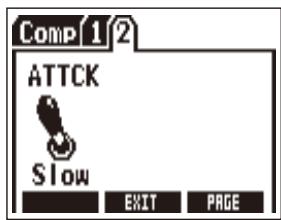
7 | To use the Tap Tempo function
Delay effects and some modulation and filter effects can be synchronized to the tempo. Select an effect that can be synchronized, and set its Time, Rate or other parameter that can be synchronized to a or note value.
The tempo can be set by tapping the footswitch or a knob.
NOTE
- By default, when pressed and held, the footswitch is set to activate the Tuner. To tap the tempo with the footswitch, the setting must be changed so that it activates Tap Tempo when pressed and held. (See page 24.)
- Tempo settings are saved separately for each patch memory.
To set the tempo by tapping the footswitch
-
Press and hold ( ) for 1 second.
-
Tap 2 or more times at the desired
tempo.
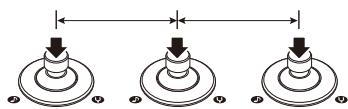
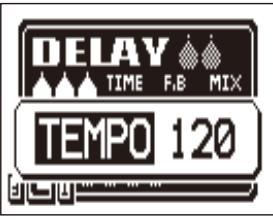
- Press and hold ( ) for 1 second
to return to the Home Screen.
NOTE
- If you press when becomes unlit and the effect turns OFF for 1 second.
To set the tempo with the parameter knobs
- Open an effect that can be synchronized to the tempo. (See page 35.)

- Turn , and

Press 2 or more times at the desired tempo.
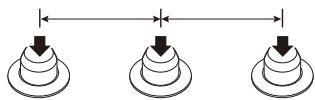
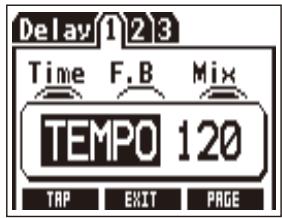
8 | To return to the Home Screen
Press
HINT
- You can press on any effect screen to return to the Home Screen.
You can increase the volume by up to 12 dB, allowing you to adjust the volume used during solos or when switching from strumming to finger picking.
1 | To turn the boost ON and OFF
- This turns the Boost function ON or OFF.
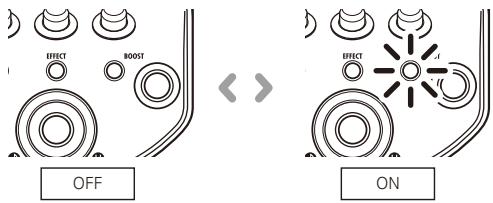
NOTE
- If the sound becomes distorted when the Boost function is ON, adjust the master level.
- The Boost ON/OFF setting is not saved. It is always OFF when the unit starts up.
2 | To adjust parameters
Press

- Adjust parameters.
Boost: Turn
Tone: Turn
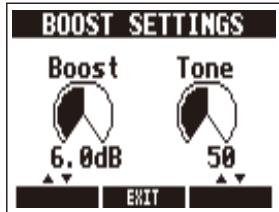
3 | To complete the setting
Press

or

The frequency range that is causing feedback can be detected automatically and cut to stop the feedback.
1 | To eliminate feedback
ANTI FEEDBACK
Press

NOTE
-
The Anti-feedback ON/OFF setting is not saved. It is always OFF when the unit starts up.
-
After detecting the frequency causing feedback, the Anti-feedback function turns ON.
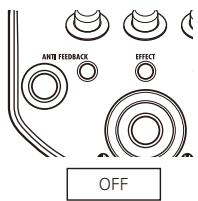
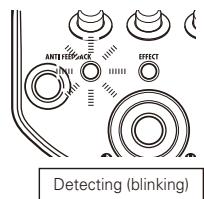
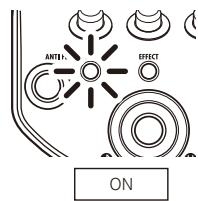
ANTI FEEDBACK
Each time you press , the unit detects the feedback frequency. Up to 3 frequencies can be cut at once.
HINT
- After detection completes, the screen shows the number of feedback frequencies that are being cut.
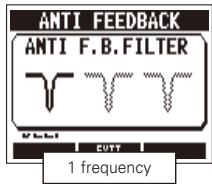
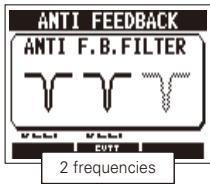
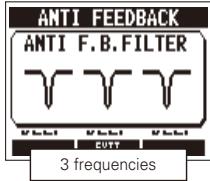
ANTI FEEDBACK
- To turn off the Anti-feedback function, press again when 3 frequencies have been set.
NOTE
- When the Anti-feedback function is turned off, the detected frequencies are forgotten.
- When the unit is detecting the feedback frequency, it will be canceled if you use any other switch or knob.
2 | To adjust parameters
Press
ANTI FEEDBACK


- Adjust the depth (amount frequency is cut).
Depth of 1st filter:
Turn

Depth of 2nd filter:
Turn

Depth of 3rd filter:
Turn

NOTE
After detection, the depth of each filter is automatically set to DEEP.
3 | To complete the setting
Press

or
ANTI FEEDBACK

Selecting and Saving Patch Memories
You can save up to 20 effect settings as patches in the memory.
When shipped from the factory, the automatic patch saving function is active.
Changes to settings are saved automatically as soon as they are made.
1 | To select a patch memory
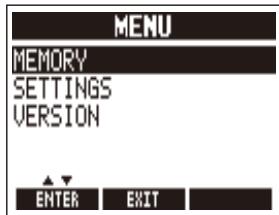
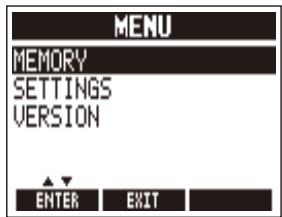
- Press on the Home Screen.

- Turn to select MEMORY.
- Press

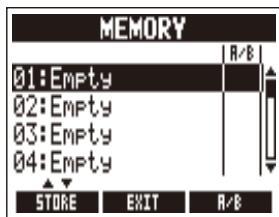
- Turn to select a patch memory.
2 | To save a patch memory
Press

on the MEMORY screen.
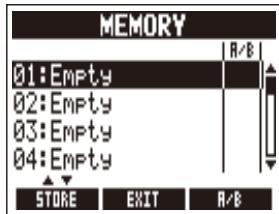

- Change the name and select where to save the patch memory.
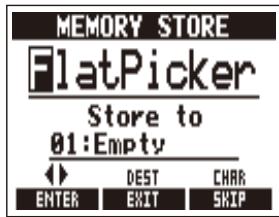
Turn to move the cursor.
Turn to change the character.
Press to change the type of character/symbol.
Turn to select where to save the patch memory.

Press

NOTE
After the settings are saved, the MEMORY screen reopens.
HINT
- You can cancel saving patch memory settings and return to the MEMORY screen by pressing instead of
You can set in advance the order that patch memories are changed when you press the footswitch. You can add up to 20 patch memories to this order.
1 | To add or remove patch memories to a list that the footswitch cycles through
- Press on the Home Screen.

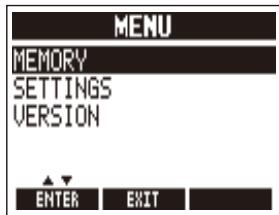
- Turn to select MEMORY.
Press


- Turn to select a patch memory to add it to or remove it from the order.
Press

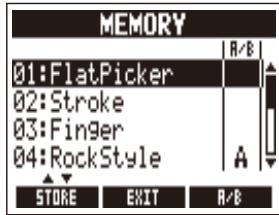
HINT
- Press and hold to remove all patch memories from the footswitch list.
2 | To cycle through patch memories in the list in order using the footswitch
- Press on the Home Screen.

- Turn to select MEMORY.
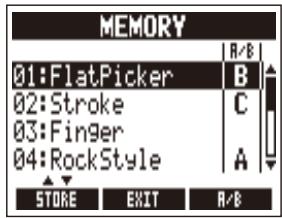
Each time you press the footswitch, the patch memory will change in the set order.
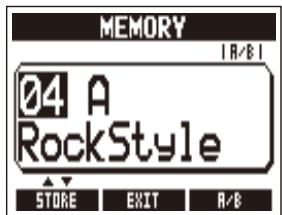

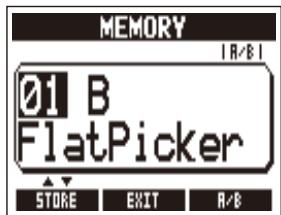
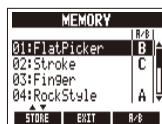
HINT
- In the example on the right, pressing the footswitch cycles through the patch memories in alphabetical order like this.
[04:RockStyle] [01:FlatPicker] [02:Stroke]
[04:RockStyle] [01:FlatPicker] ...
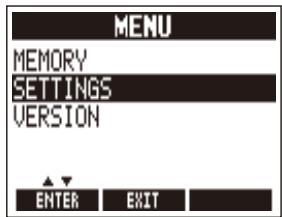
1 | To change various settings
- Press on the Home Screen.

- Turn to select SETTINGS.
Press
HINT
- When making settings, press to return to the previous screen.
Press to return to the Home Screen.
2 | To change mic input settings
- Turn to select MIC.
Press
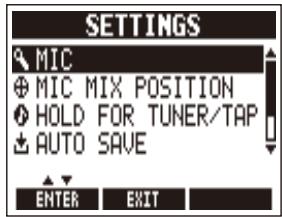

- Turn to select the item to set.
Press
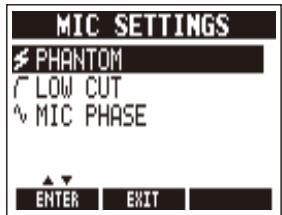

- Turn to change the setting.
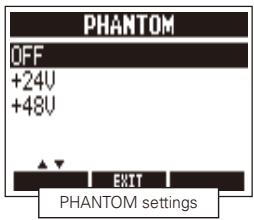
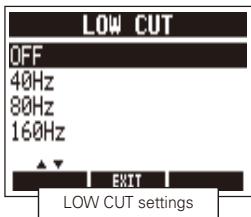
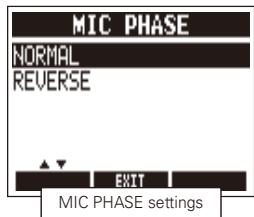
HINT
- PHANTOM: Set the phantom power voltage.
- LOW CUT: To reduce low-frequency noise, select a frequency band to cut.
- MIC PHASE: Set the phase of the mic input signal.
NOTE
If you press to exit the PHANTOM page, the selected setting will become active.
- Some condenser mics will not work with the +24V phantom power setting. This uses less power than the +48V setting, though, so it can help when using batteries.
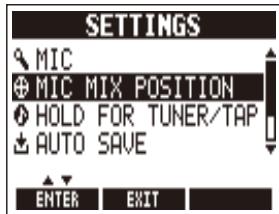
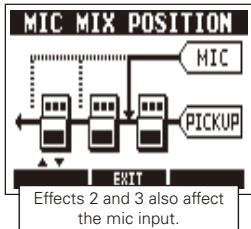
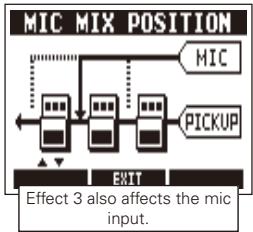
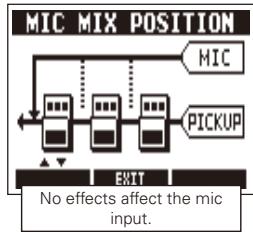
3 | To set the mix position of the mic input
- Turn to select MIC MIX POSITION.
- Press

- Turn to select the mic mix position.
4 | To set the function activated by pressing and holding the footswitch
-
Turn to select HOLD FOR TUNER/TAP.
-
Press

- Turn to select the function.
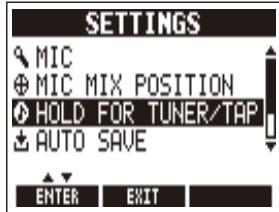
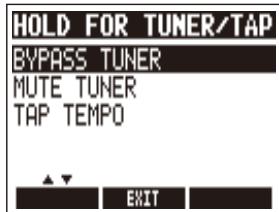
HINT
- BYPASS TUNER : Activates the tuner. The effects are bypassed when the tuner is being used.
- MUTETUNER: Activates the tuner. The output is muted when the tuner is being used (default setting).
TAP TEMPO: Activates Tap Tempo.
5 To set the Auto Save function
- Turn to select AUTO SAVE.
- Press
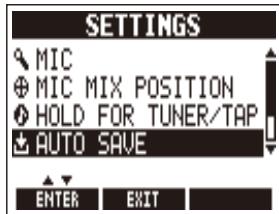

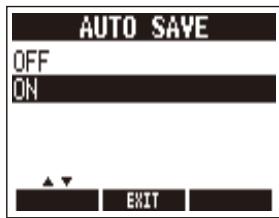
- Turn to select the setting.
HINT
- ON (default): Changes to presets are automatically saved.
- OFF: Changes to presets are not saved until they are saved manually. (See page 19.)
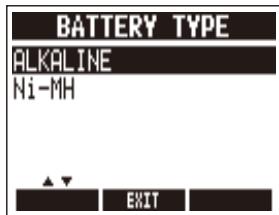
6 | To select the battery type
- Turn to select BATTERY TYPE.
- Press
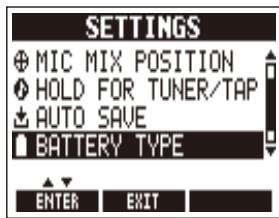

- Turn to set the type of batteries used.
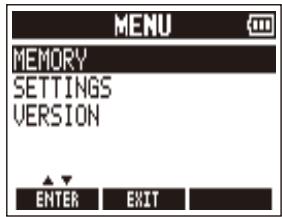
7 | To check the remaining battery charge
- The remaining battery charge is shown at the top right of the MENU screen when batteries are in use.
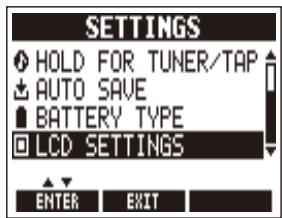
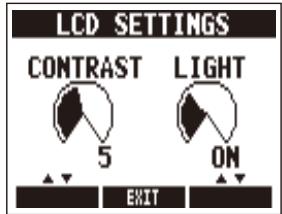
8 | To adjust the display
- Turn to select LCD SETTINGS.
- Press

- Adjust the display.
CONTRAST:
Turn

LIGHT (backlight time) :
Turn

9 | To end making settings
Press

HINT
- When making settings, press to return to the previous screen.
1 | To activate the tuner
Press and hold
for 1 second.
HINT
- A setting must be changed to make pressing and holding activate Tap Tempo. (See page 24.)

NOTE
SETTINGS
2 | To change the tuner's standard pitch
Press

on the Tuner Screen.
- Turn

NOTE
The standard pitch for middle A can be set to 435 - 445Hz
- The standard pitch is remembered even when the POWER is OFF.
CALIB TYPE
440Hz CHRU-MATIC

TUNER SETTINGS
3 | To select the tuner type
Press

on the Tuner Screen.
- Turn

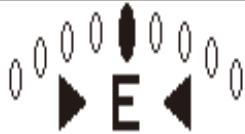
Chromatic tuner
The chromatic tuner shows the nearest pitch name (semitone) and how far the input sound is from that pitch.
CALIB TYPE FLAT
440Hz GUITAR b>0

TUNER SETTINGS
Other tuning types
Depending on the selected type, the nearest string name and how far the sound input is from that pitch are shown. You can select from the following tunings.
| Display | Meaning | String number/Note name | ||||||
| 7 | 6 | 5 | 4 | 3 | 2 | 1 | ||
| GUITAR | Standard tuning for guitars, including 7-string guitars | B | E | A | D | G | B | E |
| OPEN A | In open A tuning, the open strings make an A chord | - | E | A | E | A | C# | E |
| OPEN D | In open D tuning, the open strings make a D chord | - | D | A | D | F# | A | D |
| OPEN E | In open E tuning, the open strings make an E chord | - | E | B | E | G# | B | E |
| OPEN G | In open G tuning, the open strings make a G chord | - | D | G | D | G | B | D |
| DADGAD | This alternate tuning is often used for tapping, etc. | - | D | A | D | G | A | D |
4 | To use a drop tuning
- Press on the Tuner Screen.

- Turn

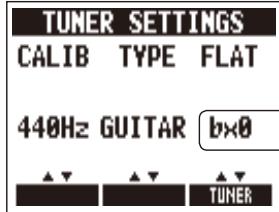
NOTE
- You can drop the tuning by one (b × 1) , two (b × 2) or three (b × 3) semitones.
- Drop tuning is not possible when the TYPE is set to CHROMATIC.
5 | To tune a guitar
- Play the open string that you want to tune and tune it.
Chromatic tuner
The name of the nearest note and the pitch accuracy are shown.
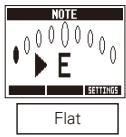
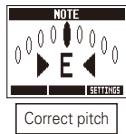
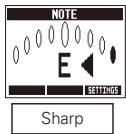
Other tuner types
The number of the nearest string and the pitch accuracy are shown.
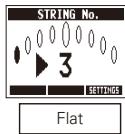
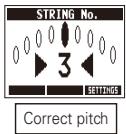
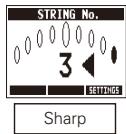
6 | To end tuning
Press
HINT
- You can also end tuning by pressing


ANTI FEEDBACK
and
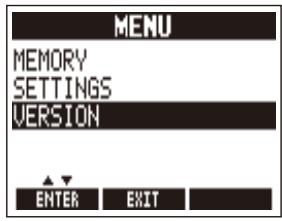
1 | To view the firmware versions
- Press on the Home Screen.

- Turn to select VERSION.


- The firmware version is shown.
VERSION
SYSTEM : 1.00
PRESET : 1.00
BOOT : 1.00
EXIT
2 | To download the latest firmware Update application
- Visit the ZOOM website (http://wwwzoomo.co.jp).
3 | To prepare to update the firmware
- Confirm that the POWER switch is set to OFF.

- While pressing both USB cable.
ANTI FEEDBACK BOOST

, connect the unit to a computer using the

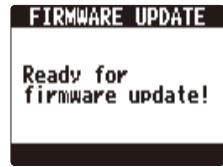
- The FIRMWARE UPDATE screen appears.
4 | To update the firmware
- Launch the firmware update application on your computer, and execute the update.
NOTE
- Do not disconnect the USB cable while the firmware is being updated.
HINT
- See the ZOOM website for instructions about how to use the application.
5 | To complete updating
- When the A3 has finished updating, "Complete!" appears on the display.

- Disconnect the USB cable.
HINT
- Updating the firmware will not erase saved patch memories.
Restoring the A3 to its Factory Default Settings
-
To use the All Initialize function
-
While pressing , set the POWER switch to ON.
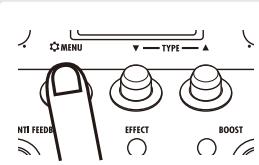
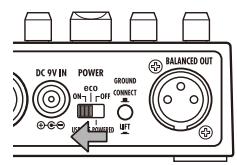
- The All Initialize screen appears.
All Initialize
Are you sure?
YES: EFFECT SW
NO : ANY KEY
- To execute the All Initialize function
Press


NOTE
Press any key other than

to cancel.
HINT
- Executing the All Initialize function will restore all the settings of the A3, including its patch memories, to factory defaults. Do not use this function unless you are certain that you want to do this.
Body Types
| Round Shoulder | Dreadnought | ||
| Best for guitars with round shoulders, such as the Gibson J-45. | Best for dreadnought guitars, such as the Martin D-28. | ||
| Square Shoulder | Orchestra | ||
| Best for guitars with square shoulders, such as the Gibson Hummingbird. | Best for orchestra guitars, such as the Martin OM-28. | ||
| Jumbo Body | Triple 0 | ||
| Best for jumbo body guitars, such as the Gibson SJ-200. | Best for 000 guitars, such as the Martin 000-28. | ||
| Parlor Body | Double 0 | ||
| Best for parlor guitars, such as the Gibson LG-2. | Best for 00 guitars, such as the Martin 00-18. | ||
| Mold Body | YMH | ||
| Best for resin guitars, such as the Ovation Adamas. | Best for YAMAHA jumbo body guitars, such as the YAMAHA LL36. | ||
| Single Cutaway | Silent | ||
| Best for single cutaway guitars, such as the Taylor 314ce. | Best for silent guitars that do not have resonant body cavities. | ||
| Resonator | 12 Strings | ||
| Best for resonator guitars. | Recreates the clear tones of 12-string guitars. | ||
| Upright Bass | Nylon Strings | ||
| Best for upright basses. | Best for classical guitars that use nylon strings. | ||
Model Types
| D-28 | Dreadnought | D-18 | Dreadnought | D-45 | Dreadnought | 000-28 | Triple 0 |
| Body characteristics of a Martin D-28, which is a standard acoustic guitar style. | Body characteristics of a Martin D-18, which features a clear tone. | Body characteristics of a Martin D-45, which features rich harmonics and deep bass. | Body characteristics of a Martin 000-28, which features beautiful treble. | ||||
| 000-18 | Triple 0 | OM-28 | Orchestra | OM-18 | Orchestra | OM-42 | Orchestra |
| Body characteristics of a Martin 000-18, which features clear bass. | Body characteristics of a Martin OM-28, which features full high frequencies and just the right amount of volume. | Body characteristics of a Martin OM-18, which features a tone with a fast response. | Body characteristics of a Martin OM-42, which features rich harmonics and a tight low end. | ||||
| 00-21 | Double 0 | 00-18 | Double 0 | J-45 | Round Shoulder | Advanced Jumbo Round Shoulder | |
| Body characteristics of a Martin 00-21, which features a clear tone typical of jacaranda. | Body characteristics of a Martin 00-18, which features a balanced tone from a small body. | Body characteristics of a Gibson J-45, which features a dry tone that is perfect for strumming. | Body characteristics of a Gibson J-45 Advanced Jumbo, which uses a rosewood back to add rich bass to the J-45 sound. | ||||
| J-160E Round Shoulder | Hummingbird Square Shoulder | Dove Square Shoulder | SJ-200 | Jumbo Body | |||
| Body characteristics of a Gibson J-160E, which is famous as a pioneering acoustic-electric guitar. | Body characteristics of a Gibson Hummingbird, which is loved by pop and rock artists. | Body characteristics of a Gibson Dove, which features a solid bass tone from its maple sides and back. | Body characteristics of a Gibson SJ-200, which is known as the king of flattop guitars. | ||||
| F-55 | Jumbo Body | LG-2 | Parlor Body | LG-0 | Parlor Body | 314ce | Single Cutaway |
| Body characteristics of a Guild F-55, which has deep bass and bell-like high frequencies thanks to its large body. | Body characteristics of a Gibson LG-2, which is a small-bodied guitar loved by blues musicians. | Body characteristics of a Gibson LG-0, which has a down-home sound thanks to its ladder bracing. | Body characteristics of a Taylor 314ce, which is popular because of its great playability and balanced tone. | ||||
| LL36 | YMH | LL66 | YMH | Adamas | Mold Body | Legend | Mold Body |
| Body characteristics of a YAMAHA LL36, which features a thick solid sound with a balanced tone. | Body characteristics of a YAMAHA LL66, which has a transparent sound with a good balance of all the strings. | Body characteristics of an Ovation Adamas, which was created to have ideal vibration traits by using a unique top material. | Body characteristics of an Ovation Legend, which features a round back and a large sound hole. | ||||
| Nylon | Nylon Strings | 12Strings | 12Strings | Resonator | Resonator | UprightBass Upright Bass | |
| Body characteristics of a nylon guitar used in bossa nova, jazz and other genres. | Body characteristics of a Guild 12-string guitar, which features the unique wide sound of doubled strings. | Body characteristics of a Dobro resonator guitar, which has a spider cone resonator in a wood body. | Body characteristics of a 3/4 upright bass, which has soft highs and rich lows. | ||||
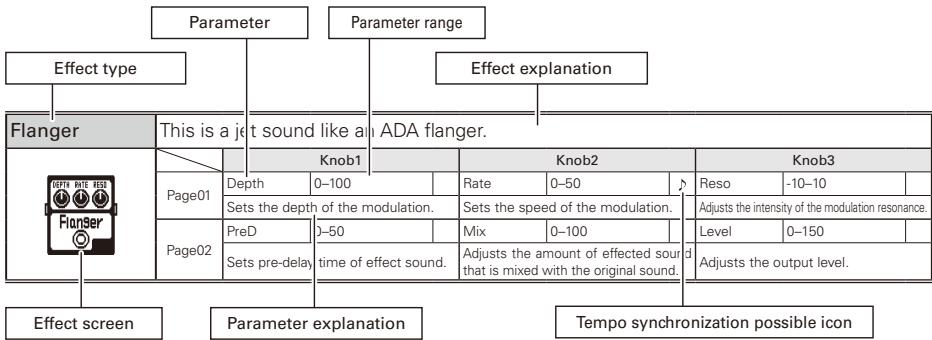
■ Effect Types and Parameters
[DYN/FLTR]
| Comp | This compressor is in the style of the MXR Dyna Comp. | |||||||
| Page01 | Knob1 | Knob2 | Knob3 | |||||
| Sense | 0-10 | Tone | 0-10 | Level | 0-150 | |||
| Adjusts the compressor sensitivity. | Adjusts the tone. | Adjusts the output level. | ||||||
| Page02 | ATTCK | Slow, Fast | ||||||
| Sets compressor attack speed toFast or Slow. | ||||||||
| RackComp | This compressor allows more detailed adjustment than Comp. | |||||||
| Page01 | Knob1 | Knob2 | Knob3 | |||||
| THRSH | 0-50 | Ratio | 1-10 | Level | 0-150 | |||
| Sets the level that activates the compressor. | Adjusts the compression ratio. | Adjusts the output level. | ||||||
| Page02 | ATTCK | 1-10 | ||||||
| Adjusts the compressor attack rate. | ||||||||
| M Comp | This compressor provides a more natural sound. | |||||||
| Page01 | Knob1 | Knob2 | Knob3 | |||||
| THRSH | 0-50 | Ratio | 1-10 | Level | 0-150 | |||
| Sets the level that activates the compressor. | Adjusts the compression ratio. | Adjusts the output level. | ||||||
| Page02 | ATTck | 1-10 | ||||||
| Adjusts the compressor attack rate. | ||||||||
| OptComp | This compressor is in the style of an APHEX Punch FACTORY. | |||||||
| Page01 | Knob1 | Knob2 | Knob3 | |||||
| Drive | 0-10 | Tone | 0-100 | Level | 0-150 | |||
| Adjusts the depth of the compression. | Adjusts the tone. | Adjusts the output level. | ||||||
| Page02 | ||||||||
| SlowATTCK | This effect slows the attack of each note, resulting in a violin-like performance. | |||||||
| Page01 | Knob1 | Knob2 | Knob3 | |||||
| Time | 1-50 | Curve | 0-10 | Level | 0-150 | |||
| Adjusts the attack time. | Set the curve of volume change duringattack. | Adjusts the output level. | ||||||
| Page02 | ||||||||
| ZNR | ZOOM's unique noise reduction cuts noise during pauses in playing without affecting the tone. | |||||||
| THRSH | 1-25 | DETCT | Gtrl, EfxIn | Level | 0-150 | |||
| Adjusts the effect sensitivity. | Sets control signal detection level. | Adjusts the output level. | ||||||
| NOR | ||||||||
| Page02 | ||||||||
| GraphicEQ | This unit has a 6-band equalizer. | |||||||
| Knob1 | Knob2 | Knob3 | ||||||
| 160Hz | -12-12 | 400Hz | -12-12 | 800Hz | -12-12 | |||
| Boosts or cuts the low (160 Hz) frequency band. | Boosts or cuts the low-middle (400 Hz) frequency band. | Boosts or cuts the middle (800 Hz) frequency band. | ||||||
| 3.2kHz | -12-12 | 6.4kHz | -12-12 | 12kHz | -12-12 | |||
| Boosts or cuts the high (3.2 kHz) frequency band. | Boosts or cuts the extremely high (6.4 kHz) frequency band. | Boosts or cuts the harmonics (12 kHz) frequency band. | ||||||
| Level | 0-150 | |||||||
| Adjusts the output level. | ||||||||
| ParaEQ | This is a 2-band parametric equalizer. | |||||||
| Knob1 | Knob2 | Knob3 | ||||||
| Freq1 | 20Hz-20kHz | Q1 | 0.5, 1, 2, 4, 8, 16 | Gain1 | -12-12 | |||
| Adjusts center frequency of EQ1. | Adjusts EQ1 Q. | Adjusts EQ1 gain. | ||||||
| Freq2 | 20Hz-20kHz | Q2 | 0.5, 1, 2, 4, 8, 16 | Gain2 | -12-12 | |||
| Adjusts center frequency of EQ2. | Adjusts EQ2 Q. | Adjusts EQ2 gain. | ||||||
| Level | 0-150 | |||||||
| Adjusts the output level. | ||||||||
| Exciter | This exciter is in the style of the BBE Sonic Maximizer. | |||||||
| Knob1 | Knob2 | Knob3 | ||||||
| Bass | 0-100 | Trebl | 0-100 | Level | 0-150 | |||
| Adjusts the amount of low-frequency phase correction. | Adjusts the amount of high-frequency phase correction. | Adjusts the level of the signal after it has passed through the module. | ||||||
| Page02 | ||||||||
| AutoWah | This effect varies wah in accordance with picking intensity. | |||||||
| Knob1 | Knob2 | Knob3 | ||||||
| Sense | -10-1, 1-10 | Reso | 0-10 | Level | 0-150 | |||
| Adjusts the sensitivity of the effect. | Adjusts the intensity of the resonance sound. | Adjusts the output level. | ||||||
| Page02 | ||||||||
[MOD]
| Tremolo | This effect varies the volume at a regular rate. | ||||||||
| Page01 | Knob1 | Knob2 | Knob3 | ||||||
| Depth | 0-100 | Rate | 0-50 | ↓ | Level | 0-150 | |||
| Adjust the depth of the modulation. | Adjusts the rate of the modulation. | Adjusts the output level. | |||||||
| Page02 | Wave | UP 0-UP 9, DWN 0-DWN 9, TRI 0-TRI 9 | |||||||
| Sets the modulation waveform. | |||||||||
| Phaser | This effect adds a phasing variation to the sound. | ||||||||
| Page01 | Knob1 | Knob2 | Knob3 | ||||||
| Rate | 1-50 | ↓ | Color | 4 STG, 8 STG, inv 4, inv 8 | Level | 0-150 | |||
| Sets the speed of the modulation. | Sets the tone of the effect type. | Adjusts the output level. | |||||||
| Page02 | |||||||||
| Chorus | This effect mixes a shifted pitch with the original sound to add movement and thickness. | |||||||
| Knob1 | Knob2 | Knob3 | ||||||
| Page01 | Depth | 0-100 | Rate | 1-50 | Mix | 0-100 | ||
| Sets the depth of the modulation. | Sets the speed of the modulation. | Adjusts the amount of effected sound that is mixed with the original sound. | ||||||
| Page02 | Tone | 0-10 | Level | 0-150 | ||||
| Adjusts the tone. | Adjusts the output level. | |||||||
| Detune | By mixing an effect sound that is slightly pitch-shifted with the original sound, this effect type has a chorus effect without much sense of modulation. | |||||||
| Knob1 | Knob2 | Knob3 | ||||||
| Page01 | Cent | 25-25 | PreD | 0-50 | Mix | 0-100 | ||
| Adjusts the detuning in cents, which are fine increments of 1/100-semitone. | Sets the pre-delay time of the effect sound. | Adjusts the amount of effected sound that is mixed with the original sound. | ||||||
| Page02 | Tone | 0-10 | Level | 0-150 | ||||
| Adjusts the tone. | Adjusts the output level. | |||||||
| SilkyCho | This chorus effect combines 2 bands of detuning and chorus for precise control. | |||||||
| Knob1 | Knob2 | Knob3 | ||||||
| Page01 | LoMix | 0-100 | HiMix | 0-100 | ChMix | 0-100 | ||
| Adjusts the amount of low-frequency detuning in the mix. | Adjusts the amount of high-frequency detuning in the mix. | Adjusts the amount of chorus in the mix. | ||||||
| Page02 | LoPit | 25-25 | HiPit | 25-25 | PreD | 0-50 | ||
| Adjusts the amount of pitch modulation for the low-frequency detuning. | Adjusts the amount of pitch modulation for the high-frequency detuning. | Sets pre-delay time of effect sound. | ||||||
| Page03 | Rate | 0-100 | Depth | 0-100 | Tone | 0-10 | ||
| Sets the speed of the modulation. | Sets the depth of the modulation. | Adjusts the tone. | ||||||
| MirageCho | This chorus shimmers like a mirage. | |||||||
| Knob1 | Knob2 | Knob3 | ||||||
| Page01 | Depth | 0-100 | Rate | 0-100 | Mix | 0-100 | ||
| Sets the depth of the modulation. | Sets the speed of the modulation. | Adjusts the amount of effected sound that is mixed with the original sound. | ||||||
| Page02 | PreD | 1-20 | Tone | 0-10 | Level | 0-150 | ||
| Sets pre-delay time of effect sound. | Adjusts the tone. | Adjusts the output level. | ||||||
| StereoCho | This is a stereo chorus with a clear tone. | |||||||
| Knob1 | Knob2 | Knob3 | ||||||
| Page01 | Depth | 0-100 | Rate | 1-50 | Mix | 0-100 | ||
| Sets the depth of the modulation. | Sets the speed of the modulation. | Adjusts the amount of effected sound that is mixed with the original sound. | ||||||
| Page02 | Tone | 0-10 | Level | 0-150 | ||||
| Adjusts the tone. | Adjusts the output level. | |||||||
| Flanger | This is a jet sound like an ADA Flanger. | |||||||
| Knob1 | Knob2 | Knob3 | ||||||
| Page01 | Depth | 0-100 | Rate | 0-50 | Reso | -10-10 | ||
| Sets the depth of the modulation. | Sets the speed of the modulation. | Adjusts the intensity of the modulation resonance. | ||||||
| Page02 | PreD | 0-50 | Mix | 0-100 | Level | 0-150 | ||
| Sets pre-delay time of effect sound. | Adjusts the amount of effected sound that is mixed with the original sound. | Adjusts the output level. | ||||||
| PitchSHFT | This effect shifts the pitch up or down. | |||||||
| Knob1 | Knob2 | Knob3 | ||||||
| Page01 | Shift | -12-12,24 | Tone | 0-10 | Bal | 0-100 | ||
| Adjusts the pitch shift amount in semitones. Selecting "0" gives a detuning effect. | Adjusts the tone. | Adjusts the balance between original and effect sounds. | ||||||
| Page02 | Fine | 25-25 | Level | 0-150 | ||||
| Allows fine adjustment of pitch shift amount in Cent (1/100 semitone) steps. | Adjusts the output level. | |||||||
[DELAY]
| Delay | This long delay has a maximum length of 4000 ms. | ||||||||
| DELAY TIME FER MIX | Knob1 | Knob2 | Knob3 | ||||||
| Page01 | Time | 1-4000 | FB | 0-100 | Mix | 0-100 | |||
| Sets the delay time. | Adjusts the feedback amount. | Adjusts the amount of effected sound that is mixed with the original sound. | |||||||
| Page02 | HiDMP | 0-10 | P-P | MONO, P-P | Level | 0-150 | |||
| Adjusts the treble attenuation of the delay sound. | Sets delay output to mono or ping-pong. | Adjusts the output level. | |||||||
| Page03 | Tail | OFF/ON | |||||||
| When ON, effect sound continues even after effect is turned off. When OFF, effect sound stops right when effect is turned off. | |||||||||
| ModDelay | This delay effect allows the use of modulation. | ||||||||
| ModDelay | Knob1 | Knob2 | Knob3 | ||||||
| Page01 | Time | 1-2000 | FB | 0-100 | Mix | 0-100 | |||
| Sets the delay time. | Adjusts the feedback amount. | Adjusts the amount of effected sound that is mixed with the original sound. | |||||||
| Page02 | Rate | 1-50 | Level | 0-150 | Tail | OFF/ON | |||
| Sets the speed of the modulation. | Adjusts the output level. | When ON, effect sound continues even after effect is turned off. When OFF, effect sound stops right when effect is turned off. | |||||||
| ReverseDL | This reverse delay is a long delay with a maximum length of 2000 ms. | ||||||||
| ReverseDL | Knob1 | Knob2 | Knob3 | ||||||
| Page01 | Time | 10-2000 | FB | 0-100 | Bal | 0-100 | |||
| Sets the delay time. | Adjusts the feedback amount. | Adjusts the balance between original and effect sounds. | |||||||
| Page02 | HiDMP | 0-10 | Level | 0-150 | Tail | OFF/ON | |||
| Adjusts the treble attenuation of the delay sound. | Adjusts the output level. | When ON, effect sound continues even after effect is turned off. When OFF, effect sound stops right when effect is turned off. | |||||||
| MultiTapD | This effect produces several delay sounds with different delay times. | ||||||||
| MultiTapD | Knob1 | Knob2 | Knob3 | ||||||
| Page01 | Time | 1-3000 | PTTRN | 1-8 | Mix | 0-100 | |||
| Sets the delay time. | Sets the tap pattern, which varies from rhythmical to random patterns. | Adjusts the amount of effected sound that is mixed with the original sound. | |||||||
| Page02 | Tone | 0-10 | Level | 0-150 | Tail | OFF/ON | |||
| Adjusts the tone. | Adjusts the output level. | When ON, effect sound continues even after effect is turned off. When OFF, effect sound stops right when effect is turned off. | |||||||
| StereoDly | This stereo delay allows the left and right delay times to be set separately. | ||||||||
| STEREO DELIV | Knob1 | Knob2 | Knob3 | ||||||
| Page01 | TimeL | 1-2000 | TimeR | 1-2000 | Mix | 0-100 | |||
| Adjusts delay time of left channel delay. | Adjusts delay time of right channel delay. | Adjusts the amount of effected sound that is mixed with the original sound. | |||||||
| Page02 | LchFB | 0-100 | RchFB | 0-100 | Level | 0-150 | |||
| Adjusts delay feedback of left channel. | Adjusts delay feedback of right channel. | Adjusts the output level. | |||||||
| Page03 | LchLv | 0-100 | RchLv | 0-100 | Tail | OFF/ON | |||
| Adjusts delay output of left channel. | Adjusts delay output of right channel. | When ON, effect sound continues even after effect is turned off. When OFF, effect sound stops right when effect is turned off. | |||||||
| StompDly | By turning the feedback up on this stomp-style delay, you can make it self-oscillate. | ||||||||
| StompDly | Nob1 | Knob2 | Knob3 | ||||||
| E.LVL | 0-120 | FB | 0-100 | Time | 1-600 | ||||
| Adjusts amount of effect sound mixed with original sound. | Adjusts the feedback amount. | Sets the delay time. | |||||||
| Sync | OFF, -j x8 | Mode | MONO, STR | Tail | OFF/ON | ||||
| Activates tempo sync. | Sets output to mono or stereo (STR).When stereo, effect sound is output from L channel and unchanged input sound is output from R channel. | When ON, effect sound continues even after effect is turned off. When OFF, effect sound stops right when effect is turned off. | |||||||
| HiDMP | 0-10 | ||||||||
| Adjusts the treble attenuation of the delay sound. | |||||||||
[REVERB]
| HD Reverb | This is a high-definition reverb. | ||||||||
| HD Reverb BETT THE MIX HOLD THE MIX | Knob1 | Knob2 | Knob3 | ||||||
| Page01 | Decay | 0-100 | Tone | 0-10 | Mix | 0-100 | |||
| Sets the duration of the reverberations. | Adjusts the tone. | Adjusts the amount of effected sound that is mixed with the original sound. | |||||||
| Page02 | PreD | 1-200 | HPF | 0-10 | Level | 0-150 | |||
| Adjusts the delay between input of the original sound and start of the reverb sound. | Adjusts high-pass filter cutoff frequency. | Adjusts the output level. | |||||||
| Page03 | Tail | OFF/ON | |||||||
| When ON, effect sound continues even after effect is turned off. When OFF, effect sound stops right when effect is turned off. | |||||||||
| Hall | This reverb effect simulates the acoustics of a concert hall. | ||||||||
| HALC | Knob1 | Knob2 | Knob3 | ||||||
| Page01 | Decay | 1-30 | Tone | 0-10 | Mix | 0-100 | |||
| Sets the duration of the reverberations. | Adjusts the tone. | Adjusts the amount of effected sound that is mixed with the original sound. | |||||||
| Page02 | PreD | 1-100 | Level | 0-150 | Tail | OFF/ON | |||
| Adjusts the delay between input of the original sound and start of the reverb sound. | Adjusts the output level. | When ON, effect sound continues even after effect is turned off. When OFF, effect sound stops right when effect is turned off. | |||||||
| Room | This reverb effect simulates the acoustics of a room. | ||||||||
| ROOM | Knob1 | Knob2 | Knob3 | ||||||
| Page01 | Decay | 1-30 | Tone | 0-10 | Mix | 0-100 | |||
| Sets the duration of the reverberations. | Adjusts the tone. | Adjusts the amount of effected sound that is mixed with the original sound. | |||||||
| Page02 | Level | 0-150 | Tail | OFF/ON | |||||
| Adjusts the delay between input of the original sound and start of the reverb sound. | Adjusts the output level. | When ON, effect sound continues even after effect is turned off. When OFF, effect sound stops right when effect is turned off. | |||||||
| TiledRoom | This reverb effect simulates the acoustics of a tiled room. | ||||||||
| TiledRoom | Knob1 | Knob2 | Knob3 | ||||||
| Page01 | Decay | 1-30 | Tone | 0-10 | Mix | 0-100 | |||
| Sets the duration of the reverberations. | Adjusts the tone. | Adjusts the amount of effected sound that is mixed with the original sound. | |||||||
| Page02 | Level | 0-150 | Tail | OFF/ON | |||||
| Adjusts the delay between input of the original sound and start of the reverb sound. | Adjusts the output level. | When ON, effect sound continues even after effect is turned off. When OFF, effect sound stops right when effect is turned off. | |||||||
| Spring | This reverb effect simulates a spring reverb. | ||||||||
| Page01 | Knob1 | Knob2 | Knob3 | ||||||
| Decay | 1-30 | Tone | 0-10 | Mix | 0-100 | ||||
| Sets the duration of the reverberations. | Adjusts the tone. | Adjusts the amount of effected sound that is mixed with the original sound. | |||||||
| Page02 | PreD | 1-100 | Level | 0-150 | Tail | OFF/ON | |||
| Adjusts the delay between input of the original sound and start of the reverb sound. | Adjusts the output level. | When ON, effect sound continues even after effect is turned off. When OFF, effect sound stops right when effect is turned off. | |||||||
| Arena | This reverb effect simulates the acoustics of a large enclosure such as a sports arena. | ||||||||
| Page01 | Knob1 | Knob2 | Knob3 | ||||||
| Decay | 1-30 | Tone | 0-10 | Mix | 0-100 | ||||
| Sets the duration of the reverberations. | Adjusts the tone. | Adjusts the amount of effected sound that is mixed with the originalsound. | |||||||
| Page02 | PreD | 1-100 | Level | 0-150 | Tail | OFF/ON | |||
| Adjusts the delay between input of the original sound and start of the reverb sound. | Adjusts the output level. | When ON, effect sound continues even after effect is turned off. When OFF, effect sound stops right when effect is turned off. | |||||||
| EarlyRef | This effect reproduces only the early reflections of reverb. | ||||||||
| Page01 | Knob1 | Knob2 | Knob3 | ||||||
| Decay | 1-30 | Shape | -10-10 | Mix | 0-100 | ||||
| Adjusts the duration of the reverb. | Adjusts the effect envelope. | Adjusts the amount of effected sound that is mixed with the original sound. | |||||||
| Page02 | Tone | 0-10 | Level | 0-150 | Tail | OFF/ON | |||
| Adjusts the tone. | Adjusts the output level. | When ON, effect sound continues even after effect is turned off. When OFF, effect sound stops right when effect is turned off. | |||||||
| Air | This effect reproduces the ambience of a room, to create spatial depth. | ||||||||
| Page01 | Knob1 | Knob2 | Knob3 | ||||||
| Size | 1-100 | Tone | 0-10 | Mix | 0-100 | ||||
| Sets the size of the space. | Adjusts the tone. | Adjusts the amount of effected sound that is mixed with the original sound. | |||||||
| Page02 | Ref | 0-10 | Level | 0-150 | Tail | OFF/ON | |||
| Adjusts the amount of reflection from the wall. | Adjusts the output level. | When ON, effect sound continues even after effect is turned off. When OFF, effect sound stops right when effect is turned off. | |||||||
| ModReverb | This reverb generates fluctuating echoes. | ||||||||
| Page01 | Knob1 | Knob2 | Knob3 | ||||||
| Depth | 0-100 | Decay | 1-30 | Mix | 0-100 | ||||
| Sets the depth of the modulation. | Adjusts the duration of the reverb. | Adjusts the amount of effected sound that is mixed with the original sound. | |||||||
| Page02 | Rate | 1-50 | Tone | 0-10 | PreD | 1-100 | |||
| Sets the speed of the modulation. | Adjusts the tone. | Adjusts the delay between input of the original sound and start of the reverb sound. | |||||||
| Page03 | Level | 0-150 | Tail | OFF/ON | |||||
| Adjusts the output level. | When ON, effect sound continues even after effect is turned off. When OFF, effect sound stops right when effect is turned off. | ||||||||
| SlapBack | This reverb creates a repeating echo effect. | ||||||||
| SlapBackReverb | Knob1 | Knob2 | Knob3 | ||||||
| Page01 | Time | 0-1000 | Decay | 1-30 | Mix | 0-100 | |||
| Sets the delay time. | Sets the duration of the reverberations. | Adjusts the amount of effected sound that is mixed with the original sound. | |||||||
| Page02 | FB | 0-100 | Tone | 0-10 | DRBal | 0-100 | |||
| Adjusts the feedback amount. | Adjusts the tone. | Sets the ratio of delay and reverb. | |||||||
| Page03 | Level | 0-150 | Tail | OFF/ON | |||||
| Adjusts the output level. | When ON, effect sound continues even after effect is turned off. When OFF, effect sound stops right when effect is turned off. | ||||||||
| HD Hall | This is a dense hall reverb. | ||||||||
| HD HallPREND RECHN | Knob1 | Knob2 | Knob3 | ||||||
| Page01 | PreD | 1-200 | Decay | 0-100 | Mix | 0-100 | |||
| Adjusts the delay between input of the original sound and start of the reverb sound. | Sets the duration of the reverberations. | Adjusts the amount of effected sound that is mixed with the original sound. | |||||||
| Page02 | LoDMP | 0-100 | HiDMP | 0-100 | Tail | OFF/ON | |||
| Adjusts low frequency damping in reverb sound. | Adjusts high frequency damping in reverb sound. | When ON, effect sound continues even after effect is turned off. When OFF, effect sound stops right when effect is turned off. | |||||||
| Plate | This simulates a plate reverb. | ||||||||
| PlatePREND RECHN | Knob1 | Knob2 | Knob3 | ||||||
| Page01 | PreD | 1-200 | Decay | 0-100 | Mix | 0-100 | |||
| Adjusts the delay between input of the original sound and start of the reverb sound. | Sets the duration of the reverberations. | Adjusts the amount effect sound that is mixed with the original sound. | |||||||
| Page02 | Color | 0-100 | LoDMP | 0-100 | HiDMP | 0-100 | |||
| Adjusts the reverb time of the low frequencies. | Adjusts low frequency damping in reverb sound. | Adjusts high frequency damping in reverb sound. | |||||||
| Page03 | Tail | OFF/ON | Level | 0-150 | |||||
| When ON, effect sound continues even after effect is turned off. When OFF, effect sound stops right when effect is turned off. | Adjusts the output level. | ||||||||
[MIC]
| Dyna 57 | This simulates the sound of miking with a Shure SM57. | ||||||||
| DYNAMIC 57 | Knob1 | Knob2 | Knob3 | ||||||
| Page01 | Dist. | On, Off | Posi. | Hole, Brdg | Level | 0-150 | |||
| Sets the mic distance. | Sets the mic position. | Adjusts the output level. | |||||||
| Page02 | |||||||||
| Cond 414 | This simulates the sound of miking with an AKG C414. | ||||||||
| CONDenser 414 | Knob1 | Knob2 | Knob3 | ||||||
| Page01 | Dist. | On, Off | Posi. | Hole, Brdg | Level | 0-150 | |||
| Sets the mic distance. | Sets the mic position. | Adjusts the output level. | |||||||
| Page02 | |||||||||
| Cond 87 | This simulates the sound of miking with a Neumann U87. | ||||||||
| CONDenser 87 | Knob1 | Knob2 | Knob3 | ||||||
| Page01 | Dist. | On, Off | Posi. | Hole, Brdg | Level | 0-150 | |||
| Sets the mic distance. | Sets the mic position. | Adjusts the output level. | |||||||
| Page02 | |||||||||
| Page02 | |||||||||
The unit will not turn ON
- Confirm that the POWER switch is set to "ON". When using bus power, set the switch to "OFF" before connecting the USB cable.
- When using batteries, confirm that they still have a charge.
No sound or very low volume
- Check the connections ( P4 - 5)
- Adjust input sensitivity ( P8)
- Adjust the master level ( P9)
- Confirm that unit is not in mute mode ( P24)
- If using a condenser mic, confirm that phantom power is ON ( P23)
There is a lot of noise
- Check shielded cables for defects.
- Use only a genuine ZOOM AC adapter.
The sound distorts strangely/has an odd timbre
- Adjust input sensitivity ( P8)
- Adjust the master level ( P9)
- Adjust the amount of boost amplification ( P15)
- Set the pickup selection correctly for the type of pickup. ( P5)
An effect is not working
- Adjust the balance knob ( P9) .
- If the effect processing capacity is exceeded, "THRU" appears on the effect graphic. In this case, the effect is bypassed ( P11)
Batteries lose their charge quickly
- Confirm that you are not using manganese batteries. Alkaline batteries should provide 8 hours of continuous operation.
- Check the battery setting ( P25) . Set the type of batter being used to enable the remaining charge to be shown more accurately.
- Confirm that phantom power is not being used. When +48V phantom power is being used, the unit can operate continuously for about 5 hours with alkaline batteries.
| Effect types | 40 + 28 guitar models | |
| Number of simultaneous effects | 3 | |
| Number of user patches | 20 | |
| Sampling frequency | 44.1kHz | |
| A/D conversion | 24-bit with 128x oversampling | |
| D/A conversion | 24-bit with 128x oversampling | |
| Signal processing | 32-bit floating point & 32-bit fixed point | |
| Frequency characteristics | 40Hz - 20kHz (+1dB/-3dB) (10kΩ load) | |
| Display | LCD | |
| Input | PICKUP IN | Standard monaural phone jackRated input level -20dBmInput impedance 1MΩ |
| MIC IN | XLR/standard phone combo jacksRated input level -20dBmInput impedance 1MΩ | |
| Output | R | Standard monaural phone jackMaximum output level:Line: +5dBm (with output load impedance of 10kΩ or more) |
| L/MONO/PHONES | Standard stereo phone jack (line/headphones)Maximum output level:Line: +5dBm (with output load impedance of 10kΩ or more)Headphones: 20mW + 20mW (into 32Ω load) | |
| BALANCED OUT | XLR connectorOutput impedance100Ω (HOT-GND, COLD-GND), 200Ω (HOT-COLD)GND LIFT (switch selectable) | |
| S/N (equivalent input noise) | 120dB | |
| Noise floor (residual noise) | -100dBm | |
| Power | AC adapter DC9V (center minus plug) 500mA (ZOOM AD-16)Batteries 8 hours of continuous operation using 4 AA alkaline batteries | |
| Dimensions | 160.3mm(D) x 108mm(W) x 54.9mm(H) | |
| USB | Firmware update | |
| Weight | 630g (Not including batteries) | |
- 0dBm = 0.775Vrms
FCC regulation warning (for U.S.A.)
This equipment has been tested and found to comply with the limits for a Class B digital device, pursuant to Part 15 of the FCC Rules. These limits are designed to provide reasonable protection against harmful interference in a residential installation. This equipment generates, uses, and can radiate radio frequency energy and, if not installed and used in accordance with the instructions, may cause harmful interference to radio communications. However, there is no guarantee that interference will not occur in a particular installation. If this equipment does cause harmful interference to radio or television reception, which can be determined by turning the equipment off and on, the user is encouraged to try to correct the interference by one or more of the following measures:
- Reorient or relocate the receiving antenna.
- Increase the separation between the equipment and receiver.
- Connect the equipment to an outlet on a circuit different from that to which the receiver is connected.
- Consult the dealer or an experienced radio/TV technician for help.
For EU Countries

Declaration of Conformity:
This product complies with the requirements of
EMC Directive 2004/108/EC and
Low Voltage Directive 2006/95/EC and
ErP Directive 2009/125/EC and
RoHS Directive 2011/65/EU
Disposal of Old Electrical & Electronic Equipment
(Applicable in European countries with separate collection systems) This symbol on the product or on its packaging indicates that this product shall not be treated as household waste. Instead it shall be handed over to the applicable collection point for the recycling of electrical and electronic equipment. By ensuring this product is disposed of correctly, you will help prevent potential negative consequences for the environment and human health, which could otherwise be caused by inappropriate waste handling of this product. The recycling of materials will help to conserve natural resources. For more detailed information about recycling of this product, please contact your local city office, your household waste disposal service or the shop where you purchased the product.

ZOOM CORPORATION
4-4-3 Kanda-Surugadai, Chiyoda-ku, Tokyo 101-0062 Japan
http://wwwzoomo.co.jp
- Pre-Amp & Effects for Acoustic Guitar
- A3
- OPERATION MANUAL
- Contents
- SAFETY PRECAUTIONS
- Warning
- Operation using an AC adapter
- Operation using batteries
- Alterations
- Precautions
- Product handling
- Operating environment
- AC adapter handling
- Battery handling
- Connecting cables with input and output jacks
- Volume
- Usage Precautions
- Interference with other electrical equipment
- Cleaning
- Malfunction
- Copyrights
- Acoustic modeling restores body tone
- High-quality preamp can be used with both pickups and mics
- types of acoustic guitar effects
- Anti-feedback function with minimal effect on tone quality
- Clean boost of up to 12 dB
- Terms Used in This Manual
- Patch memory
- Right Panel
- Pickup type selection switch
- GROUND switch
- | To turn the power ON
- When using batteries
- When using an adapter
- Using the POWER switch eco setting
- Display information
- The Home Screen shows the current effect
- HINT
- Edit Screen shows parameters being edited
- | To select the body type
- NOTE
- | To adjust the input sensitivity
- For the pickup input
- For the mic input
- | To select the model type
- | To adjust the equalization
- | To adjust the amount of the original sound
- | To adjust the master level
- | To turn an effect ON and OFF
- | To select the effect to adjust
- | To select an effect type
- Effect processing capacity
- | To select the effect category
- To adjust parameters
- | To change the page
- | To use the Tap Tempo function
- To set the tempo by tapping the footswitch
- To set the tempo with the parameter knobs
- | To return to the Home Screen
- | To turn the boost ON and OFF
- | To adjust parameters
- | To complete the setting
- | To eliminate feedback
- ANTI FEEDBACK
- Selecting and Saving Patch Memories
- | To select a patch memory
- | To save a patch memory
- | To add or remove patch memories to a list that the footswitch cycles through
- | To cycle through patch memories in the list in order using the footswitch
- | To change various settings
- | To change mic input settings
- | To set the mix position of the mic input
- | To set the function activated by pressing and holding the footswitch
- To set the Auto Save function
- | To select the battery type
- | To check the remaining battery charge
- | To adjust the display
- | To end making settings
- | To activate the tuner
- | To change the tuner's standard pitch
- | To select the tuner type
- Chromatic tuner
- Other tuning types
- | To use a drop tuning
- | To tune a guitar
- Other tuner types
- | To end tuning
- | To view the firmware versions
- VERSION
- | To download the latest firmware Update application
- | To prepare to update the firmware
- ANTI FEEDBACK BOOST
- | To update the firmware
- | To complete updating
- Restoring the A3 to its Factory Default Settings
- All Initialize
- ■ Effect Types and Parameters
- The unit will not turn ON
- No sound or very low volume
- There is a lot of noise
- The sound distorts strangely/has an odd timbre
- An effect is not working
- Batteries lose their charge quickly
- FCC regulation warning (for U.S.A.)
- For EU Countries
- Disposal of Old Electrical & Electronic Equipment
- ZOOM CORPORATION
Brand : ZOOM
Model : A3
Category : Guitar effects pedalboard