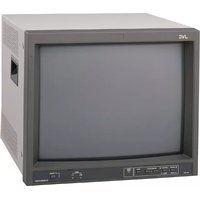
DT-E17L4G - Monitor JVC - Free user manual and instructions
Find the device manual for free DT-E17L4G JVC in PDF.


Pick your language and provide your email: we'll send you a specifically translated version.
| Product Type | Professional LCD Monitor |
| Display Size | 17 inches (43.2 cm) |
| Aspect Ratio | 4:3 |
| Native Resolution | 1280 x 1024 pixels |
| Brightness | 400 cd/m² |
| Contrast Ratio | 1000:1 |
| Input Connectors | Composite (BNC), S-Video, Component (BNC), VGA (D-Sub) |
| Output Connectors | Composite (BNC) loop-through, S-Video loop-through |
| Audio Input | RCA stereo pair |
| Power Supply | AC 100-240V, 50/60 Hz |
| Power Consumption | 45 W (typical) |
| Dimensions (W x H x D) | 15.4 x 13.5 x 6.5 inches (391 x 343 x 165 mm) |
| Weight | 13.2 lbs (6.0 kg) |
| Operation Temperature | 32°F to 104°F (0°C to 40°C) |
| Storage Temperature | -4°F to 140°F (-20°C to 60°C) |
| VESA Mount | 100 x 100 mm |
| Cleaning Instructions | Wipe with a soft, dry cloth. Do not use solvents. |
| Safety Features | Built-in power surge protection, ventilation vents |
| Repairability | Replaceable power board, accessible panels |
Frequently Asked Questions - DT-E17L4G JVC
How do I connect a composite video source?
Connect the yellow RCA cable to the Composite Input (BNC connector) on the back of the monitor. If using an RCA-to-BNC adapter, ensure it is securely attached.
What is the native resolution of the DT-E17L4G?
The native resolution is 1280 x 1024 pixels, which provides sharp image quality for 4:3 content.
Can I mount this monitor on a wall?
Yes, the monitor supports VESA 100 x 100 mm mounting. Use a compatible wall mount and ensure the wall can support the monitor's weight.
Why is there no image on the screen?
Check that the monitor is powered on (power LED lit) and the input source is correctly selected. Verify the video cable is firmly connected at both ends. Try a different input port or cable.
How do I clean the screen?
Turn off the monitor and unplug it. Use a soft, lint-free cloth slightly dampened with water. Gently wipe the screen in a circular motion. Do not use alcohol or abrasive cleaners.
What inputs does this monitor support?
It supports Composite (BNC), S-Video, Component (Y, Pb, Pr via BNC), and VGA (D-Sub 15-pin) inputs.
Is there a built-in speaker?
No, the DT-E17L4G does not have built-in speakers. You need external speakers connected to the audio output of your video source or use the monitor's audio input through an external amplifier.
How do I adjust the picture settings?
Use the buttons on the front panel to access the On-Screen Display (OSD) menu. Navigate to Picture settings to adjust brightness, contrast, color, and sharpness.
What is the power consumption?
Typical power consumption is 45 watts. The monitor automatically enters power-saving mode when no signal is detected.
Where can I find the user manual?
The user manual is available for free download in PDF format from notice-facile.com. Search for 'JVC DT-E17L4G manual' on the site.
User questions about DT-E17L4G JVC
0 question about this device. Answer the ones you know or ask your own.
Ask a new question about this device
No questions yet. Be the first to ask one.
Download the instructions for your Monitor in PDF format for free! Find your manual DT-E17L4G - JVC and take your electronic device back in hand. On this page are published all the documents necessary for the use of your device. DT-E17L4G by JVC.
USER MANUAL DT-E17L4G JVC

Manual assistant
Powered by Anthropic
Waiting for your message
Product information
Brand : JVC
Model : DT-E17L4G
Category : Monitor