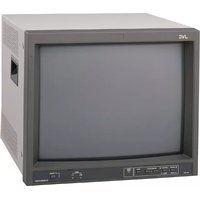
DT-U27HB - Monitor JVC - Free user manual and instructions
Find the device manual for free DT-U27HB JVC in PDF.


Pick your language and provide your email: we'll send you a specifically translated version.
| Product Type | LED Monitor |
| Brand | JVC |
| Model | DT-U27HB |
| Screen Size | 27 inches |
| Resolution | 1920 x 1080 (Full HD) |
| Aspect Ratio | 16:9 |
| Contrast Ratio | 1000:1 (typical) |
| Brightness | 250 cd/m² |
| Response Time | 5 ms |
| Viewing Angle | 178° / 178° |
| Connectivity | HDMI, VGA, DisplayPort |
| Power Consumption | 30 W (typical) |
| Standby Power | < 0.5 W |
| Power Supply | AC 100-240V, 50/60Hz |
| Dimensions (with stand) | 24.2 x 18.1 x 8.3 inches (614 x 460 x 210 mm) |
| Weight (with stand) | 12.5 lbs (5.7 kg) |
| VESA Mount | 100 x 100 mm |
| Speakers | Built-in 2 x 2W |
| Cleaning | Use a soft, dry cloth. Avoid chemicals. |
| Safety | Do not open. Risk of electric shock. |
| Spare Parts | Contact JVC support for replacement parts. |
Frequently Asked Questions - DT-U27HB JVC
How do I connect the monitor to my computer?
Use an HDMI, VGA, or DisplayPort cable. Connect one end to the monitor and the other to your computer's graphics output.
Why is the monitor not turning on?
Check if the power cable is securely connected and the power outlet is working. Press the power button on the monitor. If still off, try a different cable or outlet.
How can I adjust the brightness and contrast?
Press the Menu button on the monitor, navigate to Picture settings, and adjust brightness and contrast using the on-screen controls.
What should I do if the screen flickers?
Ensure the cable is properly connected. Try a different refresh rate in your computer's display settings (e.g., 60 Hz). If issue persists, test with another cable or device.
Can I mount this monitor on a wall?
Yes, the monitor supports VESA 100x100 mm mounts. Use a compatible wall mount bracket and follow the manufacturer's instructions.
How do I clean the screen?
Turn off the monitor and unplug it. Use a soft, dry microfiber cloth to gently wipe the screen. Do not use alcohol or ammonia cleaners.
Why is there no sound from the built-in speakers?
Check if the audio source is set to output via HDMI/DP. Ensure the monitor volume is not muted (press Menu and adjust Audio settings).
What is the warranty period?
JVC typically offers a 1-year limited warranty for monitors. Contact JVC support for details.
How do I reset the monitor to factory settings?
Press the Menu button, go to Setup or Others, and select Factory Reset. Confirm the reset.
Can I use the monitor with a gaming console?
Yes, connect your console via HDMI. The monitor supports up to 1080p at 60Hz, suitable for most consoles.
User questions about DT-U27HB JVC
0 question about this device. Answer the ones you know or ask your own.
Ask a new question about this device
No questions yet. Be the first to ask one.
Download the instructions for your Monitor in PDF format for free! Find your manual DT-U27HB - JVC and take your electronic device back in hand. On this page are published all the documents necessary for the use of your device. DT-U27HB by JVC.
USER MANUAL DT-U27HB JVC

Manual assistant
Powered by Anthropic
Waiting for your message
Product information
Brand : JVC
Model : DT-U27HB
Category : Monitor