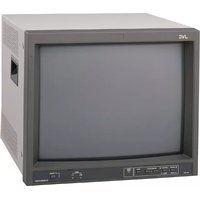
TM-H1700GU - Monitor JVC - Free user manual and instructions
Find the device manual for free TM-H1700GU JVC in PDF.


Pick your language and provide your email: we'll send you a specifically translated version.
| Product Type | Professional CRT Monitor |
| Brand | JVC |
| Model | TM-H1700GU |
| Screen Size (Diagonal) | 17 inches (16 inches visible) |
| Aspect Ratio | 4:3 |
| Dot Pitch | 0.25 mm |
| Maximum Resolution | 1600 x 1200 |
| Horizontal Frequency | 30-85 kHz |
| Vertical Frequency | 50-120 Hz |
| Input Signals | Analog RGB, Composite, S-Video (BNC) |
| Dimensions (W x H x D) | 406 x 413 x 450 mm |
| Weight | 17.6 kg (38.8 lbs) |
| Power Consumption | 90 W (max) |
| Power Requirement | AC 100-240V, 50/60Hz |
| Cabinet Color | Dark gray |
| Tilt/Swivel Base | Yes |
| Control Buttons | Menu, Brightness, Contrast, Degauss |
| Cleaning Instructions | Use soft dry cloth. No harsh chemicals. |
| Repairability | Only qualified service personnel. |
Frequently Asked Questions - TM-H1700GU JVC
How do I adjust the screen geometry on my JVC TM-H1700GU?
Press the Menu button to access the on-screen display. Use the arrow keys to navigate to Geometry and adjust settings like size, position, and pincushion.
What cables do I need to connect my computer to this monitor?
You need a VGA to BNC cable. Connect the red, green, blue, and sync (H/V) BNC connectors to the monitor's RGB inputs.
Why is there no display after turning on the monitor?
Check that the power cable is firmly connected and the monitor is powered on. Ensure the input source is correctly selected. If using a computer, verify the output resolution is supported (up to 1600x1200).
How do I degauss the screen to remove color purity issues?
Press the Degauss button on the front panel. The monitor will emit a brief magnetic field. Wait 20 minutes between degaussing cycles.
Can I use this monitor with a modern graphics card?
Yes, if your graphics card has a VGA output. Use a VGA to BNC cable. Some cards may require a sync-on-green compatible setting.
What is the recommended cleaning method for the CRT screen?
Turn off and unplug the monitor. Use a soft, dry microfiber cloth. For stubborn stains, slightly dampen the cloth with distilled water. Never use alcohol or ammonia.
How can I tell if my monitor needs repair?
Symptoms like persistent flickering, color distortions, loud humming, or burning smell indicate internal issues. Contact a qualified technician; do not open the monitor yourself.
Does this monitor support 1080p resolution?
No, the maximum resolution is 1600x1200 at 60 Hz. 1080p (1920x1080) is not supported. The monitor is best for 4:3 aspect ratio signals.
Why does my monitor make a faint hissing noise?
A low hissing sound from the CRT is normal, caused by the high-voltage flyback transformer. If it becomes loud or high-pitched, have it inspected.
What should I do if the screen flickers?
Adjust the vertical refresh rate to 75 Hz or higher. Also ensure the power supply is stable. If using fluorescent lights nearby, move them away.
User questions about TM-H1700GU JVC
0 question about this device. Answer the ones you know or ask your own.
Ask a new question about this device
No questions yet. Be the first to ask one.
Download the instructions for your Monitor in PDF format for free! Find your manual TM-H1700GU - JVC and take your electronic device back in hand. On this page are published all the documents necessary for the use of your device. TM-H1700GU by JVC.
USER MANUAL TM-H1700GU JVC

Manual assistant
Powered by Anthropic
Waiting for your message
Product information
Brand : JVC
Model : TM-H1700GU
Category : Monitor