
P20 ZOOM FLASH - Camera Flash KODAK - Free user manual and instructions
Find the device manual for free P20 ZOOM FLASH KODAK in PDF.


| Product type | Photo flash for Kodak EasyShare P-series DSLR cameras |
| Model | P20 ZOOM FLASH |
| Brand | KODAK |
| Dimensions (L x W x H) | 83.8 mm x 62.4 mm x 93 mm |
| Weight (without batteries) | 199 g |
| Power supply | 2 AA batteries (1.5 V): alkaline, Ni-MH, oxy-alkaline or rechargeable |
| Number of flashes (alkaline batteries) | Approx. 100 |
| Recycling time (alkaline batteries) | Approx. 10 seconds |
| Number of flashes (Ni-MH batteries) | Approx. 140 |
| Recycling time (Ni-MH batteries) | Approx. 8 seconds |
| Color temperature | 5600 K ± 400 K (full power) |
| Flash duration | 1/800 s (at 1/2 power) |
| Operating temperatures | 0 °C to 40 °C |
| Guide number ISO 100 (80 mm, 1/1) | 40 m (131 ft) |
| Main features | Auto zoom (24-80 mm), Auto and Manual modes, bounce flash (tilting head up to 90°), LCD screen with backlight, charge indicator |
| Maintenance and cleaning | Clean with a soft, dry cloth. Do not use solvents. |
| Safety | Do not open, repair or modify. Keep away from eyes. Use only recommended accessories. |
| Spare parts and repairability | Contact Kodak after-sales service. Do not attempt self-repair. |
| General information | Designed for Kodak EasyShare P-series cameras. Class B certified, Canadian standard NMB-003. WEEE compliant. |
Frequently Asked Questions - P20 ZOOM FLASH KODAK
User questions about P20 ZOOM FLASH KODAK
0 question about this device. Answer the ones you know or ask your own.
Ask a new question about this device
Download the instructions for your Camera Flash in PDF format for free! Find your manual P20 ZOOM FLASH - KODAK and take your electronic device back in hand. On this page are published all the documents necessary for the use of your device. P20 ZOOM FLASH by KODAK.
USER MANUAL P20 ZOOM FLASH KODAK
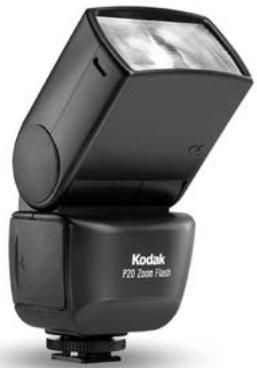
Kodak P20 Zoom Flash
Zoom Flash P20
P20 Zoomblitz
Flash con zoom P20
Flash externo P20
Flash Zoom P20
P20 줌 플래시
P20 变焦闪光灯
P20 變焦閃光燈
P20 ズームフラッシュ
natural_image
Exterior view of a Kodak P20 Zoom Flash flash unit (no visible text or symbols on body)User's Guide
Guide d'utilisation
Benutzerhandbuch
Important Safeguards 2
Features and Functions 2
Overview 3
Installing the Batteries.... 3
Mounting the Flash to the Camera.... 4
Flash Charging Status 4
Power Save and Automatic Shutdown.... 4
LCD Back Light 4
Mode Button.... 4
Zoom Button 4
Test Button 4
Flash Range Scale.... 4
Adjustable Bounce Flash Head...... 5
Power Zoom Head 5
Technical Specifications.... 6
Troubleshooting 6
IMPORTANT SAFEGUARDS

CAUTION Failure to observe the instructions marked by this symbol. The handling the product may result in serious bodily injury or damage to liberty. Make sure to observe the instructions.

CAUTION
Do not attempt to open, repair, or modify this unit. It contains a high-voltage circuit, which may cause a fire, electric shock, or serious injury.
Do not use accessories other than those specified by Eastman Kodak Company. Doing so may cause a fire, electric shock, or other injury.
Do not touch any exposed internal component of the unit if the unit is dropped or damaged, or if foreign matter enters the unit.
Do not operate the unit near the eyes (especially those of infants).
Flashing the unit near someone's eyes may cause visual impairment. Make sure to allow a minimum distance of about 3 ft (1 m) or more from the subject, especially when taking pictures of infants.
Make sure to install the batteries correctly. When replacing batteries, replace both old batteries with a pair of new batteries as recommended on page 3 of this manual. Using batteries of the wrong type or old batteries may result in leakage, heat buildup, rupture, shortened service life, or loose connections.
Keep the unit away from beverages and other liquids, cosmetics or chemicals. Spills or splashes of liquid entering the unit may cause a fire, electric shock or injury.
Do not operate the unit in extremely humid environments, such as a bathroom or near a humidifier. This may result in a fire, electric shock, or injury.
Do not operate the unit if there is any chance that a flammable or volatile gas is present.
Do not expose the unit to splashes, sprays, or water droplets.
Do not expose batteries to a very hot environment or excessive heat such as intense sunlight, fire, etc.
Do not attempt to charge disposable batteries (such as carbon-zinc and alkaline cells).
Do not place the unit in direct sunlight or where it can be exposed to high humidity. This can result in excessive humidity inside the unit, which can cause damage to or failure of the unit.
Do not store the unit in a dusty place; otherwise, subsequent use of the unit may result in a fire or electric shock.
Do not place the unit in an unstable position; otherwise, the unit may fall or drop accidentally, causing damage to the unit or personal injury.
Do not clean the unit with benzene or other solvents. This can result in discoloration or deformation of the unit. Stains or dirt should be removed with a soft dry cloth.
SAVE THESE INSTRUCTIONS
Your Kodak P20 zoom flash is for use with Kodak EasyShare P series digital cameras.
FEATURES AND FUNCTIONS
- Multi-step Auto Power Zoom function automatically provides optical flash coverage matched to the focal length of the lens in use (24–80 mm).
- Choose between Camera Auto Mode and Manual Mode.
- Large, easy-to-read LCD panel displays all the information needed to monitor and control all flash settings. The panel can be illuminated for easy reading in dark conditions. The data display remains on for 5 seconds after pressing the Display button.
- Provides five Manual flash output settings, from full power to 1/16.
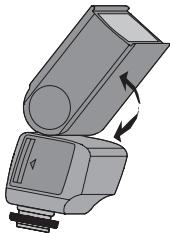
- The flash head can be tilted upward incrementally to 90 degrees (vertical), with stops at 45, 60, and 75 degrees, for convenient bounce flash capability.
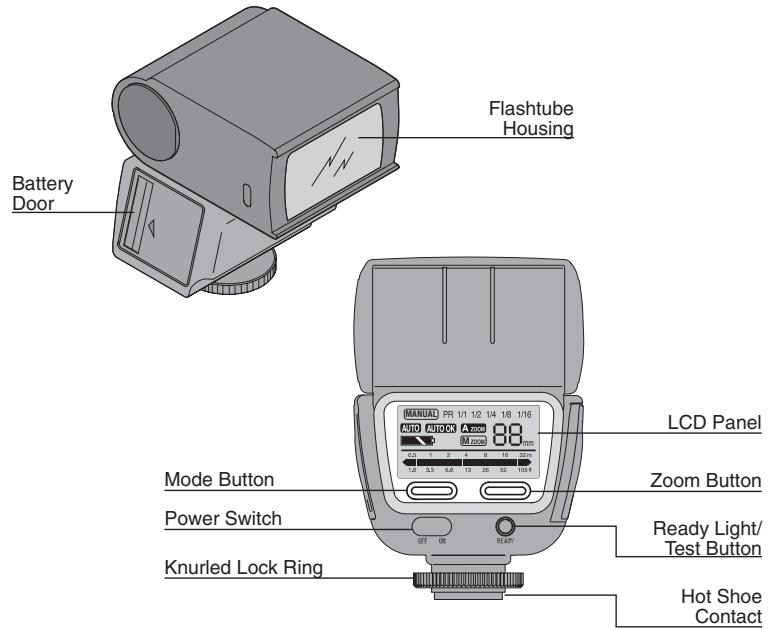
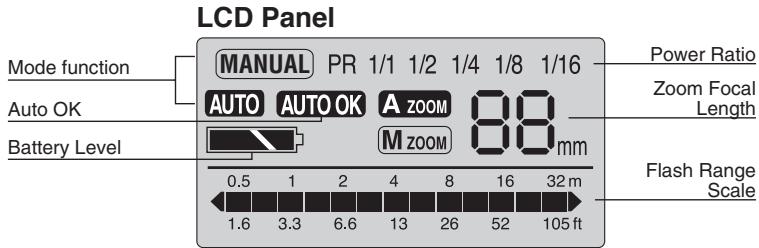
INSTALLING THE BATTERIES
The flash uses two 1.5V AA batteries (not included) and is compatible with alkaline, Ni-MH, oxy-alkaline, and most AA rechargeable batteries. We recommend using Kodak Ni-MH rechargeable digital camera batteries when possible.
- Slide the power switch to the "OFF" position.
- Open the battery compartment by sliding the battery door back slightly toward the rear of the unit to unlatch it, then flipping down the door.
- Insert 2 AA size batteries into the battery compartment according to the polarity indications “+ -”. The flash will not operate if the batteries are installed incorrectly.
- Close the battery door. When the unit is switched on, it will start charging with a slight humming sound and the Ready Light will come on when charging is completed.
NOTE: The flash is ready to fire as soon as the Ready Light is lit. However, full power will not be available for several seconds. Wait a few seconds after the Ready Light activates to achieve maximum output.
If it takes longer than 30 seconds for the Ready Light to come on after the flash is fired in Full Power Mode, replace the batteries.
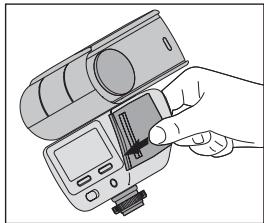
natural_image
Illustration of a hand inserting a device into a digital camera module (no text or symbols visible)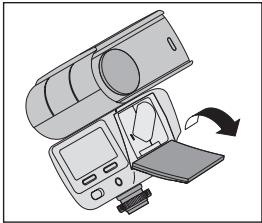
natural_image
Illustration of a device with a scroll wheel and control panel, showing a right-hand rule for rotation (no text or symbols present)
CAUTION Turn the flash unit off before
mounting on or detaching from the camera. If it is turned on, the flash unit may self-fire, or damage to the flash unit may result.
Battery Status

MOUNTING THE FLASH TO THE CAMERA
- Slide the power switch to the "OFF" position.
- Slip the flash unit onto the camera's hot shoe. Turn the knurled lock ring to firmly affix the flash unit.
CAUTION When using the flash on your camera, hold your camera and the flash. If you hold on to the flash only, your camera may slip off the flash and be damaged, or the weight of the camera may damage the flash foot.

FLASH CHARGING STATUS
| Ready Light | Charging Level | Flash Status |
| Lit | Fully charged | Ready for full emission |
| Blinking | Charging | Able to flash at current charge level |
| Off | Empty | Cannot flash |
POWER SAVE AND AUTOMATIC SHUTDOWN
To save battery life, the flash automatically switches to the Standby state after 5 minutes of inactivity or when your camera goes into LCD Time Out state. The LCD panel and Ready Light turn off. To reactivate the flash, partly depress the camera's shutter release, or slide the power switch to the "OFF" position and then back to the "ON" position. The flash Ready Light and LCD panel will go on again after a brief delay.
LCD BACK LIGHT
Use the LCD Back Light to illuminate the LCD panel for easy reading in dark conditions. To turn on the LCD Back Light, press the Mode or Zoom button. After 5 seconds of inactivity, the LCD Back Light automatically turns off.
MODE BUTTON
The Mode button toggles between:
- Camera Auto mode—the amount of flash is determined automatically in accordance with the capture setting on the camera.
Auto OK icon—when the subject is within the auto effective range and there is enough light, the Auto OK icon blinks for two seconds after the flash is fired. If the icon does not appear, then there is not enough light for an exposure. Either move closer to the
subject or set the camera to Aperture Priority mode and select a larger aperture (smaller f-number).
- Manual mode—the amount of flash is adjusted manually, with Power Ratio settings of 1/1 (full emission), 1/2, 1/4, 1/8 or 1/16 power. Use the Mode button to toggle through the settings.
NOTE: If the Mode Select button is pressed for more than one second, the mode will change to Camera Auto mode.
ZOOM BUTTON
The Zoom button toggles between:
- Auto Zoom mode—flash focal length is determined automatically in accordance with the capture setting on the camera. The focal length range is 24–80 mm. If the value on the camera is less than or equal to 24 mm, “F mm” is displayed. If no information is received from the camera, “-- mm” is displayed.
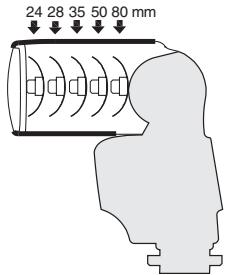
- Manual Zoom mode—flash focal length is set manually, with settings of 24 mm, 28 mm, 35 mm, 50 mm, or 80 mm.
If the Zoom button is pressed for more than one second, the mode will change to Auto Zoom.
TEST BUTTON
If the Test button is pressed after the Ready Light goes on, a test flash fires.
FLASH RANGE SCALE
In response to a signal from the camera, the flash calculates the effective flash range and displays it on the LCD panel. This range shows the minimum and maximum distances a proper exposure can be made using the flash. To increase or decrease the effective distances, set the camera to Aperture Priority mode and change the aperture setting. The flash range scale changes as the aperture (f/stop value) is adjusted.
The available range will be displayed when you partly depress the camera's shutter release or when the Ready Light is on. The flash range is 1.5 –100 ft (0.5–30 m) and is indicated by a bar graph. An asterisk indicates distances greater than 100 ft (30 m).
ADJUSTABLE BOUNCE FLASH HEAD
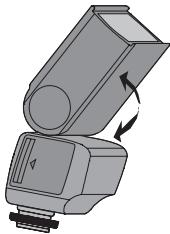
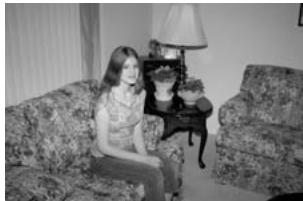
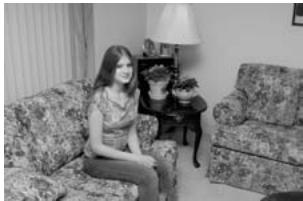
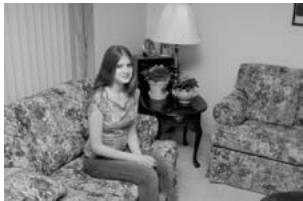
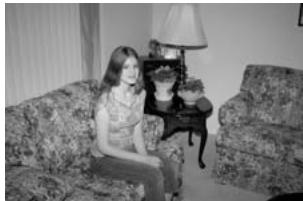
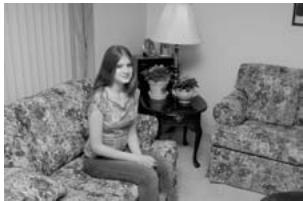
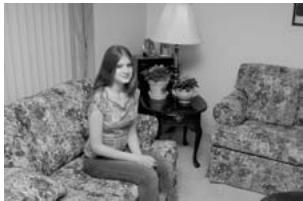
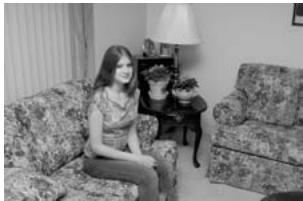
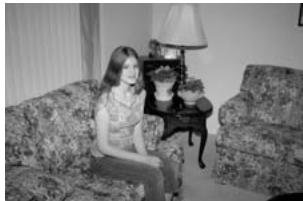
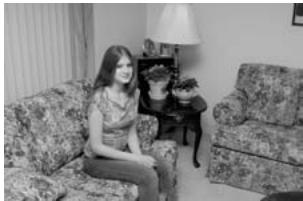
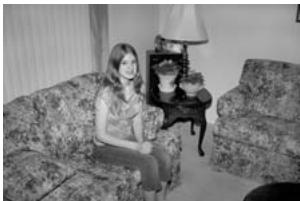
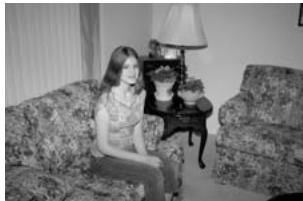
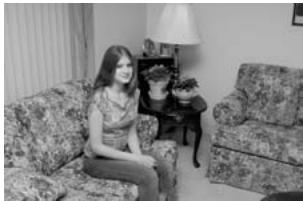
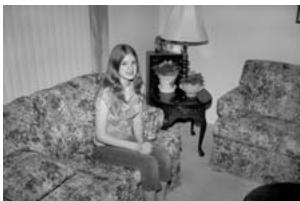
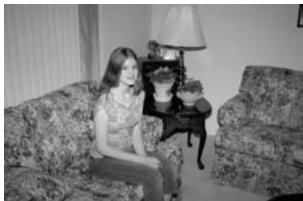
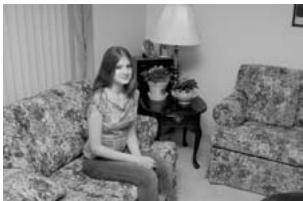
The P20 flash includes a head that lets you position the light in a number of vertical positions, in all exposure modes. For more pleasing and creative lighting effects, such as softening harsh shadows on a subject, the Bounce Flash Head is adjustable vertically up to 90 degrees, with stops at 45, 60, and 75 degrees.
CAUTION Do not attempt to force the head beyond the available settings, or damage to the flash unit will occur.
- Partly depress the camera's shutter release to check whether the correct aperture and shutter speed are selected.
natural_image
Illustration of a mechanical device with an arrow indicating rotation or movement (no text or symbols present)IMPORTANT: The effectiveness of the bounce flash feature is dependent upon the distance to, and the condition of, the reflecting surface used.
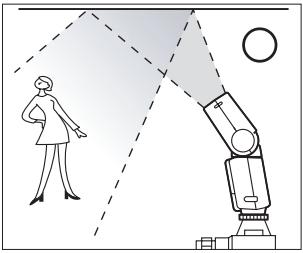
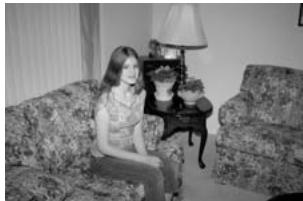
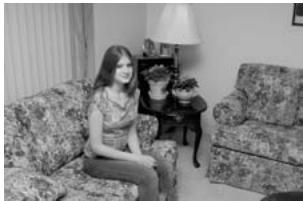
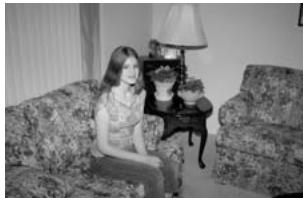
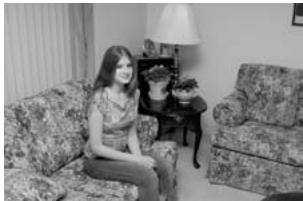
- Aim the flash head at a point on the bounce surface, halfway between the flash and the subject. Normally, when the flash is bounced off a surface, it will lose 25% power or more, even when the surface is white. Therefore, when a bounce flash photo is taken in TTL (through the lens) mode, it is recommended that you select a larger aperture than for a direct flash photograph.
NOTE: Bounce your flash off a white surface whenever possible to achieve the best overall illumination level. In color photography, when a colored surface is used for bounce lighting, it reflects its color on the subject. When indoors, use a white ceiling of 20 ft (6.1 m) or lower.
natural_image
Illustration of a robotic arm projecting a person's view through a dashed light path, with a circle nearby (no text or symbols)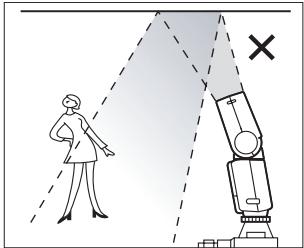
natural_image
Black-and-white photo of a woman sitting on a patterned sofa in a living room with a lamp and table (no visible text or symbols)Direct Flash
natural_image
Black-and-white photo of a woman sitting on a patterned sofa in a living room with a lamp and table (no visible text or symbols)Bounce Flash
POWER ZOOM HEAD
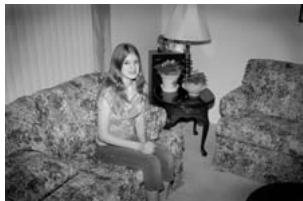
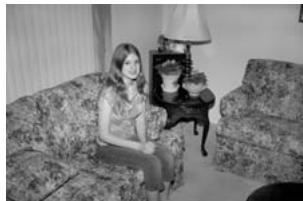
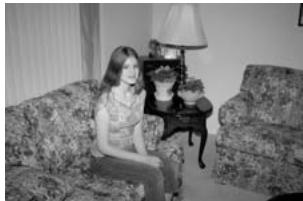
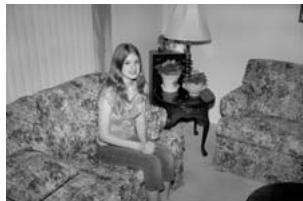
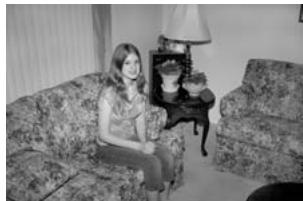
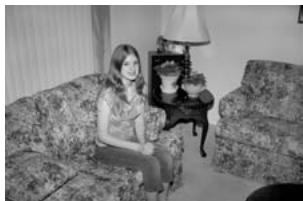
The P20 flash is equipped with a motorized zoom head. It is controlled by the camera and is set automatically to provide optimal flash coverage for the focal length of the lens in use. It can even select intermediate settings within the 24–80 mm focal length range. Or, you can manually set it to 24, 28, 35, 50, and 80 mm by using the Manual Zoom mode.
NOTE: Auto Power Zoom works only with lenses of 24 mm or greater focal length.
natural_image
Black-and-white photo of a woman sitting on a patterned sofa with a lamp and side table (no visible text or symbols)Without Power Zoom Head
natural_image
Black-and-white photo of a woman sitting on a patterned sofa with a lamp and side table in the background (no visible text or symbols)With Power Zoom Head
TECHNICAL SPECIFICATIONS
| Power Zoom | Automatic setting – Signal from cameraManual setting – Pressing the Zoom button |
| Color Temperature | 5600 K ± 400 K at full power output |
| Flash Duration | 1/800 sec. at 1/2 power output |
| Operating Temperature | 0–40°C (32–104°F) |
| Dimensions | 83.8(L) x 62.4(W) x 93(H) mm (3.3 x 2.5 x 3.7 in.) |
| Weight | 199 g (7.0 oz.), without batteries |
Guide Number: ISO 100 (m/ft)
| Zoom Setting | 24 mm(0.9 in.) | 28 mm(1.1 in.) | 35 mm(1.4 in.) | 50 mm(2.0 in.) | 80 mm(3.1 in.) | |
| Manual flash | 1/1 | 24/78 | 26/85 | 28/92 | 34/111 | 40/131 |
| 1/2 | 17/56 | 18/59 | 20/66 | 24/78 | 28/92 | |
| 1/4 | 12/40 | 13/43 | 14/46 | 17/56 | 20/66 | |
| 1/8 | 8/26 | 9/30 | 10/33 | 12/40 | 14/46 | |
| 1/16 | 6/20 | 6/20 | 7/23 | 8/26 | 10/33 | |
Working Range (m/ft)
| Zoom Position | 24 mm(0.9 in.) | 28 mm(1.1 in.) | 35 mm(1.4 in.) | 50 mm(2.0 in.) | 80 mm(3.1 in.) |
| F/2 | 12/39 | 13/43 | 14/46 | 17/56 | 20/66 |
| F/4 | 6/20 | 6.5/21 | 7/23 | 8.5/28 | 10/33 |
| F/8 | 3/9.8 | 3.3/11 | 3.5/11 | 4.3/14 | 5/16 |
| F/16 | 1.5/5 | 1.6/5.3 | 1.8/5.7 | 2.1/7 | 2.5/8.2 |
Number of Flashes and Recycling Time
| Number of Flashes* | Recycling Time** | |
| AA alkaline batteries | Approx. 100 | Approx. 10 sec. |
| AA Ni-MH batteries | Approx. 140 | Approx. 8 sec. |
* Measured with new batteries that are within 3 months from their date of production, flashed every 30 seconds continuously, and recycled to the point at which the Ready Light takes 30 seconds to come on after the last flash.
** The time to activate the Ready Light under the above conditions.
NOTE: The design and specifications of this product are subject to change without prior notice.
TROUBLESHOOTING
| Problem | Solution |
| Flash doesn't fire | Clean hot shoe area; remove any dust or dirt.Make sure flash is securely fastened to camera—is knurled ring tight? |
| No power | Make sure batteries are charged and positioned properly. |
| Flash takes a long time to recharge | Recharge batteries or use fresh batteries. |
| Flash picture is too dark | Allow flash to fully charge. Set camera to Aperture Priority mode and open the aperture by one or more stops. If bounce is used, make sure the surface is reflective enough and not taller than 20 ft (6 m). |
| Dark corners in flash pictures | Make sure flash is set to the proper zoom setting. Use flash with lenses 24 mm or greater (35 mm equivalent). |
| Subject is too bright in flash pictures | Use flash in Auto mode and set camera to Aperture Priority mode, and close the aperture by one or more stops. |
TABLE DES MATIÈRES
natural_image
Illustration of a hand using a digital camera to adjust a small electronic device (no text or symbols visible)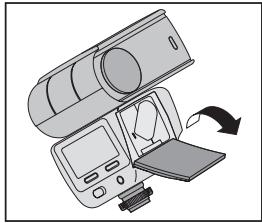
natural_image
Illustration of a medical imaging device with an arrow indicating rotation or movement (no text or symbols present)natural_image
Illustration of a mechanical device with an arrow indicating rotation or movement (no text or symbols present)
natural_image
Illustration of a person observing a robotic arm with light beams, no text or symbols present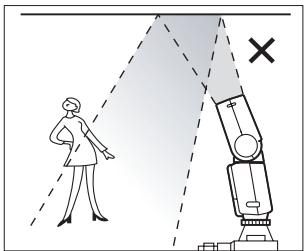
natural_image
Black-and-white photo of a woman sitting on a patterned sofa in a living room with a lamp and table (no visible text or symbols)Flash direct
natural_image
Black-and-white photo of a woman sitting on a patterned sofa in a living room with a lamp and table (no visible text or symbols)Flash directionnel
TETE DE ZOOM ELECTRONIQUE
natural_image
Black-and-white photo of a woman sitting on a patterned sofa with a lamp and side table (no visible text or symbols)natural_image
Black-and-white photo of a woman sitting on a patterned sofa with a lamp and side table (no visible text or symbols)natural_image
Illustration of a hand using a handheld device to adjust a component (no text or symbols visible)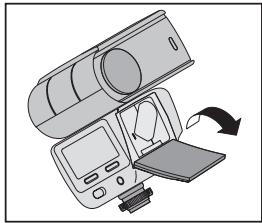
natural_image
Illustration of a medical imaging device with an arrow indicating rotation or movement (no text or symbols present)natural_image
Illustration of a mechanical device with a rotating arm and base mount (no text or symbols)
natural_image
Illustration of a human figure observing a robotic arm with light beams, no text or symbols present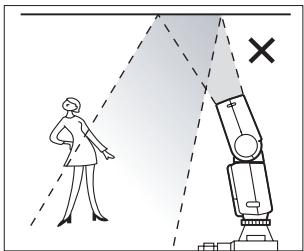
natural_image
Black-and-white photo of a woman sitting on a patterned sofa in a living room with a lamp and table (no visible text or symbols)Direkter Blitz
natural_image
Black-and-white photo of a woman sitting on a patterned sofa in a living room with a lamp and table (no visible text or symbols)Indirekter Blitz
ZOOMKOPF
natural_image
Black-and-white photo of a woman sitting on a patterned sofa with a lamp and side table (no visible text or symbols)Ohne Zoomkopf
natural_image
Black-and-white photo of a woman sitting on a patterned sofa with a lamp and side table in the background (no visible text or symbols)Mit Zoomkopf
TECHNISCHE DATEN
natural_image
Illustration of a hand inserting a camera into a digital camera module (no text or symbols visible)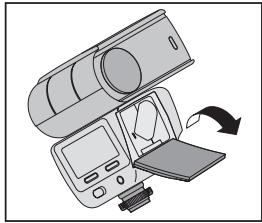
natural_image
Illustration of a device with a scroll wheel and a slide, showing a right-hand rule for rotation (no text or symbols present)natural_image
Illustration of a mechanical device with rotating arrows indicating motion (no text or symbols)natural_image
Illustration of a human figure observing a robotic arm with light beams and a circle, no text or symbols present.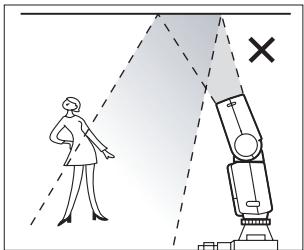
natural_image
Illustration of a person observing a robotic arm with a cross symbol (no text or labels)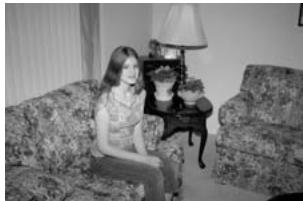
natural_image
Black-and-white photo of a woman sitting on a patterned sofa in a living room with a lamp and table (no visible text or symbols)Flash diretto
natural_image
Black-and-white photo of a woman sitting on a patterned sofa in a living room with a lamp and table (no visible text or symbols)Flash riflesso
TESTA CON ZOOM ELETTRICO
natural_image
Black-and-white photo of a woman sitting on a patterned sofa with a lamp and side table (no visible text or symbols)natural_image
Black-and-white photo of a woman sitting on a patterned sofa with a lamp and side table in the background (no visible text or symbols)natural_image
Illustration of a hand inserting a camera into a digital camera module (no text or symbols visible)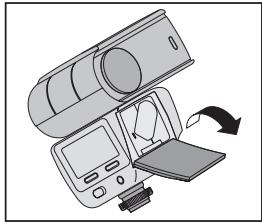
natural_image
Illustration of a medical imaging device with an arrow indicating rotation or insertion (no text or symbols present)natural_image
Illustration of a human figure observing a robotic arm with light beams and a circle, no text or symbols present.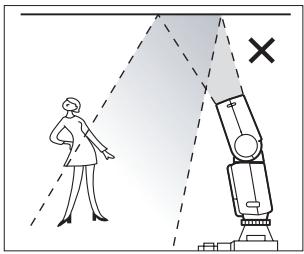
natural_image
Illustration of a mechanical device with rotating arrows indicating motion (no text or symbols)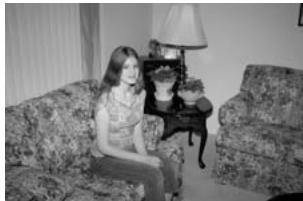
natural_image
Black-and-white photo of a woman sitting on a patterned sofa in a living room with a lamp and table (no visible text or symbols)Flash directo
natural_image
Black-and-white photo of a woman sitting on a patterned sofa in a living room with a lamp and table (no visible text or symbols)Flash de rebote
ZOOM AUTOMÁTICO DE COBERTURA
natural_image
Black-and-white photo of a woman sitting on a patterned sofa with a lamp and side table (no visible text or symbols)natural_image
Black-and-white photo of a woman sitting on a patterned sofa with a lamp and side table in the background (no visible text or symbols)natural_image
Illustration of a hand inserting a camera into a digital camera module (no text or symbols visible)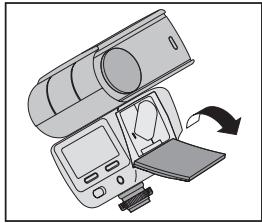
natural_image
Illustration of a device with a scroll wheel and a slide, showing a right-hand rule for rotation (no text or symbols present)natural_image
Illustration of a mechanical device with a rotating lever and base mount (no text or symbols)natural_image
Illustration of a robotic arm projecting a person's view through a light source, with no text or symbols present.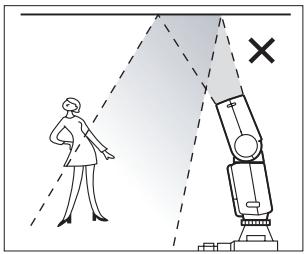
natural_image
Black-and-white photo of a woman sitting on a patterned sofa in a living room with a lamp and table (no visible text or symbols)Flash direto
natural_image
Black-and-white photo of a woman sitting on a patterned sofa in a living room with a lamp and table (no visible text or symbols)Flash rebatido
CABEÇA DE POWER ZOOM
natural_image
Black-and-white photo of a woman sitting on a patterned sofa with a lamp and side table (no visible text or symbols)natural_image
Black-and-white photo of a woman sitting on a patterned sofa with a lamp and side table in the background (no visible text or symbols)natural_image
Illustration of a hand inserting a camera into a digital camera module (no text or symbols visible)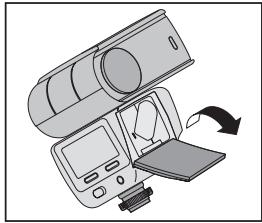
natural_image
Illustration of a medical imaging device with an arrow indicating rotation or movement (no text or symbols present)전지 상태
natural_image
Illustration of a mechanical device with a rotating lever and base mount (no text or symbols)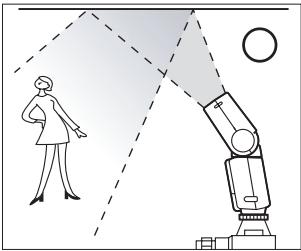
natural_image
Illustration of a human figure observing a robotic arm with light beams, no text or symbols present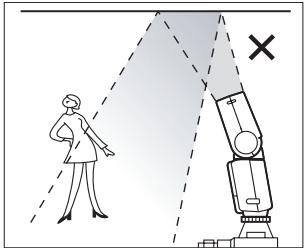
natural_image
Black-and-white photo of a woman sitting on a patterned sofa with a table and lamp in the background (no visible text or symbols)직접 플래시
natural_image
Black-and-white photo of a woman sitting on a patterned sofa in a living room with a lamp and tableware (no visible text or symbols)바운스 플래시
파워 줌 헤드
natural_image
Black-and-white photo of a woman sitting on a patterned sofa with a lamp and side table (no visible text or symbols)파워 줌 헤드 사용 안 함
natural_image
Black-and-white photo of a woman sitting on a patterned sofa with a lamp and side table in the background (no visible text or symbols)파워 줌 헤드 사용
기술 사양
natural_image
Illustration of a hand using a digital camera to adjust a small electronic device (no text or symbols visible)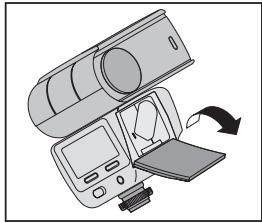
natural_image
Illustration of a medical imaging device with an arrow indicating rotation or movement (no text or symbols present)将闪光灯装到相机上
natural_image
Illustration of a mechanical device with an arrow indicating rotation or movement (no text or symbols present)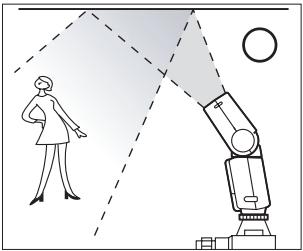
natural_image
Illustration of a robotic arm projecting a person's view through a dashed light path, with no text or symbols present.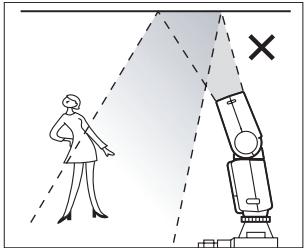
natural_image
Black-and-white photo of a woman sitting on a patterned sofa in a living room with a lamp and table (no visible text or symbols)直接闪光
natural_image
Black-and-white photo of a woman sitting on a patterned sofa in a living room with a lamp and table (no visible text or symbols)反射闪光
电动变焦头
natural_image
Black-and-white photo of a woman sitting on a patterned sofa with a lamp and side table (no visible text or symbols)无电动变焦头
natural_image
Black-and-white photo of a woman sitting on a patterned sofa with a lamp and side table in the background (no visible text or symbols)有电动变焦头
技术规格
natural_image
Illustration of a hand inserting a camera into a digital camera module (no text or symbols visible)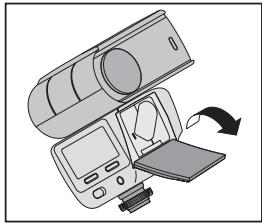
natural_image
Illustration of a medical imaging device with an arrow indicating rotation or movement (no text or symbols present)將閃光燈裝上相機
natural_image
Illustration of a mechanical device with a rotating lever and base mount (no text or symbols)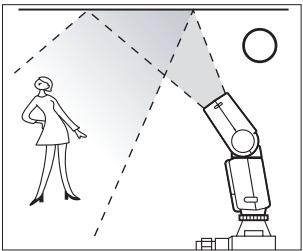
natural_image
Illustration of a robotic arm projecting a person's view through a dashed light path, with a circle nearby (no text or symbols)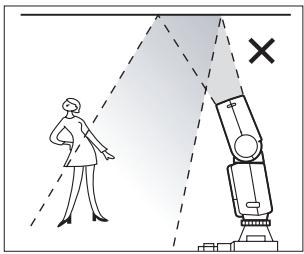
natural_image
Black-and-white photo of a woman sitting on a patterned sofa with a table and lamp (no visible text or symbols)直接閃光
natural_image
Black-and-white photo of a woman sitting on a patterned sofa in a living room with a lamp and table (no visible text or symbols)跳燈閃光
強力變焦頭
natural_image
Black-and-white photo of a woman sitting on a patterned sofa with a lamp and side table (no visible text or symbols)未配備強力變焦頭
natural_image
Black-and-white photo of a woman sitting on a patterned sofa with a lamp and side table in the background (no visible text or symbols)配備強力變焦頭
技術規格
natural_image
Illustration of a hand inserting a camera into a digital camera module (no text or symbols visible)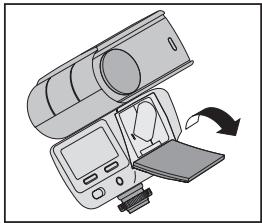
natural_image
Illustration of a medical imaging device with an arrow indicating rotation (no text or symbols present)natural_image
Illustration of a mechanical device with rotating arrows indicating motion (no text or symbols)natural_image
Illustration of a robotic arm projecting a person's view through a dashed light path, with no text or symbols present.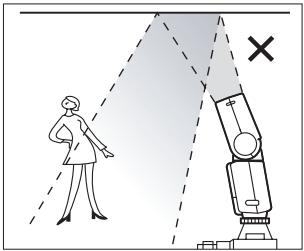
natural_image
Black-and-white photo of a woman sitting on a patterned sofa with a lamp and table in the background (no visible text or symbols)ダイレクトフラッシュ
natural_image
Black-and-white photo of a woman sitting on a patterned sofa in a living room with a lamp and table (no visible text or symbols)バウンスフラッシュ
パワーズームヘッド
natural_image
Black-and-white photo of a woman sitting on a patterned sofa with a lamp and side table (no visible text or symbols)パワーズームヘッド未使用時
natural_image
Black-and-white photo of a woman sitting on a patterned sofa with a lamp and side table in the background (no visible text or symbols)パワーズームヘッド使用時
技術仕様
This equipment has been tested and found to comply with the limits for a Class B digital device, pursuant to Part 15 of the FCC Rules. These limits are designed to provide reasonable protection against harmful interference in a residential installation.
This equipment generates, uses, and can radiate radio frequency energy and, if not installed or used in accordance with the instructions, may cause harmful interference to radio communications. However, there is no guarantee that interference will not occur in a particular installation.
If this equipment does cause harmful interference to radio or television reception, which can be determined by turning the equipment off and on, the user is encouraged to try to correct the interference by one or more of the following measures: 1) reorient or relocate the receiving antenna; 2) increase the separation between the equipment and the receiver; 3) connect the equipment to an outlet on a circuit different from that to which the receiver is connected; 4) consult the dealer or an experienced radio/TV technician for additional suggestions.
Any changes or modifications not expressly approved by the party responsible for compliance could void the user's authority to operate the equipment. Where shielded interface cables have been provided with the product or specified additional components or accessories elsewhere defined to be used with the installation of the product, they must be used in order to ensure compliance with FCC regulation.
Canadian DOC statement
DOC Class B compliance—This Class B digital apparatus complies with Canadian ICES-003.
Waste Electrical and Electronic Equipment Labeling
In the European Union, do not discard the product as unsorted municipal waste. Contact your local authorities or go to www.kodak.com/go/recycle for recycling program information.