PANASONIC WH-UX09HE8 - Air-conditioner

WH-UX09HE8 - Air-conditioner PANASONIC - Free user manual and instructions

Find the device manual for free WH-UX09HE8 PANASONIC in PDF.

📄 88 pages English EN Download 💬 AI Question 11 questions ⚙️ Specs
Notice PANASONIC WH-UX09HE8 - page 2
Pick your language and provide your email: we'll send you a specifically translated version.
Product type Air-to-water heat pump
Brand Panasonic
Model WH-UX09HE8
Category Air conditioner / Heat pump
Main functions Cooling, Heating, Domestic hot water (DHW) production
Operating modes Force DHW backup, Turbo heating, Silent mode, Force heating backup, Forced defrost, Weekly programming
Control Remote controller with screen and quick menu
Remote controller lock Yes, with PIN code (resettable)
Clock programming Up to 6 programs per day, adjustable by day
Zone management Up to 2 temperature zones
Error display Yes, with error code initialization
Power supply Not specified in the manual
Dimensions (indoor unit) Not specified in the manual
Weight (indoor unit) Not specified in the manual
Maintenance Clean filters regularly; call a professional for annual maintenance
Spare parts Contact Panasonic after-sales service
Repairability Repairability index not provided
Safety Remote controller lock, automatic shutdown in case of error
Warranty Refer to Panasonic general terms and conditions

Frequently Asked Questions - WH-UX09HE8 PANASONIC

How to access the quick menu?
After initial settings, press the dedicated button (usually represented by a menu symbol) and use the arrows ▲▼ ◀▶ to navigate the options.
How to activate silent mode?
In the quick menu, select the 'Silent mode' icon then choose 'Yes'. The mode starts about 1 minute after activation.
How to program the weekly timer?
In the quick menu, select 'Weekly prog.' then 'Yes'. You can then define programs for each day (up to 6 per day) with desired times, modes and temperatures.
What to do if the remote controller is locked?
Press any button to display the unlock screen, then enter the 4-digit code. If you forgot the code, simultaneously press the ▲, ▼ buttons and a button (not specified) for 5 seconds to reset the code to 0000.
How to activate backup heating?
In the quick menu, select 'Force backup heating' then confirm. The electric heater will start about 1 minute later.
How to interpret the operating icons?
The icon « » indicates stop, while « — — » indicates operation. Refer to the manual for the meaning of other symbols.
Can I lock the remote controller to prevent tampering?
Yes, in the quick menu select 'R/C lock', then confirm 'Yes'. A PIN code will be requested to unlock later.
How to reset error codes?
In the quick menu, select 'Error code initialization' and confirm. Make sure all units are stopped before proceeding.
What to do if the screen displays 'Set time overlaps'?
This means one schedule overlaps another. Modify the schedules to avoid conflicts by adjusting start/end times.
How to force backup domestic hot water (DHW) production?
In the quick menu, select 'Force DHW backup' to activate the hot water tank heater. Note that this mode is deactivated if 'Force heating' is active.

User questions about WH-UX09HE8 PANASONIC

1 question about this device. Answer the ones you know or ask your own.

Ask a new question about this device

The email remains private: it is only used to notify you if someone responds to your question.

How to activate the cooling mode on the PANASONIC WH-UX09HE8?
Frequently Asked Questions - 25/05/2026
Response Notice-Facile

The PANASONIC WH-UX09HE8 is a multifunctional air-to-water heat pump that includes a cooling mode (air conditioning). According to the available documentation, this mode can be accessed via the quick menu under the Turbo Cooling function, which allows you to reach the desired cooling temperature more quickly.

To activate the cooling mode, first check the control panel of your device: the cooling mode is generally activated from the mode selector or the main menu. Once in cooling mode, you can use the Turbo Cooling function to speed up the process if the ambient temperature is high.

This device is specifically designed for three functions: heating, cooling, and the production of domestic hot water. The PDF of this manual does not specify the exact step-by-step procedures for each operational mode; for complete handling details, a more detailed user guide or manufacturer support may be necessary.

Respond (be the first)

Download the instructions for your Air-conditioner in PDF format for free! Find your manual WH-UX09HE8 - PANASONIC and take your electronic device back in hand. On this page are published all the documents necessary for the use of your device. WH-UX09HE8 by PANASONIC.

USER MANUAL WH-UX09HE8 PANASONIC

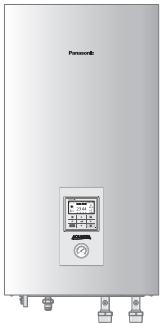
Air-to-Water Heatpump
PANASONIC WH-UX09HE8 - Air-to-Water Heatpump - 1

Model No.

Indoor Unit

WH-SDC09H3E8

WH-SDC12H9E8

WH-SDC16H9E8

WH-SXC09H3E8

WH-SXC12H9E8

WH-SXC16H9E8

Outdoor Unit

WH-UD09HE8

WH-UD12HE8

WH-UD16HE8

WH-UX09HE8

WH-UX12HE8

WH-UX16HE8
PANASONIC WH-UX09HE8 - Air-to-Water Heatpump - 2

PANASONIC WH-UX09HE8 - Air-to-Water Heatpump - 3

Quick Menu Guide

Air-to-Water Heatpump

Please read the Operating Instructions thoroughly before using the Quick Menu.

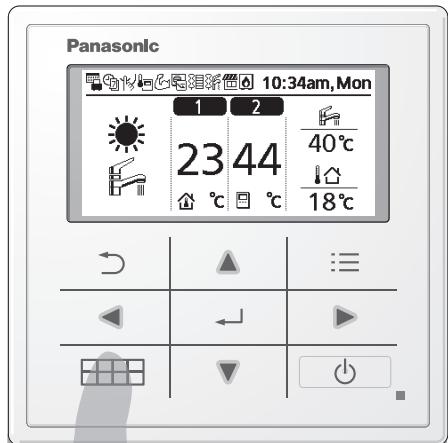
How to use the Quick Menu

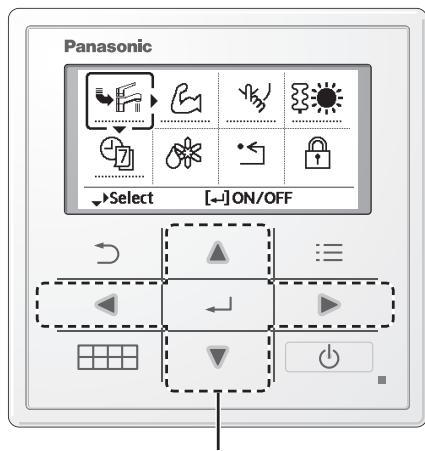
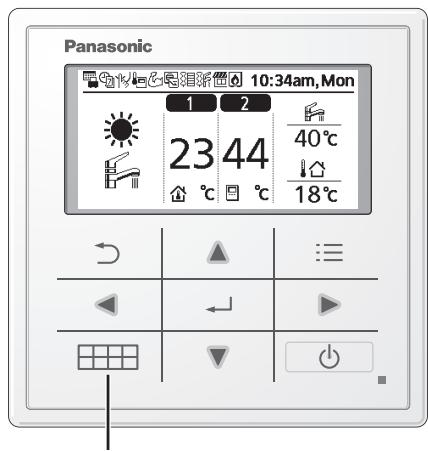
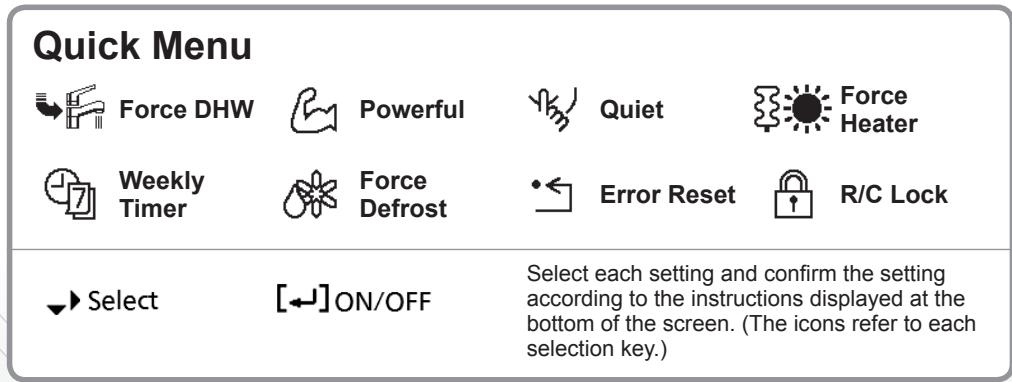
After the initial settings have been completed, you can select a quick menu from the following options and edit the setting.
PANASONIC WH-UX09HE8 - How to use the Quick Menu - 1
① Press .

PANASONIC WH-UX09HE8 - How to use the Quick Menu - 2

PANASONIC WH-UX09HE8 - How to use the Quick Menu - 3
② Use ▲ ▼ ▶ ▷ to select menu.
③ Press to turn on/off the select menu.
PANASONIC WH-UX09HE8 - How to use the Quick Menu - 4

To return to the Main Screen,

Press or

Note:

  • If the system is not connected to the tank (Tank Connection is OFF), the Quick Menu screen will be displayed as right. Make sure the Tank Connection is ON.
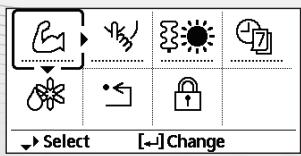
PANASONIC WH-UX09HE8 - Note: - 1

Notes on operation icon

Example:

PANASONIC WH-UX09HE8 - Notes on operation icon - 1

Operation icon indicate with "..........." = OFF

PANASONIC WH-UX09HE8 - Notes on operation icon - 2

Operation icon indicate with "——" = ON
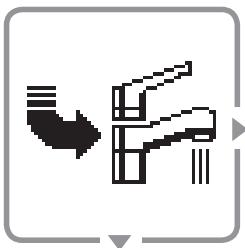
PANASONIC WH-UX09HE8 - Notes on operation icon - 3
Force DHW

Select this icon to turn the Tank DHW on or off.

Press to confirm your selection.
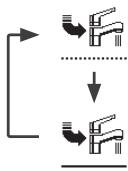
PANASONIC WH-UX09HE8 - Press  to confirm your selection. - 1

  • Force DHW is turned off.
  • Force DHW is turned on.

PANASONIC WH-UX09HE8 - Press  to confirm your selection. - 2

Note:

  • Force DHW is disabled when Force Heater is turned on.
  • When Force DHW is turned off, operation & mode should change back to the previous memorized status.

PANASONIC WH-UX09HE8 - Note: - 1
Powerful

Select this icon to operate the heating/cooling system powerfully.

Press to confirm your selection.

(The powerful operation starts approximately 1 minute after is pressed.)
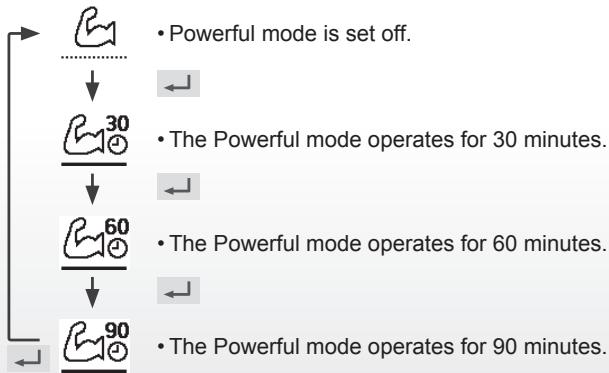
PANASONIC WH-UX09HE8 - Press  to confirm your selection. - 1

PANASONIC WH-UX09HE8 - Press  to confirm your selection. - 2

Note:

  • Powerful is disabled when operation is turned OFF.

PANASONIC WH-UX09HE8 - Note: - 1
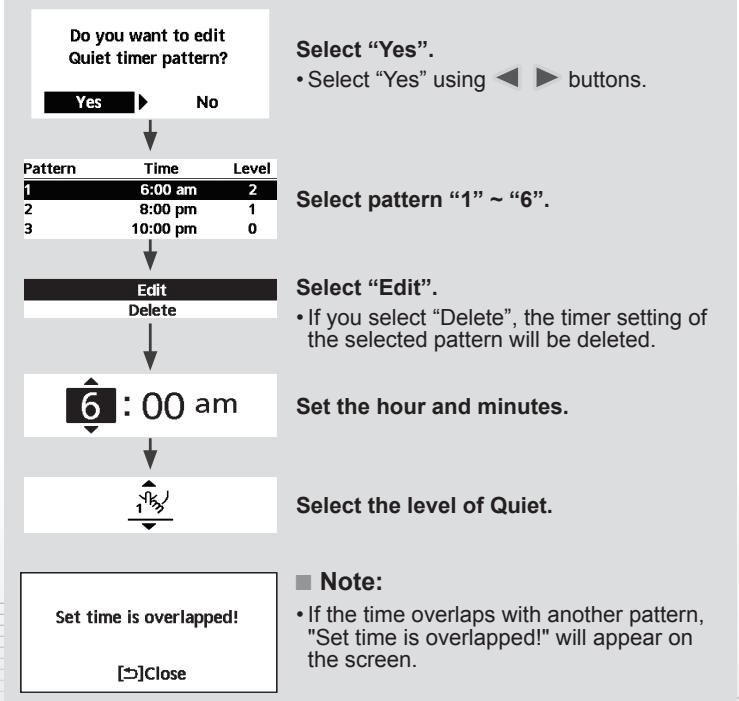
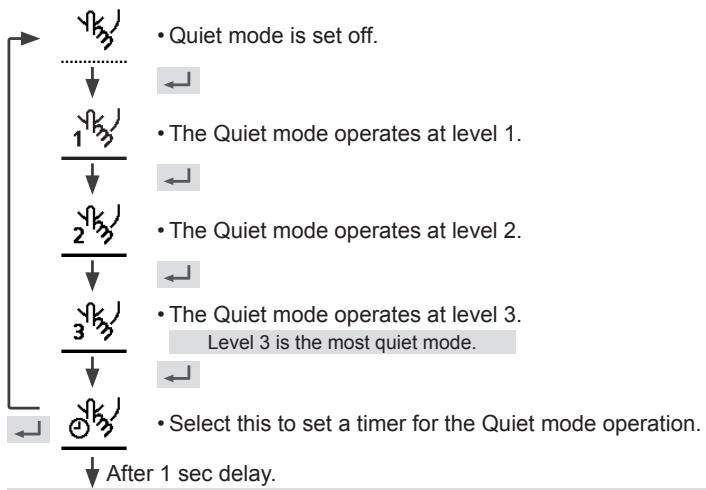
Quiet

Select this icon to operate quietly.

Press to confirm your selection.

(The quiet operation starts approximately 1 minute after is pressed.)

PANASONIC WH-UX09HE8 - Press  to confirm your selection. - 1

PANASONIC WH-UX09HE8 - Press  to confirm your selection. - 2

PANASONIC WH-UX09HE8 - Press  to confirm your selection. - 3
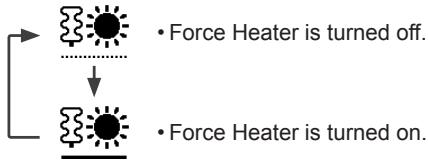
Force Heater

Select to force the Heater on.

Press to confirm your selection.

(The Force Heater mode starts approximately 1 minute after is pressed.)
PANASONIC WH-UX09HE8 - Select to force the Heater on. - 1

Note:

  • Force Heater is disabled whenever operation is already on and 'Disabled due to operation ON!' will be displayed.

Disabled due to operation ON!

[Close

PANASONIC WH-UX09HE8 - Note: - 1
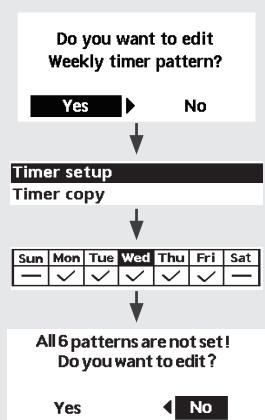
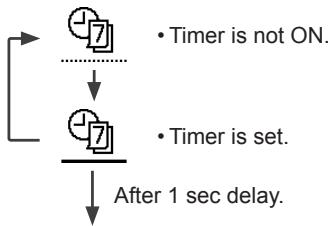
Weekly Timer

Select this icon to delete (cancel) or change the pre-set Weekly Timer.

Press to confirm your selection.
PANASONIC WH-UX09HE8 - Select this icon to delete (cancel) or change the pre-set Weekly Timer. - 1

PANASONIC WH-UX09HE8 - Select this icon to delete (cancel) or change the pre-set Weekly Timer. - 2

Select "Yes".

  • If you select "No", the screen will return to the Main Screen.

  • Timer setup: Select Timer setup to edit the Weekly Timer.

  • Timer copy: Select to copy a timer setting.

[Example of a Timer setup]

Select the day(s) which you wish to edit using buttons.

If all 6 patterns are not preset, this screen will be displayed.

PANASONIC WH-UX09HE8 - [Example of a Timer setup] - 1

④ Select the operation mode.

① Select pattern "1" ~ "6".
② Set the hour and minutes of the Timer.
③ Select ON/OFF of the Timer.

A/A/(//)/

  • Select mode using buttons.

⑤ Set the temperature for both Zone 1 and 2 (if your system has the 2-Zone setting).

Saturday: Pattern 1: Set Temp

Zone1Zone2
ON25°CON25°C

⑥ Set the Tank temperature.

Note:

  • Timer is disabled when Force Heater is turned on or Heat-Cool SW is enabled.
    If you have preset the Weekly Timer on 2 zones, you must repeat the same procedure with Zone 2.

PANASONIC WH-UX09HE8 - Note: - 1
Force Defrost

Select to defrost the frozen pipes.

Press to confirm your selection.

(When the mode is accepted, below screen will be displayed.)

Request accepted!

[ ] Close

PANASONIC WH-UX09HE8 - Select to defrost the frozen pipes. - 1
Error Reset

Select to restore the previous settings when error has occurred.

Press to confirm your selection.

(When the mode has been accepted, below screen will be displayed.)

Request accepted!

[ ] Close

  • Make sure all units are turned off before selecting this mode which restores the whole system to the previous settings.
PANASONIC WH-UX09HE8 - Select to restore the previous settings when error has occurred. - 1
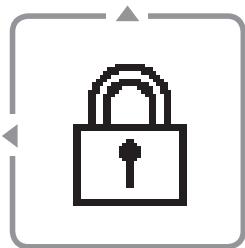
R/C Lock

Select to lock the Remote Controller.

Press to confirm your selection.

(When the mode has been accepted, below screen will be displayed.)

Do you want to lock remote control?

Yes

No

Select "Yes".

(The Main Screen will be locked.)

  • If "No" is selected, the screen will return to the Main Screen.

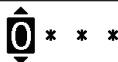
To unlock the Remote Controller

Press any key.

(When the mode has been accepted, below screen will be displayed.)
PANASONIC WH-UX09HE8 - Select to lock the Remote Controller. - 1

Enter any 4 digits of number (if the number is correct, the screen will be unlocked).

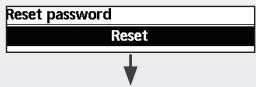
To reset forgotten password (under operation OFF screen)

Press , and continuously for 5 seconds.

(When the mode has been accepted, below screen will be displayed.)
PANASONIC WH-UX09HE8 - Select to lock the Remote Controller. - 2

Select "Reset".

  1. Password is reset to 0000
  2. Remote control is unlocked

(The screen will be off after 3 seconds.)

Disabled due to operation ON!

[Close

PANASONIC WH-UX09HE8 - Select to lock the Remote Controller. - 3
Week-timer

Do you want to lock remote control?

Yes

No

  1. Password is reset to 0000
  2. Remote control is unlocked

Disabled due to operation ON!

[Close

Saturday: Pattern 1: Set Temp

Zone1Zone2
ON25°CON25°C

Do you want to lock remote control?

Yes No

Eπιλέξετε "Yes".

(H Kupia OToyn 0a kλεδωθεi.)

1 Password is reset to 0000

2.Remote control is unlocked

Zone1Zone2
ON25°CON25°C

Disabled due to operation ON!

[Close

Kraftfull inaktiveras nar driften stangs AV.

PANASONIC WH-UX09HE8 - Select to lock the Remote Controller. - 4
Tystläge

Väljennaikonforattdravystyst.

Disabled due to operation ON!

[Close

PANASONIC WH-UX09HE8 - Väljennaikonforattdravystyst. - 1
Viikkoajastin

Saturday: Pattern 1: Set Temp
Zone1Zone2
ON25°CON25°C

⑥ Aseta sällön lämpötila.

Huomautus:

Do you want to lock remote control?

Yes No

Vaelg dette ikon for at stille drift.

© Panasonic Corporation 2016

CountryHotline Phone Number
Hungary+36 1 382 60 60
Netherlands+31(0)736402538
Norway+47 210 339 99
Poland+48 22 338 11 57
Spain+34 (0) 902 153 060
Sweden+46 (0)8 566 426 88
Switzerland0800 - 001074
UK/Ireland+44 (0) 1344 853 393

Authorised representative in EU
Panasonic Testing Centre
Panasonic Marketing Europe GmbH
Winsberging 15, 22525 Hamburg, Germany

AEEE Compliance with Turkey Regulations
AEEE Yönetmeligiine Uygundur
BU ÜRUNÜN KULLANIM ÖMRÜ 10 YILDIR

Manual assistant
Powered by Anthropic
Waiting for your message
Product information

Brand : PANASONIC

Model : WH-UX09HE8

Category : Air-conditioner