
ZFX - Industrial optical sensor OMRON - Free user manual and instructions
Find the device manual for free ZFX OMRON in PDF.

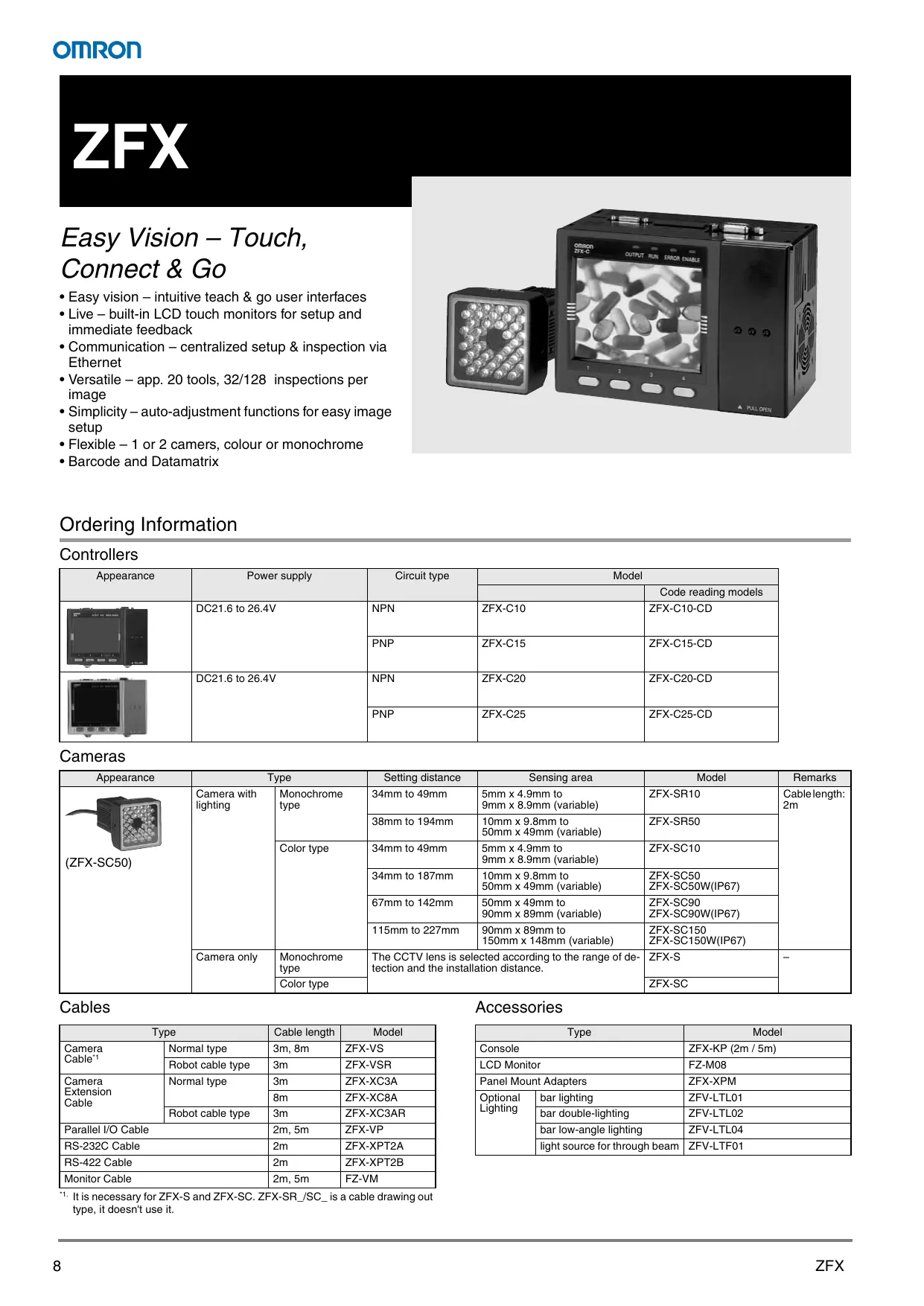

| Product type | Industrial optical sensor (vision) |
| Brand | OMRON |
| Model | ZFX |
| Display | Integrated touch LCD for configuration and visualization |
| Number of cameras | 1 or 2 depending on version (ZFX-C20/25) |
| Camera types | Monochrome or color, with integrated lighting or C-mount |
| Available fields of view | From 5 mm to 150 mm depending on lens |
| Number of inspection tools | 20 tools (position compensation, edge detection, shape comparison, defects, area, brightness/hue, code reading, calculation) |
| Number of inspections per image | Up to 32 |
| Automatic adjustment function | Yes, via AUTO button (lighting, color filter, settings) |
| Communication interfaces | Ethernet, USB, 20 digital I/Os |
| Code reading | 1D/2D barcodes and DataMatrix |
| Power supply | 24 VDC (typical for industrial sensors) |
| Installation | In 3 steps: tool selection, zones, settings |
| Maintenance and cleaning | Clean the lens with a soft dry cloth; avoid aggressive solvents |
| Safety | Follow applicable electrical standards; disconnect power before intervention |
| Spare parts and repairability | Contact OMRON support for spare parts; repair by qualified personnel |
| General information | Advanced vision sensor with interactive user interface |
Frequently Asked Questions - ZFX OMRON
User questions about ZFX OMRON
0 question about this device. Answer the ones you know or ask your own.
Ask a new question about this device
Download the instructions for your Industrial optical sensor in PDF format for free! Find your manual ZFX - OMRON and take your electronic device back in hand. On this page are published all the documents necessary for the use of your device. ZFX by OMRON.
USER MANUAL ZFX OMRON
Inspections multiples
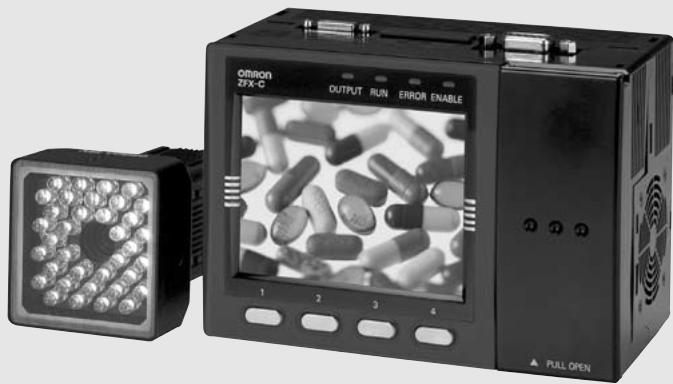
Easy Vision – Touch, Connect & Go
- Easy vision - intuitive teach & go user interfaces
- Live - built-in LCD touch monitors for setup and immediate feedback
- Communication - centralized setup & inspection via Ethernet
- Versatile - app. 20 tools, 32/128 inspections per image
- Simplicity - auto-adjustment functions for easy image setup
- Flexible - 1 or 2 cameras, colour or monochrome
- Barcode and Datamatrix
Ordering Information
Controllers
| Appearance | Power supply | Circuit type | Model | |
| Code reading models | ||||
| DC21.6 to 26.4V | NPN | ZFX-C10 | ZFX-C10-CD | |
| PNP | ZFX-C15 | ZFX-C15-CD | ||
| DC21.6 to 26.4V | NPN | ZFX-C20 | ZFX-C20-CD | |
| PNP | ZFX-C25 | ZFX-C25-CD | ||
Cameras
Cables
| Appearance | Type | Setting distance | Sensing area | Model | Remarks | |
| (ZFX-SC50) | Camera with lighting | Monochrome type | 34mm to 49mm | 5mm x 4.9mm to 9mm x 8.9mm (variable) | ZFX-SR10 | Cable length: 2m |
| 38mm to 194mm | 10mm x 9.8mm to 50mm x 49mm (variable) | ZFX-SR50 | ||||
| Color type | 34mm to 49mm | 5mm x 4.9mm to 9mm x 8.9mm (variable) | ZFX-SC10 | |||
| 34mm to 187mm | 10mm x 9.8mm to 50mm x 49mm (variable) | ZFX-SC50 ZFX-SC50W(IP67) | ||||
| 67mm to 142mm | 50mm x 49mm to 90mm x 89mm (variable) | ZFX-SC90 ZFX-SC90W(IP67) | ||||
| 115mm to 227mm | 90mm x 89mm to 150mm x 148mm (variable) | ZFX-SC150 ZFX-SC150W(IP67) | ||||
| Camera only | Monochrome type | The CCTV lens is selected according to the range of detection and the installation distance. | ZFX-S | - | ||
| Color type | ZFX-SC | |||||
| Type | Cable length | Model | |
| Camera Cable*1 | Normal type | 3m, 8m | ZFX-VS |
| Robot cable type | 3m | ZFX-VSR | |
| Camera Extension Cable | Normal type | 3m | ZFX-XC3A |
| 8m | ZFX-XC8A | ||
| Robot cable type | 3m | ZFX-XC3AR | |
| Parallel I/O Cable | 2m, 5m | ZFX-VP | |
| RS-232C Cable | 2m | ZFX-XPT2A | |
| RS-422 Cable | 2m | ZFX-XPT2B | |
| Monitor Cable | 2m, 5m | FZ-VM | |
- It is necessary for ZFX-S and ZFX-SC. ZFX-SR_/SC_ is a cable drawing out type, it doesn't use it.
Accessories
| Type | Model | |
| Console | ZFX-KP (2m / 5m) | |
| LCD Monitor | FZ-M08 | |
| Panel Mount Adapters | ZFX-XPM | |
| Optional Lighting | bar lighting | ZFV-LTL01 |
| bar double-lighting | ZFV-LTL02 | |
| bar low-angle lighting | ZFV-LTL04 | |
| light source for through beam | ZFV-LTF01 | |
Controller
| Item | ZFX-C10(-CD) | ZFX-C15(-CD) | ZFX-C20(-CD) | ZFX-C25(-CD) | ||
| Number of connected cameras | 1 | 2 | ||||
| Connectable camera | ZFX-SR_/SC_/SC | |||||
| Processing resolution | When ZFX-SR_/SC_is connected:464 (H) x464 (V)When ZFX-S/SC_is connected:608 (H) x464 (V) | |||||
| Display | LCD monitor | 3.5" TFT color LCD (320 x 240 pixels) | ||||
| Indicator | "Measuring" indicator (color: green): RUNTrigger indicator (color: blue): ENABLEJudgment indicator (color: orange): OUTPUTError indicator (color: red): ERROR | |||||
| External I/F | Parallel Interface | Input | 12 points (RESET, DSA, DI0 to 8, TRIG) | |||
| Output | 22 points (OR, ERROR, RUN, ENABLE, GATE, STGOUT0, DO0 to 15) | |||||
| Circuit type | NPN | PNP | NPN | PNP | ||
| Serial Interface | USB2.0 | 1 port, FULL SPEED, MINI-B connector | ||||
| RS-232C | 1 port, max. 115200 bps (cannot be used simultaneously with RS-422 interface) | |||||
| RS-422 | 1 port, max. 115200 bps (cannot be used simultaneously with RS-232C interface) | |||||
| Network communications | Ethernet | 1 port, 100BASE-TX/10BASE-T | ||||
| Monitor output | Analog RGB output, 1 ch (resolution VGA: 640 x 480) | |||||
| Memory card I/F | SD card slot 1 ch | |||||
| Operation I/F | Touch panel, key operation, console connection | |||||
| Main functions | Number of registered banks | 32 banks | ||||
| Number of setup items | 32 items/1 bank | 128 items/1 bank | ||||
| Measurement items | Shape inspection | Pattern, sensitive search | Pattern, sensitive, graphic, flexible search | |||
| Size inspection | Area | Area, labeling | ||||
| Edge inspection | Position, width, count | |||||
| Brightness/color inspection | Brightness, HUE | |||||
| Application-based inspection | Defects | Defects, grouping | ||||
| Code reading (-CD models only) | Barcode (WPC(JAN/EAN/UPC), Code 39, Codebar (NW-7), ITF (Interleaved 2 of 5),Code 93, Code 128, GS1-128, GS1 Databar, Pharmacode)Datamatrix (ECC200, QR Code, MicroQR Code, PDF417, MicroPDF417, Maxi Code,AZtec Code, Codablock) | |||||
| Postion correction | 1 model search, 2 model search, position, area | |||||
| Support | Image memory function | Max. 100 images | Max. 100 images (50 for 2 x cameras) | |||
| Ratings | Power supply voltage | 21.6 to 26.4 VDC (including ripple) | ||||
| Current consumption | 1.0 A max. | 1.5 A max. | ||||
| Insulation resistance | Across all lead wires and controller case: 20 MΩ (by 250 V megger) | |||||
| Dielectric strength | Across all lead wires and controller case, 1000 VAC, 50/60 Hz, 1 min | |||||
| Operation environment robustness | Ambient temperature range | Operating: 0 to + 50°C, Storage: -15 to +60°C (with no icing or condensation) | ||||
| Ambient humidity range | Operating and storage: 35% to 85% (with no condensation) | |||||
| Ambient atmosphere | No corrosive gases allowed | |||||
| Degree of protection | IP20 (IEC60529) | |||||
| Vibration resistance (durability) | Vibration frequency: 10 to 150 Hz Single-amplitude: 0.35 mm Acceleration:50 m/s2 10 times for 8 minutes | |||||
| Shock resistance (destructive) | 150 m/s2 3 times each in 6 directions (up/down, left/right, forward/backward) | |||||
Camera
| Item | ZFX-SR10 | ZFX-SR50 | ZFX-SC10 | ZFX-SC50/SC50W | ZFX-SC90/SC90W | ZFX-SC150/SC150W | ZFX-S (monochrome type) | ZFX-SC (color type) |
| Detection range (H x V) | 5x4.9 mm to 9x8.9 mm (variable) | 10x9.8 mm to 50x49 mm (variable) | 5x4.9 mm to 9x8.9 mm (variable) | 10x9.8 mm to 50x49 mm (variable) | 50x49 mm to 90x89 mm (variable) | 90x89 mm to 150x148 mm (variable) | The CCTV lens is selected according to the detection range and the setting distance. | |
| Setting distance (L) | 34 to 49 mm | 38 to 194 mm | 34 to 49 mm | 31 to 187 mm | 67 to 142 mm | 115 to 227 mm | ||
| Relationship between setting distance and detection range | Setting distance (L) | Setting distance (L) | Setting distance (L) | Setting distance (L) | Setting distance (L) | Setting distance (L) | ||
| 49mm | 194mm | 49mm | 187mm | 142mm | 227mm | |||
| 34mm | 38mm | 34mm | 31mm | 67mm | 115mm | |||
| 5mm | 10mm | 50mm | 10mm | 50mm | 90mm | |||
| 9mm | Detection range (H) | Detection range (H) | Detection range (H) | Detection range (H) | 90mm 150mm | |||
| Image rate function | All-pixel capture inter-line transfer type 1/3" CCD (monochrome) | All-pixel capture inter-line transfer type 1/3" CCD (color) | All-pixel capture inter-line transfer type 1/3" CCD (monochrome) | All-pixel capture inter-line transfer type 1/3" CCD (color) | ||||
| Lens mount | - (with Lens) | C mount | ||||||
| Item | ZFX-SR10 | ZFX-SR50 | ZFX-SC10 | ZFX-SC50/SC50W | ZFX-SC90/SC90W | ZFX-SC150/SC150W | ZFX-S (monochrome type) | ZFX-SC (color type) | |
| Lighting | Lighting method | Pulse lighting | - | ||||||
| LED | Red LED | White LED | |||||||
| Type | Direct lighting | ||||||||
| Guide light | Available (center, measurement region) | Not available | |||||||
| Optional lighting I/F | Not available | Not available | Available (ZFV-LT Series) | Not available | Available External lighting: 3Z4S-LT Series Flash Controller: made by Moritex Corporation 3Z4S-LT MLEK-C100E1TSX | ||||
| Indicator Class*1 | - | Class 1 | Class 2 | Class 2 | Class 1 | - | |||
| Ratings | Current consumption | Approx. 200 mA | Approx. 350 mA (15 VDC: approx. 150 mA, 48 VDC: approx. 200 mA) (including current consumption when optional lighting is connected) | Approx. 100 mA | |||||
| Operation environment robustness | Ambient temperature range | Operating: 0 to +40°C, Storage: -20 to +65°C (with no icing or condensation) | Operating: 0 to +50°C, Storage: -20 to +65°C (with no icing or condensation) | ||||||
| Ambient humidity range | Operating and storage: 35% to 85% (with no condensation) | ||||||||
| Ambient atmosphere | No corrosive gases allowed | ||||||||
| Degree of protection | IP65 (IEC60529) | ZFX-SC : IP65 (IEC60529), ZFX-SC_W: IP67 (IEC60529) | IP20 (IEC60529) | ||||||
| Dielectric strength | 1000 VAC 50 Hz/60 Hz 1 min | 500VAC 50 Hz/60Hz 1 min | |||||||
| Vibration resistance (durability) | 10 to 150 Hz Single-amplitude 0.35 mm 10 times for 8 min each in X, Y, and Z directions | ||||||||
| Shock resistance (destructive) | 150 m/s² 3 times each in 6 directions (up/down, left/right, forward/backward) | ||||||||
| Connection method | Cable built-in type (cable length: 2 m) | Connector connection type (camera cable ZFX-VS/VSR required) | |||||||
- Applicable standards IEC60825-1:1993 +A1:1997 +A2:2001, EN60825-1:1994 +A2:2001
External Dimensions
Controllers (Unit: mm)
ZFX-C_
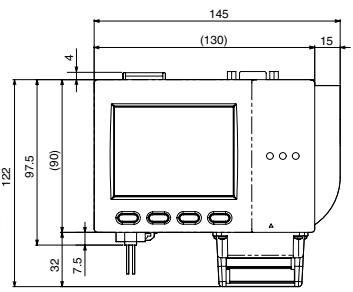
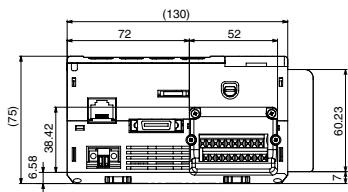
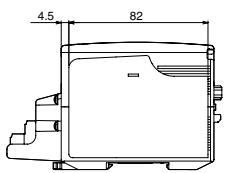
Cameras
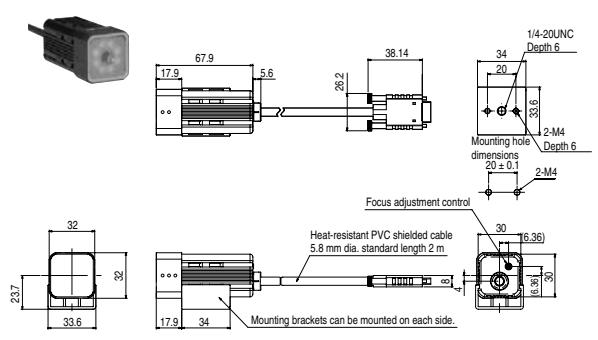
ZFX-SR10/SR50
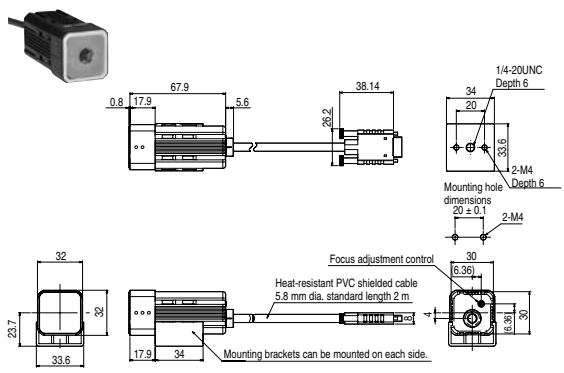
ZFX-SC10
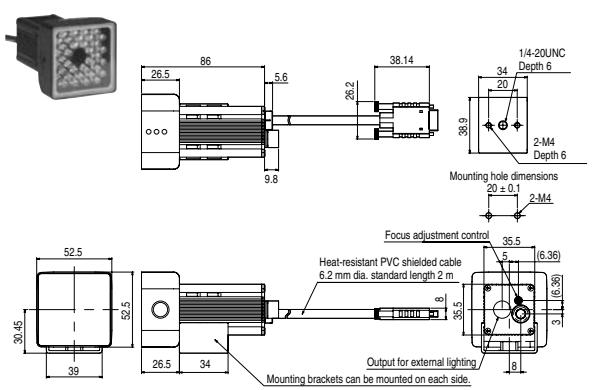
ZFX-SC50/50W
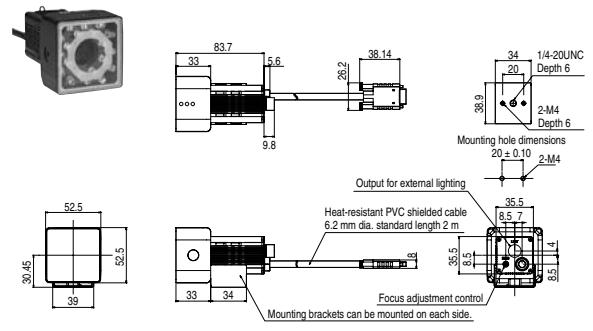
ZFX-SC90/90W
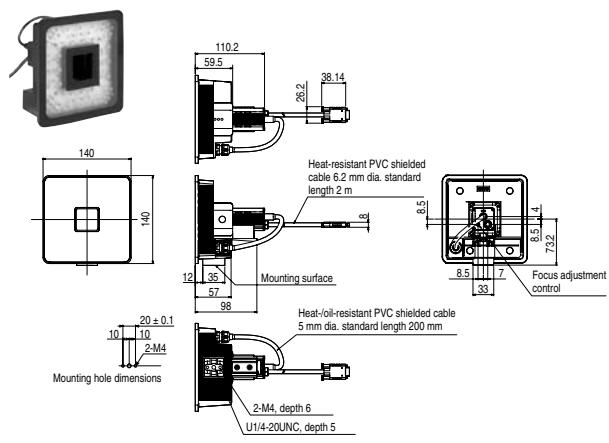
ZFX-SC150/150W
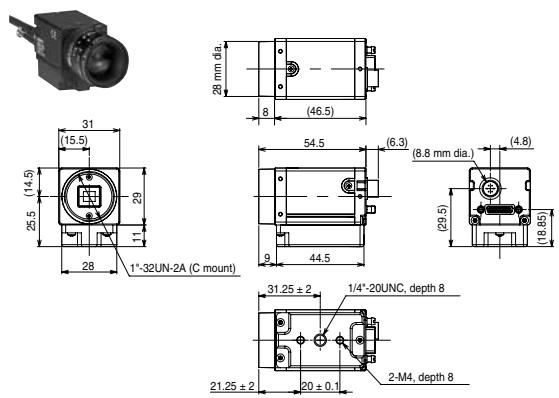
ZFX-S/SC
Cat. No. E381-E1-02
OMRON EUROPE B.V. Wegalaan 67-69, NL-2132 JD, Hoofddorp, Pays-Bas. Tel.: +31 (0) 23 568 13 00 Fax: +31 (0) 23 568 13 88 www.industrial.omron.eu
FRANCE
Omon Electronics S.A.S.
14 rue de Lisbonne
93561 Rosny-sous-Bois cedex
Tel.: +33 (0) 156637000
Fax: +33 (0) 148559086
www.industrial.omron.fr
Agences régionales
N°Indigo 0825825679
0.15 € TTC/MN
BELGIQUE
Omron Electronics N.V./S.A.
Inspect smarter... You can rely on it!