
DV-500 - DVD Player DAEWOO - Free user manual and instructions
Find the device manual for free DV-500 DAEWOO in PDF.


| Product Type | DVD Player |
| Brand | DAEWOO |
| Model | DV-500 |
| Dimensions (W x H x D) | 430 x 48 x 286 mm |
| Weight | 3.8 kg |
| Power Supply | AC 100-240 V, 50/60 Hz |
| Power Consumption | < 14 W |
| Video System | PAL / AUTO / NTSC |
| Horizontal Resolution | High Definition (MPEG2) |
| Video Outputs | Composite, S-Video, RGB (SCART) |
| Audio Outputs | Stereo Analog (RCA), Digital Coaxial and Optical |
| Supported Audio Formats | Dolby Digital, DTS, PCM |
| Compatible Disc Formats | DVD, CD, CD-R, CD-RW, MP3, Picture CD |
| Main Functions | Play, Pause, Stop, Fast Forward/Rewind, Slow Motion, Frame-by-Frame, Zoom, Program, Repeat, A-B Repeat, Search, Angle, Subtitles, Multi Languages, Parental Control, Karaoke |
| Frequency Response | 20 Hz - 20 kHz (±1 dB) |
| Signal-to-Noise Ratio | ≥ 90 dB |
| Channel Separation | ≥ 85 dB (1 kHz) |
| Dynamic Range | ≥ 80 dB (1 kHz) |
| Laser Wavelength | 650 nm |
| Cleaning | Use a soft cloth with a neutral detergent. Do not use solvents. |
| Safety | Do not open the casing. Risk of electric shock and laser exposure. Have all repairs carried out by a professional. |
| Spare Parts and Repairability | Spare parts available from the manufacturer. Repairs by qualified technician only. |
| General Information | User manual included. Manufacturer's warranty 1 year. |
Frequently Asked Questions - DV-500 DAEWOO
User questions about DV-500 DAEWOO
0 question about this device. Answer the ones you know or ask your own.
Ask a new question about this device
Download the instructions for your DVD Player in PDF format for free! Find your manual DV-500 - DAEWOO and take your electronic device back in hand. On this page are published all the documents necessary for the use of your device. DV-500 by DAEWOO.
USER MANUAL DV-500 DAEWOO
IMPORTANT SAFETY PRECAUTIONS .... 2
FEATURES 5
ABOUT DISC 6
BEFORE OPERATION 8
PREPARATIONS BEFORE OPERATION. 10
Front Panel 10
Rear Panel 11
VFD. 12
Names and Layout of Remote Controls 13
CONNECTIONS 14
BASIC OPERATIONS 15
Play Discs 15
System Setting. 16
V-Mode 16
Display. 16
Fast Play. 17
Slow Play 17
Pause/ Step. 17
Select Audio Language 18
Select Channels 18
Selecting 3D Audio 18
PLAYING A DESIRED SCENE 19
To skip scenes in a disc 19
Directly moving to a desired title (DVD) 19
Playing a disc containing MP3 files 20
Repeat Play 20
Repeating a defined period from A to B 21
Select a Subtitle Language 21
Searching 22
PLAY DISCS IN VARIOUS WAYS 23
Select Angle. 23
Zoom Play. 23
Book Mark 23
Program Play (DVD) 24
Program Play (CD) 24
Digest Play (DVD) 25
Digest Play (CD) 25
Play MP3 or PIC-CD Disc 26
FUNCTION SETTING 27
Menu Setting 27
General Setup 28
Dolby Digital Setup 29
Preference Setup 30
OTHERS 31
Tone Control 31
Troubleshooting 32
Technical Specifications 33
IMPORTANT SAFETY PRECAUTIONS
| CAUTION RISK OF ELECTRIC SHOCK DO NOT OPEN | |
| CAUTION: TO REDUCE THE RISK OF ELECTRIC SHOCK, DO NOT REMOVE COVER (OR BACK). NO USER-SERVICEABLE PARTS INSIDE. REFER SERVICING TO QUALIFIED SERVICE PERSONNEL. | |

The lightning flash with arrowhead symbol, within an equilateral triangle, is intended to alert the user to the presence of uninsulated "dangerous voltage" within the product's enclosure that may be of sufficient magnitude to constitute a risk of electric shock.

The exclamation point within an equilateral triangle is intended to alert the user to the presence of important operating and servicing instructions in the literature accompanying the appliance.
WARNING : TO REDUCE THE RISK OF FIRE OR ELECTRIC SHOCK, DO NOT EXPOSE THIS APPLIANCE TO RAIN OR MOISTURE.
CAUTION : TO PREVENT ELECTRIC SHOCK, MATCH WIDE BLADE OF PLUG TO WIDE SLOT, FULLY INSERT.
IMPORTANT FOR LASER PRODUCTS
- LASER This Digital Video Disc Player employs a Laser System. To ensure proper use of this product please read this owner's manual carefully and retain for future reference. Should the unit require maintenance, contact an authorized service location - see service procedure.
Use of control adjustments or the performance of procedures other than those specified may result in hazardous radiation exposure.
To prevent direct exposure to the laser beam, do not try to open the enclosure. Visible laser radiation when open and interlocks defeated.
DO NOT STARE INTO THE BEAM.
- DANGER Visible laser radiation when open and interlock failed or defeated. Avoid direct exposure to beam.
- CAUTION Do not open the top cover. There are no user serviceable parts inside the Unit; leave all servicing to qualified service personnel.
CLASS 1
LASER PRODUCT
CAUTION: Any changes or modification in construction of this device which are not expressly approved by the party responsible for compliance could void the user's authority to operate the equipment.
MACROVISION
This product incorporates copyright protection technology that is protected by method claims of certain U.S. patents and other intellectual property rights owned by Macrovision Corporation and other rights owners. Use of this copyright protection technology must be authorized by Macrovision Corporation, and is intended for home and other limited viewing uses only unless otherwise authorized by Macrovision Corporation. Reverse engineering or disassembly is prohibited.
This set has been designed and manufactured to assure personal safety. Improper use can result in electric shock or fire hazard. The safeguards incorporated in this unit will protect you if you observe the following procedures for installation, use and servicing. This unit is fully transistorized and does not contain any parts that can be repaired by the user.
1 READ INSTRUCTIONS
All the safety and operating instructions should be read before the unit is operated.
2 RETAIN INSTRUCTIONS
The safety and operating instructions should be retained for future reference.
3 HEED WARNINGS
All warnings on the unit and in the operating instructions should be adhered to.
4 FOLLOW INSTRUCTIONS
All operating and use instructions should be followed.
5 CLEANING
Unplug this unit from the wall outlet before cleaning. Do not use liquid cleaners or aerosol cleaners. Use a damp cloth for cleaning.
6 ATTACHMENTS
Do not use attachments unless recommended by the unit's manufacturer as they may cause hazards.
7 WATER AND MOISTURE
Do not use this unit near water- for example, near a bath tub, wash bowl, kitchen sink or laundry tub, in a wet basement, or near a swimming pool.
8 ACCESSORIES
Do not place this unit on an unstable cart, stand, tripod, bracket, or table.
The unit may fall, causing serious injury to a child or adult as well as serious damage to the unit. Use this unit only with a cart,
stand, tripod, bracket, or table recommended by the manufacturer.
8A
A unit and cart combination should be moved with care. Quick stops, excessive force, and uneven surfaces may cause the video product and cart combination to
overturn.
9 VENTILATION
Slots and openings in the case are provided for ventilation to ensure reliable operation of the unit and to protect it from overheating. These openings must not be blocked or covered. These openings must not be blocked by placing the unit on a bed, sofa, rug, or other similar surface. This unit should never be placed near or over a radiator or heat radiator. This unit should not be placed in a built-in installation such as a bookcase or rack unless proper ventilation is provided or the manufacturer's instructions have been adhered to.
10 POWER SOURCES
This unit should be operated only from the type of power source indicated on the marking label. If you are not sure of the type of power supply to your home, consult
your video dealer or local power company. For units intended to operate from battery power, or other sources, refer to the operating instructions.
11 GROUNDING OR POLARIZATION
This unit is equipped with a polarized alternating - current line plug (a plug having one blade wider than the other). This plug will fit into the power outlet only one way.
This is a safety feature. If you are unable to insert the plug fully into the outlet, try reversing the plug. If the plug still fails to fit, contact your electrician to replace your obsolete outlet. To prevent electric shock, do not use this polarized plug with an extension cord, receptacle, or other outlet unless the blades can be fully inserted without blade exposure. If you need an extension cord, use a polarized cord.
12 POWER-CORD PROTECTION
Power-supply cords should be routed so that they are not likely to be walked on or pinched by items placed upon or against them, paying particular attention to cords at plugs and the point where they exit from the unit.
13 LIGHTNING
For added protection for this unit during a lightning storm, or when it is left unattended and unused for long periods of time, unplug it from the wall outlet and disconnect the antenna or cable system. This will prevent damage to the unit due to lightning and power line surges.
IMPORTANT SAFETY PRECAUTIONS
14 DISC TRAY
Keep your fingers well clear of the disc as it is closing. It may cause serious personal injury.
15 OVERLOADING
Do not overload wall outlets or extension cords as this can result in a risk of fire or electric shock.
16 OBJECT AND LIQUID ENTRY
Never push objects of any kind into this unit through openings as they may touch dangerous voltage points or "short-out" parts that could result in a fire or electric shock. Never spill liquid of any kind on the unit.
17 BURDEN
Do not place a heavy object on or step on the product. The object may fall, causing serious personal injury and serious damage to the product.
18 DISC
Do not use a cracked, deformed or repaired disc. These discs are easily broken and may cause serious personal injury and product malfunction.
19 SERVICING
Do not attempt to service this unit yourself as opening or removing covers may expose you to dangerous voltage or other hazards. Refer all servicing to qualified service personnel.
20 DAMAGE REQUIRING SERVICE
Unplug this unit from the wall outlet and refer servicing to qualified service personnel under the following conditions.
A. When the power-supply cord or plug is damaged.
B. If liquid has been spilled, or objects have fallen into the unit.
C. If the unit has been exposed to rain or water.
D. If the unit does not operate normally by following the operating instructions. Adjust only those controls that are covered by the operating instructions. Improper adjustment of other controls may result in damage and will often require extensive work by a qualified technician to restore the unit to its normal operation.
E. If the product has been dropped or the cabinet has been damaged.
F. When the unit exhibits a distinct change in performance this indicates a need for service.
21 REPLACEMENT PARTS
When replacement parts are required, have the service technician verify that the replacements he uses have the same safety characteristics as the original parts. Use of replacements specified by the unit manufacturer can prevent fire, electric shock, or other hazards.
22 SAFETY CHECK
Upon completion of any service or repairs to this unit, ask the service technician to perform safety checks recommended by the manufacturer to determine that the unit is in safe operating condition.
23 WALL OR CEILING MOUNTING
The product should be mounted to a wall or ceiling only as recommended by the manufacturer.
24 HEAT
The product should be situated away from heat sources such as radiators, heat registers, stoves, or other products (including amplifiers) that produce heat.
FEATURES
OUTSTANDING SOUND QUALITY
Dolby Digital DOLBY system developed by Dolby Laboratories and DTS DTS developed by DTS Inc., features high quality surround sound which can be played in DVD or CD disc at home, to reproduce high quality sound effects.
HIGH DEFINITION
The unit adopts MPEG2 coding format and brings the high horizontal resolution.
UNIQUE FUNCTIONS
Multi-angle and multi-language bring unique trick functions.
Parent lock makes it easy to control the content of discs.
SCREEN
Ordinary screen and wide screen (16:9) are available.
COMPATIBILITY
The unit can play DVD discs, and is compatible with CD, CD-R, CD-RW, PIC-CD and MP3 discs.
ZOOM
It can enlarge pictures or reduce pictures.
MULTI-FUNCTIONS
Fast forward, fast reverse, forward and reverse slow, frame play, repeat play and program play.
TIME SEARCH
It can search a specific part on a disc, especially good for watching fiction movies.
RESUME PLAY
It can memorize the position where the disc is stopped and resume playback.
VIDEO OUTPUT
Standard video, S-video, RGB signal output mode.
6) AUDIO OUTPUT
Analog audio output, coaxial and optical digital audio output, can be connected with the appropriate amplifier to enjoy high-quality sound effects.
KARAOKE
Microphone input, KARAOKE channel selection.
ABOUT DISC
PRINCIPLES FOR WRITING
This manual mainly introduces how to use buttons on the remote control.
You may operate the unit if the buttons on the unit have the same or similar names as or to those on the remote control.
PLAYABLE DISCS
DVD and Audio CD
| Disc type | Playable | Restriction |
| DVD | Possible | Region number 2 or Region number All |
| CD | Possible | PCM or DTS digital out |
| CD-G | Possible | Only Audio playback |
| CD-ROM | Possible | MP3 File |
| CD-R | Possible | CD/CD-ROM (MP3 File) |
| CD-RW | Possible | CD/CD-ROM (MP3 File) |
| DVD-R | Possible | DVD Video |
| DVD-ROM | Impossible | DVD Video |
| DVD-RAM | Impossible | |
| DVD+RW | Impossible | |
| DVD-RW | Impossible | |
| Photo CD | possible |
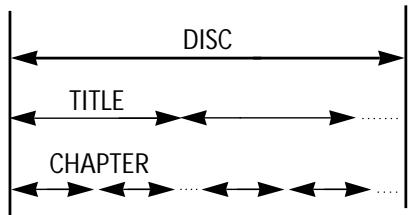
STRUCTURE OF DVD
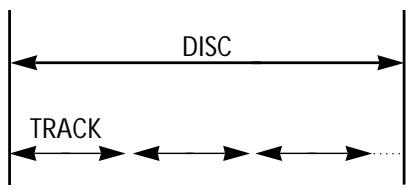
STRUCTURE OF CD
TITLE
The images or music of a DVD are divided into some units, among which title is the biggest one.
When playing a DVD, the movie is the title.
When playing a CD, the combined tracks make up the title.
CHAPTER
It is smaller than title among the units of a DVD. A title is made up of several chapters, and each chapter has a number for search. But some discs may not have numbered chapters.
TRACK
In a CD, each track has a number to enable search functions.
SCENE
The menu pictures, motion and motionless pictures of a CD can be divided into some parts, these parts are scenes. Each scene has a number for search.
REGION MANAGEMENT INFORMATION
This unit is designed and manufactured to respond to the Region Management information that is recorded on a DVD disc. The region number of this player is "2". If the region number described on the DVD discs does not correspond to the Region number of this player, the player will not play this disc. This player will play DVD discs made for "ALL" regions. Therefore, this player will play DVD discs marked with labels containing the region number "2" or "ALL".

(Region 2)

(Region ALL)
BEFORE OPERATION
SECURITY
- Before operation, check if the voltage of the unit is in line with the local voltage.
- Hold the plug to disconnect it from the mains outlet. Do not pull the power cord.
- When the plug of the unit is connected to the mains outlet, the unit will be still connected to AC even if the power is turned off.
- Disconnect the plug as soon as liquid or objects enter the unit. The unit can not be used until being checked by experts.
- Do not open the cabinet as laser rays employed by the unit may damage eyes. Any servicing should be done by qualified service personnel.
PLACEMENT
- Put the unit where ventilation is good enough to prevent overheating.
- Never put the unit in direct sunlight or near heat sources.
- Put the unit horizontally, never put any heavy object on the unit.
- To protect the pickup, do not put the unit where there is dust. If there is dust on the pickup, use a cleaning disc to clean it. Paying particular attention to the operating instructions of the cleaning disc.
CONDENSATION
Moisture will appear on the pickup lens in the following cases:
- The unit is suddenly moved from a cold place to a warm place.
- The unit is put in a room with a heater, or in cold air from an air-conditioner.
- Using the unit in a humid place. In these cases, the unit can not work. Unload the disc and leave the unit on for about one hour to evaporate the moisture.
CLEANING
- Use a soft cloth with a little neutral detergent to wipe the cabinet, panel and controls.
Never use abrasive paper, polishing powder, solvent like alcohol or gasoline.
HANDLING DISC
- To keep the disc clean, do not touch the playsides of the disc.
- Do not attach paper or tape to the disc.
- Keep the disc away from direct sunlight or heat sources.
- Store the disc in a disc case after playback.
CLEANING DISC
- Before playback, wipe the disc outward from the centre with clean cloth.
- Do not use any type of solvent such as thinner, benzine, commercially available cleaners or antistatic spray.
CHECK ACCESSORIES
Check if you have all the accessories after the carton is opened.
| Remote control | AAA batteries | Video/Audio cord | Owner's manual | Scart Lead |
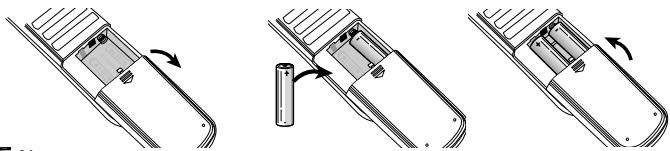
USE REMOTE CONTROL
Check if you have all the accessories after the carton is opened.
1 Open the battery compartment.
2 Insert two AAA batteries, make sure to match "+" and "-" of the batteries to the marks in the battery compartment.
3 Close the battery compartment.
4 Point the remote control at the remote sensor.
Note:
- Batteries can last for about 6 months generally. Change the batteries of that does not work.
- If the remote control is not used for a long time, remove the batteries to prevent battery leakage.
PREPARATIONS BEFORE OPERATION
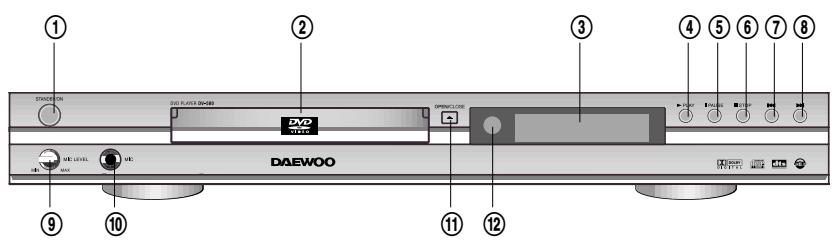
FRONT PANEL
① STANDBY/ON button
To switch the unit On or standby when connected to AC power outlet
② TRAY DOOR
Press OPEN/CLOSE button to open it.
③ DISPLAY
Displays operation status
④ PLAY button
To play the loaded disc. Press this button to go to the preferred item when the menu is displayed on the TV screen.
⑤ PAUSE button
Press this button in playback mode, the picture stops. This machine enters the playback pause mode.
⑥ ■ STOPbutton
One Chapter/Track backward button
To skip back from the status.
One Chapter/Track forward button
To skip forward to the status.
⑨ Microphone Level adjustment knob
Microphone Jack
⑪ OPEN/CLOSE button
To open or close the disc tray.
Remote Sensor
REAR PANEL
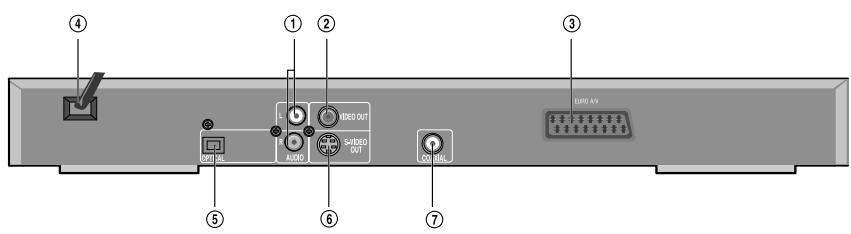
① AUDIO OUT (L/R TRACK)
Two phono sockets for analogue 2 Channel audio in order to a TV or stereo amplifier.
②VIDEO OUT
Connects composite video signal to input AV or PHONO sockets of TV or monitor to achieve high fidelity colour reproduction.
③ EURO AV JACK
If VIDEO OUT phono is not utilized, the SCART socket can be used to connect to a TV set, monitor or VCR.
④ POWER SUPPLY SOCKET WIRE
Creates POWER between wall outlet and the unit.
⑤ DIGITAL AUDIO OPTICAL OUT
Connects digital audio under play mode into an AV amplifier or a receiver equipped with digital audio decoder for you to enjoy the theatre-quality sound in your home.
⑥ S-VIDEO OUTPUT
Connects to TV or monitor equipped with S-VIDEO input. In order to achieve a sharper and cleaner picture than that when connected via VIDEO OUT (composite video).
⑦ DIGITAL AUDIO COAXIAL OUT
Connects digital audio under play mode into an AV amplifier or a receiver equipped with digital audio decoder for you to enjoy the theatre-quality sound in your home.
PREPARATIONS BEFORE OPERATION
VFD
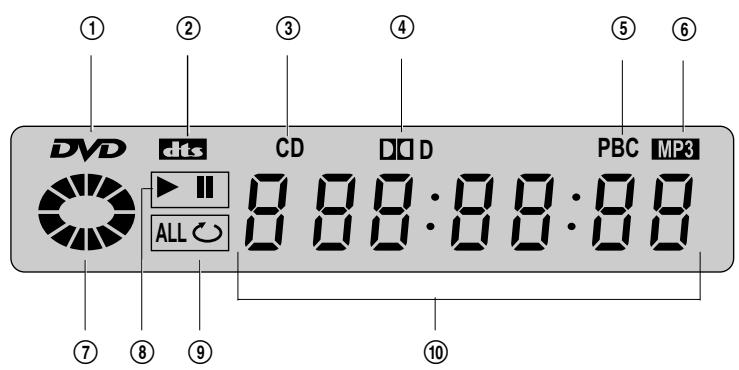
① Recognized DISC TYPE indicator : DVD
② DVD AUDIO STREAM indicator :dts
③ Recognized DISC TYPE indicator : CD
④ DVD AUDIO STREAM indicator Indicates the audio type of the disc under play is DOLBY DIGITAL.
PBC indicator This indicator is lit up in selecting PBC ON while this indicator disappears in selecting PBC OFF.
(6) Recognized DISC TYPE indicator Illuminates when MP3 disc is played.
⑦ DISC LOAD/PLAYindicator Thisindicator is lit up after recognizing the disc.
⑧ PLAY/ PAUSE indicator
⑨ REPEAT MODE indicator
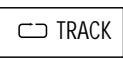
□ In case you want to repeat and play a chapter or track.
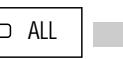
ALL : In case you want to repeat and play a title or disc.
10 NUMBER/CHARACTERindicator
Title, chapter number, and time are displayed in loading DVD disc while track number and time are displayed in loading CD(CD-G)/MP3.
OPEN:Tray is opened
CLOSE:Tray is closed
LQ Rd : Disc is loaded
nD:There is no disc in tray
Err or : Disc has some error

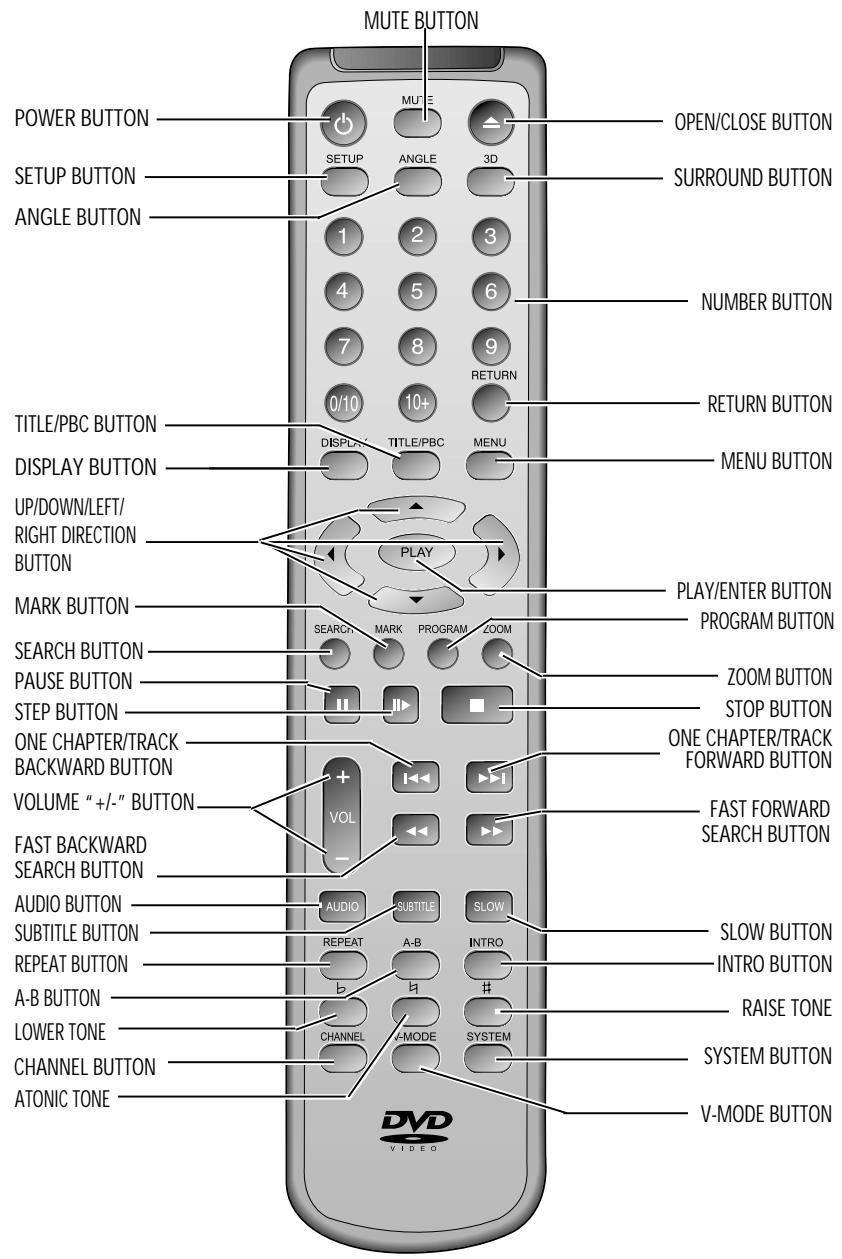
NAMES AND LAYOUT OF REMOTE CONTROLS
- After setting the mode by using SETUP menu (for example, AUDIO select in PREFERENCE SETUP), the setting is kept though you switch the unit off and turn it on.
CONNECTIONS
Turn off all equipment before operation.
The unit has many kinds of output modes like A/V output, S-VIDEO output and digital signal output (COAXIAL, OPTICAL). You may select as you need.
CONNECTED TO A TV AND AN ORDINARY AMPLIFIER
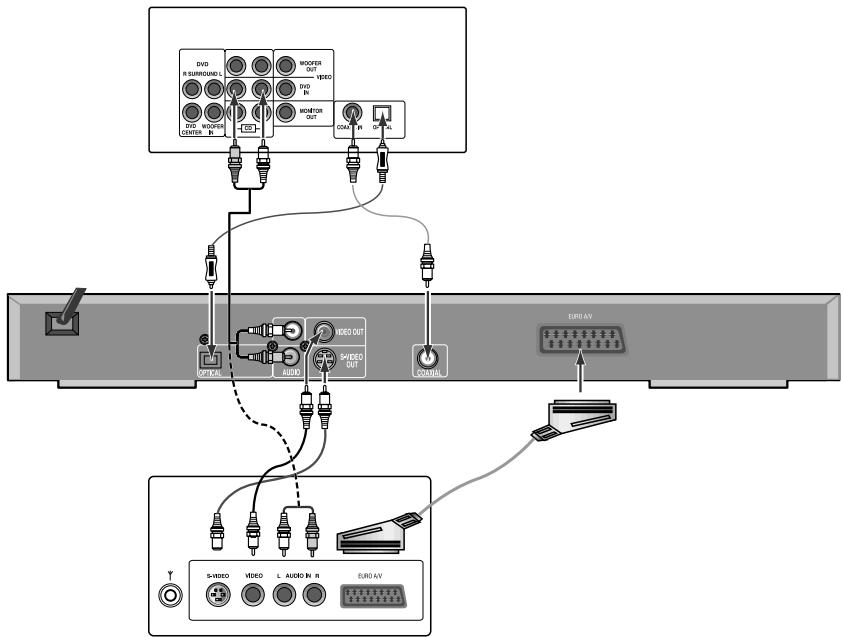
AMPLIFIER
TV Set
Manufactured under license from Dolby Laboratories. "Dolby" and the double-D symbol are trademarks of Dolby Laboratories. Confidential Unpublished works.
© 1992-1997 Dolby Laboratories, Inc. All rights reserved.
"DTS" and "DTS Digital Out" are trademarks of Digital Theater Systems, Inc.
BASIC OPERATIONS
PLAY DISCS
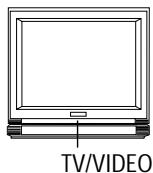
1 Push "POWER" button on the TV and audio system, Push "TV/VIDEO" button on the TV, select VIDEO mode (TV).
Select S-Video mode if using an S-VIDEO connection.

Note:
The Step2 can be cancelled if you do not connect it to the amplifier.
2 Select the correct audio input on the amplifier.
Each amplifier is different from another, please refer to the manual for the amplifier. (e.g., connect the audio output of the DVD player to the DVD audio input of an amplifier.)
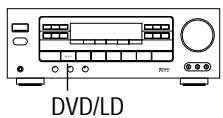
3 Push "STAND BY/ON" button on the front panel or " " button on the remote control to turn the unit on.
Push "OPEN/CLOSE " button to open the disc tray and insert the disc with its label upward. Push "OPEN/CLOSE " button again to close the disc tray. The unit begins to read the disc. The TV screen shows the DVD menu and title menu.
- When playing a DVD, DVD menus and titles are displayed on TV screen.
- In the case of CD, the disc plays in order of its track number.
5 Stop playback.
Press ■.
6 Press to remove the disc.
BASIC OPERATIONS
SYSTEM SETTING
According to the system of the TV to be connected, set the system of the unit to make it match the TV.
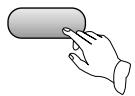
Push SYSTEM button on the remote control, then choose TV TYPE.
- If the system of the TV is PAL, push "SYSTEM" once.
- If the TV is multi-system, push "SYSTEM" twice.
- If the system of the TV is NTSC, push "SYSTEM" three times.
SYSTEM
V-MODE (Only when the player has component jack)
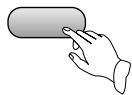
- When utilising the component mode, press the V-MODE on the remote control to select YUV (Y, Pb, Pr).
- When you connect the Composite or S-VIDEO and picture is not displayed, press the V-MODE on the remote control to check if DVD player position in the video mode.
V-MODE
DISPLAY
Each time you press the "DISPLAY" button when playing a disc, the TV screen shows the information as :
DVD
TITLE ELAPSED TITLE REMAIN CHAPTER ELAPSED CHAPTER REMAIN DISPLAY OFF
DISPLAY
T: 水 / 水 C: 水 / 水 水 : 水
CD
SINGLE ELAPSED SINGLE REMAIN TOTAL ELAPSED TOTAL REMAIN
MP3
Folder
FAST PLAY
When playing disc, you may play it forward fast or reverse it fast to find what you need.

Note:
Push PLAY to play normally when playing fast.

Note:
The marked FAST PLAY speed on owner's manual and real fast play speed can be different depending on which disc you play.

Push to play forward fast. Each time you push the button, the speed of picture changes like those shown on the right.

Push to reverse the disc fast. Each time you push the button, the speed of picture changes like those shown on the right.

FFX2

FFX4

FFX8

FFX16

FFX32

PLAY

4FRX2

FRX4

FRX8

FRX16

FRX32

PLAY
SLOW PLAY

Note:
Push PLAY to play normally.
Enjoy slow motions by the following steps.
Push "SLOW" button to play slowly.

DW

DVD
1 SFX1/2 D SFX1/4 D SFX1/8 D SFX1/16 1S RX1/2 1S RX1/4 1S RX1/8 1S RX1/16
PLAY

Note:
Push PLAY to play normally.
PAUSE/STEP
Push PAUSE on the remote control to make the playback pause. Pushing STEP again moves the picture forward frame by frame.
BASIC OPERATIONS
SELECT AUDIO LANGUAGE
You can choose the language according to your choice when playing a multi-language DVD.
Press "AUDIO" button, select different languages.
Note:
- Different discs have different languages
- You can push the "AUDIO" button to choose the language you want when you play multi-language DVD discs.
*Attention:
Please select the AUDIO language in SETUP menu to keep the setting!!!
SELECT CHANNELS (CD, MP3)
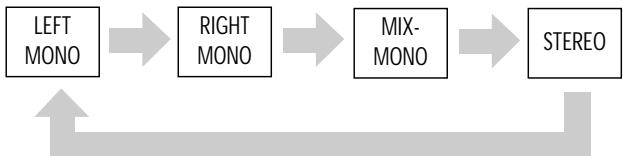
You may select the right channel or left channel or stereo from a multi-channel.
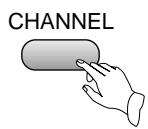
Push the "CHANNEL" button, the screen shows alternately the choices below and select the desired audio channel:
Note:
You can use the channel function when you play the disc, you can choose mono audio output (left or right channel), stereo or mix-mono.
SELECTING 3D AUDIO
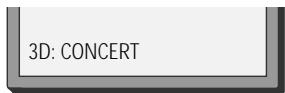
This function outputs 3D effects on the stereo audio analog output where 3D effects are broken down into 7 surround modes.
1 Press the [3D] button.
Every time the user presses the [3D] button, CONCERT, LIVING ROOM, HALL, BATHROOM, CAVE, ARENA and CHURCH appear one by one.
2 Select the desired 3D sound mode.
3D
PLAYING A DESIRED SCENE
TO SKIP SCENES IN A DISC
Push I to move to the next chapter (or track).
The current chapter (or track) moves to the next chapter (or track).
Push to move to previous chapter (or track).
The current chapter (or track) moves to the previous chapter (or track) or first scene of current chapter (or track).
DIRECTLY MOVING TO A DESIRED TITLE (DVD)
Some movie discs may contain multiple titles. If the disc has a movie title menu recorded on it, the [TITLE/PBC] button can be used to select the movie title. Details of operation may differ depending on the disc used.

Note:
You can select the desired title directly by using number button.
Push the [TITLE/PBC] or [MENU] button.
A list of the titles on the disc is displayed.
- In the case of PBC play, press RETURN to return to the sub-menu, press it again to return to the home menu.

Push the [PLAY] button after pressing the [ ] button to select the desired title.
The selected title now starts playing.
PLAYING A DESIRED SCENE
PLAYING A DISC CONTAINING MP3 FILES
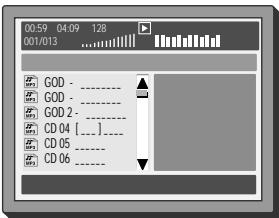
When a MP3 disc is loaded, the MP3 menu screen is displayed automatically depending on MP3 disc's folder structure.
2 Use the direction button to select the folder you want to play, by pressing the [PLAY] button. This button allows you to see the file lists under the folder.
3 Use the direction button and select a MP3 title using the PLAY button then play will start automatically. When you know the title number, enter the MP3 title number using the numeric buttons on the remote control and then press the [PLAY] button.
4 Press on the remote control to choose next title (next files in play mode). Press for previous title (previous files in play mode).
When you know the title number, enter MP3 title number using the numeric buttons on the remote control and then press the [PLAY] button.
REPEAT PLAY
When playing a DVD disc, this function can be used to repeatedly play a title, chapter or disc.
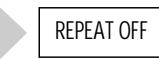
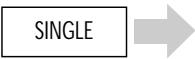
Push the "REPEAT" button, the screen shows orderly.
REPEAT

Note:
Push REPEAT to cancel the repeat function.
DVD


REPEAT OFF
CD

MP3

FOLDER

SHUFFLE

RANDOM
REPEATING A DEFINED PERIOD FROM A TO B

Note:
A MP3 disc may not be repeated from A to B.
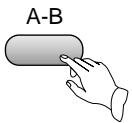
You may press the A-B to enjoy some parts repeatedly when playing a disc.
- Press "A-B" to set a starting point A.
- Press "A-B" twice for an end point B. Afterwards, the unit plays from A to B
- Press "A-B" three times to remove A-B repeat.

SELECT A SUBTITLE LANGUAGE
When you play a multi-subtitle DVD, you may select one subtitle to show it on the screen.

Note:
- For some discs,
subtitles cannot be removed. - Subtitle function is only available for some discs with subtitle recorders.
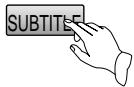
1 Keep pressing the [SUBTITLE] button till the user's preferred language appears. If a DVD disc includes subtitle information, every time the user presses the [SUBTITLE] button, ENGLISH, FRENCH, SPANISH and others appear one by one.
SUBTITLE 01/03:ENGLISH
2 Remove the subtitle.
Press SUBTITLE until the screen shows "SUBTITLE OFF".
SEARCHING
SEARCHING DVD WITH A TITLE/CHAPTER NUMBER OR A TIME
You may directly enter a title or chapter number to search fast on a disc. The unit plays from the point.
1 If you want to search with a chapter or a title number, press the [SEARCH] button. It shows the current disc mode; TITLE, CHAPTER, AUDIO, SUBTITLE, ANGLE, REPEAT, TIME Disp..
Select the TITLE or CHAPTER and enter the new chapter or title number to be searched using the [PLAY], [NUMBER] and [▲▶▲▼] buttons.
-DVD

2 On completing entering, please press [SEARCH] button. PLAY starts from the selected position.
SEARCHING CD WITH A TRACK TIME
- If you want to search with a track time of a CD, press the [SEARCH] button. Select the TRACK TIME and enter the new time to be searched using the [NUMBER] buttons. -CD -
-CD-
PLAY DISCS IN VARIOUS WAYS

Note:
Multi Angle
function is limited
to a DVD disc
supporting multi
angle
information.
SELECT ANGLE
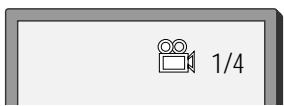
Some discs have images with different screen angles, you may select among them. For example, when you watch a running train, you may select to watch it from the front, the left window or the right window without stopping it.
Keep pressing the [ANGLE] button till the preferred angle appears.

2/4 (select ANGLE2)

3/4 (select ANGLE3)

4/4 (select ANGLE4)
ANGLE
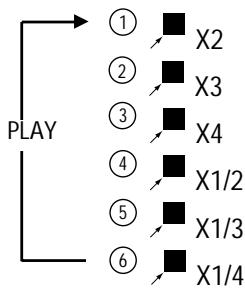
ZOOM PLAY
This function can be used to enjoy a motion or motionless picture.

Push the "ZOOM" button when playing, the screen changes as shown on the right:
ZOOM

Push UP/DOWN/LEFT/RIGHT [▲▶▲▼] button to move the enlarged picture.
BOOK MARK

Note:
If you erase a
book mark
function, push
"RETURN"
button.

Push MARK button, the screen will show the following frame:
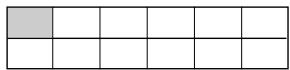

Moving direction button to select the saving position on the screen. Push PLAY button to save the time tag.

Push MARK button when you need book mark function, then choose the item you want to resume playing, then push PLAY button to continue playing from the saving point.
| 02 | 05 | ||||
| 08 |
PROGRAM PLAY (DVD)
You may program the title and chapter on a disc and play them in the programmed order.
1 Push the "PROGRAM" button, the screen shows:
PROGRAM
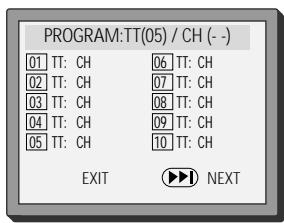

Note:
- First one is title, second one is chapter.
- If the disc has only one title, TT will not be displayed.
2 Input the sequence number you want to program playing.
3 After the programming is finished, move cursor to "START" by direction button and push "PLAY" button to start playing.
Push "STOP" button two times to remove program play.
Push "STOP" button two times to remove
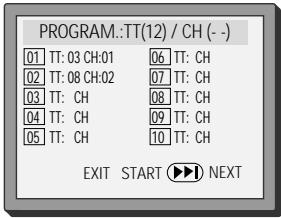
- If you want to remove any program number, put the cursor in the position of the program number, push the "RETURN" button.
PROGRAM PLAY (CD)
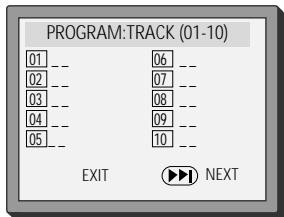
You may program the track on a disc and play them in the programmed order. (For MP3 play, refer to the page 20)
1 Push "PROGRAM" button, the screen shows:
Push the direction button, input the sequence number you want to program play.
After the programming is finished, push the direction button to select "START", Push the "PLAY" button to start playing.
DIGEST PLAY (DVD)
Push the "INTRO" button when the unit is playing a disc, the screen shows:
Push the direction button to select the digest type. And push the "PLAY" button.
Note:
SELECT DIGEST TYPE :
TITLE DIGEST
CHAPTER DIGEST
TITLE INTERVAL
CHAPTER INTERVAL
INTRO
- TITLE DIGEST
The player will play about 5 seconds of each title. After moving the cursor in the position "---", push NUMBER button to select the title and push the PLAY button. Then the player will begin to play from the title you selected. Or put the cursor in the position of the desired picture and push the PLAY button.
CHAPTER DIGEST
The player will display the first picture of each chapter in the current selected title.
- TITLE INTERVAL
Scan the story in the disc from 00: 00:00 on, the unit will play the disc every other 10 minutes.
CHAPTER INTERVAL
Scan the story in the current title from 00: 00:00 on, the unit will play the disc every other 10 minutes.
DIGEST PLAY (CD)
Push the "INTRO" button when the unit is playing a disc, the screen shows:
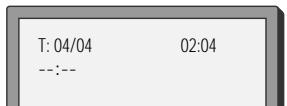
T:01/10
INTRO
00:05
PLAY MP3 OR PIC-CD DISC
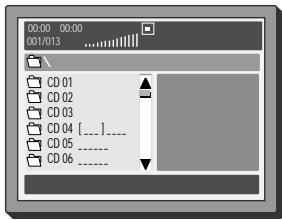
USE NUMBER BUTTONS TO SELECT TRACKS (MP3 OR PIC-CD)
1 The screen will display as right after the disc is loaded
Each time you press the PROGRAM button, FOLDER and FILE LIST appear one by one. At this time you can select the item in the list.
3 You can select the file you want using the direction buttons.
4 Press the PLAY button after selecting the file you want. The file will be played back.

Note:
If you go to Menu screen or File list during Playback mode, press STOP button.
SELECT PLAYING MODE (MP3 OR PIC-CD)
Push "REPEAT" button, you can select "SINGLE", "REPEAT ONE", "FOLDER REPEAT", "FOLDER", "SHUFFLE" and "RANDOM".
- Single mode: the player will stop after it has finished playing the current item
- Repeat one mode: repeat the current item
- Repeat folder mode: repeat the items in the current directory
- Shuffle mode: play items in random
- Folder mode: the player will stop after it has finished playing the whole directory

Note:
If you go to Menu screen or File list during Playback mode, press STOP button.
PLAY PIC-CD BY ZOOM OR ROTATING OPERATING (PIC-CD)
The screen will show "ZOOM 100% " when you push the ZOOM button under playing status, the current picture can be zoomed by pushing or button, and the screen will also show the zoom ratio of the picture ( ZOOM 100% , ZOOM 125% , ZOOM 150% , ZOOM 200% , ZOOM 75% , ZOOM 50% ). The picture will restore to the normal status if you push the PLAY button under the ZOOM status.
FUNCTION SETTING

MENUSETTING
According to the recorded information and external equipment, set the following functions for DVD to obtain the best playing status. Push "SETUP" button to set the main menu.
BASIC NAVIGATION
Navigate through the setting on the screen, use the direction buttons to scroll through the list of settings and use the "PLAY" button to select the high lighted function.
SETUP MENU
Press the SETUP button to enter the On Screen Display and to exit at any time. In each of the menus, selecting MAIN PAGE (SETUP menu) will immediately return you to the initial screen.
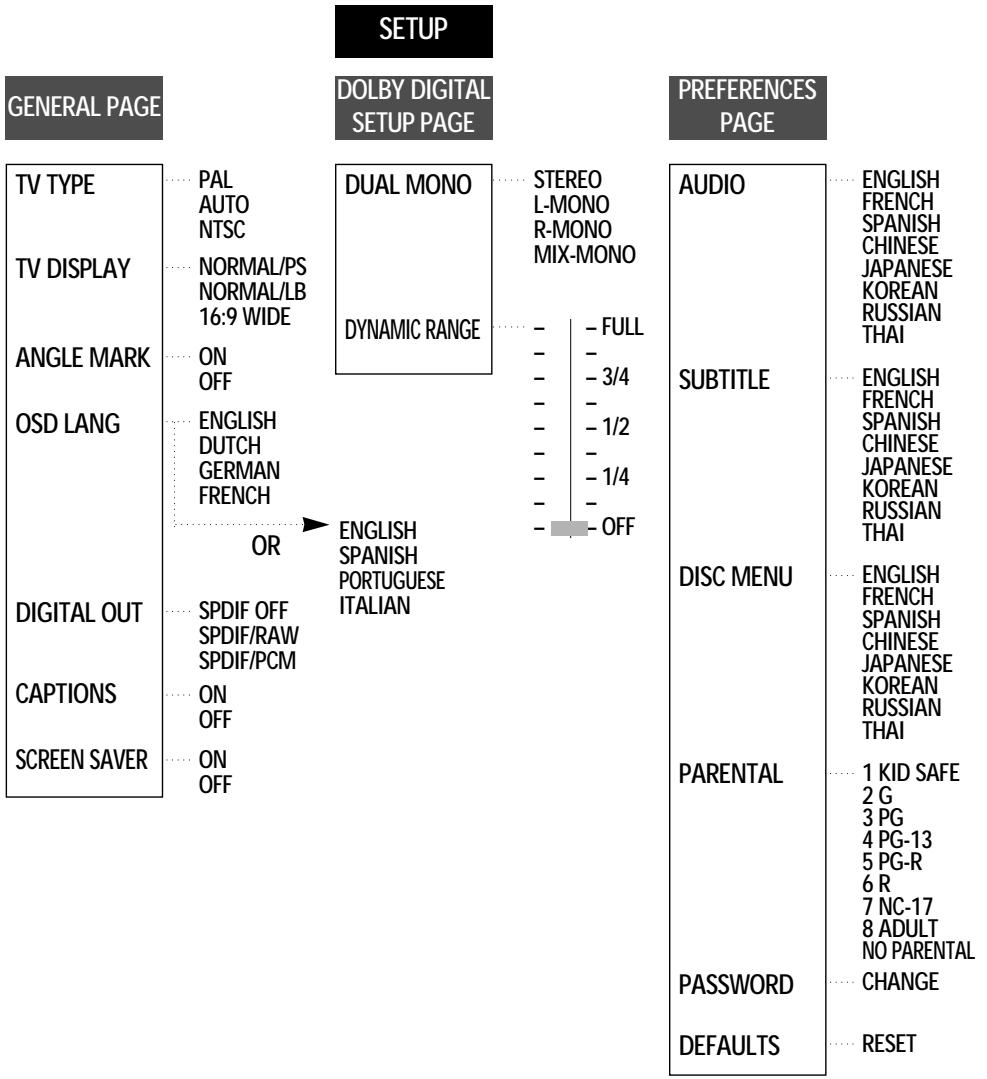
GENERAL SETUP
TV TYPE
You may select according to the colour system of the TV to be connected.
- Select "PAL" for a PAL TV.
- Select "AUTO" for a multi-system TV.
- Select "NTSC" for a NTSC TV.
TV DISPLAY
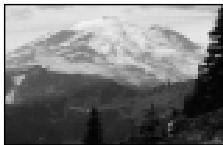
1 NORMAL/PS
This is selected when the unit is connected with a normal TV.
Wide-screen images are shown on the screen, but with some parts cut automatically.
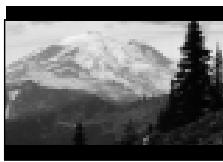
2 NORMAL/LB
This is selected when the unit is connected with a normal TV.
Wide-screen images are shown on screen, with black belts on the top and bottom.
3 16:9 WIDE
This is selected when the unit is connected with a wide-screen TV.

ANGLE MARK
This only works when there is an angle mark on the disc.
- Select "ON", the screen shows the mark when playing a DVD.
- Select "OFF", the mark is not shown.

Note:
"OSD" means
"On Screen
Display".
OSD LANGUAGE
When you select a language, the screen shows this language.
For example, if you select ENGLISH, the OSD is in English.
DIGITAL OUTPUT
- SPDIF OFF
No signal is output from the coaxial, optical port.
SPDIF/RAW
Select this when the DVD player is connected with a power amplifier through optical or coaxial port. Please refer to the page 14. When a Dolby Digital DVD, DTS DVD or MPEG DVD is played, select this, the coaxial or optical port will output in the corresponding digital format (source code). The power amplifier to be connected must have Dolby Digital, DTS and MPEG DVD is played, the optical or coaxial port will output in PCM 2-channel format.
- SPDIF/PCM
Select this when the DVD player is connected with a TV or a power amplifier through an audio cord.
CAPTIONS
The hidden subtitle is shown or turned off.
SCREENSAVER
Start the screen saver, the screen saver image appears when the unit stops or the image is motionless for a few minutes. This saver can keep the screen from being damaged.
DOLBY DIGITAL SETUP
DUAL MONO
This is the output mode of the L and R signals of the set audio output. If it is set to "MIX-MONO", the function only works when the DVD being played is 2.0-channel.
STEREO
Choose this option, the audio output should be a dummy stereo signal.
L-MONO
R-MONO
- MIX-MONO
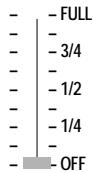
DYNAMIC RANGE
Set "OFF" to view a program in the dynamic range as recorded in the disc. If you hear loud sounds softer and soft sounds louder, set "FULL".
FUNCTION SETTING
PREFERENCE SETUP
AUDIO
Selecting an audio language. Set it as the preferred audio language. Where the audio language is set and recorded in the DISC, it is automatically played in the set language on every playing. For example, If English is set and recorded as the audio language in the DISC, it is played in English.
SUBTITLE
Selecting Subtitle language. Please set it as the preferred language. Where the subtitle language is set and recorded in the DISC, it is automatically played in the set language on every playing. For example, If English is set and recorded as the subtitle language in the DISC, it is played in English.
DISC MENU
Selecting Disc Menu language. Please set it as the preferred DISC MENU language. Where the DISC MENU language is set and recorded in the DISC, it is automatically played in the set language on every playing. For example, English is set and recorded as the DISC MENU language in the DISC, it is played in English.
PARENTAL

Note:
The password is set by yourself.
The content of a disc with lock function is evaluated by grades. You can select an age grade as your need.
Example: Select "KID SAFE", the scenes of violence inadvisable to children are not played. For adults, the screen suggests you enter the code after pushing the "PLAY" button, you can watch if the code is right.

Note:
The password is 3308 when the unit is turned on initially or you forget the password.
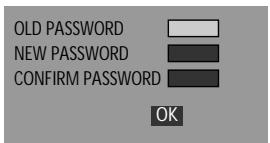
DATABASE
Select a "password" in the PREFERENCE SETUP menu to setup password, input a password. Enter a password according to the screen.
DEFAULT>>RESET
Each function setting returns to the factory initial status if you select this.
OTHERS
TONE CONTROL
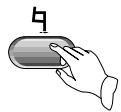
You may change the pitch to adapt to your voice
- Push # to raise the pitch.
Each time you push the button, the pitch is raised by one step. It can be raised by 7 steps at the most.
- Push b to lower the pitch.
Each time you push the button, the pitch is lowered by one step. It can be lowered by 7 steps at the most.
- Retune to the preliminary atonic-tone.
OTHERS
TROUBLESHOOTING
If you experience the following problems while using the unit, this troubleshooting guide can help you.
-
NO SOUND
-
Check if the unit is connected securely.
-
Make sure you operate the TV or amplifier correctly.
-
NO IMAGE, IMAGE ROLLS AND NO COLOUR
-
Check if the unit is connected securely.
- Make sure you operate the TV correctly.
-
Make sure you set the colour system correctly.
-
BAD SOUND QUALITY
-
Make sure the audio output mode is set correctly.
- Make sure the audio connection between the unit and amplifier is right.
DISC CAN NOT BE PLAYED
- There is no disc in the unit.
- Insert the disc on the disc tray properly with the label side up.
- Clean the disc.
- Moisture has condensed in the unit.
Remove the disc and leave the unit on for about one hour.
-
NO MICROPHONE SOUND
-
Switch on the microphone.
- Turn the MIC LEVEL knob clockwise.
SCREAMING
- Keep the phone far away from the speaker
- Turn down the volume
-
Turn down the volume of phone and echo.
-
REMOTE CONTROL DOES NOT WORK
-
Remove barriers between the remote control and the unit.
- Replace the batteries with new ones.
- Point the remote control at the remote control sensor of the unit.
TECHNICAL SPECIFICATIONS
| Laser | wavelength 650nm | |
| Video | PAL/AUTO/NTSC | |
| Frequency response | 20Hz ~ 20KHz (±1dB) | |
| Signal/noise ratio | ≥ 90dB | |
| Channel separation | ≥ 85dB (1KHz) | |
| Dynamic range | ≥ 80dB (1KHz) | |
| Output Audio | Analog | output level : 2.0 + 0/-0.2Vrms (Load impedance : 10KΩ) |
| Digital | output level : 0.5 ± 0.1Vp-p (Load impedance : 75Ω) | |
| Output Video | Composite | output level : 1.0 ± 0.1Vp-p (Load impedance : 75Ω, imbalance, negative polarity) |
| S-video | output level : brightness (Luma) 1.0 ± 0.1Vp-p chromaticity (Colour) 0.286 ± 20% (Load impedance : 75Ω) | |
| RGB | 0.5 Vp-p 75% white | |
| Power supply | AC100~240V, 50/60Hz | |
| Power consumption | < 14W | |
| Dimensions (W x H x D) | 430 x 48 x 286 mm | |
| Weight | About 3.8Kgs | |
Notes : Design and specifications in this owner's manual are subjected to change without prior notice to improve quality and function.
CONNECTING YOUR DAEWOOD DVD PLAYER

REAR PANEL

RED PLUG - into Audio Out R
WHITE PLUG - into Auido Out L
YELLOW PLUG - into Video Out
Or
SCART lead from EURO AV on DVD player to the Scart socket on your TV set
INSERT THE OTHER END OF THE AUDIO/ VISUAL CORD INTO THE SAME Sockets ON YOUR TV SET.
01 In the DVD player box there is a Video/Audio cord (this has a Red, White and Yellow plug on each end). On the rear panel of your DVD player, as seen above, you have coloured coded outputs. While the DVD player is OFF, please connect the Red plug on the Video/Audio cord to the Red output on your DVD player. Please do the same for the White and Yellow plugs.
02 With the other end of the Video/Audio cord please connect the plugs to the same inputs on your TV set.
03 On the Front Panel of your DVD player, press the Stand-By/On button once. On the display of your DVD player you will see Load and then No Disc displayed.
04 Press the button to open the disc tray.
05 Insert the DVD film into the tray. Press the button to close the disc tray.
06 Press the Play button on your Remote Control.
07 Your film will appear on TV screen after a short loading period.
08 You have now successfully connected your new Daewoo DVD Player.
DAEWOO HELPLINE 08701002525
-MEMO-
IMPORTANT
DAEWOO
GUARANTEE REGISTRATION
YOUR 1ST YEAR
MANUFACTURER'S
GUARANTEE
Please keep this with your purchase receipt, which will be required if service is needed on this product during the guarantee period.
KEEP THIS SECTION FOR FUTURE REFERENCE
SERIAL No. DATE OF PURCHASE
TEAR OFF HERE
AND RETURN TODAY
BIDENUC REGISTERING YOUR NEW DAEWOO PRODUCT
To register you product for its 12 month guarantee please complete and return the section below.
MR MR5 SURNAME INITIALS
TOWN
COUNTRY POSTCODE PRODUCT DETAILS
MODEL No. SERIAL No. DATE OF PURCHASE PRODUCT DESCRIPTION PRODUCT VALUE
On the expiry date of the manufacturer's guarantee you will be sent details of our annual insurance plan but if you have already bought an extended warranty for this product from your retailer please tick box
The information provided will be held on computer b of guaranty insurance on product related revenues.
Down in any instance for products that are not available. Limited, on the address overhead.
DAE REG/295
DAEWOO GUARANTEE CONDITIONS
This product is guaranteed for 12 months from the date of original purchase. Any defect that arises due to faulty materials or workmanship will be repaired free of charge during this period by the dealer from whom you purchased the unit. The guarantee is subject to the following provisions.
The guarantee does not cover accidental damage, misuse, cabinet
The guarantee does not cover accidental damage, misuse, cabinet parts, knobs or consumable items such as batteries, drive belts or bulbs.
The product must be correctly installed and operated in accordance with the instructions contained in the manual. It must be used solely for domestic purposes. For further information regarding your guarantee please see the section at the rear of your user manual.
The guarantee will be rendered invalid if the product is resold or has been damaged by inexpert repair.
DAEWOO disclaims any liability for incidental or consequential damages.
The guarantee is in addition to and does not diminish your statutory or legal rights.
In the event of a breakdown please refer to your instruction manual and check all plugs, fuses and electricity supply. In the event of there being no breakdown you will be charged for the repair.