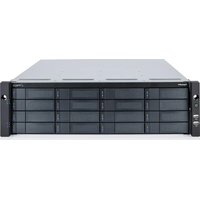
PegasusPro R16 - Hard Drive Promise Technology - Free user manual and instructions
Find the device manual for free PegasusPro R16 Promise Technology in PDF.


Pick your language and provide your email: we'll send you a specifically translated version.
| Product Type | External Hard Drive Enclosure / RAID Storage |
| Brand | Promise Technology |
| Model | PegasusPro R16 |
| Drive Bays | 16 x 3.5-inch SATA/SAS (or 2.5-inch with adapters) |
| Interface | Thunderbolt 3 (USB-C compatible) |
| RAID Support | RAID 0, 1, 5, 6, 10, 50, 60, JBOD |
| Dimensions (H x W x D) | 3.5 x 19 x 23 inches (88.9 x 482.6 x 584.2 mm) – rackmount 3U |
| Weight (without drives) | Approximately 32 lbs (14.5 kg) |
| Power Supply | Dual 550W hot-swappable power supplies (redundant) |
| Cooling | Three hot-swappable cooling fans |
| Maximum Storage Capacity | Up to 256 TB (with 16 TB drives) |
| Operating System Support | macOS, Windows (via driver) |
| Management | Promise Utility via web interface or command line |
| Maintenance | Hot-swappable drives and modules; firmware updates via tool |
| Safety | CE, FCC, UL certified; overcurrent/overvoltage protection |
| Spare Parts & Repairability | Replacement power supplies, fans, controller modules available |
| General Information | Designed for professional video editing and high-bandwidth storage |
Frequently Asked Questions - PegasusPro R16 Promise Technology
What is the maximum capacity of the Promise PegasusPro R16?
The maximum capacity depends on the hard drives used. With 16 TB drives, you can achieve up to 256 TB raw storage. Use enterprise-class SAS or SATA drives for best performance.
Which RAID levels are supported?
The PegasusPro R16 supports RAID 0, 1, 5, 6, 10, 50, 60, and JBOD. RAID 5 or 6 is recommended for a balance of performance and redundancy.
Can I use this enclosure with a Windows PC?
Yes, although primarily designed for macOS, it works with Windows after installing the Promise Utility driver. It connects via Thunderbolt 3 (USB-C).
How do I replace a failed drive?
The drives are hot-swappable. Simply remove the failed drive from its bay, insert a new drive of matching or larger capacity, and rebuild the array using the Promise Utility.
What is the warranty period?
Promise Technology typically offers a 3-year limited warranty on the chassis, covering defective materials and workmanship. Check your region for specifics.
Is the power supply redundant?
Yes, the unit includes dual 550W hot-swappable power supplies. If one fails, the other keeps the system running without interruption. You can replace the failed unit without powering down.
Does it support SSDs?
Yes, you can use 2.5-inch SATA or SAS SSDs with appropriate drive trays (sold separately). Mixing HDDs and SSDs in the same array is not recommended for optimal performance.
How do I access the management interface?
Install the Promise Utility from the included software. You can manage the RAID volume, monitor health, and configure settings via a web browser or command-line interface.
What cables are included?
The PegasusPro R16 comes with two Thunderbolt 3 cables (0.5m and 1m) and a power cord. Additional cables can be purchased separately.
Can I daisy-chain multiple units?
Yes, Thunderbolt 3 supports daisy-chaining. You can connect up to six devices in a chain, but performance may be shared. Use the second Thunderbolt port for daisy-chaining.
User questions about PegasusPro R16 Promise Technology
0 question about this device. Answer the ones you know or ask your own.
Ask a new question about this device
No questions yet. Be the first to ask one.
Download the instructions for your Hard Drive in PDF format for free! Find your manual PegasusPro R16 - Promise Technology and take your electronic device back in hand. On this page are published all the documents necessary for the use of your device. PegasusPro R16 by Promise Technology.
USER MANUAL PegasusPro R16 Promise Technology
Manual assistant
Powered by Anthropic
Waiting for your message
Product information
Brand : Promise Technology
Model : PegasusPro R16
Category : Hard Drive