
FS-9130DN - Laser printer KYOCERA - Free user manual and instructions
Find the device manual for free FS-9130DN KYOCERA in PDF.


| Product type | Monochrome laser printer |
| Brand | KYOCERA |
| Model | FS-9130DN |
| Dimensions (L × D × H) | 599 × 646 × 615 mm |
| Weight (main unit) | 68 kg |
| Power supply | 120 V, 60 Hz, max. 11.4 A or 220-240 V, 50/60 Hz, max. 6.1 A |
| Print speed (A4/Letter) | Up to 40 pages per minute |
| Print resolution | Fast 1200, 600 dpi with KIR, 300 dpi with KIR |
| Time to first print (A4) | Approximately 3.5 seconds (from ready state) |
| Warm-up time | 60 seconds or less (at 23°C) |
| Output tray capacity | 500 sheets (0.11 mm thickness) |
| Supported paper sizes | A3, A4, A5, A6, B4, B5, B6, Ledger, Letter, Legal, Envelopes, Postcards, etc. |
| Main memory | 64 MB expandable to 576 MB |
| Standard interfaces | Parallel IEEE1284, USB Hi-Speed, Network 10BASE-T/100BASE-TX |
| Supported operating systems | Windows 95/98/Me/2000/XP, NT 4.0, Server 2003, Mac OS 9/X |
| Toner cartridge yield | Approximately 40,000 pages at 5% coverage (starter cartridge: 20,000 pages) |
| Maximum duty cycle | 200,000 pages per month |
| Noise level (printing) | 70 dB(A) (according to EN ISO 7779) |
| Power consumption (auto standby) | 4.5 W (40 W in standby mode) |
| Routine maintenance | Replacing toner cartridge and toner waste box, cleaning filters and separator |
| Safety | Class 3B laser, CE marking, ENERGY STAR compliant |
Frequently Asked Questions - FS-9130DN KYOCERA
User questions about FS-9130DN KYOCERA
0 question about this device. Answer the ones you know or ask your own.
Ask a new question about this device
Download the instructions for your Laser printer in PDF format for free! Find your manual FS-9130DN - KYOCERA and take your electronic device back in hand. On this page are published all the documents necessary for the use of your device. FS-9130DN by KYOCERA.
USER MANUAL FS-9130DN KYOCERA
IBM Program License Agreement
THE DEVICE YOU HAVE PURCHASED CONTAINS ONE OR MORE SOFTWARE PROGRAMS ("PROGRAMS") WHICH BELONG TO INTERNATIONAL BUSINESS MACHINES CORPORATION ("IBM"). THIS DOCUMENT DEFINES THE TERMS AND CONDITIONS UNDER WHICH THE SOFTWARE IS BEING LICENSED TO YOU BY IBM. IF YOU DO NOT AGREE WITH THE TERMS AND CONDITIONS OF THIS LICENSE, THEN WITHIN 14 DAYS AFTER YOUR ACQUISITION OF THE DEVICE YOU MAY RETURN THE DEVICE FOR A FULL REFUND. IF YOU DO NOT SO RETURN THE DEVICE WITHIN THE 14 DAYS, THEN YOU WILL BE ASSUMED TO HAVE AGREED TO THESE TERMS AND CONDITIONS.
The Programs are licensed not sold. IBM, or the applicable IBM country organization, grants you a license for the Programs only in the country where you acquired the Programs. You obtain no rights other than those granted you under this license.
The term "Programs" means the original and all whole or partial copies of it, including modified copies or portions merged into other programs. IBM retains title to the Programs. IBM owns, or has licensed from the owner, copyrights in the Programs.
1. License
Under this license, you may use the Programs only with the device on which they are installed and transfer possession of the Programs and the device to another party.
If you transfer the Programs, you must transfer a copy of this license and any other documentation to the other party. Your license is then terminated. The other party agrees to these terms and conditions by its first use of the Program.
You may not:
1 use, copy, modify, merge, or transfer copies of the Program except as provided in this license;
2 reverse assemble or reverse compile the Program; or
3 sublicense, rent, lease, or assign the Program.
2. Limited Warranty
The Programs are provided "AS IS".
THERE ARE NO OTHER WARRANTYES COVERING THE PROGRAMS (OR CONDITIONS), EXPRESS OR IMPLIED, INCLUDING, BUT NOT LIMITED TO, THE IMPLIED WARRANTYES OF MERCHANTABILITY AND FITNESS FOR A PARTICULAR PURPOSE.
Some jurisdictions do not allow the exclusion of implied warranties, so the above exclusion may not apply to you.
3. Limitation of Remedies
IBM's entire liability under this license is the following;
For any claim (including fundamental breach), in any form, related in any way to this license, IBM's liability will be for actual damages only and will be limited to the greater of:
1 the equivalent of U.S.$25,000 in your local currency; or
2 IBM's then generally available license fee for the Program
This limitation will not apply to claims for bodily injury or damages to real or tangible personal property for which IBM is legally liable.
IBM will not be liable for any lost profits, lost savings, or any incidental damages or other economic consequential damages, even if IBM, or its authorized supplier, has been advised of the possibility of such damages. IBM will not be liable for any damages claimed by you based on any third party claim. This limitation of remedies also applies to any developer of Programs supplied to IBM. IBM's and the developer's limitations of remedies are not cumulative. Such developer is an intended beneficiary of this Section. Some jurisdictions do not allow these limitations or exclusions, so they may not apply to you.
4. General
You may terminate your license at any time. IBM may terminate your license if you fail to comply with the terms and conditions of this license. In either event, you must destroy all your copies of the Program. You are responsible for payment of any taxes, including personal property taxes, resulting from this license. Neither party may bring an action, regardless of form, more than two years after the cause of action arose. If you acquired the Program in the United States, this license is governed by the laws of the State of New York. If you acquired the Program in Canada, this license is governed by the laws of the Province of Ontario. Otherwise, this license is governed by the laws of the country in which you acquired the Program.
Monotype Imaging License Agreement
1 "Software" shall mean the digitally encoded, machine readable, scalable outline data as encoded in a special format as well as the UFST Software.
2 You agree to accept a non-exclusive license to use the Software to reproduce and display weights, styles and versions of letters, numerals, characters and symbols ("Typefaces") solely for your own customary business or personal purposes at the address stated on the registration card you return to Monotype Imaging. Under the terms of this License Agreement, you have the right to use the Fonts on up to three printers. If you need to have access to the fonts on more than three printers, you need to acquire a multi-user license agreement which can be obtained from Monotype Imaging. Monotype Imaging retains all rights, title and interest to the Software and Typefaces and no rights are granted to you other than a License to use the Software on the terms expressly set forth in this Agreement.
3 To protect proprietary rights of Monotype Imaging, you agree to maintain the Software and other proprietary information concerning the Typefaces in strict confidence and to establish reasonable procedures regulating access to and use of the Software and Typefaces.
4 You agree not to duplicate or copy the Software or Typefaces, except that you may make one backup copy. You agree that any such copy shall contain the same proprietary notices as those appearing on the original.
5 This License shall continue until the last use of the Software and Typefaces, unless sooner terminated. This License may be terminated by Monotype Imaging if you fail to comply with the terms of this License and such failure is not remedied within thirty (30) days after notice from Monotype Imaging. When this License expires or is terminated, you shall either return to Monotype Imaging or destroy all copies of the Software and Typefaces and documentation as requested.
6 You agree that you will not modify, alter, disassemble, decrypt, reverse engineer or decompile the Software.
7 Monotype Imaging warrants that for ninety (90) days after delivery, the Software will perform in accordance with Monotype Imaging-published specifications, and the diskette will be free from defects in material and workmanship. Monotype Imaging does not warrant that the Software is free from all bugs, errors and omissions.
8 THE PARTIES AGREE THAT ALL OTHER WARRANTYES, EXPRESSED OR IMPLIED, INCLUDING WARRANTY OF FITNESS FOR A PARTICULAR PURPOSE AND MERCHANTABILITY, ARE EXCLUDING.
9 Your exclusive remedy and the sole liability of Monotype Imaging in connection with the Software and Typefaces is repair or replacement of defective parts, upon their return to Monotype Imaging.
10 IN NO EVENT WILL MONOTYPE IMAGING BE LIABLE FOR LOST PROFITS, LOST DATA, OR ANY OTHER INCIDENTAL OR CONSEQUENTIAL DAMAGES, OR ANY DAMAGES CAUSED BY ABUSE OR MISAPPLICATION OF THE SOFTWARE AND TYPEFACES.
11 Massachusetts U.S.A. law governs this Agreement.
12 You shall not sublicense, sell, lease, or otherwise transfer the Software and/or Typefaces without the prior written consent of Monotype Imaging.
13 Use, duplication or disclosure by the Government is subject to restrictions as set forth in the Rights in Technical Data and Computer Software clause at FAR 252-227-7013, subdivision (b)(3)(ii) or subparagraph (c)(1)(ii), as appropriate. Further use, duplication or disclosure is subject to restrictions applicable to restricted rights software as set forth in FAR 52.227-19 (c)(2).
14 YOU ACKNOWLEDGE THAT YOU HAVE READ THIS AGREEMENT, UNDERSTAND IT, AND AGREE TO BE BOUND BY ITS TERMS AND CONDITIONS. NEITHER PARTY SHALL BE BOUND BY ANY STATEMENT OR REPRESENTATION NOT CONTAINED IN THIS AGREEMENT. NO CHANGE IN THIS AGREEMENT IS EFFECTIVE UNLESS WRITTEN AND SIGNED BY PROPERLY AUTHORIZED REPRESENTATIVES OF EACH PARTY. BY OPENING THIS DISKETTE PACKAGE, YOU AGREE TO ACCEPT THE TERMS AND CONDITIONS OF THIS AGREEMENT.
Conformité
Programme Energy Star

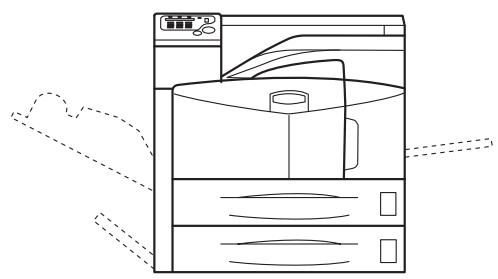
Gauge:300mm (12pouce)
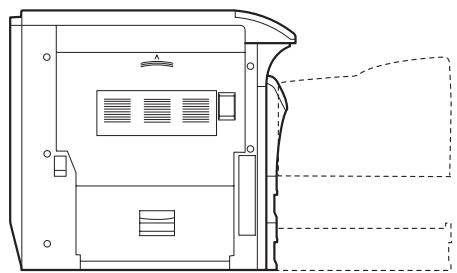
Droite:300mm (12pouces)
Arrière:100 mm (4pouces)
Avant: 1000 mm (40 pouces)
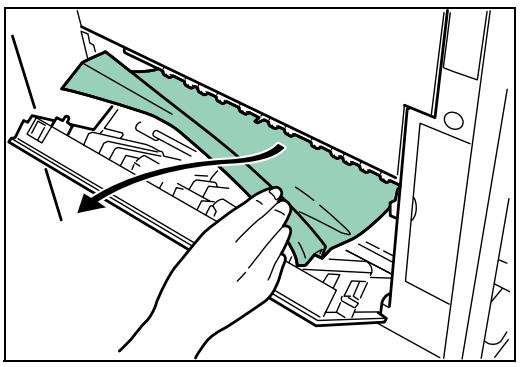
2 Retirez le papier coince.
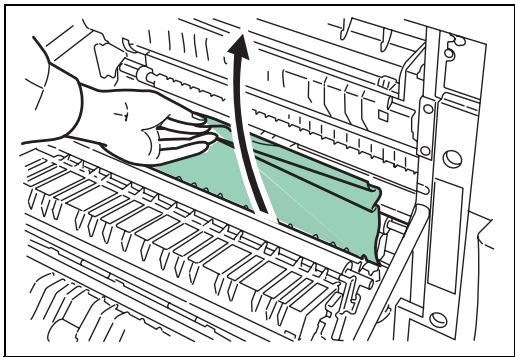
2 Retirez le papier coincide.
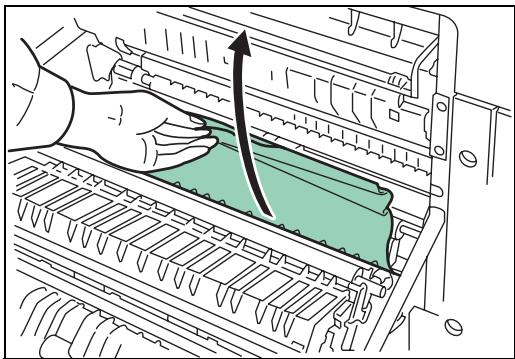
2 Retirez le papier coince.
This machine has passed all quality controls and final inspection
KYOCERA MITA EUROPE B.V.
Phone: +39.02.92179.1
S.A. KYOCERA MITA BELGIUM N.V.
Hermesstraat 8A,1930 Zaventem,
Belgium
Phone: +32.2.720.9270
KYOCERA MITA FRANCE S.A.
Parc Les Algorithms Saint Aubin
91194 GIF-SUR-YVETTE,
France
Phone: +33.1.6985.2600
Phone: +34.91.631.8392
KYOCERA MITA FINLAND OY
Phone: +49.2159.918.0
KYOCERA MITA GMBH AUSTRIA
Phone: +43.1.86338.210
KYOCERA MITA SVENSKA AB
Vretenvagen 2,6tr,17 154 Solna,
Sweden
Phone: +46.8.546.55000
KYOCERA MITA NORGE
Postboks 150 Oppsal, NO 0619 Oslo
Phone: +351.21.842.9100
KYOCERA MITA SOUTH AFRICA (PTY) LTD.
527 Kyalami Boulevard,
Kyalami Business Park Midrand,
South Africa
Phone: +27.(0)11.540.2600
KYOCERA MITA AMERICA, INC.
Headquarters:
225 Sand Road,
Fairfield, New Jersey 07004-0008,
U.S.A.
Phone: (973) 808-8444
KYOCERA MITA AUSTRALIA PTY. LTD.
Level 3, 6-10 Talavera Road, North Ryde,
N.S.W. 2113 Australia
Phone: (02) 9888-9999
KYOCERA MITA NEW ZEALAND LTD.
1-3 Parkhead Place, Albany
P.O. Box 302 125 NHPC, Auckland,
New Zealand
Phone: (09) 415-4517
KYOCERA MITA (THAILAND) CORP., LTD.
9/209 Ratchada-Prachachem Road,
Bang Sue, Bangkok 10800, Thailand
Phone: (02) 586-0320
KYOCERA MITA SINGAPORE PTE LTD.
121 Genting Lane, 3rd Level,
Singapore 349572
Phone: 67418733
KYOCERA MITA HONG KONG LIMITED
11/F., Mita Centre,
552-566, Castle Peak Road,
Tsuen Wan, New Territories,
Hong Kong
Phone: 24297422
KYOCERA MITA TAIWAN Corporation.
7F-1~2, No.41, Lane 221, Gangchi Rd.
Neihu District, Taipei, Taiwan, 114. R.O.C.
Phone: (02) 87511560
KYOCERA MITA Corporation
2-28, 1-chome, Tamatsukuri, Chuo-ku
Osaka 540-8585, Japan
Phone: (06) 6764-3555
http://www.kyoceramita.com