
AUDIOBEAM - Directional audio system SENNHEISER - Free user manual and instructions
Find the device manual for free AUDIOBEAM SENNHEISER in PDF.


| Product type | Directional audio system (acoustic projector) |
| Brand | Sennheiser |
| Model | AudioBeam |
| Power supply | Mains via supplied power cable |
| Carrier frequency | 40 kHz (ultrasonic) |
| Audio input | Symmetrical XLR 3F socket, galvanic isolation |
| Output | 1 x BNC, 50 Ω short-circuit protected |
| Adjustable input level | +6 dBm (1.55 V) / -14 dBm (150 mV) via selector |
| Trigger threshold | -46 dBm (4 V) at high position / -66 dBm (0.4 mV) at low position |
| Input impedance | 600 Ω |
| Noise level | 75 dB ± 5 dB (at 4 m distance) |
| Integrated distance detector | Automatic shutdown if a person approaches within 4 m |
| Safety zone | 4 meters in front of the device (ultrasound) |
| Projection distance | Up to 10 meters |
| Diffusion angle | Approx. 20° (not precisely specified, estimate) |
| LED indicators | Green LED (ready/standby), red (not ready/detector triggered) |
| Package contents | AudioBeam, power cable, 5/8 to 3/8 thread adapter, manual, warranty card |
| Optional accessories | Mounting plate GZP 10, ball joint GZG 1029, base MZT 14, table stand MZT 100, mounting rail MZT 1019, tripod SEMS 3134 |
| Maintenance and cleaning | Dry or slightly damp cloth; no solvent or detergent |
| Safety precautions | Do not open (electric shock risk), do not block ventilation slots, avoid heat sources, liquids, flammable materials within 1 m |
| Repairability | Repair exclusively by a qualified technician; opening voids warranty |
| Use | Wall, ceiling, or stand mounting; orientation via gooseneck and ball joints |
Frequently Asked Questions - AUDIOBEAM SENNHEISER
User questions about AUDIOBEAM SENNHEISER
0 question about this device. Answer the ones you know or ask your own.
Ask a new question about this device
Download the instructions for your Directional audio system in PDF format for free! Find your manual AUDIOBEAM - SENNHEISER and take your electronic device back in hand. On this page are published all the documents necessary for the use of your device. AUDIOBEAM by SENNHEISER.
USER MANUAL AUDIOBEAM SENNHEISER
Instructions for use
Notice d'emploi
Instructions for use 11
Notice d'emploi 19
Modulation: Breitband AM
Instructions for use
Contents
How AudioBeam works 12
Safety instructions 12
Connections and operating controls 13
Mounting AudioBeam 14
Putting AudioBeam into operation 15
Troubleshooting 16
Accessories 16
Specifications 17
Thank you for choosing Sennheiser!
We have designed this product to give you reliable operation over many years. Over half a century of accumulated expertise in the design and manufacture of high-quality electro-acoustic equipment have made Sennheiser a world-leading company in this field.
Please take a few moments to read these instructions carefully, as we want you to enjoy your new Sennheiser product quickly and to the fullest.
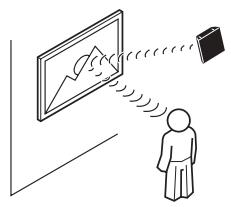
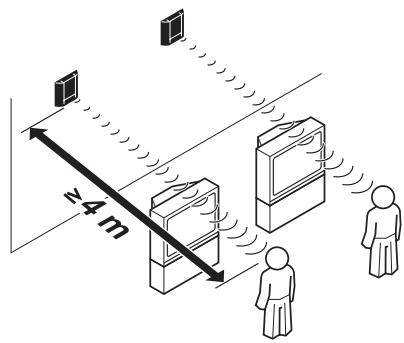
How AudioBeam works
AudioBeam is an acoustic spotlight. This means:
- AudioBeam is able to focus sound – either directly or via reflections on a surface. This allows e.g. information in museums and at exhibitions to be radiated directly from the exhibits – only visitors standing directly in front of an exhibit are addressed.
- AudioBeam limits sound reproduction to precisely defined areas – adjacent areas are kept sound-free. This allows e.g. the soundtrack from a video to be projected in different languages, without the need for headphones. The visitors simply have to enter the desired “language area”.
AudioBeam uses state-of-the-art ultrasonic sound transmission technology:
The desired audible sound is created at a distance of four to up to ten meters directly in front of AudioBeam and at an angle of approx. 30^ . As soon as someone comes closer than four meters to AudioBeam, a built-in distance sensor automatically turns off the unit.
Safety instructions
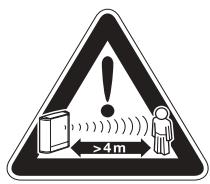
Possible danger for persons with cardiac pacemakers!
Possible danger of hearing defects!
At a distance of less than four meters in front of AudioBeam, ultrasonic frequencies may disturb the function of cardiac pacemakers and may cause damage to the hearing!
Make sure that no-one can come closer than four meters to AudioBeam - especially when mounting the unit movably or rotatably.
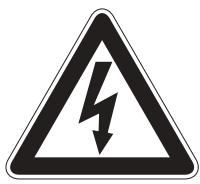
Warning of life-threatening electrical shock!
If AudioBeam is connected to the mains, opening AudioBeam may result in a life-threatening electric shock!
If AudioBeam should be defective, repair must be carried out by your Sennheiser service partner. If the unit is opened in breach of this instruction, the warranty becomes null and void.

Risk of fire!
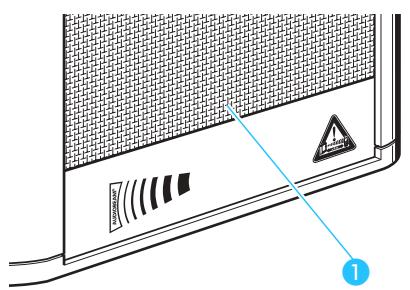
AudioBeam generates heat! Make sure that the air vents of the unit are not covered or blocked!
Keep AudioBeam away from heat sources and never expose AudioBeam to direct sunlight! Maintain a minimum distance of 1 meter between AudioBeam and combustible materials.

Attention!
If liquids or small parts which conduct electricity find their way into the interior or to the connecting sockets of AudioBeam, this can cause a short circuit!
Use AudioBeam in dry rooms only and keep liquids and small parts which conduct electricity away from the unit and its connecting sockets. For cleaning AudioBeam, only use a dry or slightly damp cloth. Never use any solvents or cleansing agents.
Connections and operating controls
Delivery includes:
AudioBeam
- 3 mains cables with plugs
- Interchangeable thread 5 / 8 to 3 / 8
- Instruction manual
- Document of warranty
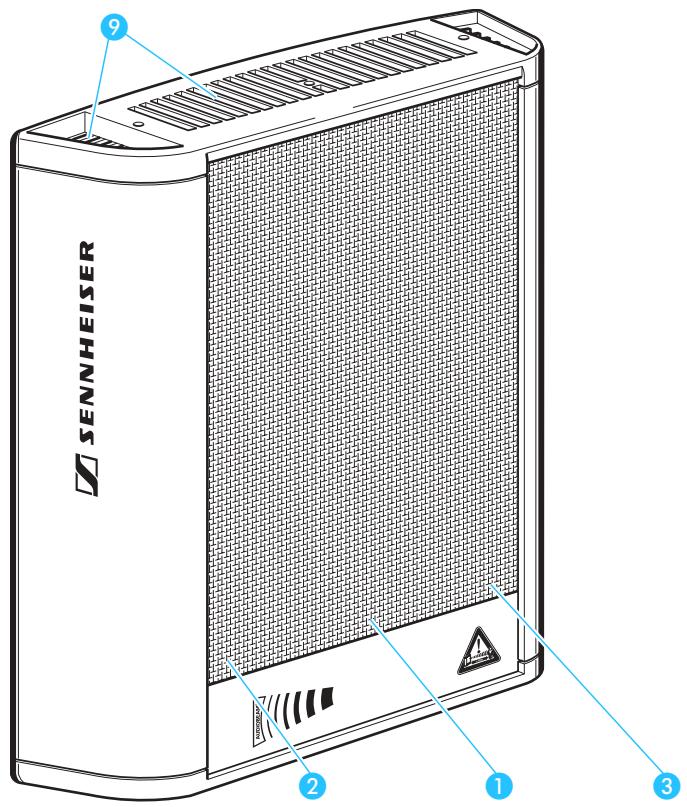
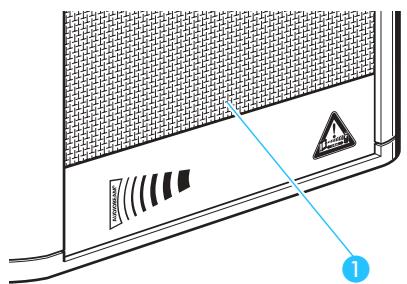
LED operation indicator: green: AudioBeam is operational (standby)
red: AudioBeam is not operational
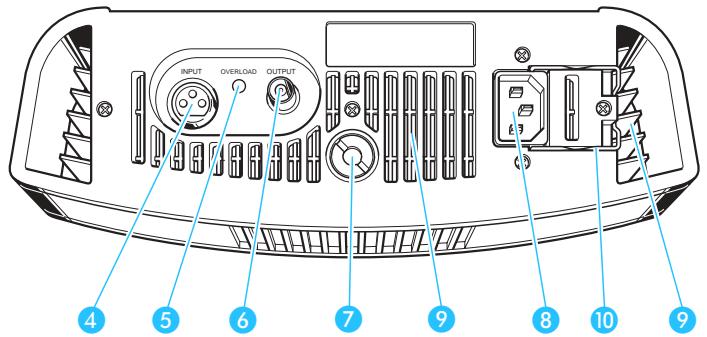
Sensitivity selector switch (+6 dBm, -14 dBm)
3 On/off switch for distance sensor (it is vital to observe the warning on page 15!)
XLR-3 socket for audio input INPUT
5 OVERLOAD LED
6 BNC socket for modulator signal output OUTPUT
7 5 / 8 " thread with adapter to 3 / 8 " thread
IEC mains socket
Air vents
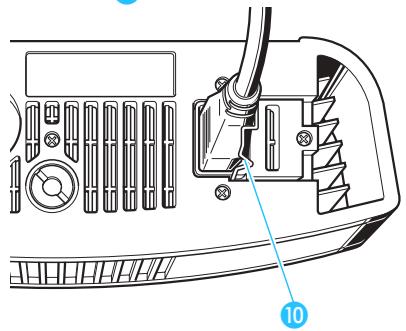
10 Steel clamp for securing the mains cable
Mounting AudioBeam
Correct mounting location
Warning!
Failure to comply with the following location conditions may result in danger to persons and damage to AudioBeam!
When mounting AudioBeam, make sure that:
- the ultrasonic sound wave can travel undisturbed for at least 1m before it strikes the first surface.
- the sound (including the reflections) can travel for at least 4m before it strikes a human being
- a minimum distance of 10cm is maintained between AudioBeam and adjacent objects so that any heat generated can dissipate. Make sure that the air vents at the top and rear of the unit are not covered or blocked!
- a minimum distance of 1 meter is maintained between AudioBeam and combustible materials
- AudioBeam is kept away from heat sources such as central heating radiators, spot lights and lamps. Never expose AudioBeam to direct sunlight.
AudioBeam never gets damp or wet
Mounting AudioBeam in a fixed position
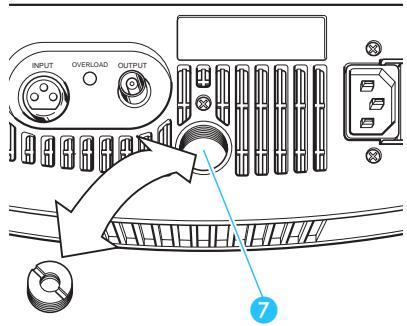
To ensure that AudioBeam is always orientated towards the correct area of interest, you should mount AudioBeam fixedly. Use a mounting plate for wall or ceiling mounting. For free installation, use a table or floor stand (see: „Accessories“ on page 16).
Screw the mounting plate or the table or floor stand to the 5/8 thread ⑦. If necessary, use the interchangeable thread to do this.
By using a gooseneck or swivel joint (see: „Accessories“ on page 16), directly orientate AudioBeam towards the correct area of interest or the reflection area.
Mounting AudioBeam movably or rotatably
Screw AudioBeam onto a drive mechanism or a rotating mechanism using the 5/8 thread ⑦. Use the interchangeable thread if necessary.
- Start up AudioBeam as described on page 15 and ensure that the distance sensor does not trigger in rotating mode (LED operation indicator ① is constantly lit green).
If the distance sensor triggers (LED operation indicator lights up red):
Remove all objects from the rotating range scanned by AudioBeam up to a distance of 4m .
If the distance sensor still triggers (LED operation indicator lights up red again), you must turn off the built-in distance sensor as follows:
Warning!
If you turn off the built-in distance sensor, persons who come closer than 4m to AudioBeam may be in danger from ultrasound.
Always ensure that nobody can come closer than 4 ~m to AudioBeam across the entire rotating range!
To do this, mount AudioBeam at a height of more than 7 m.
- If necessary, take the appropriate structural measures (barriers) to keep people away.
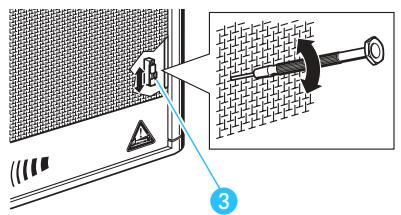
Disconnect AudioBeam from the mains.
- Set the On/Off switch for the distance sensor ③ to the lower position (OFF).
Reconnect AudioBeam to the mains.
Putting AudioBeam into operation
Ensure that AudioBeam is not connected to the mains!
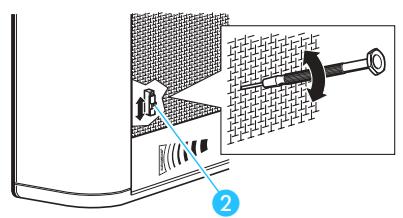
Use the sensitivity selector switch 2 to adapt AudioBeam's input sensitivity to the audio source:
- Sources with a high output power (e.g. mixing console, CD or DVD player): upper position (+6 dBm)
- Sources with a low output power (e.g. portable mini disk player): lower position (-14dBm)
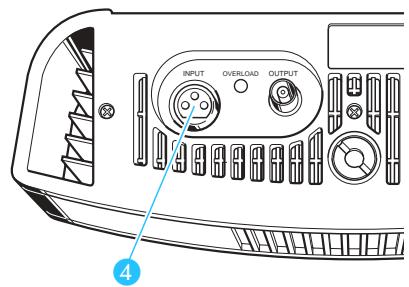
- Use an XLR-3 cable to connect the audio source (e.g. CD or DVD player, mixing console, receiver of a wireless microphone) to the audio input INPUT 4.
AudioBeam automatically emits ultrasound as soon as an audio signal (see "Specifications" on page 17) is present at the audio input INPUT 4.
Use the mains cable to connect AudioBeam to the mains. Secure the mains cable with the steel clamp 10.
The LED ① lights up green, indicating that AudioBeam is ready for operation (standby).
Note:
If you do not use the unit, pull the mains connector out of the wall socket. This helps to increase the service life of AudioBeam and save energy.
Troubleshooting
If the LED operation indicator ① lights up red, one of the following problems may have occurred:
The distance sensor has triggered
- Someone has entered the security area of 4 meters in front of or around AudioBeam and the distance sensor has triggered. After the person has left this area, AudioBeam automatically turns on again after 30 seconds.
- You are operating the device in rotating mode and the distance sensor has triggered because objects or persons are located within the sensor range of the built-in distance sensor.
- solve the problem, see: „Mounting AudioBeam movably or rotatably“ on page 14.
AudiBeam is defective
Please contact your Sennheiser distributor or the Sennheiser Customer Service (for address, see last page).
Accessories
The following accessories are available from your Sennheiser distributor:
GZP 10 Mounting plate for wall and ceiling mounting
GZG 1029 Swivel joint for attachment to stands or the GZP 10 mounting plate, includes 14 " interchangeable thread
MZT 14 Mounting bolt for mounting goosenecks and swivel joints with 38 " thread to table tops
MZT 100 Stable, metal table stand with 3/8'' thread
MZT 1019 Mounting bar for two units with 38 internal thread
SEMS 3134 Floor stand with 38 thread
Specifications
AudioBeam Master:
Modulation: wideband AM
Carrier frequency: 40 kHz
Peak limiter: limiter amplifier
Audio channels: 1
Audio input: XLR-3F socket, balanced, DC-isolated
Input level for max. peak SPL: +6 dBm (1.55 V) = upper switch position -14 dBm (150 mV) = lower switch position
Switching threshold: -46 dBm (4 mV) = upper switch position -66 dBm (0.4 mV) = lower switch position
Impedance: 600Ω
Sound pressure level: 75dB± 5dB (at a distance of 4m )
Output: 1 x BNC, 50 Ω shortcircuit-proof
Amplifier power: approx. 90 W
Power supply: switchable power supply 110 - 240 V, 50 - 60 Hz max. 100 W
Dimensions: 264 × 82 × 320 ~mm
Weight: approx. 4 kg
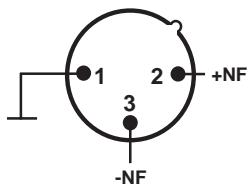
XLR-3 pin assignment:
Notice d'emploi
Sommaire
Modulation : bande large AM
Amplification: env. 90 W
Alimentation: circuit d'alim. 110 - 240 V, 50 - 60 Hz max. 100 W
Dimensions: 264 × 82 × 320 ~mm
Poids: env.4 kg
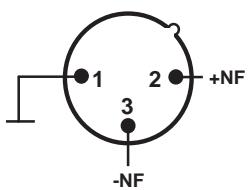
Circuit XLR 3 :
Sennheiser electronic GmbH & Co. KG declare that this device is in compliance with the applicable CE standards and regulations.
Certification
30900 Wedemark, Germany
Phone +49 (5130) 600 0
Fax +49 (5130) 600 300
www.sennheiser.com