
JG6000SP - Video game LEXIBOOK - Free user manual and instructions
Find the device manual for free JG6000SP LEXIBOOK in PDF.



| Product type | Interactive video game with console and inflatable scooter |
| Brand | LEXIBOOK |
| Model | JG6000SP |
| Reference | JG6000SP |
| Console power supply | 4 LR6 (AA) 1.5 V batteries or 9 V 500 mA transformer (not included, polarity IN+/OUT-) |
| Dashboard power supply | 4 LR6 (AA) 1.5 V batteries |
| Number of built-in games | 7 |
| Box contents | Spider-Man Super TV Air Jet, air pump, console, instruction manual, repair kit |
| Maximum user weight | 50 kg |
| Maximum infrared distance | 3 meters |
| TV connection type | AV cable (yellow video jack, red audio jack) |
| Scooter controls | Handlebar (tilt left/right), right grip accelerator, left grip brake |
| Console controls | On/Off, Start, Reset buttons |
| LED indicators | Left, right, power, brake on scooter; power on console |
| Maintenance and cleaning | Clean with a slightly damp cloth without detergent; protect from moisture and heat |
| Safety | Epilepsy warning; not suitable for children under 3 years; adult supervision recommended |
| Warranty | 2 years |
| Manufacturing | Designed in Europe, made in China |
| Standards | EN300220-1-3, EN301489-1-3, EN50088; directive 1999/5/EC |
Frequently Asked Questions - JG6000SP LEXIBOOK
User questions about JG6000SP LEXIBOOK
0 question about this device. Answer the ones you know or ask your own.
Ask a new question about this device
Download the instructions for your Video game in PDF format for free! Find your manual JG6000SP - LEXIBOOK and take your electronic device back in hand. On this page are published all the documents necessary for the use of your device. JG6000SP by LEXIBOOK.
USER MANUAL JG6000SP LEXIBOOK
Marvel, Spider-Man, and the distinctive likenesses thereof are trademarks of Marvel Characters, Inc., and are used with permission. © 2007 Marvel Characters, Inc.
All rights reserved. www.marvel.com
CE
This section explains briefly how to play with the Spider-Man™ Super TV Air Jet. It is recommended to read the complete user guide for detailed instructions on the activities and safety warnings.
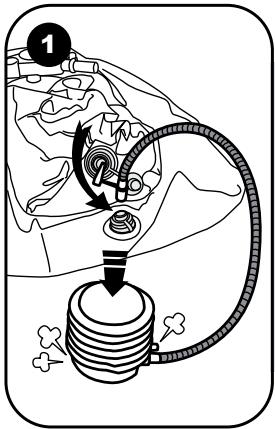
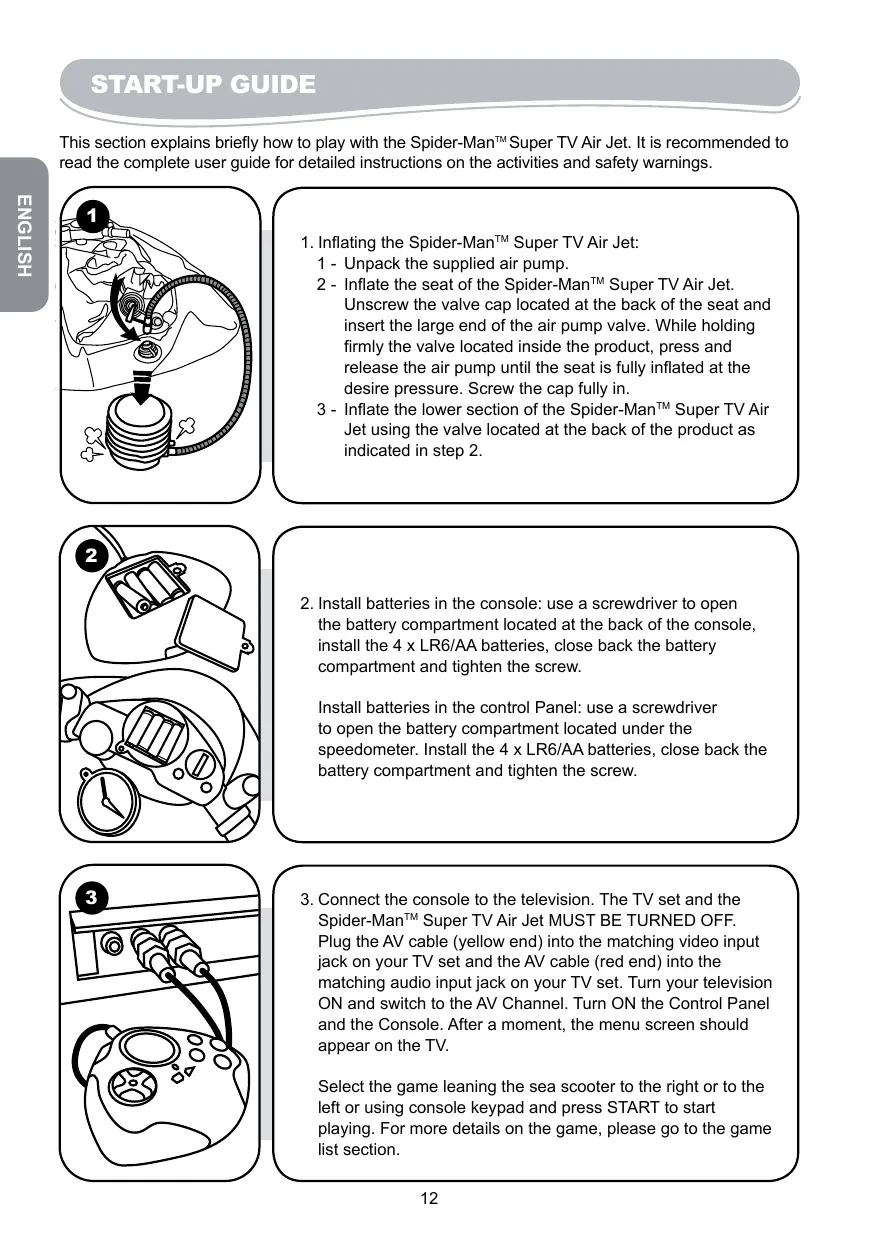
- Inflating the Spider-Man™ Super TV Air Jet:
1 - Unpack the supplied air pump.
2 - Inflate the seat of the Spider-Man™ Super TV Air Jet. Unscrew the valve cap located at the back of the seat and insert the large end of the air pump valve. While holding firmly the valve located inside the product, press and release the air pump until the seat is fully inflated at the desire pressure. Screw the cap fully in.
3 - Inflate the lower section of the Spider-Man™ Super TV Air Jet using the valve located at the back of the product as indicated in step 2.
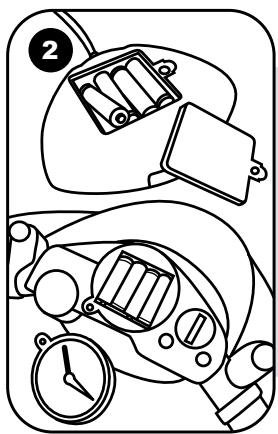
- Install batteries in the console: use a screwdriver to open the battery compartment located at the back of the console, install the 4 × LR6/AA batteries, close back the battery compartment and tighten the screw.
Install batteries in the control Panel: use a screwdriver to open the battery compartment located under the speedometer. Install the 4 x LR6/AA batteries, close back the battery compartment and tighten the screw.
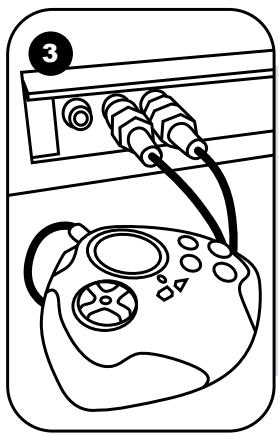
- Connect the console to the television. The TV set and the Spider-Man™ Super TV Air Jet MUST BE TURNED OFF. Plug the AV cable (yellow end) into the matching video input jack on your TV set and the AV cable (red end) into the matching audio input jack on your TV set. Turn your television ON and switch to the AV Channel. Turn ON the Control Panel and the Console. After a moment, the menu screen should appear on the TV.
Select the game leaning the sea scooter to the right or to the left or using console keypad and press START to start playing. For more details on the game, please go to the game list section.
Feel the sensation of a real sea scooter with your Spider-Man™ Super TV Air Jet! Play the 7 thrilling games and catch the villains! Please read the instructions below to learn how to use your new Spider-Man™ Super TV Air Jet, and play the various games.
CONTENT OF THE PACKAGING
The packaging includes the following:
- One Spider-Man™ Super TV Air Jet
- One Air pump
- One console
- Instruction Manual
- One reparation kit
WARNING: All packaging materials, such as tape, plastic sheets, wire ties and tags are not part of this toy and should be discarded for your child's safety.
INSTALLING THE BATTERIES
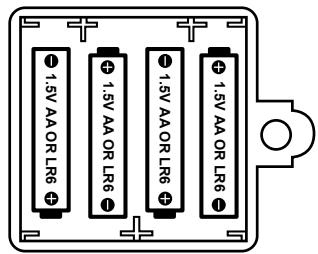
Your Spider-Man™ Super TV Air Jet operates with 8x 1.5V LR6/AA — — batteries 4 batteries for the console and 4 batteries for the control panel.
Console:
- Use a screwdriver to open the battery compartment located at the back of the console.
- Install the 4 × LR6/AA batteries observing carefully the polarity indicated at the bottom of the battery compartment.
- Close back the battery compartment and tighten the screw.
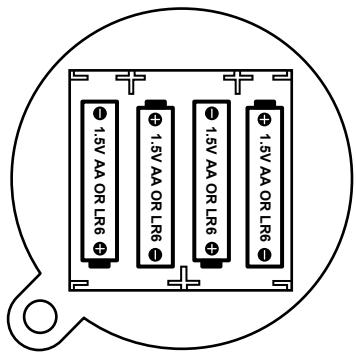
Control Panel:
- Use a screwdriver to open the battery compartment located under the speedometer.
- Install the 4 x LR6/AA batteries observing carefully the polarity indicated at the bottom of the battery compartment.
- Close back the battery compartment and tighten the screw.
Do not use rechargeable batteries. Non-rechargeable batteries are not to be recharged. Rechargeable batteries are to be removed from the toy before being charged.
Rechargeable batteries are only to be charged under adult supervision. Different types of batteries or new and used batteries are not to be mixed. Only batteries of the same or equivalent type as recommended are to be used. Batteries are to be inserted with the correct polarity. Exhausted batteries are to be removed from the toy. The supply terminals are not to be
short circuited. Do not throw batteries into a fire. Remove the batteries if you are not going to use the game for a long period of time.
WARNING: If the unit malfunctions or receives an electrostatic shock, press the Reset key. If this proves to be ineffective, remove the batteries and insert them again.
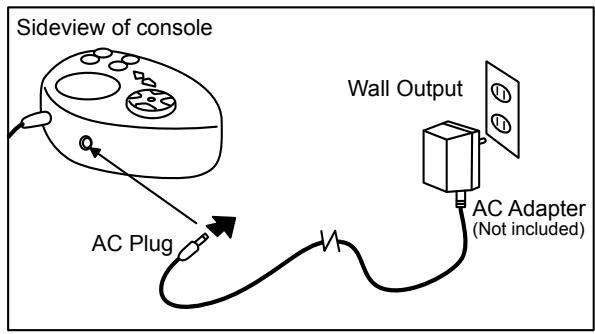
The game also works with a 9V - 500mA transformer with polarity type: IN Positive / OUT Negative - + (not included).
To connect it, follow these instructions:
- Make sure the game is switched off.
- Connect the transformer plug to the socket of the game.
- Connect the transformer to the main outlet.
- Start the game.
Disconnect the transformer if the game is not used for a long period of time to prevent overheating. If you are using the power supply transformer, do not play outdoors. The toy is not intended for children under 3 years old; the toy must only be used with the recommended transformer; the transformer is not a toy; toys liable to be cleaned with liquid are to be disconnected from the transformer before cleaning; packaging shall be kept for future reference; transformers or battery chargers used with the toy have to be regularly examined for damage to the cord, plug, enclosure and other parts. In the even of such damage, toy must not be used with the transformer or battery charger until such damage has been repaired. This game is not suitable for children under 3 years old. The game should only be used with the recommended power adaptor.
NOTE ON INFRA RED
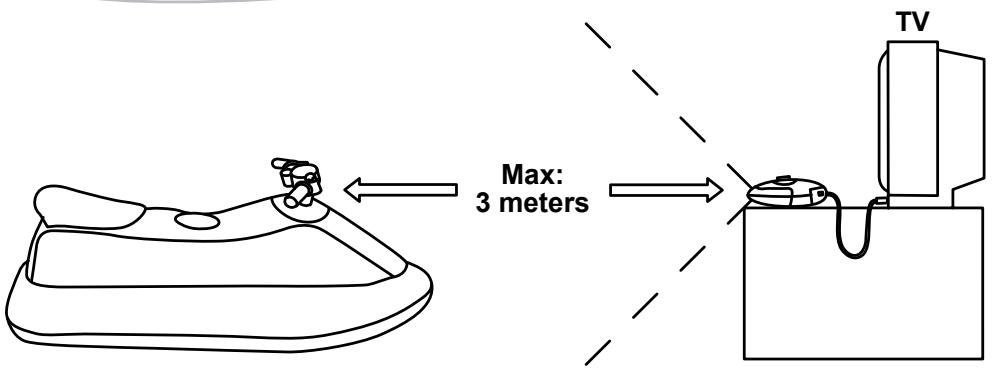
The receiver of the console must face the transmitter located on the handlebar of the unit as per the diagram above. The maximum distance between the transmitter and the receiver is 3 meters at full battery power supply.
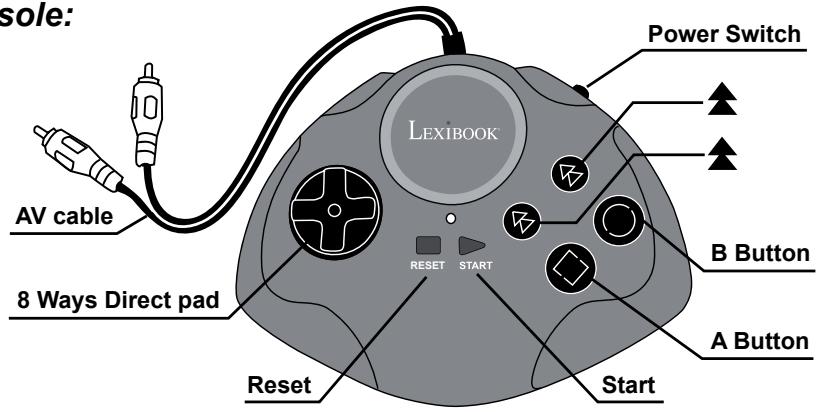
Console:
Power Switch
Used to switch the Console on and off.
Start
Used to start the game.
Reset
Used to access the selection menu during a game.
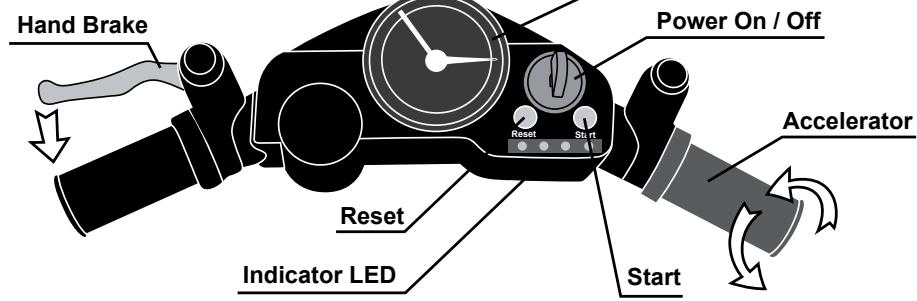
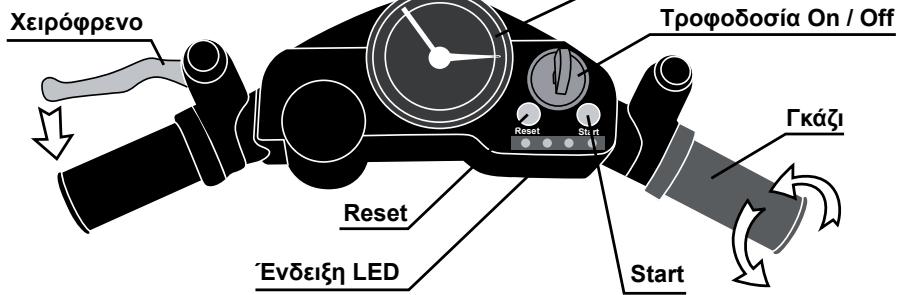
Control panel:
Power On / Off
Used to switch the Spider-Man™ Super TV Air Jet on and off.
Reset
Used to access the selection menu during a game.
Start
Used to start the game.
Accelerator
Please refer to Game list for more details.
(Right Handgrip)
Hand Brake
(Left Handgrip)
Please refer to Game list for more details.
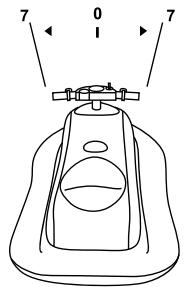
Horizontal position
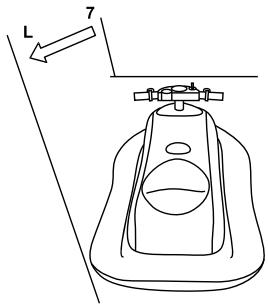
When you position the Spider-Man™ Super TV Air Jet horizontally or within 7 degrees left and right, the vehicle reflects on TV keep straight forward.
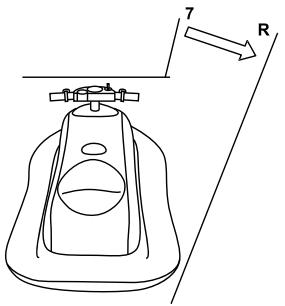
Slant to Right
When you position the SpiderMan™ Super TV Air Jet to more than 7 degrees right, the vehicle reflects on TV moves to right.
Slant to Left
When you position the SpiderMan™ Super TV Air Jet to more than 7 degrees left, the vehicle reflects on TV moves to left.
Maximum weight : The authorized maximum weight on the Spider-Man™ Super TV Air Jet is 110 lbs.
Warning : The Spider-Man™ Super TV Air Jet game is not intended as a floatation device or pool toy. Do not use it in or around water.
CONNECTING THE SPIDER-MAN™ SUPER TV AIR JET TO A TV SET
- The TV set and the Spider-Man™ Super TV Air Jet must be turned off.
-
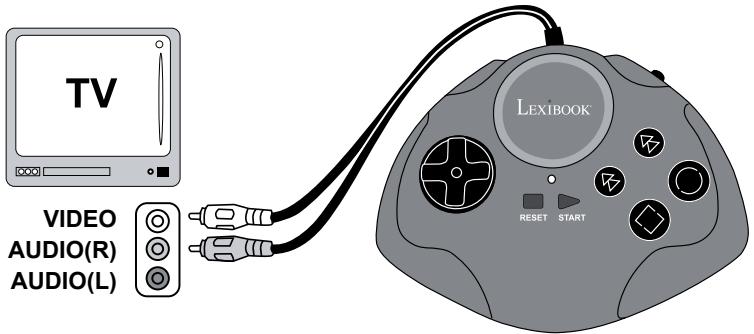
Connect the Console to the television :
-
Plug the AV cable (yellow end) into the matching video input jack on your TV set.
-
Plug the AV cable (red end) into the matching audio input jack on your TV set.
-
Turn your television ON and switch to the AV Channel.
- Turn ON the Control Panel and the Console. After a moment, the menu screen should appear on the TV.
- Once select the game, press START to start playing.
Remark:
The console can be used as an independent hand-held game console. Just power off the SpiderMan™ Super TV Air Jet and you can also play all the games with the console alone.
| Problem | Before requesting repair, check the following items |
| No picture on the screen | ● Are the Spider-Man™ Super TV Air Jet & Console turned on? ● Is the TV turned on? ● Is the TV on the Input or A/V channel? ● Is the A/V cable connected properly? ● Do the batteries have enough power? ● Are batteries properly installed? |
| Screen flickers or no colour | ● Are the TV colour controls set properly? ● Are the TV channel fine adjustments set properly? ● Do the batteries have enough power? |
| No game sound | ● Is the TV volume too low or muted? ● Has the audio cable become loose or disconnected? |
| Picture on TV is unsteady | ● Adjust the vertical or horizontal hold controls on your television until the picture becomes steady. ● Do the batteries have enough power? |
| Fringes appear on TV during play | ● Is the video cable connected properly? ● Do the batteries have enough power? |
| Picture is blinking or distorted | ● Try pressing the reset button, if there is no improvement, turn power off and try again. ● Do the batteries have enough power? |
| No power | ● Are the batteries inserted properly? ● Is the power switch turned on? |
If you still have a problem, please follow the instructions given in this manual and re-connect the system step by step.
Spider Jet
Help Spider-Man complete this thrilling race before time is up. Collect the bonus points and fuel to add to your score. Avoid the obstacles and buoys, else you will lose time!
Functions
Control handlebar: Left and right
Twist right handgrip: Accelerate
Control the ball to destroy all the sea life onscreen. Move the submarine left and right to catch the ball. You lose one life every time you miss the falling ball. You have 5 lives. There are 7 levels.
Functions
Control handlebar: to move the submarine left and right.
Twist right handlebar: to shoot the ball.
Spider Bike
On his super hero motorbike, Spider-Man races the villains on a race track. Complete the 3 laps within the given time. Avoid the villains and the obstacles; else, you will lose precious time.
Functions
Control handlebar: Left and right
Twist right handgrip: Accelerate
Spider-Man (1P icon) is racing against a villain (computer - icon COM). Spider-Man must finish the race before the computer. Try to avoid the many obstacles which will slow you down. The best scores will be displayed at the end of a race.
Functions
Control handlebar: Left and right
Twist right handgrip: Accelerate
Tons of colorful balls are falling from the top of the screen. Use the bar to catch as many as you can. You can catch bonus items but beware of the bad items.
Functions
Control handlebar: to move the bar left and right.
Webdigger
Control Spider-Man's web and digger to catch all the money and coins. Be quick as there is a time limit. There are 30 levels.
Functions
Twist right handlebar: to launch the digger/web and to explode the current item in the digger/web in case a bomb icon is available. Press left handlebar: to take back the digger/web faster.

Spider Escape
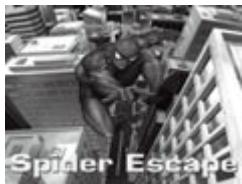
Control the ball to destroy the bricks displayed onscreen. Move the bar left and right to catch the ball. You lose one life every time you miss the falling ball. You start off with 2 lives. There are many bonus items to catch, but beware of the bad items (skull head, -1 etc..). There are 10 levels.
Functions
Control handlebar: to move the bar left and right. Twist right handlebar: to shoot the ball.
Illustrated below are the function descriptions and differences between the Spider-Man™ Super TV Air Jet and the console.
| Spider-Man™ Super TV Air Jet | console |
| Left handgrip: Hand brake | B button |
| Right twist grip: Accelerator/throttle | A button |
| Moving left/right: Slanting or leaning the Sea scooter left or right | 8 ways pad |
| Power => Power On/Off | Power Switch |
| Reset => Start again Start => Start | Reset => Start again Start => Start |
| LED Indicator => Left, Right, Power, Brake. | LED Indicator => Power. |
WARNING REGARDING EPILEPSY
To be read before attempting to use a video game, either by you or your child. Some people are susceptible to suffer epileptic seizures or to loose consciousness when looking at certain types of flashing lights or elements commonly present in our everyday environment. These people are exposed to seizures when watching certain images on television or they play some video games. This phenomenon can become apparent even if the person has no previous medical history of such, or has never suffered an epileptic fit. If you or a member of your family has shown in the past any symptom linked to epilepsy (either a seizure or loss of consciousness) when exposed to "luminous" stimulation, please consult with your doctor prior to any attempt to use this game. We warn parents to be vigilant with their children while they play with video games. If you or your child experience any of the following symptoms: dizziness, altered vision, eye or muscle twitches, loss of awareness, disorientation or involuntary movement or convulsions, stop immediately playing the game and consult a doctor.
FOLLOW THE PRECAUTIONS BELOW WHENEVER USING YOUR SPIDER-MAN™ SUPER TV AIR JET
When using your SPIDER-MAN™ SUPER TV AIR JET do not sit or stand too close to the television screen. Play as far back from the screen as possible.
- Do not play if you are tired or need sleep.
- Always play in a well-lit room.
- Be sure to take a 10 to 15 minutes break at least every hour while playing.
MAINTENANCE
Only use a soft, slightly damp cloth to clean the unit. Do not use detergent. Do not expose the unit to direct sunlight or any other heat source. Do not immerse the unit in water. Do not dismantle or drop the unit. Do not try to twist or bend the unit.
NOTE: please keep this instruction manual, it contains important information.
NOTE : Please keep this instruction manual, it contains important information.
This product is covered by our 2-year warranty. For any claim under the warranty or after sale service, please contact your distributor and present a valid proof of purchase. Our warranty covers any manufacturing material and workmanship defect, with the exception of any deterioration arising from the non-observation of the instruction manual or from any careless action implemented on this item (such as dismantling, exposition to heat and humidity, etc.). It is recommended to keep the packaging for any further reference.
In a bid to keep improving our services, we could implement modification on the colours and the details of the product shown on the packaging. Not suitable for children under 36 months old, as it contains small detachable elements which could be swallowed.
Reference: JG6000SP
Designed and developed in Europe - Made in China
© 2007 LEXIBOOK®
www.lexibookjunior.com
Marvel, Spider-Man, and the distinctive likenesses thereof are trademarks of Marvel Characters, Inc., and are used with permission. Copyright © 2007 Marvel Characters, Inc. All rights reserved. www.marvel.com
CE
Environmental Protection:
Unwanted electrical appliances can be recycled and should not be discarded along with regular household waste! Please actively support the conservation of resources and help protect the environment by returning this appliance to a collection centre (if available).
Marvel, Spider-Man, and the distinctive likenesses thereof are trademarks of Marvel Characters, Inc., and are used with permission. © 2007 Marvel Characters, Inc.
All rights reserved. www.marvel.com

Marvel, Spider-Man, and the distinctive likenesses thereof are trademarks of Marvel Characters, Inc., and are used with permission. Copyright © 2007 Marvel Characters, Inc.
All rights reserved. www.marvel.com

Marvel, Spider-Man, and the distinctive likenesses thereof are trademarks of Marvel Characters, Inc., and are used with permission. © 2007 Marvel Characters, Inc.
All rights reserved. www.marvel.com

Handbremse (linker Griff)
Gashebel (rechter Griff)
Marvel, Spider-Man, and the distinctive likenesses thereof are trademarks of Marvel Characters, Inc., and are used with permission. © 2007 Marvel Characters, Inc.
All rights reserved. www.marvel.com

WAARSCHUWING VOOR EPILEPSIE
Marvel, Spider-Man, and the distinctive likenesses thereof are trademarks of Marvel Characters, Inc., and are used with permission. © 2007 Marvel Characters, Inc.
All rights reserved. www.marvel.com
CE
Aiaokottns Tpofooosaic
Xpoaiouoiieiayia to iνηµ kai tn diakotn λi t p γi α ts kovoolac.
Start (Evapξη)
Xpnoiopoioietai yia to iν η µ kai Tnv TPOoWpivn DIAKOTN TOU PAixVIOIou Iou eivai eEeAIXIg
Reset (Eπαναφορά)
Xpnoiopoioietai yia tv npoobaon oTo evou ETIIOyns Otn diapkeia evoc Tnaxviiou
Nivakaç ελέγχου:
TpoqoosoiOn/Off (Avoiyma/Kεioiμo)
XpnoiioTIOeIaia To Eekivma Ka Tbiakotn Ieitoupyiac Tou Spider-Man Super TV Air Jet.
Reset (Eπαναφορά)
Xpnoiopoioietai yia tv npo8aon oTo evou Etnioyns otniapkεia evoc Tnixio
Start (Evapξη)
Xpnoiopoioietai yia To Eekivna Kai Tnv Tpoowpivn DiaKoTn Tou TaaVIOIou Tou eivai oE EeAix
Xeipoppevo
Iapakaloume 6eite Tn AioTa TiaXviWiV yia TepiooTepecs AETTOMEPEIECS
(Apiotepn xepolαβ)
Kα
(△εξiαχερολβη)
Marvel, Spider-Man, and the distinctive likenesses thereof are trademarks of Marvel Characters, Inc., and are used with permission. © 2007 Marvel Characters, Inc. All rights reserved. www.marvel.com

YtObeEic yia Tnv TpOaTcA Tou pIbaovtoc
OIIaIcIgKTEGoukeuEeivaiTolutia ulika koiuvtic6evexouvTeoIaikakatoppmuata! Oa telaeAoiovvaacnapakaleoume va macuotnpieTe oubetaovtac evpya otny pooataawpwtuvwauWkai Tou TepiBaalovtoc npadibovtac noukeun autn otic utnpoeicv avakkuwan
-εφοσον Uπαρχούν.
DECLARATION DE CONFORMITE
Nous, LEXIBOOK
2, Av de Scandinavie, 91953 Courtaboeuf Cedex
DECLARATION OF CONFORMITY
We, LEXIBOOK
2, Av de Scandinavie, 91953 Courtaboeuf Cedex
declare under our sole responsibility that the product
Kind of product: Spider-Man™ Super TV Air Jet
Type number: JG6000SP
to which this declaration relates, is in conformity with the following standards and/or other normative documents :EN300220-1-3, EN301489-1-3, EN50088.
We hereby declare that the above named product is in conformity to all the essential requirements of Directive 1999/5/EC.
Julian Chung
QA Manager
- CONTENT OF THE PACKAGING
- INSTALLING THE BATTERIES
- CONSOLE
- CONTROL PANEL
- NOTE ON INFRA RED
- CONNECTING THE SPIDER-MAN™ SUPER TV AIR JET TO A TV SET
- REMARK
- SPIDER JET
- FUNCTIONS
- SPIDER BIKE
- WEBDIGGER
- SPIDER ESCAPE
- WARNING REGARDING EPILEPSY
- FOLLOW THE PRECAUTIONS BELOW WHENEVER USING YOUR SPIDER-MAN™ SUPER TV AIR JET
- MAINTENANCE
- WAARSCHUWING VOOR EPILEPSIE
- DECLARATION DE CONFORMITE
- DECLARATION OF CONFORMITY
Brand : LEXIBOOK
Model : JG6000SP
Category : Video game