
IG810 - Tablet LEXIBOOK - Free user manual and instructions
Find the device manual for free IG810 LEXIBOOK in PDF.



| Product type | Portable gaming console with color screen |
| Brand | LEXIBOOK |
| Model | IG810 |
| Power supply | 3 LR03 alkaline batteries 1.5V (not included) |
| Number of built-in games | 60 games |
| Game categories | Action, Racing, Shooting, Sports, Wits |
| Game modes | Standalone or connected to a TV |
| Connectivity | AV jack (cable included) and headphone jack |
| Screen | Integrated color screen |
| Included accessories | AV cable, headphones |
| Auto power-off | After 3 minutes of inactivity |
| Safety | Epilepsy warning, not suitable for children under 36 months (small parts) |
| Maintenance and cleaning | Slightly damp cloth, no detergent |
| Warranty | 2 years, covers material and manufacturing defects |
Frequently Asked Questions - IG810 LEXIBOOK
User questions about IG810 LEXIBOOK
0 question about this device. Answer the ones you know or ask your own.
Ask a new question about this device
Download the instructions for your Tablet in PDF format for free! Find your manual IG810 - LEXIBOOK and take your electronic device back in hand. On this page are published all the documents necessary for the use of your device. IG810 by LEXIBOOK.
USER MANUAL IG810 LEXIBOOK
The Plasma Console: 60 games on colour screen for hours of fun! The game console includes two games modes: stand alone for more flexibility or connected to a TV set for wide-screen game play. Please read the instructions below to discover all the functions of this game.
POWER SUPPLY
The Plasma Console works with 3 alkaline 1.5V 2.25 Ah batteries type LR03 or AAA (not included).
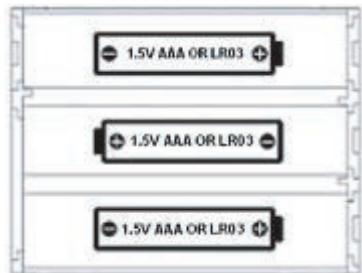
Inserting the batteries
- Open the battery compartment door located at the back of the game console using a screwdriver.
- Install 3 x AAA batteries observing carefully the polarity indicated inside the battery compartment, and as per the diagram shown opposite.
- Close back the battery compartment.
Do not use non-rechargeable batteries. Non-rechargeable batteries are not to be recharged; rechargeable batteries are to be removed from the toy before being charged; rechargeable batteries are only to be charged under adult supervision ; different types of batteries or new and used batteries are not to be mixed; only batteries of the same or equivalent type as recommended are to be used; batteries are to be inserted with the correct polarity; exhausted batteries are to be removed from the toy; the supply terminals are not to be short circuited. Do not throw batteries into a fire. Remove the batteries if you are not going to use the game for a long period of time.
WARNING: if the unit malfunctions or receives an electrostatic shock, switch the unit off and on again using the ON/OFF button. If this proves to be ineffective, perform the Reset procedure.
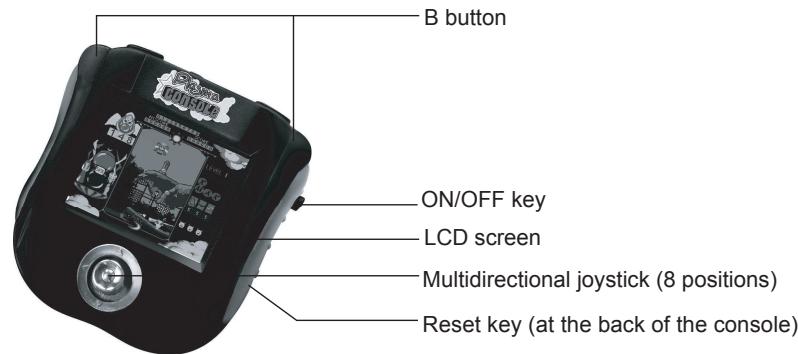
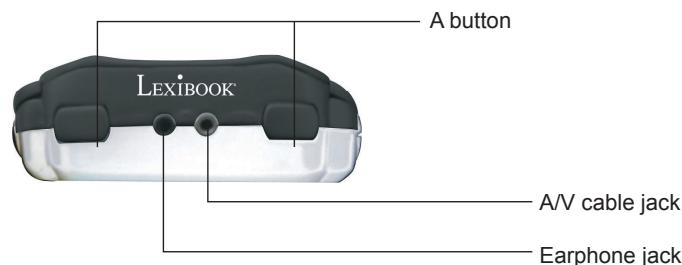
DISCOVERING THE PLASMA CONSOLE
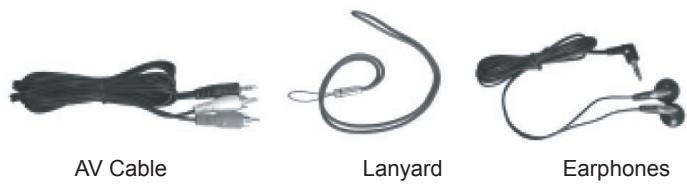
The Plasma Console includes the following accessories:
GETTING STARTED
Connecting the Plasma Console to a TV set
You have the option to plug the Plasma Console to your TV set if you wish to play on a wider screen. To do so, follow the instructions below:
- The TV set and the Plasma Console must be turned off.
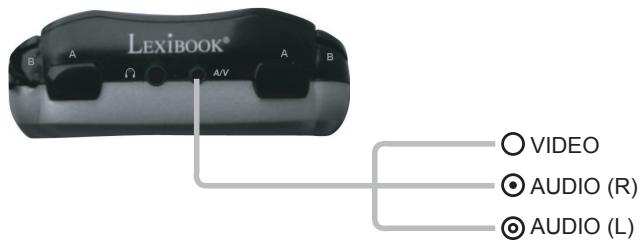
- Plug the AV cable (black end) into the game's A/V cable jack.
- Plug the AV cable (yellow end) into the matching video input jack on your TV set.
- Plug the AV cable (red end) into the matching audio input jack on your TV set.
- Switch on the TV set and turn on the Plasma Console by pressing on the On/Off key.
Using the earphones
Plug the earphones into the earphone jack.
On/Off key
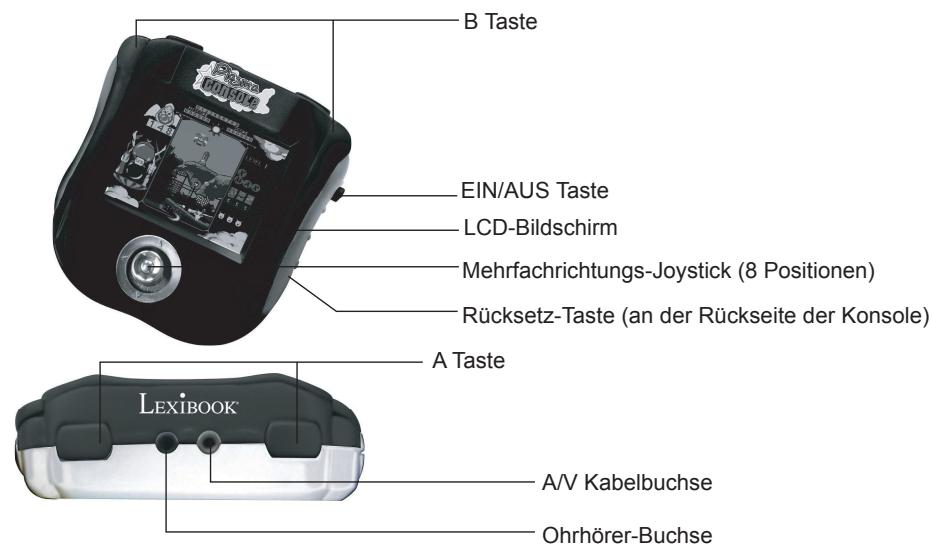
Press the ON/OFF key to turn the Plasma Console on. When the console is on, press the ON/OFF key swiftly (for less than a second) to return to the main menu or press and hold the ON/OFF during 2 to 3 seconds to turn the game off.
Note: the Plasma Console will automatically turn off after 3 minutes of inactivity.
Reset key
If an abnormal operation is observed (the console stops working or freezes), use a pointed object (e.g. a paper clip) in order to press the RESET button located at the back of the unit.
Note: make sure the Plasma Console is always turned off when you plug and unplug the AV cable.
Selecting a game
- After turning the game on, the opening animation is displayed. Press A to enter the main menu.
- The games are divided into 5 categories: Action, Racing, Shooting, Sports, and Wits
- To select a category, use the up and down arrow keys and press A to enter.
- The games for a given category are listed. To select a game, use the up and down arrow keys and press A to enter.
- Press A once again to start playing.
GAME LIST
Please find below the instructions for every game included in the Plasma Console.
ACTION
| Game | Description | Action - Keys to press |
| Ball Clash | Take part in the red ball tournament! Your character is the rabbit on the lower part of the screen, and the computer is the monkey on the upper part of the screen. To win a set, you must throw all the red balls towards your opponent's end of the court. You freeze for a few seconds whenever a red ball hits you. | A: to throw red balls. ←: to move the rabbit leftwards or rightwards and to position yourself behind a ball. |
| Build up Road | Use the crane to build a road between your vehicle and the final destination while avoiding rocks and trees. A limited number of sections is available. Use the shovel to remove a section. You win when your vehicle (located on the upper left side of the screen) reaches its final destination. Press «Reset» on the left side of the screen to start over again. | A: to select and put down a section. To press «Reset» or «Exit」. Arrow keys (8): to move your crane and drag a road section to the location of your choice. |
| Towers | Leap from one platform to the other while steering clear of the deadly spikes. | A: hold this key down to increase the strength of the jumps and release to jump. |
| Lonely Island | Lead the penguin on the desert island. On the way you can play 5 different mini-games. The penguin must enter into one of the small houses to play a mini-game. | A: to make a selection, to move the images and jump. ← ↑: to lead the penguin. |
| Delivery Man | Fill all the supermarket's shelves with goods. | ← ↑: to choose the location of a good. A: to drop a good. B: to pick a good. |
| The Night | Your character is the monster at the bottom of the screen. You must shoot of the bubbles dropped down by the angels. The bubbles sometimes contain extra lives, weapons or traps. You lose a life whenever a bubble or another object hits you. | ←: to move the monster leftwards or rightwards. A: to shoot an arrow. B: to fire with a bonus weapon. |
| Challenge 100 | You must leap down from platform to the other while steering clear of the spikes. Do not fall off the platforms. | ←: to move your character leftwards or rightwards. |
| Lucky Lawnmower | Mow the lawn so that you can collect the diamonds and find the garden's exit (EXIT). You lose if time is up or if a stone crashes on your lawnmower. | ← ↑: to drive the lawnmower towards one of the 4 directions. B: to make your lawnmower explode if you are trapped. |
| Mr. Onion | Mr. Onion must collect all the keys to free his girlfriend who is locked in a cage on top of the path. Mr. Onion must not bump into the pumpkins or into the other villains. | ←: to move Mr. Onion leftwards or rightwards. ↑: to climb or go down the ladders. A: to shoot a villain. |
RACING
| Game | Description | Action - Keys to press |
| Motor Rally | Get ready for an exhilarating motorbike race. Beware of the obstacles on the road and other participants. Cross the finishing line within the time limit to win. | ↔: to move the bike leftwards or rightwards. A: to accelerate B: to brake |
| Runner Car | Complete the race before running out the fuel. Beware of obstacles and other participants. Collect the money bags to get 100 bonus points and petrol cans (P) to refuel. | ↔: to move your car leftwards of rightwards. A: to accelerate B: to brake |
| Truck Race | Race your truck against obstacles before running out of fuel. You can refuel by collecting the red circles. | ↔: to move your truck leftwards of rightwards. A: to accelerate B: to brake |
| VR Racing | Choose a motorbike circuit among the 4 different races available. To save precious time, steer clear of obstacles and other participants. An arrow indicates that you are approaching a big curve. Curve well to maintain optimal speed. | ↔: to move your bike leftwards of rightwards. To choose a track. A: to accelerate or begin a race. B: to brake |
| Big Racing | Ready, set, go! Cross the finishing line within the time limit. Do not bump into other cars. | ↔: to move your car leftwards of rightwards. A: to accelerate B: to brake |
| Bump Car | You are driving a car on a road filled with obstacles and must get home safely. Steer clear of obstacles and other cars. You can choose your driver. | ↔: to move your car leftwards or rightwards. To select a driver. A: to start off or to accelerate. B: to propel your car. |
| Fast Race | Put on your seatbelt and get ready for a race prone to accidents. Stay away from obstacles and the sides of the road. Beware of other vehicles which try to push you towards the sides of the road. Propel your car to jump over the bridges. | ↔: to move your car leftwards or rightwards. ↑: to accelerate. ↓: to decelerate A: to begin the race or to propel your car. |
| GP Race | You take part into a motorbike grand prix. Cross the finishing line before running out of fuel. You can refuel by collecting the blue cans. | ↔: to move your bike leftwards or rightwards. A: to accelerate. B: to maintain an average speed of 62 km/h. |
SHOOTING
| Game | Description | Action - Keys to press |
| Aero Engine | You are the commander of a spacecraft in the midst of a galactic battle, and you must destroy your enemy's fleet. Collect the blue diamonds to double your fire power; collect two to triple it. | → ↑: to move your spacecraft towards one of the 3 directions. A : to fire. |
| Last Cabra | You are the commander of a fighter in the midst of a battle, and you must destroy your enemy's fleet. Collect the "S" to double your fire power; collect two to triple it. | → ↑: to move your spacecraft towards one of the 3 directions. A : to fire. |
| Block Flying | You must make all the blocks disappear. Shoot at the blocks so that you form squares or rectangles. Before starting the game, you can choose among 3 game areas. You lose if your ship crashes on the blocks. | ←: to move leftwards or rightwards. To select a game area. A : to shoot. To launch the game after selecting a game area. |
| Space Castle | A horde of space monsters is moving down your village. Use your laser to shoot them before they land. You are safe when you stand inside one of the four houses but you cannot shoot. Beware: if the houses are destroyed, you have no more shelter. Before starting a new game, you can access the top score list. | ←: to move leftwards or rightwards. To scroll the opening menu. A : to shoot; to access the top score list. |
| Star Ally | A civil war is raging in the galaxy. Destroy all the enemy forces and their commander. This game can be played in one or two player mode. You can also access the top score list. At the end of a game round, you can enter the 3 first letters of the first name using the ↓ arrows to scroll the alphabet and pressing A to select a letter. | ←: to move your spacecraft leftwards or rightwards. ↓: to select the 1 or 2 player mode; to scroll the opening menu; to move your spacecraft upwards or downwards or to exit the game (EXIT). A : to fire; to launch a game, to select a menu option. |
| Submarine War | Your submarine fleet is at war against another fleet. When you begin the game, you must strategically choose the position and location of your submarines. Then, you must find and destroy your enemy's submarines before your fleet is wiped out. | → ↑: to move the cursor towards a coordinate. A : to confirm a selection; to confirm the location of one of your submarines. To fire at a coordinate. B : to change the layout of your submarine (horizontal or vertical). |
| Valiant Rescue | A war in raging on planet Earth. You command a spacecraft, and you must fight your enemies. This game can be played in one or two player mode. You can also access the top score list or exit the game (EXIT). You can fire two different shots. | ←: to move your spacecraft leftwards or rightwards. ↓: to scroll the opening menu. A : to shoot (standard), to select a menu option. B : for a short and accurate shot. |
SPORTS
| Game | Description | Action - Keys to press |
| Golden Arrow | Join the archery competition! Select the wind speed before shooting arrows at the target. You must qualify to move to the next round. | A : to shoot. Hold and release to increase the angle of your shot. B : to select the wind speed. |
| Super Surfing | Surf the waves and pick up as many flags as possible. You lose a life every time you bump into fellow surfers, boats or kayaks. | ←: to move you surfboard rightwards or leftwards. A : to take a wave or jump. |
| Racing Boat | Here is a race down a river full of crocodiles and sharks. Try to get as far as possible before running out fuel. Avoid obstacles and catch the green cans to get bonus fuel. | ←: to move the boat leftwards or rightwards. A : to accelerate B : to brake |
| Basketball | Try to break the record of 20 baskets within the time limit! Observe the power bar on the upper right side of the screen to adjust the strength of your throw. | A : to throw the basketball. |
| Dart Champion | You must shoot at the white or blue targets when they are located inside a square. White targets are worth 100 points and blue targets 300 points. | A : to shoot the targets on the left side of the screen. B : to shoot the targets on the right side of the screen. |
| Pool Pro | Play pool! You can play in single or two player mode. Position the cue ball (white ball) using the arrow keys and press A. Then, choose the angle of your shot using the arrow keys and press A. Finally, choose the strength of your shot by pressing A. | ←: to position the cue ball and to choose the angle of a shot. A : to choose the location of the cue ball ; to choose the strength of a shot; to shoot. B : to reveal the numbers of the balls. |
WITS
| Game | Description | Action – Keys to press |
| Block Out | Use the blue bar to bounce the ball and destroy all the blocks. Beware, some blocks contain elements which can give you an extra life, take away a life, accelerate the ball or widen the bar. | ↔: to move the bar leftwards or rightwards. A: to launch the ball when beginning a new game round. |
| Fish Catcher | Catch the red fish, but do not catch the black ones. | ↔: to move the hand leftwards or rightwards. A: to catch a fish. |
| Push the Box | Your task to push the boxes over each ball/marble. | ↔↑: to move your character leftwards, rightwards, upwards or downwards. A: to cancel your last move. B: to reset the game at the current level. |
| Jewel Master | Rows of 3 stones are falling from the top of the screen. To cancel them, line up 3 stones of the same colour and shape. The lines can be diagonal, horizontal or vertical. Remember that you can change the position of the stones on a falling row. | ↔: to move a descending row leftwards or rightwards. ↓: to increase the speed of a falling row. A: to change the position of the stones on a row. |
| Insect Chase | Catch the butterflies with your net. You lose a life if you catch other insects. | ↔↑: to move the net in 8 directions. |
| Ocean Quest | Complete the speedboat race before time runs out. Avoid bumping into other boats. You can collect extra seconds (T) and lives (L). | ↔: to move your boat upwards or downwards. A: to accelerate B: to brake |
| Pinball Track | Roll the ball through the pipeline keeping clear of cracks and holes. You must find the key unlocking the next level. | ↔↑: to roll the ball leftwards, rightwards, upwards or downwards. |
| Spin Ball | Roll the ball on the rail track. Find the key to open the door and reach the end of the track and move to the next level. You can collect bonus items along the way, but beware, there are also traps. | ↔↑: to roll the ball in 4 directions. |
| Bean's Adventure | Your goal is to push all the red stones into the chest. To do so, you must strategically move the blue stones. To win, the little character must get into the chest. | ↔↑: to move the character in 4 directions. A: if you press this key, you will reset the game at the current level. However, you will lose a life. |
| Bubble Blaster | Balls of different colours move along the spiral track. Destroy them before they reach the centre. To do so, line up 3 or more balls of the same colour. You can send the middle ball to the location of your choice. | ↔↑: to move the hand icon leftwards, rightwards, upwards or downwards. A: to move the middle ball. Place the hand icon over the desired location, then press this key to send the middle ball to this location. |
| Catch the Egg | Birds drop eggs which you must catch using your frying pan. Beware, the birds also drop bombs. | ↔: to move the frying pan leftwards or rightwards. |
| Dragon Fire | Lead the dragon to the fireballs. The dragon grows after each fireball eaten. Beware! The dragon must not bump into the wall or into its tail. | ↔↑: to move the frying pan leftwards or rightwards. |
| Elfland | Destroy the elves by bumping into them. You can only bump into the elves which are the same colour as you are. Otherwise, you lose a life. To change the colour of your elf, jump into a pot of paint. | ↔: to move your elf in 2 directions. A: to jump. Press ↓ and A to jump into the blue pot of paint. |
| Monkey N Fox | Foxes are attacking your monkey character. Shoot the foxes; otherwise, they will catch you. You can play in one or two player mode. | ↑: to move the monkey upwards or downwards. To toggle between one and two player mode. A: to shoot; to start the game |
| Paint Master | Paint all the pathways without getting captured by the villains. | ↔ ↑: to move leftwards, rightwards, upwards or downwards. |
| Sea War | Enemy submarines are firing at your vessel. Strike back and destroy your enemy's fleet. | ↔: to move your vessel leftwards or rightwards. A: to fire. |
| Sky Mission | Get the boxes suspended to flying balloons. Steer clear of obstacles and villains at the ground and sky levels. You can propel yourself in the sky to fire by pressing the down arrow key and A. | ↔: to move your character leftwards or rightwards. ↓: to aim downwards or upwards. A: to shoot. |
| Dangerous Zone | Fill in the empty spaces using the falling blocks to make horizontal rows. A row will disappear once it has been filled. Your character can pick up blocks and move them somewhere else. The character can also jump. You lose if a row of blocks reaches the top of the screen; if time is up; or if a block crashed on your character. | ↔: to move your character leftwards or rightwards. A: to pick up a block and move it somewhere else. B: to jump. |
| Fire Fighter | Move the stretcher to catch the falling fireman and make him bounce. The fireman must rescue the inhabitants of a building on fire and extinguish the fire. You move to the next level if all the inhabitants are safe or if the fire is extinguished. | ↔: to move the stretcher leftwards or rightwards. A: to propel the fireman at the start of a game round. |
| Fish Quiz | Move the purple fish to the positions indicated by the purple marbles (see the star at the right side of the screen). The fish can only move in a circle. To do so, position the cursor on a fish which is circled by 6 fish and press A or B. | ↔ ↑: to move the selector towards one of the 8 directions. A: to move a circle of fish anti-clockwise. B: to move a circle of fish clockwise. |
| Happy Diamond | Make the blocks disappear by joining 2 blocks of the same image. Blocks cannot be moved upwards. If you wish to restart the game at the current level, lead the selector over the icon «RETRY», located on the lower bottom corner of the screen, and press A. Follow the same instructions if you wish to press «MENU» and restart the game from level 1. | ↔: to move the selector leftwards, rightwards, upwards or downwards. A: to select a block, lead the selector over that block and keep this key pressed to move the block. B: to cancel your last move. |
| Hard Win | The aim of this game is to make a marble of a given colour fall into a bucket of the same colour. Marbles are falling from the top of the screen. Change the direction of the pipelines to lead the marble to the corresponding bucket. | ←: to flip the pipeline to the left. →: to flip the pipeline to the right. ↑: to flip the pipeline upright. |
| Loop Tennis | Bounce the tennis ball from one racket to the other. | A: for a short bounce. B: for a long bounce. |
| Matching Tiles | Clear the board by removing pairs of identical tiles. Identical tiles can only be removed if the tiles can be connected by an invisible line of maximum two 90° turns. | ← ↑: to move the cursor leftwards, rightwards, upwards or downwards. A: to select a tile. |
| Pet Shop | You are the cat and must face the dog on the other side of the fence. Use to the ball to hit the dog. | A: press once to choose the strength of your throw and twice to throw the ball. |
| Igloo Land | Use your logic to lead the crocodile to the castle. On the way, the crocodile must stop by the igloos (numbers) to solve the riddles. Place an ice cube over each ice ball before the bomb explodes. There are also bonus missions represented by (?). You must pass the bonus missions to unlock the gates. | ← ↑: to lead the crocodile leftwards, rightwards, upwards or downwards. A: to enter in an igloo or bonus mission. To cancel you last move. B: to start the riddle over. |
| Move Fun | On the opening menu, press the apple to play, «Scores» to view the top score or «EXIT» to exit the game. Before playing, you must choose among the three types of icons: figures, fruits or flowers. Your task is to make horizontal or vertical lines of 3 identical icons. Select two icons side by side to exchange their positions. | ← ↑: to direct the cursor over an icon; to choose an option in the opening screen; to choose a type of icons. A: to make a selection and to start the game. |
| Ultra Doggy | The dog must cross the streets without getting hit by the cars. It must find all the keys before getting home. It can also collect bonus objects on the way. | ← ↑: to lead the dog leftwards, rightwards, upwards or downwards. |
| Right Spot | You must place the rectangles of a given colour over a star of the same colour. You can only exchange the position of two rectangles if they are linked by a line of dots. There can only be one rectangle over a star at once. | ← ↑: to direct the ‘hand’ icon towards a rectangle or star. A: to send a rectangle to an empty star. |
| Rainbow | Catch the falling rainbows with your pot. To reach the next level, you must catch as many rainbows as indicated next to ('ROLE') on the scoring board. | ←: to move the pot leftwards or rightwards. |
WARNING REGARDING EPILEPSY
To be read before attempting to use a video game, either by you or your child.
Some people are susceptible to suffer epileptic seizures or to loose consciousness when looking at certain types of flashing lights or elements commonly present in our everyday environment. These people are exposed to seizures when watching certain images on television or they play some video games. This phenomenon can become apparent even if the person has no previous medical history of such, or has never suffered an epileptic fit. If you or a member of your family has shown in the past any symptom linked to epilepsy (either a seizure or loss of consciousness) when exposed to "luminous" stimulation, please consult with your doctor prior to any attempt to use this game. We warn parents to be vigilant with their children while they play with video games. If you or your child experience any of the following symptoms: dizziness, altered vision, eye or muscle twitches, loss of awareness, disorientation or involuntary movement or convulsions, stop immediately playing the game and consult a doctor.
Precautions to take in any case while using a video game
When you use a video game which can be connected to a TV screen, stand or sit relatively far from the TV screen and as far as the connection cable allows it.
Use preferably video games which have a small screen. Avoid playing video games if you are tired or lack some sleep. Make sure to play in room which is well lit.
While playing video games, take 10 to 15 minute breaks every hour.
MAINTENANCE
In order to clean the game, use only a soft cloth moistened with water; do not use any detergent product. Do not expose the game to direct sunlight or to any other source of heat. Do not get the game wet. Do not dismantle or drop the game.
Remove the batteries if the product is not going to be used for an extended period of time.
WARRANTY
NOTE: please keep this instruction manual, it contains important information.
This product is covered by our 2-year warranty.
For any claim under the warranty or after sale service, please contact your distributor and present a valid proof of purchase. Our warranty covers any manufacturing material and workmanship defect, with the exception of any deterioration arising from the non-observance of the instruction manual or from any careless action implemented on this item (such as dismantling, exposition to heat and humidity, etc.). It is recommended to keep the packaging for any further reference.
In a bid to keep improving our services, we could implement modification on the colours and the details of the product shown on the packaging.
Not suitable for children under 36 months old, as it contains small detachable elements which could be swallowed.
Reference: IG810
© 2005 LEXIBOOK®
Environmental Protection
Unwanted electrical appliances can be recycled and should not be discarded along with regular household waste! Please actively support the conservation of resources and help protect the environment by returning this appliance to a collection centre (if available).

ESPANOL
INTRODUCCION
ENTDECKE DIE PLASMA-KONSOLE
DE1
SHOOTING (SCHIESSEN)
LIJST MET SPELLETJES
WITS (SCHERPZINNIGHEID)
WAARSCHUWING VOOR EPILEPSIE
While playing video games, take 10 to 15 minute breaks every hour.
YNTHPHSH
Tia va kaθaipioeTe to TaiXviO, xpoioutoioeTe mvo eva maakó Tavéλappá poukeévo e vepo. Mn xpoioutoioeTe kaveva atoppuattikó. Mny ekθeTeTe to TaiXviO oTo φwç Tou nλiou n oE otioañTtote aλnn Tyn έpóntaç. Mny apnoTe to TaiXviO va βpaxéi. Mny atooovapioyneTe n apnoeTe va πeaei KATU TO TAIxviO. ByacTe TIC μTatapiε av to TPOIOv δev TIPoketai va xpoioutoioe iya meyαo xoviko diotma.
ETTYH2H
\SHEMIEQH: Napakaloume qualaTe autoTo eYxepio oBnyiwv yiat Tepiexei onmuavtkes PAnpoopiec. Auto To Tpoiv kaUttetai 2eTn Eyyunon.
Tia oTIOIAOHTOTE aTaitnTn TIO pTOBLaETeai OTNV EyyuON n OTNV TExVIKn UTOAOTPiG, TAPAKALoUe
ETIKoivWvNTE ME TOV DIAVOEa, TAPOUIAOvGTAC MIA EYKUPN ATODEIGN ayopac. H EyyuON mac KAULTTTEI
OTIOIOHTOTE ELATTWg wS TPOC TA KATAOKEUAOTiKA UAIKA KAI TNY TExVIKn apTOTNTa, ME ECAIpEON OTIOIAHNTOTE
Φθopá TIOU TPOKUTTEI ATO t Nm TnpnON TIV W ONDyiw TUV EYXeiPoiou n OTIOAHTOTE aTPOAEKT N evpeyia
ATIEAVTI OE AUTO T PTOIov (OTIWCS ATOOuvapmoLoyon, EKToN SE ZcTo n Uypo Mepoc, kT). SUViTatai va
quaTe T OUsKEUAOIA YIA OTIOIEAOHTOTE TEPaITePw IAnpOpopieC.
Tnv TpooTnOeia aas ncs ouexouc bEaIomega twv utnpoeiwv na, Tlavw vKaVoue aalayes oTa xpwata kai tic aeTTOpEpeiec tsou pioiovto tou qaiovtai otu uakeuaia.
To Tpoiov auto Ev iai KataaAaNo yia Taiaia KATWv 36 mVw, ETEIOI TEPIeXei Mkpa aapaoumeva Kaumatia Tou ta mKpaa Taopoouav va kataiouv.
Kwokoc avapopac:IG810
© 2005 LEXIBOOK®
YtObeEige iay nTv npoTaia tou TepiBaalovTos
OIIaIcIgNkTPIKcS OoKEuEsivai IIOULTua UIKA kauvETwS Ev exouv Theo oikiaKa atoppmuata! Oa Elaue loITov va aac napakaEoue va paakaléoue va uac uttoptnpTe oujBaAlovtae evepy aTnv Tpootaia TuV pWtuv uWv kai tou
TepiBaalovto Tapaobovtac n oukeun autn otic utnpoeic avakukwong - efoov utapoxuv.

Unit 10 Petersfield Industrial Estate
Bedford Road, Petersfield
Hampshire, GU32 3QA, United Kingdom
Freephone helpline: 0808 100 3015
LEXIBOOK Ibérica S.L
LEXIBOOK Electronica Lda
Quinta dos Loios
Praceta José Domingos dos Santos, 6B-8A
2835-343 Lavradio-Barreiro Portugal
- POWER SUPPLY
- Inserting the batteries
- DISCOVERING THE PLASMA CONSOLE
- GETTING STARTED
- Connecting the Plasma Console to a TV set
- Using the earphones
- On/Off key
- Reset key
- Selecting a game
- GAME LIST
- WARNING REGARDING EPILEPSY
- Precautions to take in any case while using a video game
- MAINTENANCE
- WARRANTY
- Environmental Protection
- ESPANOL
- INTRODUCCION
- ENTDECKE DIE PLASMA-KONSOLE
- LIJST MET SPELLETJES
- WAARSCHUWING VOOR EPILEPSIE
- YNTHPHSH
- ETTYH2H
Brand : LEXIBOOK
Model : IG810
Category : Tablet